
Low reply rates stem from infrastructure issues, not just content. Fix authentication, warm domains, verify data, optimize sending patterns, add LinkedIn touchpoints, use signal-based personalization, and monitor metrics to reach 10-15% rep
- Set up SPF, DKIM, and DMARC authentication to prevent spam folder placement
- Warm domains gradually over 14 days using peer-to-peer networks before live campaigns
- Verify email addresses at source and use waterfall enrichment for data accuracy
- Rotate mailboxes, randomize timing, and vary content to avoid spam filters
- Combine email with LinkedIn outreach for up to 40% better response rates
- Reference real-time signals like hiring or funding instead of generic merge tags
Low Reply Rates? 7 Cold Outreach Fixes to Try Now
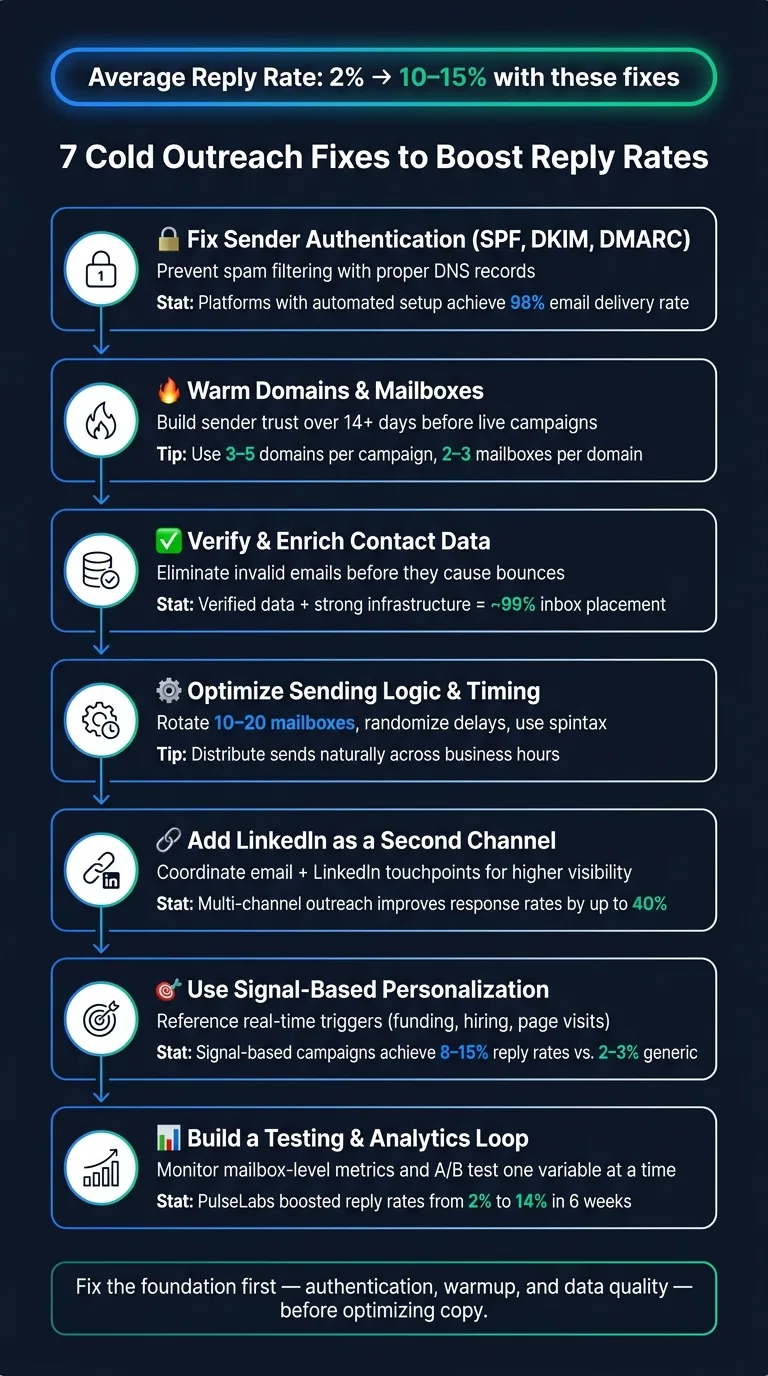
If your cold outreach campaigns are stuck at a dismal 2% reply rate, the problem likely isn’t your subject lines or CTAs. It’s the technical setup and strategy behind your emails. By fixing sender infrastructure, warming domains, and improving data quality, teams have boosted reply rates to 10–15%. Here’s a quick rundown of the key fixes:
- Set Up SPF, DKIM, and DMARC: Prevent emails from landing in spam by ensuring proper authentication.
- Warm Domains and Mailboxes: Build trust with gradual sending over 14+ days.
- Verify Data: Eliminate invalid emails to avoid high bounce rates.
- Adjust Sending Patterns: Rotate mailboxes, randomize timing, and vary email content.
- Add LinkedIn Outreach: Combine email with LinkedIn touchpoints for up to 40% better response rates.
- Use Signal-Based Personalization: Reference real-time events instead of generic merge tags.
- Test and Monitor Infrastructure: Track deliverability metrics and A/B test to isolate issues.
These steps tackle the root causes of poor results, not just surface-level tweaks. Start by ensuring your emails actually reach inboxes before focusing on content improvements.
How I Write Cold Emails That Get 15%+ Response Rate
1. Fix Your Sender Infrastructure and Authentication
Before your email even reaches a recipient's inbox, receiving servers are busy evaluating it. If your SPF, DKIM, and DMARC records aren’t set up correctly, your message is likely headed straight for the spam folder. No clever subject line can save it if your authentication is flawed.
Here’s a quick rundown of what these protocols do:
- SPF ensures only approved servers can send emails on your behalf.
- DKIM adds a cryptographic signature to verify the email’s integrity.
- DMARC tells servers how to handle messages that fail SPF or DKIM checks.
These protocols form the technical foundation of email deliverability. Without them, your emails won’t just perform poorly - they might not even make it to the recipient. For example, platforms like Reply.io boast a 98% email delivery rate because they automate the configuration of SPF, DKIM, and DMARC for every new mailbox. Manual setup mistakes, especially in DNS records, are a frequent cause of deliverability issues.
"Procedures that usually took hours (setting DKIM, SPF, etc. records) for multiple domains, now take a few minutes." - Danny Goff, Director of Sales, Propeller
OutreachFox simplifies this process by automating SPF/DKIM/DMARC setup when you provision a mailbox, guaranteeing proper authentication from the start. Before launching your email campaigns, double-check these records using tools like MXToolbox or the deliverability checker built into your platform. This quick step - just a couple of minutes - can save you from major headaches later.
Once your sender authentication is locked in, the next step is warming up your domains and mailboxes correctly.
2. Warm Your Domains and Mailboxes the Right Way
Once you've set up strong sender authentication, the next step is warming up your domains. Even with flawless SPF, DKIM, and DMARC records, a brand-new domain can appear suspicious to receiving servers without any sending history. Warming up ensures your domain builds trust and maintains deliverability before you start sending live campaigns.
It's recommended to wait at least 14 days after connecting a new mailbox before launching live sequences. During this period, a warmup tool gradually increases your sending volume while simulating real engagement, like opens, replies, and "not spam" actions. The key to effective warmup lies in using a peer-to-peer network of genuine inboxes, not bots or disposable accounts. As Reply.io explains:
"Warmup starts the moment you connect. Every mailbox builds sender reputation through a peer-to-peer network of real inboxes – no bots, no manual work."
Stay away from shared warmup pools. If another sender on the shared IP engages in harmful practices, it could harm your domain's reputation. Instead, use isolated infrastructure, where your emails are sent through your own connected SMTP or OAuth accounts. This approach keeps your reputation fully under your control. For example, OutreachFox ensures this by using private, isolated infrastructure and dedicated campaign IPs, so your warmup efforts remain unaffected by others' activities.
Once your domains are warmed up and isolated to safeguard deliverability, focus on refining your sending strategy. Rotate sending across multiple warmed mailboxes to evenly distribute volume and protect your reputation. A common setup involves using 3–5 domains per campaign, with 2–3 mailboxes per domain. Keep an eye on key metrics like reputation scores, bounce rates, and warmup progress for each mailbox. This proactive monitoring helps you address any issues early, preventing potential blacklisting.
3. Improve data quality and verify contacts at the source
Even if your authentication is spot-on and your mailboxes are properly warmed up, poor-quality data can sabotage your campaigns. Sending emails to invalid addresses leads to bounces, and high bounce rates can seriously harm your sender reputation - the same reputation you worked so hard to build. What’s worse, this issue happens before your prospects even have a chance to see your message. Once your authentication and warmup processes are solid, the next critical step is ensuring your contact data is reliable.
Start by verifying email addresses at the source before adding them to your sequences. Real-time email verification tools can confirm if an inbox actually exists and identify risky addresses, like catch-alls, disposable emails, or invalid domains. Some advanced tools can even bypass graylisting to verify inboxes without needing to send a test email. High-quality verification services boast up to 98% accuracy, and teams that pair verified data with strong infrastructure have reported inbox placement rates nearing 99%.
But verification alone isn’t enough - data enrichment plays a big role too. Instead of relying on a single database, use waterfall enrichment. This method cross-references multiple data providers to validate contact details. For instance, OutreachFox leverages over 50 providers for waterfall enrichment, significantly boosting the accuracy of their data. This process doesn’t just improve accuracy; it also provides richer profile information, which can make your personalization efforts much more effective.
4. Clean up your sending logic, timing, and send patterns
Once your data is verified and your domains are warmed up, it’s time to fine-tune your sending logic, timing, and patterns. Why? Because spam filters don’t just evaluate what you send - they pay close attention to how you send it. For example, blasting out 500 emails from a single mailbox in just two hours can raise red flags due to the unnatural volume.
The solution? Mailbox rotation. Spread your email volume across 10–20 mailboxes, ensuring each account sends a smaller, proportional number of emails. This keeps every account under provider thresholds. To make your sending behavior even more natural, add randomized delays of a few minutes between individual emails. This way, your sequences mimic the pace of a real person.
But there’s more to it than just volume. Spam filters also look for repetitive patterns in your content. If every email in your campaign looks identical, it’s easier for filters to flag them. A simple fix is to use spintax - a technique that swaps out subject lines or opening sentences with slight variations. This breaks up patterns without requiring you to rewrite every email from scratch.
"If you're struggling with cold email in 2025, stop tweaking subject lines and fix your infrastructure. That's where the real leverage lives." - Bill Stathopoulos, CEO, SalesCaptain
Timing matters, too. If all your emails go out between 9:00 and 9:15 AM, it screams automation. Instead, distribute your sends naturally across business hours. Keep an eye out for unusual spikes, as these can also signal suspicious activity to mail servers. And don’t forget to monitor each mailbox’s reputation - if one starts to decline, pause it immediately to avoid dragging down your overall deliverability.
With your sending logic in check, you’re ready to refine your channel strategy for even better engagement.
5. Add a second channel instead of relying on email alone
Once you've secured your sender infrastructure and warmed up your domains, it's time to expand your outreach strategy. Even the best email campaigns can hit a wall when inboxes are overcrowded. Adding LinkedIn to your outreach toolkit can significantly improve your visibility and impact.
The trick is to coordinate both channels effectively. Start by engaging on LinkedIn - view their profile or interact with their content - one to two days before sending your email. If your email goes unopened after three to five days, follow up with a LinkedIn connection request that references your earlier email. This multi-touch approach helps build familiarity as prospects see your name in different contexts, reinforcing the foundation you've already set with secure and optimized sending practices.
To make this strategy even more effective, use conditional sequences. These are automated workflows that adjust based on how your prospect interacts with your outreach. For instance, if a prospect opens your email but doesn’t respond, you can delay sending a LinkedIn message. On the other hand, if the email remains unopened, a LinkedIn follow-up can be triggered automatically.
This isn't just a theory - it works. Sjors Mahler, Sales & Growth Lead at pr.co, shared his experience:
"Reply offered us a platform where we're sure that the right emails go out at the right time. It helped us get reply rates of over 65% and scale operations." - Sjors Mahler, Sales & Growth Lead, pr.co
One practical tip to keep in mind: managing replies across multiple channels can get messy. A unified inbox that consolidates responses from both email and LinkedIn can help you stay organized and ensure no lead slips through the cracks. Tools like OutreachFox and lemlist offer this feature, making it easier to manage your multi-channel efforts efficiently.
6. Use signals and events to personalize, not just merge tags
Relying solely on merge tags like {{first_name}}, {{company}}, or {{job_title}} for personalization is an outdated move. These generic methods have been overused, and prospects can spot them a mile away. A line like "Hey Sarah, I noticed that Acme Corp is growing fast..." often screams "template", making it easy for recipients to tune out.
Signal-based personalization takes a completely different approach. Instead of filling in static fields, this method uses real-time triggers - specific events like a company hiring new employees, a prospect visiting your pricing page, or news of a recent funding announcement. These signals help you identify the perfect moment to reach out, focusing on timing and intent rather than just demographic data. It also ties seamlessly into the technical improvements discussed earlier, ensuring your outreach is not only functional but also contextually relevant.
"Reach prospects when they're actually ready – not just when they fit a filter. Track hiring activity, LinkedIn engagement, tech stack changes, and company growth so your outreach lands at the right moment." - Reply.io
The difference this makes is clear in the numbers. Campaigns personalized using LinkedIn activity or recent company developments have reply rates between 8–15%, far outperforming the 2–3% typical of generic email blasts. One team using AI-driven, signal-based sequences even saw a 3x higher meeting booking rate compared to their control group, which stuck to standard, non-personalized emails through HubSpot.
To stand out, reference a specific signal in your opening line - like a product launch, a new hire announcement, or a funding round. Avoid vague compliments and make it clear you've done your research. As one Senior BDR explained:
"The messages never look generic; they always read like I've done my homework, and that makes a huge difference." - Louise H., Senior BDR, Crystal Intelligence
Tools like lemlist now offer signal agents that monitor these kinds of events and automatically trigger campaigns when a prospect shows intent. The aim isn't to replace research entirely but to ensure your outreach aligns perfectly with the prospect's current context and needs.
This event-driven strategy not only improves your personalization but also lays the groundwork for more effective testing and analytics in the future.
7. Set up a testing and analytics loop tied to your infrastructure
Fine-tuning your outreach strategy goes beyond just tweaking copy or adjusting data - it requires a strong focus on testing and analytics tied to your infrastructure. Often, teams notice a drop in reply rates and immediately adjust messaging, overlooking potential infrastructure issues. To truly understand what's happening, you need to monitor both technical metrics (like inbox placement, reputation, and bounce rates) and engagement metrics (such as opens and replies). Why? Because technical problems and messaging issues require completely different solutions, and identifying the root cause is key to bridging the gap between performance and effectiveness.
One crucial step is to monitor the performance of each mailbox individually. If one domain in your sender rotation underperforms, it can quietly pull down your overall results without raising any immediate red flags. Tools like Reply.io can help by tracking the reputation score and warmup stage for each inbox, allowing you to isolate problem areas before they impact your broader metrics. Similarly, OutreachFox integrates real-time analytics at the mailbox level directly into its infrastructure, eliminating the need to juggle multiple tools.
For example, PulseLabs achieved a significant improvement by aligning their outreach engine with their infrastructure. Over just six weeks, they boosted reply rates from 2% to 14% while maintaining an impressive 99% inbox placement across 120,000 monthly emails.
To build on these insights, focus on disciplined A/B testing. Change one variable at a time - like testing different domain setups while keeping your copy consistent, or experimenting with opening lines while maintaining the same infrastructure. This methodical approach transforms your outreach into a repeatable, data-driven system rather than relying on guesswork. By prioritizing infrastructure-based testing, you set the stage for consistent and scalable success in your outreach efforts.
Conclusion
After diving into the technical and strategic aspects above, it’s clear that low reply rates usually point to deeper foundational issues - not just problems with your email copy. The upside? Foundations can be fixed.
Start by strengthening your infrastructure and authentication. Without these in place, improvements like domain warming, verified data, smart sending patterns, multichannel outreach, and precise personalization won’t deliver much impact. A well-structured testing loop ties everything together, helping you identify what’s actually working.
"If you're struggling with cold email in 2025, stop tweaking subject lines and fix your infrastructure. That's where the real leverage lives." - Bill Stathopoulos, CEO, SalesCaptain
Take PulseLabs as an example - their overhaul proved that addressing foundational issues can significantly boost reply rates. These kinds of results don’t come from simply rephrasing a subject line.
Tackle the fixes step by step, track key metrics like inbox placement, bounce rates, reply rates, and meetings booked, and give each adjustment enough time to show results. Consistency beats quick fixes every time. The teams that succeed in cold outreach aren’t sending more emails - they’re sending smarter ones, built on a cleaner, stronger foundation. A solid technical base isn’t just helpful; it’s the key to long-term outreach success.
Frequently asked questions
How long should I wait before sending live cold email campaigns after setting up a new domain?+
You should wait at least 14 days after connecting a new mailbox before launching live sequences. During this warmup period, a warmup tool gradually increases your sending volume while simulating real engagement like opens and replies. This builds trust with receiving servers and establishes your sender reputation before you start actual outreach campaigns.
What is mailbox rotation and why does it matter for cold outreach?+
Mailbox rotation means spreading your email volume across 10-20 mailboxes so each account sends a smaller number of emails, keeping every account under provider thresholds. This prevents spam filters from flagging unnatural sending volumes. Combined with randomized delays between emails, rotation makes your sending behavior appear more natural and human-like, significantly improving deliverability.
What's the difference between signal-based personalization and using merge tags?+
Signal-based personalization uses real-time triggers like hiring activity, funding announcements, or pricing page visits to time your outreach, while merge tags simply fill in static fields like name and company. Signal-based campaigns achieve 8-15% reply rates compared to 2-3% for generic merge tag emails because they reference specific, timely events that demonstrate genuine research and relevance.
Why should I add LinkedIn to my cold email strategy?+
Adding LinkedIn as a second channel can improve response rates by up to 40% by building familiarity across multiple touchpoints. The strategy involves engaging on LinkedIn one to two days before sending an email, then following up with a connection request if the email goes unopened after 3-5 days. This multi-channel approach helps you stand out in crowded inboxes.
How can I tell if my low reply rates are caused by infrastructure problems versus messaging issues?+
Monitor both technical metrics (inbox placement, reputation scores, bounce rates) and engagement metrics (opens and replies) separately. If you have high bounce rates or low open rates despite good copy, the problem is likely infrastructure-related. Track performance at the individual mailbox level to identify which domains are underperforming, as one problematic domain can quietly drag down your overall results.
What is spintax and how does it help with cold email deliverability?+
Spintax is a technique that creates slight variations in subject lines or opening sentences across your email campaign by swapping out words or phrases. This breaks up repetitive patterns that spam filters look for, making it harder for mail servers to flag your emails as automated bulk messages. It helps maintain deliverability without requiring complete rewrites of every email.
Should I use shared warmup pools to build my sender reputation?+
No, you should avoid shared warmup pools because if another sender on the shared IP engages in harmful practices, it can damage your domain's reputation. Instead, use isolated infrastructure where emails are sent through your own connected SMTP or OAuth accounts, giving you full control over your reputation and protecting you from others' poor sending practices.