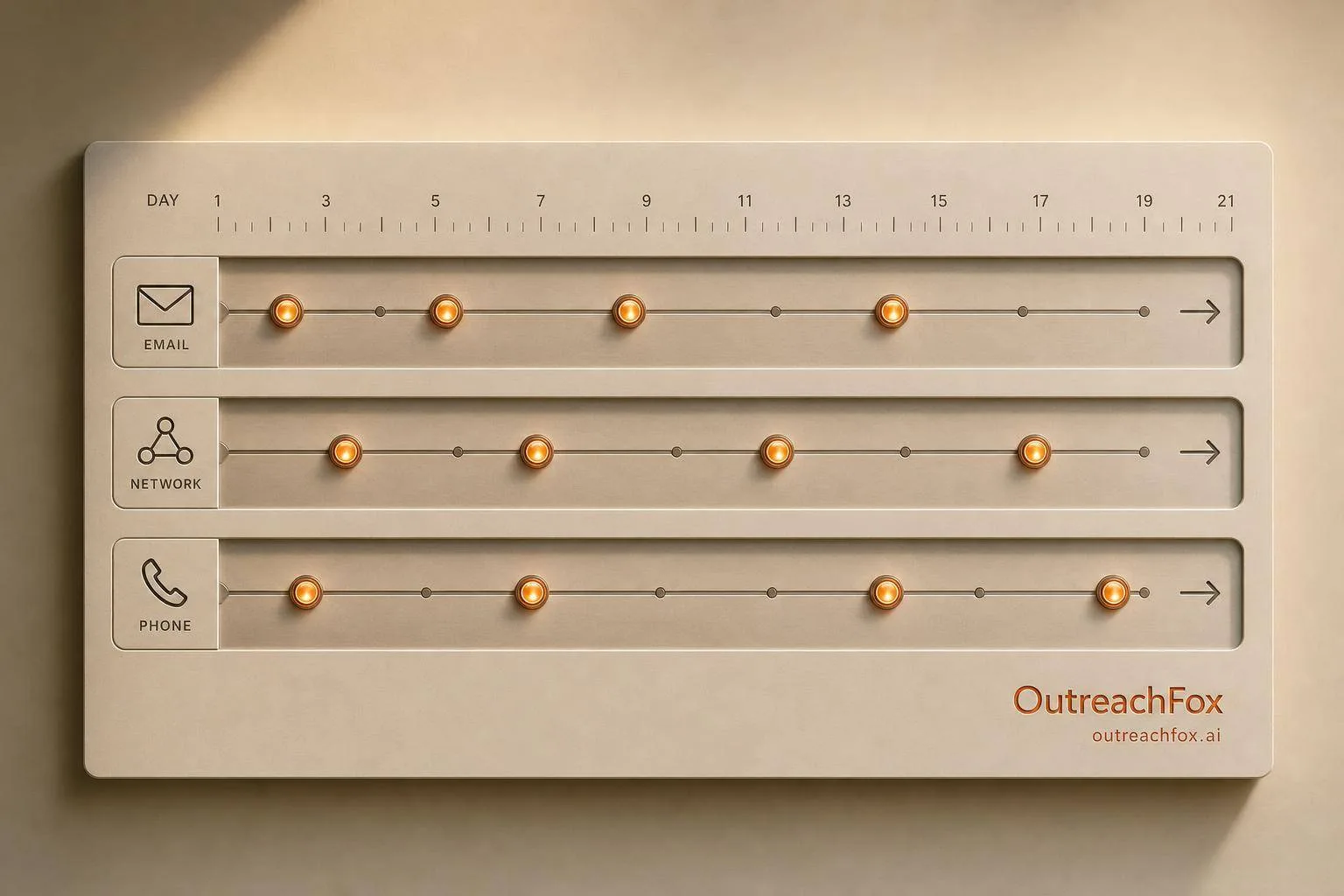
A multichannel cadence using 8-12 touchpoints across email, LinkedIn, and phone over 14-21 days can boost reply rates from 2-5% to 18-30% by building familiarity and engaging prospects through coordinated channels.
- Campaigns using three or more channels see 287% higher response rates than single-channel efforts
- Optimal cadence structure includes 8-12 touchpoints spread over 14-21 days across multiple platforms
- 80% of meetings come from the 4th to 8th touch, yet most reps stop after two attempts
- Email delivers scale, LinkedIn builds credibility, and phone adds personal connection when used strategically
- Target blended reply rates of 8-15% with 50-70% positive reply ratio for effective multichannel outreach
- Protect deliverability by spreading emails across 3-5 warmed domains with 50-80 daily sends per inbox
How to Build a Multichannel Outreach Cadence
A multichannel outreach cadence is a structured plan for contacting prospects using multiple platforms like email, LinkedIn, and phone over 14–21 days. This approach increases reply rates by combining touchpoints, making your outreach more effective than relying on a single channel. For example:
- Email: Delivers your message at scale.
- LinkedIn: Builds recognition and credibility.
- Phone: Adds a personal connection.
Here’s why this works: campaigns using three or more channels see 287% higher response rates compared to single-channel efforts. Cold email alone gets a 2–5% reply rate, but adding LinkedIn and phone can raise it to 18–30%.
To get started, you need:
- A clear Ideal Customer Profile (ICP).
- Verified, clean prospect data.
- Prepared tools and accounts (e.g., warmed email domains, LinkedIn setup).
The best cadence includes 8–12 touchpoints spread over 14–21 days, with a mix of email, LinkedIn, and phone calls. Each touchpoint should have a purpose, from introducing value to following up. For example:
- Day 1: Send an email.
- Day 2: View their LinkedIn profile.
- Day 5: Follow up with a case study email.
- Day 10: Make a phone call if they’ve engaged.
To improve results, track metrics like blended reply rates (8–15%) and LinkedIn acceptance rates (25–35%). Adjust based on data, and test one variable at a time.
This strategy helps you build familiarity, engage prospects effectively, and increase reply rates across channels.
Step 1: Define Your Cadence Structure
Set Your Touch Count and Cadence Length
For B2B sales, a cadence with 8–12 touchpoints over 14–21 days tends to perform well. This timeframe strikes a balance - building familiarity while staying relevant before prospects move on.
"The best sales cadences contain 8–12 touchpoints. You should never over-index on one piece of outreach. You need to give people time to see your message and get back to you." - Florin Tatulea, Director of Sales, Barley
Here’s an eye-opening stat: 80% of meetings come from the 4th to 8th touch. Despite this, most sales reps stop after just two attempts. A 2026 analysis revealed that a 17-day cadence - with touches on Days 0, 1, 3, 5, 7, 10, 12, and 14 - can capture about 93% of potential replies.
The ideal cadence varies by audience. For example:
- SMB prospects often respond better to faster, more compact sequences.
- Enterprise buyers prefer fewer, highly personalized touches spread over a longer timeframe.
- High-intent leads (like those who visit your pricing page) perform best with 8–12 touches over 10–15 days.
- Cold lists may only need 6–8 touches spaced further apart.
Once you’ve nailed down the touch count, it’s time to decide on the channels to use.
Choose the Right Channel Mix
Each communication channel plays a specific role in your cadence. Here’s how they stack up:
- Email: Your mainstay. It’s scalable and delivers detailed messages.
- LinkedIn: Builds familiarity. A prospect who connects with you here is 1.5x to 2x more likely to open your next email.
- Phone: Adds urgency. Best used as a follow-up tool rather than for cold calls.
- Video: A pattern disruptor. It makes your outreach feel more personal.
Here’s a breakdown of how to use these channels effectively:
| Channel | Primary Role | Best Position in Sequence |
|---|---|---|
| Value anchor; delivers context and proof | Steps 1, 4, 7, 12 | |
| Builds visibility and credibility | Steps 2, 5, 10 | |
| Phone | Creates urgency; handles objections | Steps 9, 14 |
| Video | Humanizes the sender; grabs attention | Steps 3–4, 7 |
The key is to coordinate these channels so they complement each other without becoming repetitive.
"Adding each channel doesn't just add its own response rate. It multiplies the effectiveness of the other channels." - Artur Grishkevich, Founder, Alchemail
With your channels selected, the next step is to fine-tune the timing.
Plan Your Timing and Touch Spacing
Start your cadence with shorter intervals - 1–3 days between touches - to grab attention early. Gradually increase spacing to 2–4 days later on to avoid overwhelming prospects.
"1–3 day spacing on the front half, 2–4 day spacing on the back half is the rhythm that works." - Siddharth Gangal, Founder, Gangly
For U.S.-based prospects, aim to reach out on Tuesday through Thursday, targeting 8–10 AM or 2–3 PM local time. Keep it manageable by limiting outreach to 2–3 touches per week per prospect - this helps you stay under spam filters.
Wrap up with a "break-up" email around Day 21. This final touch professionally closes the loop and often generates reply rates of 14–22% from prospects who may have been too busy to respond earlier.
How to build a cold outreach sales cadence that gets replies
Step 2: Build the Email Track
Once you've mapped out your cadence structure, it's time to create an email track that offers something different and valuable with every touch.
Assign a Role to Each Email
A common pitfall in outreach is sending emails that all serve the same purpose. To keep your sequence effective, every email should play a distinct role.
Here’s a practical five-email structure to guide you:
- Email 1 – The Opener: Start with a hook tied to a specific signal - like a recent funding round, a new hire, or an expansion - and include a simple, low-pressure ask to gauge interest.
- Email 2 – The Reframe: Revisit the problem but from a fresh perspective. Use a relevant data point or framework to encourage the recipient to rethink their current approach.
- Email 3 – Social Proof: Highlight tangible results, such as customer testimonials, ROI stats, or case studies. Specific outcomes resonate more than vague claims.
- Email 4 – Pattern Interrupt: Change things up. Use a different subject line and tone to grab the attention of a quiet prospect.
- Email 5 – The Breakup: Close with a short, direct email asking a yes-or-no question (e.g., "Should I close the loop on this?"). Surprisingly, this email often generates the second-highest response rate in the sequence.
Remember, follow-ups are key - 62% of cold email replies come from follow-ups, not the first email. If you stop after one email, you’re leaving potential opportunities untouched.
Once you’ve set each email’s purpose, the next step is to personalize the content for your audience.
Personalize Email Content for Each Recipient
Personalization doesn’t mean writing a detailed essay for every prospect. Instead, aim to make each email feel like it was crafted just for them.
"Personalization doesn't mean writing a custom novel for every prospect. It means making each touch feel like it could only have been sent to that person. The goal is relevance, not volume of research." - Alex Berman
To manage this efficiently, categorize your prospects by value and adjust your approach:
| Tier | Target | Personalization Effort | Approach |
|---|---|---|---|
| A – Dream Accounts | Top 20–30 targets | High (manual) | In-depth research, custom opener, and tailored follow-ups |
| B – Solid Targets | Mid-priority list | Medium (semi-automated) | Personalized first email with automated follow-ups tailored to personas |
| C – Volume Targets | Large cold list | Low (automated) | Segment by role, industry, or use case for relevance |
Triggering your outreach based on specific events - like a funding announcement or a new decision-maker hire - can significantly boost response rates. Signal-triggered cadences have been shown to increase reply rates by 3× to 5× compared to generic outreach. Make sure to reference the initial signal in your follow-ups for continuity.
Keep your emails concise. The sweet spot for sales email length is 75–100 words. Focus on one clear opener, one problem stated in the recipient’s language, one proof point, and a soft call-to-action.
Protect Your Email Deliverability
Even the best-crafted emails won’t work if they end up in spam. Securing your email deliverability is just as important as writing compelling content.
Start by ensuring your sending domain is set up correctly with SPF, DKIM, and DMARC records. Spread your emails across 3–5 warmed domains instead of relying on just one, and limit daily sends to 50–80 emails per inbox to avoid triggering provider limits.
If you’re using new mailboxes, start slow - send just 5 emails per day and gradually increase to avoid being flagged.
"A single bad domain can drop the program to zero overnight. Email rewards engineering investment more than any other channel." - ReachIQ
Tools like OutreachFox simplify this process. With its private sending environment and dedicated campaign IPs, OutreachFox ensures that one user’s mistakes don’t harm your sender reputation. The platform also offers pre-warmed mailboxes and industry-specific warmup profiles, enabling teams to bypass the typical 2–4 week ramp-up period and start sending in about ten minutes.
Lastly, maintain a clean email list. Verify your contacts before sending, remove addresses like info@ or sales@, and use a global suppression list to manage unsubscribes and database updates. Don’t forget to include a physical address in your email footer and a one-click unsubscribe link to comply with CAN-SPAM regulations.
Step 3: Add LinkedIn and Phone Touches
With your email sequence set, it’s time to incorporate LinkedIn and phone touches to create a multichannel outreach strategy that feels natural and connected.
Use LinkedIn to Build Familiarity
LinkedIn is a great tool for creating familiarity, which can improve the performance of your emails.
"LinkedIn does not produce meetings directly. It produces visibility, and visibility is what makes the email work." - ReachIQ Playbook
Start by viewing the prospect’s profile on Day 1. Follow this with a connection request on Day 2 or 3 - before your first email lands in their inbox. This way, when your email arrives, you’re no longer a complete stranger. If they accept your connection request, send a brief direct message a few days later, tying it back to your email thread to create a seamless narrative.
Avoid making a pitch in your connection request. Instead, keep it simple and contextual - or skip adding a note altogether, as this often results in higher acceptance rates.
Use Phone Calls Strategically
Phone calls are best used as a follow-up tool for prospects who’ve engaged with your emails or LinkedIn touches but haven’t responded yet. For example, if you see a prospect opening your email multiple times or clicking a link, that’s a good trigger for a call. This approach complements your earlier touches and reinforces your message across channels. With this strategy, connect rates can increase from 1–2% (on a cold list) to 5–10%.
When calling, leave a concise voicemail - 12 to 20 seconds is ideal. Introduce yourself, reference your email, and provide a clear reason for the callback. For follow-up calls, skip the voicemail to avoid overwhelming the prospect. The best times for phone outreach are Tuesday through Thursday, between 10–11 AM or 2–3 PM.
Create a Unified Multichannel Sequence
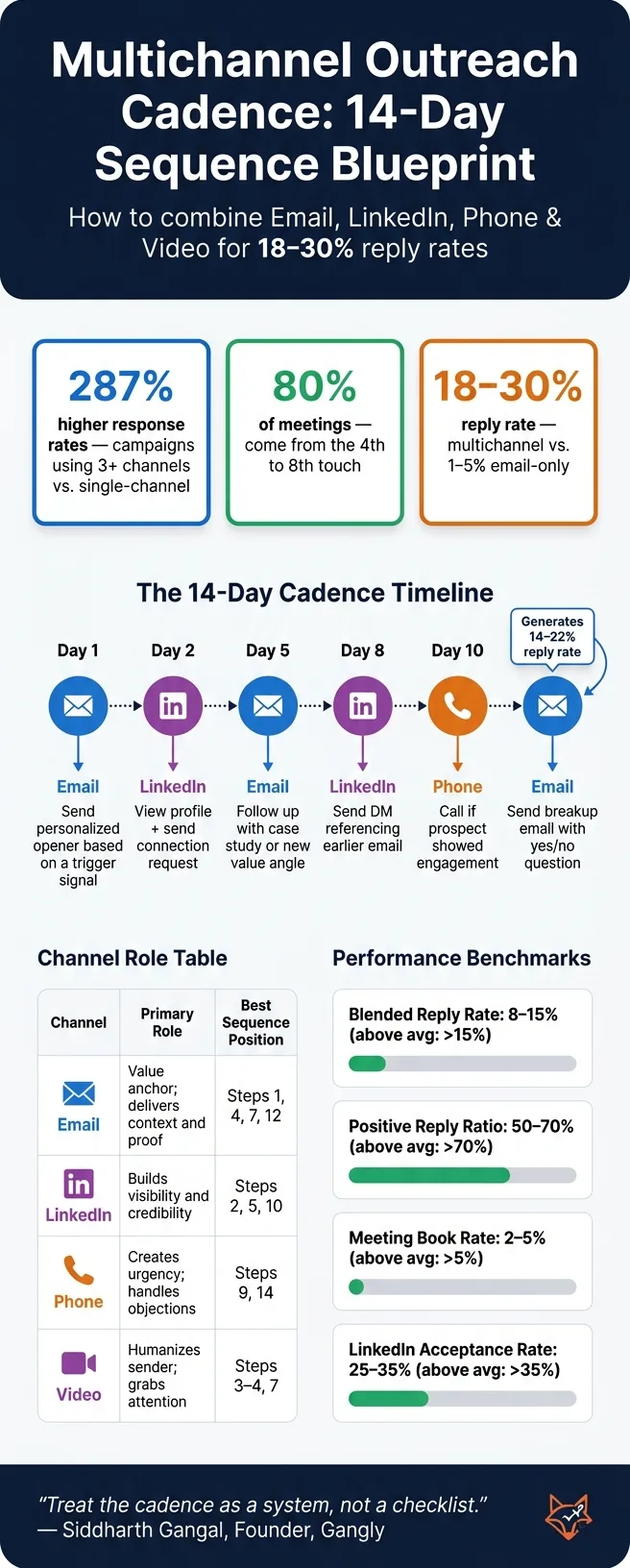
Instead of running separate campaigns for email, LinkedIn, and phone, combine them into one cohesive sequence where each touch builds on the last. Here’s an example structure:
| Day | Channel | Action |
|---|---|---|
| 1 | Send a personalized opener based on a specific trigger. | |
| 2 | View their profile and send a connection request. | |
| 5 | Follow up with a value-driven email, like a case study or new angle. | |
| 8 | Send a direct message referencing your earlier email. | |
| 10 | Phone | Call if the prospect has shown engagement with your emails. |
| 14 | Send a breakup email with a clear yes/no question. |
Consistency across channels is key. Reference your email in LinkedIn messages, and mention both your email and LinkedIn touch during phone calls. This integrated approach creates a cohesive story, which can lead to reply rates of 8–12%, compared to 1–3% for email-only campaigns.
Tools like OutreachFox can simplify this process by coordinating email and LinkedIn sequences in a single workflow and consolidating all replies into one inbox.
Up next: Learn how to measure your cadence’s success and fine-tune your outreach strategy.
Step 4: Launch, Measure, and Improve Your Cadence
Set Up Your Cadence in an Outreach Platform
Before going live, make sure your outreach platform is configured for smooth operation. Start with mailbox distribution: spread your emails across 3–5 warmed sending domains instead of relying on a single inbox. This helps protect your email deliverability.
Set strict daily volume limits to maintain sender reputation and avoid account issues:
- 50–80 emails per inbox
- 15–20 LinkedIn connection requests
- 80–120 calls per session
One of the most important settings is the exit trigger. This ensures that all automated steps stop immediately when a prospect responds or books a meeting. Forgetting this can make your outreach appear robotic and insincere. Tools like OutreachFox handle this automatically, pausing all activity across channels as soon as a reply hits the system.
Once your platform is ready, shift your focus to tracking the metrics that define success.
Track the Metrics That Matter
Once your cadence is live, keep an eye on these four key performance metrics:
| Metric | Average | Above Average |
|---|---|---|
| Blended Reply Rate | 8–15% | Above 15% |
| Positive Reply Ratio | 50–70% | Above 70% |
| Meeting Book Rate | 2–5% | Above 5% |
| LinkedIn Acceptance Rate | 25–35% | Above 35% |
The blended reply rate is a critical indicator. It measures the total unique replies across all channels divided by the number of prospects contacted. Unlike email open rates, this metric offers a clearer picture of how well your cadence is performing. However, high reply rates alone don’t guarantee success - what matters is the quality of those replies.
"Treat reply rate as a leading indicator, not a vanity metric. A cadence with 4 percent reply rate and 60 percent positive-reply ratio beats a cadence with 8 percent reply rate and 20 percent positive-reply ratio every time." - Siddharth Gangal, Founder, Gangly
Another key metric is the sequence completion rate, which tracks the percentage of prospects who make it to the final touch. If many are dropping off early, your opening message may need improvement. On the other hand, late-stage drop-offs might indicate missed replies or overly persistent follow-ups.
Run Tests and Adjust Based on Results
After launching, regular testing and adjustments are essential to improving your cadence. Conduct weekly audits and run A/B tests monthly. This allows you to monitor core KPIs for early signs of trouble while gathering enough data to make informed decisions.
When testing, focus on changing one variable at a time - like the subject line, the day of the week, or the placement of a specific touch. For instance, moving a video from Step 3 to Step 4 provides clear, actionable insights. Making multiple changes at once can muddy the results and leave you guessing.
If a specific touchpoint underperforms, use data to identify the problem. For example, if your reply rate at Step 3 is below 2%, the issue might be the content of the message, not the timing. Similarly, if your breakup email isn’t working, the tone might be too aggressive. Let the numbers guide your adjustments.
"The difference between a sequence that generates 27%+ reply rates and one that gets flagged as spam isn't the number of touches or the cadence timing. It's whether each touch earns the right to the next one." - Brandon Briggs, Fractional CRO & Founder, It's Just Revenue
Conclusion: Putting Your Multichannel Cadence Into Practice
Creating a multichannel cadence can be straightforward with the right level of focus and consistency. Aim for 8–12 touches spread over 14–21 days, assign each channel a specific purpose, and make sure every interaction brings something fresh to the table. These steps help transform a well-thought-out strategy into actionable results.
Here’s an eye-opener: 80% of closed-won B2B deals require at least five touches. A well-orchestrated outreach sequence - anchored by email, supported by LinkedIn for familiarity, and bolstered by phone calls to drive deeper engagement - can achieve reply rates of 18–30%. Compare that to the meager 1–5% reply rates of email-only campaigns, and the value of a multichannel approach becomes crystal clear.
The order in which you use these channels is just as important as the number of channels. For example, starting with LinkedIn profile views and connection requests can significantly increase reply rates. Prospects are more likely to respond when they recognize you, with reply rates jumping from 1.7% to over 8% when LinkedIn is used as the initial touchpoint. This small adjustment can make a big difference by positioning you as a familiar presence instead of a random stranger.
"The hierarchy is the strategy... channel order determines reply rates more than channel count." - Débora Oliveira, Marketing Specialist, Amplemarket
To keep your cadence effective, think of it as a dynamic system rather than a static checklist. Set clear volume limits, establish exit triggers, and monitor metrics like blended reply rates and positive response ratios from day one. Adjustments should be data-driven, testing one variable at a time to see what works best. If you're using tools like OutreachFox, you can seamlessly integrate these insights into multichannel sequences, track results in a unified inbox, and access real-time campaign metrics.
As Siddharth Gangal wisely put it: "Treat the cadence as a system, not a checklist." This mindset is what separates teams that consistently build a strong pipeline from those that constantly find themselves starting over.
Frequently asked questions
How do I choose the best channel order?+
Start by using **email** to introduce your message and highlight your value proposition. Once you've made that initial touchpoint, turn to **LinkedIn** to create a sense of trust. This can be done through connection requests or subtle engagement, like commenting on or liking posts. Finally, move to **phone calls** for more direct communication, but only after the prospect has interacted with your earlier efforts - like opening an email or accepting a LinkedIn request.
What should I do if prospects don’t reply by touch 4?+
If prospects remain unresponsive by the fourth touchpoint, send a breakup email and remove them from the sequence. Make a note to re-engage with the account in 60–90 days. It's common for prospects to stay silent during the first 21 days, so avoid cutting them off too soon. That said, remove them immediately if they opt out, show clear disinterest, or if their contact information becomes outdated due to a job change.
How can I scale safely without hurting deliverability?+
To expand your multichannel outreach effectively and without risks, it's crucial to respect the limits of each platform. For instance, aim for **50-80 emails per inbox per day** and **15-20 LinkedIn requests daily**. Stick to these thresholds to avoid triggering spam filters or damaging your sender reputation. Additionally, use **dedicated, warmed-up infrastructure** to ensure your messages are delivered reliably. When planning your outreach, space your touchpoints **24-48 hours apart** and limit your interactions to **2-3 touches per week**. This approach keeps your communication steady but not overwhelming. Don't forget to handle replies and opt-outs quickly. Ignoring these can lead to compliance issues and harm your brand image. To make the process smoother, consider leveraging **automation tools** with conditional logic. These tools can help you stay compliant, avoid over-communicating, and maintain high deliverability as your outreach efforts grow.