AI can generate personalized cold email sequences in seconds, but success requires clean prospect data, structured prompts, and proper email infrastructure. Reply rates jump from 3% to 18% when you combine AI writing with validated triggers
- AI reduces email research time from 15-20 minutes to 30 seconds per lead
- Personalized sequences achieve 15-18% reply rates versus 3.43% for generic emails
- Effective sequences use 4-6 touches over 21 days with different angles per email
- Trigger-based signals like job changes and funding drive 22-30% reply rates
- Keep bounce rates under 2% and limit sends to 25-30 emails per inbox daily
- Write sequences in two passes: structure first, then copy with clean variables
Let AI Write Your Sequences: How to Generate Personalized Cold Emails in Seconds
AI can help you build cold email sequences fast, but the win comes from clean data, clear prompts, and solid inbox setup. If you want better reply rates, you need more than fast writing. You need the right inputs, the right sequence structure, and mailboxes that can land in inboxes.
Here’s the short version:
- AI can cut research time from 15–20 minutes per lead to about 30 seconds
- Personalized emails can get 15%–18% reply rates, while generic outreach may sit near 3.43%
- Strong sequences usually run 4–6 touches over about 21 days
- Trigger-based signals like new roles, funding, and hiring spikes tend to work better than generic hooks
- Deliverability still matters: keep bounce rates under 2%, warm inboxes for 2–4 weeks, and limit volume to 25–30 emails per inbox per day
What I take from this is simple: AI should fill in the personalization, not guess the whole strategy. I’d start with a narrow audience, map fields like {{trigger_event}} and {{pain_point}}, build the sequence in two prompt passes, and review each email before it goes live.
If you’re comparing tools, the main differences come down to custom fields, AI writing, enrichment depth, and sender setup.
| Platform | Custom Fields | AI Writing | Enrichment | Variable Support |
|---|---|---|---|---|
| OutreachFox | High | Native builder | 50+ data providers | Dynamic vars and spintax |
| Instantly | Unlimited | Magic AI | Built-in lead finder | {{custom_variable}} |
| Lemlist | High | AI drafts | LinkedIn scraping | Liquid syntax |
| Apollo.io | Standard | Native writer | Built-in B2B data | {{variable}} |
So if I had to sum up the whole article in one line, it would be this: AI-written cold emails work best when your data is current, your prompts are tight, and your sending setup is clean.
I Created a Fully Personalized Email Sequence in 90 Seconds using AI
1. Define your inputs before asking AI to write anything
Before you write a single prompt, lock down three things: who you're targeting, what you're offering, and what action you want the prospect to take.
"If the input is generic, no model can make the output specific." - Luka Mrkić, Head of BD at Espressio.ai
Choose your audience, offer, and campaign goal first
Start with a tight ICP. “U.S.-based SaaS founders with 10–50 employees” gives AI a lot more to work with than just “SaaS founders.”
Then keep the match simple: one offer, one pain point, and one CTA.
Seniority matters too. C-level emails usually work best when they’re short and built around a question. Manager-level copy often needs a bit more context. ICs tend to respond better to educational framing. That means you should write separate versions for executives, managers, and ICs.
Turn raw prospect data into personalization variables
A name and company URL won’t take you very far. The fields that tend to move reply rates are the ones with context: job title, company size, industry, one pain point tied to that role, a trigger event, and one proof point that fits their situation.
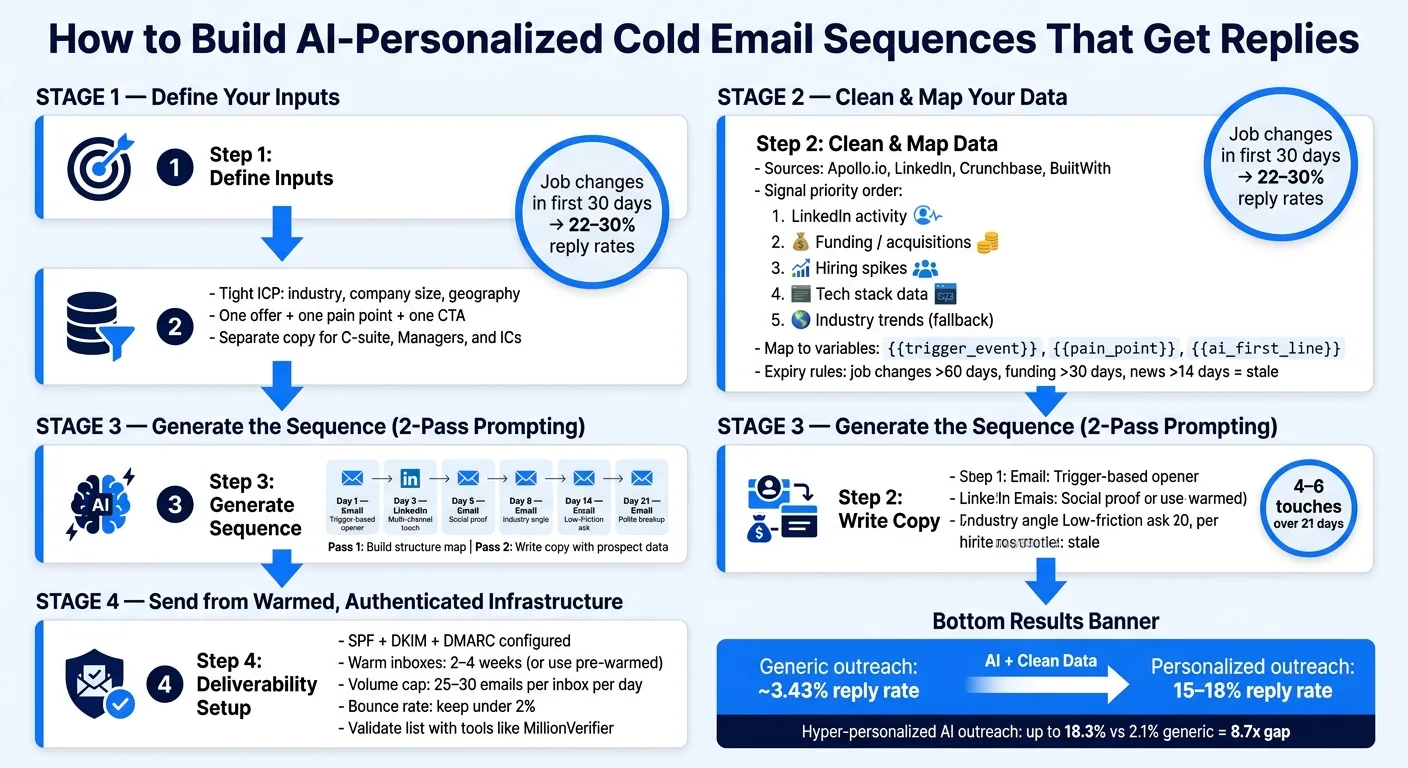
Trigger events matter a lot here. Job changes into a target role within the first 30 days yield 22–30% reply rates. Put signals in this order:
- LinkedIn activity
- Company events like funding or acquisitions
- Hiring spikes
- Tech stack data
- General industry trends as a fallback
You can pull these fields from places like Apollo.io for firmographic and intent data, LinkedIn for activity and hiring signals, Crunchbase for funding events, and BuiltWith or Clearbit for tech stack data.
Before you prompt anything, clean the data. Standardize job titles, remove legal suffixes like LLC, and normalize capitalization. Bad casing kills credibility instantly.
After that, map each field to named variables in your sequence tool, like {{trigger_event}}, {{pain_point}}, and {{ai_first_line}}. That way, the AI output drops into the right spot without manual cleanup.
Once the fields are clean, map them into the tools that can use them.
Comparison table: variable support across platforms
| Platform | Custom Fields | AI-Assisted Writing | Enrichment Data | Sequence Variables |
|---|---|---|---|---|
| OutreachFox | High (arbitrary keys) | Native AI sequence builder | Waterfall enrichment across 50+ providers | Dynamic variables & spintax |
| Instantly | Unlimited custom variables | "Magic AI" & API | Lead Finder built-in | {{custom_variable}} & spintax |
| Lemlist | High | Multi-channel AI drafts | LinkedIn scraping | Liquid syntax variables |
| Apollo.io | Standard | Native AI writer | Proprietary B2B database | {{variable}} |
Waterfall enrichment improves field coverage. That means fewer blank variables and less weak personalization.
With the variables mapped, the next step is tying them to your sending stack and sequence builder.
2. Set up the workflow: data in, mailboxes ready, sequence tool connected
Connect enriched lead data to your sequence platform
Once your variables are mapped, the next move is simple: get that data into your sequence tool without breaking the mapping.
You can do that through CSV import, direct API sync, or automation tools like Make.com or Zapier.
A common setup looks like this: pull lead data from Apollo.io or Clay, send it to GPT-4o to write a personalized first line, then push that output into a custom field inside your sequence platform. If you're using direct sync tools, you can send data straight into platforms like Instantly or Smartlead and skip CSVs altogether.
Before you sync, clean the fields. Validate job titles and standardize formatting so each field lands where it should. That's what helps AI write at speed without dropping context.
You should also filter out stale signals before sync. Old data goes bad fast:
- Job changes older than 60 days
- Funding rounds older than 30 days
- News older than 14 days
Once the fields are clean and synced, the prompt can turn that data into a sequence you can actually use.
Why your sending infrastructure affects AI sequence performance
After the data flow is in place, deliverability becomes the next bottleneck. Fast copy generation doesn't mean much if your emails never hit the inbox.
Start with SPF, DKIM, and DMARC. Then warm new mailboxes for 2 to 4 weeks before launching live campaigns. Keep sending volume at 25 to 30 emails per inbox per day, and spread sends across multiple mailboxes so ISPs don't flag you.
Here's where shared platforms like Instantly or Smartlead can cause trouble. When users sit on the same IP pools, one bad actor's spam complaints can hurt everyone else. That means your deliverability can drop even if your list is clean and your copy is solid.
OutreachFox goes the other way: private, isolated infrastructure with dedicated campaign IPs for each client. In plain English, your sender reputation depends on your behavior, not someone else's. And because pre-warmed mailboxes are available, you can skip the usual ramp-up and go live in roughly 10 minutes instead of waiting weeks.
Before launch, run your list through a validator like MillionVerifier. Keeping bounce rates under 2% is the baseline if you want to stay out of spam folders.
Shared platforms are fine for testing. Isolated infrastructure makes more sense when volume starts to grow.
With data synced and inboxes ready, the next step is generating the sequence itself.
Comparison table: infrastructure-first vs. shared sender platforms
| Feature | OutreachFox | Instantly | Smartlead | Lemlist |
|---|---|---|---|---|
| Mailbox Ownership | Private, isolated infrastructure | Platform-managed | Platform-managed | Platform-managed |
| IP Isolation | Dedicated IPs per client | Shared IP pools | Shared IP pools | Shared IP pools |
| Warmup Approach | Native, isolated ramp-up; pre-warmed mailboxes available | Automated peer-to-peer warmup | Automated peer-to-peer warmup | Lemwarm (peer-to-peer) |
| API Coverage | Deep CRM & enrichment integration | Broad multi-tool connectivity | Standard webhooks & CSV | Standard webhooks & CSV |
3. Generate the sequence: prompts, structure, and real examples
Once your fields are mapped and your inboxes are set, turn those inputs into a sequence in two passes: structure first, copy second.
Use a simple prompt template to generate a 4- to 6-step sequence
Start by building the sequence in two passes: map, then write.
The first prompt should create the sequence map. No email copy yet. Just the structure. Use something like this:
"Build a B2B email sequence for [ICP] at [Company Type]. Length: 4–6 emails over 21 days. Objective: Book a 15-minute call. For each email, define: Send day, Subject line (2 variants), Angle/hook, and framework: PAS or BAB. Output the sequence map only."
After you approve the map, use a second prompt to write the emails. This is where you feed in the fields you already cleaned up: role, company, recent signal, pain point, and proof point.
"Write [N] emails using the approved structure. Prospect data: [Name, Company, Title, Tech Stack, Recent Signal, Pain Point]. Requirements: Email 1: Personalized first line from signal (max 5 sentences). Email 2: Social proof. Email 3: Industry trend angle. Email 4: Breakup. Subject lines: Short (4–6 words). Forbidden phrases: 'I hope this finds you well,' 'I noticed,' 'I came across,' 'Quick question,' and generic compliments."
A small trick that helps a lot: add 2–3 sentences of your own writing as a voice sample. That gives the model a better shot at matching how you normally sound.
That structure also helps each step do a different job instead of giving you the same email five times with tiny edits.
Write one first-touch email and multiple follow-ups with different angles
The most common problem with AI-written sequences is simple: it writes five copies of the same email. New subject line, same message.
That’s not what you want.
Each step needs a different angle. Every follow-up should move the conversation forward: relevance, proof, insight, exit. Start with the signal in email 1. Then move to proof, trend, and breakup in the later steps.
Here’s how a sample sequence plays out for a sales tool aimed at a VP of Sales who just joined a Series B SaaS company:
Email 1 - Day 1 (Trigger-based opener):
Subject: New role, new pipeline goals
Hi Sarah,
Congrats on the VP of Sales role at Meridian.
We help teams build a practical 4- to 6-step outbound sequence fast.
Worth a 15-minute call this week?
Email 2 - Day 4 (Social proof):
Subject: Similar rollout example
Sarah, one example:
A similar team used this same setup and saw stronger response from a cold list.
Want me to send over the exact sequence?
Email 3 - Day 8 (Industry angle):
Subject: Trigger-based outreach
Trigger-based sequences anchored to job changes, funding, or hiring spikes consistently outperform standard drip.
That gap is where most teams lose replies. Wanted to share that context in case it's relevant to what you're building.
Email 4 - Day 21 (Polite breakup):
Subject: Should I close this out?
Sarah, I'll stop reaching out after this. If outbound sequencing becomes a priority later, feel free to reply anytime.
Before anything goes out, do a fast 30-second check on each email:
- Verify the signal on LinkedIn or Crunchbase
- Cut any stiff AI phrasing
- Make sure the CTA fits the angle
If most first lines still need heavy edits, your prompt is too loose.
Sequence blueprint table you can copy
| Step | Channel | Timing | Goal | Variables Used |
|---|---|---|---|---|
| Email 1 | Day 1 | Establish relevance | {{Signal}}, {{FirstName}}, {{Company}} | |
| Touch 2 | Day 3 | Multi-channel presence | {{RecentPost}} or {{HiringSignal}} | |
| Email 2 | Day 5 | Build credibility | {{Competitor}}, {{Result}}, {{Role}} | |
| Email 3 | Day 8 | Provide value | {{Industry}}, {{Pain_Point}} | |
| Email 4 | Day 14 | Low-friction ask | {{Offer}}, {{CTA}} | |
| Email 5 | Day 21 | Close the loop | {{FirstName}} |
This setup works in pretty much any modern sequencing platform. The LinkedIn touch on Day 3 gives you a second channel without repeating the email. It just keeps your name in view.
Keep subject lines at 4–6 words. And if you want slight variation at scale, use spintax on openers, like {{RANDOM | Hi | Hello | Hey}}, so each send is a little different. Keep spintax limited to short openers and greetings.
Next, keep the sequence steady while personalizing each send with clean variables.
4. Personalize at scale without making every email sound the same
The sequence blueprint works when volume is low. Things get messy when you scale - sloppy job titles, missing signals, and extra legal tags like LLC can throw everything off.
Create clean fields for pain points and trigger events
Start by turning raw prospect data into clean inputs for AI. If the data is messy, personalization falls apart fast.
The main job here is to standardize your signals. Instead of dumping everything into a freeform "notes" field, assign each prospect to a clear trigger category, such as recent LinkedIn activity, company events, hiring signals, tech stack changes, or industry trends. Then pair each trigger type with one angle. That gives AI something clear to work from instead of forcing it to guess.
It also helps to rank signals by recency and specificity before you prompt. Once triggers are cleaned up and labeled, they can drive first-line personalization in a much more controlled way.
Use dynamic variables, first-line snippets, and light variation
A simple setup usually works best. Use standard merge fields like first name, company, and title, then add one AI-written first line in a custom field like {{ai_first_line}}. Tools like Instantly and Smartlead support custom columns, so you can generate that line ahead of time in Clay or through the OpenAI API, then drop it into the sequence as a variable. The rest of the email should stay human-written.
Use spintax sparingly, mostly in greetings and openers, like {{RANDOM | Hi | Hello | Hey}}. That helps reduce the odds of your sends looking like bulk email. Set fallbacks every time. For example, {{firstName | there}} means a missing name won't break the sentence. Keep AI outputs on a short leash with direct instructions like: "one sentence, 15–20 words, no emojis." That kind of limit helps the email sound clean instead of stiff.
Deep personalization based on role, tech stack, and pain point fields can move reply rates from about 9% to 18%. Trigger-based outreach - tied to signals like funding or leadership changes - aims for a 3% to 5% reply rate in 2026.
Prospect-data workflow table: from source to message
Use this flow to turn source data into one-line personalization without rewriting the full sequence.
| Data Source | Fields Extracted | How AI Uses It |
|---|---|---|
| LinkedIn (via scraper) | Recent post, engagement topic | Generates a 1-sentence opener tied to a specific insight |
| Apollo.io / Career pages | Open roles, hiring velocity | Connects hiring signals to pain points like SDR ramp time |
| Clay / Crunchbase | Funding round, amount, date | Creates a growth-based hook (e.g., "Saw your Series A last month") |
| BuiltWith / Wappalyzer | Current tech stack | Infers a pain point or integration angle based on existing tools |
| CRM (HubSpot / Salesforce) | Job title, seniority, past interactions | Segments copy variants by level (C-suite vs. IC) and filters exclusion lists |
Waterfall enrichment helps you fill more fields, which cuts down on blank variables.
Before rolling out any new segment, test it with 25 to 50 prospects. If reply rates stay below 1% after 100 sends, pause and look again at the trigger or the offer instead of making small copy edits.
With clean inputs and light variation, the next step is reviewing the full sequence before launch.
Conclusion: Fast AI writing works when your inputs and infrastructure are solid
AI can draft sequences fast. But speed helps only when the input data is clean and the setup behind it is in good shape. If the earlier steps are messy, the output usually is too.
The order that works is simple: define your ICP and goal, clean the data, structure the sequence, then send from authenticated, warmed infrastructure. Sequence quality and deliverability usually break for the same reason: weak inputs.
When variables are stale or missing, reply rates can fall off a cliff. AI-driven, hyper-personalized outreach can hit an 18.3% reply rate compared to 2.1% for generic campaigns - an 8.7x gap. That gap comes from having clean role data, timely triggers, and clear company signals.
If a segment underperforms, fix the trigger or the offer before you tweak the copy. Fast writing is great, but it only scales after the inputs do.
Frequently asked questions
How much time can AI realistically save when writing personalized cold emails according to this article?+
AI can reduce research and writing time from 15-20 minutes per lead down to about 30 seconds per lead. This significant time reduction allows you to scale personalized outreach without sacrificing the quality of individual prospect research.
Why does the article recommend using a two-pass prompting approach instead of generating emails in one step?+
The two-pass method separates structure from content: the first prompt creates the sequence map (timing, angles, frameworks) and the second writes the actual copy. This prevents AI from generating five similar emails with slightly different subject lines, ensuring each step in the sequence serves a distinct purpose.
What specific daily sending limits does the article recommend to maintain deliverability?+
The article recommends limiting volume to 25-30 emails per inbox per day and spreading sends across multiple mailboxes. You should also warm new inboxes for 2-4 weeks before launching campaigns and keep bounce rates under 2% to avoid spam folders.
What are the most effective trigger events for cold email personalization mentioned in the article?+
Job changes within the first 30 days yield 22-30% reply rates and are the strongest trigger. The article ranks triggers in order: LinkedIn activity, company events like funding or acquisitions, hiring spikes, tech stack data, and general industry trends as a fallback.
How does OutreachFox's infrastructure approach differ from platforms like Instantly or Smartlead?+
OutreachFox uses private, isolated infrastructure with dedicated campaign IPs for each client, meaning your sender reputation depends only on your behavior. Instantly, Smartlead, and Lemlist use shared IP pools where one user's spam complaints can negatively impact all other users on the platform.
What data fields should you prioritize mapping before prompting AI to write cold emails?+
Beyond basic name and company, you should map job title, company size, industry, one role-specific pain point, a trigger event, and one relevant proof point. Clean these fields by standardizing job titles, removing legal suffixes, and normalizing capitalization before mapping them to variables like {{trigger_event}} and {{pain_point}}.
What reply rate difference can hyper-personalized outreach achieve compared to generic campaigns?+
The article states that AI-driven, hyper-personalized outreach can achieve an 18.3% reply rate compared to 2.1% for generic campaigns, creating an 8.7x performance gap. This significant difference comes from using clean role data, timely triggers, and clear company signals rather than generic messaging.