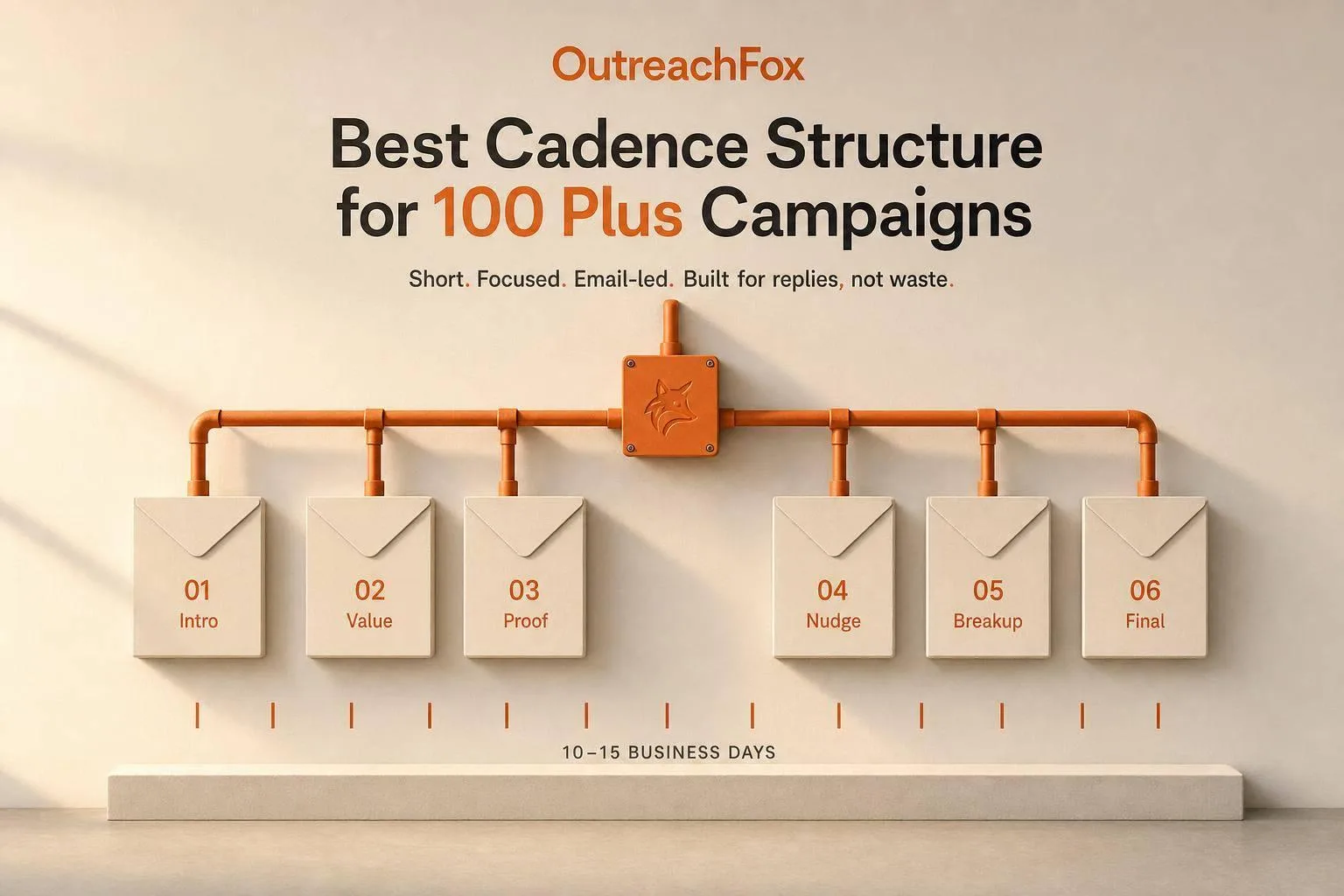
For 100+ campaigns, use short (4-7 touch), email-led, centralized cadences over 10-15 business days. Add LinkedIn and customization only when data shows clear benefit.
- Short sequences of 4-7 touches reduce operational complexity across high-volume campaigns
- Email-only cadences simplify QA and control compared to multichannel approaches
- Centralized setup enables consistent policy enforcement across 100 plus active campaigns
- Start at 20-30 emails per inbox daily and scale to 50 only after proving deliverability
- Reserve long sequences and LinkedIn for enterprise accounts with proven higher reply rates
- Client-level customization adds overhead but helps when compliance or workflows differ significantly
Best Cadence Structure for 100 Plus Campaigns
If I were running 100+ campaigns, I'd default to a short, email-led, centralized cadence first. In most cases, that means 4–7 touches over 10–15 business days, starting at 20–30 emails per inbox per day, keeping bounce rates under 2%, and only moving toward 50 emails per day after mailbox setup and health are stable.
Here's the simple version:
- Short sequences fit high-volume outbound and time-sensitive offers.
- Long sequences fit bigger deals and longer sales cycles.
- Email-only is easier to control across many live campaigns.
- Multichannel makes sense when LinkedIn adds more replies.
- Centralized setup works best when one team needs to keep rules the same.
- Client-level setup works better when accounts need different rules, compliance, or workflows.
If you want the safest default, I'd use:
- Short sequence
- Email first
- Central team ownership
- Client-level changes only when there's a clear reason
That gives you fewer failure points, less copy sprawl, and more control when campaign count gets high.
What's the Best Cadence for Your Cold Outreach Campaign?
Quick Comparison
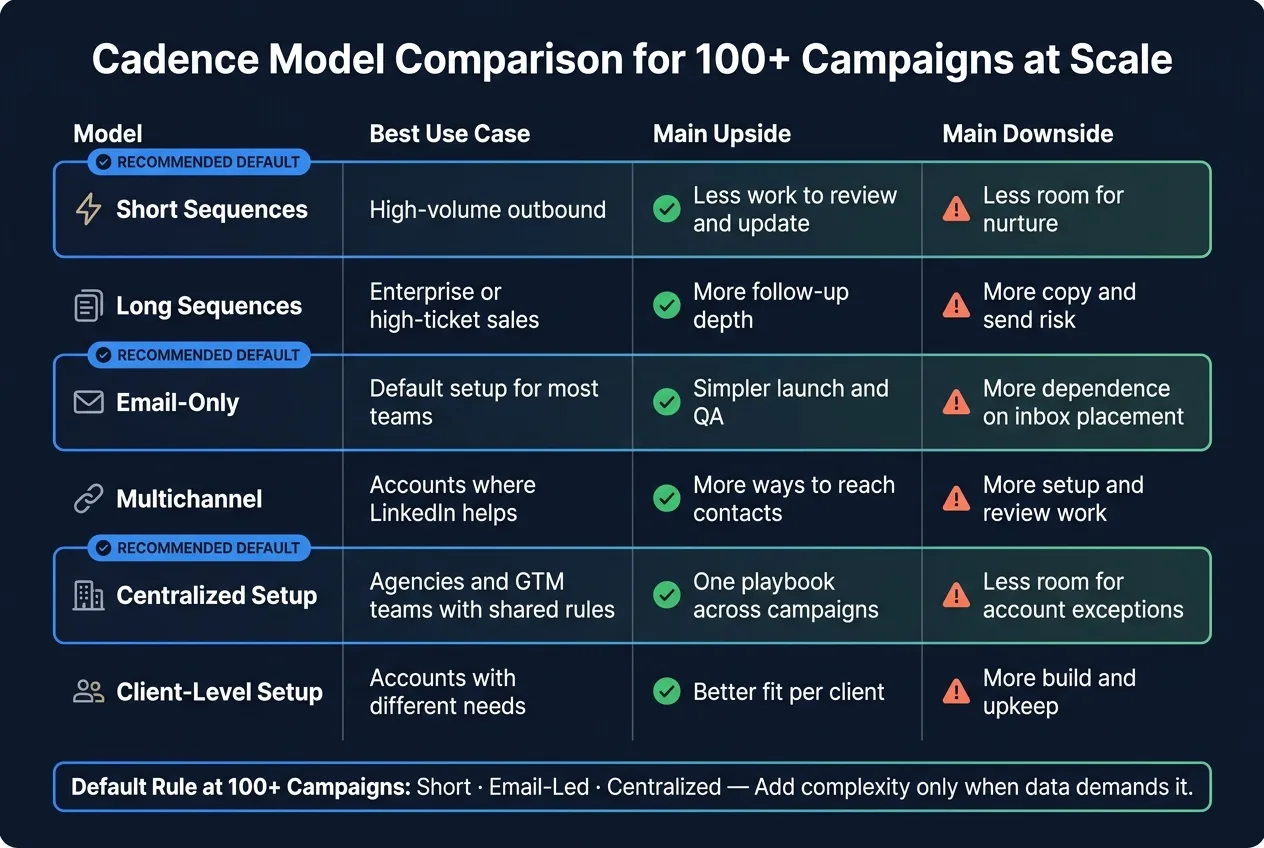
| Model | Best use | Main upside | Main downside |
|---|---|---|---|
| Short Sequences | High-volume outbound | Less work to review and update | Less room for nurture |
| Long Sequences | Enterprise or high-ticket sales | More follow-up depth | More copy and send risk |
| Email-Only | Default setup for most teams | Simpler launch and QA | More dependence on inbox placement |
| Multichannel | Accounts where LinkedIn helps | More ways to reach contacts | More setup and review work |
| Centralized Setup | Agencies and GTM teams with shared rules | One playbook across campaigns | Less room for account exceptions |
| Client-Level Setup | Accounts with different needs | Better fit per client | More build and upkeep |
So if you're asking, "What cadence structure should I use at scale?" my short answer is: keep it short, keep it standardized, and add complexity only when the data shows you need it.
1. Short Sequences
Short sequences work best when you need speed, consistency, and less ops overhead at scale. If you're managing lots of clients, inboxes, or launches, keeping the sequence short cuts complexity fast. The downside? You get less room for deeper nurture.
They also help reduce deliverability risk, lighten the ops load, and make it easier to enforce central rules across many inboxes. With fewer steps, audits move faster, and copy updates roll out cleanly at this level.
Use short sequences for high-priority outbound workflows and other time-sensitive campaigns where speed matters more than extended follow-up depth.
Once the goal moves from speed and control to deeper nurture, long sequences are the better fit.
2. Long Sequences
If short sequences lean on speed, long sequences lean on staying power.
They work well for longer sales cycles because they give you more chances to teach, revisit objections, and stay visible with high-value buyers. That extra runway matters when a deal takes time and people need more than one touch before they reply.
At 100+ campaigns, persistence only works when reputation stays separate. More steps mean more sends, and that makes weak mailbox health more expensive. Platforms like OutreachFox help limit cross-campaign spillover with private, isolated infrastructure.
There's another issue people run into fast: every added step creates more copy, more assets, and more moving parts to test, update, and keep aligned across live campaigns. If an offer or message shifts in the middle of a sequence, version control across many active campaigns becomes the main risk.
Long sequences make sense for enterprise GTM teams and high-value campaigns with long buying cycles. They're a poor fit for short-lived offers and lists that change fast.
Length is only one lever. The next call is whether the cadence stays email-only or starts to include LinkedIn.
3. Email-Only Cadences
Once you've set sequence length, the next call is simple: can email handle the campaign on its own, or does LinkedIn need to be part of it too?
Email-only is the simplest model for agency workflows and GTM teams running 100+ active campaigns. With fewer channels in play, you get fewer things that can break, faster QA, and easier control across every live sequence.
Fewer Moving Parts at Scale
Email-only cadences make sense when you want the smallest amount of complexity possible. That means fewer steps, faster QA, and easier cloning across 100+ campaigns.
At that level, the goal isn't finding the perfect sequence length. The goal is building a cadence that's easy to clone, audit, and adjust without slowing the team down. Fewer channel combinations also mean fewer test paths and simpler approvals.
Deliverability and Reputation Control
When you're managing 100+ campaigns, deliverability isn't just about one campaign doing well. It's about keeping problems contained across the whole program.
Shared domains or mailboxes can cause spillover from one campaign to another. Isolated setup helps stop that. Platforms like OutreachFox use dedicated campaign IPs and isolated mailboxes so each campaign runs in its own environment, which helps keep reputation issues from spreading.
Overhead at 100+ Campaigns
At this scale, standardization matters.
- Standardize subject lines, CTAs, and send windows.
- Change only the fields that need to change.
- Keep the core sequence the same.
- Limit variation to targeting or offer fields only.
That keeps governance clean without piling on extra review cycles as campaign count grows.
Fit by Team and Campaign Type
Email-only is a strong match for agency workflows and GTM teams that need repeatable QA, fast launches, and fewer failure points.
It's a poor match when LinkedIn is needed to start conversations or improve reply rates.
Use email-only when simplicity and control matter more than extra touchpoints. Move to multichannel only when LinkedIn makes a clear difference in reply rates.
4. Multichannel Cadences
Multichannel cadences add LinkedIn touches alongside email. That can help you reach more people, but it also creates more moving parts when you're running 100+ campaigns at once. The tradeoff is pretty simple: better coverage versus more operational load.
Typical Length
A multichannel sequence usually runs for several weeks and mixes email with LinkedIn touches like connection requests and follow-up messages. Keep the touch order fixed in the workflow.
The goal doesn't change. You want the sequence to stay coordinated across channels without turning day-to-day management into a mess at scale.
Deliverability and Reputation Control
LinkedIn can extend reach, but it doesn't lower email deliverability risk. Each campaign still needs isolated sending infrastructure. Platforms like OutreachFox keep email infrastructure isolated while running email and LinkedIn in one workflow.
Lock policy and throttles. Only change the message, persona, and channel steps.
Overhead at 100+ Campaigns
The upside is clear. The cost is operational.
Multichannel costs more to run than email-only. Each LinkedIn account has to be provisioned, warmed, and monitored. That leads to more account management, more QA steps, and more places where things can break.
A simple way to keep this under control is to use one centralized multichannel template and limit per-campaign changes to:
- The offer
- The market
- The persona
- The LinkedIn account assignment
Fit by Team and Campaign Type
Multichannel cadences make sense when LinkedIn plays a real role in how prospects buy or reply. They're a poor fit when your list has low LinkedIn activity or when your team doesn't have the time to QA two channels for every campaign.
For agencies, email-only should be the default. Bring in multichannel only for accounts where LinkedIn clearly lifts replies. At high volume, that rule matters even more: use email-only by default, and use multichannel only where LinkedIn materially lifts replies.
The next call is whether that master cadence should live with one central team or at the client level.
5. Centralized Cadence Setup
In a centralized setup, one team owns the master cadence across 100+ campaigns. That team sets the rules, the review flow, and the escalation path once. Each campaign then runs from that shared system, with campaign-level fields and permissions changed where needed.
This setup matters most when campaign volume is high and sequence rules need to stay in line across the board.
Touch Count and Duration
A centralized model doesn't mean every campaign uses the exact same number of touches. It means one team decides when a cadence should keep going, pause, or pass the conversation to a human.
That's the key idea: use escalation rules, not rigid touch counts, to route complex replies to a person. You keep one playbook in place without forcing every client into the same sequence step for step.
Deliverability and Reputation Control
Centralized policy is your first line of defense. Set your guardrails once, then apply the same standards across all campaigns. That makes it much easier to spot drift before it turns into a bigger problem.
To maintain strong sender reputation across hundreds of campaigns, ensure email authentication protocols are configured properly and monitored consistently. Platforms like OutreachFox support isolated infrastructure and dedicated campaign IPs, which keeps sending environments separate. The tradeoff is simple: tighter control usually means less flexibility, and you'll feel that most in how fast changes get approved.
Overhead at 100+ Campaigns
This is where centralization helps the most. Teams don't have to rebuild sequences from scratch every time. Instead, they start with a tested framework and work from there.
Updates can roll out from one place, and live performance data can shape changes to the master cadence. The bottleneck is usually testing and approval. Before you push updates across all campaigns, run edge-case QA checks to catch problems early.
Fit by Team and Campaign Type
Centralized cadence management works best for agencies and GTM teams that need the same policy applied across high-volume workflows. When campaigns follow a common structure, centralization cuts overhead in a big way.
It's a weaker fit when clients need different permissions or different workflow logic. In those cases, client-level setup tends to make more sense.
6. Client-Level Cadence Setup
When one shared cadence no longer works across all accounts, move cadence setup to the client level. This gives each account its own cadence rules. You can still keep core policy in one place, while changing touch count, timing, and escalation based on the client, campaign, or channel.
That's why client-level setup makes sense when account needs start to drift too far for one master template to handle well.
Touch Count and Duration
Set touch count and duration based on the account's workflow, audience, and compliance rules. Don't push the same cadence onto every account.
A support workflow, for example, shouldn't run on the same cadence as outbound sales. They serve different goals, so the pace and sequence should match.
Deliverability and Reputation Control
Client-level separation helps contain sender reputation. If one client runs into problems, those misses don't spill over into another client's campaigns.
That kind of isolation matters. It gives each account its own lane instead of tying everything to one shared setup.
Overhead at 100+ Campaigns
The downside is the extra build and maintenance work. At 100+ campaigns, that load adds up fast.
A simple way to keep it under control is to use a library of tested templates, then adjust those templates as needed instead of building every cadence from scratch.
Fit by Team and Campaign Type
Client-level cadence management works best when clients have different audiences, compliance requirements, or workflow logic that won't fit a shared template. If account differences are big enough that shared cadence rules start hurting performance, client-level setup is usually the better path.
Next, compare the tradeoffs of each model at scale.
Pros and Cons of Each Cadence Model at Scale
Each model fixes a different scale issue. The right pick comes down to team size, account mix, and day-to-day workload. Once you're running 100+ campaigns, the main question isn't which model sounds best on paper. It's which tradeoff your team can live with week after week.
At that volume, short sequences are the easiest to QA. They're simple, fast to review, and easy to adjust. The downside is depth. They can fall short when you're trying to work larger deals or avoid missing high-value openings.
Long sequences give you more room for complex sales cycles, but they come with more moving parts. Copy management gets heavier. Stop rules matter a lot more. And copy goes stale fast. If those stop rules aren't clear, it's easy to keep contacting prospects who already went cold.
Email-only is the lightest option from an ops standpoint. That's the upside. The downside is plain: it creates a single point of failure. If inbox filters get tighter, the whole program takes the hit. Learning how to manage hard and soft bounces becomes essential for protecting deliverability at scale.
The same tradeoff shows up with multichannel. You get more reach and less dependence on the inbox, but you also take on more coordination work. Cross-channel sequences need steady messaging and timing guardrails so prospects don't get hit twice in awkward ways.
Then there's the last split: should one cadence run the whole portfolio, or should each account have its own setup? Simpler cadences are easier to scale from an ops view. More complex setups can work, but they need stronger controls to keep things from drifting.
| Model | Pros | Cons | Best fit |
|---|---|---|---|
| Short Sequences | Easy to QA; fast to iterate | Limited depth; may miss high-value opportunities | High-volume prospecting; early-stage testing |
| Long Sequences | Fits complex sales cycles | Higher copy management overhead; requires precise stop rules | Enterprise sales; high-consideration products |
| Email-Only | Lowest resource requirement | Single point of failure on deliverability | High-volume sends where simplicity is the priority |
| Multichannel | Reduces inbox dependence; expands reach | Requires tight orchestration across channels | High-value accounts; strong LinkedIn presence |
| Centralized Setup | Fast deployment; consistent QA across all campaigns | May lack fit for accounts with unique requirements | Scaling 100+ campaigns with a small core team |
| Client-Level Setup | Isolates risk per account; maximum relevance | Higher maintenance; slower to deploy | Regulated industries; divergent audiences |
Those tradeoffs lead to one default structure for most 100+ campaign programs.
Recommended Cadence Structure and Final Verdict
At 100+ campaigns, the safest default is a short, email-led cadence: 4–7 total touches over 10–15 business days. Email should do most of the work. Then add LinkedIn only when it helps lift reply rates.
That setup tends to be the best fit at scale because it keeps execution simple, easier to manage, and easier to test. If you're seeing low reply rates in your cold outreach, start with technical fixes before adding complexity.
Save longer or more customized cadences for enterprise and high-value accounts, where added complexity is worth the extra writing, research, and slower test cycles.
For setup, start with centralized cadence libraries. Shift to client-level setup only when you need account-specific compliance, custom workflows, or isolated sending infrastructure.
Put simply: at 100+ campaigns, the pattern that tends to win is short, centralized, and email-led. Bring in LinkedIn and client-level customization only when the account has a clear reason for it.
If you run isolated infrastructure for each client, platforms like OutreachFox can handle that separation with dedicated campaign IPs and white-label workspaces, without forcing you to build separate cadence libraries for every account.
Use the matrix below as the final selection rule.
| Recommended Model | Ideal Use Case | Typical Duration | Channel Mix | Organizational Fit |
|---|---|---|---|---|
| Short Email-Only | Default for 100+ campaigns | 10–15 business days | Email primary | Centralized GTM teams / agencies |
| Long Email-Only | Low-intent nurturing | 30–60 business days | Email only | Marketing-led growth teams |
| Long Multichannel / Customized | Enterprise / high-value accounts | 30+ business days | Multichannel + manual research | Client-level / isolated setup |
Frequently asked questions
What is the recommended default cadence structure when managing 100+ campaigns at scale?+
The safest default is a short, email-led, centralized cadence with 4–7 touches over 10–15 business days. Start at 20–30 emails per inbox per day, keeping bounce rates under 2%, and only scale to 50 emails per day after mailbox health is stable. This approach minimizes failure points and operational overhead while maintaining control.
Why should I choose email-only cadences instead of multichannel for high-volume campaigns?+
Email-only cadences are simpler to launch, QA, and manage across 100+ campaigns with fewer moving parts and failure points. While multichannel cadences can improve reach, they require significantly more operational work including LinkedIn account provisioning, warming, monitoring, and cross-channel coordination. Add LinkedIn only when it demonstrably lifts reply rates for specific accounts.
When should I use long sequences instead of short sequences in my campaigns?+
Long sequences work best for enterprise or high-ticket sales with longer buying cycles where prospects need multiple touches to move forward. They provide more room for nurturing and revisiting objections. However, they require more copy management, stricter stop rules, and carry higher deliverability risk at scale, making them suitable only for high-value accounts that justify the extra complexity.
What are the main risks of running long sequences across 100+ campaigns?+
Long sequences create more copy to manage, more assets to test and update, and greater version control challenges across active campaigns. They also increase deliverability risk with more sends per prospect, and without clear stop rules, you risk contacting prospects who've already gone cold. At high volume, these operational costs multiply quickly across your entire program.
Should I use centralized or client-level cadence setup for my campaigns?+
Start with centralized setup when running 100+ campaigns with shared rules and similar workflows, as it enables faster deployment and consistent QA across all campaigns. Move to client-level setup only when accounts have different compliance requirements, unique workflow needs, or require isolated sending infrastructure. Centralized is the default; client-level is the exception when clearly needed.
How does OutreachFox help with deliverability when managing multiple campaigns?+
OutreachFox provides isolated infrastructure with dedicated campaign IPs and isolated mailboxes so each campaign runs in its own environment. This prevents reputation issues from one campaign spilling over to others, which is critical when managing 100+ campaigns where shared domains or mailboxes could cause cross-campaign deliverability problems.
What is the main advantage of keeping cadence sequences short at high volume?+
Short sequences reduce operational overhead by making audits faster, copy updates cleaner, and QA simpler across many campaigns. With fewer steps to manage, you get fewer things that can break, faster review cycles, and easier enforcement of central rules across all inboxes, which becomes increasingly important as campaign count grows.