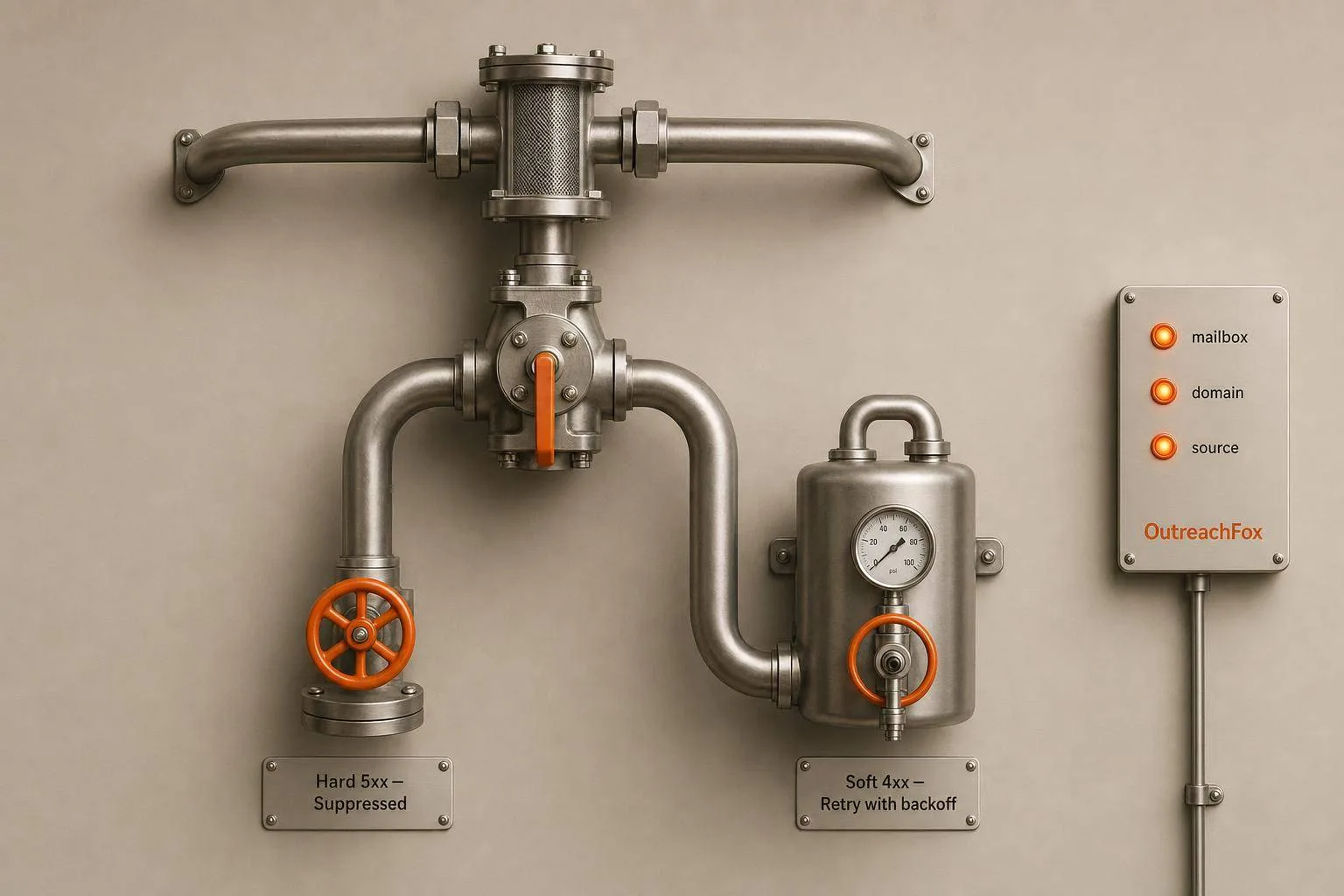
Keep bounce rates under 2% by suppressing hard bounces immediately, retrying soft bounces 2-3 times with backoff, and tracking every bounce by mailbox, campaign, domain, and source.
- Suppress hard bounces with 5xx codes immediately and never retry them
- Retry soft bounces with 4xx codes 2-3 times with backoff before suppressing
- Monitor bounce rates by mailbox, domain, campaign, and data source
- Verify lists before sending and re-check data older than 30 days
- Pause campaigns automatically when total bounce rate exceeds 3% in one day
- Use isolated infrastructure and dedicated IPs for cleaner bounce attribution
Managing Hard and Soft Bounces in Cold Email Campaigns
If your bounce rate goes over 2%, cold email delivery can slip fast. And once you get near 5%, you’re in the danger zone for throttling, poor inbox placement, or a paused campaign.
If I had to sum up bounce control in one line, it would be this: remove hard bounces at once, retry soft bounces a few times, and track every bounce back to the mailbox, campaign, domain, and list source.
Here’s the whole playbook in plain English:
- Hard bounces = permanent failure
- Usually 5xx SMTP codes
- Common examples: 550, 553
- I should suppress the address right away
- Soft bounces = temporary failure
- Usually 4xx SMTP codes
- Common examples: 421, 450, 452
- I should retry 2–3 times with backoff, then suppress if it keeps failing
- Bounce rate targets
- Keep total bounces under 2%
- Watch closely above 3%
- Treat 5%+ as high risk
- Before sending
- Check SPF, DKIM, and DMARC
- Warm up mailboxes for at least 14 days
- Re-check old lists, especially data older than 30 days
- Keep volume around 30–50 emails per mailbox per day
- During sending
- Set alerts when hard bounces hit 1%
- Pause a campaign if total bounces go above 3% in one day
- After sending
- Push all 5xx addresses to suppression
- Review soft bounces that repeat across 3 straight campaigns
- Sync invalid contacts back to the CRM
A few points matter more in cold outreach because B2B data goes stale fast - about 2% per month or roughly 30% per year. So I don’t just watch bounce volume. I look at bounce type, because that tells me whether the problem is bad data, send volume, or mailbox setup.
Why Do My Emails Bounce? 😱 Reduce Email Bounce Rate in 4 Ways!
Quick Comparison
| Type | What it means | SMTP range | What I do |
|---|---|---|---|
| Hard bounce | Permanent failure | 5xx | Suppress now, never retry |
| Soft bounce | Temporary failure | 4xx | Retry 2–3 times, then suppress if it keeps failing |
That’s the system: classify, verify, retry with limits, suppress fast, and monitor by source. If I run that process every time, bounce control stops being a fire drill and becomes a routine part of sending.
Hard Bounces vs. Soft Bounces: What You Need to Know Before Making Changes
Bounces, Bounce Rate, and the SMTP Codes Behind Them
A bounce happens when an email doesn't get delivered because the receiving server rejected it.
Your bounce rate should stay under 2%. Once it goes above 5%, you're in risky territory and deliverability can start to slip.
The SMTP code tells you what kind of problem you're dealing with:
- A 4xx code points to a temporary issue, so you should retry
- A 5xx code points to a permanent failure, so you should suppress the address
That distinction matters more than it might seem. If you treat every bounce the same way, you can end up retrying bad addresses or removing contacts who only had a short-term issue.
Classification comes first. Tracking and verification come after that.
Hard Bounces: Permanent Failures That Require Immediate Suppression
Hard bounces mean the delivery failed for good. In most cases, the address is invalid, the mailbox doesn't exist, or the receiving server flat-out refused the message.
Common SMTP codes include:
- 550 ("User unknown")
- 553 ("Invalid address format")
When you get a hard bounce, suppress that address right away across every sequence and mailbox. Don't retry it. Sending again only adds more damage.
Soft Bounces: Temporary Failures That Need Retries and Limits
Soft bounces happen when delivery was blocked by a short-term issue. The address may still be fine, but something got in the way.
Common causes include a full inbox, a server outage, rate limiting, or greylisting. You'll often see codes like:
- 421 ("Try again later")
- 450 ("Mailbox temporarily unavailable")
- 452 ("Mailbox full")
For soft bounces, retry 2–3 times with backoff. If the same address keeps failing after that, suppress it.
| Hard Bounce | Soft Bounce | |
|---|---|---|
| Definition | Permanent delivery failure | Temporary delivery failure |
| SMTP Code Range | 5xx (e.g., 550, 553) | 4xx (e.g., 421, 450, 452) |
| Typical Causes | Invalid address, non-existent domain, deactivated mailbox | Full inbox, server down, rate limiting, greylisting |
| Deliverability Impact | Severe - signals poor list quality | Moderate - damaging if repeated |
| Recommended Action | Remove immediately; never retry | Retry 2–3 times, then suppress if failure persists |
Once you can classify bounces the right way, the next move is to track them at the event level and verify lists before sending.
Set Up Bounce Tracking, Verification, and Reporting Before You Fix Anything
Enable Event-Level Bounce Tracking in Your Sending Stack
Classification only helps if your stack records each event cleanly.
Bounce rate by itself doesn't tell you much. You need to know which mailbox produced the bounce, which campaign it came from, which list segment the contact belonged to, and the exact SMTP response code. Without that level of detail, root-cause analysis turns into guesswork.
At a minimum, every bounce event should log:
- the SMTP code and reason phrase
- a timestamp
- the sending mailbox
- the sending domain
- the campaign name
- the original data source
That last field matters more than most teams think. If bounce volume jumps, data source helps you trace the problem back to a certain vendor or list pull instead of blaming your whole setup.
If your platform allows it, use webhooks or an API to capture bounce events in real time. That gives you two big wins. First, you can trigger automatic suppression right away. Second, you can set an auto-pause threshold in your sending stack, so a bad list segment doesn't quietly damage a domain while a campaign keeps running overnight.
Add DMARC reporting too. It helps you separate authentication problems from list-quality problems.
Once you've split hard bounces from soft bounces, wire the stack so every event points back to its source.
Verify Lists Before Launch and Re-Check Old Data
Pre-send verification cuts out most hard bounces before you send.
A solid verifier should flag invalid, disposable, role-based, and catch-all addresses. Role accounts like info@, sales@, and admin@ should stay out of your sends. Catch-all domains need their own segment. Why? Because standard tools can't confirm whether one specific address at a catch-all domain is live. The safer move is to watch their bounce behavior on its own instead of mixing them with verified-valid contacts.
B2B contact data decays at roughly 2% per month - about 30% per year - as people switch jobs and companies shut down domains. So verification shouldn't be one-and-done. It needs to match both the source of the list and the age of the data.
| List Source | Expected Bounce Risk | Required Verification Depth |
|---|---|---|
| CRM Exports (Aged) | Medium–High | Re-verify if older than 30 days |
| Scraped Lists | High | Full syntax, MX, and SMTP-level probe |
| Purchased Data | Very High | Deep audit + test 100–200 contacts first |
| Previously Verified | Low–Medium | Re-verify if more than 90 days since last check |
With verification handled, the next step is to isolate infrastructure so bounce signals reflect your sending, not shared noise.
Use Isolated Infrastructure for Cleaner Bounce Signals
Shared infrastructure muddies bounce attribution.
If your mailboxes share IPs with other senders, a bounce spike might come from their list quality or their sending habits, not yours. That makes diagnosis messy. You're trying to read a signal through static.
Dedicated mailboxes and isolated IPs remove that problem. When every bounce signal ties back to your own sends, the pattern gets much easier to read: high hard bounces usually point to list quality, while high soft bounces usually point to infrastructure or volume issues. That gives you a cleaner read on what's wrong and where to act.
OutreachFox fits this model with isolated sending infrastructure, built-in verification, and real-time bounce webhooks.
With tracking, verification, and isolation in place, separate hard-bounce suppression from soft-bounce retries.
Handle Hard and Soft Bounces With Separate Rules
Hard and soft bounces should not go through the same playbook. A hard bounce needs fast suppression. A soft bounce needs a few controlled retries, then a pause or suppression if the issue keeps showing up.
Hard Bounce Workflow: Suppress, Trace the Source, and Update Every System
Start with hard bounces first. They need immediate suppression across every tool that can send to that address.
When a 5xx code comes back, suppress the address right away. Do it in your outreach platform, CRM, and suppression list.
Then log the reason for the bounce. "Invalid user" and "domain not found" may both be hard bounces, but they point to different issues. The first usually means a typo or an old record. The second means the domain is dead. When that happens, check every other contact tied to that domain. If one vendor or list source keeps producing repeated 550 errors, that’s a data quality issue, not bad luck.
| Hard Bounce Scenario | SMTP Code | Required Action |
|---|---|---|
| User Unknown / Mailbox Unavailable | 550 | Suppress immediately; mark Invalid in CRM |
| User Not Local / Recipient Not Recognized | 551 | Suppress immediately; audit data source |
| Invalid Address Format / Syntax Error | 553 | Check for typos; if none found, suppress |
Sync the CRM right away. Mark the contact as Invalid or Suppressed so it doesn’t sneak back into a later list.
Soft Bounce Workflow: Retry With Backoff, Then Pause or Suppress if Failures Continue
Soft bounces are different. Treat them like temporary failures, but set a cap on retries.
A few retries make sense. Unlimited attempts do not. Use backoff between retries, then suppress if the same failure keeps happening.
Some soft bounces are about throttling, not bad recipients. If you see a spike in 421 or 450 codes, the mailbox is likely getting throttled. In that case, pull back send volume for that mailbox instead of pushing harder.
| Soft Bounce Cause | SMTP Code | Mitigation Step |
|---|---|---|
| Service Throttling / Rate Limit | 421 | Pause campaign; reduce daily send volume for that mailbox |
| Mailbox Temporarily Locked | 450 | Retry after 24 hours; suppress if it keeps failing |
| Insufficient Storage / Mailbox Full | 452 | Retry; suppress if it fails again |
| Greylisting | N/A | Wait for automatic retry; backoff handles this |
| Message Too Large | N/A | Reduce email size; remove large images or attachments |
If a campaign’s bounce rate climbs past 3–5% while it’s still running, pause the whole thing. One weak list segment can do damage overnight before anyone notices.
Review Bounce Trends by Mailbox, Domain, and Data Source
Look at bounce data across four dimensions: mailbox, domain, campaign, and data source.
That view makes the problem easier to spot. If one mailbox is producing soft bounces while the rest of the pool looks clean, that points to a mailbox reputation problem. If the spike sits inside one campaign, the list segment or source is often the issue. If bounces pile up from one lead source, the vendor is the problem. And the split between hard and soft bounces tells you where to look next: hard bounces usually mean list quality issues, while soft bounces usually point to infrastructure or send volume.
Break the data out by mailbox, domain, campaign, and source, then respond to the pattern you see.
Use those patterns to tighten your pre-send controls next.
Build a Repeatable Bounce Prevention Workflow
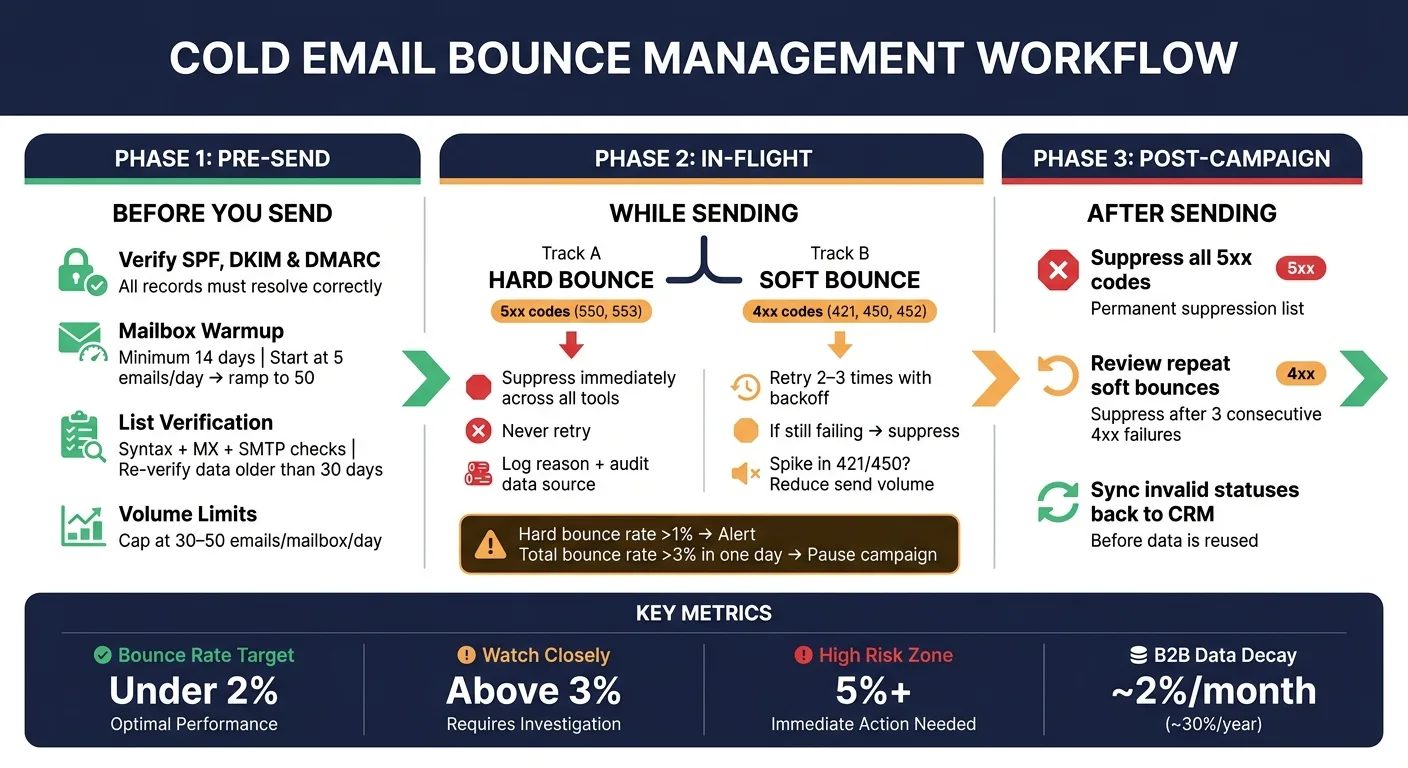
Bounce data shouldn't sit in a dashboard collecting dust. It should feed a workflow you use before, during, and after every campaign. That's how you turn random fire drills into a fixed campaign checklist.
Pre-Send Checklist: Authentication, Warmup, Verification, and Send Limits
Before any campaign goes live, make sure these four pieces are locked in:
- Verify SPF, DKIM, and DMARC - all records must resolve correctly
- Mailbox warmup status - new inboxes need at least 14 days of gradual ramp-up, starting at about 5 emails per day, before they're ready for cold outreach volume
- List verification - run every contact through syntax, MX, and SMTP checks, then remove invalid or role-based emails before launch
- Volume limits - cap daily sends at 30–50 emails per mailbox
Once the campaign starts, the job changes. You're no longer setting things up. Now you're watching for bounce signals in real time.
In-Flight Controls and Post-Campaign Cleanup
Use the mailbox, domain, campaign, and source breakdown from above to set alerts before a small issue turns into a mess. Watch for bounce spikes by mailbox, domain, campaign, and source, then move fast when you spot a pattern.
Set an automated alert when the hard bounce rate reaches 1%. If the total bounce rate goes above 3% in a single day, pause the campaign automatically. That's not overkill. One unverified segment can hurt a domain fast.
For post-campaign cleanup, keep the process tight. Confirm that all 5xx codes go to the permanent suppression list. Review any address that soft bounced across three straight campaigns and move it to suppression too. Then sync all invalid statuses back to the CRM before that data gets reused.
Use secondary domains or subdomains for cold outreach so bounce issues stay boxed away from your main business domain. OutreachFox supports this with isolated infrastructure, dedicated campaign IPs, and real-time webhooks that send bounce events and mailbox-health signals back into your stack as soon as they happen.
Conclusion: A Simple System for Keeping Bounce Rates Under Control
At its core, this system runs on a few habits that don't change: classify bounces the right way, verify data before it enters a sending queue, suppress hard bounces at once, retry soft bounces with exponential backoff and a hard cap, and track rates by mailbox, domain, and source so you can see where issues start.
| Phase | Action | Threshold / Rule |
|---|---|---|
| Pre-Send | Verify SPF, DKIM, and DMARC | Must resolve correctly before any send |
| Pre-Send | Check mailbox warmup status | Minimum 14-day ramp; 5 → 50 emails/day |
| Pre-Send | Run list through verification | Re-verify any data older than 30 days |
| Pre-Send | Set per-mailbox volume limits | 30–50 emails/day per mailbox |
| In-Flight | Monitor hard bounce rate | Alert at >1%; pause at >3% total bounce rate |
| In-Flight | Segment catch-all domains | Test in batches of 50–100 before scaling |
| Post-Campaign | Suppress all 5xx codes | Immediate, permanent suppression |
| Post-Campaign | Review repeat soft bounces | Suppress after 3 consecutive 4xx failures |
| Post-Campaign | Sync invalid statuses to CRM | Update before data is reused anywhere |
Run this checklist every time, and bounce rates stop feeling like a crisis. They become a number you can keep in check.
Frequently asked questions
What's the difference between a 4xx and 5xx SMTP code in bounce management?+
A 4xx code indicates a temporary failure (soft bounce) that should be retried 2-3 times with backoff before suppression. A 5xx code indicates a permanent failure (hard bounce) that requires immediate suppression with no retries. The distinction matters because treating them the same way either wastes effort retrying bad addresses or removes contacts who only had short-term issues.
Why should I pause a campaign at 3% bounce rate instead of waiting longer?+
A bounce rate above 3% in a single day indicates a serious problem with either list quality or infrastructure that can damage your domain reputation overnight. Once you approach 5%, you enter high-risk territory for throttling and poor inbox placement. Pausing at 3% prevents one weak list segment from doing lasting damage before anyone notices.
How often should I re-verify old contact lists before sending?+
You should re-verify any data older than 30 days. B2B contact data decays at roughly 2% per month or about 30% per year as people change jobs and companies shut down domains. Verification shouldn't be one-and-done; it needs to match both the source and age of your data.
What should I do when the same address soft bounces three times in a row?+
Suppress the address after three consecutive soft bounce failures across different campaigns. While soft bounces indicate temporary issues, repeated failures usually mean the mailbox has been abandoned or is no longer active. Continued retry attempts can hurt your sender reputation just like hard bounces.
Why does the article recommend tracking bounces by data source?+
Tracking by data source helps you trace bounce spikes back to specific vendors or list pulls instead of blaming your entire sending setup. If one lead source consistently produces 550 errors or high bounce rates, that's a data quality issue with that vendor, not a problem with your infrastructure or other lists.
What's the recommended daily send volume per mailbox for cold outreach?+
The article recommends keeping volume around 30-50 emails per mailbox per day. This limit helps prevent soft bounces caused by rate limiting or throttling. New mailboxes need at least 14 days of gradual warmup starting at about 5 emails per day before reaching full cold outreach volume.
Should I send to catch-all domains the same way as verified addresses?+
No. Catch-all domains need their own segment because standard tools can't confirm whether specific addresses at those domains are live. Send to them in separate campaigns at lower volume and watch bounce rates closely. If they don't engage after your full sequence, remove them from future sends.