Bounce rates above 2% damage sender reputation by signaling poor list quality to mailbox providers. Keep rates under 1% by verifying lists before send, suppressing hard bounces immediately, and using isolated infrastructure.
- Hard bounces above 2% trigger spam filtering; above 5% causes throttling
- B2B email lists decay 2-3% monthly, requiring frequent re-verification
- Suppress all 5xx hard bounces immediately and never retry them
- Shared infrastructure spreads reputation damage across all senders on that pool
- Track bounce rates per mailbox, not just campaign-wide averages
- Set auto-pause triggers at 1.8% to catch problems before hitting 2%
Bounce Rates and Sender Reputation: Connection
A high bounce rate can hurt your inbox placement fast. If I let bounces climb past 2%, providers may start routing more of my email to spam. At 5%+, throttling becomes a real problem. And once bounces move past 10%, blocking can follow.
Here’s the short version:
- Hard bounces mean the address is bad or the domain does not exist. I should remove those contacts at once.
- Soft bounces are temporary, like a full inbox or server issue. I can retry them, but only a few times.
- Old B2B data decays by about 2–3% per month, so lists go bad fast.
- SPF, DKIM, and DMARC need to be set up right, or mail can get rejected even with clean data.
- Volume spikes and repeat sends to bounced addresses make providers distrust my domain.
- For cold outreach, I should aim to stay under 1% and set an auto-pause near 1.8%.
What I take from this is simple: bounce rate is not just a reporting metric. It is a direct signal of list quality, sending control, and domain health. To keep reputation in good shape, I need to verify lists before sending, suppress 5xx bounces right away, watch mailbox-level trends, and keep my sending setup separate from risky shared pools.
Why do your emails BOUNCE? (And what to do about it) 😊
Bounce Rates and Sender Reputation: What They Are and How They Connect
Bounce rate is the share of attempted sends that recipient servers reject. Sender reputation is the level of trust mailbox providers give to your domain and IP. That trust comes from a mix of bounce rate, complaints, authentication, and engagement.
Every bounce affects that score.
If you want to manage reputation well, start with one simple split: permanent failures vs. temporary ones.
Hard Bounces vs. Soft Bounces
This split matters because mailbox providers don't read all failures the same way. A bad address sends one signal. A full inbox sends another.
| Bounce Type | Typical Causes | Reputation Impact | Correct Handling |
|---|---|---|---|
| Hard Bounce | Invalid address, non-existent domain, permanent block | High - signals poor list hygiene | Remove immediately; never retry |
| Soft Bounce | Full mailbox, server downtime, rate limiting, greylisting | Low - only damaging if persistent | Retry with backoff; suppress after repeated failures |
Hard bounce: Remove immediately. Never retry.
Soft bounce: Retry with backoff. If it keeps happening, suppress the address.
Once you've identified the failure type, the next step is to look at the pattern over time.
How Mailbox Providers Read Bounce Rates
Providers don't just look at a single failed send. They watch trends. One-off failures happen. A spike is what gets attention.
A steady low bounce rate is usually fine. A sudden jump is not.
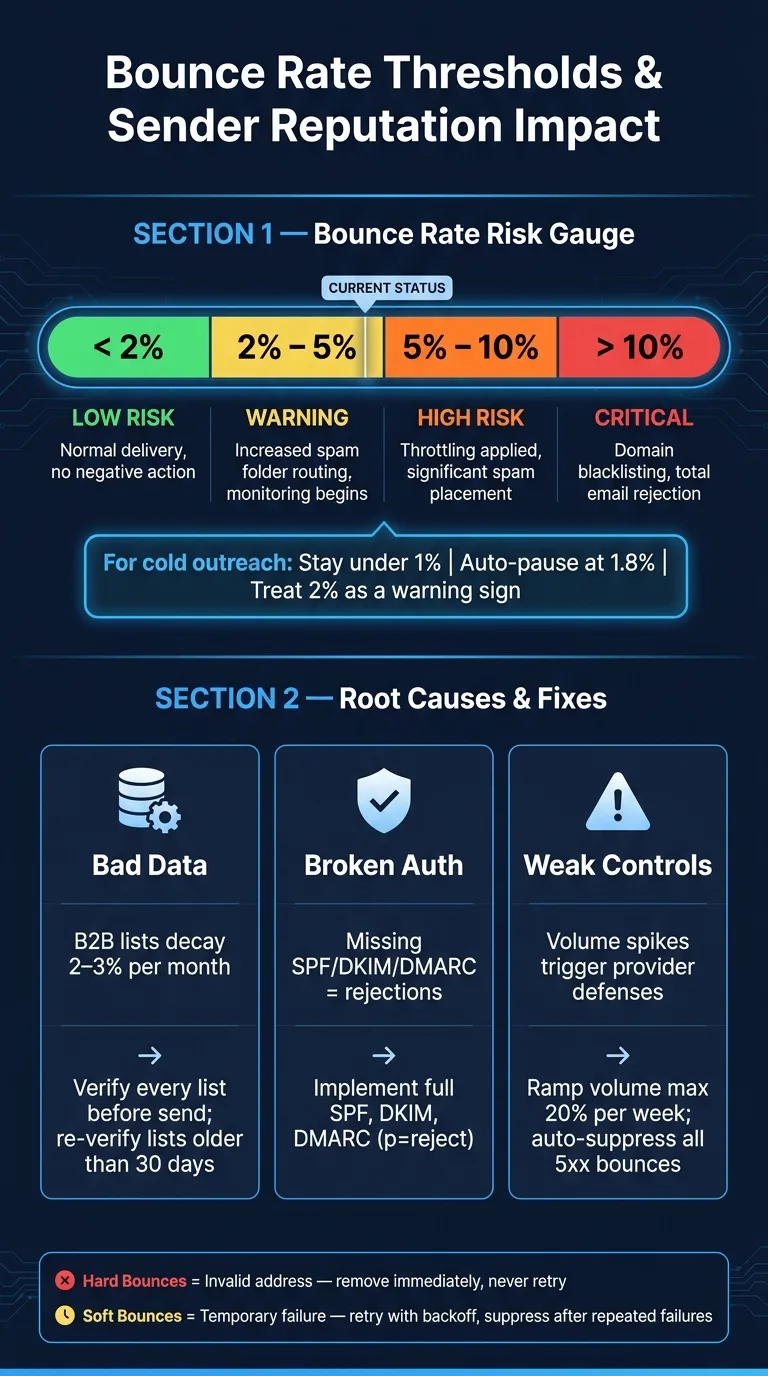
| Bounce Rate Range | Risk Level | Typical Response |
|---|---|---|
| < 2% | Low-Risk | Normal delivery; no negative action |
| 2% – 5% | Warning | Increased spam folder routing; monitoring initiated |
| 5% – 10% | High-Risk | Throttling applied; significant spam placement |
| > 10% | Critical | Domain blacklisting; total rejection of emails |
For cold outreach, keep bounce rates under 1%. Treat 2% as a warning sign. Once you hit 5% or more, you're dealing with a serious deliverability problem.
How High Bounce Rates Hurt Deliverability
From Rejected Emails to Spam-Folder Placement
Once bounce rates move past warning levels, mailbox providers stop seeing the problem as a few one-off failures. They start to lose trust.
Repeated bounces tell providers your list isn't being kept in good shape. And that trust drop hits fast. When domain trust falls, fewer emails reach the inbox and more get sent to the spam folder. That creates a nasty loop: fewer inbox placements lead to fewer opens, and lower engagement pushes reputation down even more.
How Reputation Problems Spread Beyond One Campaign
Bounce damage usually doesn't stay contained to one send.
Domain reputation shifts over time, which means one bad campaign can hurt your domain for weeks. If you're on shared infrastructure, the fallout can spread even further. One sender's poor campaign can drag down deliverability for everyone using that domain, not just the mailbox that caused the spike.
Blocklist and Suspension Risk
If bounce management stays broken, the problem doesn't stop at spam filtering. It gets worse.
Unmanaged bounces can push senders along a clear path: more spam-folder placement, then throttling, then domain blacklisting, and finally outright rejection. Sustained high bounce rates often lead there. And getting back from that point usually means sending at low volume for a while, focusing on engaged contacts, and rebuilding trust slowly.
Root Causes of High Bounce Rates in Cold Outreach
High bounce rates usually come down to three things: bad data, broken authentication, or weak sending controls.
If you miss any one of those, bounce risk goes up fast. And the problem is that each issue creates a different kind of damage. Bad data leads to hard bounces. Broken authentication leads to rejections. Weak sending controls make mailbox providers treat your activity like spam.
Stale or Unverified Prospect Data
B2B email lists decay at roughly 2–3% per month. That adds up fast. A list exported 90 days ago can already be stale in a meaningful way. People switch jobs, companies change domains, and old inboxes stop accepting mail.
Scraped lists and bulk exports make this worse. They often include role-based addresses like info@ or admin@. Those inboxes are often set up to reject automated outreach, so they add bounce risk before the campaign even starts.
Every invalid address adds to your hard bounce count. That tells mailbox providers you don't have tight control over your list quality.
Clean data helps. But it won't save you if your mail setup is broken.
Authentication and Infrastructure Failures
Missing or misconfigured SPF, DKIM, and DMARC lead to rejections that should never happen. This is one of those problems that feels small until it tanks a campaign.
Shared infrastructure adds another layer of risk. If someone else on that setup behaves badly, your deliverability can slip too. Your domain still pays the price.
And even if your data is clean and your authentication checks out, poor sending habits can still drive bounce rates up.
Poor Sending Controls and Weak Suppression Logic
Sudden volume spikes trip provider defenses. If you blast a big, untested list all at once, it looks suspicious.
Weak suppression logic is even worse. If you keep mailing addresses that already hard bounced, providers take that as a strong negative signal. That can lead to faster throttling and more delivery problems across the account.
Here’s a simple way to match each problem to the fix it needs:
| Root Cause | Category | Typical Symptom | Mitigation Strategy |
|---|---|---|---|
| Stale or unverified data | Data Quality | High hard bounces (550 errors) in new segments | Verify lists within 24 hours of sending; filter role-based emails |
| Missing SPF/DKIM/DMARC | Authentication | High rejection rates; "unauthenticated" flags in headers | Implement full SPF, DKIM, and DMARC (p=reject) |
| Volume spikes | Sending Behavior | Throttling or "421" soft bounces across the domain | Ramp volume by no more than 20% per week |
| Shared IP contamination | Infrastructure | Sudden placement drop despite clean data and auth | Move to isolated, dedicated sending infrastructure |
| Weak suppression logic | Sending Behavior | Repeated hard bounces for the same address | Automate account-level suppression for all 5xx SMTP errors |
How to Lower Bounce Rates and Protect Sender Reputation
Lowering bounce rates comes down to three things: clean data, tight suppression, and separate sending setup.
If one of those breaks, bounce rates climb fast. And when that happens, sender reputation usually takes a hit right after.
Verify Emails Before Every Send
B2B contact data goes stale fast. That’s why older lists need to be checked again before you send anything. Verify every list before send, and re-verify any list older than 30 days.
Bad data leads to hard bounces. And hard bounces can damage trust faster than almost anything else.
A single-pass verification process can miss catch-alls. Waterfall verification does a better job of flagging risky records before they enter a live sequence. Tools like OutreachFox handle both verification and waterfall enrichment before send.
Even then, clean lists won’t save you if bounce handling still depends on manual work.
Automate Bounce Handling and Suppression
Every 5xx hard bounce should go to permanent suppression right away. Soft bounces, which use 4xx codes, are temporary. Retry them with backoff, then suppress them if the failures keep happening.
If bounce rates move above normal, pause that mailbox at once. That helps limit damage to domain reputation.
Fast suppression tells mailbox providers that you have control over your list.
Track all of this at the mailbox level, not only at the campaign level. One weak inbox can get buried under better results from other mailboxes, and that can hide a problem until it gets worse.
Use Isolated Infrastructure and Monitored Authentication
Shared IP pools create a risk that list hygiene can’t fix on its own. Isolated infrastructure removes that variable. It stops another sender’s behavior from affecting your domain.
Shared infrastructure also gets harder to manage as volume grows. OutreachFox goes the other way: private, isolated mailboxes and dedicated campaign IPs, along with real-time per-mailbox bounce analytics and automated SPF, DKIM, and DMARC setup.
Once data handling is automated, infrastructure becomes the last line of defense.
| Control Measure | Bounce-Rate Impact | Sender-Reputation Impact |
|---|---|---|
| Email Verification | High - prevents hard bounces | High - stops negative signals before send |
| Automated Suppression | High - eliminates repeat errors | Critical - signals list control to providers |
| Isolated Infrastructure | Indirect - removes shared-pool risk | Critical - protects domain identity |
Monitor Postmaster Tools, SNDS, and MXToolbox weekly.
Conclusion: Clean Data and Isolated Infrastructure Are the Real Fix
High bounce rates are usually a symptom, not the root problem. The trouble often starts earlier: old contact data, broken authentication, and sending setup that lets other senders affect your reputation.
That’s why bounce management matters more than campaign-level vanity metrics. Bounce rate points to upstream data and infrastructure issues, and those issues hit sender reputation directly. That’s the system-level result this article has been building toward.
B2B email data decays at roughly 2–3% per month. If you let that slide, hard bounces can climb past 5%, which is where throttling starts. Push above 10%, and domain blacklisting becomes a real risk. Getting out of that hole is slow and expensive.
The fix is simple in theory, but it takes discipline in practice. Verify every list before you send. Suppress every 5xx hard bounce right away. Keep SPF, DKIM, and DMARC aligned. And don’t stop at campaign averages - track bounce rates at the mailbox level. Set an auto-pause at 1.8% so you can catch problems before you hit the 2% warning line.
Shared infrastructure is often the last thing teams fix. In many cases, though, it’s doing the most harm. OutreachFox fits this model with private mailboxes, dedicated campaign IPs, verification, and real-time bounce alerts. With isolated infrastructure, your reputation stays tied to your sending behavior - not the noise from a shared pool.
Frequently asked questions
What bounce rate threshold triggers spam folder placement for cold outreach?+
Bounce rates above 2% trigger increased spam folder routing and monitoring from mailbox providers. For cold outreach specifically, you should keep bounce rates under 1% and treat 2% as a warning sign that requires immediate action.
Should I retry soft bounces or suppress them immediately like hard bounces?+
Retry soft bounces with backoff logic, but suppress them after repeated failures. Soft bounces (4xx codes) indicate temporary issues like full mailboxes or server downtime, so they can be retried. Hard bounces (5xx codes) must be suppressed immediately and never retried.
How does B2B email list decay affect my bounce rate over time?+
B2B email lists decay at roughly 2-3% per month as people change jobs and companies change domains. A list that's 90 days old can have an invalid rate of 6-9%, which already exceeds the 2% warning threshold and will damage your sender reputation.
Why does shared infrastructure increase my bounce-related reputation risk?+
On shared infrastructure, one sender's poor campaign can drag down deliverability for everyone using that domain or IP pool. Your domain reputation suffers from other senders' bad behavior, even if your own data is clean and your authentication is properly configured.
At what bounce rate should I automatically pause a mailbox?+
Set an auto-pause at 1.8% bounce rate to catch problems before reaching the 2% warning threshold. This gives you time to investigate the cause and fix issues before mailbox providers escalate from monitoring to active throttling or spam placement.
What is the difference between tracking bounces at campaign level versus mailbox level?+
Mailbox-level tracking reveals individual inbox problems that campaign-level averages can hide. One weak mailbox with high bounces can get buried under better results from other mailboxes, allowing damage to spread before you notice the pattern.
How long does it take to recover sender reputation after hitting a 10% bounce rate?+
Recovery from a 10%+ bounce rate is slow and expensive, typically requiring weeks of sending at low volume to only engaged contacts. At this threshold, you face domain blacklisting and total rejection, making prevention through proper list hygiene and suppression critical.