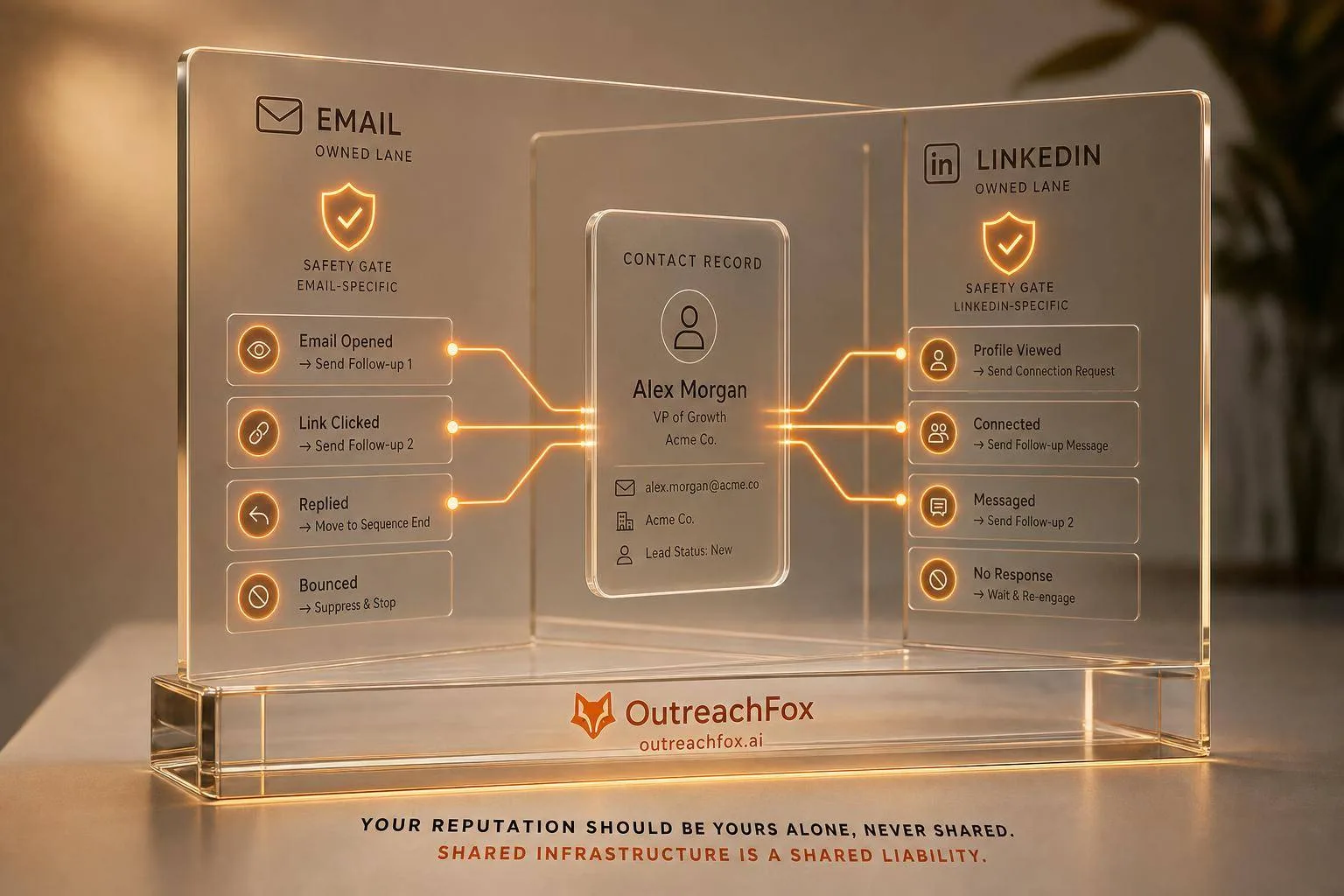
Unify email and LinkedIn outreach using one contact record, behavior-based branching, and channel-specific safety limits to drive more qualified meetings.
- Use one shared contact record with verified email, LinkedIn URL, and connection state for both channels.
- Let behavior trigger the next step: bounces, replies, profile views, and connection accepts guide routing.
- Choose LinkedIn-first when email is unverified; email-first when work email is verified and strong.
- Track email deliverability and LinkedIn account risk separately to protect each channel's health.
- Measure success by qualified meetings per 100 contacts, not individual channel metrics alone.
- Test personalization depth carefully: cleaner data and fewer variables often outperform complex sequences.
Personalization Across Email and LinkedIn: Guide 2026
If your email and LinkedIn outreach run as separate systems, you create extra noise. I’d keep one contact record, one set of rules, and one sequence that changes based on live signals like bounces, replies, profile views, and connection accepts.
Here’s the short version:
- I’d use verified work email, LinkedIn URL, and connection state on every contact
- I’d add ICP fields like industry, company size, seniority, and one trigger such as funding or company news
- I’d let behavior decide the next step, not a fixed calendar
- I’d track email health and LinkedIn account risk separately
- I’d judge success by qualified meetings per 100 contacts, not by one channel alone
A few numbers make the point. A LinkedIn note often gives you only about 200 characters to work with. And if one bad branch sends to unverified emails, your bounce rate can climb fast and hurt the rest of the sequence. That’s why I’d keep the data clean first, then keep the logic simple.
Quick comparison
| Area | ||
|---|---|---|
| Best use | More detail and context | Light warm-up and short follow-up |
| Main risk | Deliverability problems | Account warnings or limits |
| Key signals | Bounces, replies, opens | Views, accepts, replies |
| When to lead with it | When email is verified | When email is weak or missing |
| Main thing to watch | Mailbox health | Activity pattern and account trust |
What I take from this guide is simple: better data beats extra copy tricks. When both channels pull from the same record, your timing gets better, your messages stay in sync, and your reporting shows what is pulling meetings.
Build One Enrichment Layer for Both Channels
Use one shared record for each prospect so email and LinkedIn pull from the same source. That keeps your outreach in sync. No mixed signals, no drift between channels.
Once that record exists, the next job is simple: map each field to a message variable your sequence can actually use.
Core Fields Every Cross-Channel Record Needs
A cross-channel record needs two things: channel keys and trigger fields.
The channel keys are non-negotiable:
- A verified work email address, plus a verification status flag
- A LinkedIn profile URL
- A LinkedIn connection state: Connected, Pending, or Not Connected
Without those fields, you can't route the sequence correctly.
Then come the fields that shape message decisions: seniority level, employee count, industry, and at least one time-sensitive trigger. In most cases, that trigger is either a funding round - with the amount raised and the date - or a recent company news signal.
A funding round with amount and date gives you something you can act on. Without trigger fields, the record can't guide timing or copy.
| Field Category | Key Fields | How They're Used |
|---|---|---|
| Channel Keys | Work email, LinkedIn URL, connection state | Route to email vs. LinkedIn; branch logic |
| Identity | Name, title, seniority | Salutations, role-based hooks |
| Firmographics | Industry, employee count, location | ICP filtering, segmentation |
| Triggers | Funding round, amount raised, date | Timing and opening lines |
| AI Variables | Recent news excerpts, highlights | Custom first lines and follow-up context |
Use the same field set across both channels so email hooks and LinkedIn notes stay aligned. The same record should drive both what to say and where to say it.
One field that deserves more attention: a confidence tag for each data point. Most teams skip this, and that’s a mistake. If a LinkedIn URL is tagged as EXTRACTED - found directly - that’s different from INFERRED, where it was pattern-matched from a name and domain. That one tag helps you decide which records are safe to send into an automated sequence and which ones need a human review first.
How to Turn Raw Enrichment Data into Message Variables
Raw enrichment data doesn't turn into a good message by itself. It has to be mapped to clear variables your sequence builder can pull into subject lines, opening sentences, and LinkedIn invite notes.
Keep those variables short, specific, and easy to verify. If you pile on commentary, the message starts to feel made up.
A better approach is to feed the model short excerpts instead of broad research prompts. Specialized extraction tools can pull highlights - brief, relevant snippets from web content - before that data goes into a language model. That tends to improve output and keeps prompts tight.
The same rule applies to LinkedIn invites. A 200-character note with one direct reference usually works better than a bland connection request. Your enrichment layer should generate that reference on its own, instead of forcing a rep to dig for it by hand.
Where OutreachFox Fits in the Stack
OutreachFox combines enrichment and multichannel sequencing in one system, so verified fields move straight into both email and LinkedIn logic. Once the record is standardized, trigger logic can decide which channel should open first.
Plan Email and LinkedIn Sequences with Trigger Logic
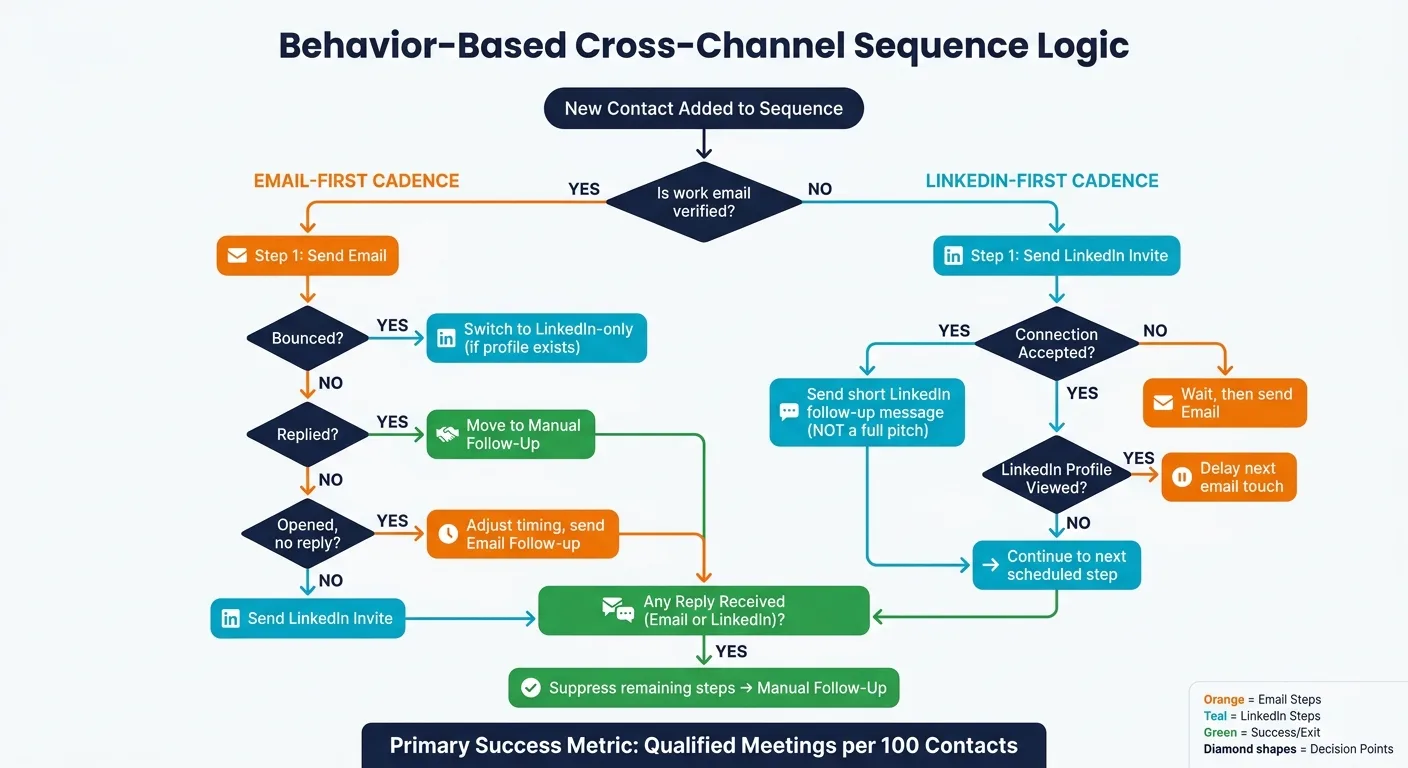
Use one sequence engine, not two separate cadences. Give each channel a clear job, and let each step respond to the last signal.
LinkedIn-First or Email-First: How to Choose Your Cadence
The best starting channel depends on verified email status, LinkedIn connection state, and recent LinkedIn activity. One pattern isn’t always better. The choice should come from your enrichment record, not habit.
| Cadence Pattern | Touch Order | Best-Fit Use Case |
|---|---|---|
| LinkedIn-First | LinkedIn invite → LinkedIn message → Email → Email follow-up | Use when email is unverified or the LinkedIn signal is stronger. |
| Email-First | Email → Email follow-up → LinkedIn invite → LinkedIn message | Use when the work email is verified and email should lead. |
Use LinkedIn-first when email is weak. Use email-first when email is verified.
Once you pick the starting channel, branch based on live signals, not a fixed calendar.
Use Behavior-Based Branches Instead of Fixed Sequences
A fixed sequence treats every prospect the same no matter what they do. A behavior-based sequence shifts in real time based on record-level events - bounce, reply, profile view, connection accepted - and routes the next step from there.
Here are the core branching rules every cross-channel sequence needs:
- Email bounces → stop email and switch to LinkedIn-only if a profile exists.
- LinkedIn profile viewed → delay the next email touch.
- LinkedIn connection accepted → send a short follow-up, not a full pitch.
- Email reply, LinkedIn reply, or InMail response → suppress the remaining steps and move to manual follow-up.
- Email opened with no reply → treat it as a weak signal only and adjust timing.
OutreachFox handles this trigger side with real-time webhooks for events like bounces, opens, replies, and mailbox-health updates, so the sequence can react right away instead of waiting for a manual sync.
This only works when both channels tell the same story.
Keep the Message Consistent Across Both Channels
Consistency means using the same problem, offer, and CTA, then shaping it to fit the channel’s length and tone.
Email gives you more room to set context: a specific trigger, a clear problem, a short proof point, and one ask. LinkedIn needs the tighter version. A LinkedIn follow-up shouldn’t paste the whole email into a shorter box. It should point back to the same core idea and move the conversation ahead.
If the email opens with a trigger, LinkedIn should mention it, not restate it, and keep the next step simple.
Keep that consistency within what each channel can safely handle.
Stay Within Deliverability Limits and LinkedIn Safety Rules
Cross-channel personalization can fall apart fast if your setup is shaky or your account trust is already slipping. If your mailbox, domain, or LinkedIn account is under pressure, even well-targeted messaging won't save the sequence.
Email Limits That Protect Sender Reputation
For email, sender reputation comes first. Use verified addresses, SPF, DKIM, DMARC, and isolated sending infrastructure. Those controls help keep your reputation tied to your own sending activity instead of a shared pool.
OutreachFox follows that setup with private, isolated infrastructure, dedicated campaign IPs, pre-warmed mailboxes, verification, and real-time health analytics.
LinkedIn breaks in a different way. The issue there isn't inbox placement. It's account trust.
LinkedIn Limits That Reduce Account Risk
Protect account health with conservative pacing, varied copy, and low-cluster activity. Watch performance closely. At the first restriction warning or account health signal, slow things down before results start to slide.
Email vs. LinkedIn Safety Constraints: A Side-by-Side View
Use different controls for each channel.
| Constraint | ||
|---|---|---|
| Main risk | Deliverability loss from poor list quality or unhealthy sending patterns | Account restriction from repetitive or automated-looking activity |
| What to watch | Bounces, complaints, mailbox health | Restriction warnings, activity patterns, response quality |
| Best safeguard | Verified addresses, authenticated domains, isolated infrastructure | Conservative pacing, varied messaging, low-cluster activity |
| When to pause | When deliverability starts to deteriorate | When activity starts to trigger restriction warnings |
Track each channel on its own: email for reputation, LinkedIn for activity trust. Once pacing settles, measure them separately so you can see which touchpoint is driving replies.
Report by Channel and Optimize What Drives Replies
Metrics That Matter for Email, LinkedIn, and the Full Sequence
Once branch logic is live, reporting decides what stays in the sequence. Track email and LinkedIn on their own, but judge the sequence as one system. Each channel gives you different signals, and lumping them together can blur what's pulling its weight.
| Metric | Full Sequence | ||
|---|---|---|---|
| Primary signal | Reply rate, bounce rate | Connection acceptance rate, LinkedIn message reply rate | Meetings booked per 100 contacts |
| Health indicator | Mailbox health, deliverability | Account safety, activity patterns | Sequence completion rate |
| Optimization lever | Subject line, send timing, list quality | Connection message, follow-up pacing | Branch logic, channel order |
Email and LinkedIn reply rates don't line up cleanly, so use them to diagnose each channel on its own terms. The main sequence metric is qualified meetings per 100 contacts.
Live per-channel reporting helps you spot drops early, before they skew the whole sequence. Then you can decide what to do next: tighten the copy, change the channel order, or remove a weak branch.
How to Test Personalization Depth Without Breaking Performance
When reply rates slip, test fewer variables first. More personalization sounds good on paper, but it also adds more ways for things to go wrong.
A cleaner approach is to use your existing confidence tags to compare clean data with inferred data, then compare results by segment. Run a basic version against a trigger-based version across the same target audience. Measure reply rate and meetings booked, and check mailbox health and LinkedIn account safety at the same time. More replies don't matter if deliverability drops or the account starts to look risky. The goal is durable performance, not a short spike.
That turns reporting into the input for the next pass, not something you look at after the fact.
Conclusion: The 2026 Playbook for Clean Multichannel Personalization
The rule is simple: cleaner enrichment beats more variables, and behavior-based branching beats fixed schedules. Channel-level metrics show which touchpoint earns more volume. Per-channel reporting shapes the next pass, and qualified meetings per 100 contacts tell you whether the sequence is doing its job.
Frequently asked questions
How does a behavior-based sequence differ from a fixed sequence in this cross-channel approach?+
A behavior-based sequence adjusts in real time based on specific contact actions like email bounces, LinkedIn profile views, connection accepts, or replies. It routes the next step according to these signals rather than following a predetermined calendar. For example, if an email bounces, the sequence automatically stops email outreach and switches to LinkedIn-only if a profile exists.
What are the three non-negotiable channel keys needed in every cross-channel contact record?+
Every contact record must include a verified work email address with verification status, a LinkedIn profile URL, and a LinkedIn connection state (Connected, Pending, or Not Connected). Without these fields, you cannot route the sequence correctly between email and LinkedIn channels.
When should you use a LinkedIn-first cadence instead of an email-first cadence?+
Use a LinkedIn-first cadence when the email address is unverified or when the LinkedIn signal is stronger than available email data. The typical flow is LinkedIn invite → LinkedIn message → Email → Email follow-up. Email-first works better when you have a verified work email and email should lead the conversation.
What is the main performance metric for judging the full sequence success according to this guide?+
The main sequence metric is qualified meetings booked per 100 contacts. While email reply rates and LinkedIn connection acceptance rates help diagnose individual channel performance, the full sequence should be judged by how many qualified meetings it generates per hundred contacts reached.
Why does the article recommend using confidence tags on enrichment data points?+
Confidence tags distinguish between data extracted directly (marked EXTRACTED) versus data that was pattern-matched or inferred (marked INFERRED). This helps you decide which records are safe to send into automated sequences and which ones need human review first, preventing deliverability issues from low-quality data.
What are the different main risks between email and LinkedIn outreach channels?+
Email's main risk is deliverability loss from poor list quality or unhealthy sending patterns, tracked through bounces and mailbox health. LinkedIn's main risk is account restriction from repetitive or automated-looking activity, monitored through restriction warnings and activity patterns. Each requires different safeguards and monitoring approaches.
What should happen to the sequence when a LinkedIn connection is accepted?+
When a LinkedIn connection is accepted, the sequence should send a short follow-up message rather than a full pitch. This represents a behavior-based branch that adjusts the next step based on the prospect's action, keeping the conversation appropriately scaled to the level of engagement shown.