
Only Instantly publicly documents Google Postmaster Tools integration among major outreach platforms. Others show internal deliverability scores, not direct Gmail reputation data.
- Instantly is the only platform that publicly confirms Google Postmaster Tools integration
- Google Postmaster data is domain-level only and delayed 24–48 hours
- Platforms require roughly 100–200 Gmail sends per day to show Postmaster data
- Most outreach tools show internal health scores, not direct Google reputation data
- Always verify whether a dashboard shows Google data or vendor-built deliverability metrics
- Use Postmaster for long-term trends and vendor telemetry for mailbox-level decisions
Google Postmaster Reporting in Outreach Platforms
Most outreach platforms do not clearly show Google Postmaster Tools data. In this comparison, Instantly is the only platform in the list that publicly says it pulls in Google Postmaster data. The other five - OutreachFox, Lemlist, Smartlead, Outreach.io, and Salesloft - do not clearly document that support in public materials.
If I were checking these tools, I’d focus on four things right away:
- Data source: Is it Google Postmaster Tools or a platform score?
- Scope: Is it Gmail / Google Workspace only?
- Delay: Is the data delayed by about 24–48 hours?
- Missing data: Does the tool say when Gmail volume is too low to show anything?
That matters because Google Postmaster data has limits. It is usually domain-level, not mailbox-level. It may not appear until a domain sends roughly 100–200 Gmail emails per day. And if a dashboard hides those limits, you can mistake a vendor health score for Google data.
How to Use Google Postmaster Tools to Improve Email Deliverability
Quick Comparison
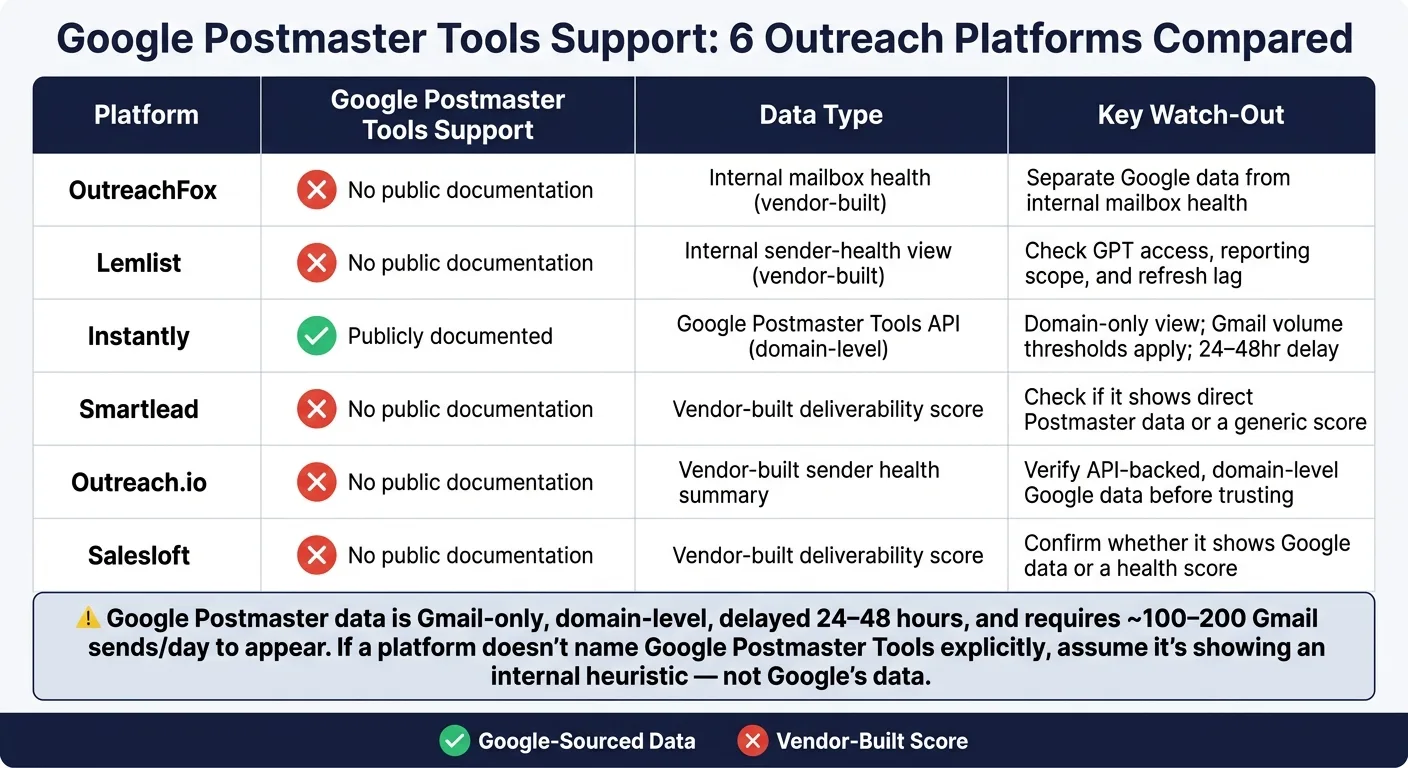
| Platform | Publicly documented Google Postmaster support | What the article says to watch for |
|---|---|---|
| OutreachFox | No clear public proof | Separate Google data from internal mailbox health |
| Lemlist | No clear public proof | Check GPT access, reporting scope, and lag |
| Instantly | Yes | Domain-only view, Gmail thresholds, reporting delay |
| Smartlead | No clear public proof | Check if it shows direct Postmaster data or a score |
| Outreach.io | No clear public proof | Verify API-backed, domain-level Google data |
| Salesloft | No clear public proof | Confirm whether it shows Google data or a health score |
Bottom line: if a platform does not clearly name Google Postmaster Tools, the safer read is that you’re looking at an internal deliverability view, not Google’s own reporting.
I’d use this article as a simple filter: trust named Google data for domain trend checks, and use vendor telemetry for mailbox-level send decisions.
1. OutreachFox
Given that context, OutreachFox is only useful here if its dashboard clearly separates Google Postmaster signals from internal mailbox health.
Its API-first architecture, dedicated campaign IPs, and real-time per-mailbox analytics make it a solid test case. But the main issue is simple: do those infrastructure-level metrics show Google Postmaster data natively, or do buyers only get internal send-health reporting?
There’s no public detail showing how OutreachFox handles Google Postmaster reporting directly. That’s the exact gap buyers need to check before they rely on its dashboard for Gmail reputation decisions.
That line matters. It decides whether the dashboard helps teams respond to Gmail reputation issues, or just keeps an eye on sending infrastructure.
2. Lemlist

Lemlist runs into the same issue as every tool in this group: does it show Gmail reputation, or does it only show its own sending health data?
Lemlist does not publicly spell out Google Postmaster integration or how much detail its dashboard shows. So without that documentation, it's safer to treat its deliverability reporting as unverified for Gmail reputation.
Before you rely on the dashboard as your source of truth, check a few things:
- GPT access
- Reporting scope
- Refresh lag
That gap matters even more when you look at the next platforms, where reporting depth is what starts to separate one tool from another.
3. Instantly
Instantly is one of the few platforms here that explicitly says it connects to Google Postmaster Tools. It plugs into Google Postmaster Tools through the API and shows that data inside its Domains dashboard.
That said, the view still comes with the same limits as GPT: domain-level scope, Gmail-volume thresholds, and a reporting delay. So this dashboard is handy for tracking trends over time, but it won't help much if you're trying to troubleshoot a single mailbox.
The main thing to look at is how much of the GPT data Instantly shows directly, and how much it rolls up into one health view.
4. Smartlead

Unlike Instantly, Smartlead does not publicly document GPT support.
And that matters here. Smartlead’s public docs also do not verify Google Postmaster integration, dashboard fields, or refresh lag. So if you see a Gmail reputation view inside the platform, treat it as unverified until it shows API-backed, domain-level reporting.
The key thing to check is simple:
- Does the dashboard show Postmaster data directly?
- Or does it fold that data into a generic deliverability score?
That keeps the comparison focused on the same issue: is the platform showing Google’s data, or just repackaging deliverability health?
5. Outreach.io

Outreach.io does not publicly document support for Google Postmaster Tools, the fields shown in its dashboard, or how often that data refreshes.
So take any Gmail reputation view with a grain of salt until it clearly shows API-backed, domain-level Postmaster data.
If the dashboard only shows general sender health, that’s not a Postmaster report.
The same check applies to Salesloft: does it show Google’s own data, or does it only give you a send health summary?
6. Salesloft

Salesloft brings up the same basic question: does the dashboard show data from Google, or just a sender-health summary?
Right now, Salesloft does not publicly spell out support for Google Postmaster Tools, the fields shown in its dashboard, or how often that data refreshes. So if you see a Gmail reputation view inside Salesloft, treat it as unverified unless the platform clearly shows API-backed, domain-level Postmaster data.
That line matters more than anything else here. If the dashboard only shows a generic deliverability score, then it is not a Postmaster report.
What Each Platform's Deliverability Dashboard Actually Shows
The only question that matters is simple: does the dashboard show Google Postmaster Tools data, or just a vendor-built deliverability score?
Across these six tools, reporting usually falls into two camps: Google-sourced data or internal health scores.
| Signal | What to ask | Red flag |
|---|---|---|
| Data source | Does it explicitly say Google Postmaster Tools, or just an internal score? | A score with no named source |
| Scope | Does it clearly state that Postmaster covers Gmail and Google Workspace only? | Claims that imply visibility across Outlook, Yahoo, or iCloud |
| Volume threshold | Does it warn that low-volume domains may not have enough data yet? | Always showing reputation data even when volume is low |
| Missing data | Does it disclose when data is unavailable instead of smoothing over the gap? | No indication that data can be missing |
That split matters because GPT is Gmail-only, delayed, and often missing below volume thresholds - roughly 100–200 Gmail sends per day.
So if a deliverability dashboard doesn’t clearly name Google Postmaster Tools and spell out its Gmail-only limits, take that view for what it is: an internal heuristic, not direct Google data.
Those limits shape the tradeoffs in the tools covered next.
Pros and Cons by Platform
Use this table to separate documented Google Postmaster reporting from dashboards that only summarize deliverability.
The table below splits platforms into two buckets: tools with publicly documented Google Postmaster reporting, and tools that only show their own internal deliverability views.
| Platform | Pros | Cons |
|---|---|---|
| OutreachFox | API-first architecture with real-time per-mailbox analytics | No public GPT details are documented. |
| Lemlist | Shows an internal sender-health view | No public GPT details are documented. |
| Instantly | Surfaces Google Postmaster data directly in the dashboard | Domain-level scope only; subject to Gmail volume thresholds and reporting delay |
| Smartlead | Uses a vendor-built deliverability score | No public GPT details are documented. |
| Outreach.io | Uses a vendor-built deliverability score | No public GPT details are documented. |
| Salesloft | Uses a vendor-built deliverability score | No public GPT details are documented. |
This split matters because a deliverability dashboard is not always the same thing as Google Postmaster Tools reporting.
Some platforms show health scores, inbox placement signals, or sender views built by the vendor. That can still be useful. But if you're trying to confirm documented GPT access, the public record is much thinner.
For example, Instantly says it pulls in Google Postmaster data. The tradeoff is that the view stays at the domain level, and the data still depends on Gmail's volume thresholds and reporting lag. The other platforms listed here may offer helpful internal scoring, but based on public documentation, they don't spell out GPT details.
Conclusion
Across these six platforms, the main split comes down to documented Google Postmaster access versus vendor-built deliverability scoring.
Google Postmaster gives you a real signal, but it's a narrow one. It works at the domain level, shows data with a 24–48 hour delay, and depends on having enough Gmail volume. So don't treat it like a same-day sending diagnostic. It's better used as a trend monitor for what’s happening over time.
That’s why the better question isn’t whether a dashboard looks helpful. It’s whether the dashboard is showing Google’s data or a vendor heuristic.
Use Postmaster as one layer in a broader monitoring stack when you want to track long-term domain reputation trends. Then use vendor telemetry for mailbox-level bounce, reply, and health data when you're making sending decisions.
Before you trust any dashboard, check the data source, scope, delay, and missing-data behavior. One layer by itself won’t give you the full picture.
Frequently asked questions
Which outreach platform in this comparison actually documents Google Postmaster Tools integration?+
Instantly is the only platform in the comparison that publicly documents pulling in Google Postmaster Tools data directly into its dashboard. The other five platforms—OutreachFox, Lemlist, Smartlead, Outreach.io, and Salesloft—do not clearly document this support in their public materials.
Why does Google Postmaster data often not appear for low-volume senders?+
Google Postmaster Tools data is domain-level and typically requires roughly 100–200 Gmail emails sent per day before any reputation data appears. Below that volume threshold, Gmail simply doesn't generate enough signal to populate Postmaster reports, leaving dashboards with missing data.
What is the typical reporting delay for Google Postmaster Tools data shown in outreach platforms?+
Google Postmaster Tools data is usually delayed by 24–48 hours. This makes it useful for tracking domain reputation trends over time, but not suitable for same-day troubleshooting or real-time sending decisions at the mailbox level.
Does Google Postmaster Tools show reputation data for all email providers or just Gmail?+
Google Postmaster Tools covers Gmail and Google Workspace only. If a platform claims to show reputation across Outlook, Yahoo, or iCloud using Postmaster data, that's a red flag—those providers are not included in GPT reporting.
What should you check before trusting a deliverability dashboard in an outreach platform?+
Verify four things: whether the data source is actually Google Postmaster Tools or a vendor score, whether the scope is Gmail-only, whether there's a 24–48 hour delay, and whether the platform discloses when data is missing due to low volume. Without these details, you may be looking at internal health metrics rather than Google's own data.
Why is Google Postmaster data described as domain-level rather than mailbox-level?+
Google Postmaster Tools aggregates reputation signals at the sending domain level, not for individual mailboxes. This means it's useful for monitoring overall domain trends but won't help troubleshoot issues with a specific sender address or mailbox configuration.
How should teams use Google Postmaster data alongside vendor deliverability metrics?+
Use Google Postmaster data as a trend monitor for long-term domain reputation with Gmail, given its delay and domain-level scope. Then rely on vendor telemetry for mailbox-level metrics like bounces, replies, and real-time send health when making day-to-day sending decisions.