
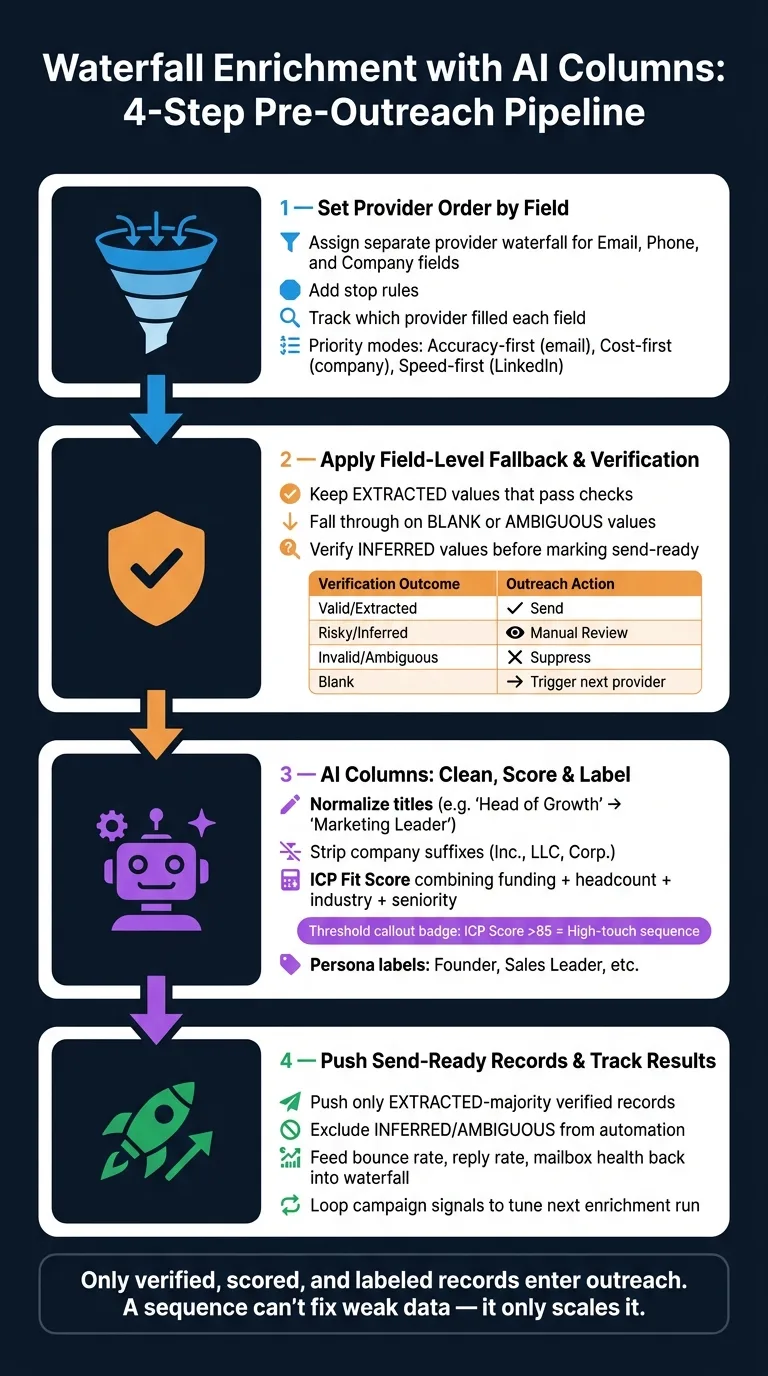
Waterfall enrichment pulls data from multiple providers field-by-field, verifies emails and phones, then uses AI columns to normalize, score, and filter records before they enter outreach sequences.
- Set separate provider waterfalls for email, phone, and company fields to optimize accuracy and cost
- Verify emails and phones after enrichment and suppress invalid or ambiguous contact data
- Use AI columns to normalize titles and company names, then score ICP fit before routing
- Push only verified, high-confidence records into sequences to reduce bounce rates
- Feed campaign metrics back into enrichment logic to refine provider order and scoring thresholds
- Waterfall enrichment creates a pre-outreach filter system that protects deliverability and reply rates
Waterfall Enrichment with AI Columns
Most bounce problems start before outreach. If I want cleaner sends, I need a pre-send data flow that fills missing fields, checks each field one by one, verifies email and phone, then uses AI columns to clean and sort records before they enter a sequence.
Here’s the short version:
- I use waterfall enrichment to pull data from multiple providers in order
- I let providers fall back by field, not by full record
- I verify emails and phones before anything gets sent
- I use AI columns to normalize titles, company names, and size bands
- I score ICP fit and tag persona
- I send only records that are mostly verified and safe to use
- I use bounce rate, reply rate, and mailbox health to tune the next pass
In plain English: good outreach starts with data control. If one provider gives me a LinkedIn URL but misses a direct email, I keep the good field and ask the next provider for the missing one. Then I clean the data, block weak records, and route the best ones into the right campaign.
A few numbers stand out here: the article points to 50+ providers, field-level source tracking, and score cutoffs like ICP fit above 85 for higher-touch outreach. That tells me this is not just list building. It’s a filter system for deciding who should get contacted, how, and when.
I’d sum up the process like this:
- Set provider order by field
- Apply fallback, confidence rules, and verification
- Use AI columns to clean, score, and label
- Push only send-ready records to outreach
- Feed campaign results back into the next enrichment run
Bottom line: I’m not building a contact list. I’m building a pre-outreach screening system that cuts bad data, lowers bounce risk, and gives sales teams a cleaner set of records to work from.
Clay 101 | Lesson 6: Enrich People Using Waterfalls
Step 1: Set Provider Order by Field
Set a different provider order for email, phone, and company fields. This gives each field its own stopping point based on the level of quality you need.
Assign a Separate Waterfall for Email, Phone, and Company Fields
Begin with the identifiers your enrichment stack can use with confidence for lookups: full name, company name, domain, and LinkedIn URL. From there, assign a separate provider sequence for each field instead of pushing every field through the same stack.
That matters because not all fields carry the same value or risk. Use accuracy-first for email, cost-first for company fields, and speed-first for LinkedIn profile lookups.
Put simply: match provider priority to the value of the field and the cost of getting it wrong.
Add Stop Rules and Track Which Provider Filled Each Field
After the provider order is in place, define what counts as a pass for each field. For work email, stop at the first verified extracted address. For lower-stakes fields, stop at the first usable value.
Also store the provider and confidence score for every filled field. That source tracking makes later scoring much cleaner.
OutreachFox tracks field-level sources automatically.
Use these defaults, then tighten them by campaign:
- Accuracy-first: verified email lookups
- Cost-first: company fields and broad segmentation
- Speed-first: real-time LinkedIn profile lookups
Step 2: Apply Field-Level Fallback and Verification Checks
Once you've set provider order and source tracking, the next step is simple in theory but easy to get wrong in practice: decide when to keep a field, when to move to the next provider, and when to suppress the field altogether.
At this stage, field-level confidence does most of the work. Instead of treating every returned value the same, use confidence tags to decide whether each field should stay, get replaced, or be held back.
Here’s the rule set: keep EXTRACTED values that pass required checks, fall through on blank or AMBIGUOUS values, and verify INFERRED values before marking them send-ready. If providers disagree, resolve the conflict by confidence first, then provider priority.
Handle Blanks, Low Confidence, and Conflicting Values
This is where a lot of messy enrichment pipelines either stay clean or start drifting. A provider may return something, but that doesn’t mean the value belongs in your sequence.
Think of it this way: a blank value tells you nothing, an AMBIGUOUS value tells you not to trust it yet, and an INFERRED value sits in the middle. It might be right, but it needs another check before you treat it as ready to use.
When two providers return different values for the same field, don't let the last write win by accident. Use confidence as the first tie-breaker. If confidence is the same, use provider priority.
Verify Emails and Phones After Enrichment
Email and phone verification should happen before anything enters sequence. That keeps risky data from slipping through and saves your team from wasting touches on bad contact info.
Route risky or unclear values to manual review. Suppress invalid values. If a field comes back blank, trigger the next provider in the waterfall. Only verified contacts should move into the sequence.
Use the same outcome logic for both email and phone so the rules stay consistent:
| Verification Outcome | Outreach Action |
|---|---|
| Valid, extracted | Send |
| Risky, inferred | Route to manual review |
| Invalid, ambiguous | Suppress |
| Blank | Trigger next provider in waterfall |
Set Overwrite Rules to Protect Good Data
Your enrichment table should remain the source of truth. The safest default is fill-blanks-only: secondary providers can fill empty fields, but they should never replace fields that already contain data.
That matters even more when a person has stepped in and fixed something by hand. Mark manually edited fields as do-not-overwrite so later enrichment runs don't wipe them out.
It also helps to store last_enriched_at at the field level. Then you can re-enrich only when data has gone stale, instead of running the same checks again and again for no good reason. That protects manual edits and cuts down on unnecessary re-enrichment.
Step 3: Use AI Columns to Clean, Score, and Label Records
Once your enrichment table has verified emails and phone numbers, AI columns clean up titles, company names, and size bands before routing. The order matters: normalize first, then score, then map the output to outreach.
Normalize Titles, Companies, and Segments
Normalization columns turn messy provider data into fields you can route on.
A contact might come in as "Head of Growth", "VP Demand Gen", or "Growth Marketing Lead." You want all of those to roll up into one category, like Marketing Leader, so your segmentation rules fire the same way every time.
Do the same with company names. Strip legal suffixes like "Inc.", "LLC", and "Corp." before those names show up in a personalized opener. No one wants outreach that feels pasted together.
Employee counts and industry tags need the same treatment. Normalize them into standard bands your segmentation rules can use. Mid-market sequences should trigger on bands, not messy raw strings from providers.
Return JSON so the normalized values map straight into CRM fields.
Build ICP Fit Scores and Persona Labels
After values are standardized, scoring gets much cleaner. You're comparing like with like instead of mixing inconsistent inputs.
An ICP fit score should combine funding, employee count, industry, and seniority. Score on those four inputs, then use the result to control who moves forward. High-fit records go into higher-touch sequences. Low-fit records stay out.
Persona labels add another layer. A label like Founder or Sales Leader shapes the opener and the sequence angle. It doesn't just answer whether you should reach out. It helps decide how you should do it.
Map AI Outputs to Campaign Decisions
Scores and labels only help if they connect straight to outreach actions. The cleanest way to do that is with a rule map that turns AI output into sequence, channel, and suppression choices.
| AI Output | Threshold / Label | Outreach Action |
|---|---|---|
| ICP Fit Score | >85 | High-touch LinkedIn + email sequence |
| Firmographic Data | Series B+; 100–500 employees | Mid-market growth sequence |
| Persona Label | Founder, Sales Leader | "Founder-to-Founder" or sales leadership personalization |
| Scored field confidence | INFERRED or AMBIGUOUS | Hold out of automation |
Do not score uncertain data. Use the rule map to assign sequences and suppress weak records. Only records that pass these rules should move to sequence assignment.
Step 4: Push the Final Table to Outreach and Track Results
Sync Only Send-Ready Records into Email and LinkedIn Sequences
Only send records to outreach after they pass verification and scoring.
That means pushing only records with verified contact data and fields that are mostly marked EXTRACTED. If a record includes too much INFERRED or AMBIGUOUS data, keep it out of automation for now. Review it first or run it through enrichment again.
This part matters more than it may seem. A sequence can’t fix weak data. It only scales it.
Use Campaign Results to Refine the Waterfall
Once records are live, campaign metrics become your next data check.
Bounce rates, reply rates, and mailbox health issues can show you where the waterfall or scoring started to slip. If a batch looks fine on paper but performs poorly in-market, that’s a sign something broke earlier in the process.
Feed those signals back into your enrichment table. For example:
- If one provider does better for a certain field, move that provider higher for that field.
- If an AI column is letting weak records pass, tighten its confidence threshold.
- If campaign data shows a pattern, use it to tune the next enrichment run.
OutreachFox fits this setup because enrichment, verification, AI columns, and campaign analytics sit in one API-first system. That makes it easier to loop campaign signals back into the next enrichment pass.
Conclusion: Build a Pre-Outreach Data System, Not Just a Contact List
Waterfall enrichment, verification, AI columns, and routing should work together as one pre-outreach pipeline.
The goal isn’t just to build a contact list. It’s to build a pipeline that filters out weak records before outreach starts. Cleaner data leads to better deliverability, better reply rates, and better pipeline quality.
Frequently asked questions
What does field-level fallback mean in waterfall enrichment?+
Field-level fallback means each data field (email, phone, company) uses its own provider sequence instead of sending the entire record through the same stack. If one provider returns a LinkedIn URL but misses the email, you keep the good field and ask the next provider only for the missing email field.
How should I handle INFERRED vs EXTRACTED values during enrichment?+
EXTRACTED values that pass verification checks can be used immediately for outreach. INFERRED values should be verified before being marked send-ready, and AMBIGUOUS values should trigger fallback to the next provider or be routed to manual review. Only verified, mostly EXTRACTED records should enter automation sequences.
Why normalize data before scoring ICP fit?+
Normalization ensures you're comparing consistent values when scoring. Without it, 'Head of Growth' and 'VP Demand Gen' would be treated as different inputs instead of both mapping to 'Marketing Leader,' making your segmentation rules fire inconsistently and lowering scoring accuracy.
What is the fill-blanks-only rule and why does it matter?+
Fill-blanks-only means secondary enrichment providers can only populate empty fields, never overwrite existing data. This protects manually edited fields and prevents later enrichment runs from replacing good data with lower-quality or conflicting information from different providers.
How do campaign results improve future enrichment runs?+
Bounce rates, reply rates, and mailbox health metrics reveal where enrichment quality broke down. If a provider consistently delivers poor results for a field, you move it lower in the waterfall. If AI columns let weak records pass, you tighten confidence thresholds based on actual outreach performance.
What determines whether a record should enter a high-touch sequence?+
Records with ICP fit scores above 85, verified contact data, and mostly EXTRACTED fields qualify for high-touch sequences. The scoring combines firmographic data like funding and employee count with persona labels like Founder or Sales Leader to route records into the appropriate campaign angle.
Why track which provider filled each field during enrichment?+
Field-level source tracking lets you identify which providers consistently deliver accurate data for specific fields. This makes later scoring cleaner, helps resolve conflicts between providers using confidence and priority rules, and allows you to optimize provider order based on actual performance.