
Real-time verification uses DNS, MX, and SMTP checks to catch dead inboxes before they bounce, protecting sender reputation. Verify at enrichment and again before enrollment to keep bounce rates under 2%.
- Hard bounces hurt sender reputation; keep bounce rates well under 2%
- DNS checks confirm domain validity, MX checks verify mail routes exist
- SMTP handshakes reveal whether individual mailboxes still function or are disabled
- Verify twice: once during enrichment and again immediately before campaign enrollment
- Job changes, stale CRM data, and expired domains create dead inboxes
- Inference from enrichment tools is not verification; always check live mail signals
How Real-Time Verification Finds Dead Inboxes
A dead inbox can hurt deliverability before your campaign even starts. I’d treat verification as a last-minute gate: check the domain, check the mail setup, check the mailbox, then decide whether to send, suppress, or review.
Here’s the short version:
- Dead inboxes lead to hard bounces
- Risky inboxes are unclear and need a second look
- Old CRM records, CSVs, job changes, and expired domains are common failure points
- DNS and MX checks show whether a domain can take mail
- SMTP checks help show whether the mailbox still exists
- A 550 SMTP reply often points to a dead or disabled mailbox
- One-time cleaning is not enough because email data goes stale fast
- I’d verify when the email is found and again before enrollment
A few hard bounces may not look like much. But bounce rate is one of the clearest list-health signals mailbox providers can see. Industry guidance often points to keeping hard bounces well under 2%, and many teams aim for under 1% to stay on the safe side.
| Check | What it tells me | What I’d do |
|---|---|---|
| DNS | Whether the domain is live | Stop if the domain fails |
| MX | Whether the domain has a mail route | Suppress if no valid MX exists |
| SMTP | Whether the mailbox appears to exist | Send, suppress, or review based on the reply |
Bottom line: inference is not verification. If an address was pulled from enrichment but never checked against live mail signals, I wouldn’t trust it at send time.
The article below breaks down where dead inboxes come from, how these checks work, and where I’d place them in an outbound flow.
Decrease Your Email Bounce Rate to Under 3% (5 Proven Tips)
How Dead Inboxes Get Into Prospect Lists
Dead inboxes usually slip into lists long before launch day. It happens during collection, storage, and enrichment.
Stale Records from CRMs, CSVs, and Old Exports
A lot of outbound teams reuse old exports, CSVs, and CRM segments without checking the addresses again. On paper, the record still looks fine. In practice, it may be way off.
Stored data drifts over time. People leave roles, switch companies, or stop using the address that was once correct. The older the list, the more that decay starts to pile up.
Job Changes and Company Migrations
Work email addresses are tied directly to a person’s job. So when layoffs, mergers, restructures, or rebrands hit, large groups of contacts can go bad all at once.
The contact may have been accurate when it was first added. That doesn’t mean it’s still accurate now. And at scale, these changes can wipe out whole sets of addresses. In some cases, entire domains go dark.
Disabled Domains and Unverified Enrichment Waterfalls
If a company shuts down or lets its domain expire, every email tied to that domain becomes unreachable. These are exactly the kinds of invalid addresses that verification should catch before a campaign goes live.
There’s also a quieter issue: unverified enrichment waterfalls. Many enrichment tools infer email addresses but never check whether the mailbox still exists. That’s a big gap.
The rule for outbound enrichment is simple: inference is not verification. Pulling an address from a provider is not the same as confirming that it still works. You need to verify the address at the moment it’s inferred, before it ever lands in the CRM.
How Real-Time Verification Detects Dead Inboxes
Once bad addresses get into your list, real-time verification checks them against live systems before they bounce. In practice, two checks handle most of this work: domain-level DNS checks and mailbox-level SMTP handshakes.
DNS and MX Checks: Confirming the Domain Can Receive Mail
Start with the domain. DNS shows whether the domain is still live, and an MX record check shows whether it has a mail server set up to receive email. If the domain is inactive or there’s no valid MX route, suppress it before you send.
SMTP Responses: Confirming the Mailbox Still Exists
A live domain doesn’t mean the mailbox is still there. People switch jobs, leave a company, or lose account access while the domain keeps working like normal.
That’s why the verifier opens an SMTP handshake and reads the server response. A 550 response usually means the mailbox no longer exists or has been disabled.
Why Timing Matters More Than One-Time List Cleaning
Verification is a point-in-time check. It tells you what looks valid right now, not what will still be valid next week.
So it makes sense to run it again during enrichment and then once more before campaign enrollment. Platforms like OutreachFox can run verification inside the enrichment waterfall, before stale addresses make their way into the CRM.
Where to Place Verification in Your Outbound Workflow
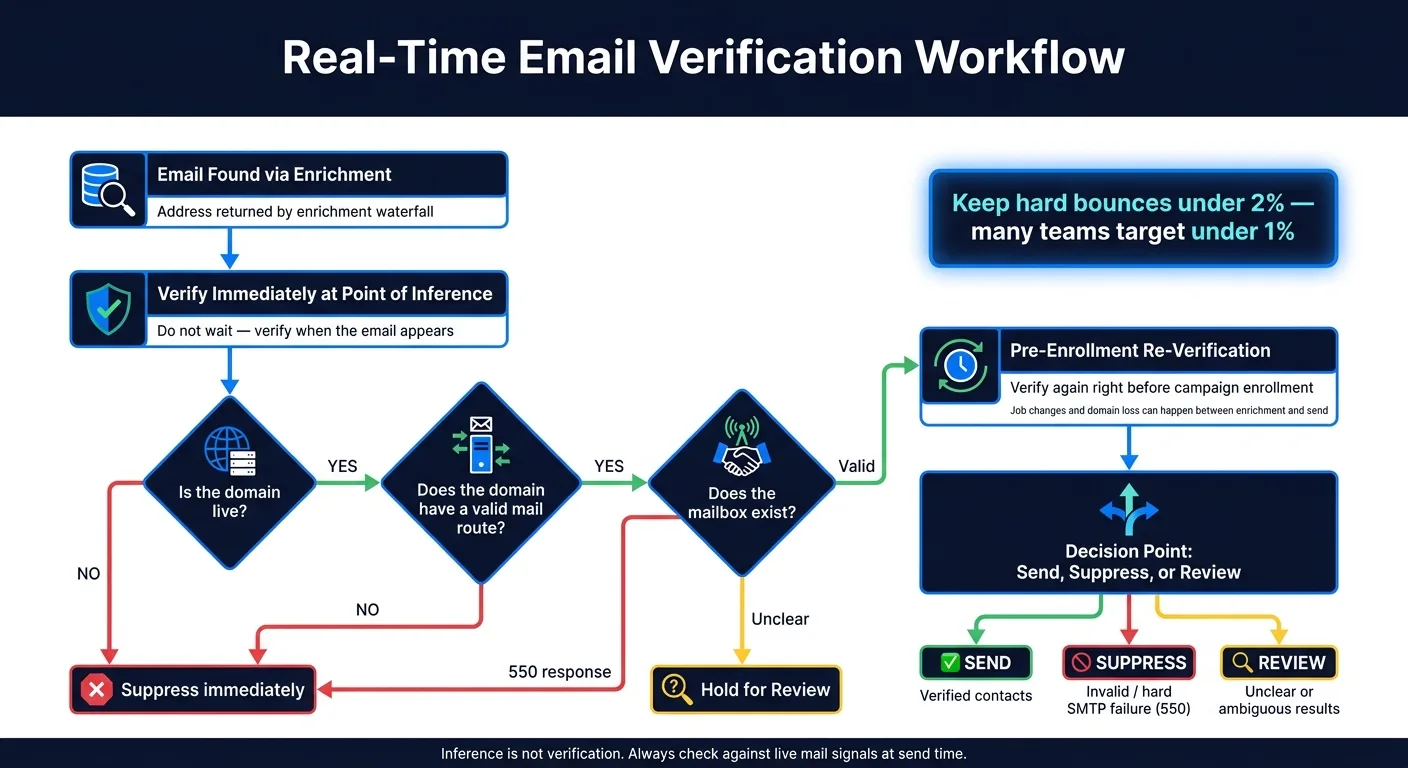
Verify During Enrichment Waterfalls and Before Campaign Enrollment
Verification should live inside your workflow, not in a one-time cleanup pass.
The best move is to verify twice: first when enrichment returns a candidate email, and then again right before enrollment.
Why both? Because any gap between enrichment and send time creates room for job changes and domain loss. An address that looked fine earlier can go bad by the time your campaign sends. So the rule is simple: verify when the email appears, and verify again before it goes out.
How to Act on Verification Results: Send, Suppress, or Review
Use verification as a decision point, not just a cleanup step.
Here’s the practical way to handle results:
- Send verified contacts
- Suppress invalid ones
- Hold unclear results for review
If you get a hard SMTP failure, move the contact to suppression right away. No second-guessing. That kind of result is a stop sign.
How Platforms Can Automate This Step
Automation helps close the gap between enrichment and enrollment.
OutreachFox verifies inside the enrichment-to-enrollment flow, so dead inboxes are filtered before send. That gives you a clean handoff from verification to enrollment.
Conclusion: Verify at the Point of Use
Dead inboxes creep into lists for pretty plain reasons: stale CRM records, job changes, disabled domains, and old enrichment data. When that happens, the problems show up in DNS, MX, and SMTP checks.
But DNS, MX, and SMTP only help if you run them at send time. Verification isn't just a cleanup step before import. It's a point-of-use check. An address might pass today and fail tomorrow.
That means timing is the main control point. Verify at the point of use during enrichment waterfalls, and then check again before enrollment.
OutreachFox builds this into the enrichment-to-enrollment flow.
Frequently asked questions
Why does the article recommend verifying email addresses twice instead of just once?+
The article explains that verification is a point-in-time check, and email addresses can become invalid between enrichment and campaign send time due to job changes or domain losses. Verifying once during enrichment and again before enrollment catches addresses that went bad during that gap.
What does a 550 SMTP response code indicate during email verification?+
A 550 SMTP response typically means the mailbox no longer exists or has been disabled. The article describes this as a hard failure signal that should trigger immediate suppression of that contact from your campaign.
How do job changes and company mergers create dead inbox problems at scale?+
Work email addresses are directly tied to a person's job, so layoffs, mergers, restructures, or rebrands can invalidate large groups of contacts simultaneously. In some cases, entire domains go dark when companies shut down or undergo major transitions.
What is the difference between DNS and MX checks in email verification?+
DNS checks show whether the domain itself is still live and active. MX record checks specifically confirm whether the domain has a mail server configured to receive email, showing if there's a valid mail route for that domain.
Why does the article say 'inference is not verification' regarding enrichment tools?+
Many enrichment tools construct or infer email addresses based on patterns but never actually check whether those mailboxes exist. This creates a gap where addresses may look structurally correct but are actually invalid or inactive.
What bounce rate threshold does the article mention for maintaining good sender reputation?+
The article states that industry guidance points to keeping hard bounces well under 2%, with many teams aiming for under 1% to stay on the safe side. Bounce rate is one of the clearest list-health signals that mailbox providers monitor.
What three actions does the article recommend taking based on verification results?+
The article recommends sending to verified contacts, suppressing invalid ones immediately, and holding unclear results for manual review. Hard SMTP failures should trigger immediate suppression without second-guessing.