
Stop sending immediately when IP reputation drops. Clean your list, fix technical issues, restart at 20-30% volume with engaged contacts only, and switch IPs only if metrics don't improve.
- Pause all sending immediately and wait 48-72 hours for severe damage
- Remove hard bounces, complainers, unsubscribes, and unverified contacts before resuming
- Check SPF, DKIM, DMARC, PTR, and server configuration for root causes
- Restart at 20-30% volume with engaged segments and ramp weekly
- Keep bounce rate below 1.0% and complaint rate below 0.1% throughout recovery
- Switch to a new IP only if inbox placement stays poor after cleanup
How to Fix Dedicated IP Reputation After Damage
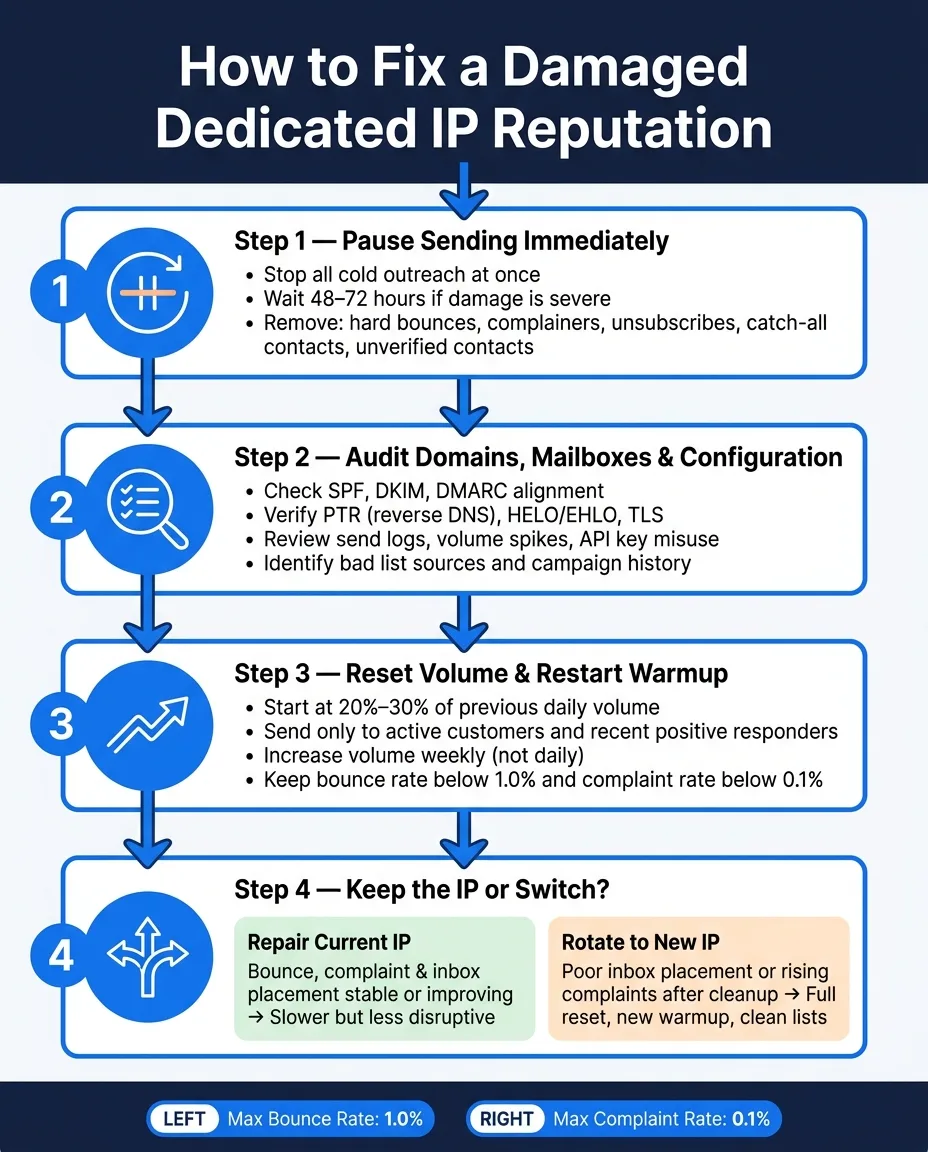
If your dedicated IP is damaged, stop sending first. Then clean your list, check setup issues, restart at 20%–30% of past volume, and switch IPs only if metrics stay bad after the reset.
Here’s the short version:
- Pause sending at once, especially cold outreach
- Wait 48–72 hours if the damage is severe
- Remove hard bounces, complainers, unsubscribes, catch-all contacts, and unverified contacts
- Check SPF, DKIM, DMARC, PTR, HELO/EHLO, TLS, send logs, and campaign history
- Restart low with your best contacts only
- Keep bounce rate below 1.0% and complaint rate below 0.1%
- Increase volume weekly, not day by day
- Move to a new IP only if inbox placement stays weak or complaints keep climbing
What I’d avoid is the common mistake: jumping to a new IP too soon. If the list is bad, the setup is off, or the sending pattern caused the damage, the next IP can fail too.
A simple rule works here: fix the cause first, then test recovery with low-volume sending. If delivery improves, keep the IP. If not, rotate and start over with a clean setup and a tighter list.
| Decision | When I’d do it | What it means |
|---|---|---|
| Repair current IP | Bounce, complaints, and inbox placement are steady or getting better | Slower path, less disruption |
| Rotate to a new IP | Inbox placement stays poor or complaints keep going up after cleanup and warmup | Full reset from low volume |
This article lays out that process in order, so you can make the call based on metrics instead of guesswork.
Mailgun Emails Going to Spam? Here’s How I Fixed Deliverability Issues
Step 1: Pause sending and cut bad traffic right away
Stop all sending on the affected IP right away. Every extra send can make the problem worse and drag out recovery. Use this pause to figure out what went wrong before you restart anything.
Set the pause window by severity
Pause all cold outreach and any other non-essential traffic at once. If the damage is severe, stop all outbound traffic on the affected dedicated IP for 48–72 hours while you investigate.
Remove hard bounces, complainers, unsubscribes, catch-all and unverified contacts
Before sending starts again, clean the list. Remove:
- hard bounces
- complainers
- unsubscribes
- all catch-all addresses
- all unverified contacts
Only resume after the list is clean.
With sending paused and the list cleaned up, audit DNS, authentication, mailbox behavior, and campaign history to find the cause.
Step 2: Audit your domains, mailboxes, and the root cause of the damage
Next, figure out why the IP took a hit. In most cases, reputation damage doesn’t live in just one place. It tends to show up across a few layers, so it helps to check them in order instead of guessing.
Check DNS, authentication, and server configuration
Start with the technical base. Make sure SPF, DKIM, and DMARC are set up the right way and aligned with your sending domain.
Then review reverse DNS (PTR), HELO/EHLO, and TLS support to confirm the server is set up properly.
If all of that looks clean, move down the chain and trace the issue through send volume, access logs, and campaign history. That’s often where the story starts to come together.
Review mailbox behavior, recent campaigns, and list sources
Now look at mailbox activity. Check for sudden spikes in volume, and see whether SMTP access or API keys were misused. Pull recent campaigns and compare bounce and complaint rates for each one.
After that, look at the lead quality behind those campaigns. The goal is simple: find which lists or segments were most likely tied to the damage. Bad data, weak targeting, or a list that should never have been mailed can drag an IP down fast.
Use isolated infrastructure and real-time health data where available
If you’re working on isolated infrastructure, real-time mailbox and IP metrics can make root-cause tracing much faster. Instead of piecing things together after the fact, you can spot trouble while it’s happening.
Once you know what caused the damage, reset volume and restart warmup as if the IP were new.
Step 3: Reset volume and restart warmup as if the IP were new
Once you've fixed the root cause, treat the IP like it's starting from scratch. That means a slow restart, close daily checks, and no rush to get back to old numbers.
Watch inbox placement, bounce rates, and complaint rates every day. The goal here is simple: rebuild trust first, then add volume back in small steps.
Start with engaged segments and lower daily volume
Don't jump back to your old sending volume. Start at 20%–30% of your previous daily volume, or even lower if the damage was bad.
Send ONLY to people most likely to engage:
- Active customers
- Recent positive responders
These are the contacts most likely to open, click, and reply. That's exactly what you want early in recovery. Once this group stays steady, you can begin to scale up.
Restart warmup and ramp on a fixed weekly schedule
Increase volume weekly, not whenever send goals start pressuring the team.
Here's the key point: base each increase on deliverability, not on targets alone. If inbox placement drops, or if bounces or complaints start to creep up, pause the ramp or cut volume back. Don't brush off those signs and hope they'll sort themselves out.
Use real-time data to decide when to slow down or stop. If performance stays steady, move to the next segment.
Recovery volume reference table
| Phase | Daily Send Range | Audience | Max Bounce Rate | Max Complaint Rate |
|---|---|---|---|---|
| Restart | 20%–30% | Active customers and recent positive responders | Below 1.0% | Below 0.1% |
| Ramp | Increase weekly | Other engaged contacts | Below 1.0% | Below 0.1% |
Keep each increase small. Don't move up until bounce and complaint rates stay within range.
Step 4: Decide whether to keep repairing the IP or move to a new one
After warmup, look at your delivery signals and make the call: keep working on the current IP or switch to a new one. The choice should come from what the numbers say now, not what you hope will happen next.
Keep the current IP if the recovery process is stable
Stick with the current IP only if bounce rate, complaint rate, and inbox placement are stable or moving in the right direction.
If those signals are holding steady or getting better, repair still makes sense. It can take more time, but it causes less disruption.
Rotate to a new dedicated IP when you need a cleaner reset
Move to a new dedicated IP only when the current one still has poor inbox placement or rising complaints after cleanup and warmup.
Before you send anything, set up authentication. Then start over the right way:
- Don’t reuse the same lists
- Don’t copy the same volume pattern
- Restart warmup from low volume
OutreachFox fits this use case because its isolated campaign IPs, automated SPF/DKIM/DMARC, and pre-warmed mailboxes make rotation a true reset.
Repair vs. rotate comparison table
Use this quick rule to make the call.
| Option | Best when | Tradeoff |
|---|---|---|
| Repair current IP | Bounce rate, complaint rate, and inbox placement are stable or improving | Slower recovery, but less disruptive |
| Rotate to a new IP | IP still shows poor inbox placement or rising complaints after fixes | Requires a full reset and warmup |
Frequently asked questions
How long should I pause sending on a damaged dedicated IP before attempting recovery?+
Pause all cold outreach and non-essential traffic immediately. For severe damage, stop all outbound traffic on the affected dedicated IP for 48–72 hours while you investigate the root cause and clean your contact list.
What types of contacts must be removed before restarting sends on a damaged IP?+
Remove hard bounces, complainers, unsubscribes, all catch-all addresses, and all unverified contacts. Only resume sending after the list is completely cleaned to avoid making the reputation damage worse.
What volume should I start with when restarting sends after IP damage?+
Start at 20–30% of your previous daily volume, or even lower if the damage was severe. Send only to your most engaged segments like active customers and recent positive responders who are most likely to open, click, and reply.
What bounce rate and complaint rate thresholds should I maintain during IP recovery?+
Keep your bounce rate below 1.0% and complaint rate below 0.1% throughout the recovery process. If these metrics start creeping up, pause the ramp or cut volume back immediately rather than hoping they'll improve on their own.
Should I increase sending volume daily or weekly during IP reputation recovery?+
Increase volume weekly, not daily. Base each increase on actual deliverability performance rather than send goals or targets. Don't move to the next volume level until bounce and complaint rates stay within acceptable ranges.
When should I switch to a new dedicated IP instead of repairing the current one?+
Move to a new dedicated IP only when inbox placement stays poor or complaints keep rising after you've completed cleanup and warmup on the current IP. If metrics are stable or improving, stick with repairing the current IP to avoid unnecessary disruption.
What technical configurations should I audit when investigating the cause of IP damage?+
Check SPF, DKIM, and DMARC setup and alignment with your sending domain. Review reverse DNS (PTR), HELO/EHLO, and TLS support to confirm proper server configuration. Then examine send logs, mailbox behavior, recent campaigns, and list sources to identify the root cause.