
Handle bounce events by suppressing hard bounces (5.x.x codes) immediately, retrying soft bounces (4.x.x) with backoff limits, and pausing mailboxes when auth or policy errors appear.
- Suppress hard bounces (5.x.x SMTP codes) immediately across all campaigns and mailboxes
- Retry soft bounces (4.x.x codes) with backoff and cap attempts to prevent endless loops
- Pause mailboxes on auth or policy errors instead of treating them as contact-level failures
- Build webhook handlers that verify signatures, dedupe events, and stay idempotent
- Check suppression lists before queueing emails and use pre-send verification to cut avoidable bounces
- Monitor mailbox health signals and lower volume automatically when bounce patterns stack up
Email Bounce Events: Error Handling Guide
If you handle bounce events the wrong way, your next emails can stop landing. I’d keep it simple: suppress hard bounces at once, retry soft bounces with a limit, and pause mailboxes when auth or policy errors show up.
Here’s the whole system in plain English:
- Hard bounces usually come from 5.x.x SMTP codes and mean the address or domain won’t accept mail. I’d stop all future sends to that contact.
- Soft bounces usually come from 4.x.x SMTP codes and mean the failure may be temporary. I’d retry with backoff and a fixed cap.
- Auth or policy errors point to setup issues, not bad leads. I’d pause the mailbox or campaign and fix the sending setup first.
- Webhook handlers should verify signatures, dedupe events, and stay idempotent so the same event does not trigger duplicate actions.
- Suppression checks should happen before an email enters the queue.
- Mailbox health signals should lower volume or pause sending when bounce patterns start to stack up.
- Pre-send verification and list cleanup cut avoidable bounces before they hurt deliverability.
A lot of teams wait too long to react. But bounce handling works best when each event leads to one clear next step: suppress, retry, review, or pause.
| Signal | What I’d treat it as | What I’d do |
|---|---|---|
| 5.x.x bounce | Permanent failure | Suppress the address |
| 4.x.x bounce | Temporary failure | Retry with backoff and cap attempts |
| Auth/policy issue | Sending setup problem | Pause mailbox and investigate |
| Repeated soft bounces | Warning on mailbox health | Lower volume or review mailbox |
Bottom line: I’d build bounce handling as an automated control layer, not a cleanup task. That means fewer repeat sends to bad addresses, fewer mailbox problems, and a cleaner sending system over time.
I Built an Email Bounce Monitoring Workflow with n8n Automation – Rahul Joshi’s AAC

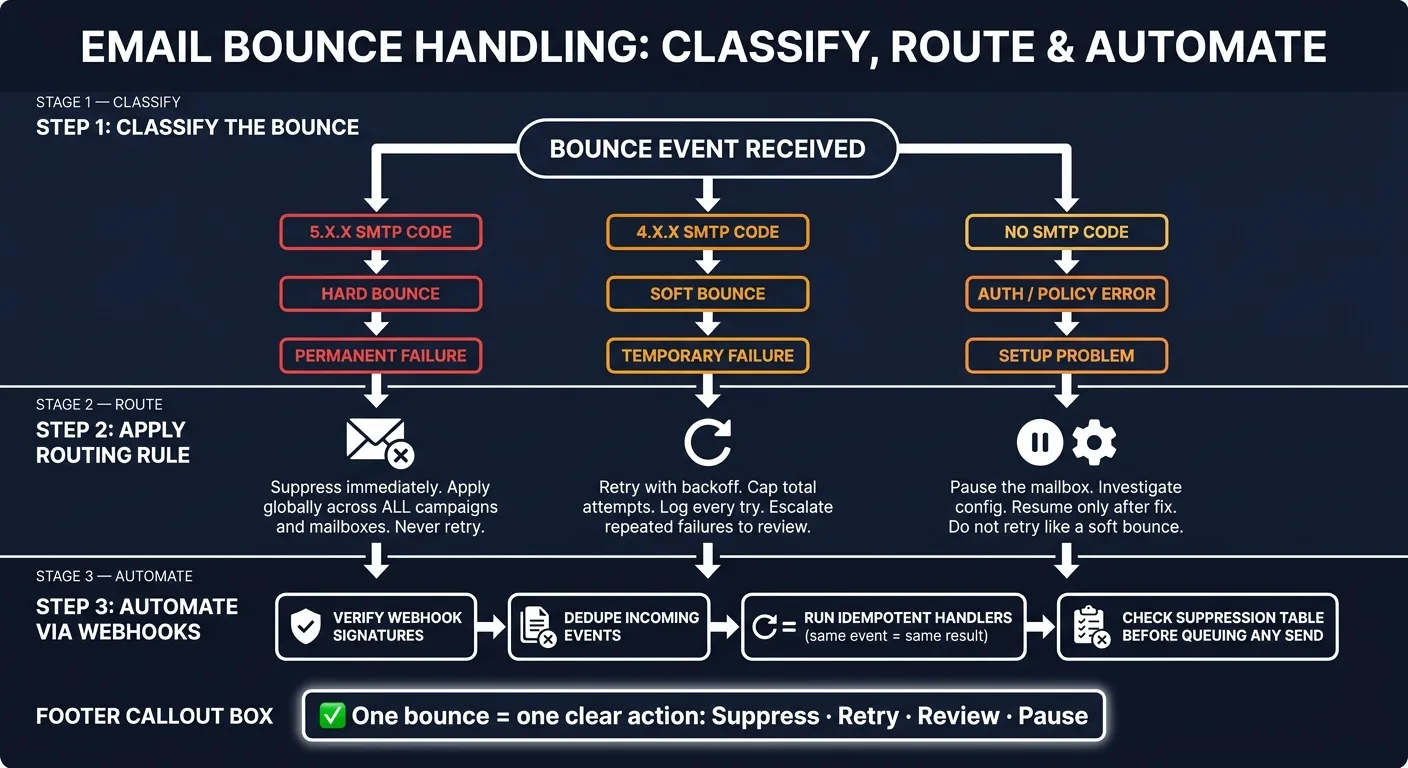
Classify bounce events before you automate anything
Sort bounce events by cause and whether the problem will stick around inside your webhook handlers and campaign logic. Start with SMTP status codes as your first pass:
- 5.x.x = permanent failure
- 4.x.x = temporary failure
Those buckets should drive what happens next: suppression, retries, or a mailbox pause.
Hard bounces: permanent failures that must stop future sends
A hard bounce means the recipient can't be reached. Suppress that address at once across all campaigns and mailboxes.
Do not retry it.
Soft bounces: temporary failures that need capped retries
With a soft bounce, the address might still be fine, but delivery failed for a temporary reason. Retry with backoff, and put a cap on the number of attempts.
If the same contact keeps soft-bouncing, pause them or send them to review.
Auth/policy errors require infrastructure fixes, not list retries
Auth/policy errors usually mean something is wrong with your sending setup, not with the lead. Don't treat these as contact-level failures, and don't retry them like soft bounces.
Pause the mailbox, check the configuration, and resume only after the issue is fixed. If you treat these like temporary failures, you just add noise and slow down the fix.
| Error Type | SMTP Code | Cause | Action |
|---|---|---|---|
| Hard bounce | 5.x.x | Permanent recipient or domain failure | Suppress immediately, never retry |
| Soft bounce | 4.x.x | Temporary failure | Retry with backoff, cap attempts |
| Auth/policy error | - | Mailbox or auth/config issue | Pause mailbox, investigate, then resume |
Use these buckets in your routing layer to decide when to suppress, retry, or pause a mailbox.
Build routing rules: suppress, retry, or pause sending
Once you’ve classified bounce types, turn them into routing rules. Each bounce type should map to one clear action: suppress hard bounces, retry soft bounces, and pause mailboxes when you hit policy or auth failures.
At that point, the job becomes simple in theory: define how your stack reacts the moment those events come in.
Hard bounce routing and global suppression rules
Suppress hard bounces right away. That suppression should apply globally across all campaigns and mailboxes.
In plain English: if one mailbox gets a hard bounce from an address, that address should be blocked everywhere in your stack. Not just in the campaign where the bounce happened.
That kind of global rule helps prevent repeat sends to bad addresses. It also cuts down on the kind of avoidable damage that can pile up fast when the same contact sits in more than one campaign.
Soft bounce retry logic with backoff and escalation
Soft bounces need a different path. Retry them with backoff, then stop once you hit the retry cap.
Log every attempt. If the same address keeps soft bouncing, send it to review instead of letting retries drag on forever. At some point, “try again later” stops being useful and starts looking like a warning sign.
Repeated soft bounces should also feed mailbox-health alerts and volume controls. That way, you’re not just reacting at the address level. You’re also watching for patterns tied to the sending mailbox.
Mailbox health alerts that trigger volume controls
When a mailbox builds up bounce signals past a set threshold, lower its sending volume on its own or pause it fully. Don’t wait for someone to catch it in a manual review cycle.
In an API-driven stack, webhook events should trigger these volume controls in real time, before bounce rates stack up into a reputation problem. That’s the whole point: act while the issue is still small, not after it spreads across the rest of your sending.
Set up webhook-based error handling in your campaign stack
Once your routing rules are in place, the next step is simple: connect them to webhook handlers. The goal is to turn each routing rule into one clear webhook action.
What your webhook handler should do for each event type
Each event should map to one action. No guesswork. No mixed logic.
| Event Type | Immediate Action | Downstream Update |
|---|---|---|
| Hard bounce | Write address to suppression table | Stop all future sends to that recipient |
| Soft bounce | Create a retry job with backoff | Increment failure count on the contact record |
| Auth/policy failure | Pause the mailbox or campaign | Alert the mailbox owner or on-call engineer |
| Throttling event | Reduce sending volume | Flag for mailbox review |
Your webhook layer also needs a few guardrails in place:
- Verify webhook signatures
- Dedupe events
- Make each handler idempotent
That last point matters more than it may seem. Same event, same result. If a provider sends the same webhook twice, your system shouldn't create double retries, double alerts, or conflicting state changes.
How campaign logic should respect bounce signals
Your send API should check the suppression table before it queues any email, not after. If the address is suppressed, drop the send and log the skip.
Campaign logic needs a clear off-ramp too. Once email is no longer a good path, the sequence should act like it knows that. If a contact has been suppressed or has stacked up too many soft bounce failures, stop sending to that contact.
In email-only flows, stop the sequence and flag the contact for review. That keeps suppression enforced at send time, instead of letting damage happen first and cleaning it up later.
Where OutreachFox fits for API-first teams

OutreachFox is API-first and sends bounces and mailbox-health events through webhooks in real time. That gives your system a structured event stream you can route straight into suppression, retry, and alert logic.
For agencies running multiple client workspaces, dedicated infrastructure keeps suppression lists and health alerts tied to the right account. Built-in email verification also catches bad addresses before they turn into a bounce.
Protect sender reputation with verification, list hygiene, and a clear policy
Bounce handling starts before the webhook. Then it continues with steady suppression after events come back.
Pre-send verification and source-level list cleanup
Once event routing is set, move upstream and cut avoidable bounces before they happen. OutreachFox includes built-in email verification in its enrichment layer, so you can check addresses before they hit the sending queue.
If one source keeps feeding you bad addresses, fix that source and prune it upstream. It’s cheaper to stop bad data at the door than deal with bounce cleanup later.
List hygiene and suppression policies for agencies and multi-mailbox teams
Verification catches bad records. Hygiene makes sure bad sources don’t keep sneaking back in.
Apply suppression the same way across campaigns and workspaces so bounced addresses don’t slip back in through another send path. Keep webhook updates synced to the same suppression store.
When prevention and suppression are set, the next job is simple: keep the automation layer in sync. If bounce volume jumps, pause the campaign, audit the source, and fix the list before you start sending again.
Conclusion: the minimum bounce-handling system
The minimum setup is pretty simple: verify before send, suppress bad addresses fast, and route bounce and mailbox-health events into automation. OutreachFox supports that workflow with built-in verification and real-time event webhooks.
Frequently asked questions
What's the difference between how I should handle 4.x.x and 5.x.x SMTP bounce codes?+
5.x.x codes indicate permanent failures and should trigger immediate suppression of that email address across all campaigns with no retry attempts. 4.x.x codes signal temporary failures that warrant retry logic with exponential backoff and a cap on the number of attempts before escalating to review.
Why shouldn't authentication and policy errors be treated like regular soft bounces?+
Auth and policy errors indicate problems with your sending infrastructure or mailbox configuration, not issues with the recipient's address. Retrying these like soft bounces adds noise and delays fixing the actual problem. The correct response is to pause the affected mailbox and investigate the setup before resuming sends.
When should suppression checks happen in the email sending workflow?+
Suppression checks must happen before an email enters the queue, not after it bounces. Your send API should verify against the suppression table prior to queuing any message, dropping the send and logging a skip if the address is already suppressed.
How do repeated soft bounces from the same address get escalated in this system?+
When the same contact keeps soft bouncing after hitting the retry cap, they should be sent to review rather than continuing indefinitely. These patterns should also feed into mailbox-health alerts and volume controls to catch broader sending issues before they damage reputation.
What three guardrails should webhook handlers have for bounce events?+
Webhook handlers need to verify signatures to ensure authenticity, dedupe events to prevent processing the same bounce multiple times, and remain idempotent so that duplicate webhooks produce the same result without triggering conflicting actions or state changes.
Why should hard bounce suppression be global rather than campaign-specific?+
Global suppression prevents the same bad address from being sent to across multiple campaigns and mailboxes. If one mailbox receives a hard bounce, that address should be blocked everywhere in your stack to avoid repeat sends that damage deliverability and sender reputation.
How does pre-send verification reduce bounce-related deliverability damage?+
Pre-send verification catches invalid addresses before they enter the sending queue, eliminating avoidable bounces that would otherwise hurt sender reputation. This upstream approach is more cost-effective than handling bounce cleanup after delivery attempts have already failed.