
Infrastructure beats features when choosing an outbound platform. Compare campaign limits, mailbox ownership, sender risk, CRM data flow, and multichannel control before evaluating surface-level features.
- Check infrastructure first: campaign limits, mailbox ownership, and sender risk before features.
- Private mailbox ownership protects your reputation from other users' sending mistakes.
- Clean CRM sync means replies, bounces, and opens write back automatically without manual exports.
- Multichannel control requires email and LinkedIn in one workflow with a unified inbox.
- Pre-warmed mailboxes cut setup from 2-4 weeks down to 10 minutes for faster launches.
- Test live campaigns before buying to find real limits, sync gaps, and deliverability issues.
Outreach Platform vs Competitor: Planning Guide
If I were choosing an outbound platform, I’d check infrastructure first and features last. That means I’d look at five things right away: campaign limits, mailbox ownership, sender risk, CRM data flow, and multichannel control.
Here’s the short version:
- If sending limits are tight or tied to a shared pool, campaigns can slow down mid-quarter.
- If mailbox reputation is shared, one account’s spam issues can hurt others.
- If replies, bounces, and opens do not sync back to the CRM, teams end up doing manual cleanup.
- If email and LinkedIn run in separate tools, follow-up gets slower and less organized.
- If setup takes 2 to 4 weeks of mailbox warmup, launch time slips. In this article, OutreachFox is positioned as cutting that to about 10 minutes with pre-warmed mailboxes.
For me, the buying question is simple: Can this platform handle my volume, keep sender control in my hands, and keep data clean from first list upload to reply sync?
Quick comparison
| Check | OutreachFox | What to watch for in another platform |
|---|---|---|
| Campaign setup | Pre-warmed Google, Microsoft, SMTP, and Azure mailboxes | Long warmup time before launch |
| Sending model | Private, isolated setup with dedicated campaign IPs | Shared sending pool |
| Mailbox risk | Your results depend on your own sending | Other users can affect deliverability |
| CRM flow | API-first setup, webhooks, event write-back | Manual exports, delayed sync, or partial sync |
| Verification | Pre-send verification | Bad records caught after sending |
| Multichannel | Email + LinkedIn + unified inbox | Split tools and split inboxes |
| Agency use | White-label workspaces and bulk provisioning | Shared client setup |
| Lean team fit | Fast launch with auto SPF, DKIM, and DMARC setup | More setup friction |
I’d use this guide to plan an outbound system, not just compare feature lists. The main point is simple: safe scale comes from limits, ownership, sync, and channel control.
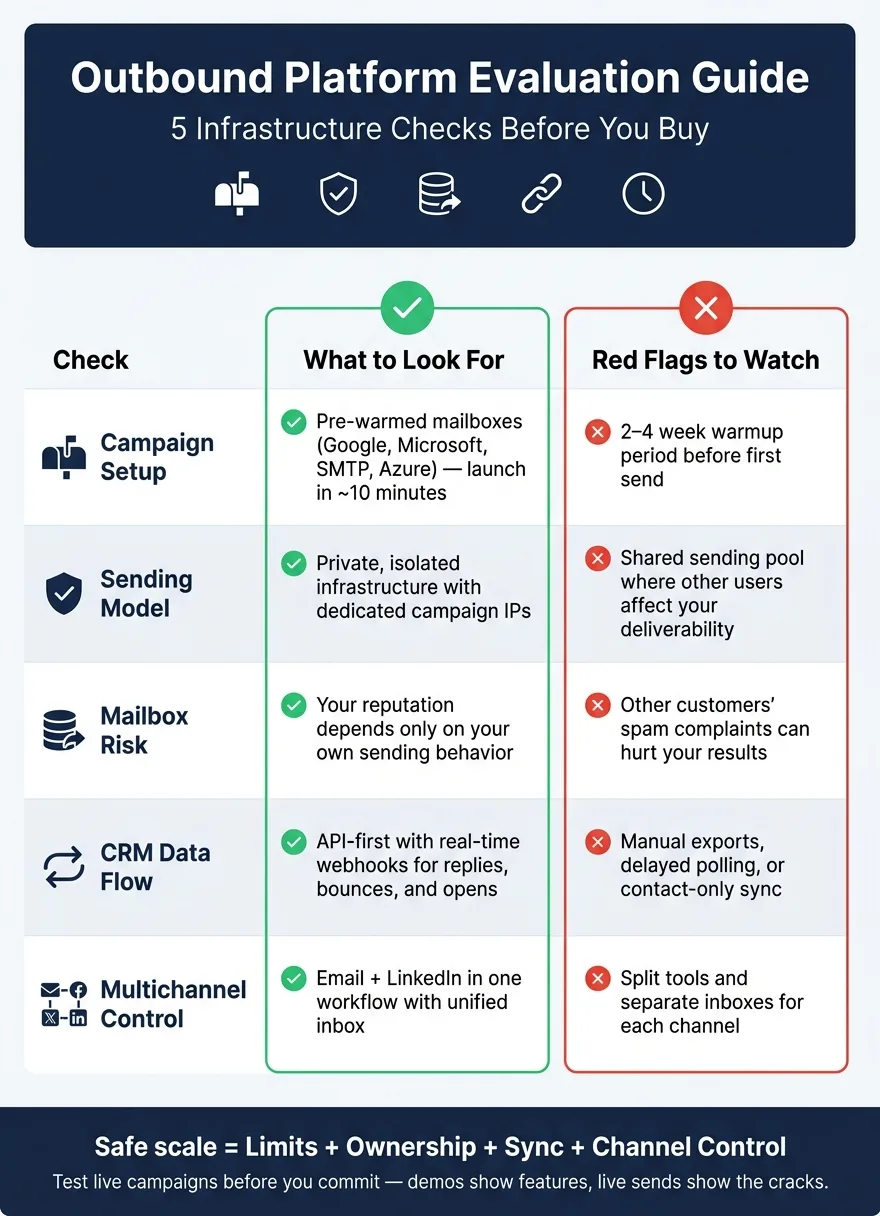
Compare Infrastructure First: Limits, Ownership, and Reputation Risk
Campaign limits and throttling rules
Start with the sending model, not the feature list. That’s where the big difference usually shows up.
Send caps matter less than whether your sending environment is isolated. What you want to compare is how limits are enforced: per mailbox, per workspace, or through a shared pool. Also check how throttling works. Is it applied across the whole account, or does it follow each sender’s behavior?
OutreachFox uses private, isolated infrastructure with dedicated campaign IPs and pre-warmed Google, Microsoft, SMTP, and Azure mailboxes. That means teams can get started faster with pre-warmed mailboxes, and throughput stays tied to their own sending behavior.
Mailbox ownership and shared deliverability risk
The core contrast is pretty simple: private sending environment vs. shared pool.
In a shared pool, someone else’s bad sending habits can hurt your deliverability. That’s the part many teams miss at first. If another customer racks up spam complaints, your results can take a hit too.
Private mailbox ownership changes that. Your sender reputation depends on your own campaigns, not another company’s mistakes.
Sender reputation safeguards
Ownership is one piece of the puzzle. You also need controls that help protect reputation over time.
Look for things like:
- Dedicated campaign IPs
- Real-time mailbox-health visibility and per-campaign analytics
OutreachFox includes both, which makes it a better fit for teams that need more control over deliverability.
After infrastructure, compare how each platform moves prospect data, replies, and status updates into the CRM.
Compare the Operating Layer: Data Flow, CRM Sync, and Multichannel Control
Data flow from prospect list to campaign and back to CRM
After infrastructure, the next thing to check is how data moves into campaigns and back into the CRM.
That sounds simple. In practice, it’s where a lot of teams get stuck.
Once the setup is in place, compare how each platform handles data, replies, and status changes across the system. The main issue is pretty clear: does data move cleanly from a prospect list into a live campaign, and do replies, bounces, and opens make it back into the CRM? If that flow breaks, the CRM ends up full of gaps, duplicates, and messy manual cleanup.
Start with list ingestion. You want clean imports through CSV upload, API import, or native connectors. It also helps to have pre-send verification, so bad records get removed before anything goes out. OutreachFox supports API-first automation for provisioning, verification, webhooks, and built-in enrichment.
CRM sync matters just as much. The best setup writes activity back on its own, so the CRM stays current without manual exports or patched-together tools.
| Capability | What to look for | Red flag |
|---|---|---|
| CRM integrations | Native CRM connectors with event write-back | Contact-only sync |
| Verification flow | Pre-send email verification | Verification after sending |
| Event handling | Real-time webhooks for replies, bounces, and opens | Manual exports or delayed polling |
| Enrichment flow | Built-in enrichment before sequencing | Separate enrichment step |
| API access | API-first automation support | Dashboard-only workflow |
Multichannel control across email, LinkedIn, and inbox management
Once LinkedIn becomes part of the workflow, basic channel coverage isn’t enough. The platform needs to run as one operating layer.
True multichannel control means email and LinkedIn sequences live in the same place, with one inbox for all inbound replies. OutreachFox combines multichannel email and LinkedIn outreach with a unified inbox - a clear sign that both channels run from one operating layer. If email and LinkedIn replies land in separate places, follow-up slows down.
Best Cold Outreach Tools in 2026 (After Testing 200+ Tools)
Match the Right Platform to Your Outbound Model
Those checks narrow the field. The next step is simple: pick the platform that fits how your team works day to day.
Best fit for high-volume agencies
For agencies, client isolation is the big one.
When warmup pools are shared, one client’s trouble can spill into another client’s setup. That creates cross-client liability, and for agencies, that’s a risk you don’t want hanging around. The safer route is isolated infrastructure, white-label workspaces, and mailbox provisioning for each client.
OutreachFox is built around that model. It gives you dedicated campaign IPs that are never co-mingled, bulk provisioning, and white-label workspaces so your agency brand stays front and center.
If client isolation is on your list, this is the factor that usually makes the call.
Best fit for GTM teams that need one flow into the CRM
GTM teams usually need one clean path from list to CRM.
Here’s the test: can a rep enrich a list, launch email and LinkedIn, and sync results to HubSpot without exports? If that process falls apart because someone has to rely on a shaky export step, you’ve found a gap.
OutreachFox takes an API-first approach. Bounces, opens, and replies are pushed back in real time through webhooks, which helps keep CRM records current.
If your team runs lean, speed and setup friction tend to matter more than extra depth.
Best fit for solo founders and lean teams
For solo founders, setup speed matters most.
A 2–4 week warmup can drag out a launch before it even gets moving. OutreachFox cuts that ramp to about 10 minutes with pre-warmed Google, Microsoft, SMTP, and Azure mailboxes. It also auto-configures SPF, DKIM, and DMARC, which removes one of the most common setup blockers.
Conclusion: Use This Comparison to Plan, Not Just to Buy
After you compare limits, ownership, sync, and multichannel control, use those same checks to make the call. Pick the platform that fits your volume, risk, and workflow. In plain English: choose the one that matches your send volume, protects your reputation, syncs cleanly to your CRM, and runs email plus LinkedIn in one workflow.
Before you buy, pressure-test those five checks. Demos show features. Live campaigns show the cracks - limits, sync issues, and deliverability problems tend to show up there, not in a polished sales walkthrough.
Run one live test before you commit. Test live campaigns, verify CRM sync end to end, and ask who owns the mailboxes, how limits are enforced, and whether email and LinkedIn run in one workflow. Those answers tell you if the platform fits your outbound plan.
Frequently asked questions
Why does OutreachFox recommend checking infrastructure before features when selecting an outreach platform?+
Infrastructure issues like campaign limits, shared sender reputation, and poor CRM sync create operational problems that features can't fix. If mailbox reputation is shared, one user's spam complaints can hurt your deliverability. If replies don't sync back to your CRM automatically, teams waste time on manual cleanup regardless of how many features the platform offers.
How does private mailbox ownership differ from a shared sending pool in terms of deliverability risk?+
With private mailbox ownership, your sender reputation depends only on your own campaigns and sending behavior. In a shared pool, another customer's spam complaints or poor sending practices can damage your deliverability even if your campaigns follow best practices. OutreachFox uses isolated infrastructure with dedicated campaign IPs to eliminate this cross-customer risk.
What specific advantage does OutreachFox offer for setup speed compared to typical warmup periods?+
Most outreach platforms require 2-4 weeks of mailbox warmup before launching campaigns. OutreachFox reduces this to approximately 10 minutes by providing pre-warmed Google, Microsoft, SMTP, and Azure mailboxes, along with automatic SPF, DKIM, and DMARC configuration.
Why does the article emphasize CRM sync as a core infrastructure concern rather than just a feature?+
When replies, bounces, and opens don't automatically sync back to the CRM, teams face constant manual cleanup work and data gaps. OutreachFox uses an API-first approach with real-time webhooks to push activity data back to the CRM immediately, ensuring records stay current without manual exports or patched-together integrations.
What makes OutreachFox particularly suitable for agencies managing multiple clients?+
Agencies need client isolation to prevent one client's deliverability issues from affecting others. OutreachFox provides dedicated campaign IPs that are never co-mingled, white-label workspaces for agency branding, and bulk mailbox provisioning. This eliminates cross-client liability that can occur when warmup pools or sending infrastructure is shared.
How does unified multichannel control differ from running email and LinkedIn in separate tools?+
When email and LinkedIn run in separate tools, replies land in different inboxes and follow-up becomes slower and disorganized. OutreachFox combines multichannel email and LinkedIn outreach with a unified inbox, allowing teams to manage both channels from one operating layer and respond to all prospect replies in a single location.
What should teams test in a live campaign before committing to an outreach platform purchase?+
Teams should run actual live campaigns rather than relying only on demos, verify that CRM sync works end-to-end with real data, confirm who owns the mailboxes, understand how sending limits are enforced, and test whether email and LinkedIn truly operate in one unified workflow. These live tests reveal operational problems that polished sales demos typically hide.