
Build separate waterfalls for each field (email, phone, company data), verify results before sending, and choose between Clay plus point tools or a native platform based on maintenance tolerance.
- Run providers in sequence and stop on verified matches to reduce wasted lookups
- Build separate waterfalls for email, phone, and company data to keep logic clean
- Verify enriched data inside the workflow before sending to protect deliverability
- Split records by segment like SMB vs enterprise to shorten paths and lower costs
- Choose between Clay plus tools for control or native platforms for lower maintenance
- Use one status field to control send eligibility and block risky records early
Clay Alternatives: Waterfall Workflow Setup
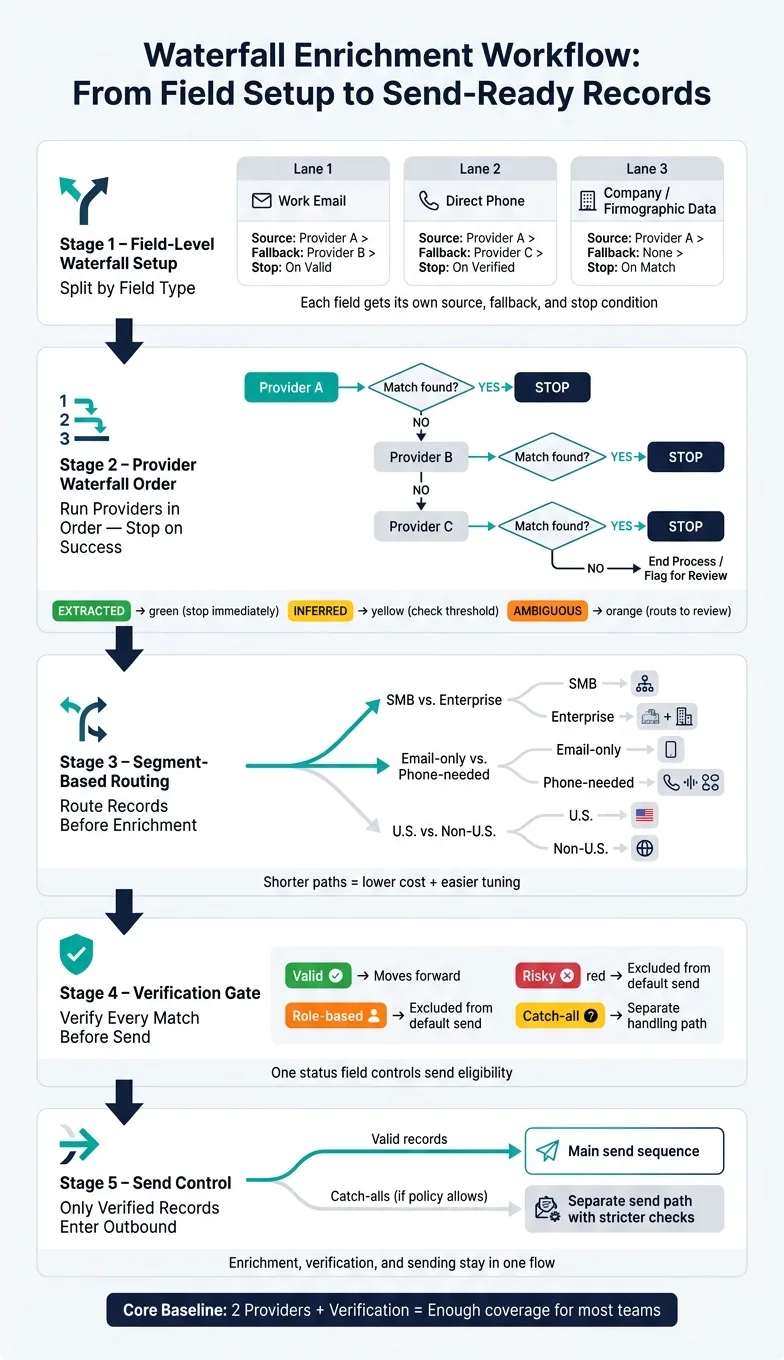
If I want better enrichment without extra mess, I keep the workflow simple: separate waterfalls by field, stop on verified results, and only send records that pass verification.
In plain terms, this setup works best when I do four things:
- Run providers in order: A, then B, then C only if needed
- Split waterfalls by field: email, phone, and company data each get their own path
- Verify before send: a found email is not ready until it passes validation
- Use clear send rules: valid goes forward, risky and role-based stay out, catch-alls follow a separate rule
That matters because bad workflow design leads to two common problems: too many tables and too much spend. In many sales stacks, each extra handoff adds one more place for sync issues, field mapping mistakes, or repeat processing. Even a simple two-provider chain can cut wasted lookups if I skip records that already have data and stop the moment I get a verified match.
Here’s the core idea in one view:
| Part | What I do | Why it matters |
|---|---|---|
| Field setup | Build separate waterfalls for email, phone, and company data | Keeps logic clean |
| Provider order | Check one source at a time and stop on success | Lowers wasted lookups |
| Confidence rules | Accept EXTRACTED, score INFERRED, review AMBIGUOUS | Prevents weak matches from winning |
| Routing | Split by segment like SMB vs. enterprise or U.S. vs. non-U.S. | Shorter paths, lower spend |
| Verification | Label records as valid, risky, role-based, or catch-all | Blocks weak records before send |
| Send control | Use one status field for eligibility | Keeps outbound rules clear |
| Stack choice | Pick Clay plus tools, or one platform with enrichment and sending together | Changes upkeep and handoffs |
A common baseline is two providers plus verification. For many teams, that gets enough coverage without adding too much logic or upkeep. And if sending sits in a different tool, the stack gets harder to run because enriched records still need to move, map, and sync before outreach starts.
So if I were setting this up today, I’d keep the waterfall as small as possible, verify inside the workflow, and choose the stack based on how much day-to-day upkeep I’m willing to own.
Clay 101 | Lesson 4: Enrich Companies Using Waterfalls
Design field-level waterfall logic before you automate anything
Don’t build one waterfall for every field. Define the fields first, then give each one its best source, fallback, and acceptance threshold.
Start with deterministic extraction before model inference. That matters because each field needs its own source chain, and a one-size-fits-all setup usually gets messy fast.
Build separate waterfalls for email, phone, and company data
Use one waterfall for firmographics, one for work email, and one for direct phone numbers. Each one should have its own source, fallback, and stop condition.
That split keeps the workflow lean. If one lookup fails, it won’t drag the whole process down or add extra steps where they aren’t needed.
Set precedence rules and confidence thresholds
Use confidence labels to settle conflicts: EXTRACTED, INFERRED, or AMBIGUOUS.
Here’s the simple rule:
- Stop on
EXTRACTED - Require a threshold for
INFERRED - Route
AMBIGUOUSto review or fallback
Store the winning provider in a hidden field for audit and tuning. That gives you a clean paper trail. If one provider keeps losing to another, move it lower in the chain or swap it out.
The next call is how deep each chain should go.
Waterfall depth: pros and cons by approach
Pick depth based on how much coverage you need and how much upkeep your team can handle.
| Approach | Coverage | Cost | Complexity | Maintenance |
|---|---|---|---|---|
| Single-provider lookup | Lowest | Most predictable | Minimal | Very low |
| Two-provider cascade | Moderate | Good | Low | Low |
| Multi-provider + verification | Highest | Least predictable | Higher | Ongoing tuning |
For most teams, a two-provider cascade plus verification is enough.
Once the field logic is set, automate it with run conditions and segment-based routing.
Automate the workflow without building a table nobody wants to maintain
Once your field rules are set, the automation should move only the records that still need work.
If an email field is already filled in, skip email enrichment. If the company domain is missing or invalid, don’t run person-level lookups yet. There’s no match key to use, so that step just burns time and money. Add a single status flag like enrichment_status: complete to stop the same record from getting processed again. Use those tags for one job: deciding whether a fallback should run.
After the run conditions are in place, split traffic by segment. Don’t send every record through one giant waterfall. Break records into separate paths before enrichment starts, based on the signals that suggest which providers are likely to work best. Provider fit shifts by segment, and that matters more than people think.
The most common splits are:
- SMB vs. enterprise
- Email-only vs. phone-needed
- U.S. vs. non-U.S. when provider coverage changes by region
This keeps each path shorter, cheaper, and simpler to tune. And if one path starts slipping, you can fix that path without messing with the rest.
Also, hide the intermediate provider columns. Roll everything up into one Final Work Email field, and do the same for phone and any other output you actually use. Keep the hidden source and confidence fields for audit purposes only. That way, the table stays readable before verification and deliverability checks kick in.
Add verification, catch-all rules, and deliverability guardrails
A match is not ready to send until verification passes.
Once a provider fills in an email field, the next step should label that address as valid, risky, role-based, or catch-all. This step blocks bad records before they trigger more lookups, more spend, and more mess downstream.
Use one status field to control send eligibility. Only valid records should move to send. That keeps enrichment and deliverability in the same workflow instead of pushing the problem into a last-minute cleanup pass.
Verify after enrichment, not just before launch
Verification should happen inside the workflow, not as a one-time sweep right before launch.
Valid records can move ahead. Risky and role-based records should stay out of the default send path. Catch-alls need their own handling before they enter outbound.
Think of it like a gate, not a bandage. If you wait until the end, weak records pile up in the system and make every later step harder.
Define catch-all handling by risk tolerance
Catch-alls can't prove mailbox-level validity, so they need separate handling.
That separation matters. It keeps risky records from clogging the main waterfall. Only records that meet your policy thresholds should enter outbound.
Some teams want the safest path possible. Others are fine testing a bit more reach. Either way, the rule should be clear before sends start.
Catch-all policy options: a risk and guardrail comparison
| Policy | Acceptance Criteria | Use case |
|---|---|---|
| Strict | Only valid, clearly approved records enter outbound; catch-alls are suppressed | Teams with the lowest risk tolerance |
| Balanced | Valid records go to the main send; catch-alls are held back for review or separate testing | Teams that want more coverage without mixing risk |
| Flexible | Catch-alls are allowed only in a separate send path with stricter checks | Teams willing to trade more certainty for broader coverage |
Keep role-based addresses out of the default send path unless policy clearly approves them. That's what keeps the waterfall small while still protecting deliverability.
Next, decide whether that workflow belongs in a separate stack or inside a native outbound platform.
When a native outbound platform simplifies the stack
Clay plus point tools vs. built-in waterfall outbound platforms
A Clay-based stack tends to work best for smaller teams with one clear owner. But in practice, most teams use Clay for enrichment, then add a separate verifier and a separate sender.
That setup can work. The tradeoff is upkeep.
Each handoff adds one more thing to manage: extra provider columns, sync problems, and one more system in the mix.
| Clay + Point Tools | Separate tools | Native platform | |
|---|---|---|---|
| Enrichment workflow control | Full field-level control | Enrichment handled elsewhere | Built-in field-level waterfalls |
| Verification | Separate tool required | Separate tool required | Built in |
| Sending infrastructure | External | External or shared | Isolated per account |
| Maintenance load | High | Medium to high | Low |
| Best fit | Teams with strong process ownership | Teams that are comfortable stitching tools together | Teams wanting one system |
If you want the same general setup without piecing tools together, the next step is simple: look at which platform keeps enrichment, verification, and sending in one flow.
Where OutreachFox fits for teams that want enrichment and sending in one place
That’s the use case OutreachFox is built for.
OutreachFox keeps enrichment, verification, and outreach in one system. Each customer gets private, isolated sending infrastructure, so records don’t need to move into a separate sender. Verified records move straight into email and LinkedIn sequences without an export step. Agencies can also keep each client in a separate workspace.
At that point, the decision is pretty simple. Do you want the most control possible, or do you want less upkeep day to day?
Conclusion: Build the smallest waterfall that gets usable coverage
Choose Clay plus point tools if you want maximum flexibility. Choose a native platform if fewer handoffs and lower maintenance matter more.
Frequently asked questions
What is the recommended waterfall depth for most teams doing enrichment?+
A two-provider cascade plus verification is recommended for most teams. This approach balances moderate coverage with low complexity and predictable costs, while avoiding the ongoing tuning burden that comes with multi-provider setups.
Why should email, phone, and company data use separate waterfalls instead of one combined waterfall?+
Separate waterfalls keep the workflow lean and prevent one failed lookup from dragging down the entire process. Each field type needs its own source chain, fallback logic, and stop conditions, so a one-size-fits-all setup creates unnecessary mess and wasted steps.
When should email verification happen in the enrichment workflow?+
Verification should happen inside the workflow immediately after enrichment, not as a one-time sweep before launch. This prevents bad records from triggering more lookups and downstream problems, acting as a gate rather than a last-minute bandage.
What are the three confidence labels used to settle conflicts between provider results?+
The three confidence labels are EXTRACTED, INFERRED, and AMBIGUOUS. The workflow should stop on EXTRACTED results, require a threshold score for INFERRED matches, and route AMBIGUOUS results to review or fallback providers.
How should catch-all email addresses be handled differently from verified emails?+
Catch-all addresses cannot prove mailbox-level validity and need separate handling based on risk tolerance. They should either be suppressed entirely, held for review in a separate testing path, or sent through a stricter verification process rather than entering the main outbound flow.
What are the common segment splits recommended before running enrichment waterfalls?+
The most common splits are SMB versus enterprise, email-only versus phone-needed records, and U.S. versus non-U.S. when provider coverage varies by region. These splits keep each path shorter, cheaper, and easier to tune without affecting other segments.
What is the main maintenance difference between using Clay plus point tools versus a native outbound platform?+
Clay plus point tools requires managing multiple handoffs, provider column mapping, and sync issues across separate enrichment, verification, and sending systems. A native platform keeps all three functions in one workflow, reducing maintenance load but offering less granular control over each component.