Use one shared contact record to let AI write channel-specific versions of the same message intent, switch channels based on behavior, and stop both on any reply.
- One shared contact record should feed both email and LinkedIn personalization.
- AI writes two channel-fit versions from one message intent and prospect profile.
- Switch channels only when recent behavior signals LinkedIn will perform better.
- Stop both channels immediately when a prospect replies on either platform.
- Verify prospect data before send to avoid stale signals ruining personalization.
- LinkedIn works best under 300 characters while emails need two to three paragraphs.
AI Personalization for Email and LinkedIn Sequences
If email and LinkedIn run in separate systems, personalization gets messy fast. I end up with repeated angles, stale context, and follow-ups that ignore what already happened on the other channel.
Here’s the fix in plain English: I use one shared contact record, let AI write two versions of the same message intent, and switch channels only when behavior says it makes sense. That means one profile, one memory, one stop rule, and fewer awkward touches.
What matters most:
- One live profile should feed both email and LinkedIn
- One message goal should become a channel-fit version for each touch
- One sequence should decide when to stay in email and when to move to LinkedIn
- One reply on either channel should stop everything at once
- One bad data point can hurt the whole sequence, so verification matters
A few numbers make this clearer. LinkedIn connection notes often work best at 300 characters or less, while prospecting emails usually land better when kept to 2–3 short paragraphs. And since sales reps spend about 20% to 30% of their time on selling versus admin and research, one shared workflow can cut wasted motion.
I’d sum it up like this: don’t let AI write each touch in isolation. Give it shared memory, clear channel rules, and hard stop conditions. That’s how I keep outreach short, relevant, and less repetitive.
Below, I’ll walk through the workflow, switching logic, tone rules, data-to-message mapping, and setup checks that keep it running cleanly.
How AI Personalization Works Across Email and LinkedIn
This workflow has three parts: enrichment builds a single profile, AI turns that profile into message inputs, and the sequence engine sends a version built for each channel.
Shared Signals That Drive Both Channels
The best signals are the ones that change outreach intent right now: role, company size, funding stage, recent news, hiring activity, tech stack, and past interactions. You can use these across email and LinkedIn, but the way you use them shifts based on the format.
Take a funding announcement. It gives you the same raw signal in both places. In an email, you can mention the exact raise amount and connect it to what the team is likely focused on next. In a LinkedIn message, that same signal becomes a short observation - brief, relevant, and with no pitch attached.
How One Message Intent Becomes Two Channel Variants
The value proposition stays the same. What changes is the amount of context around it.
Email can carry the full picture: a detailed opener, supporting context, and a direct ask. LinkedIn works best when you cut that down to the core - one observation and one light question.
| Element | ||
|---|---|---|
| Tone | Professional, contextual | Conversational, low-friction |
| Length | Longer, with supporting detail | Short - one to three sentences |
| Call to action | Direct ask or meeting link | Engagement-focused |
The intent stays the same. Only the format, length, and pressure level change.
If a prospect just closed a Series B, they don’t need two separate sequences saying the same thing in slightly different words. They need one sequence that acknowledges the milestone once, in the right format and on the right channel, then moves on from there. AI keeps the intent steady and rewrites the message for each channel.
Once AI can generate both versions from one intent, the next move is deciding when to switch channels.
Channel Switching Rules for a Single Sequence
Once AI can write both versions, the next step is simple: pick the channel most likely to get a reply.
Use the channel with the best shot at moving the conversation forward. After AI writes both versions, switch channels only when recent behavior shows LinkedIn is the better next touch.
Behavior-Based Switching Logic
Use unified prospect memory and the latest engagement signal to decide which channel should send the next touch.
| Situation | Next Action |
|---|---|
| Little or no recent email engagement | Switch to LinkedIn with a shorter note |
| Repeated engagement, but no reply | Use LinkedIn as the next follow-up |
| Reply on either channel | Stop sequence |
| Same angle already used across touches | Change channel or stop |
Switching decides which version goes out next, not whether you need a brand-new message. The intent stays the same. Only the channel changes.
Timing and Stop Conditions
Timing should follow behavior, not some rigid schedule. Switch only when recent behavior supports the next touch.
Stop on any reply. OutreachFox's unified inbox keeps email and LinkedIn replies in one workflow.
Tone, Format, and Data Mapping by Channel
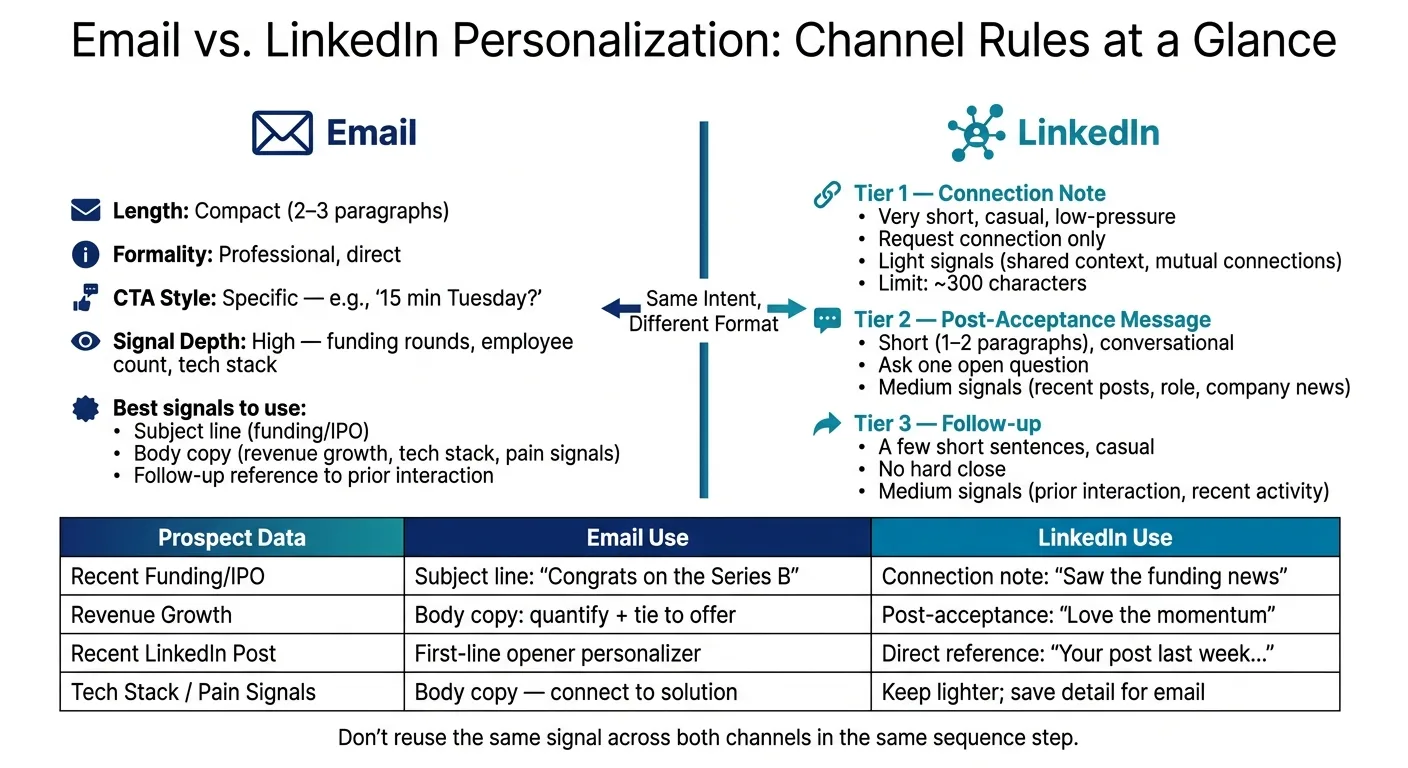
Once you've decided when to switch channels, the next job is deciding how the message should show up in each one.
The core intent stays the same. But the way AI writes it should change based on the channel's natural length, tone, and level of pressure. An email can handle more detail and a firmer CTA. LinkedIn usually works better when it feels lighter, shorter, and less pushy.
Email vs. LinkedIn Tone Rules
After the switch decision, AI should rewrite the same intent for the channel's native length, formality, and CTA pressure.
| Channel | Length | Formality | CTA Style | Signal Depth |
|---|---|---|---|---|
| Compact (2–3 paragraphs) | Professional, direct | Specific - "15 min Tuesday?" | High - funding rounds, employee count, technology signals | |
| LinkedIn Connection Note | Very short | Casual, low-pressure | Request connection only | Light - shared context, mutual connections |
| LinkedIn Post-Acceptance | Short (1–2 paragraphs) | Conversational | Ask one open question | Medium - recent posts, role, company news |
| LinkedIn Follow-up | A few short sentences | Casual | End without a hard ask | Medium - prior interaction, recent activity |
It helps to think of LinkedIn as having three separate pressure levels, not one:
- Connection note: light touch, almost no ask
- Post-acceptance message: small step forward, usually one open question
- Follow-up: brief nudge, no hard close
That stage-by-stage logic should connect straight into the sequence engine. Otherwise, AI tends to flatten everything into one tone, and that’s where messages start to feel off.
Prospect Data Mapped to Message Components
Each data point should feed the part of the message where it fits best. Same signal, different job. A funding event that works as an email subject line may work better as a quick nod in a LinkedIn note.
| Prospect Data Field | Email Component | LinkedIn Component |
|---|---|---|
| Recent funding / IPO | Subject line: "Congrats on the Series B" | Connection note: "Saw the funding news - big milestone" |
| Revenue growth signal | Body copy: quantify the growth, tie it to your offer | Post-acceptance: "Love the momentum you're seeing lately" |
| Role / title | Formal greeting, role-specific framing | Conversational opener - "Hey [Name] - " |
| Recent LinkedIn post | First-line personalizer in the opener | Direct reference - "Your post last week..." |
| Prior interaction history | Follow-up: "Following up on my email Tuesday..." | Follow-up: "Circling back on our chat here..." |
| Tech stack / pain signals | Body copy - connect the signal to your solution | Keep lighter and more contextual; save deeper detail for email |
Some signals simply work better in one place than another.
Technology signals and employee count data usually belong in the email body, where there's space to connect the dots. Company-stage signals, like a funding round or recent IPO, are strong enough to lead a subject line or open a connection note. And recent LinkedIn posts often land better on LinkedIn than in email. It feels natural there, not over-researched.
One more rule matters a lot: don’t reuse the same signal in the same sequence step across both channels. If email leads with funding news, LinkedIn should use something else. That small change keeps outreach from feeling duplicated and gives each touch its own reason to exist.
Next, put these rules into one workflow so sequence logic, safety checks, and reply handling stay aligned.
Unified Workflow Design, Safety Checks, and Key Takeaways
Why One Workflow Cuts Tool Sprawl
Once your switching rules are in place, a shared workflow keeps every channel aligned. That matters more than it may seem.
When email, LinkedIn, and your CRM run in separate systems, status changes get missed. One prospect record should control both channels. Every touch should update that single record, and the sequence should check it before the next send goes out.
If that doesn’t happen, context breaks fast. Data gets copied by hand, statuses drift, and the AI writing your messages starts working from old information. That’s how outreach turns clumsy.
OutreachFox brings email setup, LinkedIn sequences, enrichment, and a unified inbox into one system. So instead of patching tools together, you can keep the record, timing, and messaging in one place. From there, deliverability, reply detection, and verification become the next set of controls.
Safety and Implementation Checklist
A unified workflow only works if the setup underneath it is strong. The big checks are pretty simple, but they matter.
- Pace: Email and LinkedIn both have limits, and pushing too fast looks automated. Keep LinkedIn activity conservative. For email, scale step by step from warmed mailboxes instead of jumping to high volume on day one.
- Infrastructure: Shared sending pools tie your sender reputation to everyone using that pool. Isolated infrastructure - dedicated IPs and owned mailboxes - keeps your reputation tied to your own behavior, not some stranger’s spam complaint.
- Reply handling: Reply detection needs to pause both channels right away. If someone replies, the system should stop. If a LinkedIn connection request gets accepted, that update should hit the shared record at once, not after some sync lag.
- Verification: A wrong job title, a stale funding round, or an unverified email address doesn’t just waste a touch. It tells the prospect the outreach is automated and careless. Waterfall enrichment across multiple data providers, with field-level verification, stops bad data before send.
- Touch limits: Set a hard touch limit for each prospect.
Frequently asked questions
Why should email and LinkedIn sequences share one contact record instead of running separately?+
Separate systems cause repeated angles, stale context, and follow-ups that ignore cross-channel activity. A shared contact record ensures both channels work from the same prospect data, interaction history, and reply status, so one reply on either channel stops everything and prevents duplicated outreach.
How does AI generate different versions of the same message for email versus LinkedIn?+
AI keeps the core intent and value proposition identical but adjusts format, length, and pressure level by channel. Emails get 2-3 paragraphs with detailed context and direct CTAs, while LinkedIn messages are shortened to 1-3 sentences with conversational tone and lighter asks.
When should a sequence switch from email to LinkedIn during outreach?+
Switch channels when recent behavior signals LinkedIn has a better chance of getting a reply—typically after little or no email engagement, or when repeated engagement produces no response. The switch changes only the delivery channel, not the underlying message intent.
What happens if a prospect replies on one channel while the sequence is still active on another?+
Any reply on either email or LinkedIn should immediately stop the entire sequence across both channels. This requires unified reply detection that updates the shared contact record in real-time, preventing awkward follow-ups after a conversation has already started.
Why shouldn't the same prospect signal be reused across email and LinkedIn in the same sequence step?+
Reusing the same signal—like a funding announcement—in both an email and LinkedIn message makes outreach feel duplicated and automated. Each touch should reference different data points from the shared profile to give every message its own reason to exist.
What role does data verification play in AI-personalized sequences?+
One bad data point like a wrong job title or stale funding round signals careless, automated outreach to prospects. Field-level verification through waterfall enrichment across multiple providers stops inaccurate data before send, protecting the quality and credibility of every touch.