
Real-time email verification blocks invalid leads at forms, enrichment, and imports before they enter your CRM, cutting bounce rates and cleanup work through normalized statuses and smart routing rules.
- Run sync checks for single leads and async jobs for bulk uploads
- Store normalized status separately from raw provider responses for clean routing
- Only retry transient failures like timeouts with a three-attempt cap
- Route leads by status before they enter outreach sequences or CRM
- Real-time verification at entry points stops bad data before bulk cleanup reacts
- Track coverage, bounce rate, and retry success to measure pipeline impact
Real-Time Email Verification for Lead Lists
Bad emails cost you before you ever hit send. If I verify each address at the moment it enters the list, I can block invalid records before they reach the CRM, cut cleanup work, and lower bounce risk.
Here’s the short version:
- I run sync checks for single leads from forms
- I use queued async jobs for CSV uploads and big batches
- I store the raw provider response отдельно from one simple status:
- Valid
- Invalid
- Risky
- Catch-all
- Unknown
- I retry only short-term failures like timeouts, rate limits, and network issues
- I route each lead by status before it enters outreach
This setup matters because post-import cleanup is late. By then, bad records may already be in the CRM, enrichment flow, or outbound sequence. Even a small bounce drop can protect list quality at scale, and a 3-attempt retry cap helps control provider load without checking the same bad record again and again.
Quick comparison
| Setup | When checks happen | What gets blocked | Main downside |
|---|---|---|---|
| No verification | After sends fail | Nothing up front | Bounces show up too late |
| Bulk-only | After import | Some bad records | Bad data can still enter the CRM first |
| Real-time | At forms, enrichment, and upload | Bad records before routing | Needs queue, retry, and status logic |
If I want cleaner lead lists, the rule is simple: treat every entry point like a quality gate.
How to Verify Email Leads in Real-Time to Improve Lead Quality (Block Bad Ones OR Get Better Data)
Where to Place Verification Triggers in Your Lead Workflow
Bad addresses usually slip into a workflow through three gates: forms, enrichment, and CSV imports. Real-time verification works best when it stops bad data at the exact moment it enters your list.
Trigger Checks on Forms, Enrichment Outputs, and CSV Uploads
There are three places where unverified emails reliably enter a lead workflow: website forms, enrichment outputs, and CSV imports.
Website forms are the first trigger point. As soon as a visitor submits an email, you can fire a verification call before the record is written to your CRM. That stops bad data at the source.
Enrichment outputs come next. When an enrichment tool returns a business email for a prospect, that address can still be wrong or unconfirmed. Verify it right after enrichment and before the record moves into your CRM or sequence. That way, unconfirmed data doesn't keep flowing downstream. After that, the pipeline should normalize the result before anything reaches the CRM.
CSV imports need a different approach. Treat them as background jobs, and run verification in a queue instead of blocking the upload.
Synchronous Checks for Single Leads, Async Jobs for Bulk Lists
Use a simple rule: sync calls for single leads, async jobs for bulk lists. Push large lists into a queue, then write back each normalized status as workers finish.
The tradeoff here is latency versus volume, not accuracy.
Once you've picked the trigger, the next step is the API layer that stores the result and routes it through the queue.
How to Build the Verification Pipeline
Send API Requests and Store Normalized Statuses
The pipeline should capture the email, call the verification API, normalize the result, and then write back both the raw output and the usable status.
Here’s the key idea: store the raw provider response separately, either in a sidecar field or a raw_logs table. Then route mail flow and system logic using ONLY the normalized status:
- Valid
- Invalid
- Risky
- Catch-all
- Unknown
That normalized field is the handoff point for routing, retries, and suppression rules. It also keeps downstream logic steady even if you switch verification providers later. One provider might label a result one way, another might use a different term. Your app doesn’t need to care. It just reads the normalized status and moves on.
Normalized status is what powers routing, retries, and suppression rules.
Design Queues, Rate Limits, and Dead-Letter Handling for Scale
If you're verifying bulk lists, don’t process everything inline. Use a queue.
Push verification jobs into the queue as records arrive. Then run workers in parallel to send requests to the API. This keeps the pipeline moving without turning your app into a traffic jam.
A few parts matter here:
- Workers should respect rate-limit headers
- Backoff should happen before you hit provider limits
- Every API call should have a timeout
- After repeated failures, the job should move to a dead-letter queue for review and replay
Once jobs land in the dead-letter queue, you can inspect what failed, replay the job, and apply retry and routing rules for each status. That setup gives you control when things go sideways instead of letting failed requests disappear into a black hole.
Where OutreachFox Fits in an API-First Stack

In an API-first stack like OutreachFox, verification can plug into enrichment, webhooks, and real-time status updates.
Set Up Retry Logic and Lead Routing Rules
Retry Transient Failures Without Overloading Providers
Use the normalized status from your verification pipeline to decide what happens next: retry, suppress, or route.
Only retry transient failures like rate limits, network errors, and SMTP timeouts. If the failure is permanent, such as invalid syntax, don't waste another check on it. It won't change on the next pass.
Use exponential backoff and cap retries at three attempts. That gives temporary issues room to clear without hammering the provider.
Store retry_count, last_attempt_at, and next_scheduled_retry right on the lead record. This keeps the current state in one place, so workers can see it at a glance instead of querying the queue again. It also cuts down on duplicate checks when the same lead hits the pipeline from different triggers.
Route Valid, Risky, Invalid, and Unknown Emails by Status
Once the verification result comes back, the normalized status should decide the next move right away. One status, one path.
| Email Status | Routing Path | Action |
|---|---|---|
| Valid | Main outbound | Enter sequence immediately. |
| Risky / catch-all | Low-volume warm-up pool | Manual review or warm-up. |
| Invalid | Suppression list | Suppress globally. |
| Unknown | Re-enrichment / retry queue | Backoff; max 3 retries. |
Unknown results can go back through enrichment or a second verification pass. Log every attempt with verification_timestamp, provider_id, and request_id for traceability.
Measure the Bounce Rate Impact and Review Key Steps
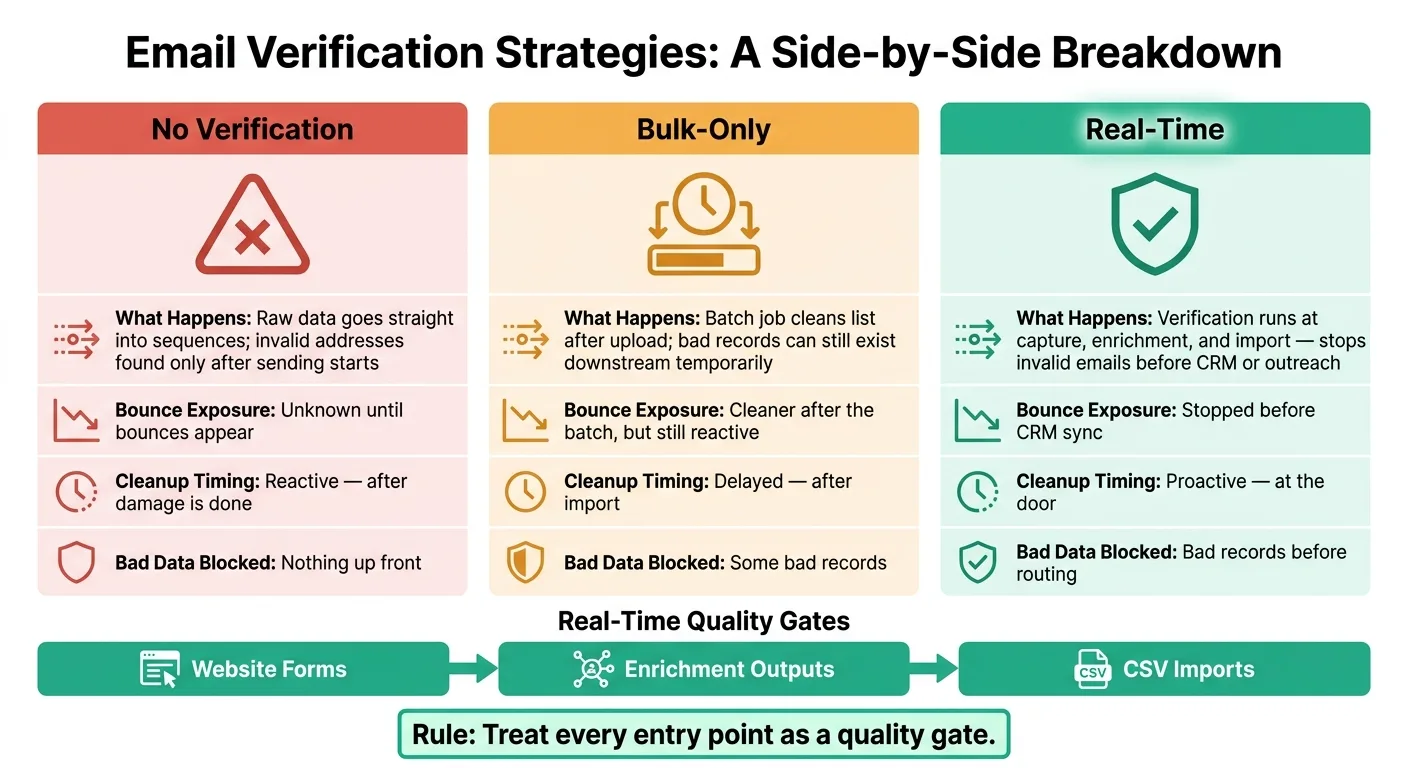
No Verification vs. Bulk-Only vs. Real-Time: A Direct Comparison
The main difference comes down to where bad data gets blocked.
Once your pipeline is live, look at bounce rate before and after each verification setup. Then compare bounce exposure and the cleanup work each setup leaves behind across these three models:
| Setup | What Happens | Bounce exposure at send time |
|---|---|---|
| No verification | Raw data goes straight into sequences, and invalid addresses are only found after sending starts. | Unknown until bounces appear |
| Bulk-only (post-import) | A batch job cleans the list after upload, so bad records can still exist downstream for a period of time. | Cleaner after the batch, but still reactive |
| Real-time at entry points | Verification runs at capture, enrichment, and import, stopping invalid emails before they move downstream into CRM or outreach sequences. | Stopped before CRM sync |
In plain English: bulk cleanup helps, but it reacts after the fact. Real-time verification blocks bad emails at the door.
Use bulk cleanup for legacy records, not as your primary defense.
This side-by-side view makes it easier to spot which entry point is still leaking bad data. If bounce rate drops after one checkpoint but not another, you've found the weak spot.
Key Takeaways for Large Outbound Lists
After launch, track:
- Coverage
- Bounce rate
- Retry success
- Provider errors
Then review coverage and status routing to make sure the system is cutting bounces on a steady basis.
A simple routing model works best:
- Send valid leads into sequences
- Keep risky addresses in a separate review lane or lower-volume path
- Exclude invalid emails from sending
OutreachFox can feed bounce and mailbox-health webhooks back into the same routing logic.
Treat every entry point as a quality gate.
Frequently asked questions
What are the five normalized email statuses used in real-time verification pipelines?+
The five normalized statuses are Valid, Invalid, Risky, Catch-all, and Unknown. These statuses are stored separately from raw provider responses and power all routing, retry, and suppression decisions in the verification pipeline.
Should I use synchronous or asynchronous verification for CSV bulk imports?+
Use asynchronous jobs for CSV bulk imports. Push large lists into a queue and process them with background workers, rather than blocking the upload. Synchronous checks should only be used for single leads from forms or enrichment outputs.
Which email verification failures should trigger automatic retries?+
Only retry transient failures like rate limits, network errors, and SMTP timeouts. Permanent failures such as invalid syntax should not be retried because they won't change on subsequent attempts. Cap retries at three attempts using exponential backoff.
How should risky and catch-all email addresses be routed differently from valid ones?+
Valid emails should enter the main outbound sequence immediately, while risky and catch-all addresses should be routed to a low-volume warm-up pool for manual review or separate handling. Invalid addresses go to a suppression list, and unknown results enter a re-enrichment or retry queue.
Where are the three entry points that require real-time verification triggers?+
The three entry points are website forms, enrichment outputs, and CSV imports. Verification should fire at each of these gates before records reach the CRM, stopping bad data at the exact moment it enters your lead workflow.
Why store raw provider responses separately from normalized status values?+
Storing raw responses separately keeps downstream logic stable even when switching verification providers. Different providers may use different labels for the same result, but your application only reads the normalized status for routing and suppression decisions.
What fields should be stored on the lead record to manage retry attempts?+
Store retry_count, last_attempt_at, and next_scheduled_retry directly on the lead record. This keeps the current verification state in one place so workers can access it without querying the queue again, reducing duplicate checks.