Waterfall enrichment routes each missing field through ranked providers, stopping at the first verified result to maximize usable data while minimizing credit waste and bounce rates.
- Route email, phone, and firmographic data through separate provider waterfalls for better coverage
- Stop at the first verified result to prevent wasted credits and false positives
- Use inline verification with SMTP, MX, and HLR checks to ensure deliverability
- Monitor verified accuracy, bounce rate, and cost per usable record monthly
- Reverify active emails every 60 days as B2B data decays 30% annually
- Switch to waterfalls when single providers leave 40-60% of records uncovered
Waterfall Enrichment Guide 2026
If one data vendor leaves gaps, a waterfall can fill more records, cut credit waste, and help keep bounce rates under 3%.
I’d sum it up like this: a waterfall sends each missing field - like work email, phone, LinkedIn URL, or company data - through a set order of providers and stops when it gets a result that passes checks. The goal is not more raw matches. The goal is more usable data.
Here’s the short version:
- I’d use a single provider when volume is low, the ICP is narrow, and manual fallback is still fine.
- I’d use a waterfall when match rates flatten, phone coverage is thin, or the list spans the U.S., EMEA, and APAC.
- I’d set separate flows by field:
- Email: pattern sources → broad databases → fallback tools
- Phone: verified direct-dial sources first
- Firmographics: short 2–3 provider chains
- I’d put verification inside the flow, not only at the end:
- Email: SMTP + MX checks
- Phone: HLR or phone checks
- I’d stop at the first verified result so I don’t keep spending after a field is already filled.
- I’d review provider performance every month using:
- match rate
- verified accuracy
- cost per usable record
- days since last verification
A few numbers matter here. B2B data decays at about 30% per year. The article also points to common targets like 70%–85% email match rate, over 90% verified accuracy, under 3% hard bounce rate, and under $0.10 cost per verified email.
The main point: I wouldn’t judge a waterfall by how many lookups it runs. I’d judge it by verified output, bounce rate, and cost per working record.
| Topic | What matters most |
|---|---|
| Single provider vs. waterfall | Use one source for low volume and tight ICPs; use a waterfall when coverage gaps start hurting results |
| Routing style | Fixed order is simpler; conditional routing fits mixed geos, company sizes, and segments |
| Verification timing | Inline checks help prevent false stops and wasted credits |
| Best stack setup | Normalize data, route by field, verify, write back source metadata, then activate |
| Maintenance | Reverify active emails every 60 days, refresh lists every 90 days, and audit samples each quarter |
If you want the plain-English takeaway, it’s this: the best waterfall is not the longest one - it’s the one that stops fast, verifies hard, and keeps changing as vendor performance shifts.
AI Waterfall enrichment - find 80% more emails [2024 Guide]
How a multi-provider waterfall works
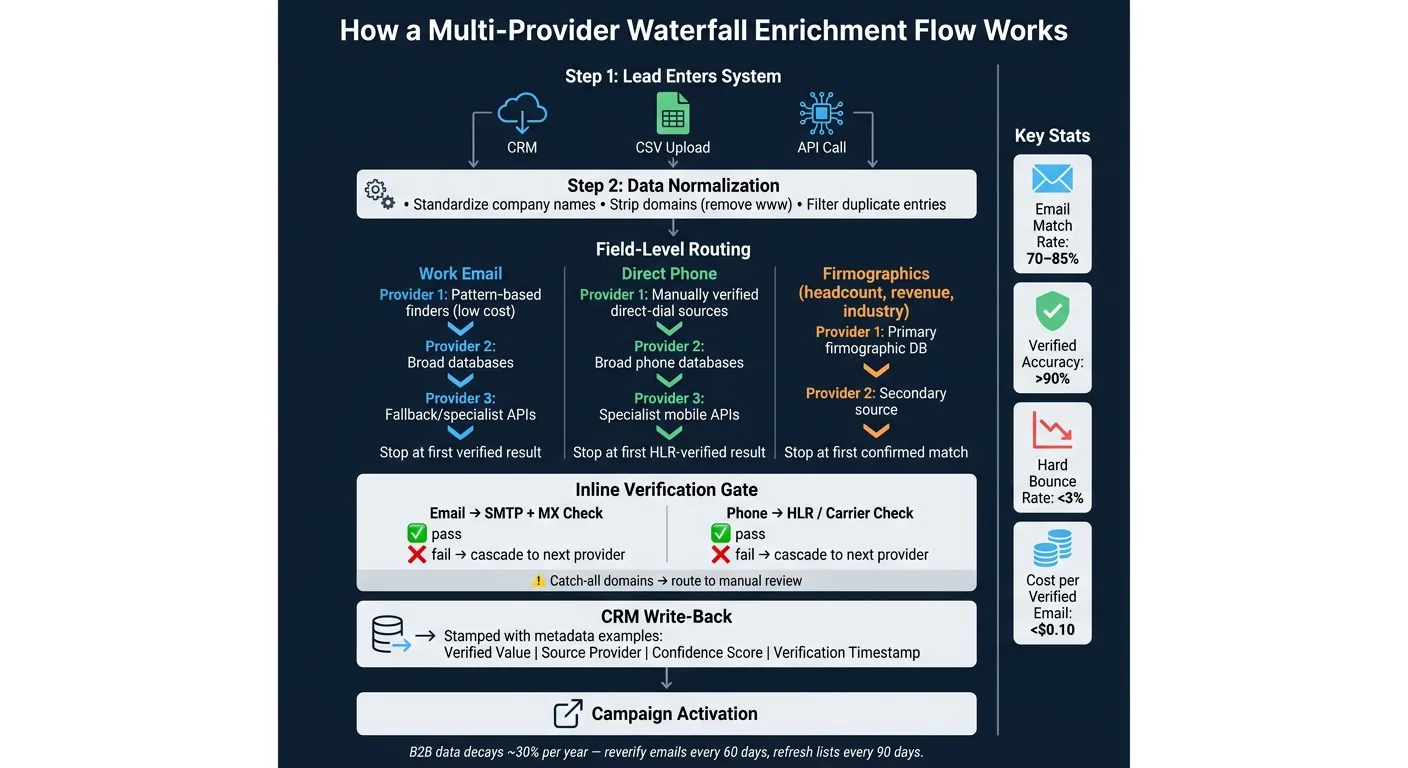
A lead can come in from a CRM, a CSV upload, or an API call. Before any routing starts, the record gets cleaned up. Company names are standardized, "www" is removed from domains, and duplicate entries are filtered out. That clean input matters because lookup order and stop rules only work well when the data going in is consistent.
From there, the waterfall runs field by field, not record by record. Work email, direct phone, and company data each have their own ranked provider sequence, their own confidence threshold, and their own stop rule. When a provider returns a result that clears the threshold for that field, the system stops there for that field and moves on.
After a value is picked, it passes through a verification gate before anything gets written back. Emails go through SMTP and MX checks. Phone numbers go through phone verification checks. The final verified record - the confirmed value plus source metadata - is then written back to the original system. That source stamp shows which provider won, which makes it easier to audit performance over time and reshuffle the waterfall when needed.
Field-level waterfalls for email, phone, and company data
Email, phone, and firmographic data need separate provider sequences because providers don't perform the same way across all three fields.
Work email waterfalls usually start with broad pattern-based sources, then move to larger databases, then use fallback layers for harder-to-match contacts.
Phone waterfalls use the same general setup, but they lean more heavily on verified direct-dial sources. That's because mobile and direct-dial coverage is thinner than email coverage across most databases. Saving deeper - and more expensive - phone lookups for priority accounts is a simple way to protect budget.
Firmographic fields like headcount, revenue, and industry tend to have better baseline coverage and decay more slowly than contact data. Because of that, a lighter two- or three-provider sequence can handle most cases without burning credits on deeper lookups.
Once that field sequence is set, the next call is whether the provider order stays fixed or changes by segment.
Fixed provider order versus conditional routing
A fixed waterfall uses the same provider sequence for every record. It's simple to set up and tends to work well for homogeneous lists, like U.S.-based companies in a narrow size range. The issue shows up when the list includes mixed geographies, company sizes, or industries. If you run a U.S.-centric provider first on a list of European leads, you burn credits and get lower match rates than you would by starting with a provider that knows that segment better.
Conditional routing handles that by branching the waterfall based on segment attributes. A U.S. enterprise account might go to accuracy-first vendors early in the sequence, while a European lead gets routed to a provider with stronger regional coverage. At higher volumes, tighter provider-to-segment matching cuts credit waste and improves overall match quality without adding more providers to the stack.
The downside is extra orchestration logic. Conditional routing needs segment tagging at ingestion and branching logic in the orchestration layer. If a team is working with a single ICP and a clean list, a well-ordered fixed waterfall is often enough. Conditional routing starts to pay off at scale.
API orchestration versus CSV batch workflows
CSV batch enrichment is slower and harder to audit. There’s no automatic retry when a provider returns an empty result, metadata usually isn’t captured in a consistent way, and records can decay before the batch gets imported again.
API-first orchestration runs enrichment in real time as leads enter the system. Retries happen automatically, source metadata is stamped at the field level, and the verified result is written back right away. That gives each field a timestamp, a source, a confidence score, and a verification status.
API-first platforms can handle waterfall enrichment, verification, and writeback in one flow. That routing and verification logic is what drives match-rate differences in the next section.
How lookup order and verification affect match rates
Once you set field-level routing, provider order starts driving both match rate and spend. In many cases, a multi-provider waterfall beats a single source on match rate, especially when you're dealing with tougher records.
Choosing provider order by accuracy, coverage, and cost
A layered order usually works best. Start with a low-cost, broad provider to knock out the easy matches. Then move to a premium or segment-specific provider for the tougher records. Save specialist or human-verified fallback sources for the last gaps.
There’s also an accuracy-first sequence. In that setup, you lead with your most accurate vendor, even if the cost per credit is higher. That approach can make sense for Tier A accounts, where even one bounce can damage sender reputation. For high-volume, lower-priority segments, cost-first ordering often comes out ahead when you're optimizing for effective cost.
Before you lock in the order, test 200–500 ICP records against each vendor. After that, score vendors every month based on:
- match rate
- verified accuracy
- cost per usable record
Then adjust the sequence when the numbers change.
Where verification fits in the flow
Verification sits inside the waterfall and decides whether the process should stop or keep going.
There are three common patterns. Inline verification checks each provider’s result right away. If it passes SMTP and MX checks, the waterfall stops. If it fails, the system moves to the next provider. Post-waterfall verification checks only the final result. It’s faster and cheaper, but there’s a catch: an early provider might return a plausible pattern-guessed email, and that false positive can block a better result later in the sequence. The hybrid model splits the difference. It uses inline confidence thresholds to decide whether to cascade, then runs one final SMTP/MX pass before records enter the outbound sequencer.
Catch-all domains need extra care. An email that passes an SMTP check on a catch-all domain is not automatically confirmed deliverable. Route those records to manual review or to a non-email path. For phone data, a number that fails an HLR check should usually cascade to the next provider, since carrier data freshness can differ from one vendor to another.
Comparison table: provider order scenarios and verification placement
| Scenario | Strategy | Verification Placement | Best-Fit Use Case |
|---|---|---|---|
| Accuracy-first | Most accurate provider first, then specialist fallback | Inline after each hit | Tier A accounts with low bounce tolerance |
| Coverage-first | Cheapest and broadest provider first, then premium fallback | Post-waterfall final pass | High-volume outbound and broad list testing |
| Cost-first | Cheapest provider first, with strict stop rules | Inline to prevent waste | Bootstrapped teams and lower-priority leads |
These tradeoffs shape when a waterfall outperforms a single-source database.
When to use a waterfall instead of a single-source database
Single-provider enrichment works fine until coverage gaps start to hurt. A waterfall helps by filling in the holes one provider leaves behind. The main issue is simple: does the lift in coverage make the extra setup worth it?
Cases where a single provider is enough
For low-volume teams, manual fallback is often fine. If you enrich fewer than 500 records per month and can patch missing data with a fast manual lookup, adding orchestration can create more work than value.
A narrow ICP can also make a second source unnecessary. If your team stays focused on one geography or one vertical where a single provider already has strong coverage, one source may do the job.
Cases where a waterfall is the better choice
This is the point where the stack stops feeling optional. A waterfall makes more sense when match rates flatten, bounce rates climb, or you move into weaker geographies like EMEA and APAC, where U.S.-centric databases get thin fast.
Agencies run into this all the time because every client ICP behaves a little differently. High-volume SDR teams also get a lot out of a waterfall, since even a small lift in reachable contacts adds up fast at scale.
There’s also the issue of source resilience. B2B contact data decays at roughly 30% per year. Spreading lookups across providers with different update schedules helps cut your exposure to one vendor’s refresh lag. Platforms such as OutreachFox combine field-level waterfalls across 50+ providers with built-in verification.
Comparison table: waterfall stack versus single provider
| Dimension | Single Provider | Waterfall |
|---|---|---|
| Email match rate ceiling | Lower | Higher |
| Phone coverage | Usually weaker than email | Broader across providers |
| Verification control | Limited to one vendor's refresh cycle | Multi-layer; supports external SMTP/MX checks |
| Vendor lock-in risk | High | Low - providers can be swapped without rebuilding |
| Complexity | Low - one API or UI | Medium to high - requires orchestration |
| Best fit | Solo operators, narrow ICPs, low volume | Agencies, high-volume SDR teams, multi-geo GTM |
Once the use case is clear, the next step is the stack architecture.
Building and maintaining a waterfall enrichment stack
The baseline architecture for 2026
Once you’ve set the order and verification rules, the next challenge is simple: orchestration and monitoring. In 2026, a waterfall stack usually runs through six steps: normalization, ICP filtering, field-level routing, verification, CRM write-back, and campaign activation.
Field-level routing means you don’t run one giant waterfall for everything. You run separate waterfalls for email, phone, and firmographic data.
For email, the flow usually starts with pattern-based email finders, then moves to bulk databases, then specialist APIs, and finally managed cascade tools to fill the last gaps. Phone data works differently. Since pattern guessing doesn’t hold up well for mobile numbers, phone waterfalls should start with manually verified sources.
The stop rule matters just as much as the order. Set the waterfall to stop at the first verified match. That way, the system doesn’t keep spending credits after it already has a confirmed result.
Every field that moves through the waterfall should also be stamped with its source provider and a confidence score before it lands in your CRM. That metadata makes audits possible later. It also gives you a clean way to reorder providers when performance shifts.
What to monitor after launch
After launch, focus on verified output, not lookup volume. More lookups can look busy on a dashboard, but they don’t mean much if the data fails verification or bounces in campaigns.
Review these metrics every month:
| Metric | Target Benchmark |
|---|---|
| Verified accuracy (% passing SMTP/HLR checks) | >90% |
| Hard bounce rate in live campaigns | <3% |
| Email match rate (aggregate across all providers) | 70–85% |
| Cost per verified email | <$0.10 |
| Record freshness (days since last verification) | <90 days |
Score each vendor with weighted criteria. Verified accuracy and bounce rate should carry the most weight. After that, look at cost per usable record, raw match rate, and freshness. Then rotate provider order based on those scores.
There’s a practical reason for this. B2B contact data decays at roughly 30% per year. So a record that looked clean at import can turn into a deliverability problem much sooner than most teams think.
A simple maintenance rhythm works well:
- Reverify active emails every 60 days
- Refresh the full list every 90 days
- Audit samples quarterly
Conclusion: the key rules to follow
The last job is maintenance. Keep the waterfall accurate as provider quality changes over time.
A waterfall is a system for improving net usable data, not just raw match rate. Start with lower-cost layers, but let verification and accuracy decide when the waterfall stops. A single-source database can work for a while. But once coverage gaps and stale records start hurting deliverability, a well-ordered and closely watched waterfall becomes the safer path.
Frequently asked questions
How often should I reverify email addresses in an active waterfall enrichment system?+
Reverify active emails every 60 days, refresh your full list every 90 days, and audit samples quarterly. B2B contact data decays at roughly 30% per year, so records that looked clean at import can turn into deliverability problems much sooner than most teams expect.
What's the difference between fixed provider order and conditional routing in a waterfall?+
A fixed waterfall uses the same provider sequence for every record and works well for homogeneous lists like U.S.-based companies in a narrow size range. Conditional routing branches the waterfall based on segment attributes like geography or company size, routing U.S. enterprise accounts to accuracy-first vendors while European leads go to providers with stronger regional coverage.
Why should phone data waterfalls be structured differently than email waterfalls?+
Phone waterfalls should start with verified direct-dial sources because mobile and direct-dial coverage is thinner than email coverage across most databases, and pattern guessing doesn't hold up well for mobile numbers. Email waterfalls can start with pattern-based sources, then move to broader databases and fallback tools.
What metrics should I track monthly to optimize my waterfall enrichment stack?+
Track verified accuracy (target over 90%), hard bounce rate in live campaigns (target under 3%), aggregate email match rate (target 70-85%), cost per verified email (target under $0.10), and record freshness (target under 90 days since last verification). Use these metrics to score each vendor and adjust provider order based on performance.
Should inline verification or post-waterfall verification be used in the enrichment flow?+
Inline verification checks each provider's result immediately and stops if it passes, preventing false positives from blocking better results later in the sequence. Post-waterfall verification is faster and cheaper but risks early providers returning plausible pattern-guessed emails that block superior data from subsequent providers.
At what enrichment volume does a waterfall become more cost-effective than a single provider?+
A waterfall becomes worth the setup when enriching 5,000+ records per month, especially when your current source leaves 40-60% of records uncovered. For teams enriching fewer than 500 records monthly with narrow ICPs, manual fallback and a single provider often work fine without the orchestration overhead.
How should I handle catch-all domains in my waterfall verification process?+
An email that passes an SMTP check on a catch-all domain is not automatically confirmed deliverable. Route these records to manual review or to a non-email outreach path, since catch-all acceptance doesn't guarantee the specific mailbox exists or is monitored.