
Set up webhooks with HMAC signature checks, event ID deduplication, and sub-5-second response times to catch replies and bounces in real time instead of polling.
- Webhooks deliver inbox events immediately instead of waiting for polling intervals
- Verify raw request bodies with HMAC-SHA256 and reject requests older than 5 minutes
- Store event IDs to prevent duplicate processing under at-least-once delivery
- Return 2xx responses under 5 seconds and queue payloads for background processing
- Test valid payloads, slow responses, 500 errors, and bad signatures before launch
- Start with 1 to 2 pilot campaigns before enabling webhooks across all mailboxes
Webhooks for Outreach Platforms: Setup Guide
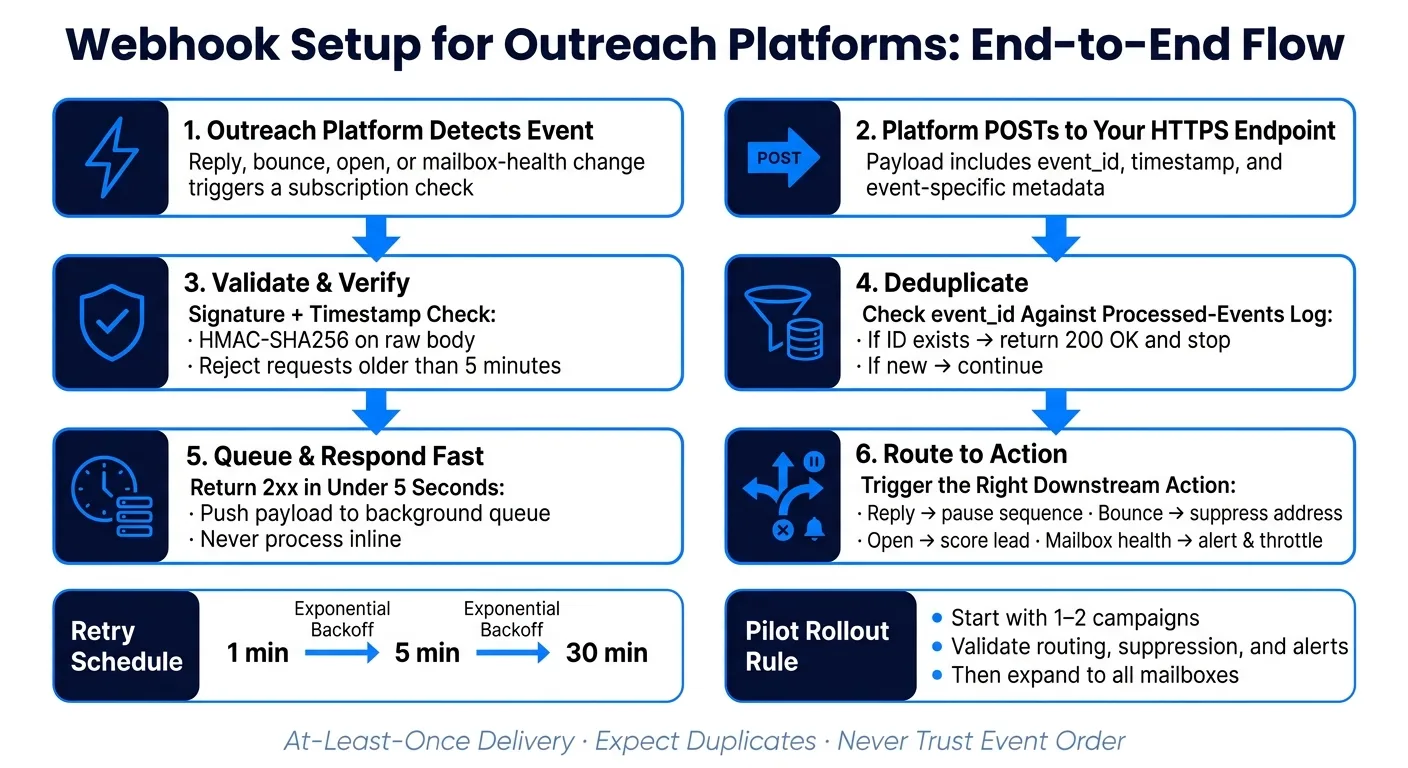
If your outreach data shows up even 5 to 15 minutes late, your team can miss replies, keep sending to bounced addresses, and overlook mailbox issues. I’d set this up with one HTTPS endpoint, HMAC signature checks, a 5-minute timestamp window, event ID deduplication, and a queue that returns 2xx in under 5 seconds.
Here’s the short version of what matters:
- Webhooks beat polling for inbox events because they send data when something happens, not on a timer.
- I’d subscribe to the core events: replies, bounces, opens, and mailbox health.
- I’d treat delivery as at-least-once, which means duplicates can happen.
- I’d never trust event order. A reply can arrive before a related send event.
- I’d verify the raw request body with an HMAC-SHA256 signature header.
- I’d reject old requests with a timestamp check to cut replay risk.
- I’d log each
event_id,replyId, oremailLogIdso the same event does not run twice. - I’d test four failure cases before launch: valid payload, slow response,
500response, and bad signature. - I’d roll out with 1 to 2 live campaigns first, then expand after reply routing, bounce suppression, and mailbox alerts look right.
A few numbers make the setup clearer:
- A webhook endpoint should answer in under 5 seconds
- Old requests should usually be rejected after 5 minutes
- A pilot should start with 1–2 campaigns, not every mailbox at once
- Retry gaps often follow patterns like 1 minute, 5 minutes, then 30 minutes
If I had to reduce the whole guide to one sentence, it would be this: make your endpoint fast, verify every request, expect duplicates, and test failure before live traffic hits it.
How Event Delivery Works in Outreach Platforms
Reply, bounce, open, and mailbox-health event flow
When a reply, bounce, open, or mailbox-health event fires, the platform first checks for a matching subscription. If it finds one, it sends a POST request to your endpoint with the event payload, its IDs, and a timestamp.
Here’s the core flow at a glance:
| Event Type | Triggering Action | Key Metadata |
|---|---|---|
email.bounced | Recipient server rejects the message | bounceType, toEmail, emailLogId |
email.opened | Recipient opens a tracked email | timestamp, leadId, campaignId |
reply.received | Prospect replies; message is matched to a campaign | replyId, subject, bodyPreview, senderEmail |
mailbox.health | Mailbox status changes, such as a deliverability drop or a pause | mailboxId, healthScore, status |
mailbox.health events need extra care. They warn you about deliverability drops or auto-pauses before one weak inbox drags down the rest of the domain. That early signal can save you a lot of pain later.
Delivery guarantees, ordering, and duplicates
Most outreach platforms use an at-least-once delivery model. In plain English, the same event may hit your endpoint more than once.
Order can get messy too. A reply.received event might show up before the email.sent event tied to it, especially during retry delays or heavy sending spikes. Do not assume events arrive in the same order they happened. Use the event_id and timestamp fields in each payload to rebuild the sequence on your side.
Your endpoint should return a 2xx response within a few seconds. Think of webhook delivery as repeated POSTs, not a single call.
A safe setup is simple:
- Store each incoming
event_idin a cache or database - Check that ID before processing the payload
- If the ID is already there, discard the duplicate
That one guardrail helps you avoid duplicate CRM records, double Slack pings, and leads getting suppressed twice.
After delivery is stable, validate the payload and signature before you process anything.
How to Set-up Webhook Inside Smartlead.ai?

Set Up Webhook Endpoints for Core Outreach Events
Once delivery is stable, the next step is simple: send each event type to the right handler.
One endpoint or separate routes: how to choose
If your platform supports both setups, start with one route when one team owns the workflow and one signing secret is enough. Split routes only when different teams or services need their own boundaries.
| Feature | Unified Route (/webhooks/outreach) | Split Routes (/webhooks/replies, etc.) |
|---|---|---|
| Setup Effort | Low - one URL and one signing secret to configure | Higher - multiple URLs and secrets to manage |
| Security Control | One shared secret for all events | Different secrets or IP allowlists per route if needed |
| Routing Simplicity | Requires internal logic to inspect the event or type field | Routing is handled at the web server or load balancer level |
| Debugging | All event logs are mixed together | Failures are isolated to a specific route, which makes tracing easier |
For most teams, a unified route is the best default. It keeps setup simple and cuts down on moving parts.
Split routes make more sense when replies and bounce suppression are owned by different microservices or different teams. They also help when you want tighter security boundaries between event types.
Once routing is set, give each event type one clear action.
How to handle replies, bounces, opens, and mailbox-health events
Each event should trigger one direct outcome in your outreach flow. Think of it like a relay race: one signal comes in, one next step follows.
Replies should pause or end the sequence, then send the lead to CRM or inbox follow-up.
Bounces need the fastest reaction. If it’s a hard bounce, mark the lead as invalid and suppress the address right away.
Opens should go into reporting and lead scoring. Use them for trend tracking, not blind trust. Filter repeat opens and bot activity so the data doesn’t get noisy.
Mailbox-health events and failure signals such as email.failed should throttle or pause the affected mailbox or campaign. These are early warning signs. Treat them that way, and alert your team before deliverability issues spread.
Platform example: API-first webhook setup in OutreachFox
A platform example helps make this more concrete.
OutreachFox is API-first and provides granular events, including reply.categorized. That means downstream systems can route based on reply intent without building a separate classification layer.
Validate Payloads, Secure Requests, and Handle Retries
Once event routing is set up, validate every payload before it touches your queue or storage.
How to read the payload structure
Use one consistent envelope: top-level event or meta.eventName, ISO 8601 timestamp, and data or attributes.
| Event Type | Key Fields | Purpose |
|---|---|---|
| All Events | event, timestamp, campaignId | Routing and chronological auditing |
| Replies | replyId, fromEmail, subject, bodyPreview | Reply triage and routing |
| Bounces | emailLogId, bounceType, error | Suppression and list hygiene |
| Opens | emailLogId, toEmail | Engagement tracking |
| Mailbox Health | category, previousCategory | Mailbox alerts and throttling |
If a required field is missing, reject the payload with a 400 before it reaches storage.
That one check saves a lot of pain later. Bad input that slips into your system tends to cause messy failures downstream, and those are harder to trace.
How to verify signatures and reject bad requests
An unsigned endpoint accepts arbitrary POSTs. HMAC-SHA256 signing closes that gap.
The platform hashes the raw request body with a shared secret and sends the result in a signature header, usually something like X-Webhook-Signature. Your endpoint computes the same hash and compares the two in constant time.
One detail matters a lot: verify against the raw, unparsed body. If you parse JSON first, whitespace or key order can shift, and that can break the signature check even when the request is valid.
Beyond signature verification, add a timestamp check. Reject requests older than 5 minutes to cut replay risk.
| Feature | Unsigned Payloads | HMAC-Signed Payloads |
|---|---|---|
| Authenticity | None - anyone can POST to the URL | Verified - only the secret holder can generate the signature |
| Integrity | Payload can be tampered with in transit | Any body change causes a signature mismatch |
| Replay Protection | Vulnerable | Protected when combined with timestamp validation |
| Complexity | Low - no extra code needed | Moderate - requires HMAC calculation on the receiver side |
HTTPS is non-negotiable. Signature checks alone don't help on plain HTTP, because both the secret and the payload can be exposed in transit. Only after that should the event move to your processor.
How to design for retries and duplicate delivery
After authentication, make delivery idempotent.
Webhook platforms retry failed deliveries, so plan for that from day one. If the same event shows up twice, your system should behave as if it only arrived once.
Return a 2xx within 5 seconds, then push the payload to a background queue. If your endpoint tries to handle everything inline and times out, the platform marks the delivery as failed and retries.
Deduplicate on the event's unique ID, such as emailLogId or replyId. Before processing any event, check whether that ID already exists in your processed-events log. If it does, return 200 OK and stop.
Retry schedules vary by platform. Some use fixed intervals. Others use exponential backoff. A pattern like 1 minute, 5 minutes, then 30 minutes works well for server outages or rate-limiting.
| Approach | No Deduplication | Event-ID Idempotency |
|---|---|---|
| Risk | Same event processed multiple times | Each event processed exactly once |
| CRM Impact | Duplicate records or double-suppression | Clean, accurate contact state |
| Complexity | None | Requires a processed-events log or cache |
Store raw payloads alongside your processed-event log. If something breaks halfway through processing, you can replay from the raw log instead of waiting for the platform to retry.
Test the Workflow and Roll It Out Safely
With payload validation and retry logic in place, test the full workflow in staging before you send any live traffic.
Run staging tests and failure simulations
Before anything goes live, validate the endpoint in staging. Most outreach platforms give you a "Send Test Payload" or "Test" button in the webhook settings. Some also tag test payloads with "test": true in the JSON envelope, which makes it easy to filter them out in your processing logic.
On each test send, check the status code, response time, signature verification, and field mapping. Then push on the weak spots a bit. Return a 500 response to confirm the platform retries the request. Delay the response past the platform timeout to see how it handles slow processing. Send a request with a tampered signature and make sure the endpoint rejects it.
Use the platform's delivery log while you do this. It shows the status code, response duration, and the full request and response. In practice, that's usually the fastest way to spot what broke and why.
If those tests pass, move one or two campaigns into a live pilot.
Start with a pilot campaign before full rollout
Don't turn on webhooks for every mailbox at once. Start with one or two campaigns and watch latency, error rates, and routing accuracy.
Staging tells you the plumbing works. The pilot tells you the workflow holds up under live sends. Check that reply routing puts conversations in the right bucket, hard bounces trigger suppression, and mailbox-health events send the right alerts. Expand to all mailboxes only after those behaviors stay stable under live traffic.
Use the pilot to prove the workflow under actual load before full rollout. Scale once queueing and alerting are in place.
Conclusion: Minimum production checklist
Before you call the integration production-ready, verify these points:
- HTTPS endpoint only - no plain HTTP
- Staging tests passed - valid payload, slow response, failed response, and tampered signature all confirmed
- Pilot campaign completed - at least one or two campaigns checked under live traffic
- Reply, bounce, open, and mailbox-health routing validated - each event type triggers the right downstream action
Frequently asked questions
How do I prevent duplicate webhook events from being processed twice in my outreach platform integration?+
Store each incoming event_id, replyId, or emailLogId in a cache or database before processing. Check that ID against your stored list when a new event arrives. If the ID already exists, return a 200 OK response and skip processing. This pattern handles the at-least-once delivery model most outreach platforms use and prevents duplicate CRM records or double suppressions.
Why do I need to verify the raw request body instead of the parsed JSON for HMAC signature checks?+
Parsing JSON before verification can change whitespace or key order, which breaks the signature check even when the request is valid. The platform hashes the raw request body with a shared secret, so your endpoint must compute the hash against that same raw, unparsed body. Only after successful signature verification should you parse and process the payload.
What specific events should I subscribe to for outreach webhook integrations?+
Subscribe to replies, bounces, opens, and mailbox health events. Replies should pause sequences and route to CRM. Bounces need immediate suppression for hard bounces. Opens feed reporting and lead scoring. Mailbox health events warn about deliverability drops or auto-pauses before issues spread across your domain.
How should I handle webhook events that arrive before related send events?+
Never assume webhook events arrive in chronological order. A reply.received event can show up before the related email.sent event during retry delays or sending spikes. Use the event_id and timestamp fields in each payload to rebuild the correct sequence on your side, rather than relying on arrival order.
What is the recommended response time and status code for webhook endpoints?+
Return a 2xx status code within 5 seconds. Push the payload to a background queue for processing instead of handling everything inline. If your endpoint times out, the platform marks delivery as failed and retries, which can create duplicate deliveries and processing delays.
How do I test my webhook endpoint before sending live outreach traffic to it?+
Run four failure simulations in staging: send a valid payload to confirm success, delay the response past timeout to test slow processing, return a 500 response to verify retry behavior, and send a tampered signature to confirm rejection. After staging tests pass, start with 1-2 live campaigns in a pilot before expanding to all mailboxes.
Why should I reject webhook requests older than 5 minutes?+
A timestamp check cuts replay risk by rejecting old requests that could be malicious replays of legitimate events. Combined with HMAC signature verification on the raw body, this provides protection against both tampering and replay attacks. Most platforms include an ISO 8601 timestamp in the payload for this validation.