Use p=quarantine while validating senders to keep failed mail visible in spam folders. Switch to p=reject only after 30 days of clean reports when all sending paths are documented and aligned.
- Quarantine accepts failed mail and sends it to spam for easier debugging
- Reject blocks failed mail at SMTP with no message delivered to review
- Use quarantine during rollout to catch misaligned senders before blocking mail
- Switch to reject only after 30 days of clean aggregate reports
- Forwarding often breaks SPF alignment and can trigger DMARC failures
- Isolated infrastructure makes stricter enforcement safer and easier to troubleshoot
DMARC Quarantine vs Reject For Cold Outreach
If you’re still checking senders, use p=quarantine. If every mail path is lined up, use p=reject.
That’s the short answer. Quarantine lets failed mail get accepted and pushed to spam, so I can still spot problems. Reject blocks failed mail during SMTP with errors like 5.7.1, so the message never lands. For cold outreach, that means one bad setup can either be visible and fixable or blocked on the spot.
Here’s what matters most:
p=quarantine: failed mail is usually accepted, then sent to spam or junkp=reject: failed mail is refused before delivery- Quarantine is safer during setup because I can still inspect failures
- Reject gives stronger spoofing protection once all senders are checked
- Forwarding can break SPF, which can trigger DMARC failure under strict policy
- Bounce logs matter more under reject, because there’s often no message left to review
My simple rule: I use quarantine for rollout and reject for lock-down.
DMARC Policy Explained: p=none, p=quarantine, p=reject
Quick Comparison
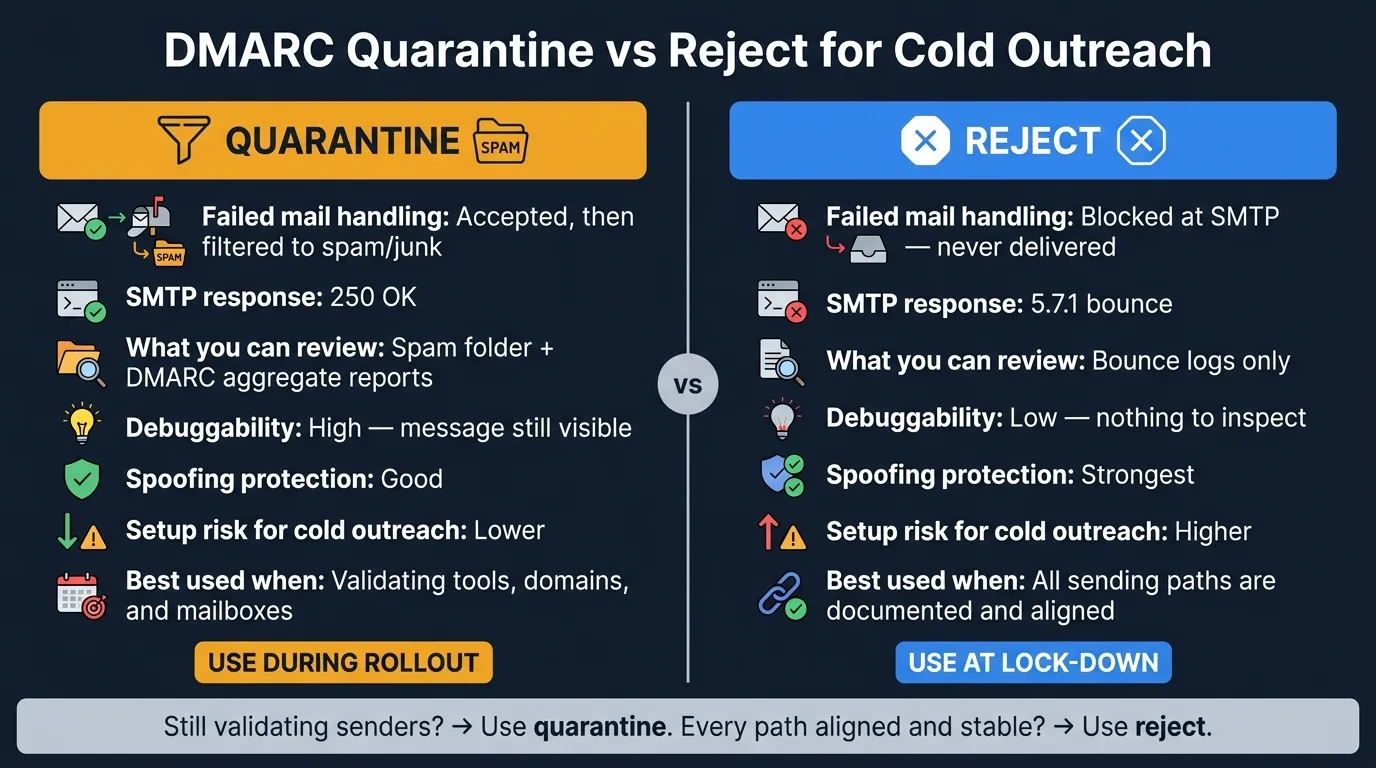
| Checkpoint | p=quarantine | p=reject |
|---|---|---|
| Failed mail handling | Accepted, then filtered | Blocked at SMTP |
| Where the message goes | Spam/junk in many cases | Nowhere; not delivered |
| What I can review | Spam folder + DMARC reports | Bounce logs |
| Setup risk for cold outreach | Lower | Higher |
| Spoofing protection | Good | Stronger |
| Best time to use it | While validating tools, domains, and mailboxes | After all paths pass alignment |
A lot of teams don’t fail because DMARC is wrong. They fail because one sender, one forwarding path, or one tool was missed. This comparison is about avoiding that.
DMARC quarantine vs reject: a quick comparison
DMARC has three states: p=none for monitoring, p=quarantine for soft enforcement, and p=reject for hard enforcement.
| Factor | p=quarantine | p=reject |
|---|---|---|
| Acceptance behavior | Accepted | Rejected |
| Where failed mail lands | Spam, junk, or another filtered folder | Not delivered |
| Debuggability | Easier - the message is still visible in the recipient's spam folder | Harder - nothing to inspect once refused |
| Domain protection | Moderate enforcement against spoofed mail | Stronger enforcement against spoofed mail |
| Cold outreach risk | Lower risk of losing legitimate mail during rollout | Higher risk of blocking legitimate mail if alignment is incomplete |
What quarantine does when mail fails
When a message fails DMARC under p=quarantine, the receiving server accepts it with a 250 OK response and sends it to spam or junk. That gives teams a safety buffer. The message still exists, so you can spot misaligned senders in reports and inbox tests before legitimate mail gets blocked.
What reject does when mail fails
Under p=reject, the receiving server refuses the message during the SMTP stage. The sender gets a 5.7.1 bounce, and the recipient never sees the email. Once the server rejects it, the message is gone. All that's left is the bounce.
This makes p=reject the strongest option against domain spoofing and impersonation. It also makes it the least forgiving. If your outbound setup includes multiple mailboxes or forwarding paths, one misaligned sender can stop a campaign cold, and the bounce may be your only clue.
Those differences show up most clearly in deliverability, monitoring, and domain safety.
Deliverability, monitoring, and domain safety: quarantine vs reject
The main difference comes down to day-to-day operations: quarantine leaves you clues to work with, while reject takes those clues away.
| Factor | p=quarantine | p=reject |
|---|---|---|
| Inbox placement impact | Usually spam/junk vs. SMTP refusal | |
| Failure visibility | Reports plus spam-folder checks | Bounce logs only |
| Spoofing protection | Good | Strongest |
| Rollout safety | Safer during validation | Riskier after escalation |
| Blast radius | Lower | Higher |
How quarantine affects inbox placement and debugging
With p=quarantine, failed mail usually stays visible in spam folders and DMARC reports. That makes troubleshooting a lot easier. If a CRM integration was forgotten or a third-party tool is missing from SPF, you can often spot it as a pattern in aggregate reports instead of dealing with a silent hole.
You still give up primary inbox placement for those messages. But you keep the signal you need to find the source of the issue, which matters when you're still checking that every mail path lines up the way it should.
How reject affects message loss and domain protection
With p=reject, spoofed mail gets blocked at SMTP, so the bounce is often the only trace left. That gives your domain the strongest protection, but it also leaves less room for error.
Forwarding is a common pain point here because it often breaks SPF alignment. Under p=reject, those messages bounce with a 5.7.1 error instead of drifting into spam. When that happens, your SMTP logs become the main place to find out what went wrong.
That tradeoff is what tells you whether you're ready for hard enforcement or still need more validation.
Why isolated infrastructure matters more under stricter enforcement
Stricter policies are much easier to handle when each sender sits on isolated infrastructure. If one sending path breaks, it's simpler to pinpoint the problem instead of sorting through a mess of shared systems.
Put bluntly: when enforcement gets tighter, clean separation saves time and limits damage.
Which DMARC policy fits your cold outreach setup
After comparing the policies, the next issue is simple: how steady is your sender inventory?
Your best choice comes down to what your aggregate reports look like right now. If those reports are still shifting, p=quarantine is usually the safer move. If every sending path has been checked and confirmed, p=reject is the better call.
| Team condition | Better fit | Reason |
|---|---|---|
| Multiple tools or domains still being validated | p=quarantine | Reduces the chance of blocking legitimate mail during cleanup |
| Sender inventory not fully documented | p=quarantine | Gives you time to find and fix missing alignment |
| All sending paths are documented and aligned | p=reject | Stronger protection with lower risk of accidental blocking |
| Strong spoofing protection requirements | p=reject | Stops failed mail at the policy layer |
| Active rollout | p=quarantine | Safer transitional policy |
| Stable outbound program | p=reject | Better final-state enforcement |
Choose quarantine when your sender inventory is still changing
If your reports still show moving pieces, stay light on enforcement.
When you're sending campaigns across several domains or wiring up a few third-party tools, quarantine is the safer place to start. One sender you forgot about - one tool that isn’t set up right - can make valid mail fail under p=reject.
That’s why p=quarantine works well during cleanup. It gives you room to catch unknown senders, broken DKIM, and missed SPF entries before you block mail outright.
Choose reject when every sending path is locked down
Once your reports are clean and steady, hard enforcement makes more sense.
Use p=reject only when aggregate reports show that every sender is documented, aligned, and stable. At that point, blocking spoofed mail matters more than keeping visibility into failed messages.
There is one common exception: a dedicated outbound-only domain. Some teams set that kind of domain to p=reject on day one. That can work when the setup is isolated and fully under your control.
In that sense, p=quarantine is your rollout policy, and p=reject is your mature-state policy.
Conclusion: quarantine for rollout, reject for mature enforcement
After the comparison above, the choice comes down to rollout safety versus final enforcement.
During rollout, p=quarantine keeps failed mail visible and easier to debug. If a tool is set up the wrong way or a sending path was missed, the message still lands in spam instead of disappearing completely. That gives you room to spot problems and fix them before mail starts getting blocked outright.
Once alignment is stable, strict rejection is the cleaner end state.
Move to p=reject only after aggregate reports stay clean and every sending path is documented and aligned. At that point, blocking spoofed mail at the SMTP layer matters more than keeping failed messages around for inspection. That’s why quarantine fits the rollout stage, while reject fits the lock-down stage.
A dedicated cold-sending domain can start at p=reject when it is fully isolated. Treat them as stages, not rivals: use quarantine while validating senders, and use reject once the stack is stable.
Frequently asked questions
What happens to my cold outreach emails if I set p=reject too early?+
If you switch to p=reject before all your sending paths are properly aligned, legitimate cold outreach emails can be completely blocked at the SMTP layer with a 5.7.1 error. The recipient never sees the message, and you're left with only bounce logs to troubleshoot. This is especially risky if you're using multiple tools, domains, or haven't fully documented every sender in your stack.
Can I see failed emails in my spam folder under p=reject?+
No. Under p=reject, failed messages are refused during the SMTP handshake and never delivered to the recipient's mailbox. Unlike p=quarantine where failed mail lands in spam or junk folders, p=reject leaves no message to inspect—only bounce logs on the sending side.
Why does forwarding break SPF and cause DMARC failures under strict policies?+
When an email is forwarded, the forwarding server sends it from its own IP address rather than the original sender's IP. That new IP typically isn't listed in your SPF record, breaking SPF alignment. Under p=reject, this SPF failure can cause the forwarded message to bounce with a 5.7.1 error, even though the original send was legitimate.
How long should I stay on p=quarantine before switching to p=reject for cold outreach?+
Stay at p=quarantine for at least 30 days while monitoring DMARC aggregate reports. During this period, verify that 100% of your legitimate sending passes SPF and DKIM alignment, and ensure every sending source is documented and stable. Only move to p=reject once reports stay consistently clean with no unexplained failures.
Is it safe to use p=reject immediately on a brand new cold outreach domain?+
Yes, if the domain is dedicated to outbound-only cold outreach and completely isolated from other sending paths. When the setup is fully under your control with pre-configured authentication and no shared infrastructure, you can start at p=reject on day one. This doesn't apply to domains with mixed use or multiple tools.
What debugging information do I lose when switching from quarantine to reject?+
With p=reject, you lose the ability to inspect failed messages in spam folders and can only rely on SMTP bounce logs. Under p=quarantine, failed emails still reach the recipient's spam folder, giving you direct message samples to review alongside aggregate reports. This makes troubleshooting misaligned senders or broken authentication much easier during rollout.
Can one misconfigured tool block all my cold emails under p=reject?+
Yes. If you're using p=reject and one CRM integration, third-party tool, or mailbox isn't properly aligned with SPF and DKIM, all messages from that source will be blocked at SMTP. This is why it's critical to audit every service that sends email for your domain and validate alignment in aggregate reports before escalating to p=reject.