
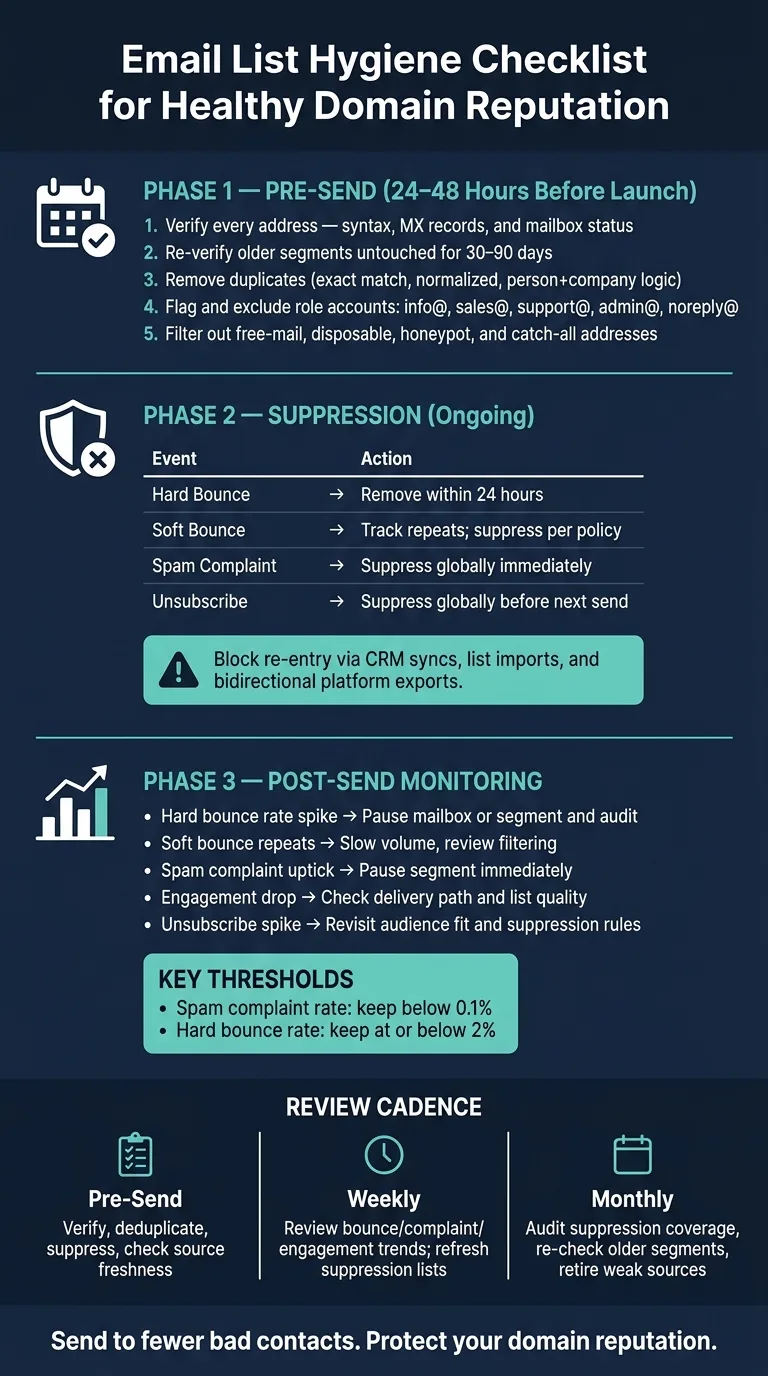
Maintain domain reputation by verifying emails 24-48 hours before send, suppressing hard bounces and complaints immediately, and monitoring mailbox-level bounce patterns after launch.
- Verify every address for syntax, MX, and mailbox status 24-48 hours before launch
- Suppress hard bounces, spam complaints, and unsubscribes within 24 hours to protect sender reputation
- Re-verify older segments unused for 30-90 days before sending to catch stale data
- Remove duplicates, role accounts, disposable emails, and catch-all addresses from active lists
- Monitor bounce and complaint rates by mailbox and recipient domain after every send
- Keep spam complaints under 0.1% and hard bounces under 2% to maintain healthy deliverability
List Hygiene Checklist for Healthy Domain Reputation
A dirty list can wreck deliverability fast. If I want to protect domain reputation, I need to verify addresses 24 to 48 hours before send, remove duplicates, block bad records, and watch bounce and complaint patterns right after launch.
Here's the short version:
- I verify every address for syntax, MX, and mailbox status.
- I re-check older data, especially lists untouched for 30 to 90 days.
- I remove duplicates, role accounts, and risky address types.
- I suppress hard bounces, spam complaints, and unsubscribes without delay.
- I stop bad records from re-entering through CRM syncs or imports.
- I review source age, source type, and job-change signals before I trust a segment.
- I monitor bounce, complaint, unsubscribe, and engagement trends by mailbox and recipient domain after sending.
A few numbers matter here. Spam complaint rates should stay very low, often under 0.1% for many programs. Hard bounce rates are often expected to stay around 2% or less, and when you exceed these bounce rate benchmarks for cold outreach, it's time to pause and audit your list before sending more.
This checklist is about one thing: send to fewer bad contacts so inbox providers see cleaner traffic. That means less waste, fewer warning signs, and a healthier sending setup over time.
List hygiene tactics for a clean sweep | Email Camp 2024
Pre-Send Checklist: Verify, Deduplicate, and Clean Your List
A clean list helps cut bounces, complaints, and wasted sends. Run these checks 24 to 48 hours before launch so you're not fixing problems at the last minute.
Verify Every Address 24 to 48 Hours Before Launch
Check syntax, MX records, and mailbox status before you send. That helps catch formatting mistakes and inactive addresses early, which cuts down on hard bounces.
If you're using third-party data, event leads, or older segments that haven't been used or checked in the last 30 to 90 days, send them through a full re-verification pass before launch. Old data can go stale fast, which is exactly why pre-send verification cuts lead list decay so effectively—a list that looked fine a month ago can turn into a mess by send day.
Remove Duplicates, Role Accounts, and Bad Data
Deduplicate using:
- exact match
- normalized address
- person-plus-company logic
Then flag role accounts like info@, sales@, support@, admin@, and noreply@. Keep them out of your primary send. These inboxes often create noise, go to shared teams, or lead to weak engagement.
Once the list is clean, move straight to suppression so bad records don't sneak back in.
Filter Free-Mail, Disposable, and Catch-All Addresses
Separate free-mail, disposable, honeypot, and catch-all addresses from corporate contacts. These records carry more risk, so exclude them unless the segment gives you a good reason to keep them.
After source filtering, lock the list with suppression rules before launch.
Suppression Checklist: Keep Bad Records Out of Future Sends
Verification and deduplication clean your list before launch. Suppression keeps it clean after that.
Suppress Hard Bounces, Complaints, and Unsubscribes Right Away
Use these rules as your suppression policy:
| Event | Action |
|---|---|
| Hard bounce | Remove from active sending lists within 24 hours. |
| Soft bounce | Track repeat soft bounces and suppress per policy. |
| Spam complaint | Suppress globally immediately; never email again. |
| Unsubscribe | Suppress globally before the next send. |
This part shouldn't sit on the back burner. If someone hard bounces, unsubscribes, or marks your email as spam, waiting too long can turn a small list hygiene issue into a sender reputation problem, since bounce rates and sender reputation are directly connected.
Once suppression is in place, watch mailbox-level bounce patterns for new issues.
Stop Suppressed Contacts from Re-Entering via CRM and External Syncs
A clean suppression setup can fall apart fast if your CRM, sales tools, or outside syncs keep pushing bad records back into your audience. That's the leak most teams miss.
Make sure suppressed contacts can't re-enter active sending lists through:
- CRM field updates
- List imports
- Bidirectional syncs
- Sales or support platform exports
If a contact is suppressed in one system but still marked as sendable somewhere else, they'll sneak back in. And then you're right back where you started.
Source and Freshness Checks Before You Trust a Segment
Verification clears the address. Source checks clear the segment.
That difference matters. A list can pass verification and still be risky if the source is shaky or the contact has moved to a new role. Deliverability trouble often starts before send time, with weak source quality and old segment data.
Check Source Age, Origin, and Job-Change Signals
Before you trust any segment, ask three plain questions: How old is this data? Where did it come from? And is the source solid enough for cold outreach?
Look at the last verification date, the last enrichment date, and any job-change signals that point to a contact no longer being at the same company or in the same role. An email can still resolve and still be stale. That's the trap.
Apply Stricter Rules to Higher-Risk Data Sources
Not all sources carry the same level of risk. Some are close to ready. Others should sit in quarantine until they pass a deeper review.
| Source Type | Typical Risk | Recommended Verification Depth | Refresh Rule |
|---|---|---|---|
| Opt-in / inbound leads | Low | Standard verification | Re-verify if older than 30 days |
| Event / conference leads | Low–Medium | Standard verification | Re-verify if older than 30 days |
| Third-party purchased data | High | Full verification plus source review | Re-verify before use |
| Scraped lists | High | Full verification plus source review | Re-verify before use |
| Previously used internal segments | Medium–High | Full re-verification | Re-verify before reuse |
If the source age or origin looks weak, leave the segment out until you refresh it. Once the source is approved, watch live sends closely for mailbox-level bounce spikes.
After Launch: Monitor Mailbox-Level Bounce Patterns and Close the Loop
Post-send data tells you if your list-cleaning work held up and where things started to slip.
Once your suppression lists and source rules are set, keep a close eye on live sends for any drop in performance.
Review Bounce, Complaint, and Engagement Trends by Mailbox and Domain
Check metrics by individual mailbox, not just the campaign total. A campaign can look healthy at a glance while one mailbox is quietly starting to slip. When you break results out by sending mailbox and recipient domain, it becomes much easier to spot whether the problem sits with the sender or with a certain segment.
Watch for these signals after launch:
| Signal | What to Watch For | Action |
|---|---|---|
| Hard bounce rate | A sudden increase, especially in one mailbox or one segment | Pause the mailbox or segment and audit the list |
| Soft bounce rate | Repeated failures across sends | Slow down volume and review mailbox filtering |
| Spam complaints | Any noticeable uptick | Pause the segment immediately and audit source and segment fit |
| Engagement trends | A sharp drop versus recent sends | Check delivery path, routing, and list quality |
| Unsubscribes | A sudden jump above your normal baseline | Revisit audience fit and suppression rules |
If bounces pile up on one recipient domain, treat it as a domain issue. If they show up across domains but trace back to one sending mailbox, treat it as a mailbox issue.
Use real-time analytics and webhooks to catch bounce and mailbox-health events before the pattern spreads.
Build a Working Cadence from This Checklist
Use these same signals to set a weekly review rhythm. The goal is simple: catch trouble early, then act before it grows.
- Pre-send: Verify new addresses, deduplicate, apply suppression lists, and check source freshness before launch.
- Weekly: Review bounce, complaint, unsubscribe, and engagement trends by mailbox and recipient domain. Refresh suppression lists with new hard bounces and complaints, and pause anything that starts to degrade.
- Monthly: Audit suppression coverage, re-check older segments, and review which sources are producing the most problems so you can tighten or retire them.
Frequently asked questions
How far in advance should I verify email addresses before sending a campaign?+
Verify every address 24 to 48 hours before launch. This timing gives you enough buffer to catch formatting mistakes and inactive addresses early without fixing problems at the last minute.
What hard bounce rate should I aim for to maintain good domain reputation?+
Hard bounce rates should typically stay around 2% or less. If you see spikes above your normal baseline, pause sending and audit the list before continuing.
How quickly should I suppress contacts who submit spam complaints?+
Suppress spam complaints globally and immediately. These contacts should never receive another email from you, as waiting too long can escalate into a sender reputation problem.
Why do I need to re-verify email lists that haven't been used in 30 to 90 days?+
Old data goes stale quickly as people change jobs, companies update mail servers, or addresses become inactive. A list that looked fine a month ago can turn into a problem by send day, so full re-verification is necessary before reuse.
How can suppressed contacts re-enter my sending lists even after I remove them?+
Suppressed contacts often sneak back through CRM field updates, list imports, bidirectional syncs, or sales platform exports. If a contact is suppressed in one system but marked as sendable elsewhere, they'll re-enter your active lists.
Should I monitor email performance by campaign total or by individual mailbox?+
Monitor by individual mailbox and recipient domain, not just campaign totals. A campaign can look healthy overall while one specific mailbox is quietly degrading, making granular monitoring essential for catching problems early.
What verification depth should I apply to third-party purchased data versus opt-in leads?+
Third-party purchased data requires full verification plus source review and should be re-verified before each use. Opt-in leads carry lower risk and need only standard verification, with re-verification if older than 30 days.