
Verify email addresses right before sending, not weeks earlier. Pre-send verification catches closed mailboxes, catch-all changes, and dormant inboxes that decay between list build and campaign launch.
- B2B contact data decays 2-3% monthly between verification and send time
- Verify at launch, not during list build, to catch closed and dormant mailboxes
- Suppress invalid addresses, high-risk catch-all domains, and role accounts before sending
- Set freshness windows and automate re-verification for older records before enrollment
- Centralize bounce suppression across all mailboxes to prevent repeat failures
Why Pre-Send Verification Cuts Lead List Decay
A clean list can still fail by launch day. If you verify contacts too early, some addresses will change before you send, which can lead to more bounces, lower inbox placement, and wasted volume.
Here's the short version:
- List decay happens in the gap between build and send
- Old verification results can miss closed mailboxes, catch-all shifts, and dormant inboxes
- A send-day check helps you catch bad records before the first email goes out
- You should suppress invalid, risky, and role-based addresses
- A simple workflow beats one-time cleanup: enrich, verify, send, then suppress bounce records across all mailboxes
I'd treat this as a timing problem more than a list-building problem. Even if a record passed a check 14 or 30 days ago, it may fail today. And since average B2B data decay is often cited around 2% to 3% per month, that gap adds up fast on large lists.
A simple rule works well: verify near the moment of use. Then use a set freshness window, re-check older records, and block bounced contacts everywhere so they don't get mailed again.
Why verification done weeks before launch breaks at send time
The gap between list prep and launch
Verification done weeks before launch can fall apart by send day. A team may clean a list early, then leave it untouched until the campaign goes live. On paper, those records looked fine. In practice, inbox status can change before the first email goes out.
People leave companies. Mailboxes get shut off. Some inboxes are abandoned and never checked again.
That drift tends to show up in a few predictable ways.
The main send-time failure modes
Hard bounces from once-valid addresses are the clearest sign. An address may have worked when you checked it, then stop accepting mail later because the mailbox was closed, the domain changed, or the mail setup behind it shifted. Every hard bounce takes a small bite out of sender reputation.
Domains that switch to catch-all are less obvious, and they can do more damage when you send at scale. A domain may later move into catch-all mode, which means SMTP starts accepting bad addresses too. So the result you got during the first verification pass no longer matches what that domain does at send time.
Mailboxes that go dormant, get reassigned, or stop being monitored create a similar problem. These addresses may not bounce at all. But they still burn volume and can drag down deliverability.
How stale verification shows up in campaign metrics
The clearest signal is a spike in bounces grouped by domain. Sometimes a second verification pass also comes back with more "unknown" results. That's a strong sign the receiving setup changed after the first check.
The list may have been accurate when it was built. But deliverability depends on the state of the inbox when you hit send. When failures cluster after send-day conditions shift, that's usually the fingerprint of stale verification rather than a bad list.
That is why the next step is send-day verification and mailbox status checks.
How pre-send verification and mailbox status checks cut decay risk
To close that gap, verify the exact send list right before launch.
What gets checked right before send
Syntax validation comes first. Then domain and MX record checks confirm that the receiving domain is still set up to accept messages.
SMTP checks go a step further. They test whether a specific mailbox still exists on that server. At the same time, catch-all domain detection flags domains that accept any address, even when the mailbox itself isn't real.
Role account filtering removes addresses like info@, support@, admin@, and noreply@ from cold outreach sequences. Then risk scoring turns all of those signals into a simple send-or-drop call.
Why mailbox status checks are a separate step
Verification and mailbox status checks work together, but they answer different timing questions.
Verification checks likely validity. Mailbox status checks confirm current acceptance. That difference matters more than it may seem at first glance.
An address can pass SMTP verification and still fail at send time if the mailbox was closed after your verification run. That's why mailbox status checks happen at launch time, not at import. They confirm current acceptance behavior, not past validity.
What to suppress before the first send
Before a single email goes out, remove or hold back three types of records:
- Invalid addresses should be suppressed right away.
- High-risk results - including catch-all domains and other uncertain records - should be excluded or re-verified before launch.
- Role accounts should be removed from cold outreach lists.
Re-check any record older than your freshness window before it enters a sequence. OutreachFox supports API-first verification and real-time mailbox-health events, so risky records can be suppressed before the first send. Then automate re-verification, so freshness doesn't depend on manual cleanup.
Build a real-time verification workflow instead of a one-time cleanup
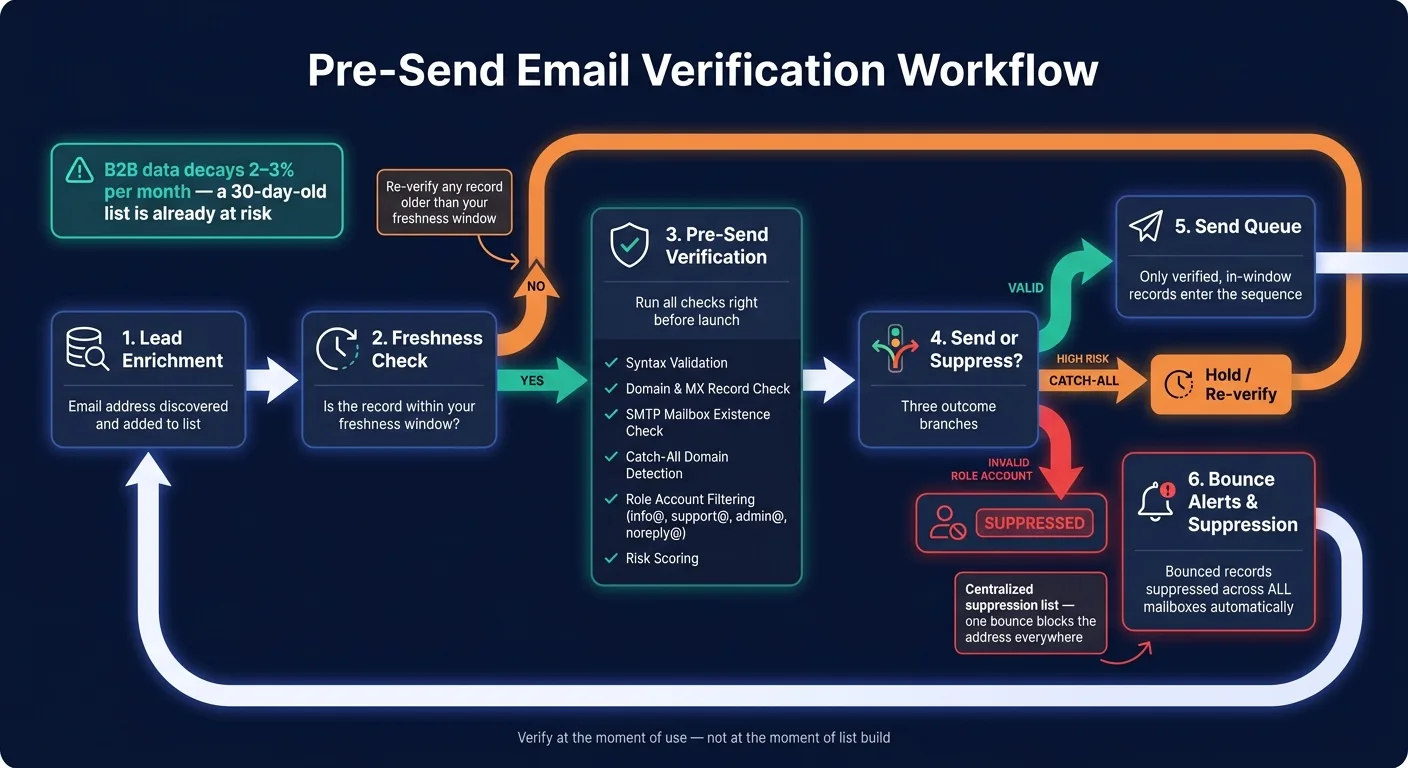
A one-time list cleanup is just a snapshot. The moment you finish it, the data starts getting old. If you send later, some of those records may already be outdated. The better move is to turn email verification into a continuous workflow that checks records right before enrollment. That only works when verification lives inside the workflow itself, not in a spreadsheet sitting off to the side.
Set freshness windows and automatic re-verification
Re-verify any contact that falls outside your freshness window before it enters a sequence. Make that window a hard rule in your outbound logic so stale records don't slip through.
Connect enrichment, verification, and sending in one flow
The safest setup is a gated workflow. Enrichment finds an email, verification checks it right away, and your CRM or outbound logic saves the result. Only records that pass the gate move into the send queue. Everything else gets held back or flagged for review.
With API-first systems, you can send verified records straight into the queue and catch issues before the next send, which is particularly important when managing hard and soft bounces across your campaigns.
Add bounce alerts and suppression across all mailboxes
Another common failure point is suppression spread across separate tools. The last gap is fragmented suppression. What you want is one suppression list that every mailbox follows.
Centralize suppression so a bounced record gets blocked across every mailbox and sender. Bounce alerts should suppress the record right away, helping you maintain healthy bounce rate benchmarks and protect your sender reputation.
Conclusion: Pre-send checks work because they match data to the moment of use
Lead data goes stale between enrichment and send time. That gap is exactly why pre-send verification matters. Verify as close to launch as you can, then suppress stale or failed records before anything goes out.
The fix is one workflow that ties enrichment, verification, and sending together. OutreachFox fits that setup with isolated sending infrastructure, built-in verification, and real-time mailbox health. The rule here is simple: verify at the moment of use, not at the moment of list build.
Use these rules on the next launch:
Key points to carry into the next campaign
One-time verification goes stale before launch, increasing bounce risk.
Mailbox status checks are a separate, needed step. Syntax and domain checks don't tell you whether a mailbox is active right now. Real-time status monitoring catches changes right before send.
Use freshness windows and automatic re-verification before any record enters a sequence.
Frequently asked questions
How does list decay happen between the time I verify contacts and when I actually send emails?+
Even after verification, people leave companies, mailboxes get shut off, domains switch to catch-all mode, and inboxes become dormant or get reassigned. With B2B data decay averaging 2-3% per month, a list verified 14 or 30 days before launch can have significant failures by send time, leading to hard bounces and wasted volume.
What is the difference between email verification and mailbox status checks?+
Verification checks likely validity through syntax, domain, and MX records at a point in time. Mailbox status checks confirm current acceptance behavior right before sending, catching mailboxes that may have been closed or changed after your initial verification run. They answer different timing questions and work together to reduce send-time failures.
Why do domains switching to catch-all mode after verification cause deliverability problems?+
When a domain moves into catch-all mode after your verification, SMTP starts accepting bad addresses that would have previously bounced. This means your original verification results no longer match what the domain does at send time, allowing invalid addresses through and burning volume on non-existent mailboxes.
What types of addresses should be suppressed before sending a cold outreach campaign?+
You should suppress three types of records: invalid addresses that fail verification, high-risk results including catch-all domains and uncertain records, and role accounts like info@, support@, admin@, and noreply@. These should be removed or held back before the first email goes out.
How does setting a freshness window prevent stale contacts from entering email sequences?+
A freshness window is a hard rule in your outbound logic that triggers automatic re-verification for any contact older than the specified timeframe before it enters a sequence. This prevents records that passed verification weeks ago but may now be invalid from getting mailed, ensuring you only send to currently valid addresses.
What does a spike in bounces grouped by domain indicate about verification timing?+
A spike in bounces clustered by domain is a strong signal that the receiving mail setup changed after your initial verification. This pattern, especially when combined with more 'unknown' results on re-verification, is the fingerprint of stale verification rather than a bad list, indicating the verification was done too far before send time.
Why should bounce suppression be centralized across all mailboxes instead of tool-specific?+
Fragmented suppression allows bounced records to slip through and get mailed again from different mailboxes or tools. A centralized suppression list that every mailbox follows ensures that once a record bounces or fails, it gets blocked across every sender immediately, preventing reputation damage across your entire sending infrastructure.