
Agencies must isolate sender reputation across four layers: domain, mailbox, IP, and provider. Shared infrastructure creates deliverability spillover; isolated setups contain problems to single clients.
- Shared domains, mailboxes, IPs, or providers let one client's bad sends hurt others
- Isolate all four reputation layers: domain, mailbox, IP, and provider per client
- Shared warmup pools muddy attribution and spread complaint or bounce rate damage
- One client equals one sending environment with separate monitoring and stop rules
- Pause and quarantine immediately when thresholds break to contain blast radius
How Agencies Partition Sender Reputation
If clients share domains, mailboxes, IPs, or provider accounts, they also share risk. In a multi-client outbound setup, I'd treat sender reputation as a 4-part isolation problem: domain, mailbox, IP, and provider.
Here's the short version:
- One client's bad sends can hurt other clients when infrastructure is shared
- UI-level separation is not enough; the sending layer has to be separate
- The 4 layers to isolate are:
- Domain
- Mailbox
- IP
- Provider
- Shared pools make two problems worse:
- deliverability spillover
- blurry troubleshooting
- The fix is simple in principle:
- one client = one sending setup
- warmup by client
- ramp volume slowly
- pause and quarantine fast when stop rules hit
- Monitoring should track each client on its own for:
- bounce rate
- complaint rate
- reply rate
- blacklist status
- inbox placement
- delivery by provider
A practical way to think about it: if even 1 of the 4 layers is shared, the wall is incomplete. And when complaint rates or bounce rates jump, that gap can let damage spread.
I'd sum it up like this: shared infrastructure may look simpler at first, but isolated infrastructure gives you cleaner signals, less spillover, and a much smaller blast radius when a client has a bad campaign.
The 4 layers of sender reputation: domain, mailbox, IP, and provider
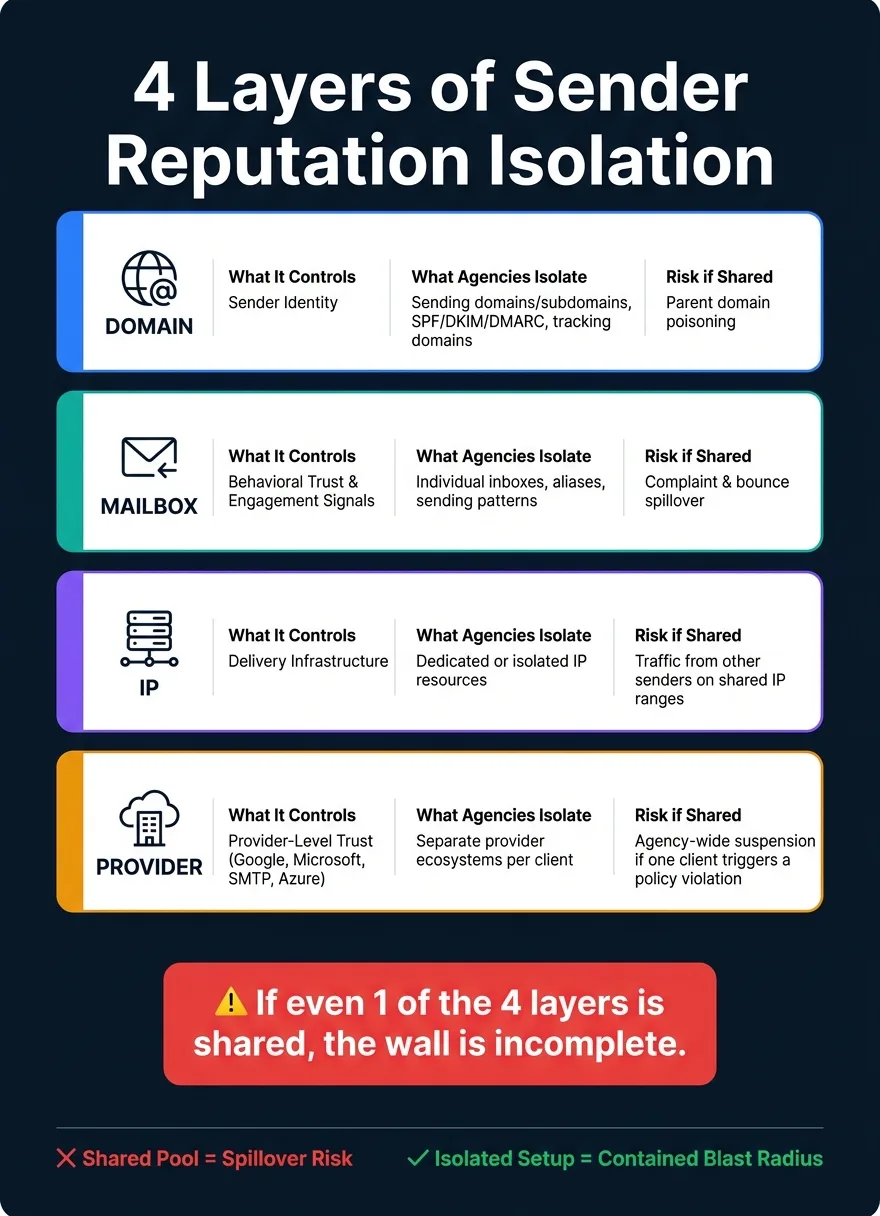
Sender reputation works across four layers. And each one can break on its own.
Once you define those layers, the next step is simple: understand what each one separates, and where trouble can still spill over.
| Layer | What It Controls | What Agencies Isolate | What Can Leak Across Clients |
|---|---|---|---|
| Domain | Sender identity | Sending domains/subdomains, SPF/DKIM/DMARC records, tracking domains | Parent domain poisoning if subdomains share a root |
| Mailbox | Behavioral trust and engagement signals | Individual inboxes, aliases, sending patterns | Complaint and bounce patterns if mailboxes are pooled |
| IP | Delivery infrastructure | Dedicated or isolated IP resources | Traffic from other senders on shared IP ranges |
| Provider | Provider-level trust | Google, Microsoft, SMTP, Azure ecosystems | Agency-wide account suspension if one client triggers a policy violation |
Domain and mailbox layers
The domain layer is about identity. Each client should have its own sending domain or subdomain. Don't use the agency's root domain, and don't put multiple clients on the same subdomain.
SPF, DKIM, and DMARC need to be set up separately for each domain. The same goes for tracking domains. If several clients share one tracking domain, you're opening another lane for reputation problems to move from one account to another.
The mailbox layer is where behavior starts to leave a trail. Complaints, bounces, and engagement history are tied to individual inboxes. When every client has its own mailboxes, those signals stay separate. That makes issues easier to trace and a lot less messy.
IP and provider layers
The IP layer controls the delivery pipe. If you send on shared IP ranges, your deliverability can be shaped by traffic from other senders. That's why isolated or dedicated IP resources matter. You don't want one sender's bad habits clogging the road for everyone else.
The provider layer deals with platform-level trust. Google, Microsoft, SMTP relays, and Azure each run their own trust environments. A policy issue with one provider doesn't automatically carry over to another.
But there's a catch. If one account gets suspended, every mailbox under that account can go down with it, across every client tied to that setup. When these layers are pooled, one client's problem can spread fast.
Why shared pools spread risk across clients
Shared infrastructure can look efficient on paper. But in practice, it turns sender reputation into a pooled asset.
That means one client's complaints, bounces, or sudden volume spikes can ripple across everyone else using the same setup. You see this most clearly in shared warmup and IP pools.
How cross-contamination happens in shared warmup and IP pools
When one client spikes complaints, bounces, or send volume, the shared pool absorbs that signal. Other clients then inherit the deliverability hit.
That spillover moves through the IP layer. Traffic from one sender helps shape the reputation environment for every other sender on the same range. So even if your own sending habits stay clean, someone else's bad week can still land on your doorstep.
Shared warmup pools also muddy signal attribution at the mailbox layer. If several senders depend on the same pool, it's hard to tell what caused a shift. Was it the mailbox? The campaign? Or another sender in the pool? Once those signals get mixed together, the answer gets fuzzy fast.
Why shared infrastructure makes troubleshooting harder
The main cost here is attribution loss. Without isolation, root cause gets blurry. The evidence is mixed across clients, mailboxes, and IP ranges, so you can't tie a deliverability issue to one clear layer.
The operational difference is simple:
| Factor | Shared Infrastructure | Isolated Infrastructure |
|---|---|---|
| Risk | One client's behavior can affect the shared environment | Problems stay contained to one client setup |
| Control | Other senders influence the system | Your behavior is the main variable |
| Debugging | Harder to isolate the root cause | Easier to trace issues back to one client |
Isolation keeps the blast radius to one client. Once the pool is isolated, the next step is per-client volume control.
How to design client-isolated infrastructure and volume controls
Once you've defined the risk, the answer is pretty simple: isolate each client and control send volume at the client level. But here's the catch: isolation on paper doesn't mean much. Actual isolation happens at the sending layer. That means separate domains or subdomains, mailboxes, IPs, and tracking assets for each client.
One client, one sending environment
The model is simple: one client gets one sending environment, end to end. Each client should have its own set of sending domains or subdomains, its own mailbox group tied only to that client, its own tracking domain, and sending IPs that never handle another client's traffic.
That setup matters because shared infrastructure turns one client's problem into everyone else's problem. If one account runs into trouble, you don't want the damage spilling across the rest of your book of business.
Cap each mailbox group based on its own send limits. Then increase volume only after that client's bounce, complaint, and reply rates stay steady.
Platforms like OutreachFox use this model with private mailboxes and dedicated campaign IPs.
Warmup and ramp rules per client and mailbox group
Warmup needs to follow the same line of separation. It should run per client and per mailbox group - never in a shared pool. If you mix warmup across clients, attribution gets messy fast, and mailbox-level issues become much harder to spot.
For agencies that need to move faster, OutreachFox adds industry-tuned warmup profiles and pre-warmed mailboxes, which can materially shorten ramp time.
Stop rules and quarantine procedures
Once ramp control is in place, the next piece is fast containment. Every client environment should have stop rules defined before a campaign goes live. At the first sign of trouble, pause sending for that client and fully quarantine the affected domains or mailboxes.
The discipline here is simple: contain the issue to one client environment. If a domain or mailbox fails, fixing it should never mean changing another client's setup. Replace only the affected domain or mailbox group.
The final piece is separate monitoring for each client, so any failure stays visible instead of getting buried in shared reporting.
Monitoring, recovery, and choosing the right infrastructure
What to monitor at each layer
Once infrastructure is isolated, your monitoring should be isolated too.
Track each client on its own, layer by layer:
| Layer | Signals to Watch |
|---|---|
| Domain | Domain reputation, blacklist status |
| Mailbox | Bounce rate, complaint rate, reply rate, inbox placement |
| IP | IP reputation, blacklist status |
| Provider | Delivery rate by provider |
The rule is simple: monitor the same layers you isolate - domain, mailbox, IP, and provider.
That matters because these signals only tell the truth when you track them per client. If you blend reporting across accounts, you can miss the first signs that something is slipping. And by the time the problem shows up in top-line numbers, the damage may already be done.
Recovery steps when one client crosses stop rules
When one client trips a threshold, speed matters more than diagnosis.
Pause sending tied to that client right away. Then quarantine the affected domains, mailboxes, or IPs, check which layer caused the issue, and bring sending back only after the problem is contained.
This is one of those moments where hesitation can make a bad situation worse. A small issue tied to one client is usually easier to contain than a pool-wide mess that spreads across shared assets.
Conclusion: shared vs. isolated infrastructure
Shared infrastructure can work early on, but isolated infrastructure is safer as you scale, especially for agencies managing 100+ client campaigns.
The goal is straightforward: partition reputation by layer and keep client pools isolated.
Frequently asked questions
What are the four layers of sender reputation that agencies need to isolate?+
The four layers are domain, mailbox, IP, and provider. Domain controls sender identity through DNS records and tracking domains. Mailbox manages behavioral trust and engagement signals. IP controls the delivery infrastructure and sending resources. Provider handles platform-level trust with services like Google, Microsoft, and SMTP relays.
How does shared infrastructure cause deliverability problems across multiple clients?+
When clients share domains, mailboxes, IPs, or provider accounts, one client's high complaint rates, bounces, or volume spikes can damage the shared reputation pool. This spillover affects all clients using the same infrastructure, making it difficult to isolate which client caused the problem. The damage spreads through shared IP ranges and pooled mailbox environments.
Why is per-client warmup important instead of using shared warmup pools?+
Per-client warmup prevents attribution confusion and contains reputation issues to individual clients. When warmup is shared across clients, you cannot tell which sender caused deliverability changes, making troubleshooting nearly impossible. Separate warmup also ensures each client builds its own sending reputation without inheriting problems from other accounts.
What specific metrics should agencies monitor separately for each client?+
Agencies should track bounce rate, complaint rate, reply rate, blacklist status, inbox placement, and delivery rate by provider for each client independently. Monitoring must be isolated by the same four layers: domain reputation and blacklist status, mailbox-level engagement signals, IP reputation and blacklist status, and provider-specific delivery rates.
What should an agency do immediately when one client triggers stop rules?+
Pause sending for that client immediately and quarantine the affected domains, mailboxes, or IPs right away. Speed is more critical than detailed diagnosis in these moments. Check which layer caused the issue, contain the problem to that one client environment, and only resume sending after the issue is fully isolated and resolved.
Can parent domain reputation be damaged if subdomains are properly isolated?+
Yes, parent domain poisoning can still occur even with subdomain isolation if multiple client subdomains share the same root domain. This is why each client should have their own sending domain or completely separate subdomain structure, along with independent SPF, DKIM, and DMARC records to prevent cross-contamination.
What happens at the provider layer if one client account gets suspended?+
A provider-level suspension can take down every mailbox under that account, affecting all clients tied to that setup simultaneously. This is why provider-level isolation matters—one client's policy violation with Google, Microsoft, or another provider shouldn't be able to suspend accounts for your other clients.