
Private IP isolates your cold email reputation for easier troubleshooting and control. Shared IP is simpler to start but ties your deliverability to other senders in the pool.
- Shared IP mixes your reputation with other senders in the pool
- Private IP isolates reputation so problems trace back to your own setup
- Bounce rates above 2-5% signal list problems on either setup
- Private IP requires warmup and authentication but offers better control
- Agencies and multi-client teams benefit most from private IP isolation
- Isolation makes root-cause diagnosis faster when deliverability drops
Private IP vs Shared IP for Cold Email: Why Isolation Changes Everything
If you want more control over cold email deliverability, private IP usually wins. Shared IP is easier to start with, but your results are tied to other senders in the same pool. Private IP gives you your own reputation, which makes inbox issues easier to track, contain, and fix.
Here’s the short version:
- Shared IP = simpler setup, but your IP reputation is mixed with other accounts
- Private IP = more setup work, but your reputation is yours alone
- Inbox placement can drop on shared pools even when your own campaign looks fine
- Bounce spikes hurt both setups, but on a private IP the damage stays inside your own sending setup
- Recovery is often easier on private IP because you’re not waiting on other senders to stop causing problems
Mailbox providers look at signals like IP reputation, domain reputation, authentication, complaints, and bounce rates. For example, bounce rates above 2% to 5% often signal list or sending problems, and high complaint rates can push more mail into spam. On a shared IP, those signals can be affected by other people’s behavior. On a private IP, the signals point back to your own list, volume, and content.
If I had to simplify the choice:
- I’d pick shared IP for lower-volume sending or a simple starting point
- I’d pick private IP for agencies, multi-client setups, or when I need clean diagnosis and more control
Cold Email Deliverability | Shared Vs. Dedicated IPs
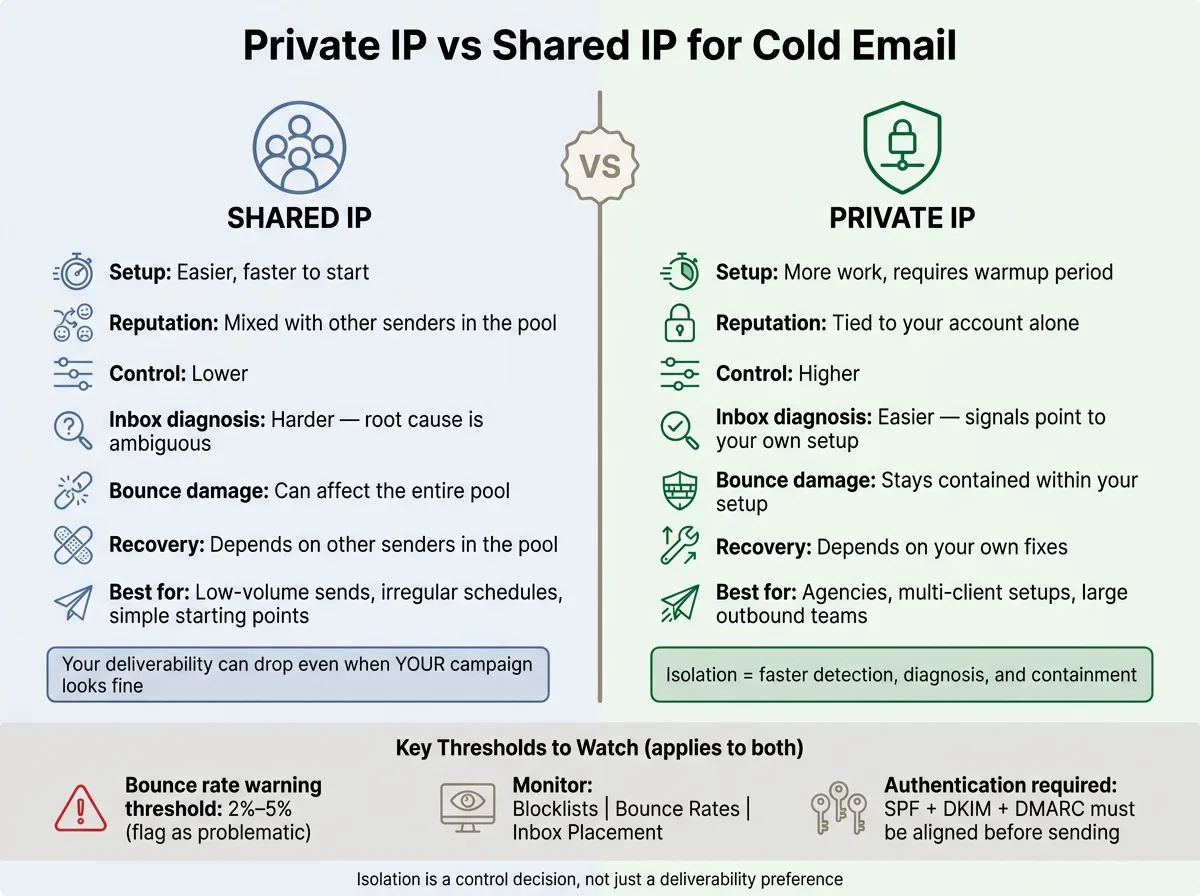
Quick Comparison
| Criteria | Shared IP | Private IP |
|---|---|---|
| Setup | Easier | More work |
| Reputation | Mixed with other senders | Tied to your account |
| Control | Lower | Higher |
| Inbox issue diagnosis | Harder | Easier |
| Bounce damage | Can affect pool | Stays in your setup |
| Recovery path | Depends on pool | Depends on your fixes |
| Best for | Small or uneven sending | Agencies, larger teams, client separation |
Bottom line: this is not just a deliverability choice. It’s a control choice. If you need isolation, cleaner signals, and a more direct path to fixing problems, private IP changes the game.
Private IP and shared IP in cold email: what changes at the infrastructure layer
A shared IP mixes your sending history with other senders. A private IP keeps that history tied to your account alone. SPF, DKIM, and DMARC help prove identity, but they don't separate reputation.
That shift changes how much control you have at the infrastructure layer.
What a shared IP means for cold email senders
Shared IP setups are common in sequencing tools like Instantly and Lemlist because they make setup fast. You connect your domain, and the platform sends mail through its shared IP pool.
The catch is shared reputation. Your deliverability doesn't depend only on what you do. It also depends on what everyone else in that pool is doing. If one sender starts acting badly, the whole pool can take a hit. When that happens, inbox placement issues can show up even when nothing changed in your own setup.
What a private IP means for cold email senders
A private IP gives you reputation that's yours alone. Your sending history stays separate. If placement drops, you can usually trace the cause back to your own operation: list quality, send volume, or content, not some other sender's campaign.
That control comes with more work. Private IPs need a warmup period, and high bounce rates can damage them fast. Infrastructure-first platforms use dedicated IPs and automated authentication to keep that control inside your own setup.
Private also doesn't mean you're protected by default. A single dedicated IP with no diversification is still a single point of failure. Isolation matters because it makes performance easier to tie back to your own actions and keeps damage from spreading beyond that setup.
With isolation, the impact shows up in your own metrics instead of getting buried inside a pool's blended results.
How isolation affects sender reputation, inbox placement, and bounce tolerance
Mailbox providers look at a few core signals: IP reputation, domain reputation, authentication, and complaint rates. On a shared IP, those signals get mixed together. On a private IP, they stay tied to one sender.
Why pooled reputation can hide problems until placement drops
When you send from a shared IP pool, mailbox providers judge the reputation of the full IP, not just your portion of the send. If another sender hits spam traps, racks up complaints, or has a bounce spike, that can hurt the whole pool.
That’s where things get messy. Your campaign metrics may still look fine on the surface, but inbox placement can start slipping in the background.
With shared pools, the hard part isn’t spotting that something has gone off track. It’s figuring out whose sending behavior caused it.
Why isolated reputation makes performance easier to read
On a private IP, bounce spikes, complaints, and placement drops point back to your own list, content, or sending pattern. There’s less guesswork. If something breaks, you can trace it to your own setup and fix it without waiting for the whole pool to recover.
That clear line matters most when deliverability starts to fail. The damage stays contained to your program instead of spilling across a shared pool. You can see the contrast pretty fast when you compare how shared pools break versus how isolated setups break.
Shared-pool failure modes vs isolated environments when deliverability breaks
Shared IP failure patterns in multi-tenant cold email tools
Once reputation starts to slip, the difference stops being abstract. It becomes an everyday ops problem.
The clearest gap shows up when deliverability starts to slide. In a shared pool, complaints or spam trap hits from any sender in that setup can lead mailbox providers to downgrade the whole pool. That means inbox placement can fall before your own numbers show an obvious issue.
That’s where things get messy. The main problem is root-cause ambiguity. You might spend time checking your copy, list quality, or sending cadence, while the actual trigger came from someone else’s behavior.
Private IPs can fail too. But the blast radius is much smaller.
Private IP failure patterns and why isolation contains the damage
When problems happen on private IP setup, they’re usually easier to trace. The signal points back to your own list, content, or sending pattern.
There’s no shared-pool noise to sort through, so diagnosis tends to move faster, and the fix stays in your hands. A flagged private IP can still disrupt that dedicated setup, but the damage stays contained. It doesn’t spill over into unrelated accounts or campaigns.
How to choose the right setup and protect performance at scale
Decision criteria: volume, client isolation, and recovery control
Once you know how shared and isolated setups break down, the next step is pretty simple: figure out how much control your team needs.
The best choice usually comes down to three things: send volume, client isolation, and recovery control.
| Situation | Better fit |
|---|---|
| Low-volume, irregular sends, or simpler starting point | Shared IP |
| Multiple clients with strict isolation needed | Private IP |
| Agency or large outbound team | Private IP |
| Need clear reputation signals and faster diagnosis | Private IP |
If you're sending at a lower volume, sending on an uneven schedule, or just want an easier place to start, a Shared IP often makes sense.
If you're managing multiple clients and need strict separation, a Private IP is usually the better call. The same goes for an agency or a large outbound team. And if you want cleaner reputation signals and faster troubleshooting, Private IP gives you that control.
Setup and monitoring points that matter most
If Private IP is the right fit, the hard part starts after the decision. Now you're dealing with authentication, warmup, and monitoring.
SPF, DKIM, and DMARC need to be aligned before you send. That keeps reputation signals tied to one sending environment instead of getting mixed into a shared pool. Infrastructure-first platforms automate authentication and mailbox provisioning for Private IP setups.
Private IPs also need a gradual warmup. You can't just flip the switch and expect mailbox providers to trust a new IP on day one. Build sender history over time.
And here's the part people sometimes miss: picking Private IP does not protect performance by itself. You still need to watch what happens after launch on a fixed cadence.
Pay close attention to:
- Blocklists
- Bounce rates
- Inbox placement
If bounce rates start climbing, act right away.
Conclusion: isolation is a control decision, not just a deliverability preference
Shared IP is simpler. Private IP gives tighter control, clearer signals, and contained risk.
When performance drops, you're looking at your own setup instead of waiting for a shared pool to recover. That changes the day-to-day reality quite a bit. It means isolation is an operational choice, not just a deliverability preference. It shapes how fast you can detect, diagnose, and contain deliverability problems.
Frequently asked questions
How does shared IP reputation affect my cold email deliverability even when my own campaigns look fine?+
On a shared IP, mailbox providers judge the reputation of the entire IP pool, not just your portion. If another sender in that pool hits spam traps, generates complaints, or has bounce spikes, it can hurt inbox placement for everyone in the pool, even when your own metrics appear normal. This creates root-cause ambiguity where your placement drops due to other senders' behavior.
What specific bounce rate thresholds signal problems to mailbox providers?+
Bounce rates above 2% to 5% typically signal list quality or sending problems to mailbox providers. These elevated bounce rates can damage sender reputation on both shared and private IPs, but on a private IP the damage stays contained to your own setup rather than affecting an entire shared pool.
Why is diagnosing deliverability issues easier on a private IP compared to shared IP?+
Private IP setups provide direct signals that point back to your own list quality, content, or sending patterns without shared-pool noise. When placement drops or bounce rates spike, you can immediately trace the cause to your specific operation rather than spending time determining whether the issue came from your behavior or another sender's actions in a shared pool.
Does setting up SPF, DKIM, and DMARC separate my reputation from other senders on shared IP?+
No, authentication protocols like SPF, DKIM, and DMARC help prove your identity but they don't separate reputation on shared IPs. These protocols verify that emails are legitimately from your domain, but mailbox providers still judge the reputation of the entire shared IP pool, which includes all senders using that IP.
What makes private IP setups better suited for agencies managing multiple clients?+
Agencies need strict client isolation to prevent one client's sending behavior from affecting another's deliverability. Private IPs keep each client's reputation and sending history completely separate, making it easier to diagnose issues per client and ensure that poor performance or risky campaigns from one account don't damage others.
What operational requirements come with choosing a private IP for cold email?+
Private IPs require proper SPF, DKIM, and DMARC alignment before sending, plus a gradual warmup period to build sender history with mailbox providers. You also need ongoing monitoring of blocklists, bounce rates, and inbox placement on a fixed cadence, as private IPs don't automatically protect performance without active management.