
15 tested cold email templates with performance data from 500K+ sends. Signal-led outreach hit 15–25% reply rates; 42% of replies came from follow-ups.
- 42% of replies came from follow-ups, not the first email sent
- Signal-based outreach reached 15–25% reply rates vs. 3.43% average
- Keep emails 70–80 words with one clear ask and yes/no CTA
- Template matters less than list quality, trigger, and inbox setup
- Best starter templates: Founder Intro, Agency Gap, and First Follow-Up
- Infrastructure (SPF, DKIM, DMARC, warmup) must be fixed before copy matters
15 Cold Email Templates (Tested on 500K+ Prospects) With Edit-Ready Copy
Most cold emails fail for simple reasons: weak targeting, no clear trigger, too much copy, or a hard ask too early.
I’d sum this article up like this: if you want more replies, use a short email, lead with one clear signal, make one simple point, and send follow-ups. The data in the piece says 42% of replies came from follow-ups, average reply rates sat around 3.43%, top campaigns hit 5.5%–10.7%, and signal-led outreach reached 15%–25%.
Here’s the full set covered in the article:
- founder intro
- founder signal-led outreach
- founder partnership ask
- technical founder email
- agency gap email
- agency proof email
- agency pilot offer
- white-label outreach
- first follow-up
- second follow-up
- breakup email
- right-person ask
- past lead re-engagement
- closed-lost reactivation
- email + LinkedIn sequence
The main takeaway is simple: the template matters less than the list, trigger, offer, and inbox setup. I’d use these as starting points, keep emails around 70–80 words, ask one yes/no question, and test one change at a time.
Quick comparison
| Template | Best use | Stage | Main ask |
|---|---|---|---|
| Founder Intro | Early users | First touch | Light reply |
| Founder Signal-Led | Public trigger | First touch | Interest check |
| Partnership Ask | Shared audience | First touch | Partner chat |
| Technical Founder | Stack issue | First touch | Short review |
| Agency Gap | Visible gap | First touch | Send audit |
| Agency Proof | Similar client result | First/mid | Send breakdown |
| Agency Pilot | Low-risk start | First touch | Send pilot asset |
| White-Label | Sell through agencies | First touch | Quick look |
| First Follow-Up | No reply | Follow-up 1 | Light nudge |
| Second Follow-Up | No reply again | Follow-up 2 | Close out? |
| Breakup Email | End sequence | Final | Last chance reply |
| Right-Person Ask | Wrong contact | First touch | Referral |
| Past Lead Re-Engagement | Old warm lead | Reactivation | Still relevant? |
| Closed-Lost Reactivation | Past “no” | Reactivation | Back on radar? |
| Email + LinkedIn | High-value accounts | Multi-touch | Send breakdown |
If you’re starting from scratch, I’d begin with Template 1, 5, and 9 because they cover the most common B2B cases.
10 Years of Expert Cold Email Advice in 36 Minutes (B2B Sales)
What 'Tested on 500K+ Prospects' Actually Means
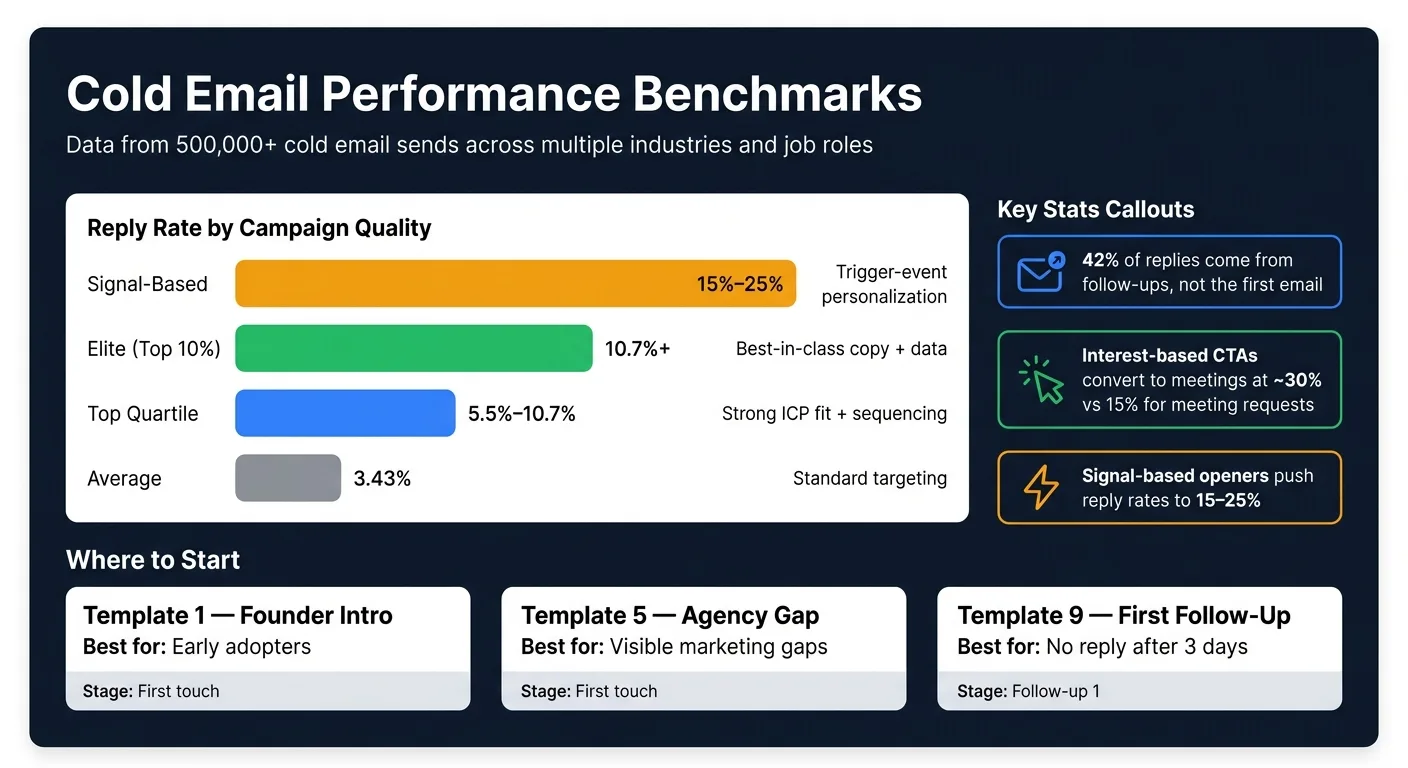
The 500,000+ sends span multiple industries, job roles, and company stages. So the patterns below don't come from just one niche.
This data tracks full-sequence performance, not a single email in isolation. That's a big deal, because as much as 42% of replies came from follow-ups, not the first message. The main benchmarks were reply rate, positive reply rate, and meetings booked.
| Performance Tier | Reply Rate | Typical Setup |
|---|---|---|
| Average | 3.43% | Standard targeting |
| Top Quartile | 5.5%–10.7% | Strong ICP fit + sequencing |
| Elite (Top 10%) | 10.7%+ | Best-in-class copy + data |
| Signal-Based | 15%–25% | Trigger-event personalization |
These figures don't promise the same outcome for your list or offer. If your ICP is weak, your offer falls flat, or your deliverability setup is off, even a solid template will struggle. Warmup, SPF, DKIM, and DMARC still matter.
"The template is 20% of the result. The targeting is 80%." - Mitchell Keller, Founder & CEO of LeadGrow
That context matters. It's why the templates below put the focus on offer, signal, and ask instead of trying to sound clever. Use these benchmarks to tighten the templates, but don't mess with the structure that helps them perform.
How to Customize These Templates Without Breaking Them
Every template here follows the same four-part flow: Observation (Hook) → Problem (Insight) → Proof (Credibility) → Ask (CTA).
Keep that order the same. What you should change are the details inside it: the signal, the offer, and the ask.
Aim for 70–80 words, or about 6–8 short sentences. That keeps the email tight and easy to read.
Each template also includes personalization tokens. Here’s what each one means and how to use it:
| Token | What It Is | Example |
|---|---|---|
| [First Name] | Recipient's given name | "Hey Marcus" |
| [Company] | Their organization's common name | "Acme Corp" |
| [Title] | Their specific role | "VP of Sales" |
| [Industry] | Their vertical | "Fintech", "Healthcare" |
| [Trigger Event] | A recent, verifiable public signal | "Saw you're hiring 5 AEs this month" |
| [Pain Point] | The operational problem the trigger implies | "Scaling that fast usually breaks lead scoring" |
| [Outcome Metric] | A real result from a similar client | "Cut ramp time from 90 to 45 days" |
| [Offer] | Your low-friction CTA | "Worth a 10-min call to compare notes?" |
Use these fields to tailor the templates below without changing the structure.
Put most of your effort into the [Trigger Event] token. This is the part that makes the email feel like it was written for one person, not blasted to a list. Signal-based openers - like a funding round, a new exec hire, or a job post - can push reply rates to 15–25%.
One simple rule: use AI only for the one-line signal opener. Write the rest yourself. That’s usually the difference between an email that feels sharp and one that sounds canned.
Before you scale any template, run the "Remove the Pitch" test. Delete the product sentence. If the email still sounds like a clear read on a real problem, you’re in good shape.
Then close with one CTA only. Keep it low-friction and easy to answer with yes or no. Something like "Worth a quick look?" works well. That kind of close converts to booked meetings at roughly 30%.
With those guardrails in place, the templates below are ready to edit.
Why Copy Alone Won't Get You Replies
Copy only helps if your email lands in the inbox. If it doesn't, even the best template is dead on arrival. That's why deliverability is the gatekeeper for every template that comes next.
In most cold outreach campaigns, deliverability, list quality, and how deep your personalization goes matter more than wording by itself.
Three infrastructure problems can tank a campaign fast. Sending from a fresh domain with no warmup period can look automated and get filtered right away. Bounce rates above 10% can hurt your domain reputation for months. And if you shove too much volume through one inbox, spam filters start paying attention no matter how sharp the copy is.
Infrastructure-first platforms like OutreachFox separate sending environments, automate warmup, and handle email + LinkedIn in one workflow. Once the sending setup is in place, move to Template 1.
1. Founder Intro to Early Adopters
Best for: Founders sending their first 50–100 outbound emails to find early users or design partners who can give real product feedback.
This template drops the sales tone. When one founder emails another, it usually feels more personal than a standard outbound blast. Use it when you have a real signal, but no formal case study yet. The aim is simple: get a reply, not book a demo.
Start with something specific and easy to verify about the prospect's company. That could be a recent launch, a funding round, or a LinkedIn post. Then point to a pain point they likely deal with and ask a low-friction question. Signal-based openers tend to beat generic outreach.
Keep the ask light. Interest-based questions often earn more replies than direct meeting requests.
Edit-ready template:
This template keeps the observation → problem → ask flow from the framework above.
Subject: quick one, {{firstName}}
Hey {{firstName}},
Saw {{company}} just {{recent launch or update}}. Congrats - that's a solid milestone.
We helped [similar company] [outcome].
Curious how you're handling {{specific pain point}} right now.
If helpful, I can share what's worked for similar teams. If not, no worries.
[Your Name]
Fill in the four fields, keep it under 100 words, skip links and attachments, and send a LinkedIn request within 24–48 hours.
2. Founder Insight-Led Outreach
Best for: Founders who can point to a clear trigger event - a funding round, a new VP hire, or a product launch - and want to start a conversation around a real business problem instead of opening with a product pitch. Use this version when the trigger is public and the business impact is easy to read.
Unlike a generic founder intro, this template starts with a specific, verifiable signal about the prospect. That could be a tech stack gap, a LinkedIn post, or a domain issue. The point is simple: it shows you did your homework before you reached out, not after.
Keep it tight. Use one trigger, name the likely consequence, then ask one simple question.
Replies come from the signal, offer, length, and ask - not from the template itself.
This is the tighter founder version when the signal is stronger and the insight is more specific.
Edit-ready template:
This template follows the Trigger → Consequence → Ask structure.
Subject: quick observation, {{firstName}}
Hey {{firstName}},
Saw {{company}} is hiring {{number}} {{role}} right now. That usually means {{specific operational consequence - e.g., "the outbound playbook is about to get a lot harder to manage manually"}}.
We helped {{similar company}} handle that exact transition - {{specific outcome}}.
Worth a look?
[Your Name]
Fields to personalize: the hiring signal or trigger event, the role being hired, the operational consequence, the comparable company, and the outcome.
For the CTA, interest-based questions like "Worth a look?" are low-friction and easier to answer than a meeting request.
3. Founder Partnership Ask
Best for: founders reaching out to companies that serve the same audience. Think integration partners, co-marketing plays, or co-sell setups. Use this when you and the other company serve the same kind of customer but don't compete.
This works when you want a partnership reply, not a sales call.
If a direct pitch feels too soon, come in through the partnership angle. Lead with one piece of proof: a shared customer segment, a mutual customer, or a nearby workflow that makes the fit plain.
Keep the ask simple and easy to answer. Tie it to one shared outcome.
Edit-ready template:
Subject: quick idea for {{company}} + {{yourCompany}}
Hey {{firstName}},
We both sell to {{shared audience description}} - you handle {{their angle}}, and we handle {{your angle}}.
{{mutual customer or peer company}} actually uses both. That made me think a {{joint webinar or newsletter swap}} could fit both lists. Open to exploring it?
[Your Name]
Fields to personalize: the shared audience description, your angle vs. their angle, the mutual customer or peer company, and the exact partnership activity you want to propose.
Strip it down to the overlap, one proof point, and one clear ask. A good gut check: if the email still sounds like a useful partner idea without your product name in it, you're on the right track.
4. Technical Founder Infrastructure Email
Best for: a technical founder reaching out to a CTO, Head of RevOps, IT/Security leader, or Engineering Manager after spotting a specific, verifiable trigger in their setup. This works best when you lead with a diagnosis, not a generic intro.
Start with a concrete infrastructure signal. Then name the likely consequence and offer a low-friction audit. That makes the message feel diagnostic, not salesy.
Specific technical triggers beat generic intros because they point to a real bottleneck. Stick to technical artifacts only, such as:
- DNS records
- DMARC configuration
- Stack details
- Hiring signals that show an operational gap
Send it as plain text and keep the CTA low-friction.
Edit-ready template:
Subject: {{company}}'s {{specific tool or config}} setup
Hey {{firstName}},
Noticed {{company}} is running {{specific tool or stack detail}} - at {{their scale or growth stage}}, teams usually hit a wall with {{specific technical pain}} around this point.
We built {{your tool}} to handle that layer without replacing what you already have. {{One-sentence proof: customer name or metric}}.
Worth a 2-minute breakdown of the gap?
[Your Name]
Use the copy below as-is, then swap in the technical trigger and proof point.
Fields to personalize: the specific tool or stack detail you observed, their scale or growth stage, the exact technical pain that tends to show up at that stage, and your one proof point. Keep the subject line short and specific.
The goal is simple: prove the problem is real.
Next, use the same structure for agency outreach.
5. Agency Gap-Spotting Prospecting Email
Best for: agencies reaching out after finding a specific gap a prospect can check on their own. That might be a missing DMARC/SPF setup, high bounce rates, a ranking gap for {{keyword}}, or a missing comparison, pricing, or case-study page that a competitor already has.
Use the same diagnosis flow as the technical founder email, but trade infrastructure signals for visible marketing gaps. This works because you lead with something the prospect can verify in a minute.
Keep it simple:
- one observation
- one consequence
- one short ask
Stick to one verifiable gap, one competitor, and one concrete number. Skip vague lines like “your SEO could be stronger.”
For the CTA, don’t ask for a meeting. Interest-based CTAs - short questions the prospect can answer in five words or less - book meetings at 30%, compared to 15% for “Got 15 minutes?” Offer a quick audit or breakdown instead. It feels easier to say yes to, and it builds trust before you ask for time.
Edit-ready template:
Subject: {{company}}'s {{gap type, e.g., "SEO gap"}} vs. {{competitor name}}
Hey {{firstName}},
Noticed {{company}} isn't ranking for {{2–3 high-intent keywords}} - {{competitor name}} is pulling most of that traffic right now.
I pulled a quick gap breakdown for {{company}}. {{One-sentence proof: client name or result}}.
Want me to send it over?
[Your Name]
Fields to personalize: the exact gap you found, the competitor name, the 2–3 keywords or signals you spotted, their industry, and one proof point. Keep the subject line specific. Personalized subject lines are 26% more likely to be opened than generic ones.
6. Agency Social Proof Email
Best for: agencies with a clear result from a similar client. If your proof is vague, like “we help companies grow,” or it comes from a totally different vertical, this template usually falls flat. Use it when you have a hard number, a real company name, and a time frame you can point to.
If the problem is obvious but trust is still shaky, start with a result from a similar client. Same-niche proof works because people trust companies that look like theirs. And the closer that client is to the prospect in size, business model, and pain point, the faster the message clicks.
Keep the proof line tight: one metric, one client, one time frame. Go past that, and it starts to feel like a sales pitch.
Use one easy ask: “Want the breakdown?”
Edit-ready template:
Use this when the prospect already sees the problem and just needs proof you can fix it.
Subject: How {{similar_company}} cut {{specific_metric}} in {{timeframe}}
Hey {{firstName}},
Worked with {{similar_company}} - a {{one-line description, e.g., "UX design studio like yours"}} - and helped them {{specific result, e.g., "cut CAC by 35% within 90 days"}} by fixing {{one-line problem, e.g., "their outbound targeting"}}.
Looks like {{prospect_company}} might be running into the same thing with {{specific_pain_point}}.
Want the breakdown?
[Your Name]
Fields to personalize: the reference client’s name or descriptor, the metric, the time frame, the prospect’s company name, and the one pain point linking the two.
Keep the body under 80 words. Emails in that range tend to beat longer ones, and 6–8 short sentences hit a 6.9% reply rate.
7. Agency Pilot Offer Email
Best for: agencies reaching out to a cold prospect with no prior connection. Use this when the safest first step is a quick audit, Loom, or gap breakdown, not a discovery call.
A pilot offer makes the ask smaller. Instead of leading with your full service, you offer one clear deliverable the prospect can say yes to without much friction. Think of it as a diagnosis, not a sales pitch. The flow stays the same: observation → problem → ask. The only change is that the pitch becomes a small asset.
In a 150-brand e-commerce campaign, a screenshot-plus-Loom offer reached a 34% reply rate.
Edit-ready template:
Use this when you've found a specific, verifiable gap and want to make the first reply feel easy.
Subject: Quick find on {{prospect_company}}'s {{specific_area, e.g., "checkout funnel" / "keyword gap" / "deliverability"}}
Hey {{firstName}},
Noticed {{specific_observable_gap, e.g., "your top competitor is ranking for 30 keywords you're not targeting"}} while looking at {{prospect_company}}.
I put together a quick {{audit/breakdown}} showing the gap and one fix worth testing.
No pitch attached - just the breakdown.
Want me to send it over?
[Your Name]
Fields to personalize: the gap you found, the type of deliverable, and the prospect's company name. If you can, make the gap easy to verify and connect it to a real trigger event or competitor move.
Keep the body under 80 words. Don't attach the audit in the first email. Ask for a yes before you send it.
If you need a reseller-friendly version, the next template turns this into a white-label offer.
8. White-Label Outreach Offer Email
Best for: agencies or service providers selling to other agencies that can resell or bundle your service under their own brand.
This is the reseller take on the pilot offer above. Use it when you're reaching out to agencies that still lean on referrals and where the founder is still the one doing sales.
If a prospect agency wants white-label delivery capacity under its own brand, this version fits. The pitch is simple: they can grow without hiring and still keep client ownership. Use an interest CTA, not a meeting request.
Edit-ready template:
Use this when the agency is ready to resell, not just review, your service.
Subject: How {{similar_agency_type}} agencies are adding clients without hiring
Hey {{firstName}},
Most {{agency_type}} agencies still rely on referrals until growth stalls.
We help agencies like {{similar_agency_name_or_type}} sell a white-label {{service_type}} under their own brand. {{similar_agency_name}} went from {{starting_state}} to {{specific_result}} in {{timeframe}}.
Open to a quick look?
[Your Name]
Fields to personalize: agency type, a real proof point from a similar sub-niche, the specific service you're white-labeling, and the result in concrete terms.
A dollar amount or timeline works better than vague wording every time.
If you can handle the main objection right away, do it. Agencies often worry about losing client control. A line like "This supplements your client relationships; it doesn't replace them" can ease that fear before they even say it out loud.
Keep the email under 70 words. Anything longer asks for trust you haven't earned yet.
9. First Follow-Up After No Reply
Best for: any cold email sequence where the first touch got no response within two to three days.
If your first email gets no reply, send ONE follow-up that adds a new angle without starting the pitch all over again.
Send it on Day 3. Follow-ups drive 42% of replies, but that only happens when the message brings something new. Add one stat, one proof point, or one observation. Don't reword the first pitch and call it done. The goal is to keep the thread moving.
Use the reply-thread format below so it feels like a continuation, not a new blast.
The structure is simple:
- one new observation
- one reminder
- one short ask
Use a low-friction CTA like "Still worth a look?" or "Worth a look?"
Edit-ready template:
Reply to the original thread - don't start a new email.
Subject: (Reply in-thread.)
Hey {{firstName}},
Wanted to add one thing to my note from {{day_of_week}}: {{one_new_stat_proof_point_or_observation_relevant_to_their_industry}}.
{{one_sentence_value_reminder}}.
Still worth a look?
[Your Name]
Fields to personalize: the day you sent the first email, one fresh industry stat or observation you didn't include before, and a one-sentence reminder of what you solve. Change the angle, not the offer.
Keep it in plain text. Skip HTML.
10. Humorous Second Follow-Up
Best for: SaaS founders, creative agencies, and marketing pros where a casual, direct tone feels human, not sloppy.
Use this only if Template 9 gets no reply. It works as a short, self-aware nudge that changes the rhythm a bit. That said, finance, healthcare, and legal are usually a tougher match for this kind of message.
Keep it under 30 words. The CTA should make it easy for the prospect to reply with a simple yes or no.
Edit-ready template:
Subject: (Optional - send as a plain-text reply.)
hey {{firstName}} - last nudge. is {{specific_problem}} still an issue at {{company}}, or should i close this out?
Fields to personalize: Replace {{specific_problem}} with a real pain point tied to the prospect’s role. If you have it, add {{trigger}} or {{mutual_connection}} so the note feels more relevant. Send it in plain text only. If there’s still no response after this, move to the breakup email.
11. Respectful Breakup Email
Best for: Use this if Templates 9 and 10 didn’t get a reply.
If your second follow-up still gets no response, send this final note to wrap up the sequence. It works best as the fourth email, about 14 days after your first outreach.
Edit-ready template:
Subject: closing the loop
Hi {{firstName}},
I've reached out a few times about {{specific_problem}} at {{company}} and haven't heard back.
I'll stop following up for now. If that changes, just reply here.
{{yourName}}
Fields to personalize: Keep {{specific_problem}} tied to the exact issue you mentioned earlier. You can also add the prospect’s role or a recent trigger if that makes the note stronger.
12. Referral or Right-Person Ask
Best for: Wrong inbox, right company.
If your last email landed with the wrong person, don't force another meeting ask. Sometimes you’ve got the right company, but the wrong contact. In that case, it’s better to ask for direction than to push a pitch at someone who can’t approve anything. And if you have a buying signal - funding, a new hire, or a product launch - put that up front.
Asking “who owns this?” is much easier for someone to answer than asking them to book a 30-minute call.
Edit-ready template:
Subject: right person at {{company}}?
Hi {{firstName}},
I reached out because {{company}} looks like a fit for {{specific_problem}}.
If this isn't your area, who owns it? I'll keep it brief.
{{yourName}}
Fields to personalize: Replace {{specific_problem}} with something role-specific and concrete. That makes it easier for them to forward your note to the right person.
If they send you to someone else, email that person using the same one-line structure. That way, the sequence keeps moving without starting the pitch all over again.
13. Past Lead Re-Engagement Email
Warm leads that stalled 3–6+ months ago.
This email is for leads who showed interest months ago, then went quiet without giving a clear no.
It’s not a follow-up to an active thread. And it’s not for deals already marked lost. If the deal was officially closed-lost, use the closed-lost reactivation email instead.
What makes this kind of email work? Specific detail.
You want to mention the exact problem, goal, feature, or timing issue they brought up before. That matters because generic “just checking in” emails tend to feel random and easy to ignore. A simple yes/no CTA works best here. It asks for very little and makes it easy for them to reply.
Edit-ready template:
Subject: still relevant, {{firstName}}?
Hi {{firstName}},
We talked a few months back about {{specific_problem_or_goal}}. You mentioned {{timing_issue_or_blocker}}, so I held off.
We've since {{new_development_or_result}} - which may change the timing on your side.
Is this still on your radar?
{{yourName}}
Fields to personalize: {{specific_problem_or_goal}} should come straight from your notes from the last conversation. {{timing_issue_or_blocker}} is the thing that slowed the deal before, like budget timing, an internal project, or the wrong quarter. {{new_development_or_result}} is your reason for reaching back out: a new case study, a client win that fits their situation, a product update, or a recent trigger tied to their earlier concern.
Don’t send this unless you have a clear new reason to reach out.
14. Closed-Lost Reactivation Email
For prospects who said no before, but whose situation has changed.
Use this only if the prospect turned you down earlier and something new has changed the timing. Same as the other templates in this set, this email works best when there’s a real reason to send it.
Good triggers include:
- a new executive hire
- a funding announcement
- a product launch
- a hiring push
Each of these can point to a shift in priorities, budget, or urgency. Your job is simple: connect that trigger to the objection they gave last time, then add one clear update from your side. That could be a new feature, a new capability, or a result that speaks to the issue they brought up.
Keep the CTA simple. A low-friction yes/no question tends to work better than asking for a full call right away.
Edit-ready template:
Subject: things have changed since we last spoke, {{firstName}}
Hi {{firstName}},
When we last spoke, {{past_pain_point_or_objection}} was the reason it didn't move forward.
I noticed {{trigger_event}}, which made me think the timing might be different now.
We've also {{new_offer_or_result}} since then, which directly addresses what you mentioned.
Is this something on your radar right now?
{{yourName}}
Fields to personalize: {{past_pain_point_or_objection}} should be the exact reason the deal stalled - budget, timing, another priority, or a missing feature. Pull it from your CRM notes. {{trigger_event}} is the buying signal that led you to reach out. {{new_offer_or_result}} is what has changed on your side since that first conversation.
Send this only when you have both pieces: a documented objection and a new trigger. If the prospect replies and the conversation opens back up, pair this email with the LinkedIn touch in Template 15.
15. Cold Email Plus LinkedIn Sequence
For prospects who need more than one touchpoint before they reply.
If email-only outreach gets ignored or lands in a filter, add LinkedIn. It helps the sender feel familiar before the email shows up. This tends to work best when you have a clear buying signal to build around, like a recent job change, a funding round, or active engagement with industry content.
Start with a personalized connection request. Then send a value-first email. After that, use two to three light follow-ups spaced 3–5 days apart.
Anton Titov of Archway.Finance used this kind of multi-channel approach across 400 agency owners and reached a 65% response rate, helping raise over $1M.
Use this sequence when the prospect shows a clear signal but hasn't replied to email alone.
Edit-ready template:
Subject: saw your post on {{topic}}, had a thought
Hi {{firstName}},
I came across your post on {{topic}} and it matched something we've been seeing across {{industry}} lately.
We've helped {{similar_company_type}} with {{specific_outcome}} - and I think there's a version of that worth exploring for {{company}}.
Want me to send the breakdown?
{{yourName}}
Use this as the first touch in a LinkedIn-plus-email sequence. The sequence map is simple: connection request → value email → light follow-up → close.
Fields to personalize: {{topic}} should be the exact LinkedIn post or piece of content you engaged with. {{industry}} links your observation to their space. {{similar_company_type}} and {{specific_outcome}} need to point to a real result you can support. {{company}} makes the ask feel direct, not generic.
Then carry the same trigger into both the LinkedIn touch and the email. That way, the outreach feels coordinated instead of random.
This template works best for high-value B2B prospects. Think heads of marketing at SaaS companies with 20 to 50 employees, or busy agency owners who may ignore email unless they’ve seen your name somewhere else first.
Personalization Checklist Before You Hit Send
Once you choose a template, do a quick check before sending it out. This is the fastest way to keep the message ready to use without stripping out the parts that made it work in the first place.
Must-fill fields:
- First name - double-check the spelling
- Role/title - line it up with the buyer's main priority
- Company name - confirm the current brand name
- Trigger event - use a recent buying signal
- Specific pain point - include one concrete problem
- Credible outcome - add one real metric
- Simple CTA - ask one low-friction question, not a calendar link
Optional fields: mutual connection, recent award or post, confirmed tech stack, or location.
Before you write the opener, scan LinkedIn and the company blog for one real hook. That small detail can make the message feel like it was written for a person, not blasted to a list.
Use the table below to check each field fast:
| Field | Example | Where to Verify |
|---|---|---|
| Trigger event | Series A funding announced | Crunchbase, LinkedIn News |
| Pain point | Content ranking on page 2 for core product keywords | LinkedIn posts, site audit |
| Tech stack | Uses HubSpot CRM | Technographic tools |
| Credible outcome | 40% inbound lead growth in Q1 | Your case studies |
| Mutual connection | Shared contact or group | Your network, LinkedIn |
Final check: if any {{placeholder}} is still there, do not send.
After this review, test subject lines and CTA variants before you scale send volume.
Cold Email Testing Tips for Better Reply Rates
Once you’ve personalized a template, testing helps you figure out what’s helping the copy and what’s coming from your list or deliverability setup.
After you personalize a template, test one variable at a time. Start with the subject line because it drives opens. Keep it specific, human, and short enough that it doesn’t get cut off on mobile - ideally around 5–7 words. If the subject line works, move on to the opener. Then test the CTA.
You also need enough volume to spot a clear directional difference. Run enough sends to get that signal. And don’t lump everything together. Segment tests by template type and buyer group, like founders, agencies, or technical buyers.
Compare like with like. Don’t judge one template across mixed audiences. Break your list down by geography, vertical, industry, and job title so you can see which message lands with each group on its own terms.
Focus on the metrics that show whether the email led to an actual conversation:
- Positive replies
- Meetings booked
At the same time, watch authentication, bounce rate, and inbox placement in every test. High bounce rates usually point to data quality or infrastructure problems, not weak copy. If spam complaints start to climb, pause campaigns.
It also helps to test softer asks against direct meeting asks and see which one gets more replies. If you’re using multichannel outreach, compare email-only sequences against email + LinkedIn sequences.
15-Template Summary Table
Use this table to pick the right template fast.
After the examples above, this gives you a quick way to choose the right template without overthinking it.
| Template Name | Best Use Case | Buyer Type | Sequence Stage | Ideal Length | Primary Personalization Fields | CTA Style |
|---|---|---|---|---|---|---|
| 1. Founder Intro | Early adopter recruitment | CEO / Founder | Initial | <100 words | Industry challenge, vision alignment | Low-friction question |
| 2. Founder Insight-Led | Problem-solving pitch | Dept. Head | Initial | Medium | Recent LinkedIn post, specific insight | "Is this on your radar?" |
| 3. Founder Partnership Ask | Strategic collaboration | CEO / Founder | Initial | Short | Shared audience, mutual benefit | Soft collaboration ask |
| 4. Technical Founder Infrastructure | Infrastructure / DevOps outreach | CTO / VP Eng | Initial | Medium | Current tech stack, specific pain point | Low-pressure interest check |
| 5. Agency Gap-Spotting | SEO / technical sales | Marketing VP | Initial | Medium | Specific site error, competitor gaps | Value-add (audit/case study) |
| 6. Agency Social Proof | Building credibility | Marketing Director / VP Marketing | Middle / proof-building | Medium | Industry-specific case study metrics | "Is this a priority?" |
| 7. Agency Pilot Offer | Reducing buyer risk | Marketing Director | Initial | Short | Current process, quick-win opportunity | Low-commitment pilot ask |
| 8. White-Label Outreach | Agency partnership | Agency Owner | Initial | Short | Agency niche, client base | Partnership conversation ask |
| 9. First Follow-Up | Gentle nudge after silence | All buyer types | Follow-up 1 | Under 30 words | Reference to the original thread | Light bump |
| 10. Humorous Second Follow-Up | Breaking the ice | All buyer types | Follow-up 2 | Short | Lighthearted observation | Low-pressure, conversational |
| 11. Respectful Breakup | Closing the loop cleanly | Any buyer type | Final | Short | Minimal; assume it's not a priority | Close the loop |
| 12. Referral / Right-Person Ask | Navigating large organizations | Gatekeeper, manager, or wrong contact | Initial | Very short | Mutual connection name, department reference | Who owns this? |
| 13. Past Lead Re-Engagement | Reviving cold inbound leads | Former lead | Reactivation | Medium | Previous pain point, relevant new update | "Still a challenge?" |
| 14. Closed-Lost Reactivation | Reopening stalled deals | Former opportunity | Reactivation | Short–Medium | Original objection, what's changed since | Soft check-in ask |
| 15. Email + LinkedIn Sequence | High-value B2B multi-touch | Decision maker / buyer | Multi-touch | Varies by touch | LinkedIn activity, shared connections, recent content | Conversation starter |
The core idea is simple: match the ask to the sequence stage.
If you want an easy place to begin, start with 1, 5, and 9. Those cover the most common use cases.
Conclusion
You now have 15 edit-ready templates for the most common B2B cold email scenarios.
Just don’t copy and paste them word for word.
Use them as a starting point, then tailor the signal, offer, and ask to fit the person you're reaching out to. After that, send them as part of a clear sequence instead of firing off one-off emails and hoping something sticks.
The templates help, but they won’t do the whole job on their own. Good results come from a few parts working together: personalization, a strong offer, testing, and solid sending infrastructure.
One more thing: don’t skip deliverability basics before you scale. If your emails aren’t landing in inboxes, even the best copy won’t matter.
If you want an easy place to begin, start with templates 1, 5, and 9.
Frequently asked questions
What percentage of replies came from follow-up emails rather than the first outreach message?+
42% of replies came from follow-ups, not the initial email. This emphasizes the importance of sending multiple touchpoints in a sequence rather than relying solely on a single cold email to generate responses.
What reply rates did signal-based outreach achieve compared to standard cold emails?+
Signal-based outreach using trigger events like funding rounds or new hires reached 15–25% reply rates, significantly higher than the average 3.43% rate. This approach works because it shows you've done specific research and are reaching out for a timely, relevant reason.
What is the recommended word count for cold emails according to this testing data?+
The article recommends keeping cold emails around 70–80 words, or approximately 6–8 short sentences. Emails in this range tend to perform better than longer messages because they're easier to read and don't ask for too much attention upfront.
Which three templates should beginners start with according to the article?+
The article recommends starting with Template 1 (Founder Intro), Template 5 (Agency Gap Email), and Template 9 (First Follow-Up) because they cover the most common B2B cold outreach scenarios and provide a solid foundation for testing.
What conversion rate do interest-based CTAs achieve compared to direct meeting requests?+
Interest-based CTAs like 'Worth a look?' convert to booked meetings at roughly 30%, compared to just 15% for direct meeting requests like 'Got 15 minutes?' These low-friction questions are easier for prospects to say yes to.
When should you send the first follow-up email after no response?+
Send the first follow-up on Day 3 after the initial email receives no response. The follow-up should add a new angle like a stat or proof point rather than simply rewording the original pitch.
What are the four essential parts every template follows in this framework?+
Every template follows: Observation (Hook) → Problem (Insight) → Proof (Credibility) → Ask (CTA). This structure should remain consistent while you customize the specific signals, offers, and asks for your prospects.