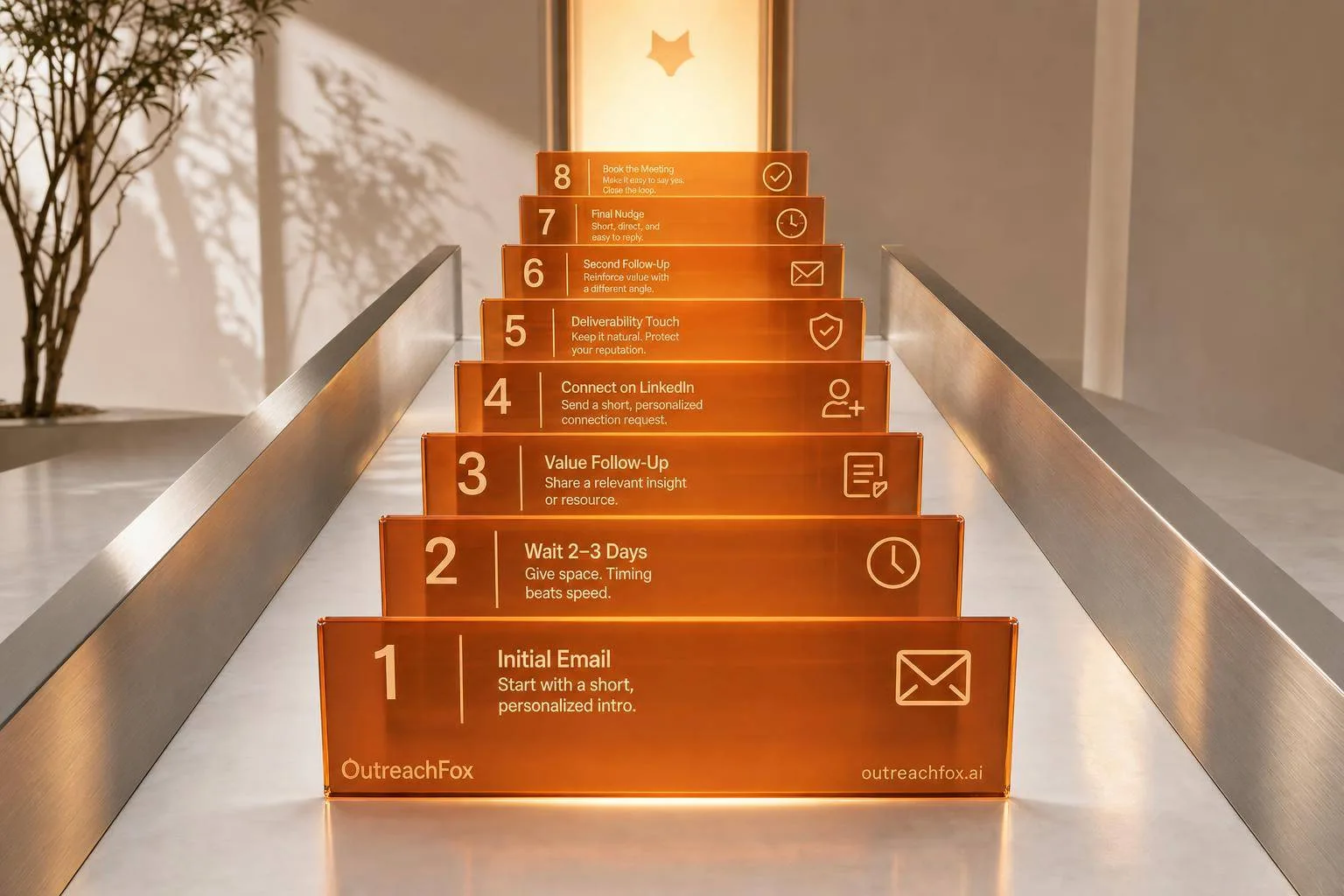
Most cold replies come after the first follow-up. This 8-step sequence spans 40 days, combines email and LinkedIn, changes angles at each touch, and stops immediately when prospects reply or opt out.
- 55-60% of cold email replies come after the first follow-up, not the initial message
- Use 8 touches over 40 days: email first, add LinkedIn on day 8, break patterns on day 22
- Stop the sequence immediately when anyone replies, even if they say not interested
- Clean data and SPF/DKIM/DMARC setup are mandatory before scaling volume
- Pause if reply rates drop below 2% or spam complaints exceed 0.1%
- Move non-responders into 90-day nurture tracks instead of endless follow-ups
The Follow-Up Sequence That Actually Works: 8 Steps to Convert Cold Leads Into Customers
Most cold leads do not reply to the first email. In many cases, 55%–60% of replies come after the first follow-up, and sequences with 4–7 follow-ups can get reply rates above 27%, versus about 9% for shorter sequences.
If I want more meetings from cold outreach, I need more than a first message. I need a clear plan: send at the right time, change the angle as I go, use LinkedIn at the right point, watch list quality, protect inbox placement, and stop the moment someone replies. The article’s core point is simple: the sequence works only when the system behind it works too.
Here’s the full flow in plain English:
- Day 1: first email with one problem, one outcome, and a small CTA
- Day 3–4: follow up with a new angle, not “just checking in”
- Day 8: send proof by email and a no-pitch LinkedIn request
- Day 15: restart the angle with a different subject line or use case
- Day 22: break the pattern with a short video or one yes/no question
- Day 28: check for blockers like timing, budget, or wrong contact
- Day 40: send a close-the-loop email and end the sequence
- After that: move non-responders into a 90-day nurture track
Just as important, I need to keep these rules in place:
- verify contacts before sending
- avoid role-based emails like
info@andsupport@ - send in the lead’s local time zone, often Tuesday–Thursday, 9:00 a.m. to 11:00 a.m.
- avoid gaps longer than 5 days during the sequence
- set up SPF, DKIM, and DMARC
- watch bounce rates and spam complaints closely
- pause if reply rates fall below 2%
- stop all follow-ups as soon as someone replies or opts out
Quick Comparison
| Part | What matters |
|---|---|
| Sequence | 8 touches over about 3 weeks+ |
| Best early channels | Email first, then LinkedIn |
| Best timing | Tuesday–Thursday, 9:00–11:00 a.m. local time |
| Main goal | Replies and meetings, not send volume |
| Main risks | Bad data, weak targeting, poor deliverability, bad spacing |
| Stop rule | End the sequence on any reply |
| End state | Move non-responders to 90-day nurture |
So if I had to boil the article down to one line, it would be this: a cold follow-up sequence works when each touch has a job, the timing is controlled, and the sending setup stays healthy.
Cold Email Follow-Up - The Ultimate Guide to Getting Replies
The 8-step follow-up sequence that actually works
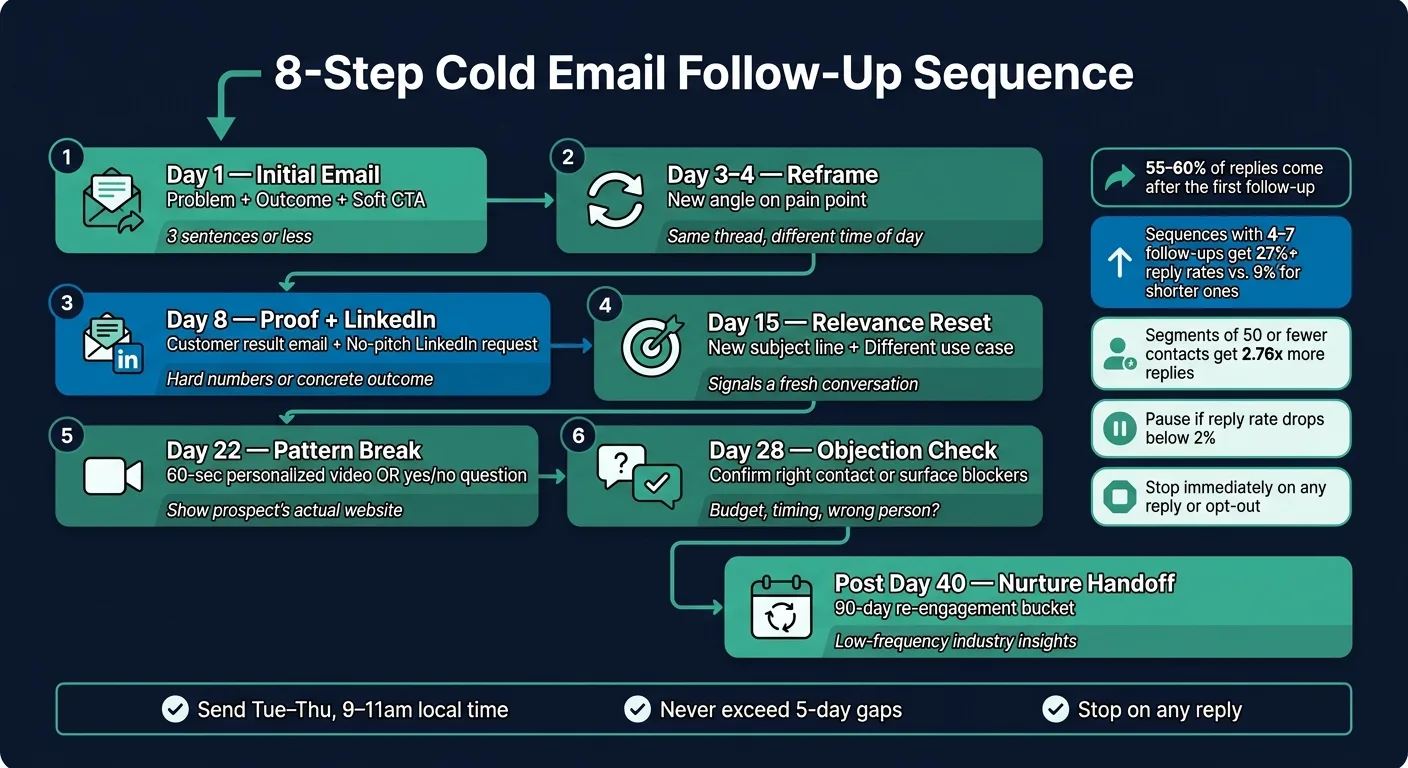
About 55% to 60% of cold replies show up after the first follow-up, not the first email. That’s why the sequence matters so much. The goal isn’t to nag people. It’s to stay relevant, show context, and make it easy to reply.
Steps 1 to 4: Start with email, then add LinkedIn at the right moment
Once your targeting, data, and deliverability are set, use this cadence.
- Day 1 - Initial email
Open with a specific problem and a clear outcome in three sentences or less. Keep the CTA easy to say yes to. "Open to a short conversation?" usually works better than asking for a 30-minute call right away. Write like you're talking to one person, not blasting a crowd.
- Day 3–4 - Reframe
Come back with a new angle on the pain point instead of sending a plain nudge. Keep the message in the same thread, and send it at a different time of day.
- Day 8 - Proof and LinkedIn
Send a LinkedIn connection request with no pitch. At the same time, send an email that points to a specific customer result, like a hard number or a concrete outcome.
- Day 15 - Relevance reset
Use a new subject line and shift to a different use case or persona angle. That signals this is a new conversation, not the same email wearing a different hat.
If the prospect still hasn’t replied by this point, stop repeating yourself. Break the pattern.
Steps 5 to 8: Pattern break, objection check, close-the-loop email, and nurture handoff
- Day 22 - Pattern break
Drop the standard text email and send a 60-second personalized video that shows the prospect’s actual website. This kind of video can lift reply rates compared with text-only follow-ups. If video isn’t possible, send a short email with one clear yes-or-no question.
- Day 28 - Objection check
Ask directly: "Are you the right person to talk to about [function], or is budget or timing the blocker?" This gets to the common blockers fast without coming off as pushy. If they’re not the right contact, ask for a referral.
- Day 40 - Close-the-loop email
Wrap it up cleanly. For example: "I'll assume the timing isn't right and close your file - no hard feelings." This often turns into the top-performing touchpoint because it removes pressure and makes the reply simple.
- Post-Day 40 - Nurture handoff
Move non-responders into a 90-day re-engagement bucket. Send low-frequency industry insights so your name stays familiar when timing shifts.
Full cadence timeline you can copy
| Day | Channel | Step |
|---|---|---|
| Day 1 | Initial pitch - problem + outcome + soft CTA | |
| Day 3–4 | Reframe - reframe the pain from a new angle | |
| Day 8 | Email + LinkedIn | Proof email + LinkedIn connection request with no pitch |
| Day 15 | Relevance reset - different use case or fresh subject line | |
| Day 22 | Video/Email | Pattern break - personalized video or a brief yes/no question |
| Day 28 | Objection check - confirm the right contact or surface blockers | |
| Day 40 | Close the loop, move to nurture | |
| Ongoing | CRM/Nurture | Low-frequency industry insights every 90 days |
A good cadence still falls apart if your list quality is poor or your inbox setup is weak. Don’t squeeze these touches too close together. And don’t send across weekends or major U.S. holidays. Always send in the prospect’s local time zone.
How to stop the sequence from breaking down in practice
This sequence only works when your list is clean and your inbox placement stays healthy. If either one slips, the whole thing starts to wobble.
Fix data quality before follow-up volume makes it worse
Start with list hygiene. Bad records don’t just sit there - they spread problems through every step that comes after.
Before you enroll anyone, verify each email address. Remove role-based addresses like info@ or support@, catch-all domains, and stale records. It also helps to separate sourcing from verification. Pull contacts in one tool, then run them through a separate check before you send. Sourcing is not verification.
Targeting matters just as much. Sending to the wrong people will hurt you even if every address is valid. Campaigns sent to tightly defined segments of 50 or fewer contacts get 2.76x more replies than broad, generic outreach. Use recent fit signals to decide who should enter the sequence: funding, a new VP hire, hiring growth, or a tech change. That way, you’re reaching accounts that are active now, not names sitting in a database.
"If your follow-up could be sent to any company in your market without changing a word, it is too generic." - Thibault Garcia, Founder, Reachly
Protect deliverability so later steps still reach the inbox
Once the list is clean, protect inbox placement before you add more volume.
SPF, DKIM, and DMARC are mandatory. Without them, Gmail and Yahoo may defer or reject your messages before they even land. Publish DMARC with p=none before launch, then tighten the policy later.
Use a dedicated sending subdomain like mail.yourcompany.com instead of your primary domain. That creates some distance between outbound risk and your main domain reputation. New domains also need warmup time. Start at 20–30 emails per day, then ramp volume by 20% per week over 4–8 weeks.
Gmail and Yahoo now enforce a 0.3% spam complaint threshold. Go over that, and your messages may be deferred or rejected, not just pushed to spam.
Check your domain’s spam rate every week in Google Postmaster Tools. If it hits 0.1%, pause and audit the list before sending anything else.
When to pause, adjust, or stop the sequence
Use response signals to decide whether the sequence should keep running.
- Pause if your total sequence reply rate drops below 2%. That usually points to a list or targeting issue, not copy. More follow-ups won’t fix the problem. They’ll just make it worse.
- Adjust when a prospect opens an email several times but never replies. The subject line did its job. The body or CTA didn’t. Try a smaller ask, like a 15-minute call instead of a demo. Or break the thread with a new two-to-four word subject line to reset attention.
- Stop after the breakup email. And stop at once when anyone replies, even if they say "not interested." Automated sequences have to honor opt-outs right away under CAN-SPAM.
There’s a clear reason to be strict here: spam complaint rates climb from about 0.1% on the first email to 1.6% by the fourth follow-up. That’s far above the enforcement threshold.
When the sequence ends, move no-open contacts into nurture. Don’t leave them in the active sequence.
How to run this sequence as a repeatable system
Build the sequence once, then run it with rules and triggers
Set the sequence up so each step follows a clear trigger: if there’s no reply, the prospect moves to the next touch. If there’s any reply, the sequence stops. Put that rule inside your platform so nobody gets another message after they’ve responded.
If the reply is an out-of-office message, pause the sequence and start it again when the prospect is back.
Automate the parts that eat time but don’t need judgment:
- Send timing
- Account rotation
- Reply detection
- Bounce handling
Keep the human work where it matters most: the research, the first line, and the reply itself.
A unified inbox helps a lot here. Replies should move from outbound into the sales inbox without someone copying things over by hand. Add a CRM webhook or native integration so the handoff stays clean.
You should also trigger sequences from buying signals like funding, hiring, or role changes, not just dates on a calendar. That’s often the gap between outreach that feels random and outreach that lands at the right moment.
Once the workflow runs on rules, the tool starts to matter a lot more.
When OutreachFox makes more sense than a basic sender
This cadence works only when the system can stop, route, and rotate without manual cleanup.
Basic senders like Instantly, Smartlead, or Lemlist can work well for email-only outreach. But once you’re running high-volume outbound or managing outreach across multiple clients, the strain on infrastructure, deliverability, and handoffs goes up fast. And when LinkedIn enters the mix, most basic senders need a second tool to make the sequence work.
OutreachFox is built for that heavier setup. It uses isolated sending infrastructure, native email and LinkedIn sequencing in one workflow, and built-in data verification before anything is sent.
Use the comparison below to pick the simplest setup that still protects deliverability and handles replies the way it should.
Comparison table: Infrastructure-first workflow vs. basic cold email workflow
| Feature | OutreachFox (Infrastructure-First) | Basic Senders (Instantly, Smartlead, Lemlist) |
|---|---|---|
| Infrastructure isolation | Dedicated, isolated sending domains with controlled IPs and no shared-infrastructure risk | Shared infrastructure creates reputation risk across campaigns |
| Warmup | Automated, long-term ramp-up | Basic or third-party warmup required |
| Data verification | Built-in enrichment and verification | Usually requires external tools or CSV cleanup |
| LinkedIn orchestration | Native multi-channel sequencing | Often requires a separate tool |
| Per-mailbox analytics | Yes - mailbox-level health monitoring | Usually aggregate campaign reporting |
| Mailbox failure recovery | Automatic account rotation if health drops | Manual monitoring and intervention |
| Reply detection and stop rules | Automatic sequence-stop across accounts | Usually campaign-level only |
That’s the difference between a workflow that keeps asking for manual cleanup and one that runs on rules.
Conclusion: The sequence is simple, but the discipline matters
The sequence itself is simple. What matters is the discipline behind it.
Start with clean data. Add LinkedIn after the first email. Stop the sequence the second anyone replies. Move every nonresponder into a nurture path. That’s the whole framework, and it works when you stick to it.
Judge the sequence by replies, meetings, and inbox health - not by how many emails you sent.
This only works when data, timing, and stop rules all line up. If one part slips, the whole thing gets weaker.
Even good copy can fall flat on a weak domain. Deliverability and stop rules aren’t side issues. They’re part of what makes the sequence work.
The practical takeaway is simple: build the sequence once, set the stop rules, check your data before volume goes up, and protect your sending domains like a business asset - because that’s exactly what they are. Run it like a system, and it stops feeling like guesswork.
Frequently asked questions
Why does the article recommend waiting until Day 8 to send a LinkedIn connection request?+
The sequence uses email first to establish initial contact and demonstrate value through proof (like customer results) before adding LinkedIn. The Day 8 timing allows the prospect to receive context through email before the connection request arrives, and the request itself should contain no pitch—just a connection invitation.
What should happen immediately when a prospect replies to any email in the sequence?+
The entire sequence must stop immediately when anyone replies, even if they say 'not interested.' This is both a deliverability best practice and a CAN-SPAM requirement. Automated sequences should have rules built in to honor opt-outs and replies right away to prevent continued outreach after engagement.
Why does the article say the Day 40 'close-the-loop' email often becomes the top-performing touchpoint?+
The close-the-loop email removes pressure by clearly ending the outreach sequence with no hard feelings, making it psychologically easier for prospects to reply. The low-pressure approach often prompts responses from people who were interested but hadn't prioritized responding to earlier messages.
What specific reply rate threshold indicates you should pause the sequence and audit your list?+
If your total sequence reply rate drops below 2%, you should pause and audit. This low rate typically indicates a list or targeting issue rather than a copy problem, and adding more follow-ups will only make the underlying problem worse instead of fixing it.
Why does the article recommend campaigns with 50 or fewer tightly defined contacts instead of broader outreach?+
Campaigns sent to tightly defined segments of 50 or fewer contacts get 2.76x more replies than broad, generic outreach. Tight targeting based on recent fit signals like funding, new hires, or tech changes means you're reaching accounts that are active now, making the outreach more relevant and timely.
How does spam complaint rate change from the first email to the fourth follow-up according to the article?+
Spam complaint rates climb from about 0.1% on the first email to 1.6% by the fourth follow-up. This 16x increase puts you well above Gmail and Yahoo's 0.3% enforcement threshold, which is why strict stop rules and clean targeting are critical as the sequence progresses.
What makes the Day 22 'pattern break' step different from earlier follow-ups in the sequence?+
The Day 22 step deliberately breaks the standard text email pattern by using a 60-second personalized video showing the prospect's actual website, or alternatively a short email with one clear yes-or-no question. This shift in format can lift reply rates because it stops repeating the same approach and captures attention differently.