
Weak outreach infrastructure causes spam placement and bounce spikes regardless of copy quality. Evaluate platforms on DNS setup, sending isolation, per-mailbox monitoring, and API reliability before features.
- SPF, DKIM, and DMARC authentication directly control inbox placement rates
- Shared sending infrastructure exposes you to other users' reputation problems
- Per-mailbox monitoring catches deliverability issues before they spread across accounts
- Isolated sending environments keep your reputation tied to your behavior only
- API-first architecture and real-time webhooks prevent missed replies and late alerts
- Infrastructure controls deliverability; features cannot fix broken sending setups
Why Outreach Infrastructure Matters More Than Features (And Why Most Platforms Get It Wrong)
If your outreach setup is weak, your copy does not get a fair test. I’d judge a platform on four things first: DNS setup, sending isolation, mailbox health tracking, and API/webhook reliability.
Here’s the short version:
- If SPF, DKIM, or DMARC are off, inbox placement can drop fast.
- If you send on shared IPs or shared warmup pools, other users can hurt your results.
- If you only get account-level reporting, one bad mailbox can drag down the rest before you spot it.
- If webhooks lag or APIs are thin, replies, bounces, and alerts can get missed.
In plain English: features do not fix delivery problems. Sequence builders, personalization, and reports look nice in demos, but they do not stop spam folder placement, bounce spikes, or mailbox warnings.
What I’d check before I buy:
- Authentication: SPF, DKIM, DMARC
- Sending model: shared vs. isolated
- Warmup: per mailbox, not pooled
- Monitoring: per-mailbox alerts and health thresholds
- Integrations: API-first setup and real-time webhooks
- Multichannel flow: one inbox and one reply stream for email + LinkedIn
Email providers already filter huge volumes of mail every day, and small setup mistakes can have an outsized effect. That is why I’d start with the system under the platform, not the feature list on the homepage.
Fix Your Cold Email Deliverability: Full Inbox Setup Walkthrough
Quick Comparison
| Checkpoint | Weak Setup | Better Setup |
|---|---|---|
| Sending reputation | Tied to other users | Tied to your own mail only |
| IP setup | Shared IPs | Dedicated IPs |
| Warmup | Shared pool | Mailbox-specific |
| Monitoring | Top-level dashboard only | Per-mailbox alerts |
| Bounce impact | Can spread across accounts | Stays contained |
| Integrations | Delayed or limited | Real-time webhooks and full API access |
| Agency use | Client risk overlaps | Client setups stay separate |
So if I were picking outreach software, I’d start with one question: does the platform protect inbox placement at the infrastructure level, or does it just sell front-end features?
How weak infrastructure leads to spam placement, bounce spikes, and account instability
When infrastructure breaks, the first signs are usually pretty clear: lower inbox placement, bounce spikes, or account warnings from Gmail and Microsoft. And those signs usually point to the same thing - the sending system, not the message itself.
How sender reputation, mailbox health, and DNS records control inbox placement
If SPF, DKIM, and DMARC records are missing or out of line, inbox providers may see your domain as unverified. That alone can push solid campaigns into spam, even if the copy is strong and the targeting is on point.
Once domain trust slips, every campaign starts in a hole. You’re no longer judged only on the message. You’re also fighting the reputation of the system behind it.
Poor mailbox health and shaky sending setups make things worse. They tend to drive up bounces and cut inbox placement. Shared or unmanaged warmup adds even more risk, and that can lead to warnings or suspensions from Gmail and Microsoft.
Common failure patterns in feature-heavy platforms
A lot of feature-heavy platforms sell the front-end story well. They highlight sequence builders, personalization, and reporting. But those features don’t fix weak sending infrastructure.
Shared or poorly isolated sending infrastructure creates a simple problem: one mailbox’s issues can spread across the system. In that setup, one bad sender can become a risk for everyone else, and your control over deliverability drops fast.
Weak monitoring creates another failure path. Without safeguards in place, a bad send can snowball quickly.
The next question is architectural: shared sending or isolated sending.
Shared vs. isolated sending setups: the architecture choice that changes results
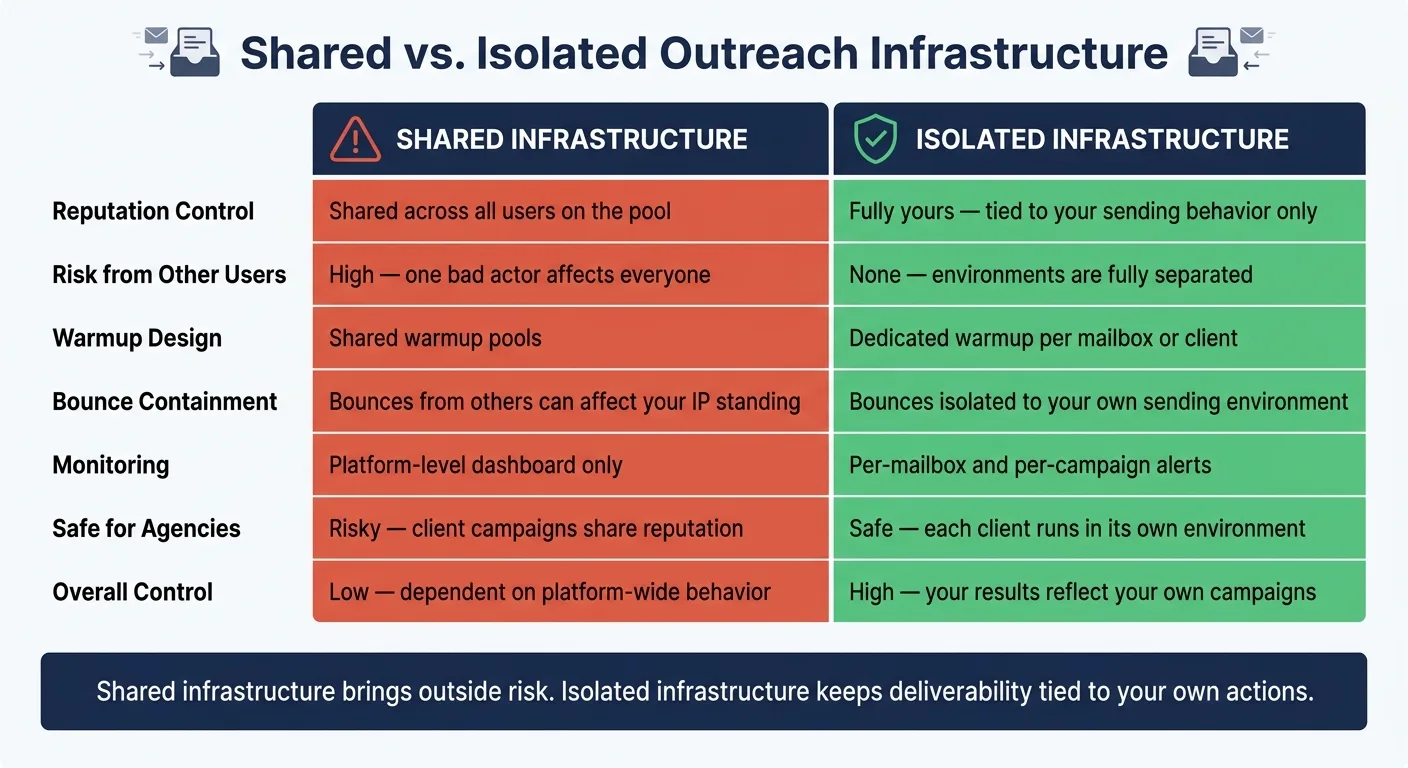
The setup under your outreach platform can decide whether your emails reach the inbox or vanish. At the center of it is one simple choice: Are you sharing sending infrastructure with other users, or are you running in your own environment? That’s why architecture comes first. It’s not some side detail.
What shared infrastructure exposes you to
With a shared setup, your IP, warmup, and reputation are linked to other users on the platform. So if someone else gets complaints or runs poor lists, your inbox placement can take a hit too.
One sender in that pool can pull down everyone on the same IP, even if your own campaigns are clean. That’s the problem. Isolation matters more than polishing your sequence if the setup itself puts you at risk.
What isolated infrastructure gives you instead
Isolated infrastructure changes that model. Your sending IPs are dedicated to your campaigns only. Your domain reputation reflects your behavior, not the actions of a group of senders you can’t control.
OutreachFox is one example. It uses isolated sending environments with dedicated IPs, separate warmup, and reputation tied to each customer’s own sending behavior. For agencies, this matters a lot. One client’s reputation doesn’t spill over into another client’s campaigns. Shared pools just don’t give you that kind of control.
Comparison table: Shared vs. isolated outreach infrastructure
| Factor | Shared Infrastructure | Isolated Infrastructure |
|---|---|---|
| Reputation control | Shared across all users on the pool | Fully yours - tied to your sending behavior only |
| Risk from other users | High - one bad actor affects everyone | None - environments are fully separated |
| Warmup design | Shared warmup pools | Dedicated warmup per mailbox or client |
| Bounce containment | Bounces from others can affect your IP standing | Bounces are isolated to your own sending environment |
| Monitoring | Platform-level dashboard | Per-mailbox and per-campaign alerts |
| Safe for agencies | Risky - client campaigns share reputation | Safe - each client runs in its own isolated environment |
| Overall control | Low - dependent on platform-wide behavior | High - your results reflect your own campaigns |
That’s the tradeoff in plain English: shared infrastructure brings outside risk, while isolated infrastructure keeps deliverability tied to your own actions. Once you know which model a platform uses, the next thing to check is the set of controls behind it.
How to evaluate an outreach platform on infrastructure before anything else
Once you know which architecture fits, the buying test gets pretty simple: check the controls that make the platform usable day to day. Fancy demo features are easy to show off. Deliverability problems are a lot harder to fix once you're in.
The basics you must verify: authentication, IP setup, warmup, and monitoring
Start with the core setup. Verify automated SPF, DKIM, and DMARC, along with dedicated IPs, mailbox-specific warmup, and per-mailbox alerts.
Then ask a direct question: does the platform use dedicated IPs, and are warmup profiles matched to your use case? If the answer is vague, that's a red flag.
Monitoring matters just as much. You want per-mailbox health alerts, real-time metrics, and alerts triggered at set health thresholds so you can catch problems early. If a dashboard hides one bad mailbox inside account-level reporting, a deliverability issue can sit there quietly and then start pulling down the rest of the account.
Deliverability controls come first. After that, integration reliability determines whether your team can handle those controls across a larger operation.
The integration layer: APIs, webhooks, and multichannel coordination
Once outreach starts feeding a CRM or reporting stack, the integration layer matters just as much as deliverability. If the setup is weak, a sync issue or late alert can turn one mailbox problem into a team problem fast. Weak APIs and delayed webhooks lead to missed replies, unlogged bounces, and alerts that show up too late to help.
What you want is API-first architecture with endpoint parity for dashboard actions. And at scale, real-time webhooks beat delayed batch updates every time.
For email + LinkedIn, keep it simple: use one inbox and one sequence flow so replies stay in one place. That cuts down on confusion and makes follow-up easier.
That’s why platform evaluation has to cover system integration too, not just sending.
Comparison table: How platform categories stack up on infrastructure
| Criteria | Shared Sending Setups | Isolated Infrastructure | Isolated Multichannel |
|---|---|---|---|
| API/webhooks | Basic or delayed | API-first with real-time webhooks | API-first with real-time webhooks |
| Client workspace isolation | Not available | Separate environments per client | Separate environments per client |
| Multichannel orchestration | Often bolted on | Limited or separate tools | Native email + LinkedIn, unified inbox |
The difference between shared setups and infrastructure-first platforms shows up fast: how soon problems appear, and whether your team can step in before those problems snowball.
Conclusion: Evaluate outreach software on infrastructure, not on demo features
Once you know which setup you want, the buying call gets a lot easier. Here’s the core idea: inbox placement is an infrastructure problem, not a feature problem.
If the setup underneath is shaky, even good copy and well-built sequences can fall flat. Weak DNS, shared sending, and late alerts can pile up in the background until your campaigns stop landing in the inbox on a steady basis.
For U.S. teams running cold outreach at any kind of scale, the checklist is pretty short: isolated sending - above all, isolated sending - threshold-based monitoring, and reliable APIs. Those are the controls that keep outreach steady.
Start with the infrastructure layer. Look at features after that. If a platform can’t show those controls, it’s a features-first tool, not an infrastructure-first one.
Frequently asked questions
Why does shared IP infrastructure hurt my email deliverability even if my campaigns are clean?+
When you share IPs and warmup pools with other users, one bad sender's complaints or poor list quality can damage the shared reputation and push your emails into spam folders. Your inbox placement becomes tied to behaviors you can't control, even when your own campaigns follow best practices.
What specific DNS records should I verify before choosing an outreach platform?+
You should verify that the platform supports automated setup of SPF, DKIM, and DMARC records for your domain. Missing or misconfigured authentication records cause inbox providers to see your domain as unverified, which can immediately push legitimate campaigns into spam regardless of message quality.
How does per-mailbox monitoring prevent deliverability problems that account-level dashboards miss?+
Per-mailbox monitoring with health threshold alerts lets you catch problems in individual mailboxes before they spread across your entire account. Account-level reporting hides isolated issues inside aggregate metrics, allowing one bad mailbox to quietly damage your overall sending reputation before you notice.
Why does OutreachFox use isolated sending environments instead of shared infrastructure?+
OutreachFox uses dedicated IPs and separate warmup for each customer so your domain reputation reflects only your own sending behavior, not actions from other platform users. For agencies, this architecture prevents one client's campaigns from affecting another client's deliverability and inbox placement.
What makes API-first architecture important for outreach platforms at scale?+
API-first design with real-time webhooks ensures replies, bounces, and health alerts sync immediately to your CRM and reporting stack without delays. Weak APIs and batch updates cause missed replies and late alerts that turn individual mailbox problems into team-wide issues before you can respond.
How should email and LinkedIn outreach be coordinated to avoid reply management problems?+
Use one unified inbox and one sequence flow for both email and LinkedIn so all replies appear in a single stream. Separate tools or bolted-on multichannel features create confusion and make timely follow-up harder when prospects respond across different channels.