
Agencies scale 100+ cold outreach campaigns by isolating each client's sending environment, setting strict volume caps, cleaning data with two-pass verification, and syncing email and LinkedIn into unified workflows with centralized reply h
- Each client needs separate domains, mailboxes, and DNS to prevent cross-account issues
- Set strict send caps per inbox and pause campaigns when health thresholds drop
- Run waterfall enrichment and two-pass verification before every campaign launch
- Email and LinkedIn should update one shared contact record to avoid duplicate touches
- Centralize reply handling and reporting with API-driven CRM sync for clear visibility
- Scale breaks when process is weak, not when volume increases with proper guardrails
Cold Outreach at Scale: How Agencies Manage 100+ Client Campaigns Without Chaos
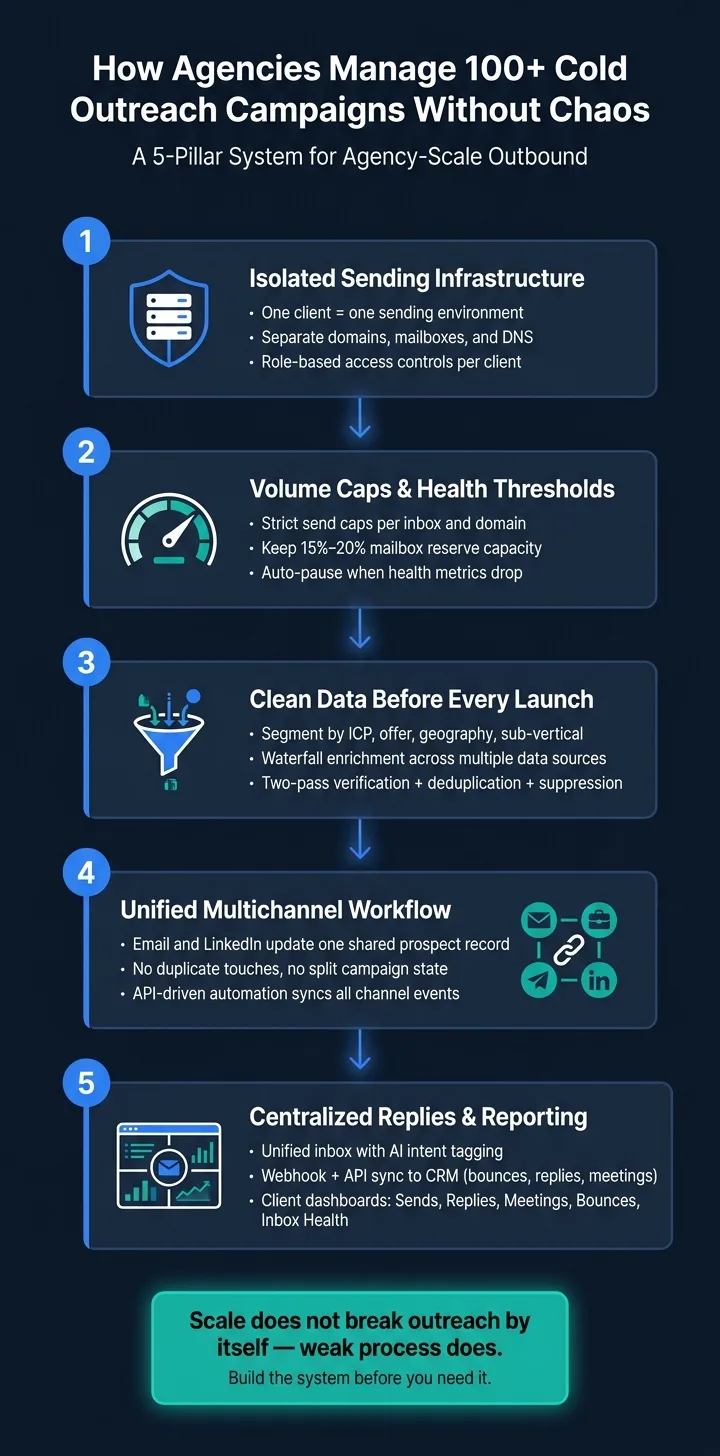
If I had to sum it up in one line: agencies keep 100+ cold outreach campaigns under control by treating outbound like a system, not a pile of spreadsheets.
Once campaign count climbs, the same problems show up fast: shared sender damage, list overlap, weak data, missed replies, and messy reporting. The fix is simple to describe, even if it takes work to set up: separate each client’s sending setup, cap volume per inbox, verify data before launch, sync email and LinkedIn into one workflow, and keep replies plus reporting in one place.
Here’s the full picture in plain English:
-
One client, one sending setup
- Separate domains
- Separate mailboxes
- Separate DNS and access controls
-
Strict send limits
- Set caps per inbox and per domain
- Pause when health drops
- Keep 15%–20% mailbox reserve capacity
-
Clean data before launch
- Segment by ICP, offer, geography, and sub-vertical
- Use waterfall enrichment
- Run two-pass verification
- Deduplicate and suppress before every launch
-
One workflow across channels
- Email and LinkedIn should update the same contact record
- No duplicate touches
- No split campaign state
-
One place for replies and reporting
- Unified inbox for triage
- API and webhook sync to CRM
- Client dashboards focused on sends, replies, meetings, bounces, and inbox health
What stood out to me most is this: scale does not break outreach by itself; weak process does. When agencies put guardrails in place before adding volume, they can launch more campaigns without letting one client’s issues spill into another account.
That’s the model this article lays out.
How To Scale A Cold Email Agency To 20+ Clients - Martin Adey | Cold Emails, Hot Takes #12
Set the Rules Before Adding More Campaigns
Once the operating model is in place, the next move is simple: set the rules before you scale.
If you add volume without clear guardrails, small problems turn into a mess fast. More campaigns mean more inboxes, more domains, more clients, and more places where things can go wrong. Agencies that run 100+ campaigns cleanly don’t win because they have more tools. They win because their process is tight.
For lead gen agencies, the bar is even higher than it is for in-house teams. They need stricter separation, tighter limits, and one place to manage deliverability. It starts with a non-negotiable rule: each client gets its own sending environment.
Treat Every Client as a Separate Sending Environment
Each client should have its own sending environment, inbox ownership, and role-based access with minimal data sharing.
That means client data, sending activity, and reporting stay isolated. If one account runs into trouble, it shouldn’t spill over into anything else. Think of it like bulkheads on a ship. If one section takes on water, the whole thing doesn’t go down.
Set Volume Caps and Health Thresholds Per Inbox and Domain
Before launch, set conservative send caps for each inbox and domain.
Then define the health thresholds that trigger alerts or pauses. If metrics drop below your line, the system should respond right away. When that happens, alerts should go to the account owner and the deliverability lead.
At scale, the goal is controlled volume, not max volume.
Those limits matter only if the team watches them all the time.
Make Deliverability an Infrastructure Function, Not a Copywriting Fix
When performance drops, check infrastructure before copy.
Mailbox rotation, replacement, and monitoring should be part of standard operations. Rotate aging inboxes, retire weak domains, and review daily health. Automated checks help cut down on manual review and make the whole system easier to manage.
Copy should help conversion. It should not be asked to patch infrastructure failures.
Once these rules are in place, the next step is building isolated domains, mailboxes, and DNS for each client.
Build Isolated Sending Infrastructure for Each Client
The next control layer is the sending stack itself: separate domains, mailboxes, and DNS for each client.
That matters for a simple reason: one client’s inbox failure shouldn’t spill over and hurt everyone else on your roster.
Once you’ve split clients apart, the next limit shows up fast: capacity. In plain terms, how many inboxes, domains, and authentication records can you add without hurting warm-up or deliverability?
Provision Domains, Mailboxes, and DNS with Reserve Capacity
Keep 15%–20% of mailboxes in reserve. That gives you backup room when a client needs to scale or when a mailbox has to be replaced.
For new inboxes, start small. Warm them at 5–10 emails per day, then ramp volume over 3–4 weeks.
How you set this up changes a lot. If you manage infrastructure yourself, you get full control. But you also take on manual provisioning, plus a multi-week ramp for each client. Platform-based setups can cut that workload by handling DNS authentication and giving you pre-warmed mailboxes, which can shrink launch time from weeks to minutes.
OutreachFox follows that approach. Each client gets a dedicated sending environment with isolated dedicated sending IPs, pre-warmed Google, Microsoft, SMTP, and Azure mailboxes, and automated SPF, DKIM, and DMARC setup. Its API-first design also supports bulk provisioning and mailbox-health monitoring.
Once the sending stack is isolated and stable, the next step is cleaning the data before launch.
Standardize Segmentation, Enrichment, and Verification Before Every Launch
Once domains and mailboxes are isolated, the next choke point is list quality.
Segment Campaigns by ICP, Offer, and Sub-Vertical
At this scale, a generic campaign usually falls flat. Each client needs its own segment map tied to a specific ICP, offer, geography, and, in many cases, a sub-vertical.
Keep every list matched to the current offer and buyer profile. If a client's ICP changes or a new sub-vertical comes into play, rebuild the segment instead of leaning on old records. Old data has a way of sneaking problems into a launch.
Run Waterfall Enrichment and Two-Pass Verification
Waterfall enrichment means checking multiple data sources in sequence and letting each one fill gaps left by the one before it. One source might have the email address. Another might have the LinkedIn match or firmographic fields.
This is where API-driven automation helps a lot. It cuts out manual CSV work and cleans up the process. The first pass covers basic validation, such as syntax and MX checks. The second pass reviews the remaining records again before launch.
Manual CSV workflows create rework. API-driven waterfall enrichment and two-pass verification reduce errors and cut launch delays.
Use one workflow that brings together:
- enrichment
- verification
- suppression updates
Maintain Suppression and Deduplication Before Every Launch
Use one suppression list per client. Every bounce, unsubscribe, and do-not-contact record should feed back into a shared suppression layer that applies across all campaigns for that client, not just the one that produced the signal. That shared layer helps stop one client's bad data from spilling into another client's campaign set.
Run deduplication before every launch, not just once during setup. The same contact can show up in multiple client lists, especially when verticals overlap.
Once the list is clean, push only approved contacts into the multichannel sequence.
Coordinate Multichannel Outreach, CRM Automation, and Live Campaign Management
After list hygiene, execution becomes the bottleneck. Once suppression and deduplication are done, the hard part is keeping every touch, reply, and status change lined up. This is the layer that stops the two problems that tend to show up last: missed replies and bad reporting.
Run Email and LinkedIn as One System, Not Two Separate Campaigns
A common agency mistake is treating email and LinkedIn like two separate plays with two separate tracking setups. That leads to duplicate touches, uneven timing, and no shared view of where a prospect stands.
Treat both channels as one shared workflow that checks the prospect's current status before the next step goes out. Each channel can still run its own automation, but both should write back to one prospect record before anything else fires.
Platforms like OutreachFox are built for this kind of setup. It supports multichannel email + LinkedIn sequences, a unified inbox, and an API-first core that keeps campaign state synced across channels.
Push Leads, Replies, and Status Changes Through APIs and CRM Syncs
The next place things break is state sync between outreach and the CRM. Manual CRM updates fall apart at this scale.
Use webhooks and APIs to send bounces, replies, meeting bookings, and inbox health alerts into the right system records. That keeps the CRM matched to what happened in outreach, not what someone meant to update later. It also helps to filter raw events before they hit the CRM.
Centralize Reply Handling, Permissions, and Client Dashboards
At 100+ campaigns, split inboxes create blind spots and delays. A unified inbox that pulls replies across a client's mailboxes and uses AI to tag replies by intent helps account managers triage fast without missing anything.
Permissions matter too. Account managers should only see the clients they own, and clients should only see their own reporting. OutreachFox supports isolated, white-label workspaces for each client, which keeps environments separate and cuts down on cross-client mix-ups.
That same shared view should drive both internal triage and client reporting. Keep the client dashboard focused on:
- Sends
- Replies
- Meetings
- Bounces
- Inbox health
Keep the deeper deliverability data on the internal side. Clients need a simple scorecard. Operators need the full control layer inside.
Conclusion: A Simple Model That Keeps 100+ Campaigns Under Control
Running 100+ campaigns at once takes structure, not extra hustle.
The parts need to work as one system. Keep infrastructure separate for each client, so one bad domain doesn't spill into another account. Set a clear daily cap for every inbox, and rotate older mailboxes out before health starts to slip. Check data before every send with a two-pass enrichment and verification workflow. Use APIs to connect multichannel workflows, so email and LinkedIn pull from the same prospect record. Then keep replies and reporting in one place, so account managers aren't bouncing between scattered inboxes.
Automation only cuts manual work when ownership is clear, limits are set, and live event sync is in place.
Build this system before you need it. Keep backup domains and mailboxes in warm-up. Pause campaigns when health triggers fire. Sync CRM events automatically. The point is simple: each part should make the next client easier to onboard, not harder. Isolated infrastructure, verified data, and synced execution are what keep agency-scale outreach under control.
Frequently asked questions
Why does the article recommend keeping 15-20% of mailboxes in reserve capacity?+
Reserve capacity provides backup room when a client needs to scale quickly or when an existing mailbox needs to be replaced due to health issues. This buffer prevents scrambling for new infrastructure mid-campaign and helps maintain consistent sending capacity across all client accounts without disrupting operations.
What is waterfall enrichment and why do agencies use it for cold outreach campaigns?+
Waterfall enrichment checks multiple data sources in sequence, with each source filling gaps left by the previous one. One source might provide email addresses while another adds LinkedIn matches or firmographic data. This approach reduces manual CSV work and ensures more complete contact records before campaign launch.
How does treating email and LinkedIn as separate campaigns create problems at scale?+
Running email and LinkedIn as separate systems leads to duplicate touches, uneven timing, and no unified view of prospect status. The article recommends treating both channels as one shared workflow that checks a prospect's current status before the next step executes, preventing conflicting outreach and maintaining consistent campaign state.
What does the article mean by treating deliverability as an infrastructure function rather than a copywriting fix?+
When performance drops, agencies should check infrastructure issues like mailbox rotation, domain health, and authentication setup before adjusting copy. Copy should improve conversion rates, not compensate for broken sending infrastructure. Regular mailbox rotation, domain retirement, and daily health monitoring should be standard operations.
Why does the article recommend maintaining one suppression list per client rather than a global list?+
A per-client suppression list ensures that bounces, unsubscribes, and do-not-contact records apply across all campaigns for that specific client without affecting other clients. This prevents one client's bad data from contaminating another client's campaign set while maintaining proper suppression across a single client's multiple campaigns.
What specific metrics should client dashboards focus on according to the article?+
Client dashboards should focus on sends, replies, meetings, bounces, and inbox health. The article recommends keeping deeper deliverability data on the internal operator side while giving clients a simple scorecard of campaign performance without overwhelming them with technical infrastructure details.
How does two-pass verification differ from single-pass email validation?+
Two-pass verification runs email validation twice before launch. The first pass covers basic checks like syntax and MX records, while the second pass reviews remaining records again just before campaign launch. This double-check reduces errors that single validation might miss and catches data degradation that occurs between initial validation and send time.