
When emails land in spam, fix authentication (SPF/DKIM/DMARC) first, then tackle sender reputation, list quality, and sending patterns. Isolated infrastructure and multichannel outreach keep deliverability stable long-term.
- Fix SPF, DKIM, and DMARC authentication before changing copy or targeting
- Keep bounce rates under 2-3% by verifying emails and removing invalid contacts
- Pause or rotate mailboxes showing high bounce rates or spam complaints immediately
- Use private infrastructure instead of shared warmup pools to isolate sender reputation
- Add LinkedIn and phone outreach to reduce pipeline risk when email deliverability drops
- Monitor mailbox health daily and set automatic alerts for reputation changes
Emails Going to Spam? 15 Instant Fixes (Plus Long-Term Solutions)
If your cold emails keep landing in spam, the problem is usually your setup, not just your copy. In most cases, I’d check 4 things first: SPF/DKIM/DMARC, sender reputation, list quality, and send volume. Even one weak signal can hurt inbox placement.
Here’s the short version:
- Fix DNS first: broken or missing SPF, DKIM, or DMARC can block inbox placement fast.
- Check reputation: review domain/IP health, blacklist status, bounce rates, and spam complaints.
- Clean your list: invalid and role-based emails can push bounce rates up. Many senders try to stay under 2% to 3% bounces.
- Reduce risk fast: cut volume on weak mailboxes and stop sending from mailboxes with poor history.
- Look at send patterns: spikes, too many links, heavy tracking, and weak targeting can trip filters.
- Build for the long run: use separate sending setup, slow warmup, daily monitoring, and more than one outreach channel.
The main idea is simple: fix the signal that is causing the spam placement instead of changing everything at once.
How to Fix Emails Going to Spam FAST (Full Tutorial 2025)
Quick comparison
| Area | What I’d check | Common warning sign | First move |
|---|---|---|---|
| Authentication | SPF, DKIM, DMARC | Missing or misaligned records | Fix DNS records |
| Reputation | Domain/IP health, blacklists | Poor reputation or listing | Pause and clean up sending |
| List quality | Validity, inactivity, role accounts | High bounce rate | Verify and remove bad contacts |
| Sending behavior | Volume, timing, links, tracking | Sudden spikes or low engagement | Lower volume and simplify emails |
Bottom line: I’d start with email setup, then reputation, then data, then sending habits. That order gives you the best shot at getting back into the inbox and keeping it that way.
Diagnose the Problem Before You Change Anything
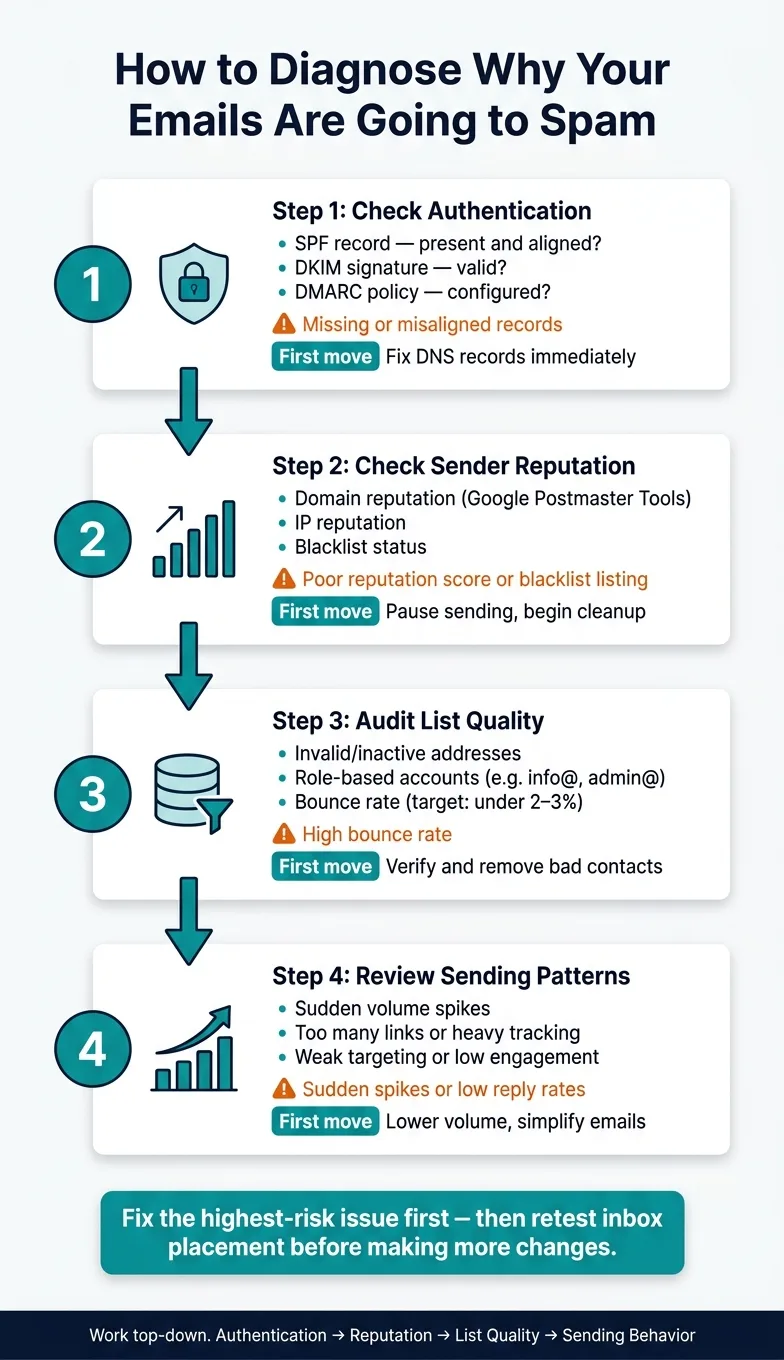
Start by figuring out which outbound signal is breaking down. Don’t change five things at once and hope for the best. That usually makes the problem harder to trace.
A better path is to narrow the issue to one of four areas:
- authentication
- reputation
- list quality
- sending behavior
Work from the top down. Fix authentication first. Then look at reputation. After that, review your list and sending behavior.
Check Authentication, Reputation, and Blacklists
First, confirm that SPF, DKIM, and DMARC are set up and aligned for every sending domain you use. If one domain is misaligned, that alone can hurt placement.
Next, review domain and IP reputation in Google Postmaster Tools if your volume is high enough to show data. If reputation is weak, mailbox providers may already be filtering your mail more aggressively.
It also helps to check whether your domain or IP shows up on any blacklist. If it does, that’s a strong sign something is off and needs attention before you touch copy, volume, or targeting.
Check Bounce Rates, Complaints, and Engagement
Now look at recent sending performance. Focus on high bounce rates, rising spam complaints, and low reply rates.
High bounces often point to bad data. Spam complaints can mean the message feels unwanted, the targeting is off, or both. Low reply rates usually hint at weak targeting or weak copy. In plain English: the right people aren’t getting the message, or the message isn’t landing.
Check Sending Patterns and Message Format
Then review how you’re sending and what the emails actually look like. Small patterns can push mail into spam fast.
Watch for sudden volume spikes, unverified lists, shared warmup pools, spammy copy patterns, too many links, or heavy tracking settings. Any one of these can hurt placement.
Fix the highest-risk issue first, then retest inbox placement. Use the strongest signal you find to decide which fix to make first.
15 Instant Fixes You Can Apply Today
Once you know whether the problem sits in authentication, sender reputation, or list quality, you can act fast. Go after the issue at the source first. That gives you the best shot at getting inbox placement back on track without wasting time.
Fixes 1–5: Authentication, Blacklists, Volume, Mailbox Triage, and List Verification
Start with the problems that can stop inbox placement right away.
- Fix broken SPF, DKIM, or DMARC
Handle missing SPF, broken DKIM, or absent DMARC first. Make sure SPF, DKIM, and DMARC line up with the exact domains and mailboxes you send from.
- Run a blacklist check on every sending domain and IP
Check all sending domains and IPs against the major blacklists. If any domain or IP is listed, take it out of rotation until it has been delisted.
- Verify and clean your prospect list
Remove invalid, inactive, and role-based accounts before you send. Bad addresses drive up bounce rates and hurt sender reputation.
Then move on to bounce risk and excess sending noise.
- Pull back sending volume on flagged mailboxes
If a mailbox shows high bounce rates or complaint signals, cut its daily send volume right away. Don’t wait until the domain gets fully flagged.
- Rotate or retire damaged mailboxes
If a mailbox has built up reputation damage, shift active sequences to a healthy mailbox. If you keep sending from a damaged address, the problem usually gets worse and can put the whole domain at risk.
Long-Term Solutions That Keep Inbox Placement Stable
The 15 fixes above stop the bleeding. But if your sending setup is weak, spam placement often comes back. Long-term stability usually comes from three things: better infrastructure, cleaner data, and more than one outbound channel.
Move to Private Sending Infrastructure and Controlled Warmup
If shared warmup or pooled sending is hurting placement, move to isolated infrastructure. When several users share the same IP or warmup setup, your reputation can take a hit because of someone else’s bad sending habits.
Private, isolated infrastructure fixes that. You get dedicated IPs and owned mailboxes that stay separate from other senders. Platforms like OutreachFox are built around that approach, so your deliverability is tied to your sending behavior, not a shared pool.
| Model | Key Benefits | Main Risks | Typical Setup |
|---|---|---|---|
| Shared infrastructure | Fast to launch, lower upfront cost | Reputation bleed from other senders, less control | Shared IPs or shared warmup pools |
| Private infrastructure | Isolated reputation, more stable inbox placement | More setup and higher cost | Dedicated IPs, owned mailboxes |
Controlled warmup matters too. Even with private infrastructure, a new mailbox should ramp up slowly instead of jumping straight to full volume. That kind of spike can trip filters fast. Some providers also offer pre-warmed mailboxes, which can shorten the early ramp period.
Standardize Data Quality, DNS Management, and Health Monitoring
Once your infrastructure is isolated, data quality often becomes the next weak spot. If bounces caused the last problem, fix lead hygiene before the next campaign goes out. Use verified enrichment and suppression before each send.
On the DNS side, treat authentication and record management like routine upkeep, not a set-it-and-forget-it job. Small misconfigurations can sit quietly in the background and drag down inbox placement over time. Regular audits help catch that before it turns into a bigger mess.
It also helps to set automatic pauses when bounce or complaint rates start to climb. Monitor mailbox health every day, and set alerts for bounce, complaint, and reputation changes. That way, you can act before a dip turns into a full deliverability slide.
Add Multichannel Outreach So Email Does Not Carry the Whole Pipeline
If inbox placement still moves up and down, take some pressure off email instead of pushing harder through the same sender. When deliverability drops, teams that depend on email alone often watch pipeline stall out.
A better move is to keep LinkedIn and phone touches running alongside email. That gives you room to reduce email volume without stopping outreach. LinkedIn sits outside your email reputation signals, and it gives prospects another place to reply.
Platforms like OutreachFox can coordinate email and LinkedIn sequences in one workflow, which makes it easier to shift attention between channels when inbox placement slips.
| Channel Model | Deliverability Impact | Resilience When Email Underperforms | Complexity |
|---|---|---|---|
| Single-channel email | All reputation risk sits on one channel | Low - pipeline can stall if deliverability drops | Low setup, high fragility |
| Multichannel (email + LinkedIn + phone) | Risk is distributed across channels | High - other channels absorb volume when email slows | Moderate setup, more stable |
It keeps outreach moving when email performance softens.
Conclusion: Fix Today's Spam Problem and Build a Safer Outbound System
The fixes in this guide work for a simple reason: they target the same signals spam filters watch most closely.
Spam placement usually starts with a few common problems. Your authentication may be weak. Your list may be messy. Or you may be sending too much, too soon. The fix follows that same path. First, stop the immediate damage. Then put the right system in place so you can stay out of spam over time.
The order matters.
Authentication comes first. SPF, DKIM, and DMARC are the base layer. Reputation protection comes next. Keep complaint rates low, watch bounce rates, and pause before a poor send makes things worse. List quality never stops mattering. Unverified data can drive up bounces fast and hurt domain reputation.
Once you've stabilized things, the next step is to keep that stability in place. That means isolated infrastructure, controlled warmup, verified data, and steady monitoring. If email performance drops, multichannel outreach helps keep pipeline movement going. Email should be one part of a broader outbound system, not the only channel doing all the work.
Platforms like OutreachFox are built around that approach. Private infrastructure and multichannel workflows help keep deliverability tied to your own sending behavior.
Frequently asked questions
What are the four main areas to check when emails are landing in spam?+
The four main areas are authentication (SPF, DKIM, DMARC), sender reputation (domain/IP health and blacklists), list quality (invalid and role-based emails), and sending behavior (volume, timing, links, and tracking). Fixing these in order gives the best chance of restoring inbox placement.
What bounce rate threshold do many senders try to stay under to avoid spam placement?+
Many senders try to stay under 2% to 3% bounce rates. High bounce rates often indicate bad data quality and can quickly hurt domain reputation and inbox placement.
Should you pause sending from a mailbox that shows high bounce rates or complaint signals?+
Yes, you should immediately cut daily send volume on any mailbox showing high bounce rates or complaint signals. If a mailbox has built up significant reputation damage, it's better to rotate to a healthy mailbox or retire the damaged one entirely to prevent further harm to the domain.
What is the difference between shared and private email infrastructure for deliverability?+
Shared infrastructure uses pooled IPs or warmup setups where your reputation can be hurt by other senders' bad habits. Private infrastructure uses dedicated IPs and owned mailboxes that isolate your reputation, making inbox placement dependent only on your own sending behavior.
Why does the article recommend multichannel outreach instead of relying only on email?+
Multichannel outreach (email plus LinkedIn and phone) distributes risk across channels and prevents pipeline stalls when email deliverability drops. It allows you to reduce email volume during reputation issues while keeping outreach moving through other channels that sit outside your email reputation signals.
What should you check first before making any changes to fix spam placement?+
You should diagnose which specific signal is causing the problem before changing anything. Check authentication records, reputation metrics, blacklist status, bounce rates, spam complaints, and sending patterns to identify the root cause, then fix the highest-risk issue first instead of changing multiple things at once.
How should new mailboxes be ramped up to avoid triggering spam filters?+
New mailboxes should use controlled warmup by ramping up volume slowly instead of jumping straight to full sending capacity. Sudden volume spikes can trip spam filters quickly, so gradual increases help build positive sender reputation over time.