Low reply rates usually stem from infrastructure, data quality, or offer issues—not copy. Fix authentication and verification first, then check targeting and ask size before rewriting sequences.
- Check SPF, DKIM, DMARC, and mailbox warmup before blaming your copy for poor replies.
- High bounce rates and bad enrichment data kill reply rates faster than weak messaging.
- Good opens with low replies usually mean targeting or ask size issues, not inbox problems.
- Spam complaint rates above 0.30% trigger active Gmail filtering and hurt sender reputation.
- Sort replies into positive, neutral, objection, and negative before judging campaign performance.
- Fix bottlenecks in order: infrastructure first, then data quality, then offer and sequence.
Not Getting Replies? The 11-Point Diagnostic That Finds Your Actual Problem
If reply rates are low, the copy is often not the first thing I’d change. I’d check the funnel in order: inbox placement, list health, target fit, offer, follow-up timing, tracking, and how replies turn into meetings.
Here’s the short version:
- Low opens usually mean sending setup, mailbox health, or spam placement issues
- Good opens + low replies usually mean weak targeting, poor list data, or an ask that feels too big
- Replies + no meetings usually mean the CTA is off or replies are being judged the wrong way
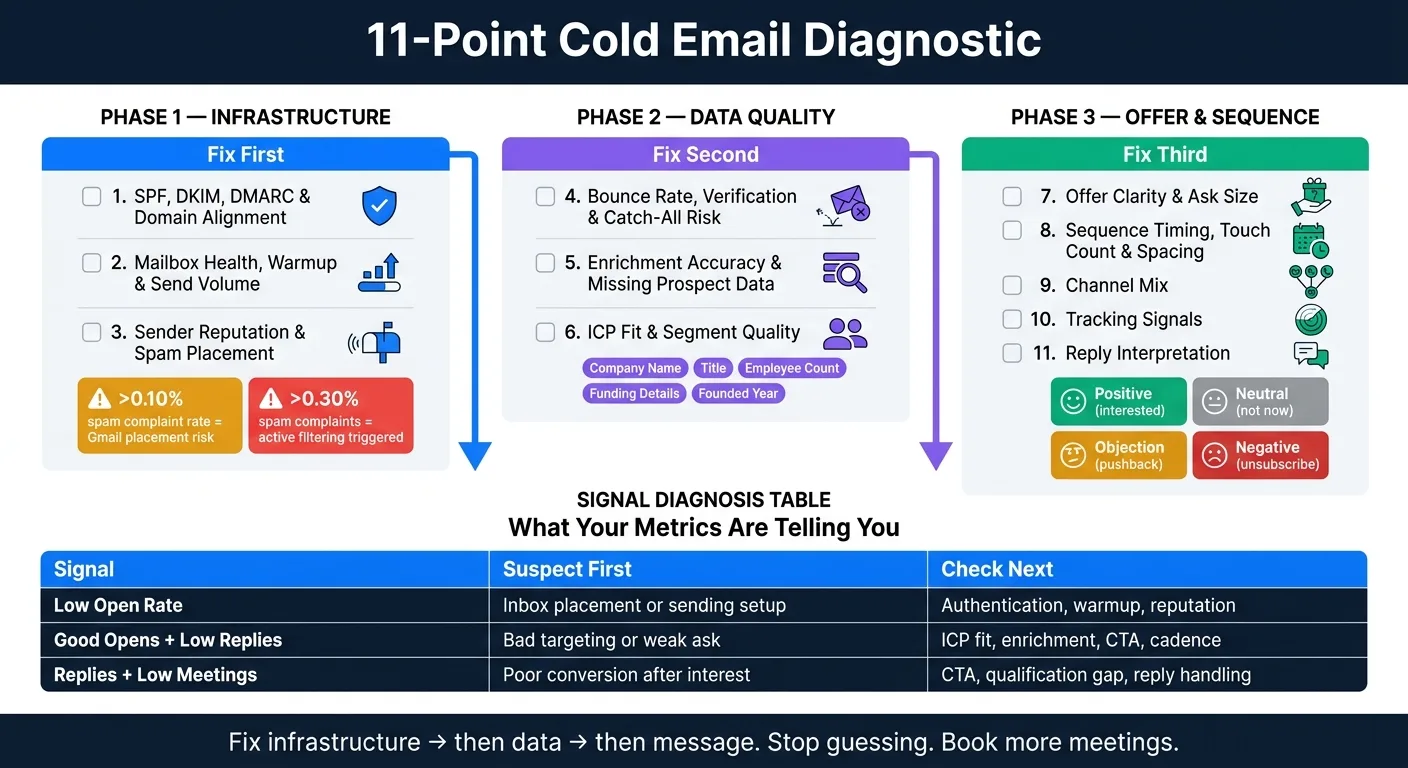
I’d run these 11 checks before rewriting a sequence:
- SPF, DKIM, DMARC, and domain match
- Mailbox warmup and daily send volume
- Sender reputation and spam folder placement
- Bounce rate, verification, and catch-all risk
- Enrichment accuracy and missing contact/company data
- ICP fit and segment quality
- Offer clarity and ask size
- Sequence timing, touch count, and spacing
- Channel mix
- Tracking setup
- Reply quality vs. booked meetings
A few numbers matter early:
- Spam complaint rate over 0.10% can hurt Gmail placement
- 0.30%+ complaints can trigger active filtering
- Hard bounces and catch-all sends can drag down mailbox performance fast
Fix Your AI Cold Outreach Reply Rates in 10 Minutes
Quick comparison
| Signal | What I’d suspect first | What I’d check next |
|---|---|---|
| Low open rate | Inbox placement or sending setup | Authentication, warmup, reputation |
| Good opens, low replies | Bad targeting or weak ask | ICP fit, enrichment, CTA, cadence |
| Replies, low meetings | Poor conversion after interest | CTA, qualification gap, reply handling |
The main point is simple: I’d fix the bottleneck in the right order - setup first, then data, then message and conversion. That saves time and keeps me from changing copy when the real issue sits somewhere else.
Section 1: Check Infrastructure Before You Touch the Sequence
Infrastructure issues are easy to miss. The copy may look fine, but the sending setup is often the real choke point. Run these three checks first before you judge anything else.
1. SPF, DKIM, DMARC, and Domain Alignment
Start with authentication. SPF, DKIM, and DMARC tell receiving mail servers that your domain is allowed to send email. If one of these records is missing, set up the wrong way, or out of alignment, your emails can land in spam or get rejected before anyone sees them.
Check each record with a tool like MXToolbox or Google Admin Toolbox. Focus on:
- SPF: A valid record that includes your sending provider's servers
- DKIM: A matching key between your DNS record and your sending platform
- DMARC: A policy set to at least
p=nonewith a reporting address so you can monitor failures - Domain alignment: The From domain matches the domain used in SPF and DKIM signing
One common problem is sending from a subdomain while the root domain holds the DMARC policy. That can create an alignment mismatch and quietly trip spam filters. Fix authentication first. Don’t read too much into open or reply data until this part is clean.
If authentication checks out, move to mailbox health.
2. Mailbox Health, Warmup Status, and Sending Volume
Next, look at the mailbox itself. Is it new? Still warming up? Sending too much each day? Those are often the first places things go sideways.
The most common issues are:
- Ramping volume too fast before the mailbox has enough sending history
- Sending in uneven bursts instead of steady daily patterns
- Leaning on artificial warmup pools that create engagement signals without normal inbox behavior
If the mailbox is still in ramp-up, slow the send. Judge reply performance only after volume and timing settle into a stable pattern.
If warmup and volume look fine, sender reputation is usually the next place to check.
3. Sender Reputation and Spam Placement Signals
A mailbox can pass authentication and still perform poorly if sender reputation has taken a hit. Reputation exists at both the domain and IP level. It drops when people mark messages as spam, bounce rates jump, or sending patterns look automated.
Use Google Postmaster Tools for Gmail placement and MXToolbox or Sender Score for broader signals. Look for:
- Spam rate trends: Google Postmaster flags domains exceeding a 0.10% spam rate; anything above 0.30% triggers active filtering
- Blocklist entries: Check major blocklists (Spamhaus, Barracuda, SURBL) for domain or IP listings
- Inbox vs. spam placement: Use a seed list test to see where messages actually land across major providers
If spam placement is the issue, pause sending from the affected mailbox. Pull it out of active campaigns and let it recover with continued warmup before bringing it back at lower volume. Do not rewrite the sequence until placement is clean.
Section 2: Check Data Quality Before You Blame Messaging
Once your setup is clean, look at the list itself.
Bad data can drag down reply rates without making much noise. And the upside here is simple: once you spot the issue, it's often much easier to fix than a messaging problem.
4. Bounce Rate, Verification, and Catch-All Risk
High bounce rates usually point to one thing: the list wasn't verified well enough.
Hard bounces tell receiving servers that you're sending to stale or made-up addresses. That can hurt list hygiene fast.
Catch-all domains make this trickier. They’re tough to verify, so a result marked "valid" can still hide bad addresses. If you didn't filter catch-alls before sending, your verification report may look cleaner than the list actually is.
Run every list through verification before it touches a campaign. Then separate catch-alls into their own segment and decide how you want to handle them:
- Suppress them completely
- Test them carefully at very low volume
If the list clears verification, move to the next check: does the segment actually match the offer?
5. Enrichment Accuracy and Missing Prospect Data
Broken personalization usually starts with stale data or guessed data.
If a prospect's title is wrong, the company size is out of date, or the funding details are old, the message gives off a bad-data signal. At that point, rewriting the sequence won't help much.
The fields that matter most for personalization are:
- Company name
- CEO/founder name
- Founded year
- Employee count
- Specific funding details
Treat inferred fields as lower-confidence than extracted fields, especially when you're using them in personalization.
A quick audit helps here. Pull a sample of active records and compare the key fields against the prospect's LinkedIn profile or company website today. If those fields are often assumed, missing, or unclear, the enrichment layer is likely the bottleneck.
Once the data is clean, check whether you're reaching the right role and the right type of company.
6. ICP Fit and Segment Quality
Healthy opens with weak replies usually point to a segment problem, not an inbox problem.
Take a hard look at your segment definition. Are you reaching the actual decision-maker, or someone one step removed? Are you using the same angle for very different roles? That's a targeting issue, plain and simple.
Break reply rates out by role and company size. Sometimes one sub-segment responds while another falls flat. When that happens, split the segment before you change the copy.
Section 3: Diagnose the Offer, Sequence, and Channel Strategy
If your setup is clean and your data checks out, the problem is often simpler than people think. It usually comes down to what you're asking for, when you're asking for it, and where you're showing up.
7. Offer Clarity and Ask Size
If deliverability and list quality are clean, low reply rates often point to the ask size, the cadence, or the channel.
A big ask tends to flop early because cold prospects don't trust you yet. That's just how it goes. If someone is hearing from you for the first time, they're not likely to jump into a long demo, a deep audit, or a big commitment.
A better test is simple: Would a cold prospect say yes to this on first read? If the answer is no, shrink the commitment.
Make the next step small. Easy. Low-friction. At the same time, make the pain point feel urgent enough that replying makes sense now, not later.
If the ask is already small and replies are still weak, look at cadence next.
8. Sequence Timing, Touch Count, and Spacing
A lot of campaigns end too soon. The prospect never got a fair chance to reply.
If replies are weak but the ask is clear, try wider spacing or add more touches. Some people need more time. Some just need to see your name a few more times before they act.
If replies seem confused, that's a different problem. In that case, the ask is probably still too big or too vague, so trim it down.
If cadence doesn't seem to be the issue, move to channel fit and tracking.
9. Channel Mix
Once the offer and cadence are in good shape, ask a different question: Does this channel match how this audience likes to respond?
Sometimes the copy isn't the problem at all. If the same prospects engage on LinkedIn but ignore email, that points to channel fit. You're showing up in the wrong place, or at least not in the best one.
Before you rewrite the whole sequence, test another channel.
10. Tracking Signals
If open or click data looks strange, check tracking before you touch the message.
Common failure points include:
- Broken open or click tracking
- Image blocking by mail clients
- Bad links or redirected links
- UTM mismatches
- Sudden drops caused by tooling changes, not performance changes
If open rates spike or drop but reply trends don't move with them, that's usually a tracking issue, not a messaging issue.
Fix the measurement layer first. Then read the data.
If the numbers still look clean, the next step is to check how replies are being interpreted.
11. Reply Interpretation
Raw reply count is a weak signal.
Instead, sort replies into four buckets:
- Positive: interested, wants to talk
- Neutral: not now, no context
- Objection: specific pushback
- Negative: unsubscribe, wrong person
Then tie campaign assessment to booked meetings, not total replies.
This is where a lot of high-volume outreach teams get it wrong. They treat neutral replies like hard no's. That's a mistake.
A campaign with plenty of neutral replies isn't dead. It may just need better follow-up or a clearer next step. Only call it a real miss when pipeline impact stays flat after you account for all four reply types.
Conclusion: Use the 11-Point Checklist to Fix the Actual Bottleneck
Low reply rates usually point to a system issue, not just a copy issue. That means the fix starts earlier than most teams think. Before you rewrite subject lines or swap in new CTAs, go through the checklist in the right order: infrastructure first, then data, then offer and sequence.
Here’s the order to use:
| Priority | Category | Fix Before Moving On |
|---|---|---|
| 1 | Infrastructure | Authentication, Warmup |
| 2 | Data Quality | Verification, Enrichment |
| 3 | Offer & Sequence | Ask Size, Cadence, Channel |
Watch your bounce, complaint, and unsubscribe trends as you go. If complaint rates start to climb, pause campaigns and fix the issue before sending more.
Move through each layer one at a time. That’s how you stop guessing and book more meetings.
Frequently asked questions
What spam complaint rate threshold does the article identify as potentially hurting Gmail placement?+
The article states that a spam complaint rate over 0.10% can hurt Gmail placement, while 0.30%+ complaints can trigger active filtering. These thresholds are important markers for monitoring sender reputation and inbox deliverability.
Why does the article recommend checking SPF, DKIM, and DMARC before analyzing reply rates?+
Authentication issues can cause emails to land in spam or get rejected before prospects even see them, making open and reply data misleading. The article emphasizes fixing authentication first because you can't accurately judge sequence performance if messages aren't reaching inboxes properly.
What does the article suggest when opens are good but replies are low?+
Good opens with low replies typically indicate targeting problems rather than deliverability issues. The article recommends examining ICP fit, enrichment accuracy, the size of your ask, and whether you're reaching actual decision-makers before rewriting copy.
How should catch-all email domains be handled according to the 11-point diagnostic?+
The article recommends separating catch-all domains into their own segment after verification, then deciding whether to suppress them completely or test them carefully at very low volume. Catch-alls are difficult to verify accurately and can hide bad addresses that hurt bounce rates.
What are the four reply buckets the article recommends for categorizing responses?+
The article suggests sorting replies into positive (interested, wants to talk), neutral (not now, no context), objection (specific pushback), and negative (unsubscribe, wrong person). This classification helps assess campaign performance based on booked meetings rather than raw reply counts.
Why does the article warn against ramping send volume too quickly on new mailboxes?+
Ramping volume too fast before a mailbox has established sufficient sending history can damage sender reputation and deliverability. The article recommends steady daily patterns during warmup and judging reply performance only after volume and timing stabilize.
What does the article identify as the most common cause of high bounce rates?+
High bounce rates typically point to insufficient email list verification. The article explains that hard bounces signal to receiving servers that you're sending to stale or invalid addresses, which quickly damages list hygiene and sender reputation.