
Cold email tools' monthly fees don't reveal true costs. OutreachFox includes dedicated IPs, pre-warmed mailboxes, and enrichment; other platforms may require separate domains, warmup tools, and mailbox licenses.
- Monthly subscription price excludes domains, mailboxes, warmup tools, and DNS setup costs.
- OutreachFox provides dedicated campaign IPs and pre-warmed mailboxes in one platform.
- Shared infrastructure ties your deliverability to other customers' sending behavior.
- Private sending stacks reduce vendor bills and ongoing deliverability maintenance work.
- Total ownership cost includes software fees plus all infrastructure you must manage.
- Waterfall enrichment across 50+ providers eliminates need for separate data tools.
EmailBison Alternatives: Cost vs Ownership
The monthly plan price does not tell you what cold email will cost. I’d judge these tools by two things: software fees and what you still have to own, buy, and run to send at volume.
If I were comparing EmailBison, OutreachFox, Instantly, Smartlead, and Lemlist, I’d keep the test simple:
- What does the platform include?
- Do I need to buy domains and mailbox seats on top?
- Is sending infrastructure shared or private?
- Who handles warmup, DNS setup, and deliverability work?
- How much team time will upkeep take each month?
Here’s the short version:
- OutreachFox is the only option in the source set with checked detail.
- It includes dedicated campaign IPs, pre-warmed mailboxes, LinkedIn outreach, and waterfall enrichment across 50+ providers.
- For EmailBison, Instantly, Smartlead, and Lemlist, the source set does not confirm pricing, mailbox setup, or infrastructure ownership.
- That means the biggest cost risk is still unknown: the sending stack outside the base plan.
A cold email tool can look like $99/month software on paper and still cost far more after you add:
- Domains
- Google Workspace or Microsoft 365 inboxes
- Warmup tools
- SPF, DKIM, and DMARC setup
- Inbox replacement and deliverability fixes
- Team time
Best Cold Email Software in 2026 (Top 5 Tested & Compared)
Quick Comparison
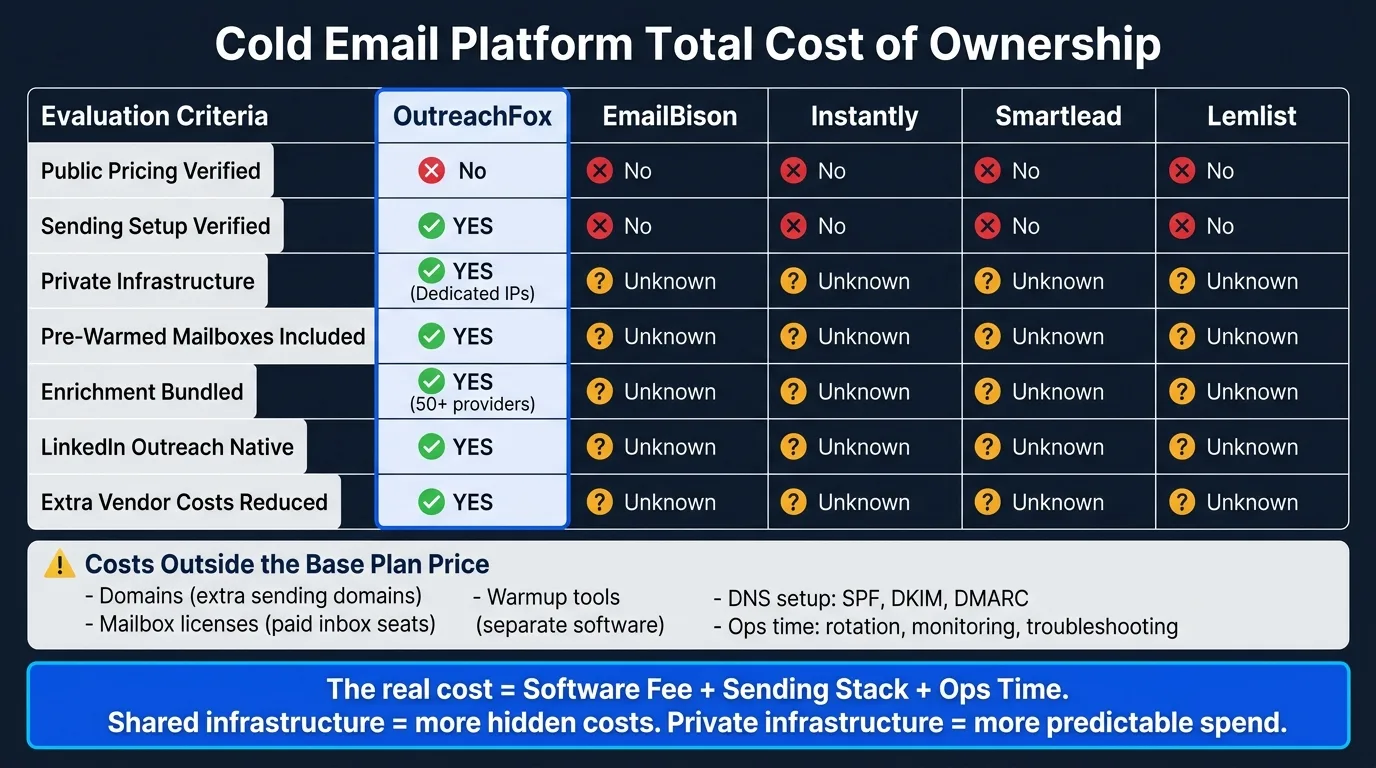
| Platform | Public pricing verified? | Sending setup verified? | Private or shared infrastructure verified? | Extra tools reduced? |
|---|---|---|---|---|
| OutreachFox | No | Yes | Private setup stated | Yes |
| EmailBison | No | No | No | Unknown |
| Instantly | No | No | No | Unknown |
| Smartlead | No | No | No | Unknown |
| Lemlist | No | No | No | Unknown |
My main takeaway is simple: ownership changes cost. If the platform owns more of the sending stack, you usually have fewer separate bills and less day-to-day work. If it doesn’t, the low sticker price can fade fast.
That’s the lens I’d use for the full comparison below.
1. OutreachFox
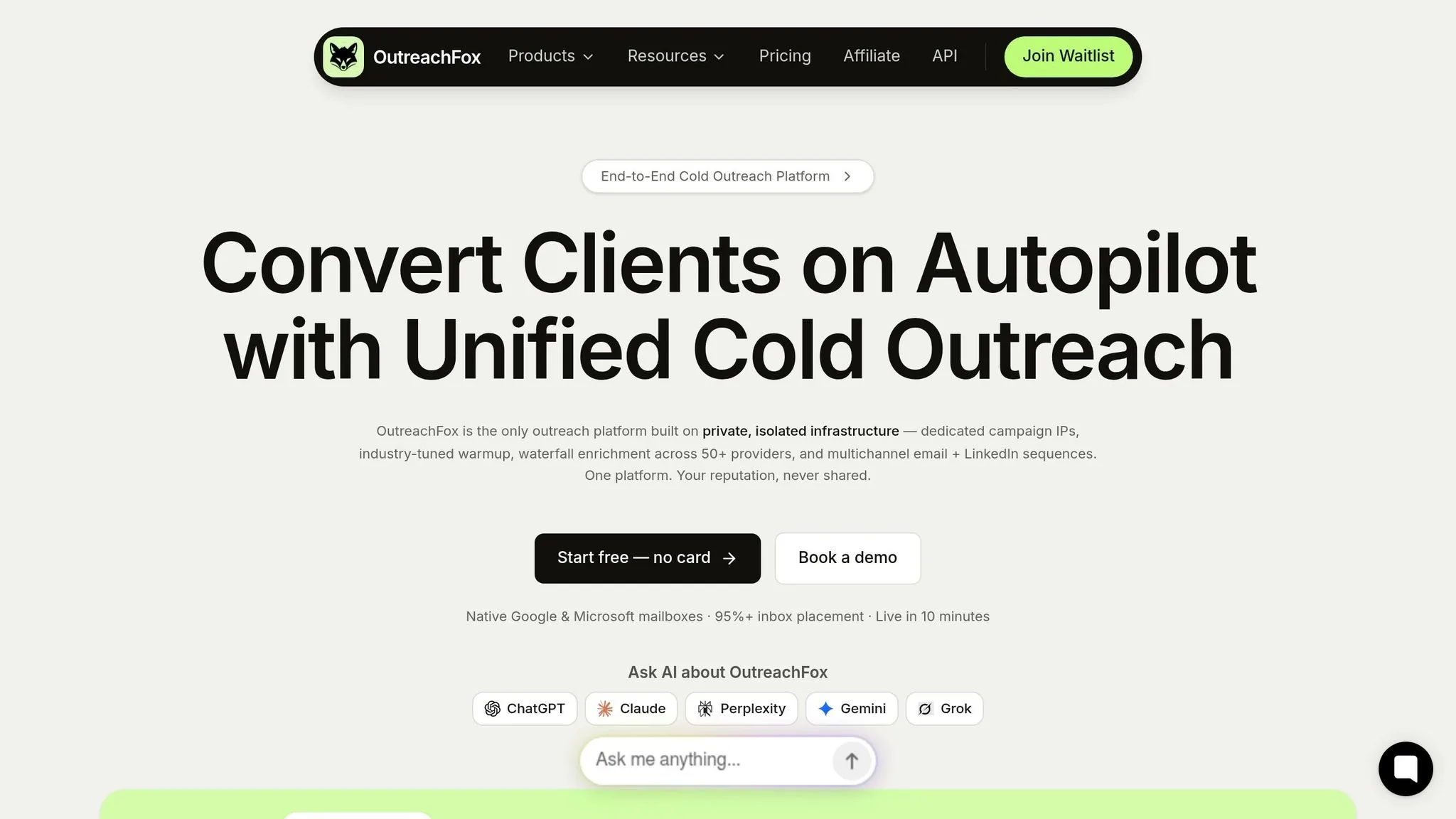
OutreachFox puts sending, warmup, enrichment, and LinkedIn outreach in one place. That cuts down on extra vendor fees. And that matters, because the sending stack, not the UI, has a big impact on total ownership cost.
Each customer gets dedicated campaign IPs. So deliverability comes down to your own sending habits, not a shared pool. OutreachFox also comes with pre-warmed Google, Microsoft, SMTP, and Azure mailboxes, plus automated SPF, DKIM, and DMARC setup. In plain English: teams can skip the usual 2–4 week ramp and get started in about ten minutes.
It also removes another outside tool from the stack with bundled enrichment. OutreachFox includes waterfall enrichment across 50+ providers to find and verify work emails and direct phone numbers. Its API-first core supports mailbox provisioning, verification, and real-time analytics.
On the outreach side, the platform includes:
- Multichannel email and LinkedIn sequences
- An AI sequence builder
- A unified inbox
- Real-time mailbox- and campaign-level metrics
LinkedIn outreach is native, so there’s no need for a separate tool or extra integration.
Pricing isn’t listed publicly for the Standard, Professional, and Enterprise tiers. But the ownership argument is pretty simple: fewer vendors, private infrastructure, and bundled enrichment make spend easier to predict as you scale. That makes OutreachFox the private-stack baseline for the EmailBison comparison that follows.
2. EmailBison
The sources reviewed do not spell out EmailBison’s pricing or sending setup. So at this point, the split between the platform fee and the sending infrastructure is still unverified.
And that split matters. A lot.
It’s the piece that shapes the actual cost of ownership. A tool can look cheap at first glance, then end up costing more once you add the parts that sit outside the base fee.
For buyers, the main question is simple: What does the platform fee cover, and what do you still need to buy and manage on your own? The next sections show how other platforms divide that line.
3. Instantly
Instantly brings up the same ownership issue. The sources reviewed do not verify its pricing model or how its setup is split, so buyers still need to check whether domains, mailboxes, warmup, and deliverability controls are included or charged on top.
That makes the full cost of ownership hard to pin down.
4. Smartlead
The source set does not confirm Smartlead's pricing, mailbox controls, or infrastructure model. So the total cost of ownership is still unverified. For buyers, that's the main thing to check.
What matters most is simple: does Smartlead include isolated sending infrastructure, or do you have to bring and manage that yourself?
Before you buy, ask a few direct questions:
- How does pricing change as you add mailboxes or domains?
- Is the infrastructure shared or isolated?
- Can you switch setups later without losing control over deliverability?
That’s where the decision usually gets made. The plan name doesn’t tell you much. What counts is whether mailboxes, domains, warmup, and deliverability controls are included in the price or sold as separate pieces.
A low headline price can look good at first. But it doesn’t tell you what ownership will actually cost.
5. Lemlist
Lemlist brings up the same ownership issue: what are you paying for, and what do you still have to buy on your own?
Publicly available sources do not confirm Lemlist's pricing, mailbox costs, or infrastructure model. That includes whether mailboxes, domains, warmup, and enrichment are bundled into the plan or sold separately.
And that gap matters.
It’s the difference between the sticker price of the software and the actual cost to send emails at scale. If Lemlist doesn’t include owned mailboxes, domains, and warmup, then buyers need to cover those costs somewhere else.
So the main checks are pretty simple:
- What’s included?
- What’s separate?
- Who owns the sending setup?
Cost Categories Most Buyers Miss
The subscription is only one piece of the bill. You still need to pay for the setup around it, and that part adds up fast.
Common add-on costs include:
- Domains - extra sending domains to spread volume
- Mailbox licenses - paid inbox seats
- Warmup tools - separate warmup software
- DNS setup and ongoing monitoring - SPF, DKIM, and DMARC configuration, plus regular checks
- Ops time - domain rotation, inbox replacement, deliverability monitoring, and troubleshooting
Here’s where many teams get caught off guard: these costs climb when the platform doesn’t own the sending stack. If you use a shared-pool tool, more of the setup, upkeep, and problem-solving lands on your team.
Private infrastructure changes that math. It can lower separate vendor fees and cut down the day-to-day ops work.
That’s the real divide: shared infrastructure vs. private ownership. Next: how shared pools and private infrastructure change those costs.
Shared vs. Private Infrastructure: What Changes and Why It Matters
This is the point where platform fees end and infrastructure costs start.
Shared infrastructure groups senders from many customers into the same pool. Private infrastructure keeps domains, mailboxes, and IPs connected to one account, so you run the setup yourself.
With a shared pool, your deliverability is tied to what other customers do. If someone else in that pool causes problems, you can feel the impact too. With a private setup, your sender reputation stays with your account.
OutreachFox uses the private model. That means dedicated campaign IPs, isolated mailboxes, and pre-warmed mailboxes tied to that account.
That ownership can cut hidden costs, such as:
- Fewer mailbox replacements
- Less DNS cleanup when issues pop up
- Less ops work when something fails
The core question is simple: are you renting shared access, or do you own the sending assets yourself?
That split shapes both risk and long-run cost.
Pros and Cons by Platform
Only OutreachFox has enough verified detail for a product-level comparison. For the other platforms, the source set doesn't give enough checked information yet.
| Platform | Main Advantages | Main Drawbacks | Best-Fit Buyer |
|---|---|---|---|
| OutreachFox | Dedicated campaign IPs; pre-warmed mailboxes; waterfall enrichment across 50+ providers; multichannel email and LinkedIn sequences; API-first core with real-time metrics | Public pricing not listed | Agencies, GTM teams, and solo founders who need to launch quickly |
| EmailBison | Unverified in provided sources | Unverified in provided sources | Unverified in provided sources |
| Instantly | Unverified in provided sources | Unverified in provided sources | Unverified in provided sources |
| Smartlead | Unverified in provided sources | Unverified in provided sources | Unverified in provided sources |
| Lemlist | Unverified in provided sources | Unverified in provided sources | Unverified in provided sources |
The table makes one thing simple: it separates verified infrastructure claims from platform claims that still need proof.
For OutreachFox, the checked details point to a setup built for speed. Dedicated campaign IPs and pre-warmed mailboxes can help teams get started without building everything from scratch. The waterfall enrichment layer across 50+ providers also stands out, especially for teams that care about contact coverage and cleaner prospect data. Add multichannel email and LinkedIn sequences plus an API-first core with real-time metrics, and the product looks geared toward operators who want to move fast.
The main gap is just as clear: public pricing isn't listed. That can slow down buyers who want to compare tools side by side without talking to sales first.
For EmailBison, Instantly, Smartlead, and Lemlist, the safest read is the plain one: the provided sources don't support product-level pros, cons, or buyer-fit claims yet. That's important, because it's easy to blur marketing claims with checked facts if the source base is thin.
With those platform tradeoffs laid out, the next move is to match them to team size and sending model.
Which Platform Fits Your Team Size and Sending Model
That ownership split shapes who each platform works best for.
Team size changes the cost picture fast. Agencies and high-volume GTM teams usually need private mailboxes, dedicated IPs, and bulk provisioning. Smaller teams may want a faster setup at first. But if the sending stack is shared, that lower-friction start can turn into higher costs later.
For most buyers, the main question isn't feature count. It's how much of the sending stack the platform owns, and how much your team has to manage on its own.
The real choice is control now or hidden cost later.
Conclusion
The headline price rarely tells the whole story. The real bill usually includes software, mailbox licenses, warmup tools, IPs, and the time your team spends keeping deliverability steady. Add those pieces together, and the cheapest plan on paper can end up costing the most.
That brings the choice down to one thing: shared access or owned infrastructure.
If your team cares most about control, OutreachFox is the clearest fit. You get private infrastructure, dedicated campaign IPs, pre-warmed mailboxes, and bundled LinkedIn outreach in one system. No patchwork. No extra stitching between tools. That works well for teams that want more control without piling on day-to-day ops work.
Choose the platform whose total cost of ownership fits your sending volume, control needs, and ops capacity.
Frequently asked questions
What costs beyond the monthly subscription do cold email platforms typically require?+
Most cold email platforms require additional investments in domains, Google Workspace or Microsoft 365 inbox seats, warmup tools, SPF/DKIM/DMARC setup, inbox replacement, and ongoing team time for deliverability monitoring. These infrastructure costs can significantly exceed the base platform fee, especially when the tool uses shared infrastructure rather than providing owned sending assets.
How does OutreachFox's infrastructure model differ from shared-pool alternatives?+
OutreachFox provides dedicated campaign IPs and pre-warmed mailboxes isolated to each customer account, rather than grouping multiple customers into shared sending pools. This private infrastructure model means your sender reputation isn't affected by other users' behavior, and it can reduce hidden costs like frequent mailbox replacements and DNS cleanup work.
Why doesn't this article include verified pricing details for EmailBison, Instantly, Smartlead, and Lemlist?+
The source materials reviewed did not provide confirmed details about pricing structures, mailbox setup requirements, or infrastructure ownership models for these four platforms. Without verified information, the article focuses on the ownership framework buyers should use to evaluate total cost, rather than making unsubstantiated claims about specific platform features or pricing.
What is waterfall enrichment and why does it matter for cold email?+
Waterfall enrichment queries multiple data providers sequentially to find and verify contact information like work emails and phone numbers. OutreachFox includes this across 50+ providers, which increases contact coverage and data accuracy while eliminating the need to purchase and manage separate enrichment tools.
How does shared infrastructure affect deliverability compared to private infrastructure?+
With shared infrastructure, your deliverability depends partly on other customers' sending behavior in the same pool—if they cause reputation problems, you may experience impacts too. Private infrastructure keeps domains, mailboxes, and IPs connected only to your account, so your sender reputation remains isolated and under your control.
What operational tasks increase when using platforms without owned sending infrastructure?+
Teams using platforms without owned infrastructure typically handle domain rotation, inbox replacement when accounts get flagged, ongoing deliverability monitoring, DNS configuration and cleanup, and troubleshooting when sending issues arise. Platforms with private infrastructure and pre-warmed mailboxes reduce these day-to-day operational demands.
What team types benefit most from private infrastructure platforms like OutreachFox?+
Agencies, high-volume go-to-market teams, and solo founders who need fast deployment with minimal setup time benefit most from private infrastructure. These users typically value control over deliverability, want to avoid managing multiple vendor relationships, and need predictable costs as sending volume scales.