
Shared infrastructure is cheaper but risky with 60-68% inbox placement, while isolated infrastructure costs more but delivers 80-92% placement with full reputation control.
- Shared infrastructure achieves only 60-68% inbox placement compared to isolated's 80-92%
- One bad sender on shared IPs can damage deliverability for all users
- Isolated infrastructure requires 4-8 weeks warmup but offers complete reputation control
- Limit each mailbox to 30-50 emails daily for optimal deliverability results
- Domain reputation accounts for 60-70% of inbox placement success
- Agencies managing multiple clients need isolated infrastructure to prevent cross-contamination
Cold Email Deliverability: Shared vs Isolated Infrastructure
Want better cold email results? The infrastructure you use matters. Shared and isolated setups impact whether your emails land in inboxes or spam folders. Here’s the key takeaway:
- Shared infrastructure: Emails are sent through IPs used by multiple senders. It's cheaper and easier to start but risky. A single bad sender can hurt your deliverability. Inbox placement is typically 60–68%.
- Isolated infrastructure: You get dedicated IPs, tracking domains, and full DNS control. It’s more expensive and requires setup but offers 80–92% inbox placement - and you’re in full control of your reputation.
For low-volume senders (<5,000 emails/month), shared systems may suffice. But for higher volumes or agencies managing multiple clients, isolated setups are the safer bet.
Quick Comparison:
| Factor | Shared Infrastructure | Isolated Infrastructure |
|---|---|---|
| Inbox Placement | 60–68% | 80–92% |
| Reputation Control | Shared with others | Fully your own |
| Cost | $1.50–$3.00/month | Higher, varies |
| Setup Time | Immediate | 4–8 weeks for warmup |
Your choice depends on your sending volume, risk tolerance, and need for control. Shared is quick and cheap, but isolated offers better results and reliability.
Shared Cold Email Infrastructure: How It Works and Where It Falls Short
How Shared Infrastructure Works
Shared infrastructure operates by routing your outbound emails through IP addresses that are used by multiple senders. The platform overseeing this setup manages the IP pool and directs all emails collectively. Typically, a single tracking domain is used to monitor opens and clicks, which means your reputation is tied to that of other users. Additionally, mailboxes run on shared servers, leaving you with limited control. This shared system is the basis of its affordability and ease of use, but it also introduces some notable risks.
Where Shared Infrastructure Has an Advantage
For those sending fewer than 5,000 emails per month, shared infrastructure can be a practical choice. At low volumes, maintaining the reputation of a dedicated IP on your own is nearly impossible.
"A shared IP address is usually sufficient... When you send fewer than 5,000 emails per month, you likely won't generate enough 'heat' to maintain a dedicated IP's reputation on your own." - Anthony Baltodano, Mission Inbox
One major perk is that shared IPs come pre-warmed, allowing you to start sending immediately without worrying about warm-up campaigns. Cost is another benefit: shared mailboxes typically cost $1.50–$3.00 per month, and access to shared IPs is often included at no extra charge. Additionally, shared pools can better handle irregular sending patterns compared to a cold dedicated IP.
That said, these advantages come with trade-offs, particularly in terms of control and deliverability.
Deliverability Risks and Loss of Control
The biggest drawback of shared infrastructure lies in the lack of control. You have no say over who else shares your IP, and one careless sender can negatively impact everyone.
"Shared IPs are a compromise. They eliminate warming time and reduce upfront cost, but they introduce an uncontrollable variable: other senders' behavior." - Nikita Stoletov, CTO, MailDeck
The statistics are concerning. Shared IPs typically achieve only 60–68% inbox placement. Worse, a single bad sender can push bounce rates above 10%, drawing scrutiny from receiving servers for everyone using the same IP. Blacklists like Spamhaus and Barracuda penalize at the IP level, meaning all users suffer regardless of individual behavior. If the IP gets blacklisted, recovery can take 1–4 weeks, and you're entirely reliant on the offending sender to resolve the issue.
The shared tracking domain adds another layer of risk. If other users’ links damage the domain’s reputation, your emails - which use the same tracking domain - are affected too. Furthermore, shared setups often limit DNS control, restricting your ability to optimize SPF, DKIM, and DMARC records to protect your domain's reputation.
How to Properly Set Up Cold Email Infrastructure (Best Method 2026)
Isolated Infrastructure: Better Deliverability and Sender Control
Switching from shared setups to isolated infrastructure gives you a dedicated and controlled environment for email sending, minimizing the risks associated with shared systems.
How Isolated Infrastructure Works
Isolated infrastructure ensures that your emails are sent through IPs, mailboxes, and tracking domains that are exclusively yours. This means:
- Dedicated IPs: No sharing with other users.
- Private Tracking Domains: Only your campaigns use them.
- Custom DNS Records: SPF, DKIM, and DMARC are tailored specifically for your domain.
Platforms like OutreachFox are designed with this model in mind, offering users a fully private sending environment. This includes dedicated campaign IPs that are never shared with others. It’s a step beyond simply tacking a dedicated IP onto a shared system - the entire setup is built around exclusivity.
How Isolation Improves Inbox Placement
Isolated infrastructure can dramatically improve inbox placement compared to shared environments, leading to higher reply rates and a stronger sales pipeline.
Why? Because your reputation is entirely your own. You’re no longer at the mercy of another sender’s poor practices. Nikita Stoletov, CTO of MailDeck, highlights this point:
"A clean dedicated IP with a damaged domain reputation will still land in spam. A strong domain reputation on a blacklisted shared IP will get rejected before the domain reputation even matters."
With isolated setups, you also gain full control over your DNS records, which allows for optimized authentication specific to your domain. This is crucial as providers like Google and Microsoft tighten requirements for bulk senders. Domain reputation, in fact, is believed to account for 60–70% of inbox placement.
This setup not only enhances deliverability but also provides the foundation for better operational control and scalable email strategies.
Control and Scalability with Isolated Infrastructure
Isolated infrastructure offers unmatched control and flexibility. You can quickly troubleshoot deliverability issues - whether it’s a misconfigured DNS record, a flagged blacklist, or a mailbox exceeding its daily sending limit - and resolve them without relying on external support.
Scaling is also easier. Instead of overloading a single IP, you can add more dedicated mailboxes and domains to distribute your sending volume. For best results:
- Limit each mailbox to 30–50 emails per day.
- Use 3–4 mailboxes per domain.
This approach keeps individual mailbox activity low while still supporting substantial overall volume.
The main challenge with isolated infrastructure is the warmup period. New dedicated IPs require 4–8 weeks to build a solid reputation. However, platforms like OutreachFox address this by providing pre-warmed mailboxes and expertly tuned warmup profiles, allowing teams to get started much faster.
Shared vs Isolated Infrastructure: Side-by-Side Comparison
Deliverability and Risk Comparison
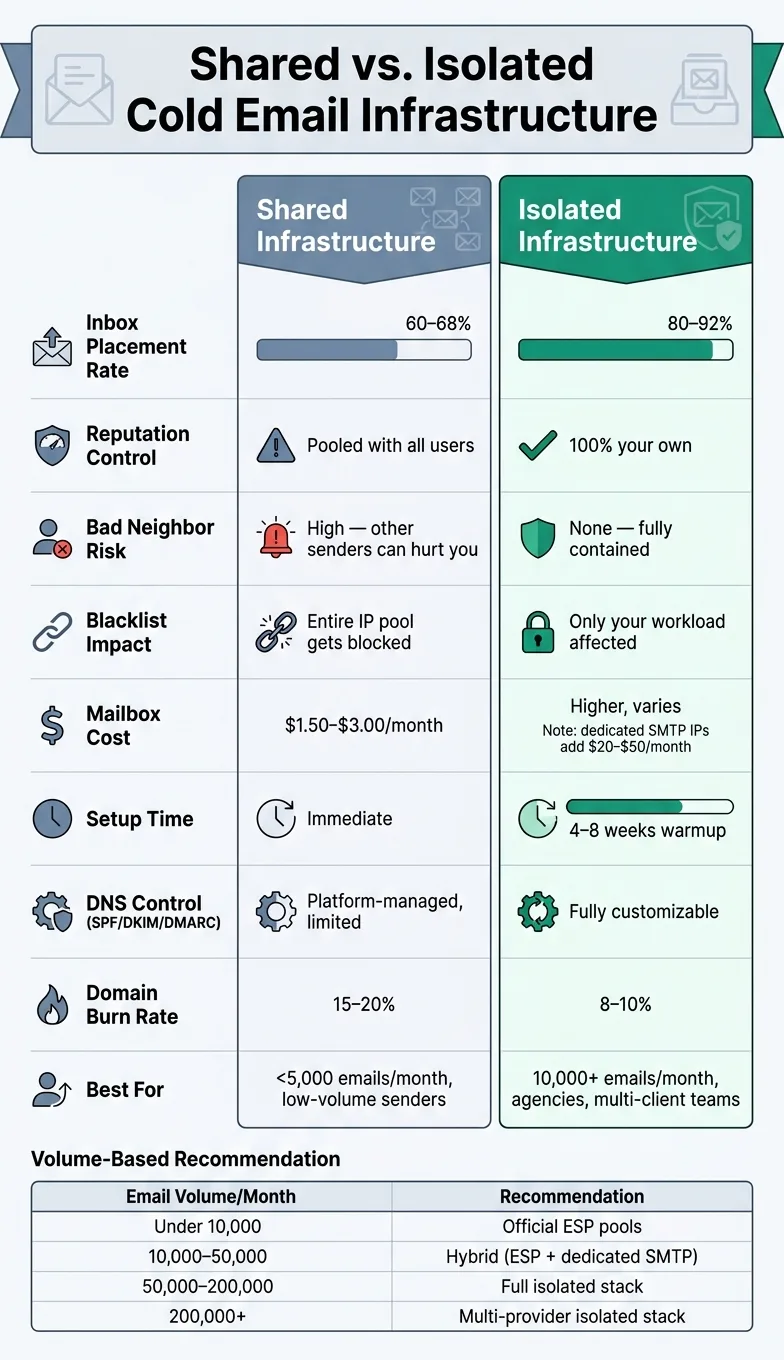
When it comes to inbox placement, the numbers speak for themselves. Shared infrastructure typically achieves 60–68% inbox placement, while isolated setups boast a much higher range of 80–92%. This difference can have a direct impact on the success of your campaigns.
The risk factor is another key distinction. On shared infrastructure, a single bad sender in your IP pool can drag down deliverability for everyone - sometimes by as much as 10%. In contrast, isolated infrastructure eliminates this risk entirely since your reputation is based solely on your own sending practices.
| Factor | Shared Infrastructure | Isolated Infrastructure |
|---|---|---|
| Inbox Placement | 60–68% (high variability) | 80–92% (consistent) |
| Bad Neighbor Risk | High - shared reputational risk from other senders | None - contained |
| Blacklist Impact | Entire IP pool gets blocked | Only the offending workload is affected |
| Reputation Control | Pooled across all users | 100% tied to your own behavior |
Beyond these core deliverability factors, DNS control adds another layer of differentiation.
DNS Control and Monitoring Features
Isolated infrastructure gives you full control over critical DNS settings like SPF, DKIM, and DMARC, along with the ability to track individual mailboxes. This level of control not only strengthens your deliverability but also enhances your sender reputation.
In contrast, shared infrastructure limits your DNS oversight. Settings like SPF, DKIM, and DMARC are mostly managed by the platform, and monitoring is restricted to aggregated data for the entire pool. Isolated setups go a step further by offering per-mailbox tracking and real-time blacklist monitoring. For instance, platforms like OutreachFox scan over 90 blacklist sources every 7 minutes. They also automate DNS setup and provide detailed metrics for each mailbox and campaign. Additionally, isolated setups allow you to customize warmup schedules, unlike shared infrastructure, where warmup parameters are fixed.
Cost and Setup Complexity
After considering the technical advantages, it’s important to evaluate costs and operational complexity.
Shared infrastructure is often more budget-friendly upfront and quicker to get started. Mailboxes on shared setups typically cost $1.50–$3.00/month, enabling you to start sending emails the same day. Certified accounts from providers like InboxKit cost between $2.50 and $3.90/month per mailbox, while dedicated SMTP IPs add $20–$50/month per IP.
Domain burn rates also differ significantly. Shared setups experience a burn rate of 15–20%, compared to 8–10% on isolated infrastructure. For teams managing a large number of domains, this can lead to substantial savings. Take the example of an AI automation agency: after switching to isolated Microsoft 365 infrastructure, their domain burn rate dropped from 18% to under 8%, saving over $2,000/month in domain replacement costs.
To simplify the operational challenges of isolated infrastructure, platforms like OutreachFox offer tools such as automated DNS configuration, bulk mailbox provisioning, and customizable warmup schedules. As Anthony Baltodano from Mission Inbox explains:
"On shared infrastructure, your reputation is pooled with every other sender... your deliverability is only as good as the worst sender on your pool."
These comparisons underscore the key considerations when deciding between shared and isolated infrastructure for your email outreach strategy.
Conclusion: Picking the Right Infrastructure for Cold Outreach
How to Match Infrastructure to Your Sending Needs
Choosing the right email infrastructure depends on a few key factors: your monthly sending volume, risk tolerance, and whether you're handling campaigns for multiple clients. Here's a quick breakdown to guide your decision:
| Monthly Send Volume | Recommended Infrastructure |
|---|---|
| Under 10,000 emails | Official ESP pools (Google Workspace or Microsoft 365) |
| 10,000–50,000 emails | Hybrid - ESP pools + dedicated SMTP buffer |
| 50,000–200,000 emails | Full dedicated/isolated stack |
| 200,000+ emails | Multi-provider isolated stack |
For agencies or teams juggling campaigns across multiple clients, isolated infrastructure is a must. It ensures that deliverability issues from one client don't spill over and affect others.
What Infrastructure-First Platforms Offer
Platforms like OutreachFox are built to address the challenges of shared infrastructure. Instead of grouping senders together, they provide every user with a private sending environment. This setup includes dedicated campaign IPs, pre-warmed Google, Microsoft, SMTP, and Azure mailboxes, along with automated SPF/DKIM/DMARC configuration. Essentially, you can bypass the usual 2–4 week warmup process and start sending in about ten minutes.
For agencies, the platform offers additional perks like isolated workspaces for each client, bulk mailbox provisioning, and detailed performance metrics per mailbox. Everything is integrated, so there’s no need to patch together multiple tools for infrastructure, data enrichment, and outreach. This streamlined approach allows teams to scale their email campaigns with confidence.
Key Takeaways
Your choice of infrastructure is more than just a technical decision - it’s a critical factor in managing risk and ensuring high deliverability. The infrastructure you select directly affects your sender reputation, which hinges on how well you manage both your IP and domain identities.
While shared infrastructure offers convenience, it comes with limited control. This trade-off might work for low-volume campaigns or testing, but as your needs grow, it can become a major obstacle. On the other hand, isolated infrastructure gives you full control over deliverability outcomes. With inbox placement rates of 80–92% compared to 60–68% on shared setups, the performance difference is clear and hard to overlook.
Frequently asked questions
What inbox placement rates can I expect with shared versus isolated infrastructure?+
Shared infrastructure typically achieves 60-68% inbox placement, while isolated infrastructure delivers 80-92% inbox placement. This 20-24 percentage point difference occurs because isolated setups give you complete control over your sender reputation, while shared infrastructure ties your deliverability to the behavior of all other users on the same IP pool.
How long does it take to warm up a dedicated IP in an isolated infrastructure setup?+
New dedicated IPs in isolated infrastructure require 4-8 weeks to build a solid sender reputation through proper warmup. However, platforms like OutreachFox provide pre-warmed mailboxes that allow you to start sending in approximately ten minutes, eliminating the typical 2-4 week warmup process.
What happens if someone else on my shared IP gets blacklisted?+
When one sender on a shared IP gets blacklisted, the entire IP pool gets blocked, affecting all users regardless of their individual sending behavior. Recovery typically takes 1-4 weeks, and you're completely dependent on the offending sender to resolve the issue. With isolated infrastructure, only your own workload is affected by any deliverability problems.
At what sending volume should I switch from shared to isolated infrastructure?+
For volumes under 10,000 emails per month, official ESP pools like Google Workspace or Microsoft 365 are sufficient. Once you reach 10,000-50,000 emails monthly, consider a hybrid approach. Full isolated infrastructure becomes necessary at 50,000-200,000 emails per month, and multi-provider isolated stacks are recommended beyond 200,000 emails.
Why do domain burn rates differ between shared and isolated infrastructure?+
Shared infrastructure experiences domain burn rates of 15-20%, compared to 8-10% on isolated infrastructure. This occurs because shared setups expose your domains to reputational damage from other senders' poor practices. The lower burn rate in isolated setups can result in significant cost savings - one agency reduced their domain replacement costs by over $2,000 per month after switching to isolated infrastructure.
What DNS records can I control with isolated infrastructure that I can't with shared?+
Isolated infrastructure provides full control over SPF, DKIM, and DMARC records, allowing you to customize these authentication protocols specifically for your domain. Shared infrastructure limits DNS oversight, with the platform managing most settings and providing only aggregated monitoring data. This DNS control is critical since domain reputation accounts for 60-70% of inbox placement.
How many emails should I send per mailbox per day in an isolated setup?+
For optimal deliverability in isolated infrastructure, limit each mailbox to 30-50 emails per day, using 3-4 mailboxes per domain. This approach keeps individual mailbox activity low while supporting substantial overall volume. Scaling should be done by adding more mailboxes and domains rather than increasing the sending volume per account.