
Shared IPs damage sender reputation by linking your deliverability to other users' behavior. Switching to dedicated infrastructure gives complete control over your email reputation.
- Shared IPs expose you to bad neighbor effects and uncontrollable reputation damage
- Spam filters evaluate IP reputation first, often blocking shared IPs before content review
- Dedicated IPs require 4-6 week warmup but provide complete reputation control
- Businesses sending over 50,000 emails monthly benefit most from dedicated infrastructure
- Google Postmaster Tools helps monitor spam rates and maintain dedicated IP health
- OutreachFox provides pre-warmed isolated infrastructure eliminating shared IP risks
Why Shared IPs Hurt Sender Reputation
Shared IPs can significantly harm your email sender reputation, directly impacting your email deliverability. When you share an IP address with others, your reputation becomes tied to their actions. Even if you follow best practices, poor behavior from other senders on the same IP - like sending spam or triggering complaints - can drag down your deliverability. Here's why shared IPs are risky:
- Shared Liability: Your reputation is influenced by all users on the IP. One bad sender can harm the entire group.
- Spam Filters Prioritize IP Reputation: Filters often block emails based on the IP's history before even evaluating your domain or content.
- No Control: You can't monitor or fix issues caused by others on the same IP.
Switching to a dedicated IP gives you full control over your sender reputation, ensuring that only your actions affect your deliverability. However, dedicated IPs require a proper warmup process and consistent email volume to maintain a strong reputation. For businesses sending fewer than 10,000 emails per month, official ESP pools like Google Workspace may be a better option.
Take charge of your email performance by auditing your setup, monitoring deliverability metrics, and considering dedicated infrastructure for consistent results.
How Spam Filters Score Sender Reputation
IP Reputation: The Foundation of Email Deliverability
Spam filters work in layers, and the first thing they check is the IP address of the sender. Before platforms like Gmail or Outlook even glance at your domain or email content, they assess the sending IP’s track record. This includes bounce rates, spam trap hits, blacklist status, and patterns in email volume.
If the IP has been flagged, your email is rejected immediately.
For those using a shared IP, the history of that IP is shared by everyone in the pool. If one sender behaves poorly - like triggering spam traps or being blacklisted - it can impact the entire group. Essentially, one bad apple can spoil the bunch. Major blacklists that operate at the IP level can block all senders using that shared IP, leaving others to face the consequences.
Domain and Mailbox-Level Reputation
Once an email clears the IP stage, spam filters then evaluate the sender's domain. This involves checking for proper authentication protocols like SPF, DKIM, and DMARC, as well as reviewing the domain's history of spam complaints and recipient engagement.
However, with shared IPs, this evaluation may never even happen. If the IP is rejected at the initial connection stage, the domain's reputation doesn’t even get a chance to be considered. Dedicated IP pools, such as those used by Microsoft 365 or Google Workspace, often achieve 15–50% better inbox placement rates compared to shared SMTP pools. This is largely because dedicated IPs start with a higher level of trust at the IP layer.
Engagement Signals and Their Role in Spam Filtering
Spam filters also look at how recipients interact with your emails. Metrics like opens, replies, spam reports, and unsubscribes help filters determine trustworthiness. High engagement suggests reliability, while low engagement or an increase in spam complaints raises red flags.
On a shared IP, these engagement signals are pooled together. If another sender on the same IP generates spam complaints that exceed Gmail’s 0.3% threshold, the entire IP - including your emails - faces increased scrutiny. In 2024, statistics showed that 1 in 6 marketing emails didn’t make it to the inbox, with 10.5% going straight to spam. Shared IP contamination plays a big role in these numbers.
As Yevhenii Odyntsov, Content Manager at Mailtrap, explains:
"In a shared IP environment, the responsibility for maintaining the IP's reputation is distributed among all users... occasional missteps by one sender may be mitigated by the good practices of others", but the risk of "IP pool contamination" remains a primary threat to deliverability.
The table below breaks down how spam filters evaluate emails and highlights where shared IPs pose the most risk:
| Layer | What Filters Check | Where Shared IPs Hurt Most |
|---|---|---|
| IP Reputation | Bounce rates, spam traps, blacklists, volume spikes | High - all users share the same history |
| Domain Reputation | Spam complaints, authentication, engagement history | Moderate - blocked at the IP level before domain evaluation |
| Content Filtering | Email body, links, tracking pixels | Low - but shared tracking domains increase risk |
These layers illustrate how shared IP contamination can block emails at the entry point and disrupt reputation metrics down the line.
The Specific Ways Shared IPs Damage Deliverability
The Bad Neighbor Effect
When you're on a shared IP, your deliverability hinges on the behavior of everyone else sharing that IP. If even one sender hits a bounce rate of over 7%, it can drag down the entire group - no matter how clean your own email list is. Major blacklists like Spamhaus, Barracuda, and SORBS evaluate IPs as a whole, meaning a single bad actor can cause the entire IP to be blacklisted. As Anthony Baltodano from Mission Inbox puts it:
"The 'bad neighbor' effect is one of the most significant risks of using a shared IP... If just one of those senders blasts out a high volume of spam, the entire IP address can be blacklisted by ISPs."
Take this example: In Q2 2026, an AI automation agency sending 150,000 cold emails monthly via shared SMTP infrastructure saw inbox placement rates swing between 72% and 85%, even with clean sending practices. After switching to dedicated infrastructure, their inbox placement improved by 11 percentage points, and the domain burn rate dropped from 18% to under 8%. This change saved them over $2,000 per month. Unfortunately, shared IPs come with risks that go beyond just bad neighbors, creating a host of uncontrollable issues.
Shared Warmup Pools and the Risk of Artificial Engagement
Many shared IP providers attempt to "pre-warm" their pools by using automated engagement methods - bots that simulate opens, clicks, and replies to build a fake history of healthy email activity. The problem? Gmail and Outlook are sophisticated enough to spot these patterns. When spam filters flag this artificial behavior, the entire shared IP's reputation suffers, impacting every sender in the pool. Because you have no insight into how much of this automated activity is occurring on your behalf, you're essentially gambling with your sender reputation. This lack of transparency leaves you vulnerable to the consequences of these automated systems.
No Control Over Your Own Reputation
The most frustrating part of shared infrastructure is the complete loss of control over your sender reputation. You have no way to monitor other senders' practices, separate your domain from their mistakes, or fix a blacklisting caused by someone else's actions.
Here's a quick breakdown of what you can - and can't - control depending on your infrastructure:
| Risk Vector | What You Control | Externally Managed Factors |
|---|---|---|
| Shared IP | Nothing | Sending volume, list quality, bounce rate |
| Shared Tracking Domain | Whether to use it | Click patterns, spam reports |
| Dedicated IP | Everything | Nothing |
(Source:)
Shared infrastructure might seem like a cost-effective option, but the risks it carries can lead to long-term damage to your email deliverability and reputation.
Shared IP vs Dedicated IP Address - Brief Summary by Mailtrap

Dedicated Infrastructure: How to Fix the Shared IP Problem
What Are Dedicated IPs and Isolated Infrastructure?
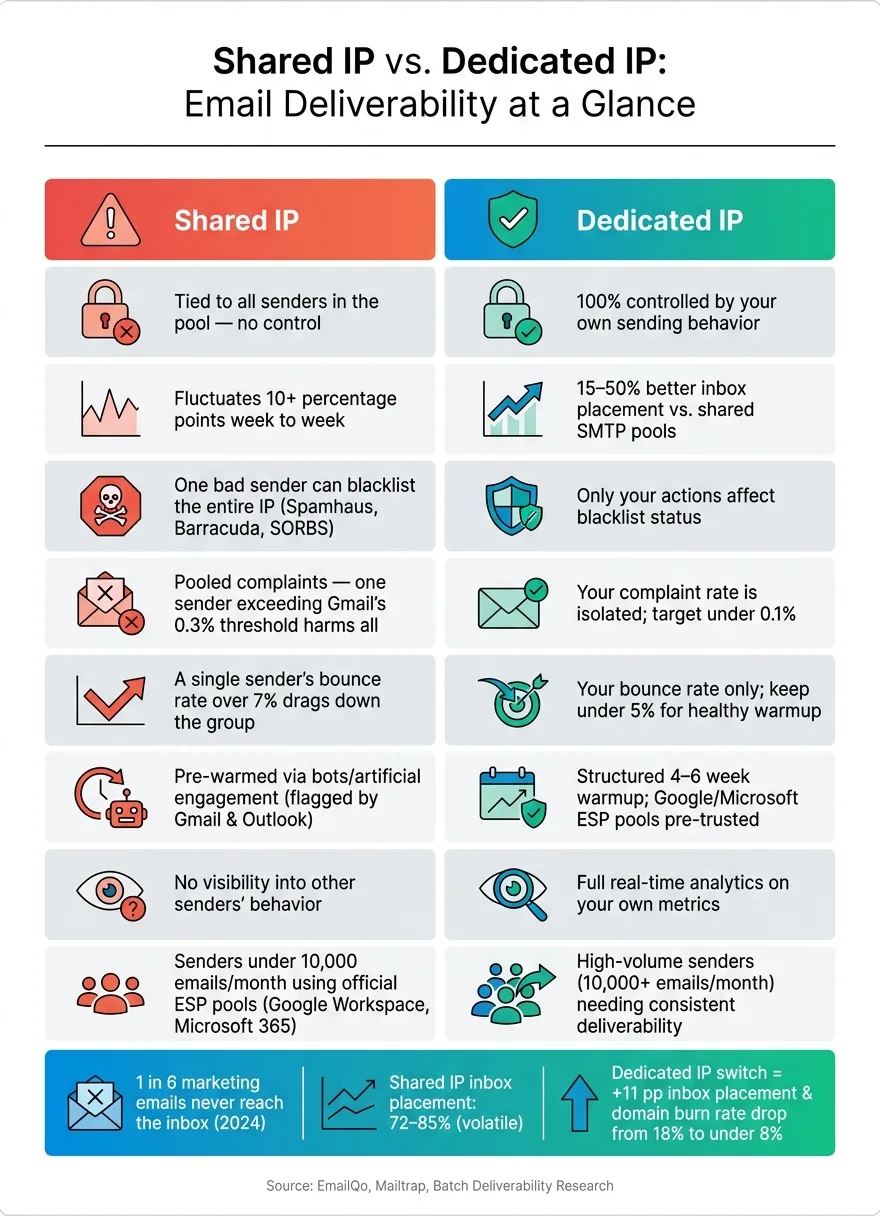
A dedicated IP is an address reserved just for you, meaning its reputation is completely shaped by your own email-sending habits. Factors like bounce rates, complaint rates, and engagement are entirely in your control. No one else's poor practices can drag your reputation down.
Isolated infrastructure takes this idea even further. It ensures that your mailboxes, sending IPs, and tracking domains are entirely separate from other senders on the same platform. Picture it as having your own private highway for emails - no sharing the road with hundreds of others where one bad driver can cause a traffic jam. This setup is the opposite of shared IP environments, where your email deliverability can suffer due to someone else’s mistakes.
However, it’s important to note that dedicated SMTP IPs start with no sending history. This means they need a structured warmup period - usually 4 to 6 weeks - where you gradually increase sending volume before operating at full capacity. On the other hand, official ESP pools like Google Workspace and Microsoft 365 skip this step since their IPs already have established trust globally.
What You Gain With Dedicated Infrastructure
Shifting to dedicated infrastructure solves the risks of shared IPs by putting you in full control of your deliverability. Unlike shared IPs, where problems can stem from other users, dedicated setups make it easy to pinpoint and resolve issues since they’re tied directly to your own campaigns.
This approach also brings stability to deliverability. It allows you to control sending volume and maintain consistency - both of which are key factors spam filters use to determine trustworthiness. In contrast, shared IP pools often experience unpredictable inbox placement, with fluctuations of over 10 percentage points week to week due to issues beyond your control.
"With dedicated infrastructure, any deliverability issue is caused by your own sending, which means you can identify and fix it without waiting for a shared provider to act." - EmailQo
That said, dedicated IPs aren’t for everyone. They require steady, high-volume sending to maintain a strong reputation. As Joanna Masorz, Senior Deliverability Manager at Batch, explains:
"A dedicated IP with volumes that are too low or too irregular will quickly see its reputation degrade. Consistency is essential."
If you send fewer than 10,000 emails per month, a dedicated SMTP IP might actually work against you. For lower volumes, using official ESP pools from providers like Google or Microsoft is often the smarter choice.
How OutreachFox Handles Dedicated Infrastructure
OutreachFox takes the benefits of dedicated infrastructure and builds on them. The platform operates on the principle that shared infrastructure creates shared risks. Every customer is given their own isolated sending environment, which includes dedicated campaign IPs that are never shared with other accounts. This means your reputation is entirely based on your behavior, free from the influence of others.
To make things even smoother, OutreachFox offers pre-warmed Google, Microsoft, and SMTP mailboxes. These allow users to skip the usual ramp-up period. The platform also includes industry-specific warmup profiles that automatically manage the gradual volume increase, and real-time analytics for each mailbox help you monitor reputation health and catch potential problems early. For more details, visit OutreachFox.
How to Move Away From Shared IPs
Check Whether You Are on a Shared IP
To figure out if you're using a shared IP, start by sending a test email to yourself. Then, inspect the raw headers of that email and look for fields like Received or X-Originating-IP to identify the sending IP. Once you have the IP, use a reverse IP lookup tool like MXToolbox or Mail-Tester. If you notice multiple unrelated domains associated with the same IP, you're on a shared IP.
Another clue? If you’ve never set up DNS records before sending emails, chances are you’re relying on shared infrastructure. Signs like sudden deliverability issues or blacklisting - without any changes on your end - are classic indicators of "bad neighbors" on shared IPs. To confirm, check your IP against major blacklists like Spamhaus or Barracuda. If your IP is flagged despite consistent sending practices, another sender in your pool may be responsible.
Once you’ve confirmed you’re on a shared IP, it’s time to plan your transition to a dedicated one.
Plan Your Migration to Dedicated IPs
Before starting the migration process, use Google Postmaster Tools to audit your domain’s spam rate and reputation score. Make sure your bounce rate is under 5% - a high bounce rate on a new dedicated IP can harm your warmup efforts.
Once your metrics are in good shape, follow these steps to migrate:
- Verify authentication records: Ensure all sending domains have properly configured SPF, DKIM (with 2048-bit keys), and DMARC records. During the migration, keep both your shared and dedicated infrastructures running for two to four weeks to avoid sudden drops in email volume, which could raise red flags for the new IP.
- Gradually warm up the new IP: Start by sending 50–100 emails per day and increase the volume by 20–30% daily over a period of four to six weeks. If you’re using services like Google Workspace or Microsoft 365, the IP is already trusted globally, so you’ll only need to warm up the domain. This process can take as little as three to seven days.
Remember, the reputation of your dedicated IP is entirely in your hands. Building and protecting it is a long-term commitment.
Monitor Reputation and Mailbox Health Ongoing
Once your dedicated IP is up and running, maintaining a strong reputation is key. Consistency in your sending practices is the foundation of a healthy IP. As Joanna Masorz, Senior Deliverability Manager at Batch, puts it:
"Consistency is essential. A dedicated IP with volumes that are too low or too irregular will quickly see its reputation degrade."
Make it a habit to check blacklists like Spamhaus, Barracuda, and SORBS weekly. Use Google Postmaster Tools to monitor Gmail-specific spam rates, aiming to keep your spam complaint rate under 0.1%. Complaints above 0.3% can start to harm your reputation. For large-scale senders, Microsoft SNDS (Smart Network Data Services) is a valuable tool to track your IP’s standing with Outlook.
Tools like OutreachFox can simplify this process by providing real-time insights into metrics like bounces, spam complaints, and overall mailbox health. With fully isolated infrastructure for each customer, these metrics reflect only your sending behavior, helping you catch potential issues early.
Conclusion: Take Control of Your Sender Reputation
When you use shared IPs, you're essentially handing over control of your email deliverability to unknown third parties. In 2024, 1 in 6 marketing emails never made it to the inbox. That’s the risk of being in a shared pool: your reputation is tied to the actions of others, even the worst senders in the group.
The fix? It’s straightforward but requires intention. By switching to dedicated infrastructure, you ensure that your sending history is entirely under your control. With this setup, any issues that arise can be identified and resolved - often within one to four weeks. As Joanna Masorz, Senior Deliverability Manager at Batch, explains:
"A dedicated IP provides full isolation of your reputation and greater control over events that could impact your sending, such as message throttling or spam placement."
This shift is a proactive step toward stabilizing and improving your email performance.
To get started, audit your current setup using tools like Google Postmaster Tools or MXToolbox to confirm whether your IP is shared. If it is, plan a gradual transition to a dedicated IP. Keep bounce rates under 5% and increase email volume steadily over four to six weeks. Platforms like OutreachFox can help facilitate this move. Dedicated infrastructure allows your reputation to reflect only your sending practices, giving you the ability to quickly address any issues. If reliable email deliverability is a priority for your business, dedicated infrastructure is the way forward. Take charge of your sender reputation now to ensure your emails consistently reach their intended audience.
Frequently asked questions
How do shared IPs create liability for senders who follow best email practices?+
On a shared IP, your sender reputation is tied to all users on that IP address. Even if you follow best practices, poor behavior from other senders - such as hitting spam traps, triggering high bounce rates over 7%, or getting blacklisted - can directly harm your deliverability. Spam filters evaluate the entire IP's history before checking your domain or content, so one bad sender in the pool can block emails for everyone.
What is the 'bad neighbor effect' in shared IP environments?+
The 'bad neighbor effect' occurs when one sender on a shared IP engages in poor email practices, causing the entire IP address to be blacklisted or flagged by spam filters. For example, if just one sender blasts spam or exceeds a 7% bounce rate, major blacklists like Spamhaus can block the entire IP. This means your emails get rejected regardless of your own clean sending practices.
Why do shared warmup pools with artificial engagement hurt deliverability?+
Many shared IP providers use automated bots to simulate opens, clicks, and replies to build fake engagement history. Gmail and Outlook can detect these artificial patterns, and when they flag this behavior, the entire shared IP's reputation suffers. Since you have no visibility into how much automated activity occurs on your behalf, you're unknowingly gambling with your sender reputation.
How long does it take to properly warm up a new dedicated IP address?+
A dedicated SMTP IP typically requires 4 to 6 weeks to warm up properly. You should start by sending 50-100 emails per day and gradually increase volume by 20-30% daily. However, if you use official ESP pools like Google Workspace or Microsoft 365, their IPs already have established global trust, so you only need to warm up your domain, which takes just 3 to 7 days.
What email volume is needed to maintain a healthy dedicated IP reputation?+
To maintain a strong dedicated IP reputation, you need consistent, high-volume sending - typically at least 10,000 emails per month, though ideally over 50,000. Dedicated IPs with volumes that are too low or irregular will quickly see reputation degradation. For businesses sending fewer than 10,000 emails monthly, official ESP pools from providers like Google Workspace or Microsoft 365 are better options.
How can I verify if my current sending infrastructure uses a shared IP?+
Send a test email to yourself and inspect the raw email headers to find the sending IP address in fields like 'Received' or 'X-Originating-IP'. Then use a reverse IP lookup tool like MXToolbox or Mail-Tester to check if multiple unrelated domains are associated with that same IP. If you find multiple domains on the same IP or never set up DNS records before sending, you're likely using shared infrastructure.
What spam complaint rate threshold triggers Gmail to increase email scrutiny?+
Gmail begins increasing scrutiny when spam complaint rates exceed 0.3%. To maintain a healthy sender reputation on a dedicated IP, you should aim to keep your spam complaint rate under 0.1%. When other senders on a shared IP generate complaints that exceed the 0.3% threshold, the entire IP - including your emails - faces increased filtering and potential blocking.