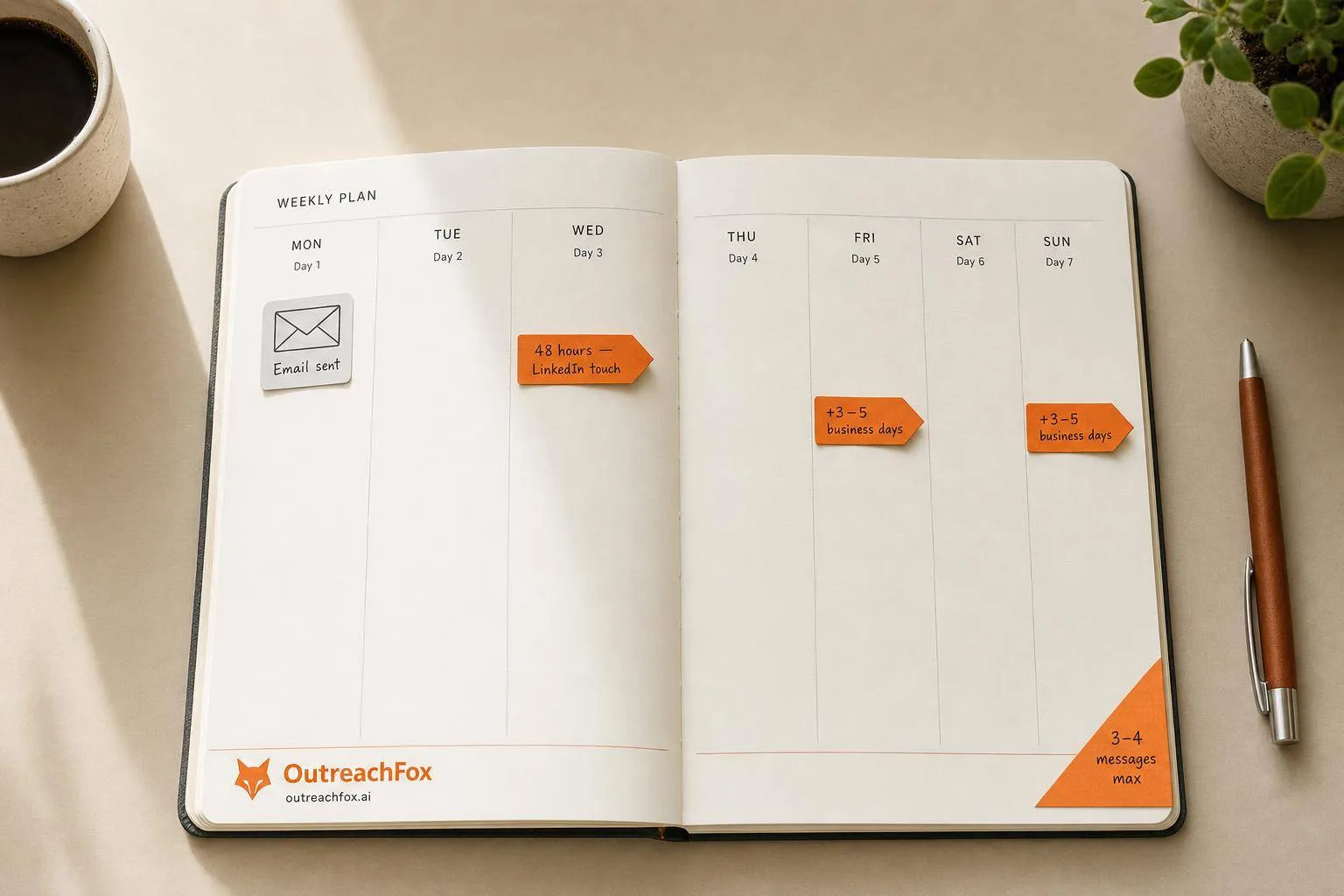
Wait 48 hours after your first email before LinkedIn follow-up, space touches 3-5 business days apart, limit LinkedIn messages to 3-4 per prospect, and coordinate channels to avoid same-day touches for 15-25% reply rates.
- Wait minimum 48 hours between first email and LinkedIn outreach to avoid appearing automated
- Space follow-ups 3-5 business days apart with 24-hour minimum between any touches
- Limit LinkedIn messages to 3-4 per prospect to maintain professionalism and avoid blocks
- Adjust timing based on engagement signals like email opens or connection acceptance
- Coordinated multichannel outreach boosts reply rates from 5% to 15-25% when timed correctly
- Stop all scheduled messages immediately when prospects reply or book meetings
LinkedIn Follow-Ups After Email: Timing Rules
When it comes to LinkedIn follow-ups after sending an email, timing is everything. Reach out too soon, and you risk appearing robotic. Wait too long, and you may lose the prospect's attention. Here's what you need to know:
- Wait 48 hours after your first email before reaching out on LinkedIn.
- Space follow-ups: Use 3–5 business days between touches to avoid overwhelming your prospect.
- Limit LinkedIn messages: Send no more than 3–4 messages per prospect to maintain professionalism.
- Track engagement: Adjust timing based on signals like email opens or connection acceptance.
- Avoid same-day touches: Don’t send messages on LinkedIn and email within 24 hours of each other.
Coordinated multichannel outreach, when timed correctly, can boost reply rates to 15–25%. However, poor timing risks spam flags and damages your reputation. Follow these guidelines to balance persistence with professionalism.
Preflight Checks Before Combining Email and LinkedIn Outreach
Getting your outreach strategy right from the start can help you avoid overlapping messages and ensure your efforts feel personal rather than automated.
Define Primary and Secondary Channels
Start by deciding which channel will take the lead, based on your prospect's profile. For example, if your prospect is active on LinkedIn or holds a VP/C-suite role at a B2B SaaS company, LinkedIn should be your go-to. Senior decision-makers often respond better to LinkedIn outreach. On the other hand, if their LinkedIn activity is minimal, email should be your first move.
The size of the deal also plays a role. For smaller deals (under $20,000 ACV), email is typically more effective, making up about 55% of the outreach mix due to its speed. For larger enterprise deals ($100,000+ ACV), LinkedIn tends to carry more weight (around 30%) and requires coordination across multiple stakeholders. Once you've set the order of your channels, limit the total number of touches across both platforms to avoid sending multiple messages to the same person on the same day. The goal is to strike the right balance without overwhelming your prospects.
After defining your channels, it's time to focus on timing.
Verify Time Zone and Working Hours
Timing is everything. Make sure your messages land during the prospect's local business hours. Research shows the best times to send messages are between 8:00–10:00 a.m. and 2:00–4:00 p.m.. When it comes to LinkedIn, Tuesday and Monday lead the pack with the highest response rates, at 6.90% and 6.85%, respectively.
"Time windows of 8–10am or 2–4pm in the prospect's local timezone perform best, though getting the spacing right matters more than the exact day of send." - Daniel Okoro, Outreach Tactics
Most outreach tools can pull time zone data from LinkedIn profiles or email open history. To keep things professional, set your campaigns to operate only between 8:00 a.m. and 6:00 p.m. in the prospect's local time zone. These simple adjustments help ensure your outreach aligns with their schedule.
Set Up Tools for Multichannel Sequences
Using separate platforms for email and LinkedIn can lead to awkward overlaps, making your outreach efforts seem automated. A unified platform is the best way to manage multichannel sequences. Look for tools with features like conditional branching, suppression rules, and a unified inbox. These features allow you to pause outreach across all channels as soon as a prospect replies or opts out.
Platforms such as OutreachFox simplify multichannel outreach by running email and LinkedIn sequences from a single interface. They also provide real-time insights, like per-mailbox health metrics, and ensure LinkedIn automation uses a verified API - reducing the risk of account restrictions under LinkedIn's current rules. This setup makes your outreach smoother and more efficient, while also protecting your accounts from unnecessary risks.
Baseline Timing Rules for LinkedIn Follow-Ups
Once you've got your channels and tools in place, the next step is to plan the timing of your LinkedIn follow-ups. The key is to space out your communication in a way that feels natural and human. Proper timing helps distinguish genuine outreach from automated messages, making your efforts more effective and less intrusive.
Delay Between First Email and LinkedIn Follow-Up
After sending your initial email, wait 3–5 business days before following up on LinkedIn. Never send a LinkedIn connection request or message within 48 hours of your email. For example, if you email someone on Monday morning and send a LinkedIn request that same afternoon, it’s too coordinated and can come across as insincere.
Studies show that multichannel outreach with this spacing tends to get 8–15% reply rates, compared to just 2–5% for cold emails alone.
"Wait at least 48 hours between the first email and the first LinkedIn touch. If you send an email Monday morning and a LinkedIn connection Monday afternoon, the prospect will notice. It feels coordinated - in a bad way." - ConnectSafely.ai
Pacing Between Touches
Space your follow-ups with at least 24 hours between each touch. Early in the sequence, aim for 2–3 day intervals to keep the conversation fresh. As time goes on, you can extend the gaps to 5–7 days. According to Daniel Okoro from Outreach Tactics, sending multiple messages across different platforms on the same day can overwhelm your prospect and lead to fatigue.
This gradual pacing mirrors how natural follow-ups occur - more frequent at first, then slowing down over time. Here’s an example of a well-paced multichannel sequence:
| Touch | Timing | Channel | Action |
|---|---|---|---|
| Touch 1 | Day 1 | Personalized cold email | |
| Touch 2 | Day 4 | Connection request | |
| Touch 3 | Day 6 | Follow-up email | |
| Touch 4 | Day 9 | Engagement/message |
Also, mix up the days of the week when you send your messages. If every follow-up lands on the same day (e.g., every Tuesday), it can feel too predictable, like an automated drip campaign, rather than a thoughtful outreach effort.
Limit LinkedIn Follow-Ups Per Campaign
To avoid coming across as pushy, limit your LinkedIn interactions to 3–4 messages per prospect. Typically, this includes:
- An initial connection request
- One or two follow-up messages
- A final "breakup" message, if necessary
Sending more than four messages significantly increases the risk of being blocked or receiving a "please stop messaging me" response.
"Beyond four messages, the risk of generating a block or a 'please stop messaging me' reply increases faster than the incremental reply benefit justifies." - Daniel Okoro, Outreach Tactics
In fact, 48% of professionals say receiving more than three follow-up messages on LinkedIn feels inappropriate. Keeping your outreach within these boundaries ensures that your efforts remain persistent but respectful.
Timing Rules Based on Prospect Behavior
Not every prospect will respond the same way, so your follow-up timing needs to adapt to their specific actions - or lack thereof. The way a prospect interacts with your outreach should guide your next move.
If Email is Opened Multiple Times Without a Reply
When a prospect opens your email multiple times but doesn’t respond, it’s a clear signal of curiosity without commitment. In this case, don’t send another email. Instead, switch to LinkedIn within 24–48 hours of noticing the repeated opens.
"If a prospect opened your email but didn't reply, they saw your message and chose to ignore it. Repeating the same channel won't change that. Swap to LinkedIn within 24–48 hours to break the pattern." - ConnectSafely.ai
Start with a low-pressure action like visiting their profile or sending a connection request. Once they accept, follow up with a short LinkedIn message that references your earlier email. This keeps the conversation cohesive without being pushy.
If Email is Not Opened
An unopened email doesn’t always mean disinterest - it could have been overlooked or filtered out. In this case, wait 3–5 business days before sending a second email. If that still doesn’t get a response, add a LinkedIn touch 1–2 days later.
When transitioning to LinkedIn, keep your message casual and briefly mention the email: "Sent a note about [topic] earlier this week - figured I'd connect here too." If there’s no engagement after five total touches across email and LinkedIn, it’s time to either rework your approach or remove the prospect from your active list.
If Connection Request is Accepted
An accepted connection request signals interest, but it’s not an invitation to go straight into a sales pitch. Instead, send a short, personalized message within 1–2 days of acceptance. Keep it brief - under 60 words - and tie it back to your original email or the reason for connecting.
"The most misread signal is the accept with zero reply. Reps treat it as a chase signal and pile on messages. It is a wait-and-warm signal." - Daniel Okoro, Outreach Tactics
If the prospect also views your profile after accepting your connection request, that’s an even stronger signal. In this case, sending a message the same day or the next day is appropriate.
Engagement Signal Summary
Here’s a quick reference guide for how to respond based on the prospect’s engagement signals:
| Signal | Recommended Action | Ideal Timing |
|---|---|---|
| Email opened, no reply | Switch to LinkedIn (connection or message) | 24–48 hours |
| Profile viewed after email | Send a warm, direct LinkedIn DM | Same-day or next-day |
| Connection accepted | Send a short context note via LinkedIn | 1–2 days |
| No engagement at all | Send a second follow-up email | 3–5 business days |
Guardrails to Avoid Overwhelming Prospects
To complement the timing rules outlined earlier, these guidelines help ensure your outreach remains respectful, effective, and aligned with industry norms. The goal is to strike the right balance between persistence and professionalism.
Set Per-Contact and Campaign Limits
Studies indicate that 48% of prospects find more than three follow-up messages off-putting or excessive. Use this as your benchmark. Specifically for LinkedIn, limit your follow-ups to 2–3 messages after the initial connection request. Across all channels combined, aim for a total of 8–12 touches within a 14–21 day period.
"Beyond four messages, returns diminish sharply and restriction risk rises." - Daniel Okoro, Outreach Tactics
Wrap up each outreach sequence with a brief breakup message. This message should acknowledge the lack of response while offering an easy way for the prospect to opt out. Interestingly, this final touch often generates 30–40% of total replies, as it creates a sense of closure.
Respect Time Gaps Between Touches
Timing matters as much as the content of your messages. Avoid sending two cold touches on different channels within the same 24-hour period. For LinkedIn, leave at least 3–5 business days between messages. Reaching out too soon - within three days - can feel pushy, while waiting more than seven days risks losing the prospect's attention.
"Under three days reads as pressure. Over seven days loses context; prospects genuinely forget who you are." - Daniel Okoro, Outreach Tactics
As your outreach progresses, gradually increase the time between touches. For example, you might start with a 2-day gap, then extend to 5 days, and later to 10 days. This approach gives prospects breathing room while keeping your outreach relevant without feeling overly persistent.
Compliance and Etiquette
Timing is just one part of respectful outreach. Your messaging approach also plays a critical role. Avoid pitching your product in the very first LinkedIn message. Instead, keep connection requests under 300 characters and focus on a specific, personal reason to connect - like referencing a recent post, a shared interest, or a mutual connection. Personalized connection requests have a reply rate of 9.36%, compared to 5.44% for generic ones.
If a prospect replies, books a meeting, or expresses disinterest, stop all follow-ups immediately. This applies across all channels to avoid damaging the relationship.
"The sequence must halt automatically on a positive reply. Continuing to fire queued messages into an active conversation damages the relationship and the account." - Daniel Okoro, Outreach Tactics
Finally, schedule your messages to land during the prospect's working hours. The best times are typically 9–11 AM or 2–4 PM in their local time zone. For optimal results, aim for midweek, as Tuesday through Thursday tend to yield the highest response rates, with Tuesday peaking at 6.90%.
Channel Coordination Rules for Multichannel Campaigns
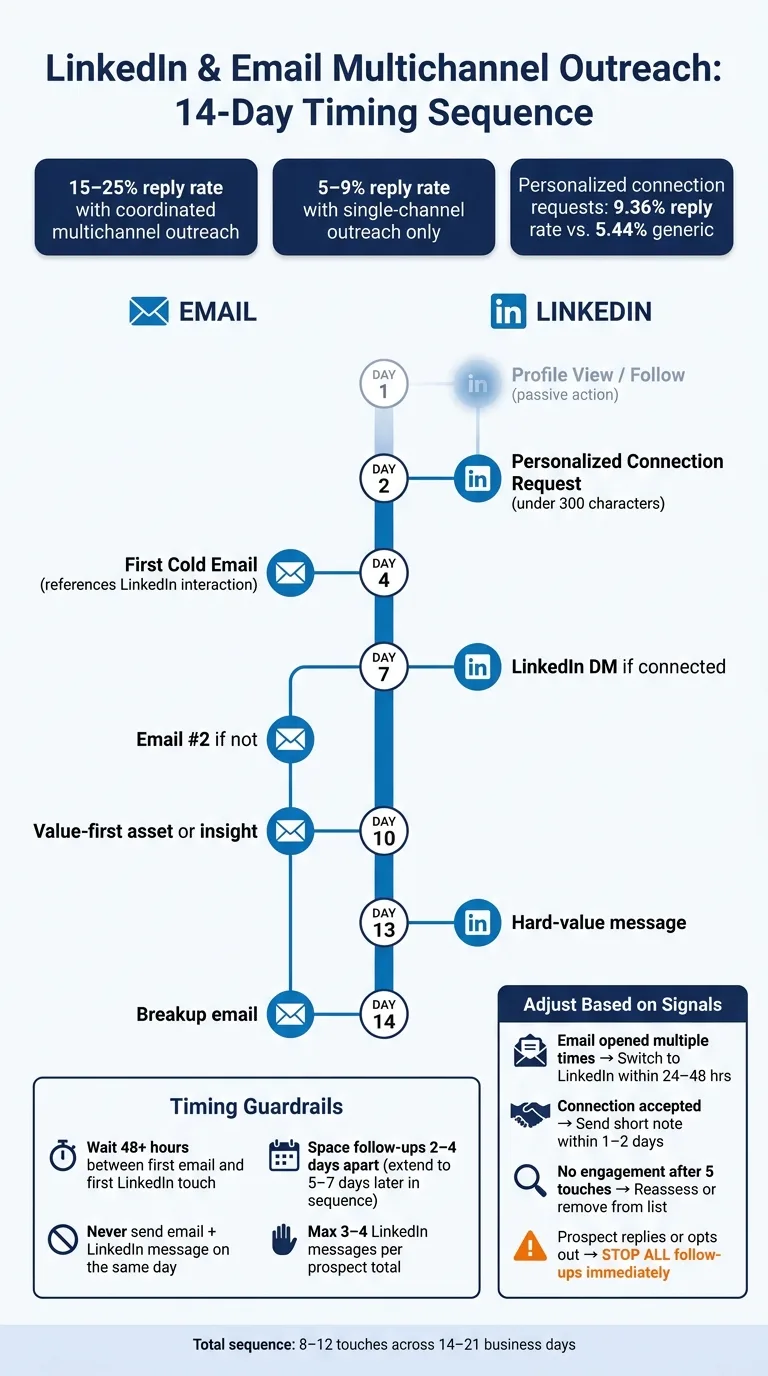
Order of Touches
Think of email and LinkedIn outreach as parts of a single, seamless conversation. Every touchpoint should reference the one before it, creating a smooth and consistent experience for the prospect instead of a series of disconnected attempts.
Start with actions that require less effort from the prospect. For example, begin by viewing their LinkedIn profile or following them. Follow this with a personalized connection request, and only then send your first cold email - making sure to mention your LinkedIn interaction. This kind of coordinated approach can boost reply rates to 15%–25%, compared to just 5%–9% for single-channel outreach.
Use conditional branching to refine your strategy. For instance, if the prospect accepts your LinkedIn connection, shift to sending a direct message there. If they don't, continue with email follow-ups. This approach ensures a natural flow between touchpoints while reinforcing your message.
Avoid Timing Collisions
Avoid overwhelming prospects by sending messages on multiple channels within the same day. The only exception is a passive LinkedIn action, like a profile view. Bombarding someone on two fronts within 24 hours can make your outreach feel like spam.
"Uncoordinated channels increase noise instead of extending reach." - Daniel Okoro, Outreach Tactics
Maintain at least a 48-hour gap between your first email and a direct LinkedIn message. After that, alternate channels every 2–3 touches to keep the prospect engaged without overloading them. Below is an example of a 14-day schedule that balances LinkedIn and email outreach:
| Day | Channel | Action |
|---|---|---|
| 1 | Profile View / Follow | |
| 2 | Personalized Connection Request | |
| 4 | First Cold Email (references LinkedIn) | |
| 7 | LinkedIn or Email | LinkedIn DM if connected; Email 2 if not |
| 10 | Value-first asset or insight | |
| 13 | Hard-value message | |
| 14 | Breakup email |
If a prospect replies on either channel, stop all scheduled messages immediately. Continuing to send outreach after someone has responded is one of the quickest ways to damage trust and derail your efforts.
Use Automation Platforms to Manage Spacing
Trying to manually manage multichannel outreach across multiple prospects is a recipe for mistakes. Timing errors, missed replies, and duplicate touches are almost inevitable when relying on spreadsheets or disconnected tools.
Tools like OutreachFox simplify this process. They allow you to set specific delays between email and LinkedIn actions, use conditional branching to adjust based on responses, and consolidate LinkedIn DMs and email replies into a single inbox. This ensures no warm lead slips through the cracks because someone was juggling multiple apps. Real-time campaign metrics also help identify and fix timing issues before they harm your deliverability or relationships.
"A LinkedIn reply that does not pause your email steps means you keep cold-pitching someone who already raised a hand." - Daniel Okoro, Outreach Tactics
In short, the success of multichannel outreach hinges on coordination. The order of actions, proper timing, and smart suppression logic are just as important as the message itself. This approach ensures your campaigns stay effective, respectful, and aligned with earlier pacing guidelines.
Conclusion: Key Timing Rules to Keep in Mind
The main takeaway is straightforward: timing matters just as much as what you're saying. Send a follow-up too soon, and it feels pushy. Hit the right moment, and it feels like the natural next step in the conversation.
Here are some key guidelines to remember: Wait at least 48 hours after your initial email before reaching out on LinkedIn. Space follow-ups 2–4 days apart. Keep your entire sequence within 14–21 business days. Limit yourself to 3–4 LinkedIn messages per prospect - after the fourth, the response rate drops significantly.
What sets great sequences apart from good ones? Adjusting based on behavior. For instance, if a prospect opens your email multiple times without replying, follow up on LinkedIn within 24–48 hours. If they accept your LinkedIn connection but don’t respond, interact with their posts before making your pitch. Silence isn’t always rejection; it’s often just context. And here’s one of the most important rules for managing campaigns:
Stop all scheduled follow-ups immediately if the prospect replies, schedules a meeting, or opts out. As Daniel Okoro explains:
"A reply on LinkedIn has to kill the next email, and a reply on email has to kill the next LinkedIn touch." - Daniel Okoro, Outreach Tactics
Looking ahead, the most successful teams in 2026 won’t be the ones with the biggest prospect lists. Instead, they’ll run disciplined 8–12 touch multichannel cadences. Pacing, adapting based on behavior, and maintaining clean suppression rules aren’t fancy strategies - they’re the foundation of outreach that gets results.
Frequently asked questions
How long should I wait after sending an email before following up on LinkedIn?+
Wait at least 48 hours after your initial email before reaching out on LinkedIn. The recommended timeframe is 3–5 business days between your first email and your first LinkedIn touch. Sending both messages within 24 hours makes your outreach feel overly coordinated and automated, which can damage trust with prospects.
What should I do if a prospect opens my email multiple times but doesn't reply?+
Switch to LinkedIn within 24–48 hours of noticing the repeated opens. Multiple opens indicate curiosity without commitment, so repeating the same channel won't change their behavior. Start with a low-pressure LinkedIn action like a connection request, then follow up with a short message that references your earlier email.
How many LinkedIn messages should I send to one prospect during a campaign?+
Limit your LinkedIn interactions to 3–4 messages per prospect, including the initial connection request and follow-up messages. Beyond four messages, the risk of being blocked or receiving negative responses increases faster than any potential benefit. Research shows 48% of professionals find more than three follow-up messages inappropriate.
How much time should I space between LinkedIn and email touches in the same campaign?+
Maintain at least 24 hours between touches on different channels, with 2–3 day intervals recommended early in the sequence. Never send messages on both LinkedIn and email within the same 24-hour period, as this overwhelms prospects. Space LinkedIn messages themselves 3–5 business days apart to maintain professionalism without losing context.
What should I do immediately after a prospect accepts my LinkedIn connection request?+
Send a short, personalized message within 1–2 days of acceptance, keeping it under 60 words. Reference your original email or reason for connecting, but avoid jumping straight into a sales pitch. An accepted connection request signals interest but is not an invitation for immediate selling—treat it as a warm signal that requires patience.
When should I stop all follow-ups in a multichannel campaign?+
Stop all scheduled follow-ups immediately if the prospect replies on any channel, books a meeting, or expresses disinterest. Continuing to send queued messages after someone has responded damages the relationship and makes your outreach appear automated. Your outreach tool should automatically pause all sequences across channels when any engagement occurs.
What timing adjustments should I make if there's no engagement at all after my first email?+
Wait 3–5 business days before sending a second email if the first wasn't opened. If there's still no response, add a LinkedIn touch 1–2 days after the second email. After five total touches across both channels with no engagement, either rework your approach or remove the prospect from your active list.