
Waterfall enrichment tests data providers sequentially using match rate, accuracy, bounce rate, and incremental coverage metrics. Prioritize cheaper reliable sources first, stop when gains under 2%, and integrate verified data directly into
- Match rate shows percentage enriched; aim for 95% accuracy with verified emails only
- Bounce rates below 5% protect sender reputation; track per provider not just campaign-wide
- Incremental coverage measures unique records each provider adds that others missed
- Order providers by cost and reliability; stop adding when gains drop below 2%
- Automate verified data flow into campaigns and validate before sending to reduce bounces
- Test with real ICP data and track field-level performance to identify best providers
Waterfall Enrichment: How to Test Providers
Waterfall enrichment is a step-by-step process to find and verify contact details like emails or phone numbers by querying multiple data providers in sequence. Testing these providers is critical to ensure data accuracy, reduce email bounce rates, and maintain sender reputation. Here’s what you need to know:
-
Key Metrics to Evaluate Providers:
- Match Rate: Percentage of records enriched by a provider (e.g., 60% match rate means 600 results out of 1,000 inputs).
- Accuracy: Focus on verified emails and valid phone numbers; aim for at least 95% accuracy.
- Bounce Rate: Emails should have a bounce rate below 5%, ideally between 1.6%–1.8%.
- Incremental Coverage: Tracks how many unique records each provider adds that others missed.
-
Testing Providers:
- Use real customer data (not generic lists) for testing.
- Track performance at the field level (e.g., which provider returned verified results).
- Prioritize cheaper, reliable providers early in your sequence and reserve premium ones for harder-to-find data.
-
Cost vs. Value:
- Avoid redundant lookups for already verified information.
- Stop adding providers when incremental gains (e.g., 1–2% new data) no longer justify the cost.
-
Integration Tips:
- Automate verified data flow into outreach campaigns to save time and improve deliverability.
- Use validation tools to filter out unverified or catch-all emails before sending.
A well-structured waterfall enrichment system ensures high-quality data, lowers costs, and protects your sender reputation.
Key Metrics for Evaluating Data Providers
Match Rate and Accuracy
Match rate refers to the percentage of records a data provider can successfully enrich from your input list - whether it's an email, phone number, or both. For instance, if you submit 1,000 contacts and receive 600 results, the match rate is 60%. However, a high match rate is only valuable if the data provided is accurate.
Accuracy evaluates how valid the returned data is - whether an email can actually be delivered or if a phone number is active. To ensure high-quality results, use a verification tool to validate the data before adding it to your sending list. The best enrichment systems aim for at least 95% contact accuracy. Anything below this threshold can lead to issues down the line.
It's essential to count only verified emails as successful entries. Avoid relying on catch-all emails or unverified guesses. If a provider's results include unverified data, move on to the next provider in your sequence to better assess their reliability.
Bounce Rate and Deliverability Impact
Once you've evaluated match rate and accuracy, the next step is to consider how data quality affects deliverability. A key indicator here is the bounce rate, which reflects how often emails fail to reach their intended recipients. High bounce rates signal poor data quality and can harm your sender reputation. In 2026, unverified contact lists often experience bounce rates of 10–20%, which is enough to damage your domain's credibility permanently.
"Dirty data triggers bounces everywhere - and nukes deliverability. Every misfire dings domain reputation and shoves you toward spam - no matter how clever the copy." - LeadEngine.ai
To identify problematic providers, track bounce rates per provider, not just at the campaign level. If one provider consistently contributes to bounces, this breakdown will help you spot the issue. Campaigns that use verified data effectively can achieve bounce rates as low as 1.6%–1.8%. The difference between a low bounce rate and one nearing 20% can determine whether your domain maintains a healthy reputation or risks being blacklisted.
Incremental Coverage
Another crucial metric is incremental coverage, which measures the additional value each provider adds. This metric answers the question: How many unique records did this provider find that others missed?. While the first providers in your sequence typically return the bulk of matches, those added later often contribute fewer unique results.
To track incremental coverage, identify which provider returned each successful data point in your sequence. Many waterfall platforms automate this process. With this data, calculate each provider's marginal value by comparing the number of new verified contacts they found to their cost per lookup. If a provider is expensive but only fills in a small percentage of missing records, it may not justify its position in your stack. Instead, prioritize more cost-effective or reliable providers early in your sequence and use premium services as a backup for harder-to-find matches.
| Metric | What It Measures | Target Benchmark |
|---|---|---|
| Match Rate | % of records a provider returns data for | Maximize within each tier |
| Accuracy | % of returned data that is valid/deliverable | 95%+ |
| Bounce Rate | % of emails that hard-bounce after sending | Under 5%, ideally 1.6–1.8% |
| Incremental Coverage | New records found that prior providers missed | Diminishing - track cost vs. new finds |
Clay 101 | Lesson 6: Enrich People Using Waterfalls
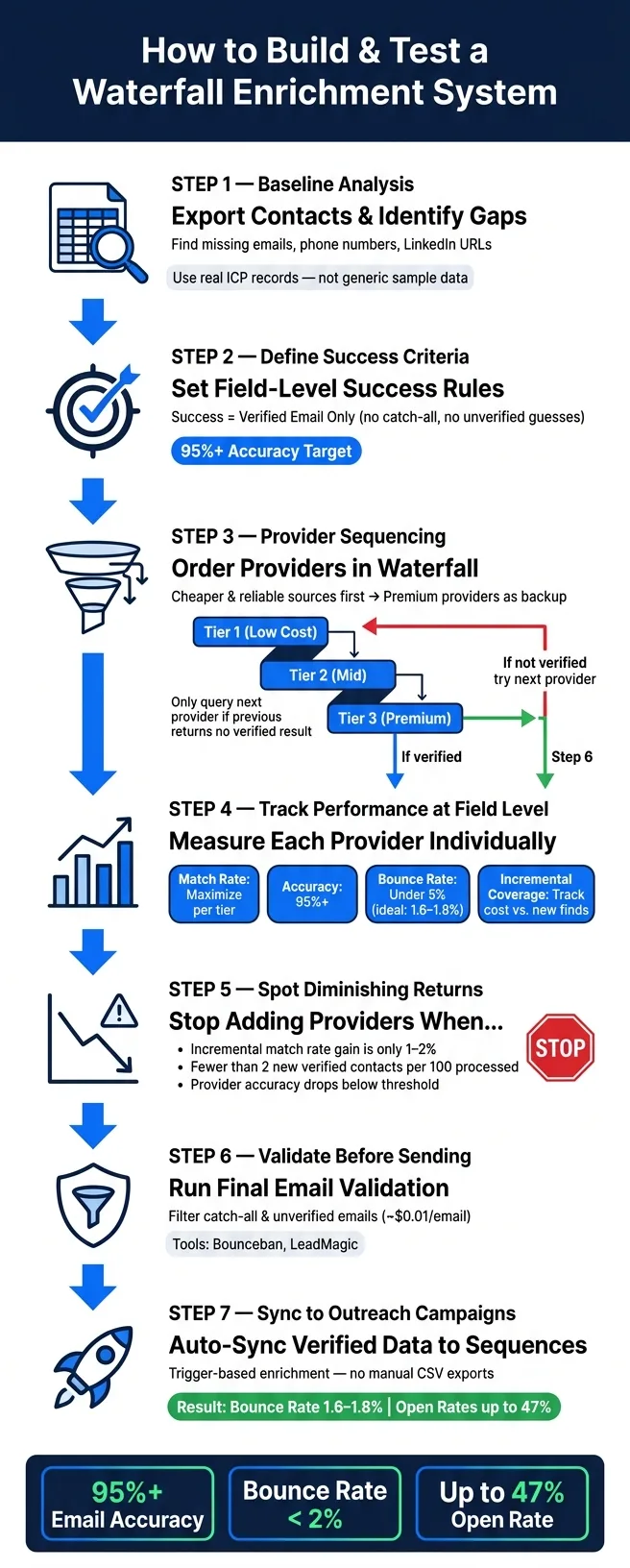
How to Build and Test a Waterfall Enrichment System
Setting Up a Controlled Test Environment
Start by conducting a baseline analysis of your lead list. Export your contacts into a CSV file and pinpoint exactly what's missing - for instance, email addresses, LinkedIn URLs, or company domains. This step helps you identify gaps for each provider and estimate costs based on the missing fields and per-credit pricing.
Make sure to use real ICP (Ideal Customer Profile) records instead of generic sample data. For example, if you're targeting mid-market SaaS companies in the U.S., test with actual prospects from that segment. Match rates can vary widely depending on the industry or company size, so relying on generic lists could skew your results. Define success as obtaining a verified email address - avoid settling for catch-all or unverified guesses.
Comparing Provider Performance
Once your test environment is set up, focus on tracking each provider's performance at the field level. This means recording which provider returned which specific data point for each contact. Confirm that your platform supports automated field-level tracking. Without this, it’s impossible to determine if Provider B is filling gaps or simply duplicating results already provided by Provider A.
Create a simple comparison table to score providers based on metrics like match rate, verified accuracy, incremental coverage, and cost per successful lookup. This approach simplifies decision-making. For instance, a provider with a 70% match rate but only 80% verified accuracy might be less effective than one with a 50% match rate and 98% verified accuracy - especially when bounce rates are a concern.
Ordering Providers in the Waterfall
After evaluating provider performance, arrange them in an effective sequence. Start with the cheaper and more accurate sources. Use your low-cost, high-trust providers first, and only move to premium options if necessary. Set up conditional rules so that the next provider in line is only queried if the previous one fails to return a verified result or finds no data.
"Pick from 100+ providers and set the order - put cheaper or trusted sources first." - Persana AI
For certain fields, like mobile numbers, take it a step further. If a provider returns a number that isn’t a direct dial, configure your system to continue searching rather than marking it as complete. This kind of field-level conditional logic is what separates a well-structured waterfall system from a basic lookup process. Finally, include a validation step at the end. Tools like Bounceban or LeadMagic (around $0.01 per email validation) can help identify and filter out catch-all addresses before they make it to your outreach list.
When to Stop Adding Providers
Balancing Coverage Against Cost
Adding more providers might seem like a good idea for expanding your data coverage, but it comes with extra expenses - higher subscription fees, additional API keys, and more maintenance work. These costs can quickly outweigh any small gains in verified data. To keep things efficient, structure your waterfall so that affordable, reliable sources are used first. Only move to premium databases if the earlier options fail to deliver results. This strategy helps keep your cost-per-verified-email low and avoids wasting expensive credits on data that could have been handled by free or cheaper tools.
Another common issue is redundant lookups, where providers are queried for data that’s already verified. This wastes credits unnecessarily. A simple fix is to skip enrichment for any fields that already contain verified information. Regularly monitor each provider’s contribution to ensure you're not spending resources on unnecessary layers.
Spotting Diminishing Returns
Once you've addressed cost management, it's time to evaluate the actual value each additional provider brings. If adding another provider only increases your match rate by 1–2%, it’s a sign that you’ve hit the point of diminishing returns. For instance, if fewer than two new verified data points are found for every 100 contacts reaching the later stages of your waterfall, the extra provider likely isn’t worth the cost.
It’s also important to assess performance at the individual provider level, not just as a whole. Let’s say Provider #6 is only returning verified data for less than 2% of the contacts it processes - this is a clear indicator that it might be time to remove it. After making adjustments, observe how your overall match rate changes. This process can help reduce unnecessary costs while keeping your workflow efficient.
Keep in mind that data quality often declines further down the waterfall. Providers at these stages are more likely to return unverified or catch-all emails, which can increase bounce rates instead of adding meaningful value.
Another effective way to set limits is by using a fit-score gate. Tools like Apify's AI lead enrichment allow you to set a minimum fit score - say, 0.5 on a 0–1 scale. This ensures that enrichment is only applied to leads that align with your ideal customer profile. By skipping prospects that don’t meet this threshold, you save credits and focus on leads with higher conversion potential.
Connecting Your Waterfall to Outreach Workflows
Integrating verified data into your outreach workflows is the next step in streamlining your process. This approach ensures both efficiency and higher deliverability rates.
Passing Verified Data into Campaigns
Once your waterfall confirms a contact's email or LinkedIn profile, you can sync that verified data directly into your outreach sequences. Forget about manually exporting CSV files - trigger-based enrichment allows fresh data to sync automatically as soon as a new list is uploaded or a CRM record gets updated.
To make this process even more effective, set field-level success rules. For example, define "success" as a fully verified email - excluding catch-all addresses or unconfirmed guesses. This ensures only high-quality contacts move forward into your sequences. Any contacts that fail verification can be redirected, such as through LinkedIn requests, rather than wasting resources on emails that won’t deliver.
You can also run your data through an AI hygiene process to clean up inconsistencies, such as correcting company name formatting or fixing garbled job titles. This step helps avoid robotic-sounding personalization. Well-prepared and enriched data can lead to hyper-personalized outreach, which has been shown to boost response rates up to 15%. Even more impressive, one-to-one researched emails can achieve open rates as high as 47%, compared to the industry average of 21%. These automated processes not only save time but also reduce the risk of bounces, making your campaigns more effective.
Lowering Bounce Rates and Protecting Sender Reputation
Unverified contact lists in 2026 can lead to bounce rates between 10% and 20%, which can severely damage your sender reputation. Once your domain lands on an ISP blacklist, no amount of tweaking your email copy will fix the issue.
As Alex Berman, author of Cold Email Manifesto, puts it:
"Every bounce hurts your domain reputation, and repeated bounces compound the damage." - Alex Berman
The best way to protect your sender reputation is to validate every contact before sending the first email. This proactive approach is far more effective than reacting to bounce spikes after the fact. Another safeguard is sender rotation, which distributes email volume across multiple authenticated mailboxes. This prevents any single domain from shouldering the entire load.
For example, UniteSync demonstrated that using verified enrichment data alongside multi-domain infrastructure resulted in positive reply rates as high as 85.26%, while keeping customer acquisition costs down to $2.86. By combining these techniques, you can protect your sender reputation and ensure that only clean, verified data powers your campaigns. This not only enhances your waterfall enrichment system but also keeps your outreach efforts efficient and effective.
How OutreachFox Handles Waterfall Enrichment
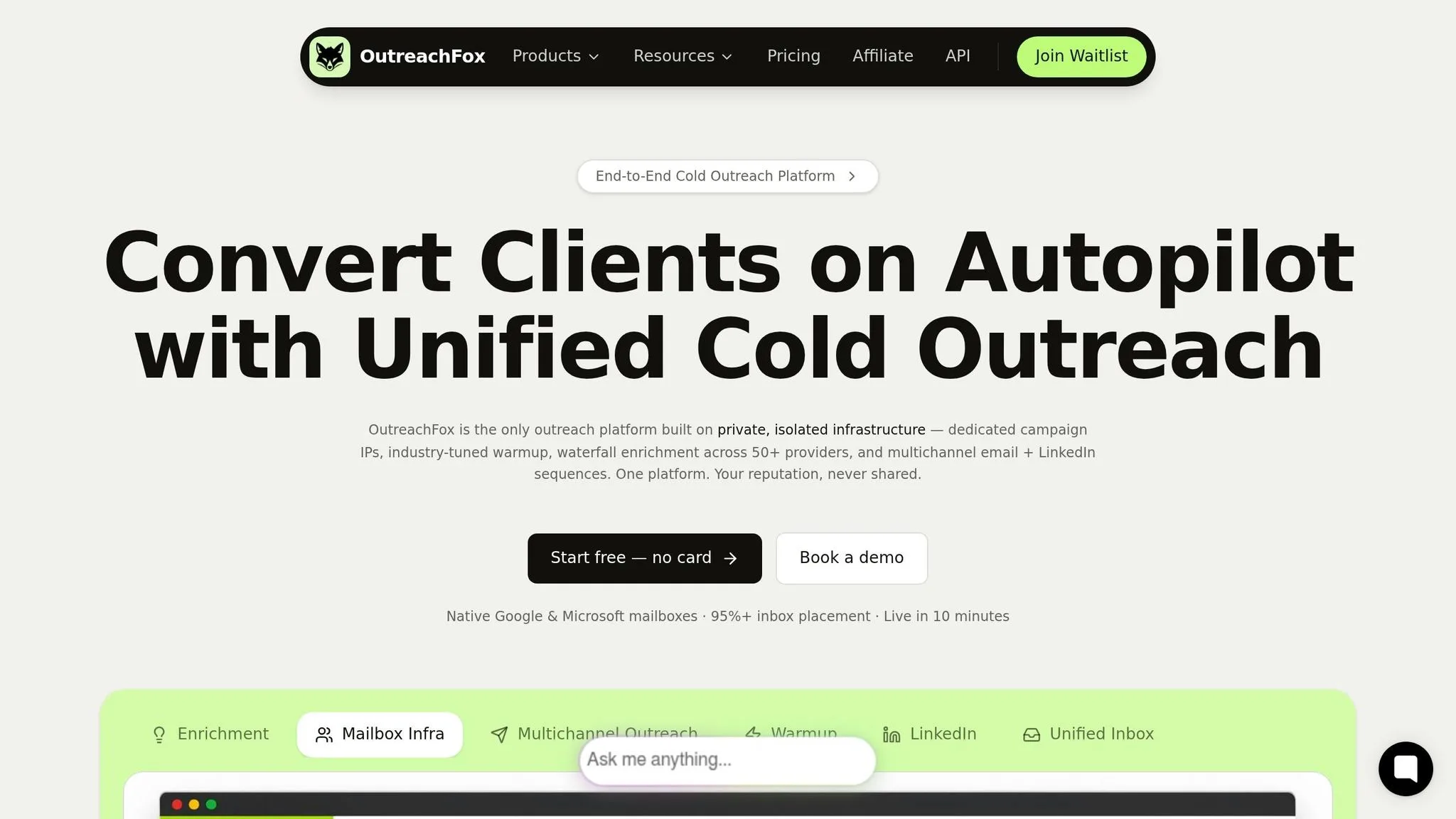
Waterfall Enrichment Across 50+ Providers
Creating a data enrichment waterfall from scratch can be a time-consuming headache. Teams often spend weeks juggling API integrations, managing credentials, and resolving errors. OutreachFox eliminates these hassles by offering built-in support for over 50 data providers. When one provider fails to deliver a result or returns a non-verified status, the platform automatically moves on to the next in line.
The process is highly customizable. You can use preset rules to prioritize certain providers, skip enrichment for data that’s already in place, and define what qualifies as a successful result - like requiring only "verified" email statuses. This automation simplifies enrichment, making it faster and more efficient while laying the groundwork for seamless outreach.
Enrichment and Outreach in One Platform
OutreachFox doesn’t just stop at enrichment; it combines it with multichannel outreach, all within a single platform. This integration eliminates the common pitfalls of using separate tools for data collection, verification, and outreach sequencing. Once contacts are verified, they’re automatically added to outreach sequences, ensuring that the rules you’ve set for data quality carry through without interruption.
Private Infrastructure for Deliverability
Deliverability is about more than just good data - it requires a strong, independent infrastructure. Shared environments can jeopardize your domain’s reputation if others on the same IP pool engage in poor practices. OutreachFox solves this by offering dedicated infrastructure. Features include unique campaign IPs, automated SPF/DKIM/DMARC setup, and detailed health monitoring for each mailbox.
"Other tools share infrastructure. SendKit's isolated infrastructure means your IP is yours. Your reputation is yours. And with per-mailbox health visibility, you see reply and bounce rate for every mailbox, so a struggling one stands out before the damage spreads." – SendKit
This isolated setup is especially important for high-volume campaigns. Even with verified data, a dip in quality could lead to blacklisting in shared environments. OutreachFox’s approach ensures that your sender reputation is solely influenced by your practices, reducing bounce rates and improving overall campaign performance. By combining verified data with isolated infrastructure, the platform helps you maintain consistent, reliable outreach results.
Conclusion: Building a Reliable Waterfall Enrichment Workflow
Creating an effective waterfall enrichment workflow hinges on three main principles: testing providers with real data, separately tracking match rates and bounce rates, and prioritizing cheaper sources early in the process. Once a provider delivers a verified result, avoid performing additional lookups that aren't necessary.
The data supports the importance of getting this right. Unverified lists often lead to high bounce rates, which can harm your sender reputation. On the other hand, well-designed workflows can achieve over 95% email accuracy, which plays a major role in successful outreach campaigns.
Integrating verified data directly into your sending platform eliminates the need for manual tasks like exporting CSV files or cleaning up spreadsheets. Automating the flow of enriched contacts into authenticated mailboxes not only protects your domain but also ensures reliable deliverability at scale. This kind of smooth integration is essential for maintaining consistent results.
For teams looking for an all-in-one solution, OutreachFox offers a streamlined approach. It combines waterfall enrichment across 50+ providers, built-in verification, and private infrastructure into one platform. This makes it a practical choice for teams aiming to move from prospecting to launching campaigns without juggling multiple tools.
Frequently asked questions
What is the target bounce rate for waterfall enrichment campaigns using verified data?+
Campaigns using verified data should aim for bounce rates below 5%, with best-in-class results achieving 1.6%–1.8%. In contrast, unverified contact lists in 2026 typically experience bounce rates of 10–20%, which can severely damage sender reputation and domain credibility.
Why should I use real ICP records instead of generic sample data when testing providers?+
Match rates and provider performance vary significantly depending on industry, company size, and geographic region. Testing with actual Ideal Customer Profile prospects from your target segment ensures accurate results that reflect real-world performance, while generic lists can produce misleading data that doesn't apply to your specific use case.
How do I calculate incremental coverage for providers in my waterfall sequence?+
Incremental coverage measures how many unique verified records each provider finds that previous providers missed. Track which provider returned each successful data point at the field level, then calculate the marginal value by comparing new verified contacts found versus the cost per lookup for that provider.
Should the waterfall continue searching if a provider returns an unverified or catch-all email?+
Yes, configure your system to only mark a field as complete when it returns a verified result. If a provider returns unverified data, catch-all emails, or non-direct-dial phone numbers, the waterfall should automatically move to the next provider in the sequence to find higher-quality data.
What percentage of new data points justifies adding another provider to the waterfall?+
When a provider only increases match rate by 1–2% or returns verified data for less than 2% of contacts reaching that stage, you've likely hit diminishing returns. At this point, the additional cost typically doesn't justify the marginal gain in coverage.
How does OutreachFox prevent sender reputation damage from shared infrastructure?+
OutreachFox provides dedicated infrastructure with unique campaign IPs, automated SPF/DKIM/DMARC setup, and per-mailbox health monitoring. This isolated environment ensures your sender reputation is controlled solely by your practices, unlike shared environments where other users' poor practices can damage your domain reputation.