B2B cold email success requires dedicated sending infrastructure, precise ICP targeting, deep personalization, and strict compliance. With proper setup, reply rates can reach 14%+ versus the 3.4% industry average.
- Use dedicated domains with 1-3 inboxes each, limiting sends to 50 emails daily per inbox
- Double-verify email lists including catch-all addresses to keep bounce rates below 2%
- Personalize emails with specific company context like hiring or tech changes for 14%+ reply rates
- Configure SPF, DKIM, and DMARC properly and warmup domains for 14 days before campaigns
- Build multi-touch sequences with 3-day intervals and stop automation when prospects reply
- Monitor reply rates above 3%, inbox placement above 98%, and open rates exceeding 40%
The Ultimate Guide to B2B Cold Email Campaigns
B2B cold email campaigns remain a direct and cost-effective way to engage decision-makers in 2026. However, reply rates have dropped to 3.4%, down from 8.5% in 2019, due to crowded inboxes and stricter spam filters. Success now hinges on smarter strategies: precise targeting, advanced personalization, and robust email infrastructure. Here's what you need to know:
- Infrastructure Matters: Use dedicated domains, limit inboxes to 50 emails/day, and configure SPF, DKIM, and DMARC for deliverability.
- Targeting Is Key: Define your Ideal Customer Profile (ICP) and enrich leads with intent signals like hiring or tech changes.
- Personalization Pays Off: Emails tied to specific company contexts can boost reply rates to 14%+.
- Follow-Up Sequences Work: Tailored, multi-step sequences keep prospects engaged and increase response rates.
- Compliance Is Non-Negotiable: Always adhere to CAN-SPAM and GDPR guidelines.
What You Need to Know About B2B Cold Email Campaigns
What Are B2B Cold Emails?
A B2B cold email is an unsolicited message sent to someone you’ve never interacted with before. The goal? To kickstart a conversation that could lead to meetings, qualified leads, or even new revenue streams.
Because you’re reaching out to prospects who don’t know you, using your primary domain for these emails can harm your sender reputation. Instead, top-performing teams rely on dedicated sending domains, rotate their mailboxes, and automate warmup processes to protect their main domain. With the right setup, inbox placement rates can hit an impressive 99%. But getting there isn’t just about technology - it’s also about crafting emails that resonate. This is why cold emails require a different approach compared to nurture or transactional emails.
"The single most expensive mistake in email outreach tool selection is treating a sequencer like it is a complete system." - Alex Berman, Author, Cold Email Manifesto
Cold Emails vs. Nurture and Transactional Emails
At first glance, cold emails, nurture emails, and transactional emails might seem similar. However, they serve very different purposes, and their infrastructure and compliance requirements reflect that.
| Cold Email | Nurture Email | Transactional Email | |
|---|---|---|---|
| Recipient | No prior relationship | Existing subscriber or lead | Existing customer |
| Primary Goal | Book meetings / generate pipeline | Educate and engage | Provide updates, receipts, or alerts |
| Infrastructure | Dedicated domains and rotated inboxes | Primary domain or subdomain | High-volume transactional relay |
| Sending Pattern | Low volume per inbox (<50/day), randomized | Bulk or drip sequences | Event-triggered |
| Compliance Focus | CAN-SPAM, GDPR legitimate interest | Opt-in / consent-based | Consent-based |
Cold email campaigns come with stricter compliance requirements since the recipients haven’t opted in. For U.S.-based campaigns, compliance with CAN-SPAM is mandatory, while European campaigns must also align with GDPR. This means including clear opt-out options in every email and ensuring platforms can permanently delete prospect data upon request. In contrast, nurture and transactional emails are sent to individuals who’ve already given consent, making compliance a bit simpler.
One standout feature of many cold email tools is reply detection. This automatically stops follow-up sequences once a prospect responds, which is crucial for maintaining both compliance and high deliverability rates.
The Ultimate Guide to Cold Emailing in B2B Sales (Step-by-Step)
How to Build a Reliable Sending Infrastructure
Your sending infrastructure is the backbone of any successful email campaign. With the right setup, you can achieve up to 99% inbox placement.
The first rule? Always rely on a dedicated sending domain instead of your primary business domain. Why? If your primary domain gets flagged, it could disrupt all critical communications. Dedicated domains act as a protective layer - if one is compromised, your main brand remains unaffected. For instance, you can purchase 21 sending domains for as little as $64.89 as a one-time cost through Porkbun, with mailboxes costing $6–$12 per month each. This approach is not only affordable but also scalable for high-volume email operations.
Setting Up a Dedicated Sending Domain
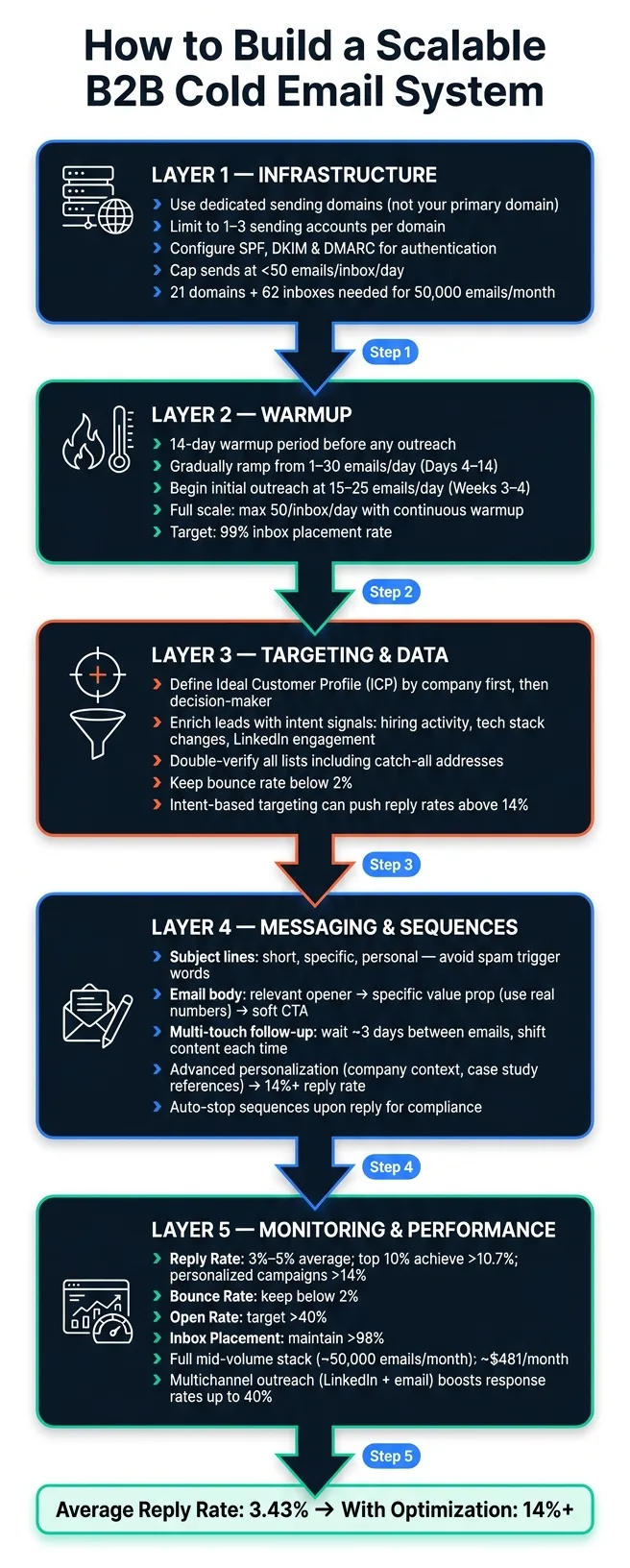
To minimize risks, limit the number of sending accounts per domain to 1–3. Exceeding this threshold increases the chance of the entire domain being blacklisted. Additionally, keep email volume per inbox under 50 emails per day. For example, a business sending 50,000 emails monthly would need approximately 21 domains and 62 inboxes to stay compliant.
New domains require a 14-day warmup period before launching any campaigns. This process helps establish a positive sending reputation with email providers.
"The operators who protect deliverability now treat inbox count limits as non-negotiable guardrails, not conservative suggestions." - Alex Berman, Cold Email Practitioner
Once your domain is set, the next step is proper DNS authentication, which involves configuring SPF, DKIM, and DMARC records.
SPF, DKIM, and DMARC Configuration
These DNS records are essential for building trust with email providers like Gmail and Outlook. Each serves a specific function:
- SPF (Sender Policy Framework): Defines which mail servers are authorized to send emails on behalf of your domain.
- DKIM (DomainKeys Identified Mail): Adds a cryptographic signature to outgoing emails, ensuring they haven’t been altered.
- DMARC (Domain-based Message Authentication, Reporting, and Conformance): Links SPF and DKIM together and provides instructions to receiving servers on how to handle unauthenticated emails (e.g., monitor, spam, or reject them).
Even a small misconfiguration can hurt your deliverability without you knowing. Tools like OutreachFox simplify this process by automating SPF, DKIM, and DMARC setup during onboarding, reducing the risk of errors.
With authentication in place, it’s time to decide between shared and dedicated infrastructure.
Shared vs. Dedicated Infrastructure: A Direct Comparison
Beginners often start with shared infrastructure, which involves connecting a Gmail or Outlook account to a sequencer tool. While easy to set up, it comes with significant risks - your email reputation is tied to other users, meaning one bad sender can hurt your deliverability.
In contrast, dedicated infrastructure isolates your domains, IPs, and accounts, giving you full control over your sender reputation. Though it requires more effort to set up, it’s the best choice for scaling high-volume campaigns.
| Feature | Shared Infrastructure | Dedicated Infrastructure |
|---|---|---|
| Deliverability Risk | High; shared with others | Low; fully isolated |
| Setup Complexity | Low; plug-and-play | Moderate; requires DNS setup |
| Scalability | Limited by provider caps | High; add domains/inboxes |
| Reputation Control | None | Full control |
| Best For | Small-scale senders (<10k emails/month) | High-volume teams |
"Gmail and Yahoo bulk sender rules have made high-volume blasting from shared infrastructure a reliable way to damage your domain reputation." - Alex Berman, Cold Email Practitioner
For B2B campaigns that demand consistent deliverability and scalability, dedicated infrastructure is the way to go.
How to Build and Enrich Your Prospect Lists
Even the most advanced email-sending tools can't save a campaign built on bad data. As Alex Berman aptly says: "Stale contact data kills campaigns before they start. If half your emails bounce... no sequencer setting fixes that." In other words, a clean, accurate lead list is critical for success.
Just like a dedicated sending domain safeguards your deliverability, a well-researched and enriched lead list protects your campaign's ability to convert.
Defining Your Ideal Customer Profile (ICP)
Your starting point should focus on companies, not individuals. Begin by identifying businesses that align with your offering - target the right accounts first, then narrow down to the decision-makers within those organizations. Once you've zeroed in on the right accounts, apply filters like job titles and seniority levels to find the key people worth reaching out to.
Many teams stick to static filters, but top performers go a step further by incorporating intent signals. These include indicators like recent hiring activity, changes in tech stacks, or engagement on LinkedIn. This approach can push reply rates above 14%. Why does this matter? Intent signals help you determine not just who matches your ICP but also when they're more likely to respond. With average cold email reply rates dropping from 8.5% in 2019 to around 3.4% in 2026 due to inbox saturation, precise targeting is your best weapon to stand out.
Once your ICP is clearly defined, the next step is sourcing and enriching leads that meet these criteria.
Lead Sourcing and Enrichment
With a well-crafted ICP, it's time to gather targeted contacts from reliable sources. A typical sourcing stack often includes tools like Apollo for collecting raw contact data and Clay for deeper enrichment. These tools can layer in intent signals and key business details - like tech stacks, growth trends, or recent news - that allow for highly specific personalization.
For teams seeking an all-in-one solution, OutreachFox offers integrated enrichment by querying over 50 providers simultaneously. This "waterfall enrichment" boosts data accuracy and freshness without requiring multiple tools for different steps.
List Hygiene and Bounce Rate Reduction
Sourcing leads is just the beginning. Before adding any list to a sequence, it must be verified. The gold standard for serious operators today is double verification: first, run the list through an initial verifier, then separately verify any catch-all addresses. Catch-all domains accept all incoming emails, even if specific addresses don't actually exist, which can quietly inflate your bounce rate.
"Double email verification - including catch-all verification - has become standard rather than optional." - Alex Berman, Cold Email Practitioner
For mid-volume operations, tools like MillionVerifier handle this process effectively. Snov.io, another popular option, boasts a 98% accuracy rate for its verification engine. The cost of verification is minimal compared to the damage a high bounce rate can do to your domain reputation.
| Tool Category | Example Tools | Primary Function |
|---|---|---|
| Data Sourcing | Apollo, Reply.io | Pulling raw B2B contact lists by title and industry |
| Enrichment | Clay | Adding intent signals, tech stacks, and custom data |
| Email Finding | Prospeo, Snov.io | Locating verified emails from LinkedIn and the web |
| Verification | MillionVerifier, Snov.io | Cleaning lists and verifying catch-all addresses |
A properly verified and enriched lead list does more than protect your sender reputation - it increases your reply rates by ensuring your emails reach the right people who are genuinely aligned with your ICP.
How to Warm Up Domains and Scale Sending Volume
Once your email-sending infrastructure is set up, the next step is to establish a strong sender reputation. This is done through a process called inbox warmup, which helps ensure your emails land in inboxes rather than spam folders.
What Is Inbox Warmup?
Inbox warmup is all about building trust for a new domain or mailbox before you start sending campaigns. The process involves gradually increasing the number of emails sent while fostering positive engagement - like opens, replies, and "not spam" signals - using a network of real inboxes. This step is crucial for gaining the trust of email providers and ensuring your messages are delivered successfully.
"Warmup starts the moment you connect. Every mailbox builds sender reputation through a peer-to-peer network of real inboxes – no bots, no manual work." - Oleg Bilozor, CEO and Founder, Reply.io
The entire warmup process typically takes around 14 days from the time you purchase a domain to when you can safely start sending outreach emails.
How to Scale Sending Volume Without Getting Flagged
To scale your email campaigns effectively, you need to avoid overwhelming any single inbox. Keep daily sends below 50 emails per inbox. A proven strategy is inbox rotation, where you distribute your campaign volume across multiple domains and mailboxes. This keeps the volume per account low, helping protect your sender reputation.
"The operators who protect deliverability now treat inbox count limits as non-negotiable guardrails, not conservative suggestions." - Alex Berman, Author, Cold Email Manifesto
To further mimic natural email behavior, introduce randomized sending intervals. Even after your campaigns are live, it's important to maintain the warmup process as part of ongoing reputation management.
Once you’ve mastered scaling, follow these warmup stages to minimize risk.
Warmup Stages and Risk Mitigation
| Stage | Timeframe | Daily Volume per Inbox | Key Action |
|---|---|---|---|
| Setup | Days 1–3 | 0 | Configure SPF, DKIM, and DMARC |
| Automated Warmup | Days 4–14 | 1–30 (gradually ramp) | Use peer-to-peer interactions to build trust |
| Initial Outreach | Weeks 3–4 | 15–25 | Start small with highly personalized campaigns |
| Full Scale | Ongoing | Max 50 | Rotate campaigns across mailboxes; continue warmup |
These stages are essential for safeguarding your sender reputation while scaling your email campaigns.
Platforms like OutreachFox make this process easier by offering pre-warmed mailboxes and tailored warmup profiles. This allows new inboxes to start with a solid foundation for outreach.
Once you're operating at full scale, the focus shifts from volume to variation. Use tools like AI-generated text variations or Spintax to ensure your messages are unique across accounts.
How to Write and Sequence Cold Emails That Get Replies
Now that your domains are warmed up and your sending volume is optimized, it's time to focus on the email itself. The quality of your email can make the difference between a 3% and a 14% reply rate. Pairing clear, engaging messaging with a strong infrastructure can significantly improve your campaign's performance. The first step? Craft subject lines that grab attention instantly.
Writing Subject Lines That Get Opened
Your subject line is your first impression, and it’s a big deal. The best ones are short, specific, and feel personal. Avoid anything that screams "mass email" - words like "exclusive" or "limited time" or using ALL CAPS can flag spam filters. Here's a good rule of thumb: if your subject line could apply to thousands of people without any changes, it’s too generic.
Before sending, always check for spam triggers. Using tools like Spintax to rotate subject line variations can help you keep things fresh and steer clear of common pitfalls.
How to Structure the Email Body for Maximum Impact
When it comes to the email body, less is more. Every sentence should add value. A proven structure includes:
- A relevant opener: Start with something that shows you’ve done your homework. Mentioning a recent business milestone - like a funding announcement or a new hire - can make a big difference in engagement rates.
- A specific value proposition: Use concrete numbers to back up your claims. Saying, "We helped a SaaS team reduce churn by 18%" is far more compelling than vague promises.
- A soft call to action: Instead of jumping straight to a meeting request, try something like, “Mind if I send over a quick breakdown?” This keeps the conversation low-pressure and aligns with earlier advice about dynamic personalization.
"Advanced personalization - going beyond first name to reference project details, specific company context, or named case study clients - can reach reply rates above 14%." - Alex Berman, Founder, Cold Email Manifesto
Tools like OutreachFox make this process easier by using dynamic custom fields and AI tagging to seamlessly integrate personalized details into templates without losing the one-to-one touch.
Once your email body is dialed in, the next step is designing follow-up sequences that keep the conversation going.
Planning Multi-Touch Follow-Up Sequences
Follow-ups are where the magic happens. A well-planned sequence can turn a quiet campaign into a high-performing one. A common approach is to wait about three days between follow-ups - this keeps you on the prospect’s radar without being overbearing.
The content of your follow-ups should shift with each email, not just the timing. For instance:
- If the first email highlights a case study, the second could pose a direct question.
- The third might introduce a new angle or benefit.
Platforms like Reply.io make this process easier by offering automated branching. This means prospects who open but don’t respond can receive tailored follow-ups, while those who don’t open at all get a different sequence. These tools also ensure follow-ups stop automatically once a prospect replies.
"Reply offered us a platform where we're sure that the right emails go out at the right time. It helped us get reply rates of over 65% and scale operations." - Sjors Mahler, Sales & Growth Lead, pr.co
Keep your sequences streamlined. Most tools allow for A/B testing and multi-step campaigns to refine your approach. If a prospect doesn’t engage after the final email, it’s best to step back. Reaching out later with a fresh perspective is often more effective than pushing a worn-out sequence.
Using API-Driven Workflows to Automate Campaigns
Once your infrastructure is set up for high deliverability and volume, the next challenge is improving operational efficiency.
Why API-Driven Automation Matters for Cold Email
After fine-tuning your sequences, the real bottleneck often shifts to operations: managing multiple inboxes, syncing lead data, and keeping everything running smoothly - without hiring a dedicated ops team. This is where API-driven automation becomes a game-changer.
At scale, a cold email system isn't just one tool - it’s a multi-layered setup. A sequencer like Smartlead or Instantly manages campaign logic and inbox rotation. A data layer like Apollo provides raw contact data. An enrichment layer like Clay adds intent signals and custom variables to your leads. APIs tie all these components together, eliminating the need for manual exports or constant tab-switching.
The benefits are clear. For example, a professional setup sending 50,000 emails monthly can automate its entire stack - sequencer, inboxes, enrichment, and verification - for about $481/month when properly streamlined. This level of automation not only simplifies operations but also lays the groundwork for rapid scaling.
Scaling Campaigns with Bulk Mailbox Provisioning
One of the most time-consuming tasks in cold email is setting up new sending accounts. Tasks like registering domains, configuring DNS records, and connecting mailboxes can take hours per domain. Bulk mailbox provisioning drastically reduces this workload.
Modern platforms now allow you to purchase and configure Google or Microsoft mailboxes directly within the app. During this process, SPF, DKIM, and DMARC are automatically configured, cutting setup time from hours to minutes. This is critical because to maintain deliverability, operators limit daily sends to fewer than 50 emails per inbox. Scaling up, therefore, requires adding more inboxes rather than increasing volume per inbox. Automated provisioning makes this expansion far easier to manage.
Platform Features for Automation
OutreachFox is a prime example of an API-first platform. It simplifies bulk mailbox provisioning, automates DNS configuration, and provides pre-warmed inboxes - so new accounts are ready for campaigns without the hassle of manual warmup. Its waterfall enrichment feature integrates with over 50 data providers to keep lead records up-to-date, while its unified inbox consolidates responses from multiple domains into a single view.
A centralized inbox is a game-changer for managing replies. It streamlines response handling across domains, improving sender reputation and operational efficiency. When running campaigns across dozens of domains with multiple team members, fragmented reply management can lead to missed opportunities. With AI tagging and a unified dashboard, response times are faster, and sales handoffs are smoother.
"Managing multiple client outreach campaigns is now effortless. The unified dashboard and sender rotation feature save our team hours every week." - Alex Thompson, Founder, Elevate Growth Agency
For agencies or teams handling campaigns for several clients, maintaining separation is just as important. API-first platforms that offer separate workspaces for each client ensure campaigns remain isolated, avoiding the common issue of cross-contamination when sharing the same sending infrastructure.
How to Track Deliverability and Campaign Performance
Once your automation workflows are live, it's crucial to keep a close eye on their health. Monitoring the right metrics ensures your emails not only reach inboxes but also engage the audience effectively.
Key Metrics to Monitor
The reply rate is the cornerstone of cold emailing success. Industry data from Instantly shows an average reply rate of 3.43%, with the top 10% of campaigns achieving 10.7% or more. Campaigns that use deep personalization - like referencing specific company details - can even surpass 14%. If your reply rate is consistently under 3%, it might signal issues with your targeting, email copy, or deliverability.
Another critical metric is the bounce rate, which reflects the quality of your email list. Aim to keep this below 2%, while maintaining an inbox placement rate above 98% to safeguard your sender reputation. Additionally, a healthy open rate should exceed 40%. Be mindful of your daily sending volume; experienced users typically limit sends to fewer than 50 emails per inbox per day.
How to Diagnose and Fix Deliverability Problems
If you notice a performance dip, start by separating your campaign software (e.g., Smartlead or Instantly) from your sending infrastructure (e.g., Google Workspace, Outlook, or DNS records). Problems can arise at either level.
- Verify SPF, DKIM, and DMARC Records: Misconfigured authentication settings are a common cause of deliverability issues.
- Analyze Bounce Types: Hard bounces indicate invalid email addresses, while soft bounces may point to temporary issues like full inboxes, blacklisted IPs, or spam-flagged content.
- Run a Spam Trigger Analysis: Use tools to identify problematic words or links in your emails.
- Check for Blacklisting: If open rates drop despite proper authentication, your sending domain may be blacklisted. Tools like OutreachFox can help monitor domain health and flag potential issues early.
Another way to improve deliverability is by using custom tracking domains. Shared tracking links carry the reputation of all senders using them, which can hurt your metrics. A unique tracking domain isolates your reputation and keeps your data clean.
Performance Benchmarks and When to Act
Here’s a quick guide to healthy metrics and what to do if they fall short:
| Metric | Healthy Range | Recommended Action |
|---|---|---|
| Reply Rate | 3%–5% (top 10%: >10.7%) | Improve targeting and personalize messaging. |
| Bounce Rate | <2% | Double-verify emails and avoid catch-all addresses. |
| Open Rate | >40% | Check authentication settings and remove spam triggers. |
| Inbox Placement | >98% | Investigate domain health and blacklisting issues. |
| Sending Volume | <50 per inbox/day | Add more domains or inboxes; rotate sending accounts. |
"Sendlio cut our manual outreach work by 80%. We went from 2% reply rates to 14% in six weeks - and never hit a spam folder once." - Luca Moretti, Growth Strategist, PulseLabs
If your platform supports it, consider enabling AI-driven reply categorization. This feature automatically organizes responses into categories like "interested", "auto-replied", or "bounced", allowing your team to focus on high-value leads instead of sorting emails manually.
Common Cold Email Mistakes and How to Avoid Them
Even with solid tools and automation, small errors can throw your cold email strategy off course. The good news? Most of these mistakes can be avoided with thoughtful preparation.
Targeting and Personalization Errors
One of the biggest pitfalls is targeting too broadly - using vague criteria like generic industries, unclear job titles, or company sizes that don’t match your ideal customer profile (ICP). Without a well-defined ICP, your messaging becomes bland, and engagement takes a hit. For example, Virtuance refined their targeting and used Mailshake to personalize their email sequences, resulting in an impressive 83% open rate.
Another common mistake is starting emails with generic first lines. Instead, reference something specific to the recipient, like a recent LinkedIn post, a funding announcement, or a relevant job posting. This shows you’ve done your homework. Michael Greenberg, owner of Business Radio X, saw a 60% success rate after switching to highly tailored, AI-assisted emails via Reply.io. By using intent signals and AI tools, you can scale personalization without sacrificing quality.
Now, let’s talk about how technical missteps can also sabotage your efforts.
Deliverability Pitfalls
Technical issues are a common culprit behind poor email performance. Problems like skipping DNS authentication, overloading inboxes, or misunderstanding the role of a sequencer can hurt your deliverability.
"The single most expensive mistake in email outreach tool selection is treating a sequencer like it is a complete system." - Alex Berman, Practitioner
It’s important to know that platforms like Instantly or Smartlead manage campaign logic and rotation but don’t provide the actual sending inboxes. You’ll need to set up these inboxes separately and configure SPF, DKIM, and DMARC records. Without proper authentication, even the best email copy will land in spam.
Volume control is also critical. Sending too many emails from one domain or connecting too many sending accounts to the same domain can harm your sender reputation. A double-verification process for your contact lists can help prevent bounces and protect your campaigns.
"Stale contact data kills campaigns before they start. If half your emails bounce... no sequencer setting fixes that." - Alex Berman, Practitioner
Staying Compliant with CAN-SPAM and GDPR
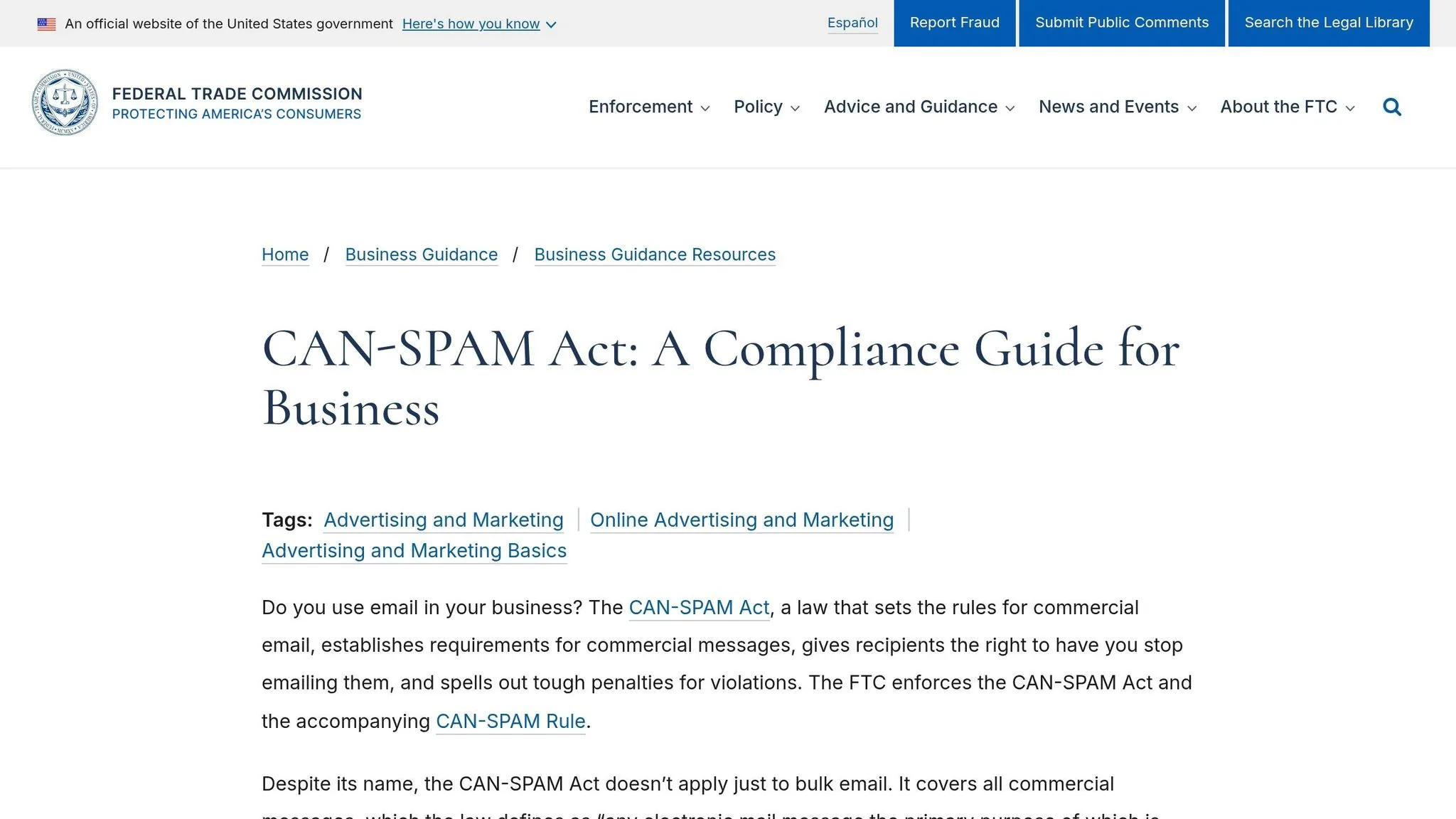
Beyond targeting and technical issues, legal compliance is essential to keep your campaigns safe. Adhering to CAN-SPAM and GDPR guidelines isn’t optional - it’s a must.
For EU contacts, GDPR requires a legal basis, like "legitimate interest", before sending outreach emails. This involves documenting a balancing test to ensure your outreach doesn’t infringe on the recipient’s rights. Always maintain clear records of your data sources and honor removal requests promptly.
Make sure your templates include unsubscribe links, a physical address, and honest subject lines. These steps not only ensure compliance but also strengthen your campaign’s foundation, tying together the technical and messaging aspects of a scalable cold email strategy.
Conclusion: How to Build a Scalable Cold Email System
Creating a scalable cold email system isn't about relying on a single tool. Instead, it's about combining multiple layers, each handling a specific function. At the base, you have infrastructure - domains, sending accounts, and DNS authentication. Sequencing takes care of campaign logic and inbox rotation, while data pipelines ensure your prospect lists remain clean and enriched. Finally, consistent monitoring helps catch deliverability issues before they escalate.
The stats back up the importance of getting this right. The average cold email reply rate hovers around 3.43%, but campaigns that use advanced personalization - like referencing specific projects or company details - can exceed 14%. The top 10% of campaigns achieve reply rates of 10.7% or higher. What separates these high performers? Strong infrastructure, precise targeting, and disciplined execution.
To keep your system running smoothly, here are a few key safeguards:
- Limit sending to 50 emails per day per inbox
- Use only 1–3 sending accounts per domain
- Double-verify all prospect lists, including catch-all domains
- Start automating warmups as soon as a new mailbox is live
Experts stress the importance of these measures:
"The operators who protect deliverability now treat inbox count limits as non-negotiable guardrails, not conservative suggestions." - Alex Berman, Founder, Cold Email Manifesto
As your system grows, adding multichannel outreach - like LinkedIn or phone calls - can boost response rates by up to 40% compared to email alone. Running a mid-volume stack (about 50,000 emails per month) with a sequencer, roughly 60 inboxes, AI enrichment, and verification will cost around $481/month. When managed effectively, this investment can deliver significant returns.
Frequently asked questions
What daily email volume limit should I maintain per inbox to protect deliverability?+
Keep your sending volume below 50 emails per inbox per day. This limit is considered a non-negotiable guardrail by experienced operators to maintain sender reputation and avoid being flagged by email providers. If you need to send more emails, add additional domains and inboxes rather than increasing volume per account.
Why has the average B2B cold email reply rate dropped from 8.5% in 2019 to 3.4% in 2026?+
Reply rates have declined due to increasingly crowded inboxes and stricter spam filters implemented by email providers. To combat this trend, successful campaigns now require smarter strategies including precise targeting using intent signals, advanced personalization tied to specific company contexts, and robust email infrastructure with proper authentication.
How many domains and inboxes do I need to send 50,000 cold emails per month?+
For 50,000 emails monthly at the recommended limit of 50 emails per inbox per day, you would need approximately 21 domains and 62 inboxes. It's recommended to limit sending accounts to 1-3 per domain to minimize blacklisting risk. The total cost for this infrastructure can be around $481/month when properly streamlined.
What is double email verification and why is it necessary for cold email campaigns?+
Double verification involves first running your contact list through an initial verifier, then separately verifying catch-all addresses. Catch-all domains accept all incoming emails even if specific addresses don't exist, which can quietly inflate bounce rates and damage sender reputation. This two-step process has become standard practice rather than optional for maintaining list hygiene.
How long does the inbox warmup process take before I can start sending campaigns?+
The complete warmup process typically takes 14 days from purchasing a domain to safely launching outreach campaigns. This involves gradually increasing email volume from 1-30 emails per day while building positive engagement signals through a peer-to-peer network of real inboxes. Proper warmup is essential for establishing sender reputation and achieving inbox placement rates up to 99%.
What reply rate can I achieve with advanced personalization in cold email campaigns?+
Cold emails using advanced personalization that goes beyond first names to reference specific company context, project details, or named case study clients can achieve reply rates above 14%. This is significantly higher than the industry average of 3.4% and even exceeds the top 10% benchmark of 10.7%, making deep personalization one of the most effective strategies for campaign success.
Should I use my primary business domain or a dedicated domain for cold email campaigns?+
Always use dedicated sending domains instead of your primary business domain. If your primary domain gets flagged during cold outreach, it could disrupt all critical business communications. Dedicated domains act as a protective layer - if one is compromised, your main brand remains unaffected. You can purchase multiple sending domains affordably to scale your campaigns safely.