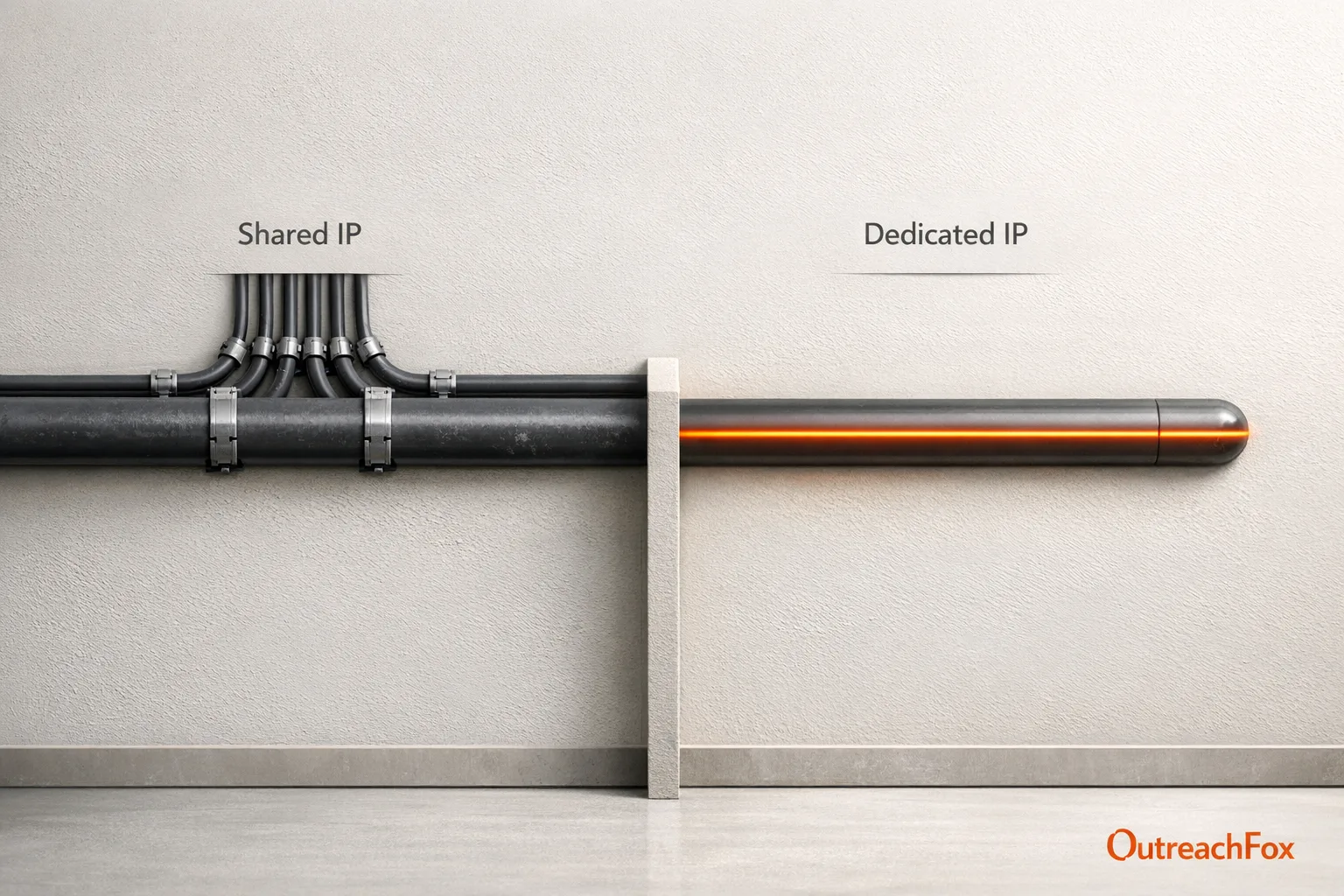
Dedicated IPs offer full reputation control for high-volume senders but require warmup and technical management. Shared IPs are plug-and-play but share reputation risks with other users.
- Dedicated IPs give full reputation control but require 14-plus day warmup periods
- Shared IPs are ready immediately but your deliverability depends on other users
- High-volume senders over 10,000 emails monthly benefit most from dedicated infrastructure
- Multi-inbox rotation across warmed mailboxes is the standard for B2B cold email
- Choose based on sending volume, technical resources, and tolerance for shared risk
- Hybrid setups with multiple warmed mailboxes combine control with scalability
Dedicated Sending IPs vs. Shared IPs for Cold Email
When it comes to cold email, your choice of sending IP - dedicated or shared - can make or break your campaign's success. Here's the key difference:
- Dedicated IPs: You control the reputation. No one else uses the IP, so your deliverability depends entirely on your practices. Best for high-volume senders (10,000+ emails/month) or agencies managing multiple clients. Requires technical setup and a warmup period.
- Shared IPs: Several users share the same IP. They're easy to start with, as providers handle the setup and warmup. Ideal for low-volume senders or small teams but risks reputation issues caused by others using the same IP.
Quick Takeaway: If you're scaling outreach or need control, go with a dedicated IP. For smaller campaigns or simplicity, shared IPs are a better fit. Choose based on your sending volume, technical resources, and risk tolerance.
Quick Comparison:
| Factor | Dedicated IP | Shared IP |
|---|---|---|
| Reputation Control | Full - your behavior impacts it only | Shared - others' actions affect you |
| Warmup Needed | Yes, gradual volume increase | No, pre-warmed by provider |
| Ease of Use | Complex setup | Plug-and-play |
| Best Fit | High-volume senders | Small teams, low-volume campaigns |
Pro Tip: For teams sending thousands of emails daily, consider a hybrid setup with multiple warmed mailboxes for better scalability and reputation control.
Dedicated Sending IPs for Cold Email
What Is a Dedicated IP and How Does It Work?
A dedicated IP is an email address that belongs exclusively to one sender. Unlike shared IPs, no one else has access to it. When you send a cold email through a dedicated IP, the email travels through a private SMTP setup rather than a shared address used by many senders.
The reputation of your dedicated IP is entirely in your hands, as it’s built based on your sending behavior. To ensure everything works smoothly, you’ll need to configure three essential DNS authentication protocols: SPF, DKIM, and DMARC. These protocols verify to receiving servers that your emails are legitimate. Platforms like OutreachFox simplify this process by automating the configuration of SPF, DKIM, and DMARC during mailbox setup, so you don’t have to handle it manually. This setup creates a solid foundation for reliable email delivery, which is crucial for cold email campaigns.
Benefits of Dedicated Sending IPs
Dedicated IPs give you complete control over your sending reputation. Platforms that rely on dedicated setups report inbox placement rates as high as 99% and delivery rates of 98% when using mailbox rotation across multiple accounts. Since no one else uses your IP, your deliverability depends entirely on your practices. By maintaining clean email lists, sending relevant content, and keeping bounce rates low, you can protect your reputation. For teams sending over 10,000 emails a month, these high placement rates can directly impact their sales pipeline.
Another key benefit is campaign isolation. This is especially important for agencies managing outreach for multiple clients. With a dedicated IP, one client’s poor email practices won’t affect another’s sender reputation. Alex Thompson, Founder of Elevate Growth Agency, highlights this advantage:
"Managing multiple client outreach campaigns is now effortless. The unified dashboard and sender rotation feature save our team hours every week."
Challenges and Constraints of Dedicated IPs
Using a dedicated IP comes with its own set of challenges. The most critical is the warmup period. When you start with a brand-new IP, it has no history with ISPs. This means you can’t immediately send thousands of emails. Instead, you need to gradually increase your email volume over several weeks to build trust with email providers. Typically, it takes at least 14 days from the time you purchase a domain to send your first campaign.
Mistakes on a dedicated IP can have serious consequences. If your emails generate a spike in spam complaints or result in too many hard bounces, your domain could get blacklisted. Recovering from this can take months. Consistency is also critical - sudden increases in your daily email volume can trigger spam filters.
Ongoing management is another factor to consider. Tasks like DNS configuration, maintaining clean email lists, monitoring deliverability, and managing inbox rotation require constant attention. Automated tools can make this easier. Marcus Lee, Outbound Lead at PipelineForge, shared:
"The unlimited email warmup feature alone justified the switch. Our inbox placement improved and bounce rates dropped noticeably."
These challenges highlight the importance of careful planning and management when using dedicated IPs.
Best-Fit Use Cases for Dedicated IPs
Dedicated IPs are ideal when volume, control, and isolation are essential:
- Agencies managing outreach for multiple clients and needing to separate sender reputations
- Enterprise outbound teams sending over 10,000 emails monthly and requiring high inbox placement rates
- Organizations with strict compliance needs that demand full control over their sending infrastructure
For smaller teams sending only a few hundred emails a week, the effort required to warm up and manage a dedicated IP may outweigh the benefits. However, for businesses aiming to scale their B2B outreach, dedicated infrastructure is a key element for achieving consistent results.
Shared Sending IPs for Cold Email
What Is a Shared IP and How Does It Work?
A shared IP is an address used by multiple senders at the same time. When you send emails through a shared IP, your messages are grouped with campaigns from other users sharing that same address. The Email Service Provider (ESP) oversees this shared pool, keeping an eye on sending behaviors to protect the IP’s overall reputation. Unlike a dedicated IP - where you have complete control over its history and use - a shared IP ties its reputation to all its users. If one sender triggers spam filters, it can negatively impact everyone using that IP.
This setup is easy to use and requires minimal technical effort, making it an attractive option for beginners.
Advantages of Shared Sending IPs
The biggest perk of shared IPs is their plug-and-play readiness. Providers pre-warm these IPs before offering them, so you can start sending emails right away without going through the lengthy warmup process required for dedicated IPs. This simplicity makes shared IPs ideal for small teams or individuals who want to dive into email outreach without hiring a technical expert.
Drawbacks of Shared Sending IPs
The downside? Your email deliverability depends on the behavior of others sharing the IP. If another sender’s poor practices land the IP on a blacklist, it can disrupt everyone’s campaigns - even if your emails are perfectly clean. This becomes a bigger issue as your sending volume increases, as higher volumes are more likely to trigger additional filters set by providers.
"Mailly sends emails directly from your connected SMTP accounts - not from shared IPs - meaning your domain reputation is never affected by other users."
These risks highlight why shared IPs work best for specific scenarios rather than high-volume or long-term strategies.
Best-Fit Use Cases for Shared IPs
Shared IPs are a good match for low-volume or sporadic email campaigns. For instance, they’re ideal for a startup testing its first outreach efforts, a small sales team sending fewer than 1,000 emails per month, or a business with seasonal campaigns. However, as your email volume grows or your campaigns require consistency, switching to individual mailbox connections - like Gmail, Outlook, or custom SMTP setups - becomes a smarter move. These alternatives allow sender rotation across multiple accounts, combining managed infrastructure with greater control and fewer risks tied to other users.
Dedicated vs. Shared IPs: Deliverability, Reputation, and Scaling
Deliverability at Different Sending Volumes
When it comes to email deliverability, the warmup process is a key difference between dedicated and shared IPs. Shared IPs are ready to go from the start because they’re pre-warmed by the provider, making them ideal for low-volume senders. Dedicated IPs, however, need a warmup period of at least 14 days to establish trust with ISPs.
At higher volumes, the benefits shift. Shared IP pools have limits, and sending too many emails through them can trigger red flags with email providers. Dedicated IPs, especially when paired with sender rotation across multiple domains, can handle large-scale campaigns without overwhelming any single account.
Reputation Management and Risk
Managing your email reputation varies significantly between dedicated and shared IPs. With a dedicated IP, you’re in full control - every bounce, complaint, or spam trap hit directly affects your reputation. While following best practices can yield great results, any slip-up, like a sudden spike in complaints, can harm your deliverability.
Shared IPs, on the other hand, offload the responsibility to your provider. However, this comes with shared risks. If another sender using the same IP lands on a blacklist or triggers spam filters, your emails could be affected, even if your practices are spotless. Reputable providers do monitor and manage these risks, but some level of exposure is unavoidable.
Scaling for Large or Multi-Domain Campaigns
Scaling campaigns, especially for large or multi-domain operations, requires careful planning. One effective strategy is sender rotation - spreading emails across multiple domains and mailboxes. This approach mimics natural email behavior and reduces the risk of hitting ISP limits. Plus, if one domain encounters issues, the rest of your setup can continue running smoothly.
Platforms like OutreachFox streamline this process by automating critical tasks like DNS configuration (SPF, DKIM, DMARC), warmup routines, and health monitoring across multiple domains. For agencies or teams managing large-scale campaigns, these tools can mean the difference between reliable inbox placement and constant troubleshooting.
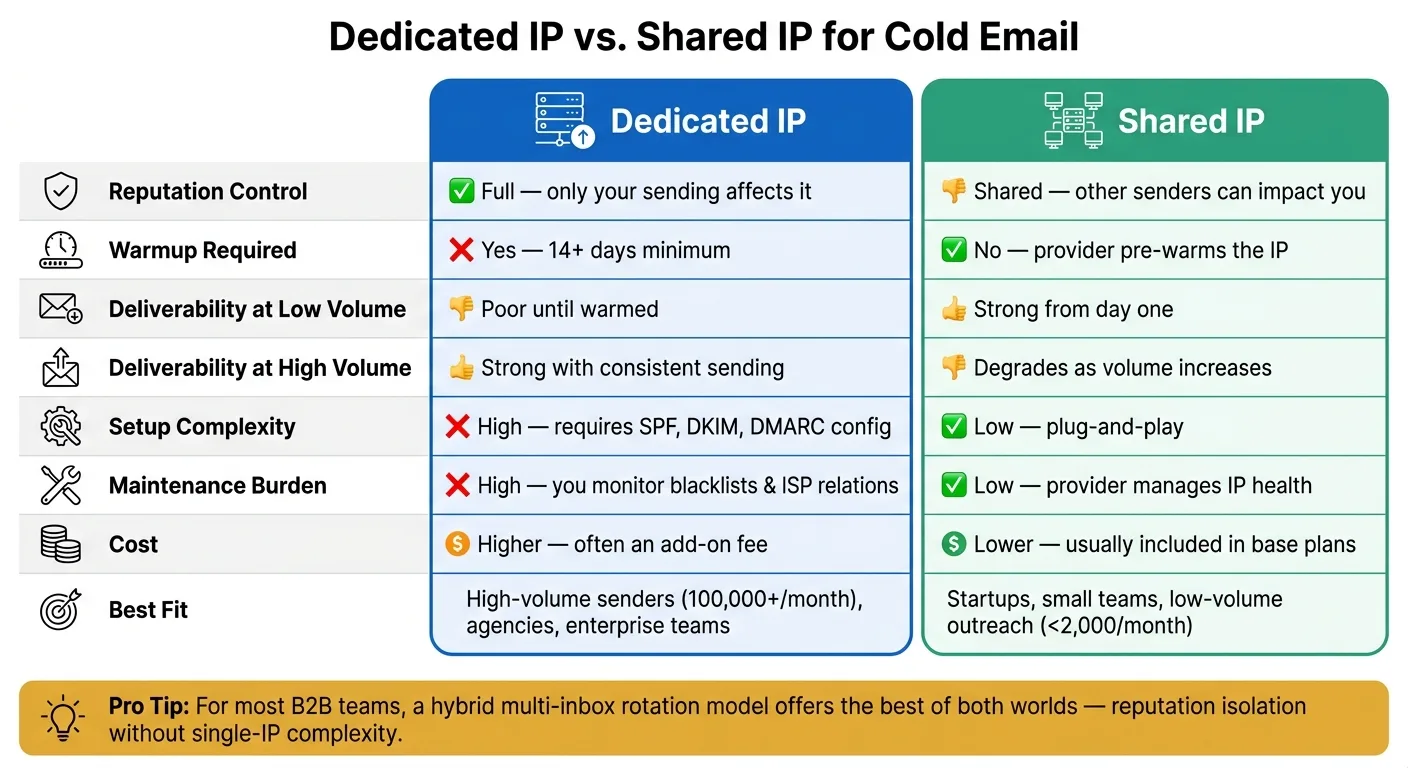
Comparison Table: Dedicated vs. Shared IPs
Here’s a quick breakdown of the key differences between dedicated and shared IPs, focusing on deliverability, reputation, and scalability:
| Factor | Dedicated IP | Shared IP |
|---|---|---|
| Reputation control | Full - only your sending affects it | Shared - other senders can impact you |
| Warmup required | Yes, 14+ days minimum | No - provider pre-warms the IP |
| Deliverability at low volume | Poor until warmed | Strong from day one |
| Deliverability at high volume | Strong with consistent sending | Degrades as volume increases |
| Maintenance burden | High - you're responsible for monitoring blacklists and ISP relations | Low - provider manages IP health |
| Setup complexity | High - requires configuring SPF, DKIM, and DMARC | Low - plug-and-play |
| Cost | Higher - often an add-on fee | Lower - usually included in base plans |
| Best fit | High-volume enterprise senders (100,000+/month) | Startups, small teams, low-volume outreach |
How to Choose the Right IP Setup for Your Cold Email Stack
Key Factors to Consider Before Deciding
Choosing the right IP setup for your cold email stack comes down to four main factors: sending volume, technical resources, risk tolerance, and business model. These elements determine how you balance control and scalability in your email outreach strategy.
Sending volume is the clearest indicator. If you're sending fewer than 2,000 emails per month, starting with a shared IP setup is often the simplest and most efficient choice. It eliminates the need for a warmup period, avoids technical setup challenges, and ensures reliable deliverability from day one. However, if your email volume exceeds 100,000 per month, a dedicated IP setup becomes worthwhile - provided you have the infrastructure to manage it.
Technical resources are a must for dedicated setups. Managing dedicated IPs involves tasks like monitoring blacklists and maintaining reputation. Without adequate technical support, this can quickly become overwhelming. Tools like OutreachFox simplify this process by automating much of the setup and management.
Risk tolerance matters, especially for agencies. If you're running campaigns for multiple clients, shared IP pools can pose risks. One bad sender in the pool can harm everyone’s deliverability. Opting for dedicated or isolated infrastructure ensures that each client’s reputation is managed separately, reducing shared risks.
Finally, your business model influences your choice. A solo entrepreneur sending 500 emails a week has different needs than an agency managing campaigns for 20 clients. Understanding how your specific model aligns with these options is key to making the right decision.
These factors are the foundation for building a scalable and effective cold email strategy.
Common Infrastructure Patterns for B2B Cold Email
Most teams rely on multi-inbox rotation to distribute email sends across several pre-warmed accounts. This approach mimics natural email behavior, avoids hitting daily provider limits, and helps maintain a positive reputation. By using existing email accounts or pre-warmed mailboxes, you can bypass provider restrictions while protecting your sender reputation. This setup strikes a balance between the control of dedicated infrastructure and the convenience of shared IPs.
For teams sending over 3,000 emails per day, this distributed model is essentially the standard. Platforms like OutreachFox make this easier by offering features like bulk mailbox provisioning, automated warmup processes, and real-time health monitoring for accounts.
Smaller teams just starting out often connect their existing Google Workspace or Microsoft 365 accounts to an email sequencing platform. This allows them to leverage the strong reputations of these providers without incurring additional infrastructure costs. As their sending volume grows, they can scale by rotating emails across multiple mailboxes to stay within per-account limits.
The takeaway: most B2B cold email teams don't need to choose between a single dedicated IP or a single shared IP. Instead, a distributed setup with isolated, warmed mailboxes across multiple domains is often the best solution. This approach combines the reputation control of dedicated infrastructure with the flexibility to scale up by simply adding more accounts. It’s a strategy that adapts to your campaign goals as they evolve.
Cold Email Deliverability | Shared Vs. Dedicated IPs
Conclusion: Matching Your IP Setup to Your Campaign Goals
The main difference between dedicated and shared IPs boils down to control versus simplicity. Dedicated IPs give you full control over your sender reputation, keeping your domain's reputation separate from others. On the other hand, shared IPs are easier to get started with, but your deliverability can be affected by the actions of others using the same IP pool.
Your choice should depend on your sending volume and technical capabilities. If you're handling smaller email volumes and have limited technical resources, shared setups - like those offered by Google Workspace or Microsoft 365 - are a practical option for low-volume campaigns. But if you're sending high volumes (think 100,000+ emails per month) or managing campaigns for multiple clients or domains, a dedicated IP setup is essential for maintaining consistent deliverability over time.
For B2B teams, a hybrid approach often works best. Using a distributed mailbox rotation model provides the benefits of reputation isolation you'd expect from dedicated IPs, but without the complexity of managing a single high-volume IP. Tools like OutreachFox simplify this process by automating mailbox provisioning, warmup, and monitoring account health.
As highlighted by industry experts:
"Your mailboxes are warmed, your reputation is protected. Now rotate them across sequences to send high volumes – safely, without overloading any single account." - Reply.io
Ultimately, your IP setup should reflect your current email volume and risk tolerance, not your future aspirations. Focus on meeting today's campaign needs, and adjust your strategy as your outreach efforts expand.
Frequently asked questions
How long does the warmup period take for a new dedicated IP before I can run full cold email campaigns?+
A dedicated IP requires at least 14 days of warmup before you can send your first campaign. During this period, you must gradually increase your sending volume to build trust with ISPs. Rushing this process by sending high volumes immediately can trigger spam filters and damage your sender reputation.
Can another sender's bad practices on a shared IP actually blacklist my domain?+
Yes, when using a shared IP, if another sender on the same IP gets blacklisted or triggers spam filters, it can negatively affect your email deliverability even if your practices are clean. The reputation is shared across all users of that IP, meaning your campaigns can suffer from others' poor sending behavior.
What sending volume threshold makes a dedicated IP more cost-effective than shared IPs?+
Dedicated IPs become worthwhile when you're sending over 10,000 emails per month, and particularly cost-effective at volumes exceeding 100,000 emails per month. Below these thresholds, the technical overhead and warmup requirements typically outweigh the benefits compared to shared IP setups.
How does mailbox rotation differ from choosing between dedicated and shared IPs?+
Mailbox rotation distributes emails across multiple pre-warmed accounts rather than relying on a single dedicated or shared IP. This approach mimics natural email behavior, avoids daily provider limits, and provides reputation isolation similar to dedicated IPs without the complexity of managing a single high-volume IP address.
What specific DNS authentication protocols must be configured for a dedicated IP setup?+
You must configure three essential DNS authentication protocols for dedicated IPs: SPF (Sender Policy Framework), DKIM (DomainKeys Identified Mail), and DMARC (Domain-based Message Authentication, Reporting, and Conformance). These protocols verify to receiving servers that your emails are legitimate and help establish your sender reputation.
If my dedicated IP gets blacklisted, how long does recovery typically take?+
Recovering from a blacklisted dedicated IP can take months. This is why consistent sending practices are critical - sudden spikes in spam complaints or hard bounces can trigger blacklisting. Unlike shared IPs where the provider manages reputation issues, dedicated IP problems require you to directly address the root causes and rebuild trust with ISPs.
Why do agencies managing multiple clients specifically need dedicated or isolated infrastructure?+
Agencies need campaign isolation to prevent one client's poor email practices from damaging another client's sender reputation. With dedicated or isolated infrastructure, each client's outreach operates independently, ensuring that reputation issues are contained and don't spread across the entire client portfolio.