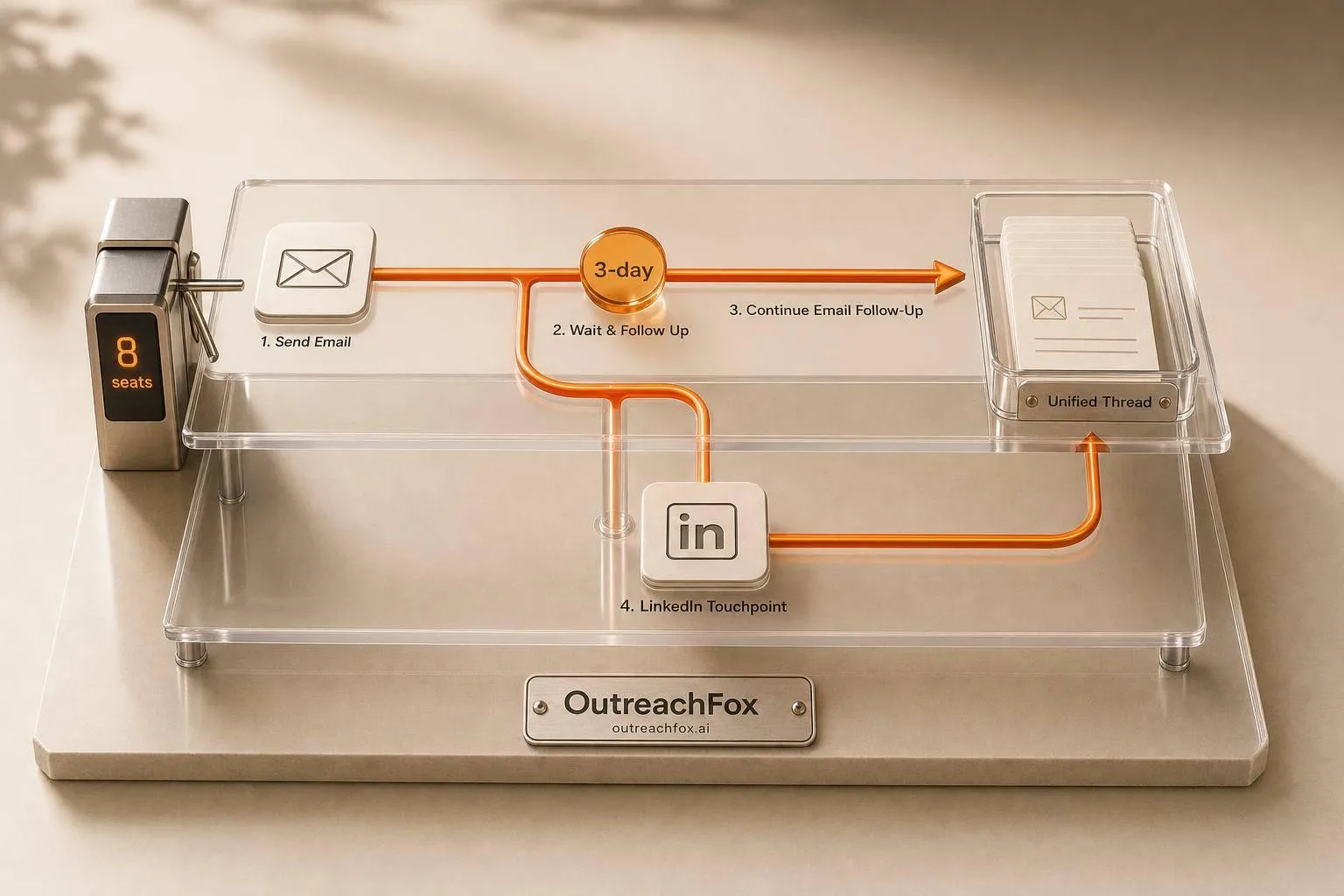
Control bulk email and LinkedIn outreach from one API using branching sequences, enforced account limits, and unified reply routing to prevent missed pauses, limit overruns, and client data leaks.
- Use one API to control email and LinkedIn timing, caps, and reply routing.
- Let email lead; send LinkedIn invites only after 3 days of no reply.
- Enforce daily caps, warmup schedules, and auto-pause rules by code, not manually.
- Route all replies, bounces, and complaints into one thread per prospect.
- Keep each client in a separate workspace to prevent data and campaign mixing.
- Use prospect_id and workspace_id to unify events across channels and clients.
Bulk Email and LinkedIn Launch: API Playbook
If you run bulk outreach from separate tools, you lose control fast. I'd keep the setup simple: run email and LinkedIn from one API, start with email, wait 3 days, send a LinkedIn invite only if there's no reply, and wait 24 hours after acceptance before the first LinkedIn message.
Here's the short version:
- I'd use one API system for mailbox setup, LinkedIn seats, sequences, webhooks, and reply routing
- I'd let email lead and use LinkedIn only when email gets no reply
- I'd enforce daily caps, warmup schedules, pause rules, and seat limits by code, not by hand
- I'd send every reply, bounce, and complaint into one thread with fields like
prospect_idandworkspace_id - I'd keep each client in a separate workspace so domains, seats, campaigns, users, analytics, and webhooks do not mix
A setup like this cuts common problems: missed pauses, limit overruns, split conversations, and client data leaks. For teams handling many mailboxes and LinkedIn seats, that can mean fewer manual checks and fewer launch errors.
The core idea is simple: branching, guardrails, and routing. If I can control those three parts in one place, multichannel outreach is much easier to run without chaos.
Design the sequence: channel timing and send logic
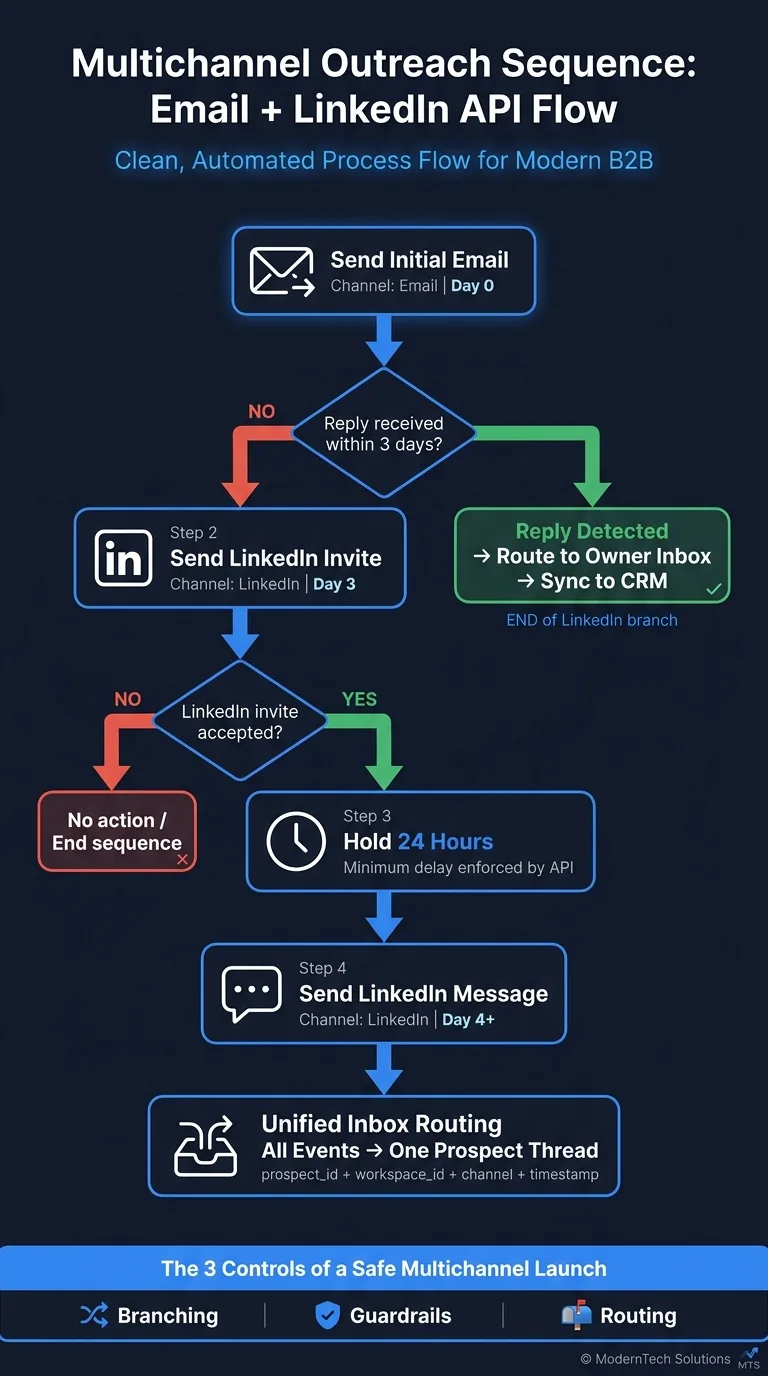
Once the launch setup is ready, map out the send order. Start with email, then let the API decide what happens on LinkedIn. The idea is simple: use LinkedIn only when email gets no reply.
Start with email, then branch into LinkedIn based on behavior
A common setup is straightforward. Send the first email, wait 3 days, and if there's still no reply, trigger a LinkedIn connection request. If the invite gets accepted, wait 24 hours before sending the first LinkedIn message.
That flow keeps LinkedIn in a support role instead of leading the outreach. It also helps avoid piling on messages across channels at the same time.
Encode delays and conditions in the API
The API can handle this with plain branching rules:
- If no reply comes in during the set delay, move to the next step
- If the LinkedIn invite is accepted, hold the message until the minimum delay has passed
That gives you one sequence, not two disconnected tools.
After the timing is locked in, enforce mailbox and seat caps before launch.
Enforce account limits without manual monitoring
Once the sequence is set, lock in the limits that keep it safe as you scale. Manual monitoring falls apart fast when dozens of mailboxes and LinkedIn seats are running at the same time. The API should handle those limits on its own.
Set per-mailbox warmup schedules, daily caps, and pause rules
Build the warmup schedule into the API before the first send. Then set hard daily caps and auto-pause rules. If a mailbox-health metric crosses your threshold, stop sending at once and send that mailbox in for review.
Set per-LinkedIn-seat invite and message limits
Use the same guardrails for LinkedIn seats. Keep invite and message ceilings low, limit how many campaigns can run at once, and let the API throttle or queue work when risk starts to climb. LinkedIn outreach tools with isolated infrastructure help maintain sender reputation while respecting platform limits.
| Parameter | Policy guidance |
|---|---|
| Daily invite cap | Conservative seat-level ceiling enforced by the API |
| Weekly invite cap | Separate rolling limit managed by policy |
| Daily message cap | Another seat-level ceiling enforced by the same guardrails |
| Max concurrent campaigns | Keep the seat's workload low enough that a pause is safe |
| Pause threshold | Throttle or stop the seat when risk signals cross your policy boundary |
When a seat hits its threshold, pause it or queue work until it clears.
With those limits in place, the system can route replies and events into one inbox.
Route replies into one inbox and keep client data separated
When limits are in place, you can route replies into one inbox without mixing client data. Then the job gets pretty straightforward: every reply, bounce, and complaint needs to map back to the right prospect and the right workspace.
That matters more than it may seem. A launch only holds together when replies, bounces, and complaints flow back into the same API system that sent the sequence.
Normalize email and LinkedIn events with webhooks
The same logic that branches by behavior should also pull behavior back into one thread. Every event - email reply, LinkedIn reply, bounce, spam complaint - should land on a single conversation record tied to the prospect.
Use one webhook format for everything. Each payload should include prospect_id, workspace_id, campaign_id, channel, event_type, owner, and timestamp. Webhooks for outreach platforms enable instant event delivery and prevent missed replies across both channels.
prospect_id ties both channels to the same record. So if a prospect replies by email and later answers on LinkedIn, both events resolve to the same thread. That keeps the history clean and gives the owner the full picture instead of two half-stories.
Webhook rules can also do some of the sorting for you. Meeting requests and pricing questions, for example, can go straight to the assigned owner.
Once events land in one thread, workspace rules stop those threads from drifting across client lines.
Use workspace controls to separate agencies and multi-client teams
The same API that launches campaigns should also enforce client boundaries. For agencies handling more than one client, separation isn't optional. Each workspace should isolate domains, mailboxes, LinkedIn seats, campaigns, users, analytics, and webhooks.
OutreachFox uses isolated, API-first workspaces, so each client keeps its own sending environment and webhook stream.
The routing logic inside each workspace should follow one clear policy:
| Event Type | Routing Rule | Sync Action |
|---|---|---|
| Email reply | Route to assigned owner based on workspace_id | Sync to CRM lead record |
| LinkedIn reply | Normalize to shared conversation record via prospect_id | Update CRM activity timeline |
| Bounce | Trigger "Invalid Email" status; update mailbox health | Mark lead as "Do Not Contact" |
| Spam complaint | Auto-pause campaign for that mailbox; alert admin | Log as "High Risk" in analytics |
workspace_id is what keeps the wall in place. It separates clients and sends each client's events to the right team. A unified inbox for cold email and LinkedIn replies consolidates multichannel conversations without sacrificing client data security.
Conclusion: The minimum API playbook for a safe multichannel launch
The minimum launch stack comes down to three controls: branching, guardrails, and routing. If you want a safe multichannel launch, you need one API with clear policies behind it. That means using event-driven branching so email and LinkedIn follow API-defined timing and conditions, instead of running on guesswork.
You also need firm per-account limits in place. Set mailbox caps, LinkedIn-seat limits, and auto-pauses for bounces and spam complaints. That's the part that keeps sending under control before small issues turn into bigger ones.
After that, bring the response stream into one place. Route replies and events into one unified prospect thread so teams can see the full conversation without jumping between tools. At the same time, keep client workspaces isolated while campaign logic changes by workspace.
OutreachFox applies that model with private email and LinkedIn infrastructure, API-first controls, native LinkedIn seats, and a unified inbox.
Frequently asked questions
Why should I wait 3 days after sending an email before sending a LinkedIn invite?+
The 3-day wait ensures LinkedIn acts as a support channel rather than competing with email. This delay gives prospects time to respond via email first and prevents overwhelming them with simultaneous messages across multiple channels. The approach uses LinkedIn only when email receives no reply.
How do I prevent client data from mixing when managing multiple workspaces?+
Each workspace should isolate domains, mailboxes, LinkedIn seats, campaigns, users, analytics, and webhooks using a workspace_id field. This ensures routing rules, webhook streams, and campaign data remain completely separated by client, preventing any cross-contamination of client information.
What fields should every webhook payload include for proper event routing?+
Every webhook payload should include prospect_id, workspace_id, campaign_id, channel, event_type, owner, and timestamp. The prospect_id ties both email and LinkedIn events to the same conversation record, while workspace_id maintains client separation and proper routing.
How long should I wait after a LinkedIn connection is accepted before sending the first message?+
Wait 24 hours after a LinkedIn invite is accepted before sending the first LinkedIn message. This delay follows natural connection behavior and avoids appearing too aggressive or automated immediately after the connection is established.
What limits should be enforced on LinkedIn seats to maintain account safety?+
LinkedIn seats should have daily invite caps, weekly invite caps, daily message caps, and limits on maximum concurrent campaigns. The API should automatically throttle or pause the seat when risk signals cross your policy threshold to prevent account restrictions.
Why is using one API system better than separate tools for email and LinkedIn outreach?+
One API system prevents missed pauses, limit overruns, split conversations, and client data leaks that occur with separate tools. It enables unified branching logic, centralized guardrails, consistent routing of all events to one prospect thread, and proper enforcement of daily caps and warmup schedules by code rather than manual monitoring.
What should happen automatically when a mailbox receives a spam complaint?+
When a spam complaint is received, the API should auto-pause the campaign for that specific mailbox and alert the admin immediately. The event should also be logged as high risk in analytics and marked in the CRM to prevent further sending from that mailbox until reviewed.