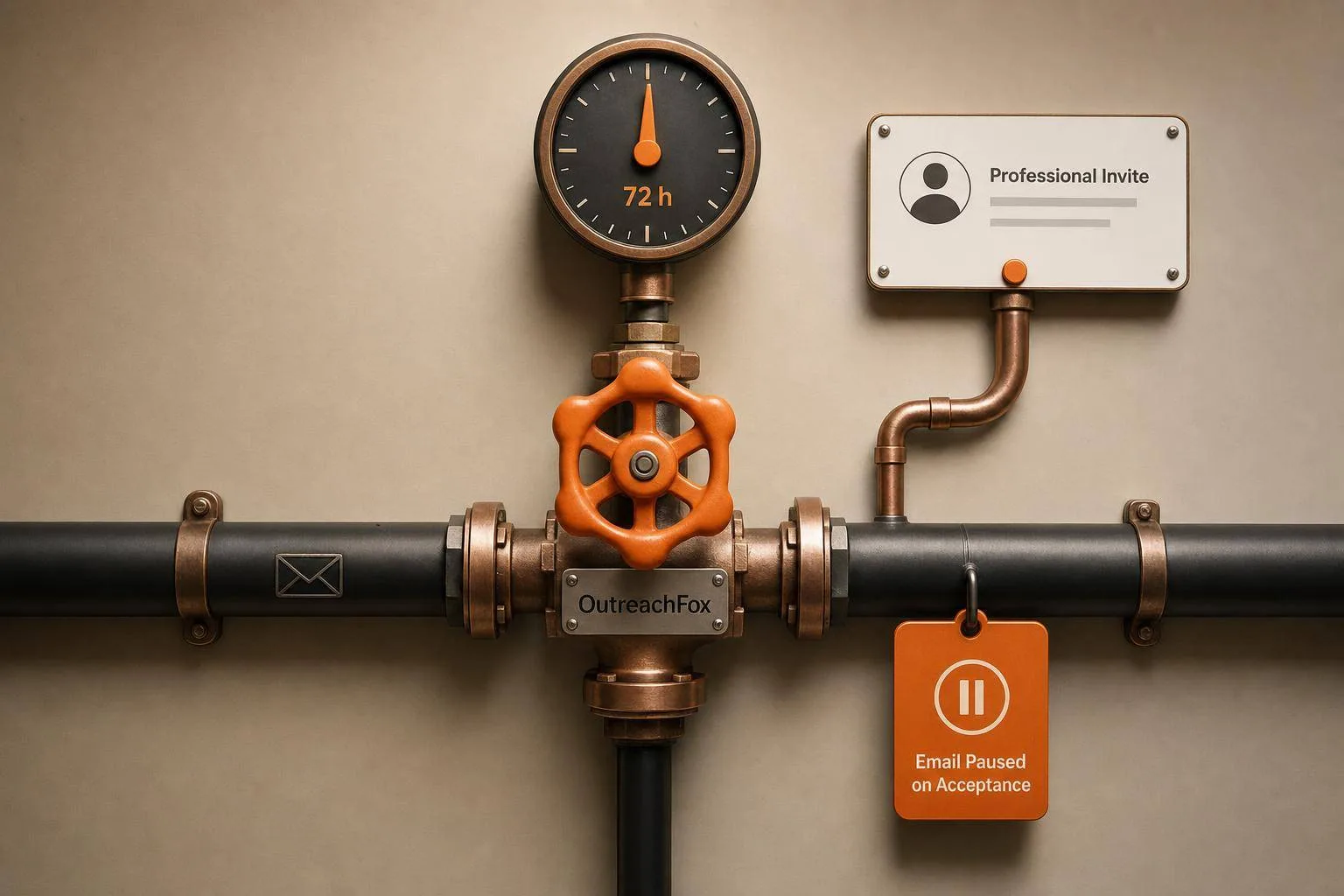
If a prospect doesn't open your email in 3 days, send a LinkedIn invite instead of another email. Build sequences that branch on real signals—opens, replies, bounces, and invite status—not fixed schedules.
- Switch to LinkedIn after 3 days of no email opens instead of sending more emails
- Pause email and send a DM 24–48 hours after a LinkedIn invite is accepted
- Stop all automation immediately when a prospect replies on any channel
- Treat 2+ opens as a strong signal; one open alone is too weak to act on
- Keep LinkedIn invites at 20–30 per day and space channels by 24–48 hours
- Test conditional sequences with 50–100 prospects before scaling to full lists
No Open in 3 Days? Trigger a LinkedIn Invite: Advanced Conditional Sequences Explained
If a lead does not open your email within 72 hours, I’d switch channels instead of sending another email. That is the core rule. I’d send Email 1, wait 3 days, trigger a LinkedIn invite for no-opens, pause email if the invite is accepted, stop all steps on any reply, and move hard bounces out of email at once.
Here’s the full playbook in plain English:
- No open after 3 days: send a LinkedIn connection request
- Open but no reply: stay selective; one open is weak, 2+ opens can justify a LinkedIn nudge or a tighter follow-up
- Any reply: stop all automation right away
- Hard bounce: end the email path at once and use LinkedIn only
- Invite accepted: pause email and send one short LinkedIn DM after 24–48 hours
- Invite ignored: wait 5–7 days, withdraw it, then restart email with a new subject line and angle
- Channel spacing: avoid hitting email and LinkedIn inside the same 24-hour window
- Safety limits: keep LinkedIn connection requests around 20–30 per day
- Testing: start with 50–100 prospects before scaling
- Re-entry rule: block non-responders from re-entering for 90 days
This article shows how I’d turn outreach from a fixed schedule into a rule-based system built on signals: opens, replies, bounces, invite status, and repeated opens. It also points out one big limit: open tracking is not perfect because privacy tools and mail apps can distort data, so I’d treat opens as a hint, not proof.
Quick Comparison
| Signal | What I’d do next | Timing |
|---|---|---|
| No open | Send LinkedIn invite | After 72 hours |
| Open, no reply | Keep email path or send one LinkedIn nudge | 24–72 hours |
| Reply on any channel | Stop all steps | Immediate |
| Hard bounce | End email path | Immediate |
| Invite accepted | Pause email, send short DM | 24–48 hours |
| Invite ignored | Withdraw invite, restart email with new angle | 5–7 days |
Bottom line: I would not let the calendar decide every next step. I’d let buyer signals do that.
Map the Signals Before You Build the Sequence
Before you automate anything, map each signal to one clear next step. That’s how you turn the 3-day rule into a clean branch instead of a coin flip.
The core decision matrix: no open, open no reply, reply, hard bounce, and invite accepted
| Signal | What It Means | Next Action | Wait Time | Primary Channel |
|---|---|---|---|---|
| No Open (3 Days) | Email failed to earn attention | Trigger a LinkedIn invite | 3 days | |
| Opened, No Reply | Opened, but not enough interest to reply | Send one LinkedIn nudge | 24–48 hours | |
| Reply Received | Engagement achieved | Stop all automation; notify the rep | Immediate | Manual |
| Hard Bounce | Invalid address | Skip remaining email steps and move to LinkedIn-only handling | Immediate | |
| Invite Accepted | Connection accepted | Send one value-first DM; pause email | 1–2 days |
A hard bounce should end the email path right away. Don’t keep trying that inbox. Move the contact to LinkedIn-only handling and keep the flow clean.
Once those signals are mapped, the next job is simple: wire the 3-day email-to-LinkedIn branch so each action follows a clear rule.
Timing rules that make triggers feel natural
Spacing matters more than most teams think. If you hit someone by email and LinkedIn on the same day, it can feel forced.
Leave 2–3 days between channels. That small gap helps the sequence feel human, not machine-driven.
At that point, the sequence moves from rule-setting to execution.
Build the Core Sequence: No Open in 3 Days Triggers a LinkedIn Invite
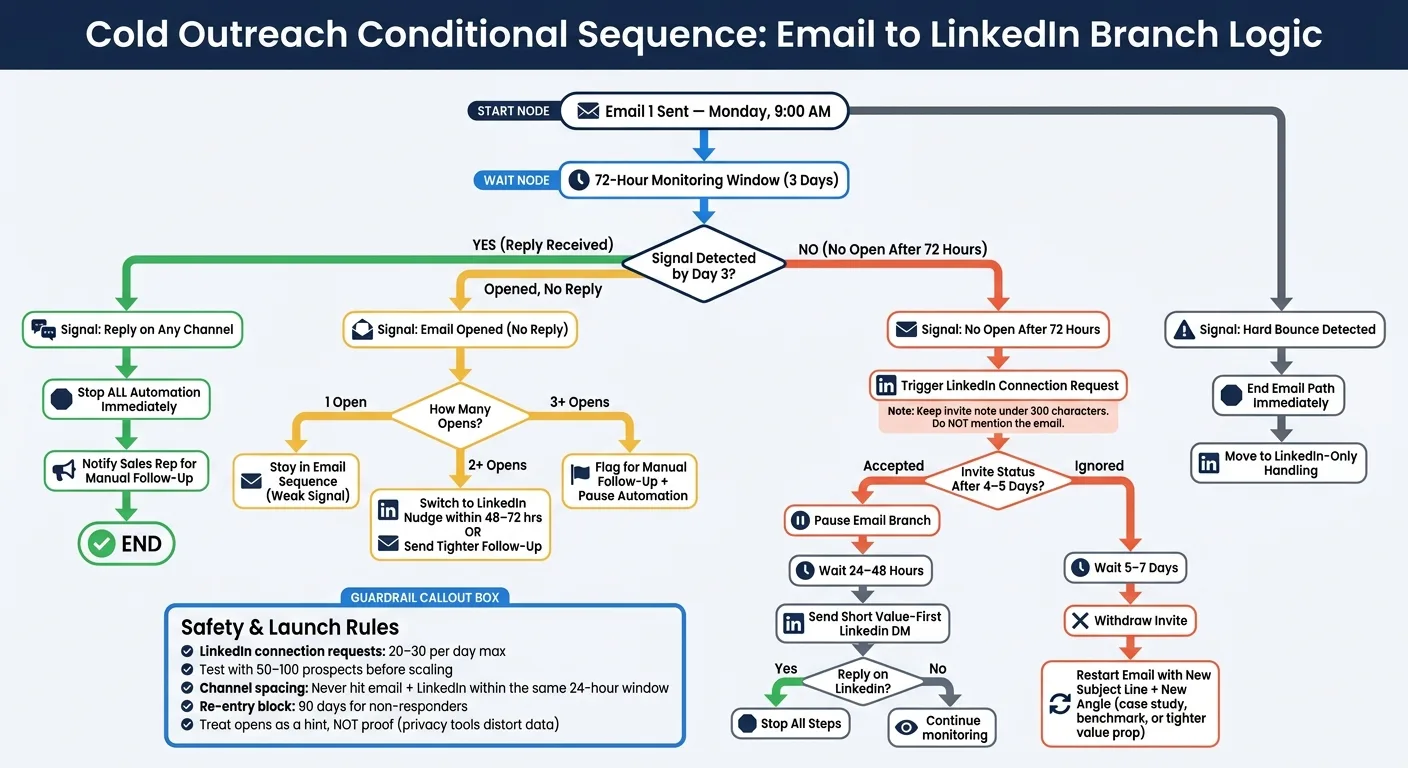
Here’s the exact logic, tied to real dates so it’s easy to picture and set up.
Base workflow: first email, 3-day wait, then branch by behavior
Email 1 goes out Monday, July 6 at 9:00 AM local time. From there, the sequence watches for opens and replies as they happen. By Thursday, July 9 at 9:00 AM, the contact will fall into one of three paths:
| Signal Detected by Day 3 | What the Sequence Does Next |
|---|---|
| Replied | Stop all automation immediately |
| Opened, no reply | Keep the contact in the email sequence; do not trigger LinkedIn |
| No open | Trigger LinkedIn connection request |
Once those signals are set, the 72-hour branch can route the next step on its own. No manual checking. No guessing.
What to send on LinkedIn after a no-open event
Treat the invite note like a first touch. Keep it short, neutral, and under 300 characters. And don’t mention the email.
A simple format that works for SDR teams, agencies, and founders:
"Saw you're scaling outbound at [Company] - would love to connect."
From there, the angle can shift a bit by team type. SDRs can tie the note to a company signal, like a new hire or a funding round. Founders often get better results with a peer-to-peer angle, based on shared space or common interest, instead of pitching a service. Agencies should skip the “free audit” tease in the invite. Save the value pitch for the first DM after the person accepts.
This setup only holds up if your platform can read opens, replies, and LinkedIn status as they happen.
How tools handle this logic in practice
Tools like Lemlist and La Growth Machine usually handle this with visual branch builders. You set the condition, choose the monitoring window, and assign what happens next for each path.
When tracking breaks, the logic breaks with it. If open events or LinkedIn status updates aren’t flowing back into the sequence in real time, your branches turn into guesswork fast.
From here, add pause, resume, and channel-switch rules for accepted invites and ignored requests.
Add Advanced Branches: Pause, Resume, or Switch Channels Again
After the invite, what happens next depends on three things: acceptance, silence, or repeated opens. Start with the acceptance path. Then deal with ignored invites. After that, handle repeated opens. Prospects fall into three states, and each state needs its own rule.
If the LinkedIn invite is accepted, pause cold email and delay the follow-up
The second a prospect accepts your connection request, pause the email branch right away. Then wait 24–48 hours before sending a short, value-first LinkedIn DM. If they reply on LinkedIn, stop every remaining step at once.
Check invite status for 4–5 days. As soon as the invite is accepted, move the prospect into the LinkedIn branch.
If the invite is ignored, resume email after 5-7 days
If the invite just sits there, treat it like a timing issue, not a win. After 5–7 days, withdraw the invite and restart email with a new subject line and a new angle. That could be:
- a specific case study
- a relevant benchmark
- a tighter value proposition
This keeps your LinkedIn profile clean and resets how your message shows up in the inbox.
If emails are opened repeatedly but get no reply, stay selective
Not every open means interest. Still, repeated opens are strong enough to justify a channel change.
One open is a weak signal. Two or more opens on the same email are enough to act on. At that point, switch to LinkedIn within 48–72 hours or send a tighter follow-up with a new angle or a lower-friction CTA. At three or more opens, flag the prospect for manual follow-up and pause automation.
| Opens (No Reply) | Action |
|---|---|
| 1 open | Stay in current email thread; treat as a weak signal |
| 2+ opens | Switch to LinkedIn or send a tighter follow-up with a new angle |
| 3+ opens | Flag for manual follow-up; pause automation |
Infrastructure, Tooling, and a Final Checklist
Why weak tracking breaks behavioral automation
Once your branch rules are set, the last big risk is bad data. If your signals are off, the whole sequence can go sideways.
Apple Mail Privacy Protection, privacy tools, and corporate firewalls can all distort open data. They may fire a false open or block a no-open trigger. So treat opens as a hint, not proof.
Replies are different. A reply on any channel should stop every active branch at once. No lag. No extra touch going out by mistake.
Bounce handling needs the same kind of logic. If an address is invalid, the email path should end right away.
Mailbox health matters too. If deliverability slips, even smart branching won't help much. Use:
- Private mailboxes
- Dedicated IPs
- Managed warmup
That setup helps keep deliverability steady.
What to look for in a multichannel sequencing platform
If your signals are clean, the platform becomes the thing that makes or breaks execution. You want one that branches in real time and stops the moment a reply comes in.
Here’s what to check for:
- Conditional branching at each step
- LinkedIn triggers for accepted invites, ignored invites, and profile views
- A unified inbox that updates reply status across channels right away
- Email validation before launch
- A verified API instead of browser extensions
- API or webhook access so CRM changes in HubSpot, Salesforce, or Pipedrive can sync back into the sequence in real time
The short version: use live monitoring, not blind waits.
| Platform | Email & LinkedIn Branching | Trigger Granularity | API & Webhooks |
|---|---|---|---|
| OutreachFox | Native multichannel sequences | Opens, replies, bounces, LinkedIn status | API-first; real-time webhooks |
| La Growth Machine | Full visual branching | Connected, open profile, email opened | Native CRM & Zapier |
| Lemlist | Native multichannel | Opened, clicked, replied, connected | Robust API access |
| Salesflow | Dynamic outreach | If connected, if open profile, if email opened | HubSpot/CRM sync |
One practical LinkedIn guardrail: keep connection requests in the 20–30 per day range to avoid account restrictions. A good platform should make that easy to control instead of pushing the work onto a spreadsheet and manual checks.
Conclusion: the simple rules that make conditional outreach work
Once the rules and tooling are in place, launch discipline is what keeps the system clean.
Test the sequence with 50 to 100 prospects before you scale. Set a 90-day re-entry block for anyone who exits without replying. Make sure a reply on any channel stops every other active branch right away. And keep channel spacing human - no double-touching across different channels inside the same 24-hour window.
More branches don't mean more replies. Better signals do.
Frequently asked questions
Why wait exactly 3 days before switching from email to LinkedIn after no open?+
The 3-day window gives prospects enough time to check email without making the follow-up feel rushed. It creates natural spacing between channels so the outreach doesn't feel machine-driven or overly aggressive. After 72 hours with no open, the signal is clear enough to justify switching channels rather than sending another email into an inbox that isn't being checked.
What should happen if a prospect accepts the LinkedIn invite while still in the email sequence?+
Pause the email branch immediately when the invite is accepted. Wait 24-48 hours, then send one short, value-first LinkedIn DM. If the prospect replies on LinkedIn, stop all remaining automation steps across every channel right away to prevent double-touching.
How do you handle LinkedIn invites that get ignored for several days?+
After 5-7 days of silence, withdraw the ignored LinkedIn invite to keep your profile clean. Then restart the email sequence with a completely new subject line and angle, such as a specific case study or tighter value proposition. This resets how your message appears and gives the prospect a fresh entry point.
Why are repeated email opens without replies treated differently than single opens?+
One open is considered a weak signal that could be accidental or automated. Two or more opens on the same email indicate genuine interest worth acting on, justifying a LinkedIn nudge or tighter follow-up. Three or more opens should trigger manual review and pause automation entirely, as this pattern suggests high interest that needs personal attention.
Why is open tracking described as unreliable for behavioral automation?+
Apple Mail Privacy Protection, corporate firewalls, and privacy tools can fire false opens or block legitimate open signals entirely. This means open data should be treated as a hint rather than proof of engagement. Reply signals are much more reliable since they represent actual human action rather than automated mail client behavior.
What happens to the sequence when an email hard bounces?+
A hard bounce should immediately end the email path for that contact since the address is invalid. The contact should be moved to LinkedIn-only handling right away. Continuing to send emails to bounced addresses damages deliverability and wastes sequence capacity.
Why should you avoid hitting a prospect on email and LinkedIn within the same 24-hour window?+
Touching someone across multiple channels on the same day makes the outreach feel forced and automated rather than human. Leaving 2-3 days between channels creates natural spacing that makes each touchpoint feel intentional. This channel spacing is critical for keeping sequences from triggering spam instincts.