Combining email, LinkedIn, and phone in the right order with 2-4 day gaps between touches can increase reply rates by 40%. Clean data, inbox placement, and behavior-based triggers are the key drivers.
- Keep email bounce rates under 2% to protect deliverability and domain reputation.
- Space touches 2-4 days apart instead of hitting all channels at once.
- Use LinkedIn to build name recognition before or after email outreach.
- Triple-tap bursts work best for warm leads showing clear buying intent.
- Verify contact data across 50+ providers before launching multichannel sequences.
- Test channel order and timing first before optimizing message copy.
6 Multichannel Outreach Strategies That Increase Reply Rates by 40% (Tested)
Email alone is losing ground. With cold email replies often stuck around 3.43% to 5.1% - and sometimes as low as 1% to 3% - I’d treat multichannel outreach as the better path if I want more replies.
Here’s the short version: reply rates go up when I combine email, LinkedIn, and sometimes phone in the right order, keep bounce rates under 2%, use verified contact data, and stop every touch as soon as someone replies. The six plays in this article cover infrastructure-first sequencing, LinkedIn-first outreach, email-first with LinkedIn triggers, triple-tap bursts for warm leads, waterfall enrichment, and behavior-based testing.
If I had to boil it down, these are the big points:
- Deliverability sets the limit: if emails miss the inbox, nothing else helps.
- Clean data matters: bad emails and wrong job titles hurt replies and can damage domain health.
- Timing matters: a 2–4 day gap between touches usually works better than hitting every channel at once.
- LinkedIn works best as support: it builds name recognition before or after email.
- Warm leads need a tighter sequence: email + LinkedIn + phone can work well when intent is already there.
- Testing should focus on order and timing first: then I’d test message angle and touch count.
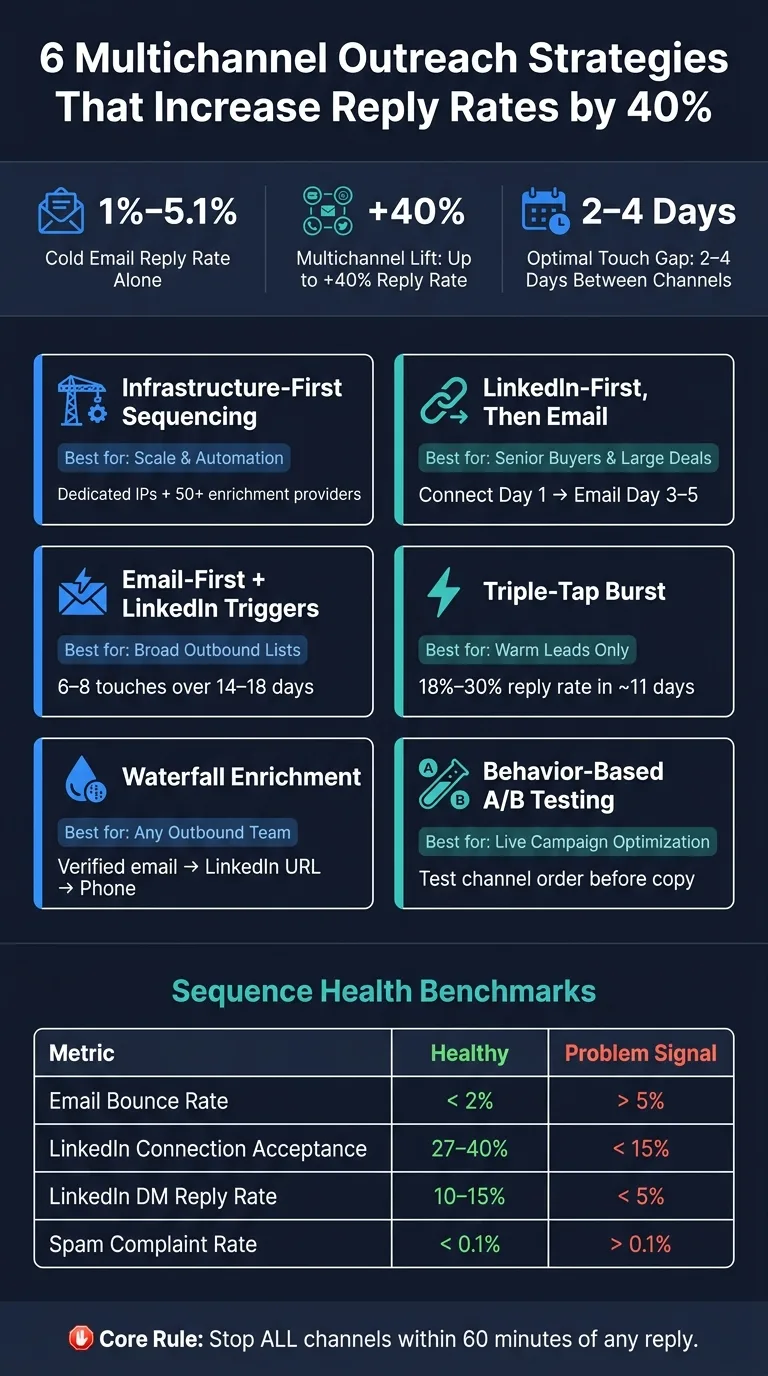
Multichannel outreach strategy that drives responses
Quick Comparison
| Strategy | Best for | Main idea | Best use case |
|---|---|---|---|
| Infrastructure-first signal-led sequencing | Teams sending at scale | Build around inbox placement, verified data, and trigger rules | When I need control and automation |
| LinkedIn-first, then email | Senior buyers and larger deals | Show up on LinkedIn before email | When recognition matters more than volume |
| Email-first with LinkedIn switches | Broad outbound lists | Let email behavior decide when LinkedIn steps in | When I want scale with selective follow-up |
| Triple-tap burst | Warm leads | Compress email, LinkedIn, and phone into a short window | When buying intent is already visible |
| Waterfall enrichment | Any outbound team | Verify contact data before launch | When bounce risk or bad data is hurting results |
| Behavior-based A/B testing | Teams improving live campaigns | Test order, spacing, and asks by response data | When I want to tune performance step by step |
The core idea is simple: I’d use each channel for a different job instead of repeating the same pitch everywhere.
What Actually Drives Higher Reply Rates
Higher reply rates come down to three levers: inbox placement, clean data, and channel-switch timing.
Inbox placement comes first. If your email goes to spam, the rest of the sequence doesn't matter. Gmail and Microsoft have tightened filtering a lot, and one campaign with too many bounces can put your domain at risk fast. Keep your bounce rate under 2%. Once it goes above 5%, domain risk starts climbing. That’s why mailbox warmup and sender rotation need to happen before launch, not after.
Clean prospect data is the next lever, and it’s easier to mess up than most teams think. A misspelled first name or the wrong job title can make the message feel automated right away. That kind of mistake hurts trust before the prospect even reads the pitch. Bad data also pushes bounce rates up, which circles back to deliverability. Verification isn’t optional. It keeps your domain in good shape and makes personalization feel believable.
Channel-switch timing is where a lot of multichannel campaigns go off the rails. If you hit someone on LinkedIn and email on the same day, it feels like a blast, not a sequence. A 2–4 day gap between touches works better. In most cases, LinkedIn should come first so the prospect sees your name before the first email lands. That small bit of recognition can make the email feel familiar instead of cold.
Replies are still the main metric to watch, but they don’t tell the whole story by themselves. You also need the supporting numbers that show whether the sequence is healthy or slipping.
| Metric | Healthy Benchmark | Problem Signal |
|---|---|---|
| Email Bounce Rate | < 2% | > 5% |
| LinkedIn Connection Acceptance Rate | 27–40% | < 15% |
| LinkedIn DM Reply Rate | 10–15% | < 5% |
| Spam Complaint Rate | < 0.1% | > 0.1% |
These benchmarks help you see if each sequence is moving performance in the right direction.
Track time-to-first-reply for positive responses too. Fast replies help protect meetings.
Use this baseline to judge the six plays that follow.
1. OutreachFox Infrastructure-First Signal-Led Sequencing
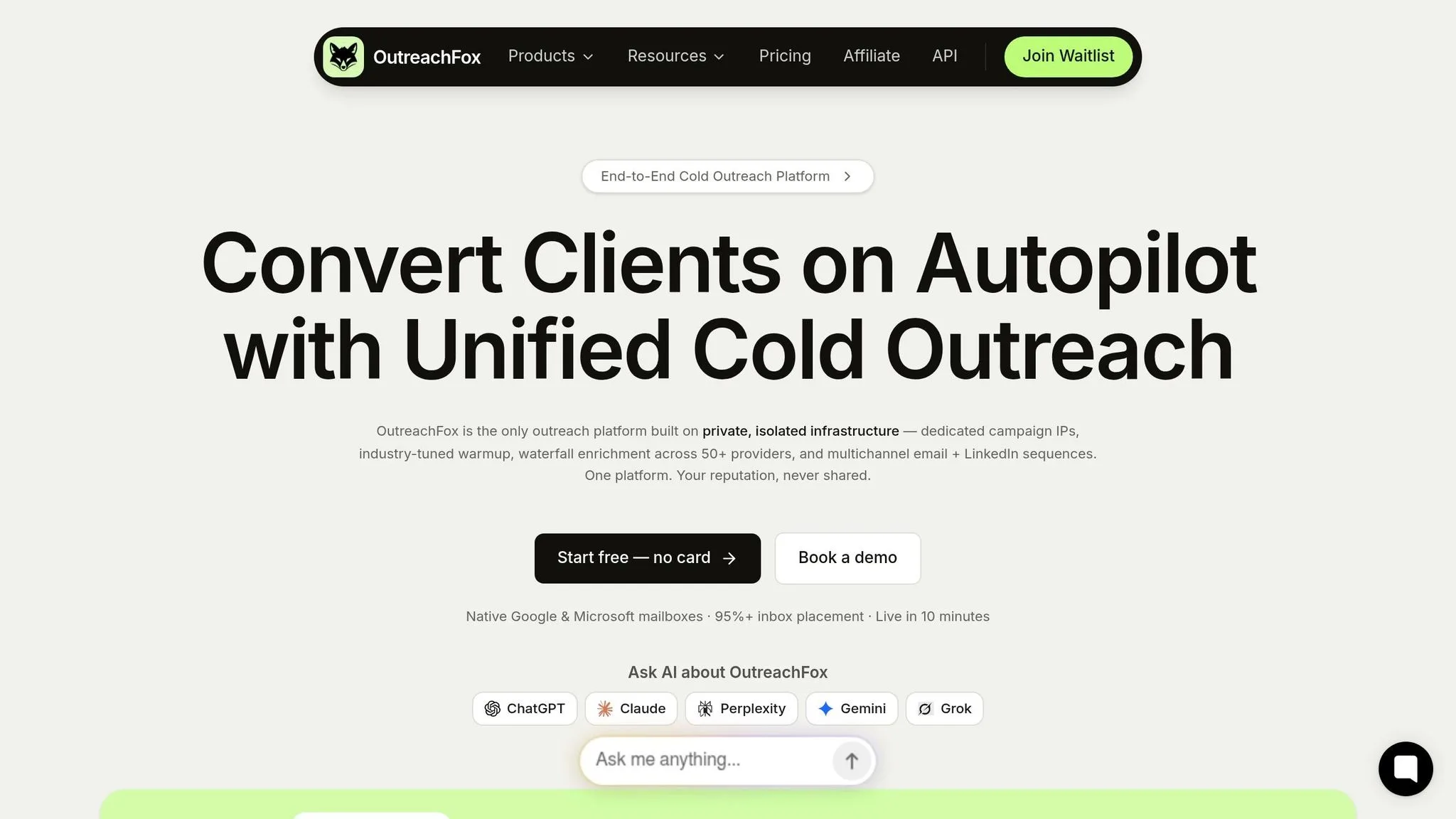
OutreachFox stands out because it runs trigger-based sequencing on isolated sending infrastructure.
At the center of the setup is dedicated infrastructure. Each customer gets dedicated IPs and mailboxes that aren't shared with other senders, which keeps sender reputation separate. OutreachFox also auto-configures SPF, DKIM, and DMARC. Before launch, every mailbox is warmed using industry-specific warmup. Pre-warmed Google, Microsoft, SMTP, and Azure mailboxes also cut launch time. The result is lower bounce rates and a setup that lets trigger-based outreach run at scale.
On the data side, waterfall enrichment across 50+ providers improves verified-email and direct-phone coverage. Once deliverability and data coverage are in place, the sequence can respond to live buyer signals instead of pushing the same message over and over.
That’s where the lift happens. Each trigger changes the next touch rather than repeating one fixed cadence across channels.
- A LinkedIn profile view by the sender comes 24–48 hours before the first cold email to build familiarity.
- A LinkedIn connection acceptance triggers a follow-up email or LinkedIn DM.
- A prospect who opens an email two or more times gets routed to a phone call.
- Negative replies trigger immediate suppression across every channel.
- Out-of-office replies pause the sequence until the prospect returns.
- Replies automatically pause the sequence to stop future touches.
Prior LinkedIn engagement can increase email familiarity and lift opens.
These triggers matter most when timing and channel order stay consistent.
2. LinkedIn Connection First, Email Follow-Up Cadence
This approach works best for larger deals and senior buyers. In those cases, LinkedIn familiarity can matter more than speed.
The idea is simple: tie your connection request to a clear signal, like a role change, a funding announcement, or a recent post. That way, your name is already in front of them when your email shows up. Use this play when recognition on LinkedIn matters more than getting the first email out fast.
Day 1 should not be a pitch. Send a connection request tied to a signal and keep it light. Then, on Day 3–5, send the email no matter the invite status. If they accepted your connection request, send a short follow-up DM after acceptance. Just don't paste your email into LinkedIn word-for-word.
The pattern is straightforward: connect first, email next, then widen the gap.
| Cadence step | If accepted | If pending or ignored |
|---|---|---|
| Day 1 | LinkedIn connection request tied to a signal | LinkedIn connection request tied to a signal |
| Day 3–5 | Email + short LinkedIn DM | Email only |
| Day 7–14 | LinkedIn DM or value-add email, then light ask | Email-led follow-ups with useful touches |
Final follow-up emails often pick up late replies. And once someone replies, stop automation right away.
LinkedIn caps connection requests at roughly 100 per week per sender. That's why this is a precision play. Save it for accounts where a LinkedIn-first sequence earns its spot in the stack.
The next play flips the order for teams that want more scale and less manual LinkedIn work.
3. Email-First Outreach With Conditional LinkedIn Switches
When LinkedIn-first feels too manual for a full prospect list, start with email and let behavior tell you when LinkedIn should step in. Email gives you scale. LinkedIn is better for warmer follow-up.
That’s the whole idea here: use email first to test message fit across a large list, then move individual prospects to LinkedIn only when their behavior shows it’s worth the extra effort.
The key word is conditional. You’re not moving every prospect to LinkedIn. You’re only moving the people who show a signal.
Here’s how that looks in practice:
- If a prospect doesn’t open the first three emails, pause the sequence and retry in 60 days with a new angle.
- If they open 3+ times but don’t reply, treat them as warm but not ready to meet. Send a LinkedIn connection request with a light reference to the email: "Hi [Name], sent you a couple of notes via email - thought LinkedIn might be easier for a quick conversation."
- If they click a link, move them into a shorter follow-up and ask for the meeting within 1 hour through LinkedIn DM or a short email.
- End with a breakup email.
Run 6–8 touches over 14–18 days. A simple mix works well: 4–5 emails and 1–2 LinkedIn touches, spaced 2–3 business days apart.
Use these triggers so you don’t burn LinkedIn touches on people who haven’t shown intent.
| Signal | What it means | Next action |
|---|---|---|
| No opens after 3 touches | Cold | Pause the sequence; retry in 60 days with a new angle |
| 3+ opens, no reply | Warm | Trigger a LinkedIn connection request with a light, contextual note |
| Clicked a link | Hot | Move to a shorter follow-up and ask for the meeting within 1 hour |
| Accepted LinkedIn invite | Qualified | Send a short, conversational LinkedIn DM - no pitch |
One thing can derail this fast: reply tracking across channels. If your automation doesn’t know a prospect replied on LinkedIn, it may keep sending emails while a live conversation is already happening. That’s a bad look.
Stop every channel within 60 minutes of any reply.
4. Triple-Tap Multichannel Bursts for Warm Leads
Use triple-tap bursts only for warm leads.
This approach fits people who are already showing buying intent, like inbound leads, retargeted prospects, or accounts with strong signals such as pricing page visits, demo requests, report downloads, webinar attendance, or recent funding events.
For cold lists, it's too aggressive. Those prospects need more space between touches.
This is the fastest form of coordinated outreach: one clear signal, followed by a tight burst across three channels.
The reason is simple. Intent fades fast. If someone is in a buying window today, that window may not stay open for long. So instead of stretching the sequence across the usual 14 to 21 days, you tighten it to about 11 days and create a short spike in visibility while interest is still there.
Here’s the basic flow:
- Day 1: Send a problem-led email
- A few hours later: Send a LinkedIn request
- Day 2: Make a phone call
- Day 3: Send a short recap email or, if they accepted, a LinkedIn message
If the prospect doesn’t answer the call, leave a 20-second voicemail that mentions the Day 1 email.
The key is coordination. Every touch should point back to the same intent signal so it feels connected, not random. In the first touch, name the trigger directly. If someone visited your pricing page, say it plainly:
"Saw you were on our pricing page and wanted to reach out directly."
Then carry that same trigger into the other channels. Don’t repeat the whole pitch. Just repeat the reason for the outreach.
When done well, compressed intent-based sequences can reach 18% to 30% reply rates and 6% to 12% meeting rates.
The moment someone replies, stop all channels right away.
If there’s still no response, finish with a short breakup email. That last touch often gets the final batch of replies.
If the trigger data is weak, clean enrichment comes next.
5. Waterfall Enrichment and Clean Data Coverage
Signals only matter when your contact data is clean.
A bad email address leads to a bounce. An old job title makes your message feel off. A missing LinkedIn URL kills the recognition effect. Verified work email is the first checkpoint. If the data is bad, bounce risk goes up and deliverability takes a hit.
Clean data helps each channel support the next instead of breaking the flow. A waterfall enrichment process checks multiple providers until it finds a verified result. After that, it removes catch-all and disposable addresses before the sequence starts. OutreachFox does this natively across 50+ providers, which helps improve usable lead coverage without forcing you to stitch together a bunch of separate tools.
In a multichannel sequence, each channel needs different data to work well.
- Email: A verified work address keeps bounces low and helps protect domain reputation.
- LinkedIn: A valid URL keeps the recognition effect intact and cuts wasted connection requests. LinkedIn volume is limited, so each request should point to a real target profile with a photo and recent activity.
- Phone: An accurate job title and current company help confirm you're calling the right person.
Signal-based outreach, like targeting people after a promotion or a funding round, often beats generic list-based sequences. But that only works when the company segment data is right.
| Field | Why It Matters |
|---|---|
| Verified work email | Keeps bounce rate low and protects domain reputation |
| Accurate job title | Enables role-specific messaging and signal-based targeting |
| Company segment | Supports event-triggered outreach, such as funding or hiring signals |
| Valid LinkedIn URL | Powers the recognition effect and avoids wasted connection requests |
Stop enrichment as soon as you get the first verified work email. Then keep catch-all and disposable addresses out of high-volume sequences. With clean data in place, you can test which message, signal, and channel mix gets the most replies.
6. Behavior-Based A/B Testing Across Email and LinkedIn
Track reply rate by touch so you can spot weak steps fast. If Touch 3 is below 2% reply rate, the problem is usually that step’s message angle or ask, not the whole campaign. Once your sequence is live, testing helps you see which channel order, timing, and ask actually get replies.
Start with channel order, not copy. That gives you a cleaner read on what works for your ICP and message angle. In plain English: figure out whether email or LinkedIn should lead before you start rewriting every message.
After you know the winning order, test spacing, invite style, and touch count. Try blank invites vs. note-based invites and see what your ICP responds to. Keep testing inside a 14–18 day window. Less than 7 days is too compressed. More than 30 days tends to weaken the flow of the sequence.
There’s another pattern worth watching. If your breakup email is your top reply step - often 15% to 25% after earlier touches have built context - test that softer, lower-pressure angle earlier in the sequence. Sometimes the message people answer isn’t the hard ask. It’s the one that gives them room to respond.
| Variable | Metric to Track | What You're Solving For |
|---|---|---|
| Channel order | Overall sequence reply rate | Which channel anchors better for your ICP |
| Invite note style | Connection acceptance rate | More prospects entering the LinkedIn DM funnel |
| Timing gaps | Unsubscribe/spam rate | Persistence without triggering automation flags |
| Message angle | Step-specific reply rate | Which value prop lands at each awareness stage |
| Touch count | Replies per send | The sweet spot before returns diminish, usually 5–7 touches |
Keep auto-pause on across every channel. Use these tests to refine the sequence before you scale volume.
Quick Comparison Tables
These tables narrow six plays down to four decisions: lead channel, trigger switch, burst timing, and data coverage.
Start with channel order. Then move to trigger rules.
LinkedIn-first builds familiarity before the ask. Email-first scales context fast. Use this table to choose the lead channel.
| Factor | LinkedIn-First | Email-First |
|---|---|---|
| Primary goal | Build recognition and trust before the ask | Deliver context at scale |
| Best ICP fit | High-value prospects who are active on LinkedIn | Broad lists and volume-heavy campaigns |
| Prospect perception | "I know this person" | "This is relevant to me" |
| Sequence start | Day 1: profile view or connection request | Day 1: cold email |
Use this table to switch based on behavior.
Behavior-Based Switches
| Prospect Behavior | Recommended Action | Channel Switch |
|---|---|---|
| No email open | Wait 3–5 days; retest with a new subject line | Stay on email or try a LinkedIn connection request |
| 2+ email opens, no reply | Trigger a warm call or LinkedIn DM | Switch to phone or LinkedIn |
| Link clicked | Move to a hot sequence with a direct CTA | Switch to phone |
| LinkedIn profile view | Reference the visit in the next email | Stay on email |
| Connection accepted | Send a short LinkedIn DM - keep it conversational | Switch to LinkedIn DM |
Use this only when intent is already visible.
Warm-Lead Burst Timing
| Metric | Standard Multichannel | Triple-Tap Burst |
|---|---|---|
| Duration | 14–18 days | 3-touch burst |
| Touch count | 6–8 touches | 3 touches (email + LinkedIn + phone) |
| Best for | Cold ICP lists | Warm leads |
| Deliverability risk | Low | Moderate |
If the signal is strong but the data is weak, fix coverage first.
Data Coverage and Verification
Use this table to compare data quality and coverage.
| Factor | Single-Provider Enrichment | Waterfall Enrichment |
|---|---|---|
| Data coverage | Lower | Higher |
| Deliverability risk | Moderate (catch-all risk) | Low (higher verification) |
Once you’ve picked the play, line it up with the stack and automation rules below.
Setup and Tooling Notes
The six plays above only work if your sending setup, enrichment, and reply routing are ready before launch. That part isn't glamorous, but it's where a lot of teams trip up.
Start with 2–5 secondary sending domains, not your primary domain. Then set up SPF, DKIM, and DMARC, add a physical mailing address in the footer for CAN-SPAM compliance, and warm each mailbox for 14–30 days.
OutreachFox rolls those pieces into one workflow. It provisions pre-warmed Google, Microsoft, SMTP, and Azure mailboxes, handles automated SPF/DKIM/DMARC setup, and gives you dedicated campaign IPs that aren't shared with other senders. So instead of sitting through a 2–4 week ramp, teams can go live in roughly ten minutes.
Before launch, connect enrichment so verified data flows into the sequence on its own. Add email verification to your lead database ahead of time to keep bounce rates under 2%. For LinkedIn, connect accounts directly instead of using proxies, and keep connection requests to 20–40 per day. That keeps you within LinkedIn's limits while making activity look human and timezone-aware.
Once sending starts, reply handling becomes the next place things can fall apart. If a LinkedIn reply doesn't pause email, the sequence breaks. A unified inbox pulls replies from every channel into one view and triggers auto-pause rules the moment any response comes in. Pair that with a CRM webhook that logs every interaction - profile views, DMs, email opens, calls - to a single contact record, so attribution stays clean without having to patch together data from separate tools.
Use:
- Apollo for prospect data
- HeyReach for LinkedIn automation
- OutreachFox for infrastructure, enrichment, and sequencing in one workflow
Conclusion
About a 40% lift in reply rate comes from deliverability, clean data, and tight email-LinkedIn timing. So the big lever isn't how many channels you use. It's how good your sequence is.
Multi-channel works only after the base sequence is strong. Once that's in place, test it on a small, controlled segment.
Pick one strategy from the six plays above that matches your sales motion:
- Email-first if you're going for volume
- LinkedIn-first if you're working relationship-led accounts
Run the test on 100–200 prospects for 14 days. Then compare reply rates by touchpoint against your email-only baseline. If the test wins, expand it. If it doesn't, move to the next fit.
Don't run all six plays at once. Find the best fit, measure the lift, and scale it.
Frequently asked questions
What bounce rate threshold should I stay under to protect my domain when running multichannel outreach?+
Keep your bounce rate under 2% for healthy campaigns. Once it climbs above 5%, you're putting your domain reputation at serious risk. This is why email verification and waterfall enrichment need to happen before you launch any sequence, not after deliverability problems appear.
How long should I wait between email and LinkedIn touches in a multichannel sequence?+
A 2-4 day gap between touches typically works better than hitting prospects on multiple channels the same day. If you send an email and a LinkedIn connection request on Day 1, it feels like spam rather than a coordinated sequence. The spacing helps each touch feel intentional instead of automated.
When should I use the triple-tap burst approach instead of a standard multichannel sequence?+
Use triple-tap bursts only for warm leads showing active buying intent, like pricing page visits, demo requests, webinar attendance, or recent funding events. This compressed 3-touch sequence across email, LinkedIn, and phone works in an 11-day window because intent fades fast. For cold lists, this approach is too aggressive and you should stick with the standard 14-18 day cadence.
What signal indicates a prospect is warm enough to switch from email to LinkedIn or phone?+
If a prospect opens your email 2-3 times but doesn't reply, they're showing warm intent and you should trigger a LinkedIn connection request or phone call. Link clicks indicate hot intent and should move the prospect into a shorter follow-up sequence with a direct meeting ask within one hour.
Should I start with LinkedIn-first or email-first sequencing for my outbound campaigns?+
LinkedIn-first works best for senior buyers, larger deals, and relationship-led accounts where recognition matters more than volume. Email-first is better for broad outbound lists and volume-heavy campaigns where you want to test message fit at scale before selectively adding LinkedIn touches based on engagement behavior.
What does waterfall enrichment across 50+ providers actually solve in multichannel outreach?+
Waterfall enrichment checks multiple data providers sequentially until it finds a verified work email, accurate job title, and valid LinkedIn URL for each prospect. This process removes catch-all and disposable addresses before launch, which keeps bounce rates under 2% and ensures each channel has the clean data it needs to support the next touch in your sequence.
What should I test first when optimizing a live multichannel campaign?+
Test channel order before testing copy or creative. Start by determining whether email or LinkedIn should lead the sequence for your specific ICP, then test spacing between touches, LinkedIn invite styles, and touch count. Track reply rates by individual touch to identify which specific steps are underperforming rather than rewriting the entire campaign.