
Dedicated IPs give full control over sender reputation but require 4–8 week warmup and suit senders above 100,000 emails/month. Shared pools work for lower volumes but carry noisy neighbor risk.
- Dedicated IPs isolate your sender reputation from other senders' mistakes and spam issues
- Warmup takes 4–8 weeks with gradual volume increases starting at 20–50 emails daily
- Keep hard bounce rates under 1 percent; above 2 percent triggers aggressive spam filtering
- Shared pools suit teams under 20,000 emails monthly; dedicated fits 100,000-plus volume consistently
- SPF, DKIM, DMARC, PTR, MX, and TLS records must align correctly before sending
- Agencies and multi-client teams benefit most from dedicated infrastructure's client isolation
The Complete Guide to Dedicated IPs for Cold Email (And Why They Matter)
If I send cold email at scale, a dedicated IP gives me control over my sender reputation. That can help inbox placement after warmup, but it also means every mistake hits my setup directly.
Here’s the short version:
- Dedicated IP = my reputation is mine alone
- Shared pool = my results can be hurt by other senders
- Best fit for dedicated IPs: agencies, large outbound teams, and senders above 100,000+ emails per month
- Best fit for shared pools: low-volume teams, testing, and senders below roughly 20,000 emails per month
- Warmup usually takes 4–8 weeks
- Hard bounces should stay under 1%
- At 2%+ hard bounces, spam filtering risk goes up fast
- If I send through Google Workspace or Microsoft 365, I’m still on shared infrastructure
- A dedicated IP only works well if SPF, DKIM, DMARC, PTR, MX, and TLS are set up right
The tradeoff is simple: more control, more responsibility.
If I want cleaner troubleshooting, isolation from bad neighbors, and more room to scale, a dedicated IP can make sense. If my sending is small or uneven, a shared pool is often enough.
| Setup | Best for | Main upside | Main downside |
|---|---|---|---|
| Shared pool | Low volume, solo founders, early testing | No warmup burden, pre-warmed setup | Other senders can hurt my deliverability |
| Dedicated IP | Agencies, high-volume teams, multi-client outbound | Full control over IP reputation | Needs warmup, daily monitoring, and tight list quality |
So before I switch, I’d ask one question: do I send enough email, often enough, to earn and keep my own reputation? If the answer is yes, dedicated infrastructure may be the better path.
Cold Email Deliverability | Shared Vs. Dedicated IPs
Dedicated IPs vs shared infrastructure: tradeoffs that affect deliverability
Cold email deliverability comes down to one core issue: who owns the reputation tied to your sends? Once you start sending at scale, your setup affects far more than price. It shapes your deliverability risk from the ground up.
How Gmail and Outlook evaluate IP reputation
Gmail and Outlook watch spam complaints, bounce rates, and sending patterns closely. If you're on a shared pool, your results get mixed in with everyone else using that pool. If you're on a dedicated IP, each signal points straight back to your own sending behavior.
There's another layer here too. Some providers look at nearby IPs as part of their scoring, which means a bad neighbor can hurt you even if your own sending looks clean.
Where shared pools fail in real cold outreach
Shared infrastructure can work at low volume. But once outbound volume climbs and risk goes up, the cracks start to show.
At scale, shared pools often fall apart when one sender's spam issues, bounce spike, or list abuse drags down everyone else on the same setup. It's a classic "one bad apple" problem.
For an agency managing 10+ clients on a shared pool, that risk stacks up fast. One client's weak list hygiene can trigger a platform-wide slowdown and disrupt every other client at the same time.
A GTM team sending 100,000+ emails per month on shared infrastructure runs into a similar issue. Good sending and bad sending get blended together, and the hit lands on everyone.
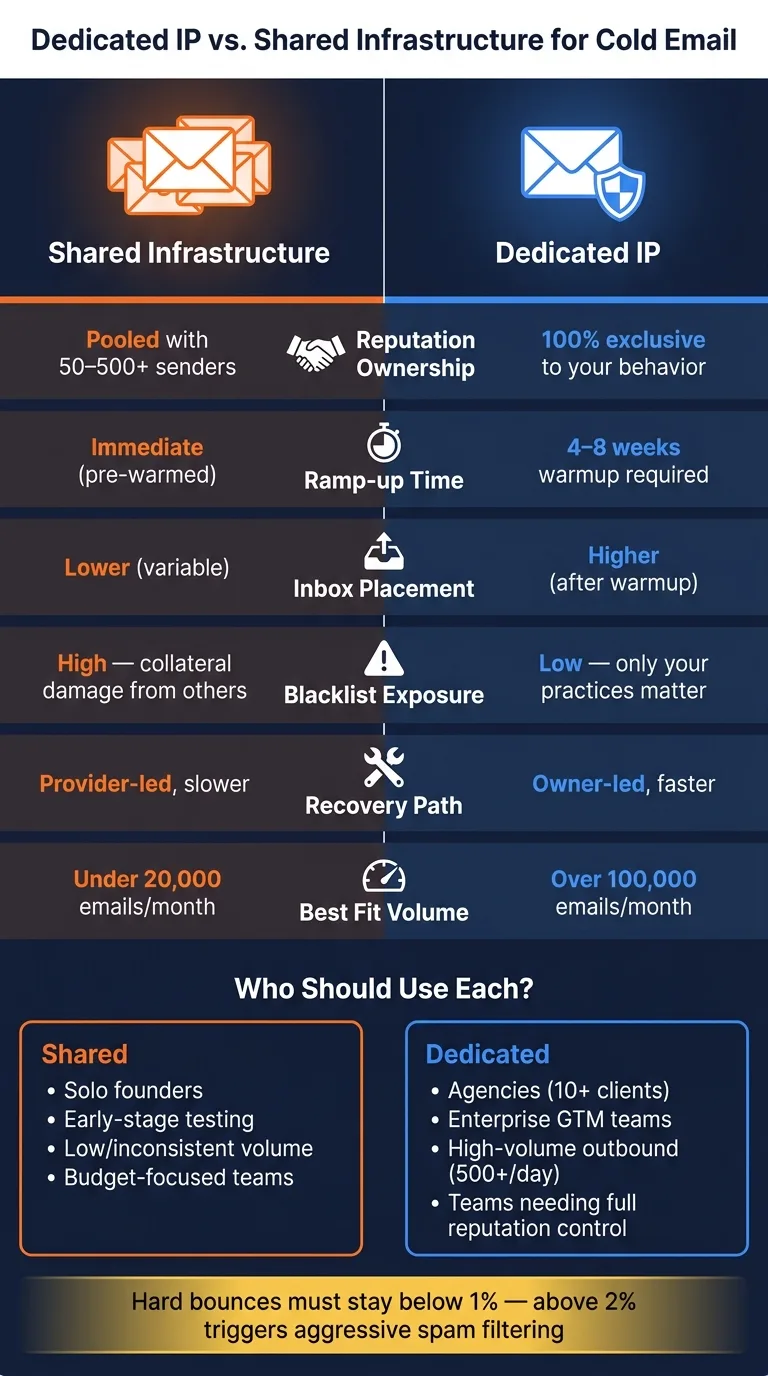
The table below shows how the two options compare across the areas that matter most for cold outreach:
| Factor | Shared Infrastructure | Dedicated IP Infrastructure |
|---|---|---|
| Reputation Ownership | Pooled with 50–500+ senders | 100% exclusive to your behavior |
| Exposure to Others | High ("noisy neighbor" risk) | None (fully isolated) |
| Ramp-up Time | Immediate (pre-warmed) | 4–8 weeks (warmup required) |
| Scalability | Throttled by shared limits | High, scales with volume |
| Best-Fit Use Case | Low volume (<20,000/mo), testing | High volume (>100,000/mo), agencies |
That’s why infrastructure choice is a deliverability decision, not just a technical one. The tradeoffs tend to show up fastest in inbox placement, bounce tolerance, and how fast you can recover when something goes wrong.
How dedicated IPs affect inbox placement, bounce tolerance, and recovery
These tradeoffs show up most clearly in inbox placement, bounce handling, and recovery speed.
Inbox placement and who owns the sender reputation
A dedicated IP ties inbox placement straight to your sending behavior. If the IP is warmed up the right way, senders on dedicated IPs often see higher inbox placement than senders on shared pools. Why? Because every reputation signal points to their mail alone, not a blended mix from other accounts on the same pool.
That said, a dedicated IP gives you less room for error than a shared pool. There’s no group cushion if you have a rough stretch. If list quality drops or complaint rates jump, the hit lands on your IP and nowhere else.
That same setup also shapes what happens when bounce rates jump or a blacklist issue shows up.
Bounce tolerance, blacklists, and isolating problems
On shared infrastructure, a hard-bounce spike from one sender can be tougher to pin down inside a pool. On a dedicated IP, every bounce goes straight into your reputation history. That’s why hard bounces need to stay below 1% on a steady basis. Once you cross 2%, Gmail and Outlook are more likely to filter your mail hard.
Blacklist risk works the same way. Teams on shared infrastructure face more risk from other senders using the same block. On dedicated infrastructure, a listing comes from your own sending behavior only.
| Factor | Shared Infrastructure | Dedicated IP |
|---|---|---|
| Inbox Placement | Lower (variable) | Higher (after warmup) |
| Bounce Tolerance | Higher (pool absorbs some impact) | Lower (hits your reputation directly) |
| Blacklist Exposure | High (collateral damage from others) | Low (only your practices matter) |
| Recovery Path | Provider-led | Owner-led |
| Recovery Time | Slower | Faster |
Why recovery is usually faster on isolated infrastructure
When deliverability drops, isolation makes the problem easier to trace.
On a dedicated IP, the cause is usually tied to something specific: a send-volume spike, a dirty list segment, or a content change. That makes the path back pretty direct. You can lower sending volume, re-verify your list so hard bounces fall back under 1%, send more mail to your most engaged segments to create good signals, and check that your SPF, DKIM, and DMARC records are aligned.
On shared pools, recovery depends on the provider’s cleanup cycle. On a dedicated IP, you control the moving parts, so you can act faster.
That control only helps if authentication, warmup, and monitoring are already in place.
Setup requirements: authentication, warmup, and monitoring
A dedicated IP only helps if authentication, warmup, and monitoring are set up the right way. That’s because the whole point of a dedicated IP is simple: you own the reputation it builds.
DNS and authentication records that must be correct
Before you send even one email from a dedicated IP, your DNS records need to be set up correctly and aligned. Aligned means the visible sender domain matches the authenticated domain. ISPs look for that. If those domains don’t match, filtering can happen even when the records exist on paper.
Here’s a quick breakdown of the records that matter, what each one does, and how to check them:
| Record Type | Purpose | Configuration Requirement | Monitoring Tool |
|---|---|---|---|
| SPF | Authorizes your dedicated IP to send for your domain | Must authorize the sending IP | MXToolbox / Google Postmaster Tools |
| DKIM | Cryptographic signature that proves the message wasn't altered | 2048-bit RSA key; must align with the sending domain | Mail-tester.com / Google Postmaster Tools |
| DMARC | Policy for handling failed SPF/DKIM checks | Start at p=none for reporting, then move to p=quarantine or p=reject | DMARC digest reports / Google Postmaster Tools |
| MX | Enables your domain to receive replies | Points to your mail server or provider | MXToolbox |
| Reverse DNS (PTR) | Maps your IP back to your domain hostname | Must match the server's HELO/EHLO hostname exactly | MXToolbox / blacklist checks |
| TLS | Encrypts mail in transit | Mandatory for modern deliverability and Gmail/Yahoo requirements | Google Postmaster Tools (Encryption %) |
It’s also smart to use a subdomain like cold.yourdomain.com. That gives your cold-email activity its own reputation instead of mixing it with your main domain.
One thing people often miss: if you send through Gmail or Microsoft 365, you’re still using their shared sending infrastructure.
Once authentication is clean, the next step is warmup. Reputation doesn’t improve by itself. It improves through steady sending over time.
How to warm up a dedicated IP and cold email domain
A new dedicated IP starts with zero sending history. From an ISP’s point of view, that means zero trust. If you jump straight into high volume, you’ll likely end up in spam or get blocked fast. In most cases, warmup takes 4–8 weeks, with a slow and steady ramp.
Send every day during warmup. Start with 20–50 emails per day in week one, then increase volume by about 20–30% each week. During this period, keep each inbox capped at 30 emails per day. If you need more throughput, add more warmed inboxes instead of forcing more volume through one.
Your first warmup emails should go to your most engaged contacts. In plain English: people who are likely to open and reply. Those signals help build reputation much faster than sending to a cold list that barely reacts.
If you’re setting up a pool of multiple dedicated IPs, bring them in one at a time with a 1–2 week gap. That makes it easier to isolate risk and avoids having several IPs fail at once.
You can also use a warmup tool or native warmup profiles to automate the engagement signals used during warmup.
Once warmup begins, check reputation every day. Small problems can snowball fast if you miss them.
Monitoring with Google Postmaster Tools and delivery dashboards
Warmup creates the signal. Monitoring shows whether that signal is getting better or worse.
Google Postmaster Tools gives you the clearest look at how Gmail sees your IP and domain. It shows reputation bands (High, Medium, Low, Bad), spam rate, authentication success, and TLS encryption percentages. Those are much easier to read when you’re not buried inside shared infrastructure.
Keep spam complaint rates well below provider limits. If Postmaster Tools shows a Low or Bad reputation band, cut volume right away or pause the affected IP.
For Outlook, Microsoft SNDS gives similar IP-level reputation and volume data. For blacklist checks, MXToolbox scans your IP against dozens of real-time blackhole lists in one pass.
Delivery dashboards inside your sending platform add one more layer. They can show per-mailbox and per-IP health in real time, which helps you spot trouble on one inbox before it spills into the rest of your sending setup.
When a dedicated IP is worth it and how to choose the right setup
A dedicated IP gives you control. But it also asks more from you. Whether it's worth it comes down to three things: volume, sending consistency, and how much risk you're willing to accept.
Use cases where dedicated IPs pay off
The clearest fit is an agency running campaigns for multiple clients. If several clients share the same setup, one client's poor list hygiene can hurt everyone else on that pool. A dedicated IP removes that spillover risk.
High-volume outbound teams run into the same issue. Once you're sending 500+ emails per day, shared-pool risk starts to matter a lot more. Dedicated infrastructure keeps your sender reputation separate, so another sender's behavior doesn't drag you down.
It's also a strong fit for technical teams that want API-driven control, like custom routing, per-mailbox health webhooks, and real-time bounce handling. That kind of setup is much easier when you have dedicated infrastructure. Providers can supply the building blocks, so teams get that control without having to build and manage everything from scratch.
Of course, the same logic works in reverse for smaller or less consistent senders.
Cases where shared infrastructure is still enough
A solo founder sending low volume usually doesn't need the extra work that comes with dedicated IP warmup. The same goes for teams with seasonal or inconsistent campaigns. Dedicated IPs need steady sending to stay warm, and long gaps can weaken a reputation that was fine before the pause.
The simplest way to decide is to look at team size, volume, and how much control you need:
| Team Type | Monthly Volume | Risk Tolerance | Infrastructure Control | Recommended Approach |
|---|---|---|---|---|
| Solo Founder | <5,000 emails | High (budget focus) | Low | Shared pool - low cost, pre-warmed, zero management |
| Small SDR Team | 5,000–50,000 emails | Medium | Medium | Shared now; dedicated as volume grows |
| Agency | 50,000–100,000+ emails | Low (client risk) | High | Dedicated IP pools - client isolation is non-negotiable |
| Enterprise GTM | 100,000+ emails | Very low (compliance) | Full | Isolated infrastructure - dedicated IPs, private MTAs, clear audit trails |
Conclusion: your reputation should belong to you
Dedicated IPs give you three things shared infrastructure can't: reputation ownership, cleaner troubleshooting, and real isolation from other senders' mistakes.
The tradeoff is discipline. Warmup, steady volume, and active monitoring are part of the deal on a dedicated setup. For teams where inbox placement has a direct effect on pipeline, the math is simple: shared infrastructure also means shared liability.
Frequently asked questions
How long does it typically take to warm up a new dedicated IP for cold email?+
Warmup typically takes 4–8 weeks. You should start with 20–50 emails per day in week one, then increase volume by about 20–30% each week while sending to your most engaged contacts first. Daily sending during this period is essential to build trust with ISPs.
What hard bounce rate should I maintain to avoid spam filtering on a dedicated IP?+
Hard bounces should stay under 1% on a steady basis. Once you cross 2% hard bounces, Gmail and Outlook are significantly more likely to filter your mail aggressively. On a dedicated IP, every bounce goes directly into your reputation history with no pooled cushion to absorb the impact.
Am I using a dedicated IP if I send cold emails through Google Workspace or Microsoft 365?+
No. Even if you send through Google Workspace or Microsoft 365, you're still using their shared sending infrastructure. Your emails are routed through pooled IP addresses alongside other users, not through a dedicated IP that you control.
What monthly email volume justifies switching from shared to dedicated IP infrastructure?+
Dedicated IPs are best suited for senders above 100,000 emails per month, while shared pools work well below roughly 20,000 emails per month. The 50,000–100,000 range is a transition zone where agencies and growing SDR teams should evaluate based on their need for reputation control and client isolation.
Why is recovery from deliverability issues faster on a dedicated IP than shared infrastructure?+
On a dedicated IP, problems are easier to trace because all signals point to your own sending behavior—whether it's a volume spike, dirty list segment, or content change. You control the fix directly instead of waiting for a provider's cleanup cycle that affects an entire shared pool.
Should I use my main domain or a subdomain when setting up a dedicated IP for cold email?+
Use a subdomain like cold.yourdomain.com rather than your main domain. This creates separate reputation tracking for your cold email activity and protects your primary domain's reputation from being mixed with outbound prospecting signals.
If I manage multiple clients on dedicated IPs, how should I add new IPs to avoid failures?+
Bring in new dedicated IPs one at a time with a 1–2 week gap between each. This staged approach makes it easier to isolate risk and prevents multiple IPs from failing simultaneously during the warmup period.