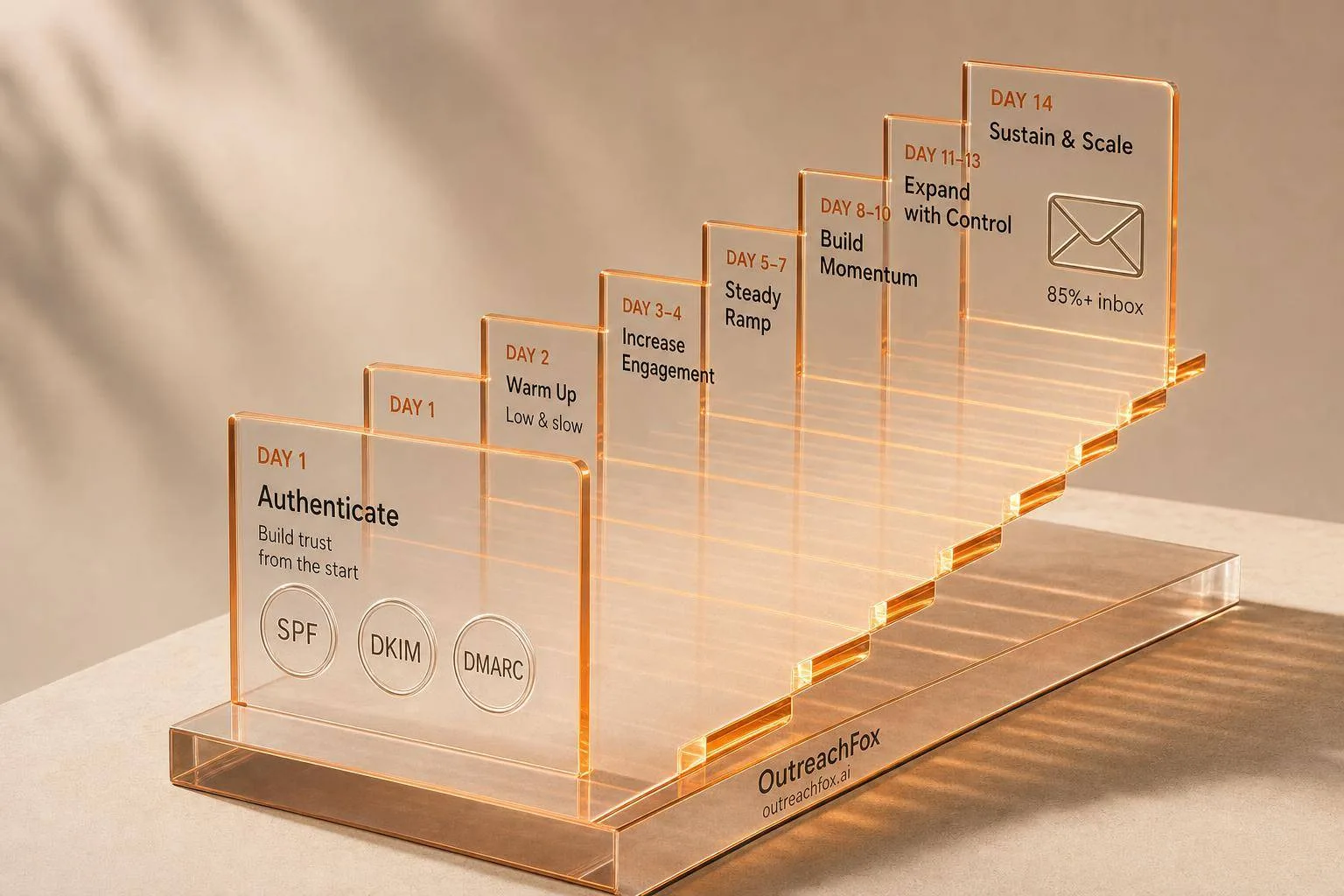
A proper 14-day domain warmup protocol starts with 3–5 emails per mailbox, increases volume by max 30% daily, and maintains strict thresholds for bounce rate (<2%), inbox placement (>85%), and spam complaints (0%).
- Use a separate sending domain, never your main company domain for cold outreach
- Verify SPF, DKIM, DMARC, and MX records before sending a single warmup email
- Start with 3–5 emails per mailbox and never increase volume more than 30% daily
- Keep bounce rate under 2% and inbox placement above 85% throughout warmup
- Add cold outreach around Days 6–8 but keep 15–20% warmup traffic running post-launch
- If metrics slip, cut volume by 50% immediately and pause until they recover
Domain Warmup Done Right: 14-Day Protocol That Actually Works
A new domain can look almost as risky as a bad one. If you skip warmup, inbox placement can sit near 54%. If you follow a tight 14-day ramp, it can move closer to 88%.
Here’s the short version:
- I start with a separate sending domain, not my main company domain
- I make sure SPF, DKIM, DMARC, MX, and tracking are set before Day 1
- I begin with just 3–5 emails per mailbox
- I never bump volume by more than 30% day over day
- I keep early sends plain text, low volume, and spread across 6–8 hours
- I watch bounce rate, inbox placement, replies, spam complaints, and deferrals every day
- If bounce rate goes over 3% or inbox placement drops below 85%, I pause or cut volume
- After Day 14, I still don’t go full send. I add cold volume slowly and keep some warmup traffic running
This protocol is built to stop the two things that hurt new domains most: sending too much too soon and starting with broken setup. If you get the setup right, ramp one mailbox at a time, and react fast when metrics slip, you give the domain a much better shot at landing in the inbox.
How to warm up a domain to send emails
Quick Comparison
| Area | What I do | Red flag |
|---|---|---|
| Domain setup | Use a separate sending domain | Using the main company domain |
| Mailbox ramp | Start at 3–5 emails/day | Big jump in volume |
| Daily growth | Stay under 30% increase | Doubling in 24–48 hours |
| Message format | Plain text early on | Links, images, heavy HTML too soon |
| Cold outreach mix | Add small cold volume around Days 6–8 | Going mostly cold too early |
| Bounce rate | Keep under 2% | Over 3% |
| Inbox placement | Aim for 85%–95%+ | Under 85% |
| Spam complaints | Keep at 0% | Above 0.3% |
| Launch after warmup | Add 5 cold emails/day at a time | Jumping straight to full volume |
If I had to boil the whole article down to one point, it’s this: warmup is less about speed and more about control.
Pre-flight setup before Day 1
Fix the setup first. Then start warmup.
Set up a separate sending domain and fully provision the mailboxes
Do not use your main company domain for cold outreach. If a campaign gets flagged, you want that risk contained on the sending domain, not spilling over to the domain tied to your site, support inboxes, and transactional email.
Use a brand-adjacent domain instead. For example: getYourbrand.com, tryYourbrand.com, or meetyourbrand.com. Keep it separate from your main domain from the start.
Plan on 2–3 inboxes per domain. If you're an agency, keep each client's setup separate: one client, one domain, one mailbox set.
Before Day 1, each mailbox should be fully ready to go:
- Sign-in works
- It can send and receive mail
- It uses a real sender name
- It's connected to a receiving inbox
Add a profile photo too. And keep the signature simple at first. No need to make it fancy.
Check SPF, DKIM, DMARC, custom tracking domain, and DNS health
Check SPF, DKIM, DMARC, MX, and tracking before you send anything. Not after the first test. Not after warmup starts. Before.
Run every check below before a single warmup email goes out. If anything fails, stop there and fix it.
| Authentication area | What to verify | Hard no-go signals |
|---|---|---|
| SPF | Single record, under 10 DNS lookups, ends in -all or ~all | Multiple SPF records, +all, lookup overrun |
| DKIM | Active and passing on the exact sending domain/mailbox | Missing, inactive, or failing DKIM |
| DMARC | Published with at least p=none for monitoring | No DMARC record at all |
| MX | Correct mail exchange records for your mailbox provider | Missing or misconfigured MX records |
| Custom tracking domain | Only configured if your sending stack will actually use it | Vendor-default or broken tracking setup |
After you change any DNS records, wait 48 hours for propagation before starting warmup.
If Day 1 mail lands in spam, the issue is usually setup, not volume. That's the hard truth with new inboxes.
Once authentication checks out and the mailbox is clean, you can start Day 1 with low-volume sends.
Clean the mailbox environment before warmup begins
A few small problems can quietly wreck warmup before it even starts. Forwarding aliases can route badly or create loops. Old HTML signatures from a past setup can make early emails look like marketing sends. Provider send caps can throttle traffic in ways that are annoying to spot later.
Fix all of that before Day 1.
During the earliest stage, set each mailbox to plain-text email with very little formatting. That means no tracking links, no rich formatting, and no extra complexity.
If you're sending to Outlook-heavy lists, watch inbox placement closely during Days 1–14. Microsoft domains often react more aggressively to new senders.
That leaves volume, mix, and monitoring to handle during the warmup phase.
The 14-day warmup schedule: daily volume targets and traffic mix
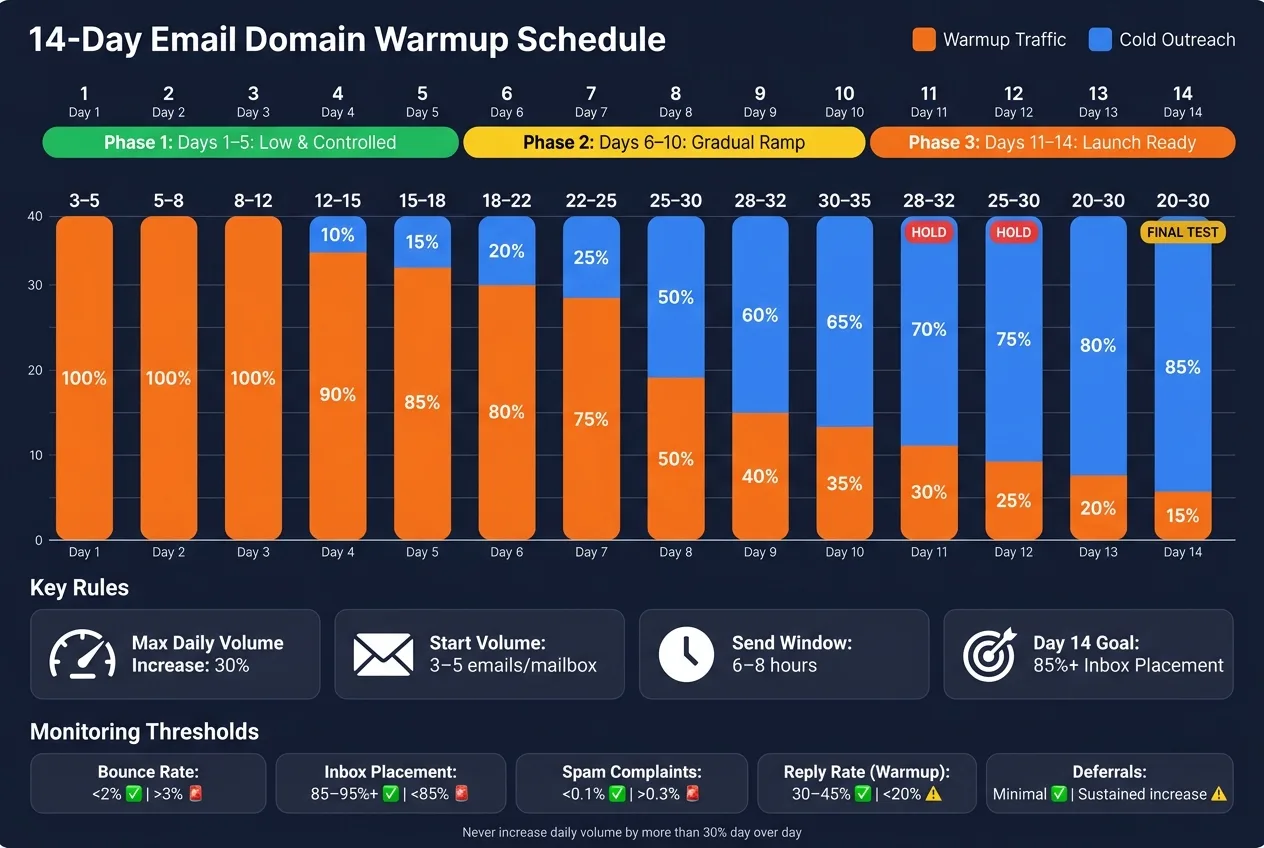
This schedule only works after authentication and mailbox cleanup pass.
The main rule is simple: never increase daily sending volume by more than 30% from the previous day. If a new domain ramps too fast, filters can treat it like bulk spam.
Once DNS and mailbox health are clean, ramp one mailbox at a time. If you have more than one mailbox on the same domain, stagger start dates by 2–3 days instead of turning them all on at once. Each mailbox needs to follow the schedule on its own.
Days 1–5: Send low, stay controlled, and keep messages conversational
Start with 3–5 emails per mailbox on Day 1 and climb slowly from there. In this early stretch, every message should be plain text. Send only to warm contacts, teammates, or colleagues.
Spread sends across a 6–8 hour window during the recipient’s business hours, and leave at least a 61-minute gap between emails.
By Day 5, the target is 15–18 emails per mailbox. At this stage, replies matter more than volume.
Days 6–10: Increase volume gradually and add limited live cold outreach
Around Days 6–8, you can start testing with a small group of real prospects, but keep it light. Begin with 2–5 cold emails per day alongside warmup traffic. Early on, the mix should still lean hard toward warmup - about 75–80% warmup through Day 7 - then shift closer to 50/50 by Day 10.
Add the custom tracking domain during Days 6–10.
By Day 10, aim for 30–35 total emails per mailbox per day. Keep bounce rate below 3% and make sure reply rates stay steady. Those are the clearest signs the ramp is holding up.
Days 11–14: Hit launch-ready volume without forcing the ramp
On Days 11–12, hold steady or cut volume by 10–15% to give reputation time to settle.
By Day 14, cold outreach should account for about 85% of sends, while 3–5 warmup emails per mailbox per day keep running in the background. That leftover warmup share - about 15–20% of traffic - should stay on after launch.
Use the schedule below exactly as written. Don’t jump from warmup traffic straight to production volume.
| Day | Target Sends (per mailbox) | Traffic Mix | Notes |
|---|---|---|---|
| 1 | 3–5 | 100% Warmup | Known contacts only; reply to every response |
| 2 | 5–8 | 100% Warmup | Reply to every response received |
| 3 | 8–12 | 100% Warmup | Add acquaintances and warm contacts |
| 4 | 12–15 | 90% Warmup / 10% Newsletters | Mix in inbound activity |
| 5 | 15–18 | 85% Warmup / 15% Cold outreach | Plain text only |
| 6 | 18–22 | 80% Warmup / 20% Cold | First 2–5 real prospects; monitor reply rate |
| 7 | 22–25 | 75% Warmup / 25% Cold | Run an inbox placement check |
| 8 | 25–30 | 50% Warmup / 50% Cold | Mostly cold; bounce rate must stay <3% |
| 9 | 28–32 | 40% Warmup / 60% Cold | Monitor bounce rates closely |
| 10 | 30–35 | 35% Warmup / 65% Cold | Keep bounce rate below 3% and reply rates stable |
| 11 | 28–32 | 30% Warmup / 70% Cold | Hold - let reputation settle |
| 12 | 25–30 | 25% Warmup / 75% Cold | Hold - stabilize before final push |
| 13 | 20–30 | 20% Warmup / 80% Cold | Near-production sending patterns |
| 14 | 20–30 | 15% Warmup / 85% Cold | Final placement test - target 85%+ inbox rate |
Once Day 14 holds, move to the monitoring thresholds below before increasing volume again.
Daily monitoring: the thresholds that tell you to continue, hold, or roll back
Use the ramp from the last section only while these signals stay healthy. Think of that schedule as a baseline, not a promise. If daily mailbox health stays in range, keep going. The second it slips, hold or roll back. Daily mailbox health decides what happens next. Ignore it, and the domain will burn.
Track inbox placement, bounce rate, replies, spam complaints, and deferrals
Five signals tell you almost everything you need to know during warmup. Inbox placement matters most. If your test emails aren’t landing in the primary inbox at least 85% of the time, something is already off.
Bounce rate is your list-quality alarm. Keep it under 2%. If it goes above 3%, pause.
Reply rate from your warmup network should stay in the 30%–45% range. If it drops below 20%, treat that as a warning.
Spam complaints should be 0%. Anything above 0.3% is an emergency.
Then there are deferrals - temporary rejections. These often mean you pushed volume too hard, too fast. If deferrals start climbing, hold volume for 3–5 days before you ramp again.
| Signal | Healthy Range | Warning Threshold | Immediate Action |
|---|---|---|---|
| Bounce Rate | < 2% | > 3% | Pause sending; verify and clean recipient list |
| Inbox Placement | 85%–95%+ | < 85% | Reduce cold volume; increase warmup sends vs. cold sends |
| Spam Complaints | < 0.1% | > 0.3% | Stop all campaigns; audit content and targeting |
| Reply Rate (Warmup) | 30%–45% | < 20% | Check warmup tool quality; inspect content for spam triggers |
| Deferrals/Throttling | Minimal | Any sustained increase | Hold current volume for 3–5 days; do not ramp |
Register your sending domain in Google Postmaster Tools from Day 1. If domain reputation drops to "Low," pause all cold sending right away. That’s not a warning you can send your way out of.
How to diagnose a slipping mailbox without guessing
If one metric slips, don’t guess. Isolate the cause in a set order. When a mailbox starts slipping, check infrastructure before copy or send time.
Start by checking whether the issue is domain-wide or tied to one mailbox. If every mailbox on the domain slips at the same time, the problem is almost always at the domain level - DNS, authentication, or a blacklisting event. If only one mailbox is affected, the issue is more likely tied to that mailbox’s sending pattern or list segment.
Next, re-verify your DNS records. Check SPF, DKIM, and DMARC with MXToolbox. Warmup will not fix broken authentication.
Then isolate whether the issue is provider-specific. Google puts a lot of weight on behavior and engagement. Microsoft 365 is more sensitive to content and fast sending patterns. On Outlook, links, tracking pixels, images, and financial language and symbols like $ are common triggers. If Gmail and Outlook act differently, treat that as provider-specific filtering.
Finally, look at what changed in the 24–48 hours before the slip. Did you add links? Did you increase volume by more than 30%? A 2x–3x spike in 48 hours is often enough to trigger filtering. If content looks like the cause - especially for Microsoft 365 - strip out links, images, tracking pixels, and financial language, then watch whether placement recovers.
Use these thresholds to decide whether to keep ramping; the next section turns them into rollback and launch rules.
Recovery rules and post-warmup launch
What to do when bounce rate rises or inbox placement drops during warmup
Use the thresholds above to decide when to pause or roll back. If a metric starts to slide, stop increasing volume right away. Don't try to brute-force your way through deliverability trouble. That usually makes things worse.
If bounce rate hits 2%–3%, cut daily volume by 50% and pause live cold outreach for 24–48 hours while you re-check DNS and authentication. If inbox placement drops below 90%, cut cold volume. If it falls below 85%, stop cold sending until placement comes back.
During that pause, lean on warm contacts who are likely to reply. Replies send one of the strongest positive signals you can get while recovering.
If spam complaints reach 0.1%–0.3%, stop cold sends. Above 0.3%, pause all sending.
Only resume from the reduced volume after bounce rate and placement recover.
How to launch campaigns after Day 14 without resetting reputation
Once metrics settle down, shift from recovery mode into a controlled launch. Day 15 is not a green light for full volume. Start with 5–10 cold emails per mailbox per day. Then add 5 emails per day until you reach a cap of 25–35 cold sends per mailbox.
Keep 10–15 warmup emails per mailbox per day after launch. Those warmup emails help keep positive engagement signals coming in and can offset the lower engagement that usually comes with cold outreach.
For Microsoft 365-heavy lists, cap cold volume at 20 sends per mailbox per day. Microsoft 365 filtering is stricter, so there's less room for mistakes than with Gmail.
Conclusion: The rules that make domain warmup actually work
This process works only if you stick to the rules. Authentication needs to be clean before Day 1 because warmup won't fix broken SPF, DKIM, or DMARC. Increase volume slowly, mailbox by mailbox. If metrics slip, roll back first, check the cause second, and ramp again only after things are stable.
Frequently asked questions
Why does the protocol recommend starting with only 3–5 emails per mailbox on Day 1?+
Starting with just 3–5 emails per mailbox prevents email filters from treating a new domain like bulk spam. Ramping too fast is one of the two main things that hurt new domains most. The protocol limits daily increases to 30% or less, which gives mailbox providers time to build trust in the sending domain gradually.
What happens if bounce rate goes above 3% during the 14-day warmup period?+
If bounce rate hits 2–3%, you should cut daily volume by 50% and pause live cold outreach for 24–48 hours while re-checking DNS and authentication. This prevents further damage to domain reputation. Only resume from the reduced volume after bounce rate recovers to under 2%.
When should you start adding real cold outreach emails during the warmup schedule?+
The protocol recommends adding 2–5 cold emails per day starting around Days 6–8, while keeping the mix at about 75–80% warmup traffic through Day 7. By Day 10, the ratio shifts closer to 50/50 between warmup and cold sends, gradually increasing cold volume while monitoring bounce rates and inbox placement.
Why does the protocol use a separate sending domain instead of the main company domain?+
Using a separate sending domain (like getYourbrand.com or tryYourbrand.com) contains the risk if a campaign gets flagged. This prevents damage from spilling over to the main domain that handles your website, support inboxes, and transactional email. It keeps cold outreach risk isolated from critical business communications.
What should you do on Days 11–12 instead of continuing to increase volume?+
On Days 11–12, you should hold steady or cut volume by 10–15% to give domain reputation time to settle. This stabilization period prevents pushing too hard right before launch and allows mailbox providers to confirm the positive sending patterns established during the first 10 days.
How do you diagnose whether a deliverability problem is domain-wide or mailbox-specific?+
Check if every mailbox on the domain slips at the same time or just one. If all mailboxes are affected simultaneously, the problem is almost always at the domain level—DNS, authentication, or blacklisting. If only one mailbox is affected, the issue is more likely tied to that specific mailbox's sending pattern or list segment.
What volume should you target when launching campaigns after Day 14 is complete?+
Day 15 is not a green light for full volume. Start with only 5–10 cold emails per mailbox per day, then add 5 emails per day until reaching a cap of 25–35 cold sends per mailbox. Continue running 10–15 warmup emails per mailbox daily to maintain positive engagement signals alongside cold outreach.