
Waterfall enrichment chains multiple data providers in cost-order, stopping at the first verified match. This pushes match rates from 40-70% (single-source) to 90%+ by letting each vendor fill gaps the previous one missed.
- Route records through providers by cost: cheapest first, premium sources handle only leftovers.
- Run separate waterfalls for email and phone to avoid wasting credits on complete fields.
- Verify every result with SMTP and carrier checks before records enter outbound sequences.
- Track cost per verified contact, aiming for $0.08–$0.15 blended across all sources.
- Reorder the stack quarterly; drop providers that resolve under 10% of records reaching them.
- B2B data decays 30% yearly—re-enrich tier-1 accounts every 30 days to maintain coverage.
Waterfall Enrichment Explained: How to Hit 90%+ Match Rates (No More Single-Source Limits)
One provider usually tops out at 40% to 70% match rates. A waterfall can push usable coverage past 90% by checking multiple sources in order and stopping when it finds a verified result.
If I had to sum up the whole article in plain English, it would be this:
- I don’t rely on one data vendor
- I route email and phone through separate provider chains
- I verify every result before it goes to outbound
- I track cost, source, timestamp, and win rate
- I reorder the stack when a provider stops pulling its weight
That’s the playbook.
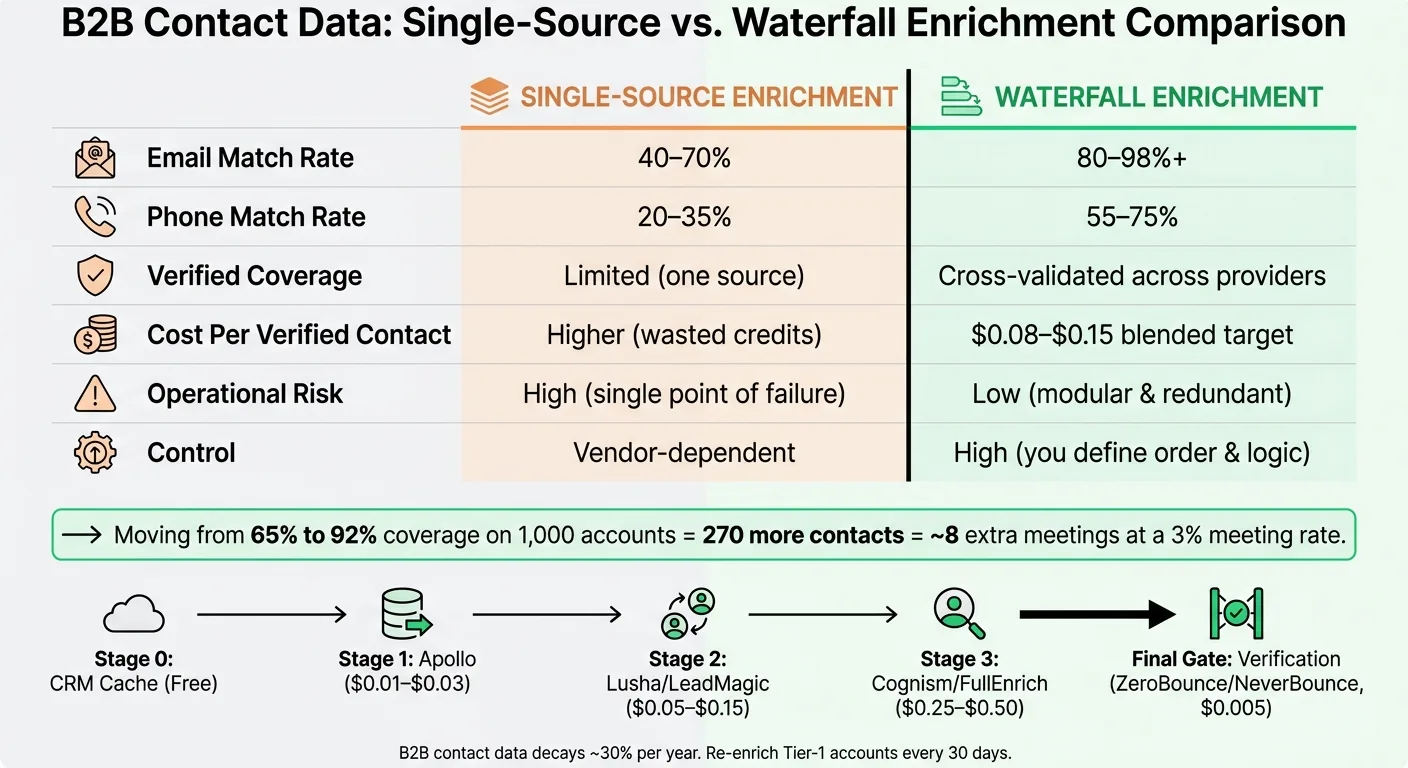
A waterfall works because each vendor misses different records. So instead of accepting one source’s ceiling, I send leftover records to the next source, then the next, until I get a usable match or hit a stop limit. That simple change can move a list from 65% coverage to 92%, which means 270 more contacts per 1,000 accounts. At a 3% meeting rate, that can mean about 8 extra meetings from the same list.
Here’s the short version of what matters most:
- Start with low-cost sources first, then send leftovers to higher-cost tools
- Check my CRM or cache first so I don’t pay twice
- Run field-level waterfalls, not one blanket flow for the whole record
- Use verification gates like SMTP for email and carrier/line-type checks for phones
- Bucket records into Pass, Review, or Reject
- Watch cost per verified contact, with a blended target around $0.08 to $0.15
- Recheck old data often, since B2B contact data decays by about 30% per year
A simple example looks like this:
- Email chain: Apollo → Hunter → People Data Labs → ZoomInfo
- Phone chain: Apollo → Lusha → Cognism
And one rule matters more than most: stop as soon as a verified match appears. That’s how I keep coverage high without wasting credits.
If a provider resolves less than 10% of the records that reach it, I move it down or cut it. If my cost per verified contact goes above $0.15, I push expensive vendors later in the order. Then I review results every quarter and test against a single-source baseline to make sure the waterfall is still worth it.
Build the Waterfall: Provider Order, Routing Rules, and Field-Level Logic
Choose Provider Order Based on ICP Fit and Data Type
Once you know the limits of any single source, the next lever is provider order. This is where a lot of the savings show up: start with broad, low-cost sources, then save niche, higher-cost tools for the leftovers.
First, check your CRM cache so you don't pay again for data you already have. Then send records to a high-volume, low-cost provider like Apollo ($0.01–$0.03 per credit), which can often handle most of the list. From there, pass the remaining records to mid-tier tools like Lusha ($0.10–$0.30 per credit) for U.S. direct dials. Only the hardest records should reach premium fallbacks like Cognism ($0.20–$0.40 per credit), which tends to perform well for European mobile numbers.
If you're working with local-service ICPs, put a place-native source like MapsLeads first.
Use Field-Level Waterfalls Instead of One Blanket Flow
After provider order, the next cost win comes from routing only the field that's missing. If Provider A gives you a company domain but no verified email, rerunning the whole record burns credits on data you already filled in. That's money down the drain.
A better setup is simple: run separate waterfalls for email and phone, and reject anything below your confidence threshold.
For example:
- Your email waterfall might run Apollo → Hunter → People Data Labs → ZoomInfo
- Your mobile waterfall might run Apollo → Lusha → Cognism
Each field follows its own path and stops as soon as a verified result appears.
Store Source Attribution and Confidence on Every Field
Every enriched field should include the provider name, a timestamp, and a confidence score. That metadata gives you audit trails and helps you decide when to reorder providers later. Those are the two levers that keep the stack getting better over time.
In tools like Clay, a COALESCE formula picks the first non-empty, verified value from your provider columns. Track each step on its own so you can see which source is actually improving coverage instead of guessing.
| Waterfall Stage | Provider Example | Typical Hit Rate | Cost Level |
|---|---|---|---|
| Stage 0 | Internal CRM / Cache | Varies | Free |
| Stage 1 | Apollo | 60–65% | Low ($0.01–$0.03) |
| Stage 2 | Lusha / LeadMagic | 15–20% of residual | Mid ($0.05–$0.15) |
| Stage 3 | Cognism / FullEnrich | 5–15% of residual | High ($0.25–$0.50) |
| Final Gate | ZeroBounce / NeverBounce | N/A (verification) | Very Low ($0.005) |
Monthly performance reviews help you spot which provider is winning on each field, so you can reshuffle the order based on actual results.
Set a hard stop at three to five providers per record. If nothing good shows up by then, cut the record loose and move on.
AI Waterfall enrichment - find 80% more emails [2024 Guide]
Verify Work Emails and Phones Before Records Enter Outbound
High match rates don't mean much if the data bounces or the number is disconnected. Verification is the last gate before outbound. Bad data leads to bounces, wasted dials, and deliverability risk. Waterfall enrichment helps you get more coverage. Verification makes sure that coverage is still usable.
Work Email Verification Checks That Matter
B2B contact data goes stale fast, and a verification pass can catch invalid addresses that enrichment labeled as valid. Re-verify any list older than 30 days.
Email verification should run in layers. Start with syntax and format checks. Then check MX records to confirm the domain can receive mail. Next, use an SMTP handshake to see whether the mailbox exists. After that, flag catch-all domains. Those should go to Review, not Pass.
Phone Verification for Direct Dials and Mobiles
Use the same gate for phones.
Phone data goes stale even faster than email. After enrichment, run numbers through mobile network, carrier, and line-type checks. That helps you separate mobiles and direct dials from switchboards and landlines. Standardize country codes and formatting before validation so provider output doesn't create avoidable mismatches. Re-verify active pipeline numbers every 90 days.
Pass, Review, or Reject: A Simple Decision Model
Use one rule set for every record.
| Status | Criteria | Action |
|---|---|---|
| Pass | Valid SMTP response for email, or a verified phone result that passes mobile network, carrier, and line-type checks | Route directly to outbound sequence |
| Review | Catch-all domain, risky or uncertain email, or unclear line type | Send to manual research or a small test batch |
| Reject | Invalid syntax, failed SMTP response, disposable domain, role-based address (e.g., info@, support@), failed phone validation, or DNC match | Suppress |
Apply the same three buckets to phones too: verified mobiles pass, unverifiable numbers reject, and ambiguous results go to review.
Once records are filtered this way, measure how much usable coverage the waterfall adds.
Measure Lift, Cost Per Verified Contact, and When to Reorder the Stack
Once Pass, Review, and Reject are set up, the next step is simple: check whether the waterfall is giving you more coverage without pushing cost too high.
Track the Metrics That Show Real Improvement
Watch the same two metrics defined earlier: raw match rate and verified match rate. Then add cost per verified contact, provider win rate, and downstream results like meetings booked and reply rates.
It also helps to split email and phone waterfalls into separate views. That way, you can see which chain is doing its job and which one is dragging.
Break performance out by:
- persona
- company size
- industry
- field
This matters because the waterfall should be judged against the same ICP slices used in provider routing. If you don’t slice it that way, you can miss where a provider is doing well - or quietly failing.
A good blended target is $0.08 to $0.15 per verified contact. In most cases, the savings come from one simple move: put lower-cost providers first, and let premium vendors handle only the leftover records.
Benchmark Waterfall Lift Against a Single-Source Baseline
The best way to show the waterfall is doing its job is with a controlled sample.
Pull 200 to 500 records from your ICP. Run that list through one provider only and record the verified match rate. Then run the same list through the full waterfall and compare the gap.
That gap can be big.
On a list of 1,000 accounts, moving from a 65% single-source match rate to 92% waterfall coverage adds 270 additional contacts. At a 3% meeting rate, that works out to about 8 more meetings from the same target list, with zero additional prospecting.
That’s the whole point of a waterfall. One provider misses, the next one gets a shot, and the list keeps moving until you run out of sources or get a verified result.
Review performance quarterly and spot-check 50 records per provider.
Comparison Table: Single-Source vs. Waterfall Enrichment
Use the table below to compare the day-to-day tradeoffs, not just coverage totals.
| Metric | Single-Source | Waterfall |
|---|---|---|
| Email match rate | 40–70% | 80–98%+ |
| Phone match rate | 20–35% | 55–75% |
| Verified coverage | Lower; limited to one source's accuracy | Higher; cross-validated across providers |
| Cost per verified contact | Higher; more wasted credits on failed lookups | Lower; cheaper providers fire first |
| Control | Vendor-dependent | High; you define provider order and logic |
| Troubleshooting | Limited to vendor support | High; swap underperforming tiers independently |
| Data freshness | Dependent on one vendor's refresh cycle | Cross-validated across sources |
| Operational risk | High; single point of failure | Low; modular and redundant |
A single-source setup can still make sense when your ICP is narrow and one vendor covers it well. The waterfall starts to win when your lists stretch across multiple industries, geographies, or company sizes - places where one database tends to be patchy.
When to reorder the stack: if a provider resolves less than 10% of the records that reach it, move it lower or remove it. If blended cost per verified contact goes above $0.15, push the premium provider farther down the stack. Re-run the math each quarter, because vendor pricing and coverage change over time.
Next, choose the tools that can automate these routes and push verified records into your CRM.
Choose Tools and Run the Workflow from Enrichment to CRM Sync
What to Look for in Enrichment and Orchestration Tools
Once the waterfall is set, the next call is where the routing logic should live. After you decide provider order and field-level waterfalls, you need tools that actually run the workflow.
For most U.S. outbound teams doing under about 500,000 enrichments per year, an orchestration-first platform is usually the better fit. Clay can run sequential provider logic, verification, and CRM sync without custom engineering. OutreachFox takes a more all-in-one route: it combines field-level waterfalls across 50+ data providers, proprietary email verification, and multichannel outreach in one platform. That means verified records can move straight into sequences without a separate sync step.
If your volume is low and you don't have much engineering support, orchestration is the faster path. A DIY stack starts to make sense only when you go above 500,000 enrichments per year or have a dedicated engineering team. If not, licensing costs and engineering time can pile up fast.
A few things are non-negotiable:
- API/webhook support
- 15+ sources
- SMTP/HLR verification
- Field-level source attribution
- Bidirectional CRM write-back with idempotency to prevent duplicate records
Comparison Table: Enrichment Workflow Options for U.S. Outbound Teams
The tradeoff is pretty direct: single-source tools give you less control, orchestration gives you more control, and an integrated platform cuts down the work needed to keep everything running.
| Single-Source Provider | Orchestration Platform (e.g., Clay) | Integrated Platform | |
|---|---|---|---|
| Implementation Effort | Low - one API or tool | High - workflow setup required | Medium - built-in waterfall, minimal config |
| Match-Rate Ceiling | 40–70% | 80–95%+ | 80–95%+ |
| Verification Control | Limited to the provider's own data | High - custom verification gates | High - built-in verification |
| Infrastructure Ownership | Vendor-owned | User-orchestrated | Platform-managed |
| Operational Complexity | Low | High - multiple APIs and logic layers | Moderate - unified but configurable |
Choose the stack that fits your scale, then connect it to your CRM and outbound sequences.
Conclusion: The Shortest Path to 90%+ Usable Coverage
The workflow is straightforward: normalize and filter your input list, run it through providers in cost-ascending order with stop conditions on verified hits, apply SMTP and HLR verification gates, resolve field conflicts with recency-wins logic, write back to your CRM with field-level source attribution stamped on every field, and then launch outbound.
Treat data like milk, not canned food. It goes bad faster than most teams think. B2B contact data decays at roughly 30% per year, so re-enrich Tier-1 accounts every 30 days and lower tiers every 60 to 90 days.
90%+ usable coverage comes from process, not better data.
Frequently asked questions
Why does a waterfall enrichment approach achieve higher match rates than using a single data provider?+
Each vendor misses different records, so a waterfall sends leftover records to the next source until finding a verified match. While one provider typically tops out at 40-70% match rates, a waterfall can push coverage past 90% by checking multiple sources sequentially, potentially adding 270 more contacts per 1,000 accounts compared to a 65% single-source baseline.
What is field-level waterfall routing and why does it reduce enrichment costs?+
Field-level routing runs separate waterfalls for email and phone instead of reprocessing entire records. If Provider A returns a company domain but no verified email, only the missing email field goes to the next provider, avoiding wasted credits on data already obtained. This approach can help maintain blended costs around $0.08 to $0.15 per verified contact.
How should providers be ordered in a waterfall enrichment stack?+
Start with your CRM cache (free), then move to low-cost, high-volume providers like Apollo ($0.01-$0.03 per credit), followed by mid-tier tools like Lusha ($0.10-$0.30), and save premium providers like Cognism ($0.20-$0.40) for the hardest records. The waterfall stops as soon as a verified match appears, keeping costs low while maximizing coverage.
What verification checks should be applied before sending enriched contacts to outbound sequences?+
For emails, run syntax checks, MX record validation, SMTP handshake verification, and flag catch-all domains for review. For phones, perform mobile network, carrier, and line-type checks to separate direct dials from switchboards. Records should be bucketed into Pass (valid), Review (uncertain), or Reject (invalid) categories, with any list older than 30 days re-verified.
When should a provider be moved lower or removed from the waterfall stack?+
If a provider resolves less than 10% of the records that reach it, move it down or cut it entirely. Also reorder if your blended cost per verified contact exceeds $0.15, pushing expensive vendors later in the sequence. Review performance quarterly and test against a single-source baseline to confirm the waterfall still delivers measurable lift.
Why does the article recommend re-enriching contact data every 30 to 90 days?+
B2B contact data decays at roughly 30% per year as people change jobs, phone numbers become disconnected, and email addresses expire. The article advises re-enriching Tier-1 accounts every 30 days and lower-priority segments every 60 to 90 days, treating data like milk rather than canned food to maintain deliverability and connection rates.
What metadata should be stored on each enriched field for ongoing optimization?+
Store the provider name, timestamp, and confidence score for every enriched field. This attribution creates audit trails and enables you to identify which sources actually improve coverage, calculate provider win rates, and make data-driven decisions about reordering the stack based on quarterly performance reviews rather than guessing.