Analysis of 2M+ emails reveals that trigger-based personalization (funding, hiring signals) achieves 15-25% reply rates vs. 1.2% for basic merge tags. Match personalization depth to deal value: role-based for volume, live signals for ABM, d
- Trigger-based personalization outperforms basic merge tags by 3.2x with 15-25% reply rates.
- Timing matters: funding mentions within 72 hours hit 22% replies vs. 7% after 14 days.
- Role-based value props reach 8-12% replies for mid-volume campaigns without deep research.
- Multichannel email plus LinkedIn coordination lifts response rates by 142% for strategic accounts.
- Match personalization effort to deal value: role-based for volume, signals for ABM, deep research for enterprise.
- Keep deeply personalized emails between 50-125 words for 11.4% average reply rates.
7 Personalization Tactics That Increase Cold Email Reply Rates (Data from 2M+ Emails)
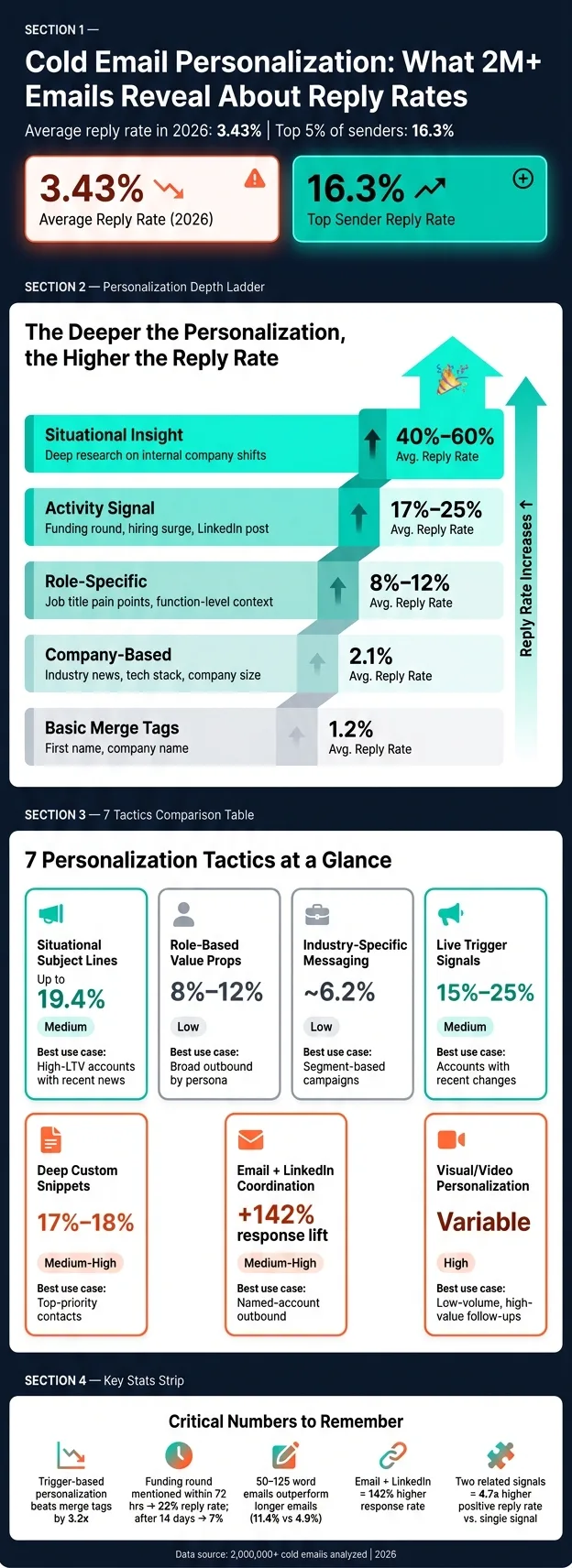
Most cold emails fail because they feel mass-sent. In this data set of 2,000,000+ emails, average reply rates fell to 3.43% in 2026, while top senders reached 16.3% by making emails more specific, timely, and tied to what the buyer is dealing with right now.
If I had to sum up the whole article in one line, it would be this: skip simple merge tags and use the lightest form of personalization that matches the account value. Role-based copy can get you into the 8%–12% range, live signals like funding or hiring can push replies to 15%–25%, and deep account research can go much higher when the deal size supports the time.
Here’s the full list of tactics covered:
- Situational subject lines
- Role-based value props
- Industry-specific messaging
- Live trigger signals
- Deep custom research snippets
- Visual or video personalization
- Email + LinkedIn coordination
A few points stand out fast:
- Basic merge tags averaged just 1.2%
- Trigger-based personalization beat basic personalization by 3.2x
- Mentioning a funding round within 72 hours reached up to 22%, but after 14 days it dropped to 7%
- Emails kept between 50 and 125 words outperformed long emails
- Multichannel outreach across email + LinkedIn lifted response rates by 142%
How I Write Cold Emails That Get 15%+ Response Rate
Quick Comparison
| Tactic | Best use case | Time needed | Reply-rate range |
|---|---|---|---|
| Situational subject lines | High-value accounts with recent news | Low-Medium | Better than generic; up to 19.4% in one test |
| Role-based value props | Broad outbound by persona | Low | 8%–12% |
| Industry-specific messaging | Segment-based campaigns | Low | Around 6.2% |
| Live trigger signals | Target accounts with recent changes | Medium | 15%–25% |
| Deep custom snippets | Top-priority contacts | Medium-High | 17%–18% on average |
| Visual/video personalization | Low-volume, high-value follow-ups | High | Can help, but only with good inbox placement |
| Email + LinkedIn | Named-account outbound | Medium-High | 142% higher response rate |
Bottom line: if you want more replies, lead with relevance and timing, not first-name placeholders. I’d start with one tactic, test it against a control group, and track positive reply rate instead of opens.
What the Data Shows About Personalization and Cold Email Reply Rates
Cold email reply rates got tougher. The average fell from 5.1% in 2024 to 3.43% in 2026.
At the same time, the top 5% of senders hit 16.3%.
That gap doesn’t come from sending more emails. It comes from making the message feel specific, timely, and relevant to the buyer.
The data draws a sharp line between shallow personalization and deep personalization.
Basic merge tags can do worse than no personalization at all. Buyers spot that pattern fast, and it often reads like automation. Deep personalization works differently. It points to a role-based pain point, a recent company event, or a behavior signal that makes the email feel grounded in what’s happening right now.
That’s where reply rates move into the 8% to 25% range.
Trigger-based personalization outperforms basic merge tags by 3.2x.
Here’s how reply rates change as personalization gets more targeted:
| Personalization Level | What It Looks Like | Avg. Reply Rate |
|---|---|---|
| Basic merge tags | First name, company name | 1.2% |
| Company-based | Industry news, tech stack, company size | 2.1% |
| Role-specific | Job title pain points, function-level context | 8%–12% |
| Activity signal | Recent LinkedIn post, hiring surge, funding round | 17%–25% |
| Situational insight | Deep research on internal company shifts | 40%–60% |
The takeaway is pretty simple: the deeper the personalization, the more meetings it tends to book, even if the cost per meeting goes up.
Timing matters too. Fresh signals beat old ones.
For example, mentioning a funding round within 72 hours can drive a 22% reply rate. Wait 14 days, and that drops to 7%. That timing rule should be the first screen when deciding which personalization tactic to use.
1. Situationally Personalized Subject Lines
The subject line is the first filter a prospect uses. If it feels generic, most people move on. That’s why situational signals tend to work better than dropping in a first name and calling it personal.
In a Q1 2026 analysis of 11,000 first-touch emails by Prospectory, signal-based subject lines - referencing funding, hiring, or leadership changes - reached a 19.4% reply rate, while templated subject lines with standard merge fields landed at 3.1%.
The best signals are the ones that show timing and intent. Focus on things like:
- funding rounds
- leadership changes
- hiring surges
- tech stack shifts
- product launches
Two aligned signals often beat one. For example, a funding round plus a hiring surge says more than either signal on its own. Keep the subject line short too - 4 to 7 words is a good range.
This approach makes the most sense for high-LTV accounts, where the research time pays off. Skip weaker signals like podcast appearances or awards. They may sound nice, but they usually don’t show buying intent.
One more thing: repeat the same signal in the first line of the email. That way, the subject line and opening sentence push the same idea, instead of pulling in different directions.
2. Role-Based Value Proposition Personalization
If the subject line gets the open, the value prop needs to earn the reply.
A lot of cold emails use the same value prop for every role. That gap hurts reply rates. When an email speaks to role-specific pain points, reply rates can hit 10–25%+. Generic templates usually land around 1–5%. So the next move is simple: match the message to the prospect’s role, not just the company.
Here’s how the hook should line up with the prospect’s level:
| Persona | Hook Type | Focus | Avg. Reply Rate |
|---|---|---|---|
| ICs & Managers | Timeline Hook | Concrete metric progression, like reducing ramp-up time | 9.91%–10.67% |
| VPs | Social Proof Hook | Peer results, like "How 3 fintechs cut CAC" | ~7% |
| C-Suite | Signal-Based Hook | High-level triggers, like a Series B funding round | ~11% |
| Non-segmented list | Problem-Statement | Generic pain points | 3.90%–4.77% |
The key move here is the bridge sentence. It connects a role-based observation to a problem the prospect is likely to recognize before you pitch anything.
For a Head of Sales, that might look like this: "Saw your team just started hiring three SDRs - that's usually when reply rates start dipping as new reps find their rhythm."
That line works because it doesn’t jump straight into the offer. It shows you noticed something, tied it to a pain point, and gave the reader a reason to keep going. One or two sentences is usually enough to connect the signal to the problem before you shift into the pitch.
This approach works well for broader qualified lists where deep research on each person just isn’t realistic. You can enrich by role to make the hook feel specific, then layer in live triggers for high-LTV accounts.
When role-level relevance still feels too broad, the next step is tailoring the message by industry.
3. Industry-Specific Messaging Personalization
Industry-specific messaging ties the email to one problem a whole sector deals with, like compliance, infrastructure, or regulatory deadlines. It sits in the middle ground between role-based relevance and live account signals.
And the numbers are pretty clear. Emails that mention a specific industry pain point average a 6.2% reply rate, compared with 3.8% for generic copy. In consulting, industry-tailored messaging paired with timeline-based hooks pushed reply rates to 10.67%.
The best move is to open with an industry-level problem, not a company-level observation. Something like "Most Series B fintech companies struggle with compliance onboarding" shows you understand the space before you pitch anything. It’s broad, but it still feels grounded. If the segment is still too broad, anchor the message to a buying trigger next.
This approach works especially well for mid-market SaaS and professional services. The deal sizes there are big enough to justify segment-based research.
SaaS and tech get the biggest lift - 3.6x over generic. A big reason is simple: those teams get buried in templated outreach. So when an email feels tied to their world, it stands out fast.
| Industry | Generic Reply Rate | Personalized Reply Rate | Lift |
|---|---|---|---|
| SaaS / Tech | 0.8% | 2.9% | 3.6x |
| Financial Services | 1.1% | 3.2% | 2.9x |
| Healthcare | 0.6% | 1.8% | 3.0x |
| Recruitment | 1.4% | 3.5% | 2.5x |
| Professional Services | 1.3% | 2.8% | 2.2x |
One trap to avoid: empty praise. Phrases like "I saw you're in [industry]" tend to underperform. In some cases, they do worse than no personalization at all. Stick with concrete problems the sector is dealing with and can act on. If there’s an active signal, use that instead of industry context.
4. Trigger-Based Personalization from Live Buying Signals
When industry context feels too broad, live buying signals make an email feel current and specific.
Instead of pointing to a general problem in the prospect's market, you're pointing to something that just happened at their company: a funding round, a new VP hire, or a spike in hiring in one team. That small shift changes the tone of the message. It feels less like a template and more like a note sent for a reason.
Signal-based emails achieve reply rates of 15–25%.
In Q1 2026, an SDR team at a mid-market SaaS company split 8,000 first-touch emails into two groups. One used generic company-name personalization. The other used signal-based openers tied to funding, leadership changes, or hiring patterns.
The difference wasn't small:
- The generic group hit a 2.8% reply rate
- The signal group hit 17.2%
A lot of that comes down to timing. If you wait 7 days after a funding announcement, reply rates drop to 11%. Wait 14 days, and the signal is basically cold.
Using two related signals can push performance even higher. A new VP of Sales hire paired with a hiring surge in that same department increases positive reply rates by 4.7x compared with single-signal emails.
New leadership hires are especially useful because they create a tight buying window in the first 90 days. New leaders often want to make changes fast, test new tools, or fix problems early. That's why these signals tend to matter more than broad company facts.
You can pull signals from a few common sources:
- Crunchbase or PitchBook for funding
- LinkedIn Sales Navigator for leadership changes
- LinkedIn Jobs or Indeed for hiring surges
- BuiltWith or HG Insights for tech stack shifts
Manual research takes about 8–12 minutes per prospect. Tools like Clay can cut that to 2–3 minutes, which makes this method far easier to use at scale for high-value accounts.
Use the freshest signal you can find. Some signals lose value fast, and the table below shows where that drop happens first.
| Signal Type | Data Source | Reply Rate Range | Freshness Window |
|---|---|---|---|
| Funding round | Crunchbase, PitchBook | 15–22% | Within 72 hours |
| Leadership hire | LinkedIn Sales Navigator | 12–18% | First 90 days |
| Hiring surge | LinkedIn Jobs, Indeed | 10–15% | Within 2 weeks |
| Tech stack change | BuiltWith, HG Insights | 8–14% | Within 30 days |
5. Deep Custom Snippets Based on Prospect Research
This is the deepest level of personalization in the sequence. Use it after role-, industry-, and trigger-based tactics.
Here, the email leans on research about the person, not just the company. That could be a post they wrote, a problem they're hiring to fix, or a comment they shared on LinkedIn. The goal is simple: make the message feel personally relevant without sounding overdone.
This kind of personalization averages a 17–18% reply rate. Basic templates, by comparison, tend to land around 7–9%.
The best places to look are a prospect's LinkedIn activity tab and their company's job postings. In many cases, job postings show active problems faster than a company overview page ever will.
To keep this workable, use a tiered approach:
- Highest-value accounts can justify 15–20 minutes of research per contact.
- Mid-priority accounts usually merit 5–8 minutes.
- Below that, role-based pain framing is usually the better call.
Once your research is solid, keep the email short. Brevity matters more than extra flair. Deeply personalized emails should stay between 50–125 words. Emails in that range average an 11.4% reply rate. Go past 200 words, and that falls to 4.9%.
Use the snippet to win attention. Then keep the rest of the email tight.
When one-to-one research gets too expensive, step down to visual or video personalization.
6. Visual and Video Personalization Inside the Email
When text-based personalization starts to lose steam, a custom image or short video can make someone pause and pay attention.
It gives the email a scroll-stopper effect. Not in a gimmicky way, but in a simple human way: it looks like you made the message for them, not for a list of 500 people.
That said, custom visuals and short videos beat generic templates only if your emails still land in the inbox. Plain-text emails tend to reach the primary inbox more often than HTML-heavy ones. So before you scale this move, check deliverability first.
There’s also a clear time cost. Making a custom Loom video or tailored image takes 25+ minutes per prospect. That’s about 3x longer than trigger-based text personalization. So this is not a volume play.
Use it in high-value, low-volume campaigns. And keep your focus tight:
- Target 1–2 decision-makers per account
- Don’t try to personalize for the whole buying committee
Timing matters too. Video works better in a later follow-up, not in the first email. It tends to do more as a re-engagement tool for people who ignored earlier text-based outreach.
And once you add a video or visual, keep the ask simple. Use one CTA. If you stack a Loom, a calendar link, and a case study in the same message, reply rates can drop from 9.1% to 2.4%.
If email alone doesn’t get movement, carry the same signal over to LinkedIn.
7. Multichannel Personalization Across Email and LinkedIn
If email signals alone aren't enough, bring that same insight into LinkedIn too. Coordinated email + LinkedIn personalization lifts reply rates by 142%. Adding multiple stakeholders lifts them by 160%.
The big idea here is coordination. Don't send the same message on both channels. Use LinkedIn to spot the signal, then use email to turn that signal into a clear pitch. Prospects often check the sender's LinkedIn profile before they reply, so keep your LinkedIn profile current. LinkedIn gives you the signal; email turns it into a message worth answering.
To avoid sounding repetitive across touchpoints, take a different angle each time. Say your first email mentions a hiring surge. Your LinkedIn follow-up could mention a post they shared about team growth. Same context, different proof point. That approach keeps each touch from feeling like a copy-paste bump.
A simple way to split the work:
- Use LinkedIn for softer signals like posts, comments, recommendations, and mutuals.
- Use email for company-level triggers like funding, leadership changes, and hiring surges.
For the final selection step, match the tactic to account value and list quality.
How to Pick the Right Personalization Tactic for Your Outbound Motion
Pick your tactic based on deal value, list size, and how much research time your team can afford. The basic rule is simple: match effort to deal value.
If you're running high-volume outbound, go with role-based pain and industry-specific context. This tier works best when you need scale, not a deep dive on every account.
For targeted account-based outreach, use activity signals when an account matters enough to spend 5–8 minutes on research. A hiring spike, a new funding round, or a recent LinkedIn post can help push reply rates into the 15%–25% range.
For high-value enterprise deals, especially contracts worth $10,000+, spend more time on research. This level makes sense when you're mixing trigger-based signals, deep custom snippets, and multichannel personalization across a small group of top-priority accounts.
Use the matrix below to line up effort with deal value.
| Outreach Type | Best Tactic | Research Time | Target Reply Rate |
|---|---|---|---|
| High-Volume | Role-Based Pain / Industry-Specific Context | Low | 3%–5% |
| Targeted (ABM) | Trigger-Based Signals (Hiring, Funding, Posts) | 5–8 mins | 15%–25% |
| Enterprise | Deep Research / Multichannel Personalization | 15–25 mins | 30%–60% |
After you choose a tier, lock in a standard workflow so reps apply the same level of personalization to similar accounts. That keeps the motion consistent and easier to manage.
There’s also a hard limit to manual work. Most reps top out at 40–50 researched emails per day. Use tools like Clay to handle the baseline for mid-market accounts, and save manual research for the accounts you care about most.
Personalization at Scale Requires Clean Data and Reliable Sending Infrastructure
About 31% of CRM contact records are out of date at any given moment. That's a big deal, because personalization falls apart when the data behind it is wrong.
Each tactic leans on a different kind of data. Role- and industry-based tactics need accurate contact and firmographic data. Trigger-based tactics depend on live signals like hiring changes, funding, and LinkedIn activity, and those signals only help if you act on them fast. Deep snippets need enriched profiles. So before any tactic can grow, data quality becomes the first filter.
"List quality accounts for roughly 60% of outbound campaign performance - more than any other single variable." - Gartner
At scale, personalization isn't just a writing issue. It's a data issue and a deliverability issue.
Fully authenticated domains with SPF, DKIM, and DMARC are 2.7x more likely to land in the primary inbox than domains without authentication. On the flip side, 23% of outbound emails are blocked before delivery because of authentication setup problems.
New domains also need time to build trust. A normal warmup schedule runs 4–6 weeks, starts at 10–20 sends per day, and climbs by about 20% every few days. A safer sending setup uses a group of isolated secondary domains, each with warmed mailboxes that rotate on a set schedule and stay under 50–80 emails per day per mailbox.
That setup may sound a bit fussy, but it matters. If your domain health is weak, even strong personalization can miss the inbox.
So what should you track? Focus on:
- Positive reply rate
- Inbox placement
Skip opens as a main success metric.
The table below shows which tactics rely most on clean data, live signals, and stronger sending infrastructure.
Comparison Tables for Each Personalization Tactic
These tables make it easy to compare fit, effort, and lift side by side. Use them to pick the right move based on signal strength, list quality, and team capacity.
One simple rule up front: keep subject lines to 4–7 words. That range tends to feel clear and natural without getting bloated.
| Subject Line Type | Example | Best Use | Risk |
|---|---|---|---|
| Name/Company only | "Hey [First Name]" | High-volume automation | Can feel automated and low-effort |
| Role-based | "Question for VPs of Sales" | Persona-driven campaigns | Can feel generic if overused |
| Industry-specific | "How [Industry] teams handle X" | Broad segment targeting | Needs accurate segmentation |
| Trigger/Situational | "Saw [Company] just hired 10 AEs" | High-priority accounts with fresh signals | Goes stale quickly if delayed |
Subject lines set the tone, but body copy does the heavy lifting. If your list is broad and your data is thin, simpler personalization usually makes more sense. If your targeting is tighter, you can push further.
| Body Copy Tactic | Avg. Reply Rate | Effort | Best For |
|---|---|---|---|
| Role-based pain | 8%–12% | Low–Medium | Persona-driven campaigns |
| Industry-specific | 6.2% | Low | When you only have broad industry fit |
| Role + Industry combined | Higher than either alone | Medium | Most B2B outbound campaigns |
That last row is often the sweet spot for B2B outbound. Why? Because it gives you enough relevance to feel personal without turning every email into a research project.
| Personalization Level | Data Needed | Time per Prospect | Scalability | Avg. Reply Rate |
|---|---|---|---|---|
| Light (Name/Company merge tags) | Name, company | Seconds | Very high | 1.2% |
| Advanced (Signals: hiring, LinkedIn posts, job changes) | LinkedIn activity, job changes, hiring, funding | 5–8 minutes | Moderate | 15%–25% |
| Hyper (Situational insights) | Deep operational research | 15–20 minutes | Low (Tier 1 only) | 40%–60% |
The jump from light to advanced personalization is where things start to change in a big way. Merge tags alone are fast, but they don’t say much. Once you bring in signals like hiring, LinkedIn posts, job changes, or funding, reply rates move from 1.2% into the 15%–25% range.
Hyper-personalization can go even further, with 40%–60% average reply rates. But there’s a catch: it takes 15–20 minutes per prospect, so it only makes sense for Tier 1 accounts.
For trigger signals, timing matters A LOT. Reference a funding round or leadership change within 72 hours, and you can see a 22% reply rate. Wait two weeks, and that same signal falls to 7%. That’s a sharp drop.
There’s also a stacking effect. Using two related signals - say, a new hire and a funding announcement - can push positive reply rates 4.7x higher than using a single-signal reference. In plain English: one signal is good, two connected signals are much stronger.
Format and channel should match the account tier, not just your team’s habits.
| Format / Channel | Best Audience | Primary Goal | Reply-Rate Lift |
|---|---|---|---|
| Plain text email | Broad ICP | Deliverability + volume | High deliverability; lower "wow" factor |
| Video (e.g., Loom) | Tier 1 accounts | Pattern interrupt | High attention; high time cost |
| Email only | Broad segments | Efficiency | 2.1%–3.4% average reply rate |
| Email + LinkedIn | Strategic accounts | Multi-threading | 160% higher response rate; requires social engagement |
Plain text email is still the default for broad outreach because it balances deliverability and volume. Video, like Loom, can grab attention fast, but it comes with a heavy time cost, so it fits best for top accounts.
Channel mix matters too. Email only averages a 2.1%–3.4% reply rate for broad segments. Add LinkedIn for strategic accounts, and response rates can be 160% higher. That extra lift usually comes from multi-threading and repeated exposure, though it also asks for social engagement from the rep.
Conclusion
The data from 2M+ emails says something pretty plain: relevance, timing, and specificity drive replies. Merge tags don't. Adding a first name does very little. But mentioning a real signal, like a hiring surge or a funding round, can push reply rates to 15%–25%. That's the gap between getting ignored and sounding relevant.
That leads to a simple pecking order for tactics. Use the lightest tactic that fits your list quality and deal value.
Don't roll out all seven at once. Start with the lowest-effort tactic that matches your list. Pick one tactic, test it against a control group of similar prospects, and track the positive reply rate. That's your result. When you see a clear lift, add the next tactic.
The gap is big. Close it with one tactic, measured against a control.
Frequently asked questions
What reply rate did trigger-based personalization achieve compared to basic merge tags in the 2M+ email dataset?+
Trigger-based personalization outperformed basic merge tags by 3.2x. While basic merge tags (first name, company name) averaged just 1.2% reply rates, activity signal-based emails using funding rounds, hiring surges, or leadership changes achieved 15-25% reply rates.
How quickly does the effectiveness of funding round mentions decline in cold emails?+
Funding round mentions are most effective within 72 hours, achieving up to 22% reply rates. However, the effectiveness drops sharply over time—waiting 7 days reduces replies to 11%, and after 14 days the reply rate falls to just 7%.
What is the optimal word count range for deeply personalized cold emails according to this data?+
Emails between 50-125 words perform best, averaging 11.4% reply rates. Going past 200 words significantly hurts performance, dropping reply rates to 4.9%. Brevity matters more than extra detail, even with deep personalization.
How much does combining email and LinkedIn outreach increase response rates?+
Multichannel outreach using coordinated email and LinkedIn messages lifted response rates by 142%. When adding multiple stakeholders across both channels, the lift increased to 160% compared to email-only campaigns.
What time investment does deep custom research personalization require per prospect?+
Deep custom snippets based on prospect research require 15-20 minutes per prospect for highest-value accounts, and 5-8 minutes for mid-priority accounts. This level achieves 17-18% average reply rates but is only practical for high-value deals worth $10,000 or more.
Why did the article recommend avoiding basic merge tag personalization?+
Basic merge tags like first name and company name averaged only 1.2% reply rates in the dataset—even lower than some generic approaches. Buyers quickly recognize this pattern as automation, making emails feel mass-sent rather than personally relevant.
What percentage of outbound emails are blocked before delivery due to authentication problems?+
23% of outbound emails are blocked before delivery because of authentication setup problems. Fully authenticated domains with SPF, DKIM, and DMARC are 2.7x more likely to land in the primary inbox than domains without proper authentication.