Send unique AI-personalized emails to 10K prospects by building clean data layers with identity, trigger, and proof fields, using AI for openers only, adding fallback logic, spreading sends across warmed inboxes, and tracking bounce, reply,
- Signal-based emails hit 18% reply rates versus 3.4% for generic outreach
- Use AI for openers and second lines, keep offers and CTAs templated
- Each mailbox should send 30-50 emails daily with bounce rates under 2%
- Build three-tier fallback logic to handle missing prospect data at scale
- Test with 200+ sends per variant over four weeks, maintain 10% control group
- Target 2-3% positive reply rate as your main quality signal
AI-Powered Personalization at Scale: How to Send Unique Emails to 10K Prospects
If you want AI-personalized cold email to work at 10,000 contacts, the answer is simple: use better data, tighter prompts, controlled sending, and strict testing.
I’d boil the whole process down to this:
- build a clean contact list with identity, trigger, and proof fields
- use AI for short custom lines, not the whole email
- add fallback rules for missing data
- spread send volume across warmed inboxes
- track bounce rate, reply rate, positive reply rate, and meetings booked
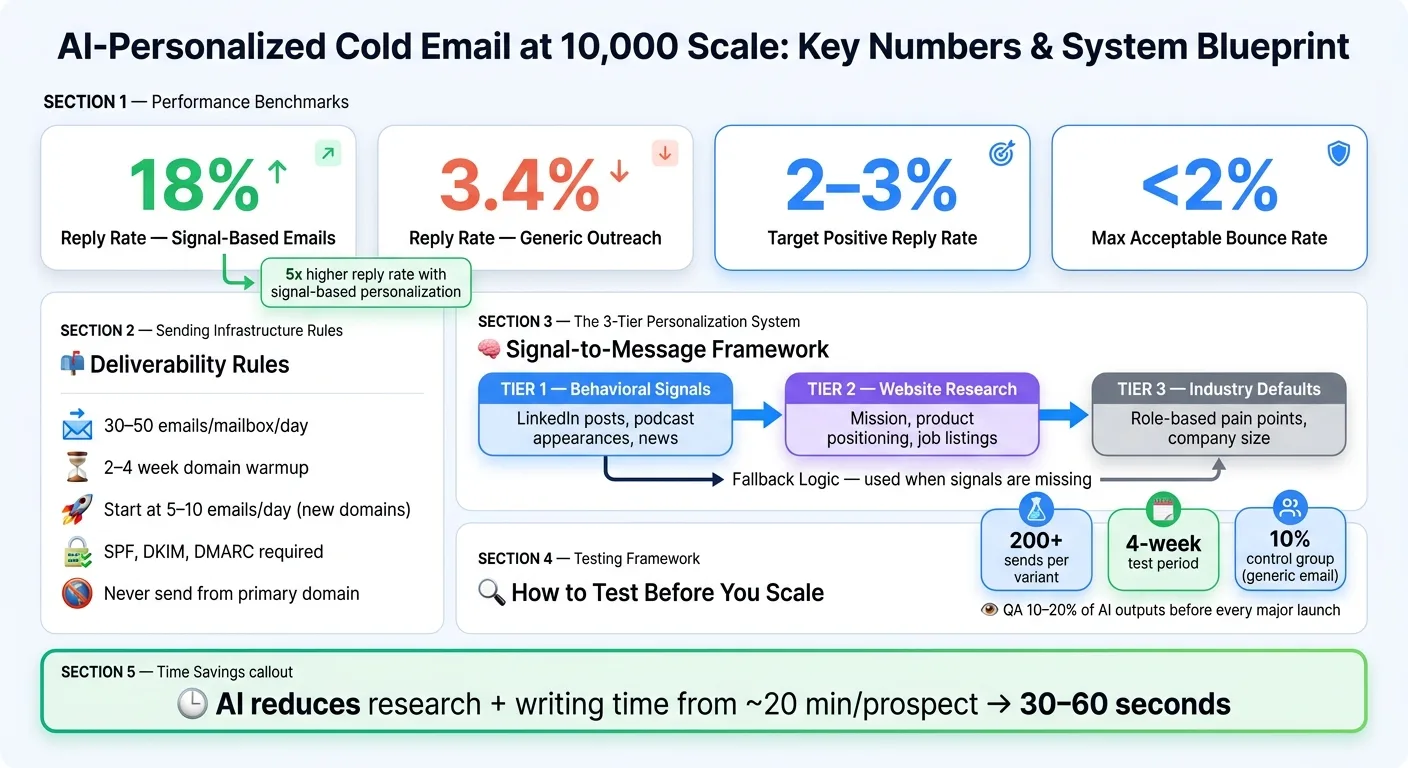
The article’s core numbers make the case fast. Signal-based emails can hit an 18% reply rate, while generic outreach sits around 3.4%. On the sending side, each mailbox should stay near 30–50 emails per day, bounce rate should stay under 2%, and new domains often need 2–4 weeks of warmup.
What I like here is the workflow focus. This is not just “write better prompts.” It’s a full system: data sourcing from tools like Apollo.io or Seamless.AI, deeper enrichment with Clay, automation through API/webhook flows, and sending through platforms such as OutreachFox, Instantly, or Lemlist. It also pushes a clear testing model: use 200+ sends per variant, run tests for about four weeks, and keep a 10% control group.
Here’s the short version of what matters most:
- Best email model for 10K scale: signal-based prompts
- Best use of AI: opener + second line
- What should stay templated: offer + CTA
- Best signals: funding, hiring, tech stack, job posts, recent posts
- Main risk: weak data leads to flat copy and more complaints
- Main fix: fallback tiers and QA on 10–20% of outputs
- Main success target: about 2–3% positive reply rate
If I were building this from scratch, I’d treat personalization as a data system first and a copy task second. That’s the big idea behind the full guide.
How to Scale Hyper-Personalized Cold Emails With AI Agents + Smartlead
Build the prospect data layer before writing a single email
Start with the fields that change the angle, proof, or timing of the email. Then define the exact fields AI will use inside prompts.
Choose the fields AI can actually use in copy
Use three field types:
- Identity: name, title, company, location
- Triggers: funding, hiring, product launches
- Proof: tech stack, job posts, LinkedIn posts from the last 14 days
Each group does a different job. Identity fields stop the message from sounding off. Trigger fields create the "why now" angle. Proof fields give AI something specific to point to, like tools, content, or recent activity that makes the pitch fit.
Before you prompt AI, normalize names, titles, and company spellings. Small errors here can throw off the whole email.
How to assemble and enrich a 10,000-contact list
For 10,000+ contacts, a realistic enrichment stack usually has two layers. The first is a base data source. Apollo.io or Seamless.AI are good options for pulling initial contact records with core identity fields. The second is an enrichment and signal layer that adds the trigger and proof fields your base source usually won't include.
Use waterfall enrichment to fill missing fields and verify email quality across multiple providers. Tools like Clay are built for this kind of multi-source orchestration. You can chain together 50+ data providers and run AI agents that scrape company websites and job listings for signals that standard databases often miss. Once the list is clean and verified, those fields can flow into prompt logic without breaking the copy.
Data sourcing and enrichment options for 10,000+ records: comparison table
| Platform | Data Completeness | Enrichment Flexibility | Fit for High-Volume | Key Strength |
|---|---|---|---|---|
| Apollo.io | High | Moderate | High | All-in-one sourcing and sequencing |
| Seamless.AI | High | Moderate | Moderate | Strong for initial contact sourcing |
| Clay | Variable | Extreme | High | Best for complex signal-based workflows |
| OutreachFox | High | High | Extreme | Infrastructure-first with private sending nodes |
Source broadly, enrich deeply, and verify before you send. That data layer should be the input for your message frameworks, not the output. With clean fields and verified records in place, map each signal to a prompt and fallback rule.
Design prompts and message frameworks that produce unique but usable emails
Use the enriched fields from the last step to shape your prompt logic. The aim is controlled variation. Each email should feel made for the prospect, while still sounding like your brand across 10,000 contacts.
Map prospect signals to each part of the email
Tie each email part to a clear prospect signal. That gives you variation without letting the copy drift.
| Email Part | Signal to Use | Example Output |
|---|---|---|
| Subject Line | Funding round, specific pain point | "60% faster regression testing for Series B teams" |
| Opener | LinkedIn post, job posting, tech stack change | "Saw you're hiring QA engineers right now" |
| Problem | Inferred bottleneck from hiring or tech signals | "Usually that means regression suites become the bottleneck" |
| Proof | Industry, company stage, similar customer | "We cut regression time 60% for teams like [Similar Company]" |
| CTA | Prospect readiness | "Worth a 15-min look?" |
A smart setup is to let AI write the opener and second line, then keep the offer and CTA templated and tested.
To keep the model on-brand, give it tight limits. Set a max word count under 25 words for openers. Ban filler like "I hope this finds you well." Add a rule that the model cannot invent facts. Ask for JSON output, such as {"opener": "...", "line_two": "..."}, so the result is easy to parse and drop into your sending tool. Use a moderate temperature to balance variety with factual control.
Use fallback logic so missing data does not break the campaign
At 10,000 contacts, some records will be missing signals. If you don't plan for that, you'll end up with broken copy or flat, generic lines that drag down the campaign.
Build a three-tier fallback into your prompt logic:
- Tier 1 uses the strongest behavioral signals, like recent LinkedIn posts, podcast appearances, or specific news.
- Tier 2 falls back to website-based research, such as company mission, product positioning, or active job listings.
- Tier 3 defaults to industry-level pain points matched to the prospect's role and company size.
Tell the model which fallback tier to use based on the fields present.
For name fields, use syntax like {{firstName|there}} so the greeting still reads naturally when a first name is missing. Then add an automated quality gate that flags outputs over the word limit or phrases like "growing company." That's usually a sign the fallback got too generic.
Token templates vs signal-based prompts vs full AI-written emails: comparison table
These three options aren't the same thing. Each one gives up some control in exchange for more uniqueness, and the best fit depends on your list quality and account value.
| Approach | Control | Uniqueness | Editing Effort | Consistency | Fit at 10K Scale |
|---|---|---|---|---|---|
| Token Templates | High | Low | Low | High | Best for sparse data lists |
| Signal-Based Prompts | Medium | High | Moderate | Moderate | Sweet spot for core ICP and mid-value accounts |
| Full AI-Written Emails | Low | Very High | High | Low | Best for high-value enterprise/strategic accounts |
For a 10,000-contact campaign, signal-based prompts are usually the practical default. Once the prompt structure is fixed, you can automate enrichment, validation, and sending without giving up control.
Automate the workflow from enrichment to send without losing control
Once your prompts and fallback rules are in place, the next step is to automate the path from enrichment to message generation to sending, without handing over the keys.
Set up the API and webhook flow
The goal is simple: move records from enrichment to AI generation to sending, then send replies and bounces back to the CRM in real time.
A common setup uses a structured enrichment layer like Clay, n8n for orchestration, and an API call to your AI model. From there, map the returned fields, such as opener and line_two, straight into custom fields in your sending platform. That keeps you out of the copy-paste mess and cuts down on formatting mistakes.
Webhooks should send replies and bounces back to the CRM too. The same flow should pause sequences when someone replies and route positive responses to SDRs.
For U.S.-based outbound, schedule sends in the prospect's local time zone and spread them across the day. That looks more natural and helps avoid big spikes in volume.
Protect deliverability while scaling personalization
If you're scaling, don't lean on one inbox. Spread volume across many warmed mailboxes and domains, with each warmed mailbox sending about 30–50 emails per day.
One bad batch can hurt an entire domain group. So don't send cold outreach from your main business domain. Use secondary domains instead, and make sure SPF, DKIM, and DMARC are fully set up.
New domains usually need a 2–4 week warmup period before they handle cold outreach. Start at about 5–10 emails per day and ramp up slowly. Keep bounce rates under 2%.
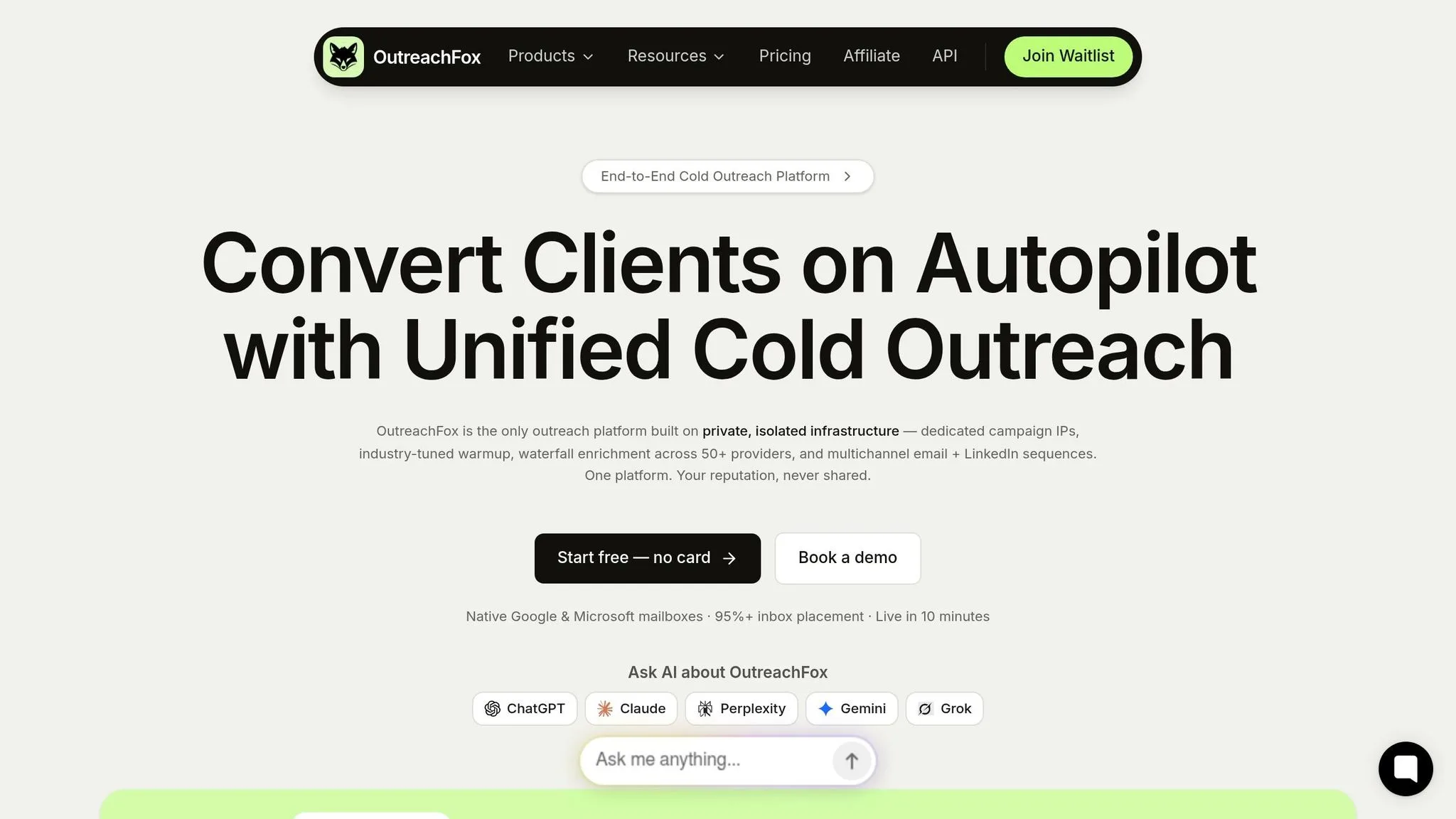
OutreachFox handles this layer natively, with private isolated sending environments, dedicated campaign IPs, and pre-warmed mailboxes that let teams move faster without going through a full warmup cycle.
OutreachFox vs Instantly vs Lemlist for AI-personalized sending: comparison table
Each platform makes different tradeoffs around infrastructure control, AI support, and multichannel reach. Here's how they compare for a 10,000-contact personalized campaign:
| Feature | OutreachFox | Instantly | Lemlist |
|---|---|---|---|
| Infrastructure Control | Private isolated infrastructure, dedicated campaign IPs | IP sharding and rotation | basic warmup |
| AI Workflow Support | Integrated AI sequence builder | AI Spintax writer and AI sequence writer | AI-generated drafts |
| Multichannel Support | Email + LinkedIn sequences | Primarily email-focused | Email + LinkedIn |
| Mailbox Health Visibility | Real-time per-mailbox metrics and webhook events | Automated warmup tracking | Warmup via Lemwarm and health monitoring |
| Fit for 10K+ campaigns | High - designed for isolated scale | High - unlimited accounts, flat-fee pricing | Moderate - per-user pricing model |
Instantly's flat-fee pricing model can make sense when you're running a large number of mailboxes. Lemlist's per-user model tends to fit smaller teams doing multichannel outreach. OutreachFox is a better match for teams that want full control over infrastructure, where sender reputation depends on their own sending behavior instead of a shared pool.
Once the workflow is live, test your signals, prompts, and send volume before you scale.
Measure results, improve the prompts, and scale what works
Once the workflow is live, the next job is simple: measure what earns more volume.
Start with bounce rate as your first health check. If it goes above 2%, you're likely facing deliverability risk. After that, watch reply rate, positive reply rate, and meetings booked.
It also helps to track time saved per email. That's your efficiency metric. AI can shrink research and writing time from about 20 minutes per prospect to roughly 30–60 seconds.
Positive reply rate is your main quality signal. Sort replies into "Interested", "Not Interested", and "Out of Office" so you can tell whether your prompts are pulling in real intent. A good target is 2–3% positive reply rate. If you're below that, the problem usually sits in the signal or the offer. And if people are replying but most of those replies are unsubscribes, that's a red flag. The personalization isn't working - it's just making more noise.
Run clean tests on signals, prompts, and send volume
Before you scale to the full 10,000-contact list, test signals in smaller, controlled batches.
For example, compare one signal type, like recent funding, against another, like tech stack, over a four-week period with at least 200 sends per variant. Keep everything else the same:
- the same subject line
- the same CTA
- the same sending infrastructure
That’s how you get a clean read. If positive reply rate changes, you can tie that change to the signal itself instead of blaming deliverability or weak list quality.
You should also keep a 10% control group that gets a generic control email. Without that control, there's no clean way to measure lift. Then break results down by signal type so you can spot which data points keep driving positive replies. Scale only the signal-to-message pairs that beat the control group.
Turn winning patterns into a repeatable outbound system
When one signal-to-message combination beats the rest, document it right away. Save the signal source, the prompt structure, the fallback logic, and the positive reply rate it produced.
Over time, this turns into a working library of tested combinations - funding triggers, hiring signals, and tech stack data - each tied to a proven prompt and a known baseline.
Human review still matters at scale, but the role changes. Instead of checking everything, manually QA a random 10–20% sample of AI-generated openers before every major launch. That’s usually enough to catch hallucinated facts or awkward phrasing without slowing the operation down.
Store the winners in a playbook and reuse them.
Frequently asked questions
What email volume should each warmed mailbox handle when sending AI-personalized cold emails at scale?+
Each warmed mailbox should send approximately 30–50 emails per day. New domains typically need a 2–4 week warmup period, starting at 5–10 emails per day and ramping up slowly. This approach helps maintain deliverability and keeps bounce rates under 2%.
Which parts of a cold email should be AI-generated versus templated in a 10,000-contact campaign?+
AI should write the opener and second line based on prospect signals, while the offer and CTA should remain templated and tested. This approach balances personalization with brand consistency and allows controlled variation across thousands of emails.
What are the three fallback tiers recommended when prospect data is missing?+
Tier 1 uses strong behavioral signals like recent LinkedIn posts or specific news. Tier 2 falls back to website-based research such as company mission or job listings. Tier 3 defaults to industry-level pain points matched to the prospect's role and company size.
How many test sends and how long should you run experiments before scaling a signal-based email campaign?+
Run tests with at least 200 sends per variant over approximately four weeks. Keep a 10% control group receiving generic emails to measure lift, and maintain all other variables constant to get clean attribution on what drives positive replies.
What positive reply rate should teams target with AI-personalized outreach at scale?+
A good target is 2–3% positive reply rate. This article notes that signal-based emails can hit 18% total reply rate, compared to 3.4% for generic outreach, but positive replies specifically indicate real buyer intent versus unsubscribes or negative responses.
What three field types should enrichment layers include for effective AI personalization?+
Identity fields include name, title, company, and location. Trigger fields capture funding, hiring, and product launches that create urgency. Proof fields provide specifics like tech stack, job posts, or LinkedIn activity from the last 14 days that AI can reference in copy.
How much time does AI-powered personalization save compared to manual research per prospect?+
AI can reduce research and writing time from approximately 20 minutes per prospect to roughly 30–60 seconds. This efficiency gain makes personalization economically viable at 10,000+ contact scale while maintaining quality through structured prompts and fallback logic.