
Google Postmaster domain reputation ratings (High, Medium, Low, Bad) indicate Gmail's trust level for your domain and directly impact inbox placement. Maintain High by keeping steady sending patterns, fix Medium by reviewing complaints and
- High rating means Gmail trusts your domain; Medium signals trust is weakening
- Low and Bad ratings lead to spam placement and potential message blocks
- Spam complaints above 0.3% can quickly damage your domain reputation
- Authentication records, list quality, and sending consistency drive rating changes
- Monitor Postmaster regularly alongside spam rate, IP reputation, and authentication
- Isolate high-risk campaigns on separate domains to prevent reputation spillover
Google Postmaster Domain Reputation: What Ratings Mean
Your Google Postmaster rating tells you one thing fast: whether Gmail is likely to trust your domain. If the rating is High, your email has a better shot at the inbox. If it drops to Medium, Low, or Bad, spam placement and even message blocks become more likely.
Here's the short version:
- High = Gmail sees a long, steady sending history
- Medium = trust is slipping and problems may be starting
- Low = Gmail already sees your domain as risky
- Bad = Gmail sees severe reputation damage
I'd read this rating next to three other signals:
- Spam rate: how often users mark your messages as spam
- IP reputation: how Gmail views the servers or setup sending your email
- Authentication: whether SPF, DKIM, and DMARC pass
A poor rating usually comes from a few common issues:
- sending to old or low-quality lists
- complaint spikes
- weak open or read behavior
- broken email auth records
- sudden jumps in send volume
- spillover from shared sending setups
What I'd do next depends on the rating:
- High: keep volume steady and watch complaints
- Medium: review recent sends before scaling
- Low: cut volume and clean your list
- Bad: stop sending, fix the cause, then restart slowly
How to Use Google Postmaster Tools to Improve Email Deliverability
Quick Comparison
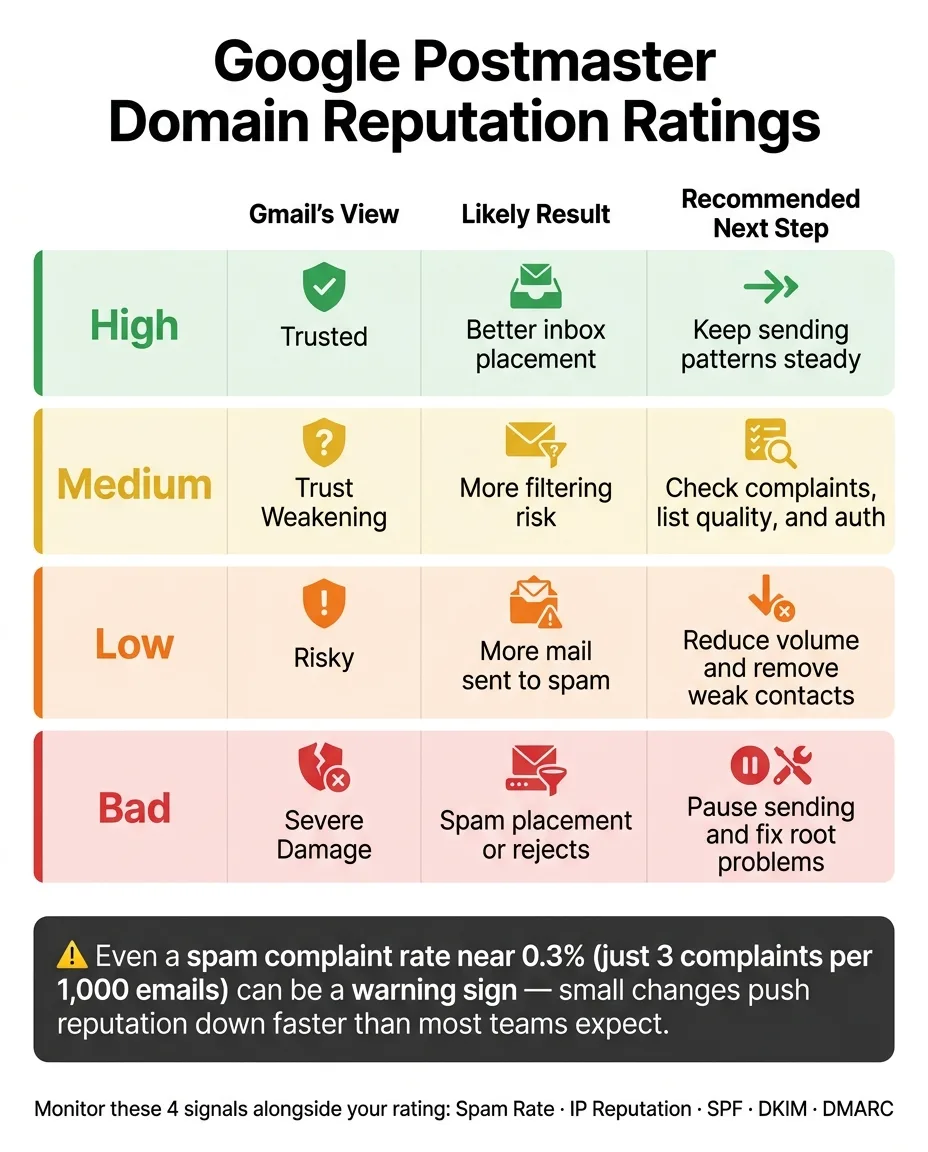
| Rating | Gmail's view | Likely result | Next step |
|---|---|---|---|
| High | Trusted | Better inbox placement | Keep sending patterns steady |
| Medium | Trust weakening | More filtering risk | Check complaints, list quality, and auth |
| Low | Risky | More mail sent to spam | Reduce volume and remove weak contacts |
| Bad | Severe damage | Spam placement or rejects | Pause sending and fix root problems |
One stat worth keeping in mind: even a spam complaint rate near 0.3% can be a warning sign for many senders. That's only about 3 complaints per 1,000 emails. So small changes in user response can push reputation down faster than many teams expect.
If you want a simple way to read Postmaster, this is it: the rating is not just a label - it's a live signal of sending health.
What each Google Postmaster rating means
Think of these ratings as a simple scale. High means things look steady. Medium is a warning. Low means performance is already hurt. Bad points to serious trouble.
High and Medium: trusted sender vs. early warning signs
High is the steady operating range. If you want to stay there, keep sending volume, complaint rates, and authentication consistent.
Medium means trust is slipping. Complaint spikes, old lists, or uneven sending patterns can drag the domain down from here.
Low and Bad: active deliverability problems
Low means Gmail is already flagging the domain as risky. At that point, a large share of Gmail messages may land in spam.
Bad means Gmail sees severe and persistent reputation damage. Spam placement is likely, and message rejection can happen too.
Comparison table: High vs. Medium vs. Low vs. Bad
| Rating | What it means |
|---|---|
| High | Long, stable positive history with Gmail; inbox delivery is likely. |
| Medium | Trust is weakening; complaints, stale lists, or erratic sending volume can push it lower. |
| Low | Gmail treats the domain as risky; a significant share of Gmail mail goes to spam. |
| Bad | Severe reputation damage; inbox placement is unreliable. |
These ratings show the result. The next section explains what causes a domain to move between them.
What causes domain reputation to change
Those ratings don't shift at random. Domain reputation changes based on list quality, engagement, authentication, and sending consistency.
Spam complaints, stale data, and low engagement
Bad lists can hurt reputation fast. Old, bought, or scraped contacts tend to lead to more spam complaints and weaker engagement than clean, permission-based lists.
And it's not just about complaints. Passive behavior matters too. If people keep ignoring your emails or deleting them without opening, Gmail reads that as a bad sign. For outbound teams sending at scale, understanding how bounce rates directly impact sender reputation helps prevent these reputation drops before they happen.
Authentication gaps and sudden volume changes
If SPF, DKIM, or DMARC records are broken or set up the wrong way, Gmail is less likely to trust the domain. That can drag down reputation.
Volume patterns matter too. When you launch new domains or mailboxes, go slow. Big spikes or choppy sending schedules can push reputation down.
Shared infrastructure risk vs. isolated sending environments
Shared infrastructure can muddy the waters. One sender's complaints can spill over and affect others on the same setup, which is why shared warmup pools hurt deliverability even when your own practices are sound.
With isolated infrastructure, reputation stays tied to your own sending behavior.
Next, match the rating to the fix.
What to do next based on your rating
Treat each rating like a clear action signal. Each status tells you what to fix next.
How to maintain High or fix Medium
High: keep list hygiene tight and monitor on a regular basis.
Medium: audit recent sends for complaints, engagement drops, and auth failures before you scale.
If the rating keeps slipping, move to the recovery steps below.
How to recover from Low or Bad
Low means deliverability is already taking a hit. Cut volume right away and remove low-quality contacts. Don't ramp sending back up until trust starts to recover, and consider following a structured domain warmup protocol to rebuild trust gradually.
Bad means stop sending from that domain. Pause the campaigns causing harm and remove risky sources from your list-building process. Fix SPF, DKIM, and DMARC, then restart at low volume.
If more than one domain is affected, isolate them before you send again.
When to separate infrastructure and how to monitor it
When bad signals spread across multiple campaigns, split the sending environment. Put high-risk workflows on separate domains with their own dedicated sending environments. Platforms like OutreachFox isolate mailboxes and dedicated campaign IPs, which helps keep one campaign's issues from spilling into the rest.
Conclusion: Use Postmaster ratings as a sending health signal
Google Postmaster domain reputation shows Gmail's current trust signal for your domain. It's not a static score. It's a sending health signal that changes based on how you send.
In plain English, your rating moves with your behavior. Spam complaints, engagement, authentication, list quality, and send volume all play a part.
Here's the practical takeaway:
- High: protect it
- Medium: fix weak spots
- Low: pause, clean up, and review what went wrong
- Bad: stop sending until you diagnose the serious deliverability problem
Each rating shows where you stand and what needs attention next.
That's why regular review matters. Check Postmaster often, and look at it alongside your other deliverability signals - not only after inbox placement starts to slip.
Frequently asked questions
What spam complaint rate is considered risky according to Google Postmaster monitoring?+
A spam complaint rate near 0.3% can be a warning sign for many senders, which equals about 3 complaints per 1,000 emails. This seemingly small percentage can push domain reputation down faster than most teams expect, highlighting how sensitive Gmail's trust signals are to user complaints.
How does a Medium rating differ from a High rating in Google Postmaster?+
A High rating indicates Gmail sees a long, stable positive history and inbox delivery is likely. A Medium rating means trust is weakening, often due to complaint spikes, stale lists, or erratic sending patterns. Medium serves as an early warning that problems may be starting before deliverability is significantly impacted.
What immediate action should you take if your domain receives a Bad rating?+
With a Bad rating, you should stop sending from that domain immediately. Pause the campaigns causing harm, fix authentication records like SPF, DKIM, and DMARC, remove risky sources from your list-building process, and only restart at low volume after addressing root problems.
Can shared email infrastructure affect your Google Postmaster domain reputation?+
Yes, shared infrastructure can cause spillover problems where one sender's complaints affect others on the same setup. With isolated infrastructure, reputation stays tied to your own sending behavior, which is why separating high-risk workflows onto dedicated domains and sending environments helps protect overall reputation.
Besides spam complaints, what other factors does Gmail consider for domain reputation?+
Gmail considers engagement signals like open and read behavior, authentication status of SPF, DKIM, and DMARC records, sending volume consistency, list quality and age, and IP reputation. Even passive negative behavior like users consistently ignoring or deleting emails without opening affects how Gmail views your domain.
What should you do if your rating drops to Low in Google Postmaster Tools?+
With a Low rating, you should cut sending volume immediately and remove low-quality contacts from your list. At this level, Gmail already treats the domain as risky and a significant share of mail goes to spam. Don't ramp sending back up until trust signals start to recover.