Links hurt cold email deliverability, especially on first touch. Send the first email with no links, then add one direct HTTPS link only after the prospect shows interest.
- First-touch cold emails perform best with no links at all
- Use one direct HTTPS link only after a prospect replies or shows interest
- Avoid link shorteners, shared tracking domains, and redirect chains completely
- Multiple links and tracked links increase spam filter risk significantly
- Configure SPF, DKIM, and DMARC on every sending domain before campaigns
- Hidden links in signatures, icons, and badges still trigger spam filters
Does Adding Links To Cold Email Hurt Deliverability?
Yes - links can hurt cold email deliverability, most of all on the first email. If I want more replies and better inbox placement, I should usually send the first touch with no links, no click tracking, and very little HTML.
Here's the short version:
- First touch: send no link
- After a reply or clear interest: use one direct HTTPS link
- Avoid: link shorteners, shared tracking domains, redirect chains, and link-heavy signatures
- Watch for hidden links: social icons, logos, badges, and calendar tools can still add spam risk
- Setup still matters: SPF, DKIM, and DMARC should be in place on every sending domain
Why? Because filters don't look at the hyperlink alone. They look at the full URL path, redirect behavior, domain history, link count, and whether the email looks like a mass promo.
A plain-text cold email often performs better than a polished one. In many outbound tests shared by sales teams, cutting links and tracking from first-touch emails can improve reply rates and inbox placement, while tracked or shared-domain links tend to add risk.
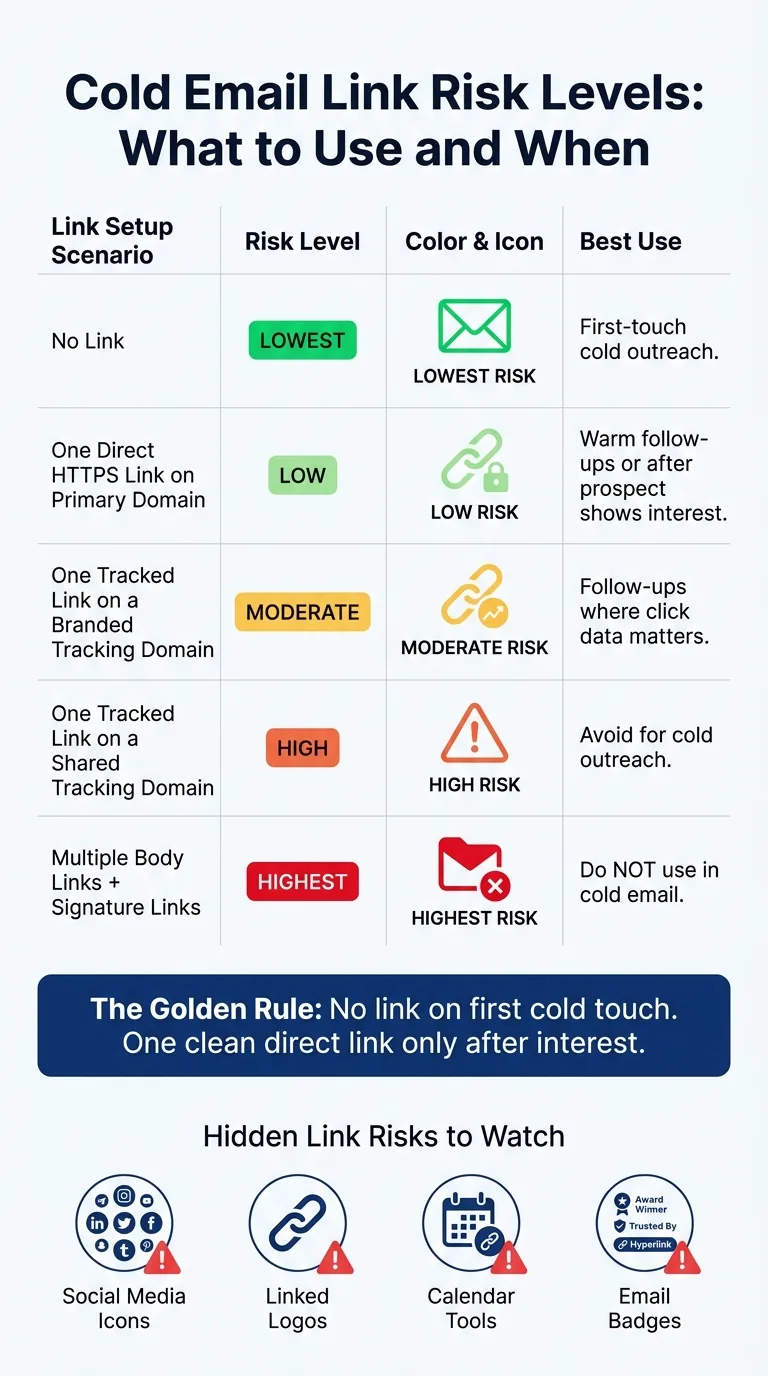
If I had to follow one rule, it would be this: no link on cold first touch, one clean link only after interest.
| Setup | Risk | Best time to use it |
|---|---|---|
| No link | Lowest | First cold email |
| One direct link to my main domain | Low | After reply or interest |
| One branded tracked link | Medium | Follow-ups when click data matters |
| One shared-domain tracked link | High | Usually avoid |
| Multiple links in body + signature | Highest | Do not use in cold outreach |
That's the core answer. The rest comes down to keeping the email simple, the links clean, and the sending setup tight.
What in a link triggers spam filters
The risk doesn't come from just the hyperlink itself. It comes from the full URL pattern.
Spam filters look at the whole picture: the full destination, links in signatures, and even small icon links. And when several warning signs show up at once, the risk stacks up fast.
Link count and link density
A short cold email with a lot of links can look promotional in a hurry.
More links, or a higher link density, gives filters a bulk-email signal. In plain English, the message starts to look less like a personal note and more like something sent at scale.
Redirect chains, click tracking, and shared tracking domains
URL shorteners and click tracking often add redirect chains, where the reader goes from a tracking URL to the final page.
Filters often read that as phishing-like behavior, especially when the link runs through a shared tracking domain. Here's the problem: if another sender using that same domain gets flagged, your emails can get hit by that bad reputation too.
Anchor text, destination domain age, and domain reputation
If the visible text says one thing but the link goes somewhere else, filters may treat it like a phishing attempt.
Filters also check the destination domain itself. They look at things like domain age and reputation. A newly registered domain or an unfamiliar TLD can look riskier than an established domain that matches your brand.
That's why first-touch cold emails usually do best with no link at all.
When to use one link and when to use none
This mostly comes down to timing. Add links only when they help the reader and don't make the email feel like a pitch. Since link count, redirects, tracking domains, and domain age can all increase risk, timing matters more than the link itself.
Use no link in first-touch cold email
Your first cold email should usually be plain text with light formatting, especially if you're sending from newer domains or mailboxes that are still building reputation. That keeps the focus where you want it: on getting a reply, not pushing a click.
Use one direct link only after the prospect shows interest
Once a prospect replies or clearly asks for more information, one link is usually fine. Keep it simple. Use one direct HTTPS link to your primary domain, like your homepage or a case study page.
A warm thread can usually handle one link. A cold one usually can't.
Safest link type
If you need to include a link, the safest option is a single direct HTTPS link on your primary domain. If the prospect hasn't asked for more, leave the link out.
How to reduce link risk in live campaigns
Knowing when to use a link is only half the job. The other half is making sure your template, signature, and sending setup don't quietly hurt inbox placement. Once you decide to include a link, the rest of the email needs to stay just as clean.
Clean up templates, signatures, and tracking settings
Start with the obvious clutter. Remove social media icons, badges, and extra URLs from your signature and template. If your email includes heavy HTML or a linked logo, cut it for cold outreach.
Cold emails work best when they look simple and direct. Too much design can make a message feel like a promo blast instead of a personal note, which is why content fixes often matter as much as technical setup.
Turn off click tracking on cold sends. If click data matters, use a branded tracking domain.
Use branded domains, authentication, and isolated infrastructure
Clean copy helps, but it won't save a bad sending setup. If your domain isn't set up the right way, even a plain-text email with no links can still land in spam.
Make sure SPF, DKIM, and DMARC are configured on every domain you send from.
If you need click data, use a branded tracking domain under your own domain. That keeps the link setup tied to your brand instead of a shared system.
Isolated infrastructure matters too. Shared pools also share reputation, and that's where things can get messy fast. Platforms like OutreachFox isolate campaign IPs and mailboxes, so reputation stays tied to your own sending.
Cold email link setups by risk level: comparison table
Use the setups below as a simple checklist before a campaign goes live.
| Link Setup | Risk | Best Use |
|---|---|---|
| No link | Lowest | First-touch cold outreach |
| One direct HTTPS link on your primary domain | Low | Warm follow-ups |
| One tracked link on a branded tracking domain | Moderate | Follow-ups where click data matters |
| One tracked link on a shared tracking domain | High | Avoid for cold outreach |
| Multiple body links and signature links | Highest | Do not use in cold email |
Conclusion: A clear rule set for cold email links
The rule is pretty simple: links are fine in cold email only if the setup is clean and the timing fits. The main things to watch are link count, redirect chains, and shared tracking domains. If the email still works without a link, send it without one.
Key rules to keep in mind
- Keep link count low and skip extra links: multiple links in a cold email are a fast path to the spam folder.
- Avoid redirect chains, link shorteners, and shared tracking domains: they add filtering risk and connect your reputation to other senders.
- Use a link only when it helps the prospect take action: no link on first touch, one direct link after interest.
First touch should usually be link-free. Later replies can include one direct link after interest.
Frequently asked questions
Should I include a link in my first cold email?+
No, you should usually send the first cold email with no links. First-touch emails perform better with no links, no click tracking, and very little HTML. Filters evaluate link count, redirect behavior, and domain history, and cold emails with links can trigger spam filters more easily.
When is it safe to add a link to a cold email sequence?+
It's safe to add one direct HTTPS link after a prospect replies or shows clear interest. Once you have a warm thread, a single link to your primary domain (like a homepage or case study page) usually won't hurt deliverability. The key is waiting until the prospect has engaged first.
Why do click tracking links hurt cold email deliverability?+
Click tracking links create redirect chains that spam filters often read as phishing-like behavior. Shared tracking domains are especially risky because if another sender using that same domain gets flagged, your emails can inherit that bad reputation. Branded tracking domains carry less risk but should still be avoided on first touch.
What makes multiple links in a cold email risky?+
Multiple links increase link density, which gives spam filters a bulk-email signal. The message starts to look less like a personal note and more like mass promotional content. This includes links in your signature, social media icons, logos, and badges—not just links in the email body.
Can links in my email signature affect cold email deliverability?+
Yes, links in signatures count toward total link count and can hurt deliverability. Social media icons, badges, logos, and calendar tool links all add spam risk. For cold outreach, you should remove these extra URLs and keep your signature simple.
What type of link is safest to use in cold email follow-ups?+
A single direct HTTPS link to your primary domain is the safest option. This means no redirects, no tracking, and the link goes directly to an established domain that matches your brand. Avoid URL shorteners, shared tracking domains, and redirect chains entirely.
Do I still need SPF, DKIM, and DMARC if I'm not using links in cold emails?+
Yes, proper email authentication (SPF, DKIM, and DMARC) should be configured on every sending domain regardless of whether you include links. Clean copy won't save a bad sending setup—even plain-text emails with no links can land in spam if authentication isn't properly configured.