
Isolated mailboxes keep your sending reputation separate and stable, while shared mailboxes pool reputation across senders, creating higher deliverability risk from others' spam complaints and bounces.
- Shared mailboxes pool reputation; one sender's mistakes affect everyone on the IP
- Isolated setups contain spam complaints and bounces to individual senders only
- Private warmup takes 4-6 weeks but builds stable, independent sender reputation
- Shared infrastructure offers faster setup but less control over inbox placement
- Isolated mailboxes make root-cause analysis easier when deliverability issues arise
- Long-term inbox rate stability favors isolated infrastructure over shared pools
Shared vs Isolated Mailboxes: Deliverability
If I want steadier inbox placement, I pick isolated mailboxes. Shared setups are easier to start, but they come with pooled reputation, more exposure to other senders’ spam complaints, and less stable warmup signals.
Here’s the short version:
- Shared mailboxes put my sending reputation in a group pool.
- Isolated mailboxes keep my reputation tied to my own sending.
- Shared pools can shift fast if another sender gets high complaint or bounce rates.
- Isolated setups make it easier for me to spot problems and fix them.
- Warmup is often more stable when it happens mailbox by mailbox instead of through a group pool.
- For teams that care about long-term inbox rate, isolated setups usually win.
A few numbers stand out right away:
- Dedicated SMTP IP warmup often takes 4–6 weeks
- A common starting range is 50–100 emails per day
- Volume often grows by 20%–30% per day during ramp-up
World’s BIGGEST Cold Email Deliverability Test (Gmail vs Outlook vs SMTP)

Quick Comparison
| Factor | Shared Mailboxes | Isolated Mailboxes |
|---|---|---|
| Reputation | Pooled with other senders | Tied to my own activity |
| Spam complaint impact | Can affect the whole pool | Usually stays contained |
| Warmup signals | Group-based | Mailbox-based |
| Inbox placement stability | More swings | More steady |
| Root-cause analysis | Harder | Easier |
| Setup speed | Faster | More setup work |
Put simply, shared means less control, while isolated means more control over deliverability. That’s the main takeaway from the article.
Shared mailboxes: faster setup, broader reputation risk
Shared sending infrastructure sends email through IPs and mail servers used by many senders. That means reputation is pooled. If one sender behaves badly, everyone on that setup can feel it.
The upside is speed. You can get started fast.
The downside is control. Inbox placement doesn't depend only on what you do. It depends on everyone sharing that IP. That's the tradeoff in plain English: faster launch, less control when placement slips.
How reputation spread works in shared pools
Gmail and Outlook look at shared IP behavior as a group. So when one sender in the pool runs a high-bounce campaign or gets flagged for spam, receiving servers may throttle, send messages to spam, or block the whole IP.
That's what makes shared pools shaky. One sender's bounce spike or spam issue can pull down inbox placement for everyone on that IP. And once complaints start piling up, they're harder to box in because the damage spreads across the pool.
Why spam complaints carry more weight in multi-tenant setups
In shared pools, spam complaints don't just hurt one sender. They affect the whole setup.
The harder part is figuring out why placement dropped. In a shared environment, you usually can't see what other senders are doing. So if your inbox placement falls, you're often left guessing. Shared warmup pools make this even messier because the engagement signals come from the group, not from your mailbox alone.
Shared warmup pools: the upside and the downside
Shared warmup pools can get new mailboxes active fast. But there's a catch: their engagement signals are collective, and that can skew placement.
If the pool starts slipping because a few senders push up complaint or bounce rates, your placement can move around without much warning. One day things look fine. The next day, deliverability takes a hit, and you may not know what changed.
| Factor | Shared Infrastructure | Isolated Infrastructure |
|---|---|---|
| Reputation control | None (pooled with others) | Full (individual account reputation) |
| Exposure to others' spam complaints | High (noisy neighbor effect) | Low (isolated consequences) |
| Warmup model | Shared / collective signals | Private / individual signals |
| Scaling stability | High variability, unpredictable | Consistent, manageable |
Isolated mailboxes: more setup work, more control
An isolated mailbox keeps each sender’s reputation separate. So Gmail and Outlook judge your behavior on its own. As sending volume grows, that separation tends to make inbox placement more predictable.
How reputation isolation protects mailbox health
With an isolated setup, complaints, bounces, and engagement signals stay contained to your own mailboxes. That usually leads to higher and steadier inbox placement than shared pools. And if placement drops, the cause is easier to spot because you can tie it back to your own bounce rate, complaint rate, and sending habits.
This matters most during warmup. Early signals can shape future inbox placement, so keeping those signals separate gives you tighter control.
What private warmup looks like in isolated setups
Private warmup happens mailbox by mailbox and IP by IP. The goal is to build reputation over time through sending patterns that match your industry and use case.
Dedicated SMTP IPs often need 4–6 weeks of gradual ramp-up. A common starting point is 50–100 emails per day, then increasing volume by 20–30% daily. Google Workspace and Microsoft 365 accounts often ramp faster because they start with a base level of trust.
The tradeoff is simple: slower ramp, tighter sending control. But the upside is clear. Your reputation reflects your own sending quality, not the behavior of everyone else in a shared pool.
Tools made for isolated infrastructure should follow that same mailbox-by-mailbox approach.
Where OutreachFox fits in the isolated model

OutreachFox follows this model with private campaign IPs, pre-warmed mailboxes, and per-mailbox health analytics.
Next: a direct comparison of reputation spread, complaint radius, and recovery speed.
Shared vs isolated: head-to-head deliverability comparison
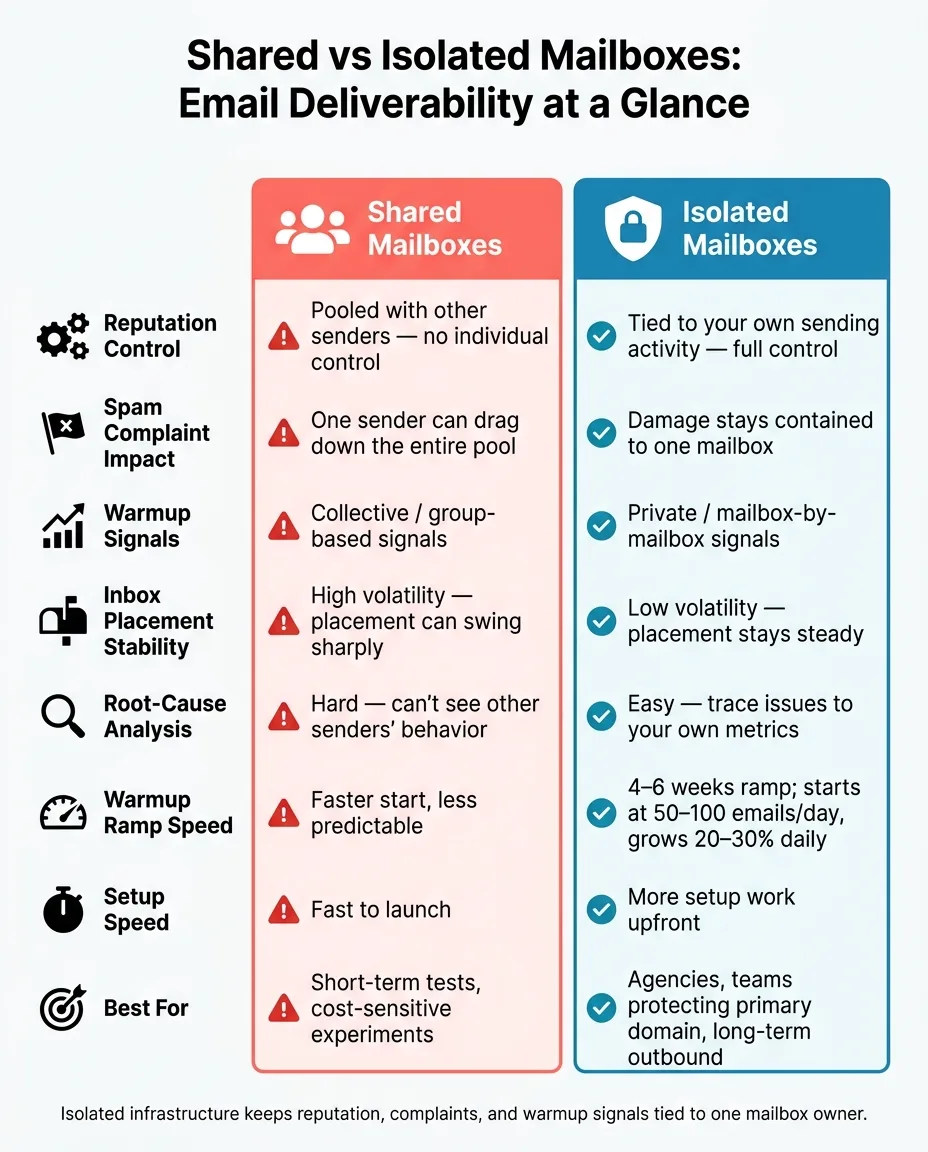
Here’s how the two setups compare on the metrics that decide whether your emails hit the inbox or drift into spam. The gap shows up first in how reputation shifts. Then you see it again in how fast you can bounce back when placement slips.
| Factor | Shared Infrastructure | Isolated Infrastructure |
|---|---|---|
| Reputation spread | Shared pool makes root-cause analysis harder | Isolation makes cause and effect easier to trace |
| Complaint radius | One sender can drag down the pool | One sender stays contained |
| Warmup pool behavior | Shared warmup history can still affect placement | Private ramp; reputation builds on your own sending history |
| Inbox placement volatility | High - placement can swing sharply | Low - placement stays more stable |
Reputation spread, complaint radius, and recovery speed
Shared infrastructure can turn one sender’s mistake into everyone’s problem. Isolated infrastructure keeps the damage boxed in.
In a shared setup, if a neighbor’s campaign triggers a blocklist, your placement can drop right along with theirs. That’s the frustrating part: you didn’t cause the issue, but you still pay for it. And until they stop, there’s not much you can do.
With an isolated setup, a complaint stays tied to that mailbox or domain. It doesn’t spill across the rest of your setup. The rest of your infrastructure keeps running.
Recovery is usually faster with isolated infrastructure because you control the levers that matter, like bounce rate, volume, and list hygiene. In a shared pool, recovery depends on the pool.
How this plays out across real tools
This isn’t just a technical edge case. It shows up in the tools people use every day.
Shared tools like Instantly and Smartlead inherit pool-level risk. Isolated stacks keep reputation, complaints, and warmup signals tied to one mailbox owner. OutreachFox uses isolated infrastructure, so each customer’s reputation stands on its own.
Conclusion: which setup fits your outbound team
The right choice comes down to one thing: how much deliverability risk your team can live with.
Three factors drive that call - reputation spread, complaint radius, and warmup behavior. Those are the levers that shape whether inbox placement stays steady or starts to slip. In plain English, the decision is usually this: do you want less work up front, or less deliverability risk over time?
Shared setups make sense when you're running short-term tests or trying to keep costs down. They can work for quick experiments. But the deliverability tradeoff is real. Shared setups usually lead to weaker inbox placement than isolated setups. And that lower per-mailbox price stops mattering fast if inbox placement falls and your cost per meeting goes up.
Isolated setups are the practical choice for agencies handling multiple clients and for teams that can't risk damage to their primary domain.
You see the same pattern with warmup. Shared warmup signals are less dependable than private warmup signals. Spam complaints can hit a much larger area in shared pools. And when reputation is spread across a shared setup, root-cause analysis gets messy. Isolated infrastructure keeps damage contained and gives you more control over long-term inbox placement.
If you want isolated infrastructure that's ready to go, OutreachFox provisions pre-warmed Google, Microsoft, SMTP, and Azure mailboxes with dedicated campaign IPs, so teams can launch without the usual warmup ramp.
Frequently asked questions
How does one sender's poor behavior in a shared mailbox pool affect my inbox placement?+
In shared mailbox setups, Gmail and Outlook evaluate the entire IP pool as a group. When one sender triggers high bounce rates or spam complaints, receiving servers may throttle or block the whole IP, causing your emails to land in spam even if your sending behavior is clean. Your reputation is tied to everyone else's actions in the pool.
What is the typical warmup timeline for isolated mailboxes using dedicated SMTP IPs?+
Dedicated SMTP IP warmup typically takes 4–6 weeks with a gradual volume increase. Most senders start at 50–100 emails per day and increase volume by 20–30% daily during the ramp-up period. Google Workspace and Microsoft 365 accounts often warm faster because they start with established baseline trust.
Why is root-cause analysis harder with shared infrastructure when inbox placement drops?+
In shared pools, you cannot see what other senders are doing on the same IP. When inbox placement suddenly drops, you're left guessing whether it was caused by your own campaigns or another sender's spam complaints, bounces, or blacklist triggers. This lack of visibility makes troubleshooting and fixing deliverability issues significantly more difficult.
How does complaint radius differ between shared and isolated mailbox setups?+
In shared setups, spam complaints from one sender can drag down inbox placement for the entire pool, creating a wide complaint radius. With isolated mailboxes, complaints stay contained to that specific mailbox or domain, preventing the damage from spreading across your other sending infrastructure.
What makes recovery from deliverability issues faster with isolated infrastructure?+
Isolated setups give you direct control over the factors that matter most—bounce rate, volume, and list hygiene—because your reputation is tied only to your sending behavior. In shared pools, recovery depends on the entire pool improving, which is outside your control and can take much longer.
Do shared warmup pools affect individual mailbox reputation even after warmup is complete?+
Yes, shared warmup history can continue to affect placement because engagement signals come from the collective group rather than your individual mailbox. If the warmup pool's overall metrics decline due to other senders' poor practices, your inbox placement can suffer even though you completed warmup and are sending responsibly.