
Sender reputation (bounces, authentication, domain health) impacts inbox placement more than spam trigger words. Fix infrastructure and list quality first, then optimize copy.
- Sender reputation affects inbox placement more than individual spam words in emails
- High bounce rates and missing SPF DKIM DMARC damage delivery faster than copy
- Shared warmup pools can hurt your reputation through other senders bad behavior
- Fix deliverability in order: list cleaning authentication infrastructure warmup then copy review
- Spam words matter most when your domain is new weak or neutral
Email Spam Words vs Sender Reputation: Comparison
If your cold emails stop hitting the inbox, the problem is usually sender reputation before copy.
I’d sum it up like this: spam-trigger words can hurt, but mailbox providers look at more than wording. They also score bounce rate, spam complaints, domain setup, sending volume, engagement, SPF, DKIM, DMARC, and shared vs. isolated infrastructure. In many cases, a clean email from a weak setup still struggles, while a plain email from a healthy setup has a better shot.
Here’s the short version:
- Spam words matter most when your domain is new, neutral, or already weak
- Sender reputation has more impact on inbox placement across campaigns
- High bounce rates and complaints can damage delivery fast
- SPF, DKIM, and DMARC must be set up before you blame copy
- Shared warmup pools can hurt you if other senders behave badly
- The right fix order is: list cleaning, authentication, infrastructure, warmup, then copy review
A useful way to think about it: if one domain underperforms no matter what you send, I’d check reputation and setup first. If the same domain performs differently with different email versions, copy is more likely the issue.
Mailbox providers do not judge one phrase alone. They look for patterns. For example, an email packed with all caps, extra punctuation, urgency, and promo claims can push risk up. But if your bounce rate is above 3% to 5% or spam complaints start climbing, that often does more damage than one bad line of copy.
Bottom line: I’d treat spam words as a secondary check, not the first fix.
Email Deliverability for Non Techies: The 3 Things That Actually Matter
Quick Comparison
| Factor | Spam Words / Copy Signals | Sender Reputation / Setup Signals |
|---|---|---|
| What filters look at | Wording, tone, punctuation, all-caps, promo patterns | Bounces, complaints, domain history, authentication, volume, engagement |
| When it matters most | New or weak domains; promo-heavy emails | Across all campaigns; poor setup or weak sending history |
| Common warning signs | One email version performs worse than another | Low inbox placement across many campaigns |
| Main causes | Urgency lines, hype, vague claims, stacked triggers | Bad lists, no SPF/DKIM/DMARC, volume spikes, shared pools |
| What to fix first | Rewrite after setup checks pass | Audit list, domain, authentication, warmup, infrastructure |
| Risk level | Often limited on its own | Usually the main driver |
If you want a simple rule, I’d use this one: fix the sending setup first, then fix the words.
Email Spam Words: What Content Filters Actually Check
Once you understand the broad scoring model, the next step is simpler: which content patterns tend to set off spam filters?
The short answer is that filters look for patterns in language, not just one bad word here or there. Copy can affect inbox placement, but it usually doesn't outweigh a strong sender reputation.
Copy patterns that raise spam risk
Spam filters respond to clusters of promotional language, not isolated words on their own. The patterns that most often increase risk include:
- urgency cues like "Act now" or "Limited time only"
- exaggerated promises like "Guaranteed results" or "100% free"
- heavy punctuation, such as multiple exclamation points or strings of question marks
- all-caps emphasis like "CLICK HERE" or "DON'T MISS OUT"
- vague benefit claims that sound more like ad copy than a direct message
Any one of these can push a filter score up a bit. Stack several of them into a short email, and the message gets much closer to the spam threshold.
When copy is the main risk
Copy becomes the main risk factor in a fairly narrow set of cases. This usually happens when a sender's reputation is still neutral, such as early in a domain's life before positive signals have had time to build. It also happens when the message sounds heavily promotional instead of conversational, or when several content triggers show up in the same email.
In those situations, language patterns carry more weight because there isn't a strong reputation signal to balance them out. If the copy looks clean but delivery still goes sideways, the issue is usually reputation, not wording.
Sender Reputation: The Main Driver of Inbox Placement
Copy can do some damage, sure. But sender reputation is usually what decides whether your emails land in the inbox and stay there.
Mailbox providers treat sender reputation like a trust score. They look at your domain, your mailboxes, and sometimes your IP. If that trust slips, inbox placement slips with it.
Signals that damage reputation quickly
A few warning signs can drag reputation down fast:
- High bounce rates
- Spam complaints
- Sudden volume spikes
- Low engagement
A big jump in sending volume from a new domain, or one that was only lightly warmed, can look shady. And when people stop opening, clicking, or replying, that weak signal adds up over time.
Authentication and domain setup basics
SPF, DKIM, and DMARC are table stakes. If those pieces aren’t set up right, strong copy won’t save you.
That’s the first thing to check. After that, the next issue is your setup: are you sending through isolated infrastructure, or are you sharing it with other senders?
Shared warmup pools and shared infrastructure risk
Shared infrastructure can connect your reputation to someone else’s bad behavior. If one sender in that pool starts sending junk, the risk doesn’t stay with them. It can spill over to everyone using the same setup.
With isolated sending infrastructure, that problem goes away. Your reputation reflects your sending habits, not some random sender’s spam complaint.
Direct Comparison: Copy Signals vs Reputation Signals
Use copy as the first variable only when the same domain is already performing well. If inbox placement is weak across campaigns, the main problem is usually reputation, list quality, or infrastructure.
This is the big split: some signals come from the message itself, while others come from the sending setup around it.
Comparison table: copy risk vs infrastructure risk
| Signal | What it points to | Fix |
|---|---|---|
| Spammy wording, urgency, all-caps | Copy/content risk | Rewrite only after reputation checks pass |
| Low inbox placement across campaigns | Reputation/infrastructure risk | Audit domain, warmup, and authentication |
| High bounce rates | List quality/verification risk | Clean and verify the list before changing copy |
| Shared warmup pool or co-mingled IPs | Infrastructure risk | Move to isolated sending |
How to tell whether copy or reputation is the real problem
Use the symptoms below to isolate which layer is failing.
If one clean domain still underperforms with the same copy, the issue is reputation or infrastructure. If the same domain performs better with one message style than another, the issue is copy.
That’s the simplest way to read it. Same copy, weak results across a clean setup? Look at the sending environment. Same domain, different message styles, different results? Look at the words on the page.
Common mistakes teams make
Teams often read the symptom wrong, then work on the wrong layer.
A common pattern is going straight to subject lines while ignoring the real problem: bad lists, weak authentication, or shared warmup infrastructure.
Fix Order and Key Takeaways
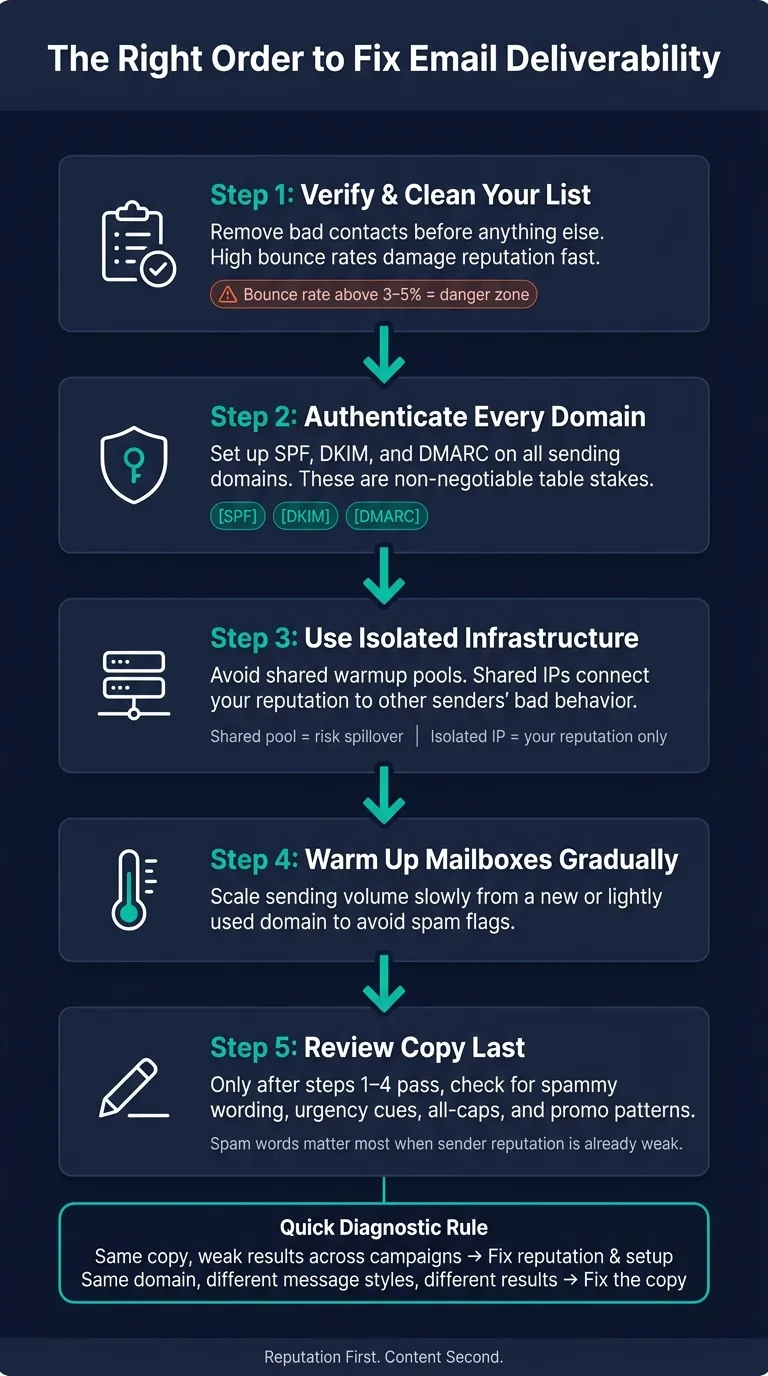
The right order for fixing deliverability
Once you separate copy risk from reputation risk, the path gets a lot simpler. A lot of teams jump straight into rewriting subject lines and email copy, even when the main issue is list quality, authentication, or domain setup.
Fix deliverability in this order:
- Verify your list first. Clean contacts before you do anything else. Poor list quality can hurt deliverability before copy even has a shot to help.
- Authenticate every domain with SPF, DKIM, and DMARC.
- Use isolated infrastructure, not shared warmup pools.
- Warm mailboxes gradually before scaling volume.
- Then review copy. Once the base is in place, check for spammy wording and overly promotional patterns.
That’s why infrastructure-first platforms matter. Platforms like OutreachFox support this order with isolated infrastructure, dedicated IPs, and automated authentication.
Conclusion: reputation first, content second
Spam words matter, but mostly when sender reputation is already weak or borderline.
Fix the infrastructure first, then refine the copy.
Frequently asked questions
Can fixing spam words in my cold emails solve inbox placement issues if my domain is struggling across all campaigns?+
No. When inbox placement is consistently weak across all campaigns from the same domain, the problem is almost always sender reputation, authentication setup, or infrastructure—not copy. Spam words become relevant only after you've fixed list quality, SPF/DKIM/DMARC, warmup, and infrastructure issues.
What sender reputation signals damage email deliverability faster than spammy wording?+
High bounce rates (above 3-5%), spam complaints, sudden volume spikes, and low engagement damage sender reputation much faster than individual spam words. These reputation signals directly affect how mailbox providers score your domain and determine whether your emails reach the inbox regardless of copy quality.
How do shared warmup pools hurt my email deliverability even if my copy is clean?+
Shared warmup pools and shared infrastructure connect your sender reputation to other senders' behavior. If someone else in that pool sends junk or triggers spam complaints, the reputational damage can spill over to your sending, even when your copy and lists are clean. Isolated infrastructure prevents this risk.
What is the correct order for fixing cold email deliverability problems?+
Fix deliverability in this order: first verify and clean your contact list, then set up SPF/DKIM/DMARC authentication, switch to isolated infrastructure, warm mailboxes gradually, and only then review copy for spam triggers. Most teams jump to rewriting copy while ignoring authentication and list quality, which are usually the real problems.
How can I tell if my deliverability issue is caused by spam words or sender reputation?+
If the same domain underperforms across all campaigns regardless of message content, the issue is reputation or infrastructure. If the same domain performs differently with different email versions while other factors stay constant, then copy is more likely the problem. Symptoms point to which layer is failing.
Do spam trigger words like 'Act now' or 'Limited time' automatically send emails to spam?+
No single phrase automatically triggers spam folders. Filters look for patterns and clusters of promotional language combined with other signals. Spam words raise risk most when your domain is new or weak, or when multiple triggers stack together in one email alongside poor sender reputation signals.