
SPF, DKIM, and DMARC must be automated and validated before cold email launch. Automation checks live DNS, prevents broken setups from reaching production, and protects sender reputation by blocking sends until mailboxes pass authentication
- SPF, DKIM, and DMARC work together to prove your domain legitimately sent the message
- Automation catches DNS drift and broken records before they hurt deliverability
- Launch gates block sending until authentication checks and warmup are complete
- Manual setup allows broken configurations to slip into production and damage reputation
- Private infrastructure keeps sender reputation isolated to your mailboxes, not shared pools
- Unified workflows prevent missed steps by keeping provisioning, authentication, and launch control together
SPF DKIM DMARC Automation for Cold Email
If SPF, DKIM, and DMARC are not set up and checked before launch, cold email can fail on day one. I’d treat them as one sending system, not three DNS tasks.
Here’s the short version:
- SPF says which servers can send mail for my domain
- DKIM adds a message signature
- DMARC checks whether that signature or SPF result matches the From domain
- Automation checks live DNS, finds drift, and stops sends when setup is broken
- Mailbox validation and warmup should be a hard gate before any sequence starts
Why this matters is simple. Cold email starts with no reply history, no open history, and no contact history. So mailbox providers lean harder on setup signals. If records are missing or misaligned, I’m more likely to see:
- spam placement
- hard bounces
- message rejection
- poor inbox placement across new mailboxes
A 2024 Google and Yahoo rule change also pushed senders to tighten setup, especially for bulk mail. And while cold email teams may not send at bulk scale on every mailbox, the message is the same: bad setup gets punished faster now.
How I Set Up MX, SPF, DKIM, DMARC for Cold Email [Full Tutorial]
Quick comparison
| Item | What it does | What happens if it breaks |
|---|---|---|
| SPF | Lists allowed sending servers | SPF fails, more trust issues |
| DKIM | Signs the message | Mail may fail checks or look altered |
| DMARC | Checks alignment with the From domain | More spoofing risk, more filtering |
| Automation | Verifies records and drift in live DNS | Broken setup can slip into production |
| Launch gate | Blocks sending until checks pass | New mailboxes can send too early |
I’d also keep one more rule in place: don’t separate provisioning, authentication checks, and launch approval across too many tools. That split is where missed steps happen.
So if I were launching cold email today, on July 15, 2026, I’d make sure the stack covers five things before the first send:
- sender reputation
- domain alignment
- bounce control
- inbox placement
- pre-launch mailbox validation
That’s the whole point of this article: get the setup right first, then send.
How SPF, DKIM, and DMARC work together in cold email infrastructure
SPF, DKIM, and DMARC each do a different job. Together, they help mailbox providers connect your email to the domain in the visible From field.
SPF says which servers can send on your behalf. DKIM adds a signature to the message. DMARC checks alignment with the visible From domain.
SPF: which servers are allowed to send on your behalf
SPF is a DNS TXT record that lists the servers and services allowed to send for your domain.
Think of it like a guest list. If a sending server is on the list, it has permission to send mail for that domain. If it’s not, that’s a red flag.
DKIM and DMARC: signing messages and enforcing domain alignment
DKIM signs the message headers. That signature helps show the message hasn’t been altered in transit and that it came from a server tied to your setup.
DMARC is the policy layer for mailbox providers. It checks whether the From domain aligns with the domain that passed SPF or DKIM, tying the authentication stack back to the sender identity recipients actually see.
Get SPF, DKIM, and DMARC aligned before launch. Once these records are aligned, the next issue is how automation protects sender reputation, bounce control, and inbox placement at scale.
What authentication automation fixes for sender reputation, bounces, and inbox placement
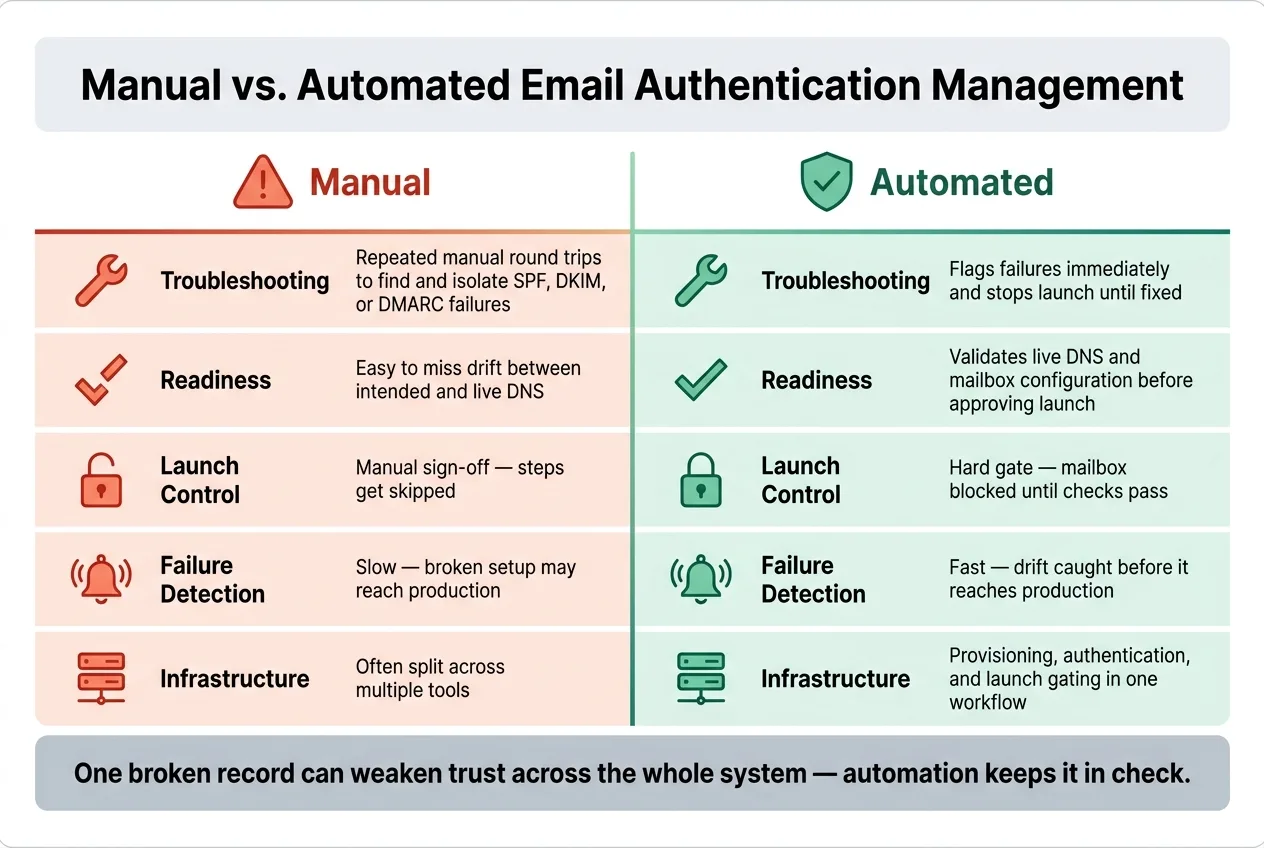
Authentication automation turns SPF, DKIM, and DMARC from static DNS records into monitored deliverability controls. Instead of setting records once and hoping nothing breaks later, you keep watch on them as part of the sending setup.
That matters for a simple reason: one broken record can weaken trust across the whole system.
It also checks alignment, spots drift, and verifies mailbox readiness before launch. So you’re not sending mail with crossed fingers. You’re making sure the mailbox is set up to send without setting off bounce spikes or alignment failures.
SPF drift, DKIM breakage, and DMARC misalignment: the actual failure modes
With manual management, teams often lean on scripts and spot checks. That sounds fine on paper. In practice, things slip.
Automation compares intended DNS settings with live DNS, flags drift, and blocks launch until SPF, DKIM, and DMARC pass. For cold email teams, that’s the test that counts: is this mailbox ready to send without hurting deliverability?
It also cuts down the time needed to diagnose failures. That means broken authentication is less likely to reach production mailboxes or hurt inbox placement.
Manual vs. automated authentication management: a direct comparison
| Area | Manual | Automated |
|---|---|---|
| Troubleshooting | Repeated manual round trips to find and isolate SPF, DKIM, or DMARC failures | Flags failures immediately and stops launch until fixed |
| Readiness | Easy to miss drift between intended and live DNS | Validates live DNS and mailbox configuration before approving launch |
Once authentication is automated, mailbox provisioning and validation become the launch gate.
Pre-launch mailbox provisioning and validation: step by step
Once your authentication automation is set up, the next thing to check is simple: is each mailbox ready to send?
That’s a separate issue from DNS authentication. And if you skip it, your first campaign can take a hit before it even gets going.
The minimum setup checklist before launching sequences
Mailbox validation helps protect sender reputation, control bounces, and support inbox placement before the first email goes out.
Start by making sure live authentication checks pass. Then confirm bounce handling is also passing live checks. After that, put a launch gate in place that blocks sending until both validation and warmup are done.
Why be so strict? Because one broken mailbox can hurt deliverability fast, and by the time you spot the problem, the damage may already be done. That’s why this step should be a hard gate, not a manual sign-off.
Keep early sending volume low. Scale only after the mailbox has cleared validation and warmup.
Why launch gates protect new domains and mailboxes
With new Google Workspace or Microsoft 365 mailboxes, reputation starts at zero. There’s no sending history to lean on. So if you send too soon, inbox placement can suffer.
Automated gates solve that by treating authentication validation and warmup completion as required checks. The mailbox either passes or it stays blocked. No gray area. That keeps a half-ready inbox out of production.
Infrastructure example: OutreachFox for isolated mailbox setup
A good example of this setup is private, isolated provisioning infrastructure.
OutreachFox is one example of provisioning automation built into private infrastructure. It includes automated SPF, DKIM, and DMARC setup, along with mailbox provisioning, with pre-warmed Google Workspace, Microsoft 365, SMTP, and Azure mailboxes.
That setup matters because private infrastructure keeps sender reputation tied to your own mailboxes, not a shared pool. If you’re picking an automation stack, that difference is a big deal.
How to choose an authentication automation approach
Once your mailbox setup is done, the next call is simple: where should authentication and launch control live?
You want a stack that keeps mailbox provisioning, SPF/DKIM/DMARC checks, and launch gating in one workflow. That setup cuts down on handoffs, missed steps, and those small errors that turn into deliverability problems later.
If you're only working with a handful of domains and you already have a sending stack, a DNS-only workflow may do the job. But the picture changes when you're adding new domains on a regular basis, running several campaigns at once, or managing outbound for clients. In those cases, keeping provisioning, authentication checks, and launch readiness in the same system lowers the odds of something slipping through the cracks.
Authentication automation tools compared: OutreachFox, Instantly, Smartlead, and Lemlist
When teams compare OutreachFox, Instantly, Smartlead, and Lemlist, the main issue isn't just features on a pricing page. It's whether authentication lives inside the workflow or gets split across different tools.
OutreachFox is a fit for teams that want private infrastructure, mailbox provisioning, authentication automation, and launch control in one place. That matters when launch control needs to follow mailbox health closely. Put bluntly, the better setup turns validation into a launch gate, not a manual checklist someone forgets to review.
Key takeaways for U.S. outbound teams
If sender reputation, bounce control, and inbox placement all need to stay in sync before a sequence goes live, pick a workflow where provisioning, authentication, and launch gating never get separated across different tools.
Frequently asked questions
What happens if I start cold email campaigns before setting up SPF, DKIM, and DMARC?+
Without proper SPF, DKIM, and DMARC setup, cold email campaigns can fail immediately with spam placement, hard bounces, message rejection, and poor inbox placement. Since cold email starts with no reply or open history, mailbox providers rely heavily on these authentication signals, and broken setup gets punished faster now than in previous years.
What is the difference between SPF, DKIM, and DMARC in cold email authentication?+
SPF lists which servers can send mail for your domain, DKIM adds a cryptographic signature to the message, and DMARC checks whether the signature or SPF result aligns with the visible From domain. Together, they help mailbox providers verify that your email legitimately comes from the domain shown to recipients.
Why is authentication automation necessary instead of just setting DNS records once?+
Authentication automation monitors SPF, DKIM, and DMARC records continuously to catch drift and breakage before they reach production. One broken record can weaken trust across the entire sending system, and automation flags failures immediately and blocks launch until issues are fixed, preventing deliverability damage.
What is a launch gate and why does it matter for new mailboxes?+
A launch gate is a hard block that prevents sending until authentication validation and warmup are complete. It protects new domains and mailboxes that start with zero sender reputation by ensuring they don't send too early, which could hurt inbox placement and deliverability before the campaign even begins.
How does OutreachFox differ from tools like Instantly, Smartlead, and Lemlist for authentication?+
OutreachFox integrates mailbox provisioning, automated SPF/DKIM/DMARC setup, and launch control in one private infrastructure system. This keeps authentication inside the workflow rather than split across different tools, reducing the risk of missed steps and ensuring validation becomes an enforced launch gate rather than a manual checklist.
What are the five things that need to be covered before the first cold email send?+
The five critical areas are sender reputation, domain alignment, bounce control, inbox placement, and pre-launch mailbox validation. Getting these elements right before sending prevents deliverability issues that are harder to fix after a campaign has already damaged mailbox reputation.
Why does private infrastructure matter for cold email authentication setup?+
Private infrastructure keeps sender reputation tied to your own mailboxes rather than a shared pool. This isolation means your deliverability isn't affected by other senders' behavior, and you maintain direct control over authentication setup, warmup, and reputation building for each mailbox.