
Warm Google Workspace mailboxes by setting up SPF/DKIM/DMARC, starting at 5-10 emails daily, ramping to 20-40 over 4 weeks, and using dedicated outreach domains with multiple mailboxes.
- Use dedicated outreach domains with 2-3 mailboxes per domain for cold email
- Publish SPF, DKIM, and DMARC before sending any warmup emails
- Follow a 4-week ramp: start at 5-10 daily emails, build to 35-50
- Keep warmup running even after launching live cold email campaigns
- Monitor spam rate and reputation weekly in Gmail Postmaster Tools
- Pre-warmed mailboxes launch in days versus several weeks warming from zero
Google Workspace Mailbox Warmup Guide 2026
If you want steady inbox placement in 2026, keep each Google Workspace mailbox at about 20–40 cold emails per day, use a separate outreach domain, and ramp volume over 4 weeks instead of forcing one inbox to do more.
I’d boil the whole guide down to this: set up your outreach domain first, publish SPF, DKIM, and DMARC, check Gmail Postmaster Tools, then start with 5–10 emails a day and build up in small steps. If you need more volume, add more domains and more mailboxes - not more sends from one inbox.
Here’s the full takeaway in one place:
- Use a dedicated outreach domain, not your main company domain
- Create 2–3 mailboxes per outreach domain
- Publish SPF, DKIM, and DMARC before sending
- Add the domain to Gmail Postmaster Tools
- Follow a 4-week ramp:
- Week 1: 5–10 emails/day
- Week 2: 10–20 emails/day
- Week 3: 20–35 emails/day
- Week 4: 35–50 emails/day
- Keep warmup traffic human with replies, threads, and mixed send times
- Don’t stop warmup when live outreach starts
- Watch spam rate, bounce rate, reputation, and inbox placement every week
- Keep DMARC at
p=noneuntil SPF and DKIM stay stable - If you need to launch in days, pre-warmed mailboxes may fit better than warming from zero for several weeks
How to verify your domain warmup in Google Workspace - Step By Step
Quick comparison
| Option | Best for | Launch time | Main trade-off |
|---|---|---|---|
| Warm from zero | Teams that want full control | Several weeks | Slower setup |
| Shared warmup pool | Teams that need to send soon and accept shared risk | Days | Other senders can affect results |
| Private pre-warmed mailboxes | Teams that need to send soon without shared pool risk | Days | Less hands-on from day one |
In other words: the safest path is low daily volume, clean setup, and steady monitoring. That’s the core of the guide.
Set up your Google Workspace outreach domain correctly
Set up domain authentication before warmup. It helps protect deliverability and gives you a clean starting point for your data.
Create outreach domains and mailboxes
Use one or more domains just for cold outreach. Then create 2–3 mailboxes per outreach domain so you can spread sending volume across inboxes instead of loading too much onto one.
That matters for a simple reason: more mailboxes make ramp-up safer and can help with inbox placement. If you want to grow, add more domains and mailboxes. Don’t try to force one inbox past its limit.
Once the mailboxes are ready, authenticate the domain before any warmup sends go out.
Publish SPF, DKIM, and DMARC records
You need three DNS records in place before sending anything.
- SPF lets Google send on behalf of your domain. Add this TXT record to the outreach domain:
v=spf1 include:_spf.google.com ~all - DKIM adds a signature to each message with a 2048-bit key. Create and turn on a 2048-bit DKIM key in Google Workspace, then publish the DNS record
- DMARC tells receiving servers what to do when authentication fails. Publish a DMARC record for the outreach domain after SPF and DKIM are set up
After the DNS records are live, confirm the domain shows up in Postmaster Tools before you ramp volume.
Add Gmail Postmaster Tools and verify reputation and authentication
Add each outreach domain to Gmail Postmaster Tools before warming. Check domain reputation, SPF and DKIM pass rates, and spam rate before you send.
Run a safe Google Workspace warmup ramp with reply loops
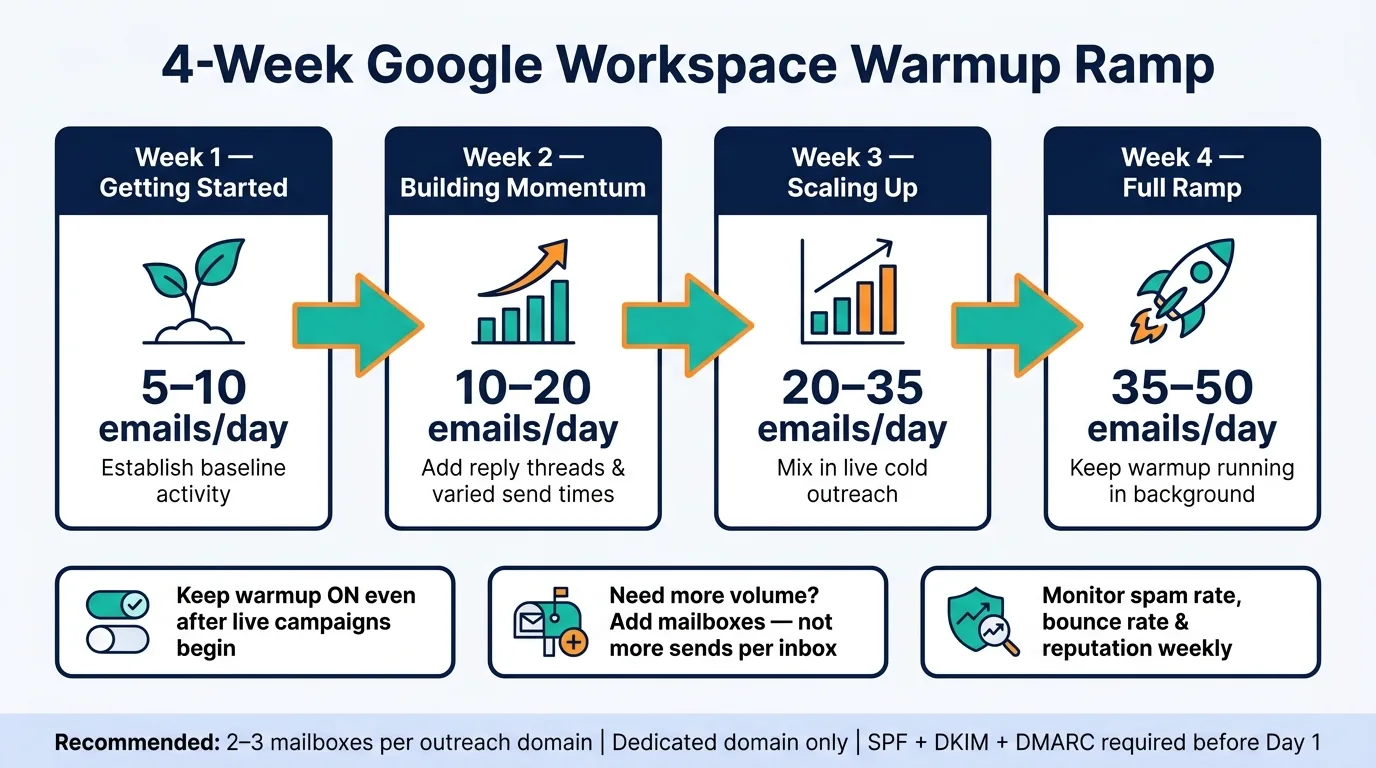
Once authentication is set up, volume becomes the main thing to watch. After SPF, DKIM, and Postmaster Tools are live, start slow and increase sending with reply-heavy activity.
Follow a 4-week daily sending ramp
A cautious 4-week ramp helps keep volume steady and easy to track:
- Week 1: 5–10 emails per day
- Week 2: 10–20 emails per day
- Week 3: 20–35 emails per day
- Week 4: 35–50 emails per day
Don’t jump too fast. Small increases work better than doubling volume overnight.
Keep warmup traffic human: replies, threads, and timing
Warmup traffic should look like normal inbox activity. That means using real replies, threaded replies, and sending at different times during the day instead of blasting everything at once.
Put another way: you want the mailbox to look like a person is using it, not like a script is firing off outbound messages. Inbound activity matters here, so keep replies and follow-ups in the mix.
Once the mailbox starts acting like a normal inbox, you can start mixing in live outreach.
Mix in cold emails without turning warmup off
Don’t pause warmup when live campaigns begin. Keep it running in the background.
If you need more sending capacity, add more mailboxes instead of forcing one inbox past its daily limit.
Warming from zero vs. using pre-warmed mailboxes: how to decide
Once ramping is in place, the next call is simple: do you build sender reputation yourself, or start with pre-warmed infrastructure?
When warming from zero is the right call
Starting from zero gives you full control over your domain’s history. The downside is time. In most cases, you should expect several weeks before a new mailbox is ready for steady cold outreach.
This route makes sense if your team knows DNS in-house and you’re not racing a launch date. If time isn’t pressing and you want to control every part of the setup, warming from zero is a solid option.
When pre-warmed mailboxes make more sense
If you need to send in days instead of weeks, pre-warmed mailboxes can shorten your launch window fast. Teams with a fixed go-live date, or less time to stay on top of deliverability checks, often do better by skipping the slow ramp.
The big split here is private vs. shared infrastructure.
Shared warmup pools connect your reputation to other users’ sending behavior. That can get messy fast. Private infrastructure keeps your reputation tied only to your own mail.
OutreachFox uses private, isolated mailboxes and dedicated campaign IPs, so teams can go live fast without taking on shared risk.
Decision matrix: private pre-warmed infrastructure vs. shared pools vs. starting from scratch
| Scenario | Recommended approach | Time to launch |
|---|---|---|
| No deadline, full technical control | Warm from zero | Several weeks |
| Need a faster launch, shared risk is tolerable | Shared warmup pool | Days |
| Need a faster launch, reputation risk is unacceptable | Private pre-warmed infrastructure | Days |
Whichever path you choose, keep an eye on reputation, bounces, and spam placement every week.
Monitor mailbox health and keep sender reputation stable
After warmup, keep a close eye on mailbox health. Check Google Postmaster Tools reputation, spam rate, bounce rate, and inbox placement every week. Those numbers show whether your 4-week ramp is holding up. They also help you decide if you should keep ramping, pause, or switch to pre-warmed infrastructure.
Track reputation, bounces, and spam placement every week
If spam placement starts to climb or spam complaints go up, cut cold volume right away. Then review your sending setup before you send another batch. If bounce rate rises, your list quality or sending setup is slipping. Fix that before you increase volume again.
When those signals hold steady, you can tighten your authentication policy.
Raise DMARC policy only after SPF and DKIM are stable
Leave DMARC at p=none until SPF and DKIM align on a steady basis. Then move to p=quarantine, and later to p=reject. Don't jump to reject until alignment stays steady.
If those signals keep moving in the wrong direction, warming from zero is the slower route. In that case, pre-warmed mailboxes can lower the risk.
Conclusion: the safest way to scale Google Workspace cold outreach
Stable health metrics show you when it makes sense to keep warming from zero and when pre-warmed mailboxes are the faster option.
Frequently asked questions
How many cold emails per day should I send from a single Google Workspace mailbox in 2026?+
Keep each Google Workspace mailbox at about 20–40 cold emails per day for steady inbox placement. If you need more volume, add more domains and mailboxes instead of forcing one inbox past its daily limit.
What is the recommended 4-week warmup ramp schedule for new Google Workspace mailboxes?+
Start with 5–10 emails per day in Week 1, increase to 10–20 in Week 2, then 20–35 in Week 3, and finally 35–50 in Week 4. Small, steady increases work better than doubling volume overnight.
Should I stop warmup activities when I start sending live cold email campaigns?+
No, don't pause warmup when live campaigns begin. Keep warmup running in the background to maintain sender reputation and inbox placement throughout your cold outreach activities.
What DNS records must be configured before starting Google Workspace mailbox warmup?+
You need three DNS records: SPF (with include:_spf.google.com), DKIM with a 2048-bit key, and DMARC. All three must be published before sending any warmup emails to protect deliverability.
When should I move my DMARC policy from p=none to p=reject?+
Leave DMARC at p=none until SPF and DKIM alignment stays stable. Then move to p=quarantine, and only switch to p=reject after alignment remains steady over time.
How many mailboxes should I create per outreach domain in Google Workspace?+
Create 2–3 mailboxes per outreach domain to spread sending volume across multiple inboxes. This makes ramp-up safer and helps with inbox placement compared to loading too much volume onto one mailbox.
What metrics should I monitor weekly after completing Google Workspace warmup?+
Check Google Postmaster Tools for domain reputation, spam rate, bounce rate, and inbox placement every week. If spam placement climbs or bounce rate rises, cut cold volume immediately and review your setup before continuing.